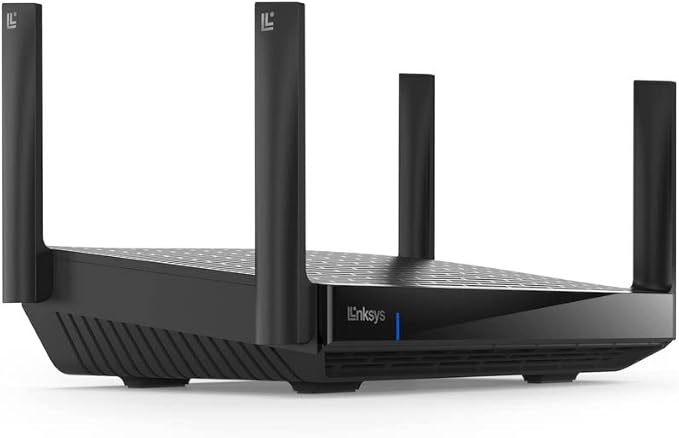


Unleash the Power of WiFi 6E Linksys Hydra Pro 6E (AXE6600) unleashes multi-gigabit speed and supports more than 55 devices at a time. WiFi 6E offers the 6GHz band connection that’s needed for low-latency performance of the latest AR and VR devices. It offers a reliable connection for a home full of people to enjoy gaming, HD streaming, and video calls without interruption.
Unleash the Power of WiFi 6E Linksys Hydra Pro 6E (AXE6600) unleashes multi-gigabit speed and supports more than 55 devices at a time. WiFi 6E offers the 6GHz band connection that’s needed for low-latency performance of the latest AR and VR devices. It offers a reliable connection for a home full of people to enjoy gaming, HD streaming, and video calls without interruption.
in 2 offers
The lowest price for Linksys Hydra Pro 6E Tri‐Band Wifi 6E Mesh Router - Wireless Gaming 8-Stream Router, 6 GHz Band For 8K Streaming, Up To 6.6 Gbps Speed, 2700 Sq. Ft right now is $425.94 at Amazon.com.au, compared across 2 retailers.
The all-time low was $116.90 on 6 June 2026 — today's price is 264% above the lowest ever. It has been notably cheaper before — worth setting a price alert.
Prices last updated 31 July 2026.
Linksys Hydra Pro 6E Tri‐Band Wifi 6E Mesh Router - Wireless Gaming 8-Stream Router, 6 GHz Band For 8K Streaming, Up To 6.6 Gbps Speed, 2700 Sq. Ft
Unleash the Power of WiFi 6E Linksys Hydra Pro 6E (AXE6600) unleashes multi-gigabit speed and supports more than 55 devices at a time. WiFi 6E offers the 6GHz band connection that’s needed for low-latency performance of the latest AR and VR devices. It offers a reliable connection for a home full of people to enjoy gaming, HD streaming, and video calls without interruption.
Unleash the Power of WiFi 6E Linksys Hydra Pro 6E (AXE6600) unleashes multi-gigabit speed and supports more than 55 devices at a time. WiFi 6E offers the 6GHz band connection that’s needed for low-latency performance of the latest AR and VR devices. It offers a reliable connection for a home full of people to enjoy gaming, HD streaming, and video calls without interruption.
Last updated at 31/07/2026 03:17:05
Linksys Hydra Pro 6E Tri‐Band WiFi 6E Mesh Router - Wireless Gaming 8-Stream Router, 6 GHz Band for 8K Streaming, Up to 6.6 Gbps Speed, 2700 sq. ft
Affiliate Disclosure: We may receive a small commission for purchases made through this link at no extra cost to you. This helps support our site. Thank you!
Linksys Hydra Pro 6e. Wan Connection Type: Rj-45. Wi-fi Band: Tri-band
Free delivery
Affiliate Disclosure: We may receive a small commission for purchases made through this link at no extra cost to you. This helps support our site. Thank you!
originally posted on linksys.com
This MR7500/AXE6600 router replaces my Vzn Fios G3100 router and it's every bit as good and even better speed wise. My Dell all-in-one PC is connected to it via cat-5 ethernet and it gets very close to my symmetrical gigabit rated speeds down and up. The wifi speeds on 5Ghz and 6Ghz are signif slower in the 3xx-4xx Mbps but that's to be expected when using WPA encryption which penalizes your speeds by 35%. You'll also take a performance hit due to simultaneous streaming to your tv sticks/boxes, cells, tablets, laptops, and connecting to your VPN. Anyway, the takeaway is that all these speeds are a bit better than Vzn's own router. Some other important benefits are that the four antennas articulate so you can direct the signal up, down, etc if you live in a ... MoreThis MR7500/AXE6600 router replaces my Vzn Fios G3100 router and it's every bit as good and even better speed wise. My Dell all-in-one PC is connected to it via cat-5 ethernet and it gets very close to my symmetrical gigabit rated speeds down and up. The wifi speeds on 5Ghz and 6Ghz are signif slower in the 3xx-4xx Mbps but that's to be expected when using WPA encryption which penalizes your speeds by 35%. You'll also take a performance hit due to simultaneous streaming to your tv sticks/boxes, cells, tablets, laptops, and connecting to your VPN. Anyway, the takeaway is that all these speeds are a bit better than Vzn's own router. Some other important benefits are that the four antennas articulate so you can direct the signal up, down, etc if you live in a multistory townhouse and that's on top of the beam steering it does already. And though it wants to bind all bands together by default, you can easily separate them into 2.4Ghz, 5Ghz, and 6Ghz bands to service smart home devices that use the 2.4Ghz band. It's also very easy to manage the router from your PC as well as from the mobile app. The only thing I miss from prior Linksys routers is the network map it would draw and that you could filter devices shown via ethernet, 2Ghz band, etc; now it's a list which can grow to be very long these days. Doesn't really matter since once you get things set up, you're never really in the management interface that much anymore. I'm really content with this router and hope it lasts years and years especially since it's got that 5Gbps internet connection port that'll easily accommodate connection speeds for the near future.
originally posted on linksys.com
I bought this a bout 3~4 days ago.(Best Buy) Would have to say, there less redeeming features compared to competition. Sadly will be returning it due to software issues.What's great about it? The overall design, has many features that other competitor don't. Also it meets bare minimum of what is considered as a "modern" router if I were to call it & its affordable price. Bought this router for Wifi 6e, 5Gbs WAN Port, Compact Size(Pic 1), Free & rotating Antennas(Simple), and Wall mountable. Most of features are already self explanatory, however the most important to me were Wall Mounting, size & antenna count. Most routers don't have wall mount feature holes under the router anymore. The compact size just like the netgear mounted on the wall behind it. Finally, ... MoreI bought this a bout 3~4 days ago.(Best Buy) Would have to say, there less redeeming features compared to competition. Sadly will be returning it due to software issues.What's great about it? The overall design, has many features that other competitor don't. Also it meets bare minimum of what is considered as a "modern" router if I were to call it & its affordable price. Bought this router for Wifi 6e, 5Gbs WAN Port, Compact Size(Pic 1), Free & rotating Antennas(Simple), and Wall mountable. Most of features are already self explanatory, however the most important to me were Wall Mounting, size & antenna count. Most routers don't have wall mount feature holes under the router anymore. The compact size just like the netgear mounted on the wall behind it. Finally, the antennas are only a count of 4 which is very manageable & minimalistic. Most of the competitor routers are basically the size of the top of a bed side table. The size is manageable for this. Most new routers have antennas I would have to say to be overkill in quantity or its fixed, which cant be adjusted to your preference. Which the hydra pro 6e takes everything by the cake in terms of physical features.Now for the negative, which is the reason as to why I'm returning the router. As an FYI this is not my 1st Linksys, i've moved from this brand b/c of the software related issues. Here are my issues1st No full user control, the interface has no advanced user control. You have less control to create new protocols, and even separating or differentiating Wifi bands. Protocols that will let you manually separate the network if you have servers or virtual boxes. However, the interface is good for those who want simplicity. This is very good for users who are not well versed with wifi or just want a 1 time setup.2nd The Speed Test always fails for router, also it does not properly measure your provider speed. I have a 1200 Down & 40 Up, this thing only measures 200 Down & 30 Up. I'm fine with the Up that's usually normal, but down is messed up. 200 Down!!! really? I called Linksys, they recommended to reset the router, which did not help at all. I've had to restore the router 3x to see if it will work. Also i only connected my desktop to make sure there is nothing that holds back the speed test. Nothing worked!!! What's funny is that when i measure from my computer I get at least 500~800 Down, which says something about the software of the router.3rd, every time you use the desktop web link for this, an Ad popup always comes up to use the app, seriously come on. that is annoying.Finally 4th, The app interface and password sharing is outdated. compared to its competitors. The app interface is simple but very slow, also its seems to be set up for the mesh system instead of just the single router. A lot of its feature are locked b/c most are for the mesh system. Next is the password sharing, is only based on send the password info manually via text or manually entering on the phone. This is just sad, the competitor amazon, tp-link, google, netgear, d-link & Asus, already use a QR code for sharing wifi name & password. While linksys is still currently in manual sharing.
originally posted on linksys.com
Had this device for little less than 2 year and had no problems with stability or speeds according to initial ISP plan of 450-500. But then Comcast increased speed to 600 and now to 800 and desktop tests show no changes in speed showing no higher than 290 for download with multiple parallel connections (min20/max20/ 20/20) via fast dot com.Replaced all internet cables to CAT8 to no resolve.Finally connected laptop directly to the cable modem and got speed via same app at 1Gbps to 24Mbps. Reconnected the network cables back via Linksys router and getting low 290/12 with only laptop connected to the router.Disappointed since I hoped this device would be future proof for at least 5 years.
| Special feature | Access Point Mode |
| Frequency band class | Tri-Band |
| Wireless communication standard | 2.4 GHz Radio Frequency |
| Wireless Type | 2.4 GHz Radio Frequency |
| Operating System | RouterOS |
Linksys Hydra Pro 6E Tri‐Band WiFi 6E Mesh Router - Wireless Gaming 8-Stream Router, 6 GHz Band for 8K Streaming, Up to 6.6 Gbps Speed, 2700 sq. ft
Affiliate Disclosure: We may receive a small commission for purchases made through this link at no extra cost to you. This helps support our site. Thank you!
Linksys Hydra Pro 6e. Wan Connection Type: Rj-45. Wi-fi Band: Tri-band
Free delivery
Affiliate Disclosure: We may receive a small commission for purchases made through this link at no extra cost to you. This helps support our site. Thank you!
This MR7500/AXE6600 router replaces my Vzn Fios G3100 router and it's every bit as good and even better speed wise. My Dell all-in-one PC is connected to it via cat-5 ethernet and it gets very close to my symmetrical gigabit rated speeds down and up. The wifi speeds on 5Ghz and 6Ghz are signif slower in the 3xx-4xx Mbps but that's to be expected when using WPA encryption which penalizes your speeds by 35%. You'll also take a performance hit due to simultaneous streaming to your tv sticks/boxes, cells, tablets, laptops, and connecting to your VPN. Anyway, the takeaway is that all these speeds are a bit better than Vzn's own router. Some other important benefits are that the four antennas articulate so you can direct the signal up, down, etc if you live in a ... MoreThis MR7500/AXE6600 router replaces my Vzn Fios G3100 router and it's every bit as good and even better speed wise. My Dell all-in-one PC is connected to it via cat-5 ethernet and it gets very close to my symmetrical gigabit rated speeds down and up. The wifi speeds on 5Ghz and 6Ghz are signif slower in the 3xx-4xx Mbps but that's to be expected when using WPA encryption which penalizes your speeds by 35%. You'll also take a performance hit due to simultaneous streaming to your tv sticks/boxes, cells, tablets, laptops, and connecting to your VPN. Anyway, the takeaway is that all these speeds are a bit better than Vzn's own router. Some other important benefits are that the four antennas articulate so you can direct the signal up, down, etc if you live in a multistory townhouse and that's on top of the beam steering it does already. And though it wants to bind all bands together by default, you can easily separate them into 2.4Ghz, 5Ghz, and 6Ghz bands to service smart home devices that use the 2.4Ghz band. It's also very easy to manage the router from your PC as well as from the mobile app. The only thing I miss from prior Linksys routers is the network map it would draw and that you could filter devices shown via ethernet, 2Ghz band, etc; now it's a list which can grow to be very long these days. Doesn't really matter since once you get things set up, you're never really in the management interface that much anymore. I'm really content with this router and hope it lasts years and years especially since it's got that 5Gbps internet connection port that'll easily accommodate connection speeds for the near future.
I bought this a bout 3~4 days ago.(Best Buy) Would have to say, there less redeeming features compared to competition. Sadly will be returning it due to software issues.What's great about it? The overall design, has many features that other competitor don't. Also it meets bare minimum of what is considered as a "modern" router if I were to call it & its affordable price. Bought this router for Wifi 6e, 5Gbs WAN Port, Compact Size(Pic 1), Free & rotating Antennas(Simple), and Wall mountable. Most of features are already self explanatory, however the most important to me were Wall Mounting, size & antenna count. Most routers don't have wall mount feature holes under the router anymore. The compact size just like the netgear mounted on the wall behind it. Finally, ... MoreI bought this a bout 3~4 days ago.(Best Buy) Would have to say, there less redeeming features compared to competition. Sadly will be returning it due to software issues.What's great about it? The overall design, has many features that other competitor don't. Also it meets bare minimum of what is considered as a "modern" router if I were to call it & its affordable price. Bought this router for Wifi 6e, 5Gbs WAN Port, Compact Size(Pic 1), Free & rotating Antennas(Simple), and Wall mountable. Most of features are already self explanatory, however the most important to me were Wall Mounting, size & antenna count. Most routers don't have wall mount feature holes under the router anymore. The compact size just like the netgear mounted on the wall behind it. Finally, the antennas are only a count of 4 which is very manageable & minimalistic. Most of the competitor routers are basically the size of the top of a bed side table. The size is manageable for this. Most new routers have antennas I would have to say to be overkill in quantity or its fixed, which cant be adjusted to your preference. Which the hydra pro 6e takes everything by the cake in terms of physical features.Now for the negative, which is the reason as to why I'm returning the router. As an FYI this is not my 1st Linksys, i've moved from this brand b/c of the software related issues. Here are my issues1st No full user control, the interface has no advanced user control. You have less control to create new protocols, and even separating or differentiating Wifi bands. Protocols that will let you manually separate the network if you have servers or virtual boxes. However, the interface is good for those who want simplicity. This is very good for users who are not well versed with wifi or just want a 1 time setup.2nd The Speed Test always fails for router, also it does not properly measure your provider speed. I have a 1200 Down & 40 Up, this thing only measures 200 Down & 30 Up. I'm fine with the Up that's usually normal, but down is messed up. 200 Down!!! really? I called Linksys, they recommended to reset the router, which did not help at all. I've had to restore the router 3x to see if it will work. Also i only connected my desktop to make sure there is nothing that holds back the speed test. Nothing worked!!! What's funny is that when i measure from my computer I get at least 500~800 Down, which says something about the software of the router.3rd, every time you use the desktop web link for this, an Ad popup always comes up to use the app, seriously come on. that is annoying.Finally 4th, The app interface and password sharing is outdated. compared to its competitors. The app interface is simple but very slow, also its seems to be set up for the mesh system instead of just the single router. A lot of its feature are locked b/c most are for the mesh system. Next is the password sharing, is only based on send the password info manually via text or manually entering on the phone. This is just sad, the competitor amazon, tp-link, google, netgear, d-link & Asus, already use a QR code for sharing wifi name & password. While linksys is still currently in manual sharing.
Had this device for little less than 2 year and had no problems with stability or speeds according to initial ISP plan of 450-500. But then Comcast increased speed to 600 and now to 800 and desktop tests show no changes in speed showing no higher than 290 for download with multiple parallel connections (min20/max20/ 20/20) via fast dot com.Replaced all internet cables to CAT8 to no resolve.Finally connected laptop directly to the cable modem and got speed via same app at 1Gbps to 24Mbps. Reconnected the network cables back via Linksys router and getting low 290/12 with only laptop connected to the router.Disappointed since I hoped this device would be future proof for at least 5 years.
Bought this on the 10th of March and it came in the mail two days ago.One problem that I've consistently encountered when using this device is the lack of end user configuration options in the firmware graphic user interface, accessible by typing 192.168.1.1 in the URL search bar in any browser and subsequently entering in the password (usually "admin"). Features this router lacked, to my surprise were 1) the ability to change between differing levels of NAT strictness. There was merely the option to use NAT or another, older standard that is no longer relevant. I suppose it might be for aging offices stuck with old technology, but that's not much of a consumer bonus. Universally, router firmware GUIs have NAT options for "strict," "moderate," and "open." No such ... MoreBought this on the 10th of March and it came in the mail two days ago.One problem that I've consistently encountered when using this device is the lack of end user configuration options in the firmware graphic user interface, accessible by typing 192.168.1.1 in the URL search bar in any browser and subsequently entering in the password (usually "admin"). Features this router lacked, to my surprise were 1) the ability to change between differing levels of NAT strictness. There was merely the option to use NAT or another, older standard that is no longer relevant. I suppose it might be for aging offices stuck with old technology, but that's not much of a consumer bonus. Universally, router firmware GUIs have NAT options for "strict," "moderate," and "open." No such option exists for this router.2) This router's configuration settings also lacked options to configure certain firewall settings. Exploring all the options, I could not find any "QoS" settings. There were WMM settings for "High Priority" devices, but I got conflicting information from Linksys as to whether that also applied to ports triggered specifically by the end user, meaning that port triggering could actually hurt high priority device performance. Whether or not IPv4 and IPv6 SPI settings were turned on or off made no difference as to the router's hostility towards regular websites I wanted to visit. Amazon.com, Google.com, etc. would all have time-out issues and I would constantly have to attempt to refresh these pages and it was aggravating how hostile this device's safety settings were to just having an optimized connection. I got this for the 6E wireless capability but it's firewall just shot any benefits down. Worse still, the 6E network band had higher latency than its 5GHz band, at least according to synthetic ping tests in the Command prompt to Google.com. One of the promises of 6E wireless was lower ping, but you will not find lower ping with this router, unfortunately.3) Certain options that are essential to user configuration of router settings, such as turning off 2.4/5/6 GHz bands, changing their channel widths, or changing the channels themselves (1-11 on 2.4Ghz, 36+ on 5Ghz, etc) were buried behind a tiny hyperlink font in the bottom right corner of the firmware GUI with the font "CA." I thought that "CA" referred to regulatory information for residents of the Republic of California, not to extra user configuration settings. That was a serious oversight by the engineering, development, and end user experience teams. That is a basic feature that is so universal that it should never be buried behind tiny font with a designation that even people familiar with IT would not associate with extra settings to configure wireless bands on or off or to change channels. I did have a lengthy chat with Linksys tech support about this where the agent did guide me to this setting (thankfully, Linksys chat support has competent techs on the other end). But this last downside really did puzzle me. I mean... why would this feature be hidden? Worse still is that the page dedicated to this setting in the new Linksys Smart Wifi pages did not mention this "CA" hyperlink to access these features at all. Come on, Linksys, do better by the end users. If you are to competitive in 6E wireless technology to compete with ASUS and Netgear, these features need to be prominently displayed and accessible within the user interface.
I was using the Linksys E1000 and have used it for a remote work in FL in 2019.2020 has been that year that introduced the world to remote work.This time I studied routers and did not know that I was using a slow one and the lowest band (2.4 GHz)!I bought the Linksys WRT1900 ACS and I got intrduced to the 5GHz band :).However, in 2021, I read about the WiFi6 and the 6GHz band and on Thanksgiving 2021, I guess, I am one of the lucky persons to see the MR7500 for $250 and I bought 1 right away! What a good deal!iPones 12 and 13 are WiFi6, but won't see the 6 GHz band. I bought the Pixel 6A and I am able to connect the 6GHz band. It is really fast.I am satisfied with the MR7500 and I still connected the two earlier routers I have giving me more devices to ... MoreI was using the Linksys E1000 and have used it for a remote work in FL in 2019.2020 has been that year that introduced the world to remote work.This time I studied routers and did not know that I was using a slow one and the lowest band (2.4 GHz)!I bought the Linksys WRT1900 ACS and I got intrduced to the 5GHz band :).However, in 2021, I read about the WiFi6 and the 6GHz band and on Thanksgiving 2021, I guess, I am one of the lucky persons to see the MR7500 for $250 and I bought 1 right away! What a good deal!iPones 12 and 13 are WiFi6, but won't see the 6 GHz band. I bought the Pixel 6A and I am able to connect the 6GHz band. It is really fast.I am satisfied with the MR7500 and I still connected the two earlier routers I have giving me more devices to get connected.
The good news:1. Solid and reliable connections.3. Has no issues with 30 Wi-Fi devices connected.2. Fast Wi-Fi on 5G.The not so great news:1. Nothing special about the range/coverage distances.2. Nothing special about the 2.4G Wi-Fi speeds.3. The phone app leaves something to be desired.I decided to attempt to upgrade my Luxul Epic 3 which is roughly four years old. I have quite a few Wi-Fi devices (around 30) in my small house and I wanted to insure reliable connections so I gave the Hydra 6E a chance. Initially I was very impressed by the 5G speeds and the number of devices it seems to effortlessly support. However after the first couple of weeks of use I started to realize there is nothing special about the range/coverage and there is nothing ... MoreThe good news:1. Solid and reliable connections.3. Has no issues with 30 Wi-Fi devices connected.2. Fast Wi-Fi on 5G.The not so great news:1. Nothing special about the range/coverage distances.2. Nothing special about the 2.4G Wi-Fi speeds.3. The phone app leaves something to be desired.I decided to attempt to upgrade my Luxul Epic 3 which is roughly four years old. I have quite a few Wi-Fi devices (around 30) in my small house and I wanted to insure reliable connections so I gave the Hydra 6E a chance. Initially I was very impressed by the 5G speeds and the number of devices it seems to effortlessly support. However after the first couple of weeks of use I started to realize there is nothing special about the range/coverage and there is nothing special about the 2.4G connection speeds either. I am about to reinstall my Epic 3 to verify my observations but I wish that I did not need to take this step.The MR 7500 is a good Wi-Fi router but I highly doubt it is the best in it's class.
In my review for the MR7500 I will highlight 3 aspects of the router with the good and not so good.1. Design & Hardware features2. Software3. Function and ReliabilityDesign - This router when comparing to my older router the monster EA9500 is very sleek and on has a much smaller footprint. The weight difference of this router to other Linksys routers I have had is noticeable – very light. The port layout has not changed you get (4) Gigabit LAN (standard) and (1) 5Gbps WAN(NEW), (1) USB 3.0, and (4) non-removable antennas. Overall, I am happy that Linksys kept the design simple and to the point, not flashy or UFO looking.Software – So on the initial setup I used my iOS device, this went OK albeit it took a long time, which could be normal or based on my ... MoreIn my review for the MR7500 I will highlight 3 aspects of the router with the good and not so good.1. Design & Hardware features2. Software3. Function and ReliabilityDesign - This router when comparing to my older router the monster EA9500 is very sleek and on has a much smaller footprint. The weight difference of this router to other Linksys routers I have had is noticeable – very light. The port layout has not changed you get (4) Gigabit LAN (standard) and (1) 5Gbps WAN(NEW), (1) USB 3.0, and (4) non-removable antennas. Overall, I am happy that Linksys kept the design simple and to the point, not flashy or UFO looking.Software – So on the initial setup I used my iOS device, this went OK albeit it took a long time, which could be normal or based on my version of iOS, it went smoothly just took a while. Second time around since I wanted to test this router thoroughly, I used the older method of connecting my PC, this went a lot faster and there were no surprises. I have not run into any bugs/glitches in my setups, all the software from their app to online UI has been very smooth.Function – I have all my (27) devices connected now for the past couple weeks and have not had one drop in connection, I am using the 5GHz band for phones and tablets, while my smart garage door and WEMO smart switches, and cameras connected to the 2.4GHz band.Range does not seem to be an issue, although I initially ran into problems when I did not separate the bands and tried using the “Airtime Fairness” setting which caused issues with devices that were further away, it would disconnect them, so I disabled that feature. I would like to add a node and see how the range performs using both the MR7500 and say the MX4200.Reliability – Like I said before I have not had a single disconnect with this router, overall a solid performance, but one you should expect from an expensive device at $500.I would recommend this to anyone that can afford it and is wanting to future proof for a few years, since most devices out now do not even have the latest Wi-Fi that this router offers.
I’m about 2 days in but I notice two big issues.1.The connection drops.Check each frequency and look for the best possible channel. After this the connection drops stop but a router should be able to not drop the connection if a channel is heavily used.2.The switch between 2.4Ghz and 5Ghz is a little aggressive. I’d rather stay on the 5Ghz with a faster connection and 1 less bar than the 2.4Ghz with slower speeds.It gives you the option to name the 2.4ghz and 5Ghz network differently and force yourself to stay on the 5Ghz so not a huge issue.
I have zero confidence in any help at this point. I have been on the phone for over an hour and hung up on the clown I was talking to.i just wanted to share that I have wasted over XXXX on this trash - it seems to be broke. I am going to go with another brand at this point which is sad because I have stood behind Linksys for over a decade using multiple products from you. This series is no good and support/customer care has gone to trash.I am going to share the poor experience online on every review platform I find and purchase another router with another company. Just sharing my insignificant voice with your companyI know the company doesn't care! This is all, please share the complaint with your management team.
I have been using this for a few months, it's okay but there is better. It is rather limited and has various flaws, some serious like:it has no ability to set ipv6 dns servers like any other brand, and it will add the isp dns to its dns list regardless of you wanting to or not, so if you have a dns server or your own dns server that blocks awebsite.com, the router promptly proceeds to try to resolve it using the isp dns. probably a security vulnerability too but linksys has no security vulnerability email address anymore lol.less serious:The advanced wifi page that needs direct link to access has no 6ghz settings, I know this router is way more capable than it is as I have toyed with it and in the US region it disables DFS so if you are in a congested area your ... MoreI have been using this for a few months, it's okay but there is better. It is rather limited and has various flaws, some serious like:it has no ability to set ipv6 dns servers like any other brand, and it will add the isp dns to its dns list regardless of you wanting to or not, so if you have a dns server or your own dns server that blocks awebsite.com, the router promptly proceeds to try to resolve it using the isp dns. probably a security vulnerability too but linksys has no security vulnerability email address anymore lol.less serious:The advanced wifi page that needs direct link to access has no 6ghz settings, I know this router is way more capable than it is as I have toyed with it and in the US region it disables DFS so if you are in a congested area your 5ghz will be horrible, not that your 2.4 will be much better as its automatic channel selector only works like once a month for all frequencies.to add to more, they deleted the telnet and ssh consoles from the firmware files, so you won't be accessing anything advanced.
| Special feature | Access Point Mode |
| Frequency band class | Tri-Band |
| Wireless communication standard | 2.4 GHz Radio Frequency |
| Wireless Type | 2.4 GHz Radio Frequency |
| Operating System | RouterOS |


