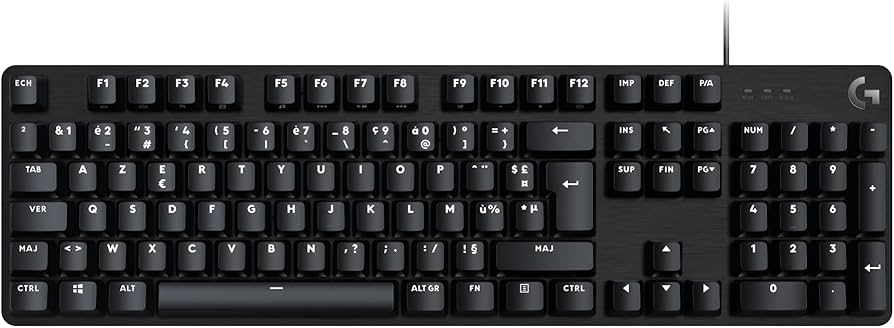
Logitech 920-010427 G713 Wired TKL Mechanical Gaming Keyboard
Elevate your gaming experience with this wired TKL gaming keyboard, designed for precision and performance. It features customizable RGB lighting and advanced mechanical switches, allowing for immersive and responsive gameplay. With its compact and portable design, it's perfect for gaming on the go or at home. Whether you're playing FPS, MOBA, or MMO games, count on it to deliver exceptional performance and reliability. Experience responsive and immersive gaming with this wired TKL gaming keyboard, offering convenience and peace of mind for all your gaming needs. Its durable construction and customizable RGB lighting allow you to personalize your gaming setup and create the perfect gaming environment. With its advanced mechanical switches and responsive keycaps, you can execute commands with precision and speed, giving you the competitive edge in any game. Stay ahead of the competition and dominate the battlefield with this premium-quality gaming keyboard.
Elevate your gaming experience with this wired TKL gaming keyboard, designed for precision and performance. It features customizable RGB lighting and advanced mechanical switches, allowing for immersive and responsive gameplay. With its compact and portable design, it's perfect for gaming on the go or at home. Whether you're playing FPS, MOBA, or MMO games, count on it to deliver exceptional performance and reliability. Experience responsive and immersive gaming with this wired TKL gaming keyboard, offering convenience and peace of mind for all your gaming needs. Its durable construction and customizable RGB lighting allow you to personalize your gaming setup and create the perfect gaming environment. With its advanced mechanical switches and responsive keycaps, you can execute commands with precision and speed, giving you the competitive edge in any game. Stay ahead of the competition and dominate the battlefield with this premium-quality gaming keyboard.
Elevate your gaming experience with this wired TKL gaming keyboard, designed for precision and performance. It features customizable RGB lighting and advanced mechanical switches, allowing for immersive and responsive gameplay. With its compact and portable design, it's perfect for gaming on the go or at home. Whether you're playing FPS, MOBA, or MMO games, count on it to deliver exceptional performance and reliability. Experience responsive and immersive gaming with this wired TKL gaming keyboard, offering convenience and peace of mind for all your gaming needs. Its durable construction and customizable RGB lighting allow you to personalize your gaming setup and create the perfect gaming environment. With its advanced mechanical switches and responsive keycaps, you can execute commands with precision and speed, giving you the competitive edge in any game. Stay ahead of the competition and dominate the battlefield with this premium-quality gaming keyboard.
Elevate your gaming experience with this wired TKL gaming keyboard, designed for precision and performance. It features customizable RGB lighting and advanced mechanical switches, allowing for immersive and responsive gameplay. With its compact and portable design, it's perfect for gaming on the go or at home. Whether you're playing FPS, MOBA, or MMO games, count on it to deliver exceptional performance and reliability. Experience responsive and immersive gaming with this wired TKL gaming keyboard, offering convenience and peace of mind for all your gaming needs. Its durable construction and customizable RGB lighting allow you to personalize your gaming setup and create the perfect gaming environment. With its advanced mechanical switches and responsive keycaps, you can execute commands with precision and speed, giving you the competitive edge in any game. Stay ahead of the competition and dominate the battlefield with this premium-quality gaming keyboard.
in 12 offers
The lowest price for Logitech 920-010427 G713 Wired TKL Mechanical Gaming Keyboard right now is $188.00 at Everyday Rewards, compared across 9 retailers.
The all-time low was $53.99 on 29 Mar 2025 — today's price is 248% above the lowest ever. It has been notably cheaper before — worth setting a price alert.
Prices last updated 7 Oct 2026.
Last updated at 07/10/2026 06:24:39
Logitech G713 Gaming Keyboard Wired (White)
Free delivery between 10–14 Oct
Logitech G713 TKL RGB Mechanical Gaming Wired Keyboard 920-010427 - White
Free delivery between Thu – Fri
Logitech G713 TKL RGB Mechanical Gaming Wired Keyboard 920-010427 - White
Free delivery between 9–14 Oct
Logitech G713 TKL RGB Mechanical Gaming Wired Keyboard 920-010427 - White
Free delivery between 13–21 Oct
Logitech G713 Wired Ten-Keyless Mechanical Gaming Keyboard White Linear Tactile TKL 920-010427
Logitech G713 Aurora Mechanical Keyboard - White Mist Wired USB, 87-key, Tenkeyless (TKL), GX Tactile switches, RGB lighting, Detachable USB-C cable,
Delivery between 10–21 Oct $12
Logitech G713 Gaming Keyboard
Free delivery
Logitech G713 Wired Gaming Keyboard with LIGHTSYNC RGB Lighting, Tactile Switches (GX Brown), and Keyboard Palm Rest, PC and Mac Compatible, White Mis
Delivery between 13–16 Oct $29
LOGITECH G713 Wired Ten-Keyless Mechanical Gaming Keyboard White Linear Tactile TKL
Free delivery between 14–21 Oct
originally posted on bestbuy.com
This is my third mechanical keyboard, but my first TKL model. I'm used to having the numpad so it's been a mild adjustment (I'll occasionally reach for it to find it's not there. Not often, but it happens).The keyboard feels really nice to type on. The keycaps have a slight texture to them, like unfinished ceramic. This texture is present on the entire surface of the keyboard, and the smooth, rounded edges only drive home the effect. The keyboard feet have three levels they can be adjusted to, and they feel far sturdier than any other keyboard I've owned, and click satisfyingly into place. The switches themselves have a moderate amount of travel that feels just right.The per-key backlighting has 4 levels of brightness and off, and the quality of the lighting is ... MoreThis is my third mechanical keyboard, but my first TKL model. I'm used to having the numpad so it's been a mild adjustment (I'll occasionally reach for it to find it's not there. Not often, but it happens).The keyboard feels really nice to type on. The keycaps have a slight texture to them, like unfinished ceramic. This texture is present on the entire surface of the keyboard, and the smooth, rounded edges only drive home the effect. The keyboard feet have three levels they can be adjusted to, and they feel far sturdier than any other keyboard I've owned, and click satisfyingly into place. The switches themselves have a moderate amount of travel that feels just right.The per-key backlighting has 4 levels of brightness and off, and the quality of the lighting is just superb. Everything is bright with no hotspots, and the colors really just pop on this thing. Media keys and a volume scroller are welcome on any keyboard, and a dedicated "gaming" button disables certain keys (like the Windows key) to prevent accidental taps from interrupting.The software is fairly simple to use. The first time I ran it, it detected and updated the firmware for the keyboard automatically (which also changed the default lighting profile, not for the better in my opinion). As this keyboard is a compact model, there are no hotkeys to set up. You're able to go in and fully customize lighting profiles down to each individual key (including the under keyboard lighting, which features 16 zones) - but the g-hub software needs to be running to use them. You can store one profile to the device's hardware memory that will travel with it. The experience is decent, but not nearly as robust as some of the competition in the keyboard market.Also included in the box is a white USB-C to USB A cable, and a cloud-shaped wrist rest that's cute, but doesn't really sit flush to the keyboard and looks strange in front of it. I would have liked to have see a USB C to C cable (or an adapter) and cap puller included, as they're super helpful when it comes time to clean the keyboard.Overall, I think it's a fantastic TKL keyboard for anyone looking for a more compact form factor and great RGB lighting.
originally posted on bestbuy.com
This wired gaming keyboard has very responsive high-key performance suited for both heavy gaming and productive tasks. The compact white design and comfy, cloud-shaped keyboard palm rest. With a practical layout and adjustable height, this is an ideal compact mechanical keyboard for gaming that gives you long-term gaming bliss. The G713 is a well-built wireless keyboard that an excellent typing experience. Its sturdy construction, textured, double-shot PBT keycaps, and lighting effects give it a premium overall experience.Negatives: I had initial issues with Logitech G HUB software commuting with the keyboard, reinstalling the software solved this problem.Very satisfying typing on this keyboard, thanks tactile and audible feedback. The cloud-shaped palm rest is ... MoreThis wired gaming keyboard has very responsive high-key performance suited for both heavy gaming and productive tasks. The compact white design and comfy, cloud-shaped keyboard palm rest. With a practical layout and adjustable height, this is an ideal compact mechanical keyboard for gaming that gives you long-term gaming bliss. The G713 is a well-built wireless keyboard that an excellent typing experience. Its sturdy construction, textured, double-shot PBT keycaps, and lighting effects give it a premium overall experience.Negatives: I had initial issues with Logitech G HUB software commuting with the keyboard, reinstalling the software solved this problem.Very satisfying typing on this keyboard, thanks tactile and audible feedback. The cloud-shaped palm rest is very comfortable with just the right amount of height and cushion to support your wrists while you’re typing on the G713. Hardcore gamers will appreciate the ultra-responsive, USB-wired play, and full media controls at your fingertips, also it has a game mode. (Toggled on and off using the game mode button at the top) You can customize the game mode by disabling additional keys in Logitech’s G HUB software.Using the Logitech’s G HUB software suite. In addition to updating the keyboard’s firmware and checking battery life, G HUB is where you can customize the keyboard’s RGB lighting, reassign keybinds, and customize game mode. The keyboard is preloaded with the collection’s which includes custom startup and shutdown effects, as well as active and static lighting effects. But you can change the lighting to whatever you want.
originally posted on bestbuy.com
The Logitech G713 Aurora Collection TKL is an excellent keyboard. Incorporating Logitech’s GX switches, they offer a great feel, solid construction, and great lighting. Double shot PBT keycaps, metal casing, customizable plates, and cherry keycap compatibility mean that you get a highly solid customizable keyboard.What makes the G713 unique? Well, the cloud wrist rest is a start - which is highly unique. This keyboard is white, and has a motif that is quite chiche. This isn’t your average black keyboard. In fact, while this keyboard comes stock white (with white keycaps) you can go a step further and get different color backplates from Logitech. There are pink and green options, and I would guess a can of Plastidip could be combined with any keycap set that’s ... MoreThe Logitech G713 Aurora Collection TKL is an excellent keyboard. Incorporating Logitech’s GX switches, they offer a great feel, solid construction, and great lighting. Double shot PBT keycaps, metal casing, customizable plates, and cherry keycap compatibility mean that you get a highly solid customizable keyboard.What makes the G713 unique? Well, the cloud wrist rest is a start - which is highly unique. This keyboard is white, and has a motif that is quite chiche. This isn’t your average black keyboard. In fact, while this keyboard comes stock white (with white keycaps) you can go a step further and get different color backplates from Logitech. There are pink and green options, and I would guess a can of Plastidip could be combined with any keycap set that’s cherry compatible to create a piece of art all your own. This keyboard speaks style, but it’s not its only appeal.Below the excellent PBT keycaps, you’ll find cherry compatible GX Brown switches. These have a small tactile bump on their travel with a medium downpress force and no audible click (like blues). These are many typists' preferred keys, and mine as a hybrid between linear gaming and typing. The metal case doesn’t ping like some other metal keyboard I’ve had, and offers a solid non-flex typing surface. The overall build quality is excellent here and it shows that Logitech has continued to hone their keyboard making.The USB-C port on the keyboard offers durability and flexibility that connector offers. Unfortunately you won’t find any additional USB ports or accessories here (a missed opportunity), but the ubiquity and quality of the connector are still huge benefits. The volume rocker is rubbery and flexible offering a nice feel and easy movement. Below the keyboard you’ll find 2 level tilt adjustments.On top of the keyboard, besides the standard key arrangements, you’ll find a game-mode button (that disables the windows key), a brightness button (for lighting that toggles between different levels) and a few dedicated media buttons. These are minimal but useful additions to this TKL arrangement.Of note: TKL keyboards are more ergonomic than their bigger brother counterparts, allowing you to mouse closer. So many people throw shade and say they want a number pad, and it can be quite useful. Do evaluate if you really need a keypad though as TKLs are more compact and better for most users.Logitech software does a great job of making it possible to change effects and customize lighting/features. Logitech G Hub is a lot better than it used to be. Macros and key customization are nice and offer some great flexibility. Of course you can choose and customize both macros and lighting based on the active application. I don’t have a ton of use for this, but if you’re a heavy macro user, it could be pretty awesome.Overall, if you’re looking for a unique keyboard with customization options by a big name manufacturer - then look no further than Logitech’s G713 Aurora. This keyboard brings colors, solid keys, great lighting, good software, and Logitech’s support. It’s expensive, but the combination of customization, top notch build quality, and lighting options makes this keyboard a great choice.
| Product dimensions | 37.06 x 15.7 x 3.72 cm; 1.51 Kilograms |
| Item Dimensions L x W x H | 37.1 x 15.7 x 3.7 centimetres |
| Connectivity technology | USB-C |
| Keyboard description | Gaming |
| Number of keys | 104 |
Logitech G713 Gaming Keyboard Wired (White)
Free delivery between 10–14 Oct
Logitech G713 TKL RGB Mechanical Gaming Wired Keyboard 920-010427 - White
Free delivery between Thu – Fri
Logitech G713 TKL RGB Mechanical Gaming Wired Keyboard 920-010427 - White
Free delivery between 9–14 Oct
Logitech G713 TKL RGB Mechanical Gaming Wired Keyboard 920-010427 - White
Free delivery between 13–21 Oct
Logitech G713 Wired Ten-Keyless Mechanical Gaming Keyboard White Linear Tactile TKL 920-010427
This is my third mechanical keyboard, but my first TKL model. I'm used to having the numpad so it's been a mild adjustment (I'll occasionally reach for it to find it's not there. Not often, but it happens).The keyboard feels really nice to type on. The keycaps have a slight texture to them, like unfinished ceramic. This texture is present on the entire surface of the keyboard, and the smooth, rounded edges only drive home the effect. The keyboard feet have three levels they can be adjusted to, and they feel far sturdier than any other keyboard I've owned, and click satisfyingly into place. The switches themselves have a moderate amount of travel that feels just right.The per-key backlighting has 4 levels of brightness and off, and the quality of the lighting is ... MoreThis is my third mechanical keyboard, but my first TKL model. I'm used to having the numpad so it's been a mild adjustment (I'll occasionally reach for it to find it's not there. Not often, but it happens).The keyboard feels really nice to type on. The keycaps have a slight texture to them, like unfinished ceramic. This texture is present on the entire surface of the keyboard, and the smooth, rounded edges only drive home the effect. The keyboard feet have three levels they can be adjusted to, and they feel far sturdier than any other keyboard I've owned, and click satisfyingly into place. The switches themselves have a moderate amount of travel that feels just right.The per-key backlighting has 4 levels of brightness and off, and the quality of the lighting is just superb. Everything is bright with no hotspots, and the colors really just pop on this thing. Media keys and a volume scroller are welcome on any keyboard, and a dedicated "gaming" button disables certain keys (like the Windows key) to prevent accidental taps from interrupting.The software is fairly simple to use. The first time I ran it, it detected and updated the firmware for the keyboard automatically (which also changed the default lighting profile, not for the better in my opinion). As this keyboard is a compact model, there are no hotkeys to set up. You're able to go in and fully customize lighting profiles down to each individual key (including the under keyboard lighting, which features 16 zones) - but the g-hub software needs to be running to use them. You can store one profile to the device's hardware memory that will travel with it. The experience is decent, but not nearly as robust as some of the competition in the keyboard market.Also included in the box is a white USB-C to USB A cable, and a cloud-shaped wrist rest that's cute, but doesn't really sit flush to the keyboard and looks strange in front of it. I would have liked to have see a USB C to C cable (or an adapter) and cap puller included, as they're super helpful when it comes time to clean the keyboard.Overall, I think it's a fantastic TKL keyboard for anyone looking for a more compact form factor and great RGB lighting.
This wired gaming keyboard has very responsive high-key performance suited for both heavy gaming and productive tasks. The compact white design and comfy, cloud-shaped keyboard palm rest. With a practical layout and adjustable height, this is an ideal compact mechanical keyboard for gaming that gives you long-term gaming bliss. The G713 is a well-built wireless keyboard that an excellent typing experience. Its sturdy construction, textured, double-shot PBT keycaps, and lighting effects give it a premium overall experience.Negatives: I had initial issues with Logitech G HUB software commuting with the keyboard, reinstalling the software solved this problem.Very satisfying typing on this keyboard, thanks tactile and audible feedback. The cloud-shaped palm rest is ... MoreThis wired gaming keyboard has very responsive high-key performance suited for both heavy gaming and productive tasks. The compact white design and comfy, cloud-shaped keyboard palm rest. With a practical layout and adjustable height, this is an ideal compact mechanical keyboard for gaming that gives you long-term gaming bliss. The G713 is a well-built wireless keyboard that an excellent typing experience. Its sturdy construction, textured, double-shot PBT keycaps, and lighting effects give it a premium overall experience.Negatives: I had initial issues with Logitech G HUB software commuting with the keyboard, reinstalling the software solved this problem.Very satisfying typing on this keyboard, thanks tactile and audible feedback. The cloud-shaped palm rest is very comfortable with just the right amount of height and cushion to support your wrists while you’re typing on the G713. Hardcore gamers will appreciate the ultra-responsive, USB-wired play, and full media controls at your fingertips, also it has a game mode. (Toggled on and off using the game mode button at the top) You can customize the game mode by disabling additional keys in Logitech’s G HUB software.Using the Logitech’s G HUB software suite. In addition to updating the keyboard’s firmware and checking battery life, G HUB is where you can customize the keyboard’s RGB lighting, reassign keybinds, and customize game mode. The keyboard is preloaded with the collection’s which includes custom startup and shutdown effects, as well as active and static lighting effects. But you can change the lighting to whatever you want.
The Logitech G713 Aurora Collection TKL is an excellent keyboard. Incorporating Logitech’s GX switches, they offer a great feel, solid construction, and great lighting. Double shot PBT keycaps, metal casing, customizable plates, and cherry keycap compatibility mean that you get a highly solid customizable keyboard.What makes the G713 unique? Well, the cloud wrist rest is a start - which is highly unique. This keyboard is white, and has a motif that is quite chiche. This isn’t your average black keyboard. In fact, while this keyboard comes stock white (with white keycaps) you can go a step further and get different color backplates from Logitech. There are pink and green options, and I would guess a can of Plastidip could be combined with any keycap set that’s ... MoreThe Logitech G713 Aurora Collection TKL is an excellent keyboard. Incorporating Logitech’s GX switches, they offer a great feel, solid construction, and great lighting. Double shot PBT keycaps, metal casing, customizable plates, and cherry keycap compatibility mean that you get a highly solid customizable keyboard.What makes the G713 unique? Well, the cloud wrist rest is a start - which is highly unique. This keyboard is white, and has a motif that is quite chiche. This isn’t your average black keyboard. In fact, while this keyboard comes stock white (with white keycaps) you can go a step further and get different color backplates from Logitech. There are pink and green options, and I would guess a can of Plastidip could be combined with any keycap set that’s cherry compatible to create a piece of art all your own. This keyboard speaks style, but it’s not its only appeal.Below the excellent PBT keycaps, you’ll find cherry compatible GX Brown switches. These have a small tactile bump on their travel with a medium downpress force and no audible click (like blues). These are many typists' preferred keys, and mine as a hybrid between linear gaming and typing. The metal case doesn’t ping like some other metal keyboard I’ve had, and offers a solid non-flex typing surface. The overall build quality is excellent here and it shows that Logitech has continued to hone their keyboard making.The USB-C port on the keyboard offers durability and flexibility that connector offers. Unfortunately you won’t find any additional USB ports or accessories here (a missed opportunity), but the ubiquity and quality of the connector are still huge benefits. The volume rocker is rubbery and flexible offering a nice feel and easy movement. Below the keyboard you’ll find 2 level tilt adjustments.On top of the keyboard, besides the standard key arrangements, you’ll find a game-mode button (that disables the windows key), a brightness button (for lighting that toggles between different levels) and a few dedicated media buttons. These are minimal but useful additions to this TKL arrangement.Of note: TKL keyboards are more ergonomic than their bigger brother counterparts, allowing you to mouse closer. So many people throw shade and say they want a number pad, and it can be quite useful. Do evaluate if you really need a keypad though as TKLs are more compact and better for most users.Logitech software does a great job of making it possible to change effects and customize lighting/features. Logitech G Hub is a lot better than it used to be. Macros and key customization are nice and offer some great flexibility. Of course you can choose and customize both macros and lighting based on the active application. I don’t have a ton of use for this, but if you’re a heavy macro user, it could be pretty awesome.Overall, if you’re looking for a unique keyboard with customization options by a big name manufacturer - then look no further than Logitech’s G713 Aurora. This keyboard brings colors, solid keys, great lighting, good software, and Logitech’s support. It’s expensive, but the combination of customization, top notch build quality, and lighting options makes this keyboard a great choice.
Let me just say first that Logitech has absolutely PERFECT timing with the release of the G713 Aurora TKL - my wife and I had just been talking about stepping up her desk setup and wanting something that wasn't squared off and black ("gamer grade") - and along comes the G713 with exactly the right aesthetic for our needs.The G713 has a few things going for it that I haven't personally had in other keyboards (including those marketed at feminine gamers):1) There's an additional RGB lighting strip on edges of the chassis, angled down. The lighting effects are really cool especially with a white/light gray desk mat underneath. Even with a bargain bin mat without its own RGB lighting, the G713 adds a splash of color to your whole desk.2) It feels like a purpose ... MoreLet me just say first that Logitech has absolutely PERFECT timing with the release of the G713 Aurora TKL - my wife and I had just been talking about stepping up her desk setup and wanting something that wasn't squared off and black ("gamer grade") - and along comes the G713 with exactly the right aesthetic for our needs.The G713 has a few things going for it that I haven't personally had in other keyboards (including those marketed at feminine gamers):1) There's an additional RGB lighting strip on edges of the chassis, angled down. The lighting effects are really cool especially with a white/light gray desk mat underneath. Even with a bargain bin mat without its own RGB lighting, the G713 adds a splash of color to your whole desk.2) It feels like a purpose built product for this segment instead of one of the manufacturer's other 'gamer' keyboards in white or pink. That's not just the 'cloud' wrist rest but the rounded edges and the aesthetics of the RGB lighting effects.The keyboard is controlled through the standard Logitech G Hub app, which has come a long way in terms of stability in the last 3 years. If you have previously had an issue with the G Hub, it's definitely worth coming back at this point. I haven't had a problem with the software in at least 2 years. The tactile keys are nicely weighted to give a good bump for feedback without needing a lot of activation force or travel, and not terribly loud (even for a mechanical keyboard).My only complaint really is the cloud wrist pad is a little too big - like maybe a 1/2 or 3/4 inch too wide, so that it is hard to get it to fit between your keyboard and the edge of your desk. Material and looks wise it is great, but I just wish it was a little less wide so we didn't have to have the keyboard so far from the edge of the desk.
The Logitech G713 Aurora TKL looks and feels like something that floated down from the clouds, so much so that it caught my wife’s eye and she immediately commented on how nice looking it was and how she’d like to use it for her PC.It’s got the aesthetic down with rounded edges, subtle randomized per key RGB backlighting, a bottom edge accent RGB strip, and a cloud motif memory foam wrist pad.But how does it type, feel and perform compared to other gaming keyboards?It’s a tenkeyless keyboard which is my favorite current design for gaming as it ditches the numpads to reduce desk footprint but keeps your F keys, arrow keys and home panel. The smaller design also lets you hold your mouse and arms closer to one another which reduces gaming fatigue in my ... MoreThe Logitech G713 Aurora TKL looks and feels like something that floated down from the clouds, so much so that it caught my wife’s eye and she immediately commented on how nice looking it was and how she’d like to use it for her PC.It’s got the aesthetic down with rounded edges, subtle randomized per key RGB backlighting, a bottom edge accent RGB strip, and a cloud motif memory foam wrist pad.But how does it type, feel and perform compared to other gaming keyboards?It’s a tenkeyless keyboard which is my favorite current design for gaming as it ditches the numpads to reduce desk footprint but keeps your F keys, arrow keys and home panel. The smaller design also lets you hold your mouse and arms closer to one another which reduces gaming fatigue in my opinion.The unit I received is the Tactile switch, which means there is a small “tooth” inside the key cap that provides slight resistance at the point of actuation and key press register. This is similar to Brown switches. This is compared to Linear which has no tooth and provides the least resistance but also tends to be louder as you bottom out the keys when typing. Linear are more like Red switches. The last switch type is Clicky which is similar to your Blues that have a very loud and audible spring click and feel. I personally prefer the Red/Linear switches since they provide the least resistance meaning faster typing and less finger fatigue for me, but the Tactile on the G713 actually feel really close to Tactile from Logitech and my other favorite OPX Linear switch from a competitor.One major update to this keyboard is that it seems Logitech has finally realized USB-C is a thing and it makes connecting wired peripherals or even wireless ones that need charging much easier since the connector can be inserted in either direction unlike micro-USB. So congrats to Logitech on that one!The not so good part of this keyboard is that the keys are still sitting in a depressed “well”, meaning the switch mounts are not flush to the face of the keyboard itself so gunk and dust can sit in there and it’s harder to blow out with compressed air. Even my older G915 TKL had this so this feels like a step back on the G713.Overall the key caps and switches are very sturdy and feel uniform in terms of pressing each button. This hasn’t always been the case with Logitech keyboards as even my premium G915 has a lot of play on some keys and not all keys feel the same when pressed, especially the larger keys like shift, space, tab etc.There is a wireless version of this keyboard the G715, of battery life is anywhere close to as good as my G915 then that’s going to be a great option for those who want wireless freedom.Overall the G713 is a great looking and feeling TKL keyboard that breaks the mold of aggressive futuristic looking gaming keyboards for something with a softer and more refined aesthetic, all while retaining its gaming chops.
Logitech has been my favorite brand for keyboards and mice for at least the past 16 years. While I normally use the wireless compact (but "full-keyed") MK470 for work and general use at home, I was looking for a decent wired gaming keyboard with my recent foray back into PC gaming. Well, it seems that the Logitech G713 Aurora (Tactile) has turned out to be more than decent.Right out of the box, I noticed that this was no lightweight keyboard, which surprised me a little. The footprint is just about the size of the K360 (my previous wireless compact, full-keyed keyboard) that we also use around the house, but slightly narrower. The design of the base is very similar, from the thickness to the curved corners and edges. While the K360 still has the 10-Key with almost ... MoreLogitech has been my favorite brand for keyboards and mice for at least the past 16 years. While I normally use the wireless compact (but "full-keyed") MK470 for work and general use at home, I was looking for a decent wired gaming keyboard with my recent foray back into PC gaming. Well, it seems that the Logitech G713 Aurora (Tactile) has turned out to be more than decent.Right out of the box, I noticed that this was no lightweight keyboard, which surprised me a little. The footprint is just about the size of the K360 (my previous wireless compact, full-keyed keyboard) that we also use around the house, but slightly narrower. The design of the base is very similar, from the thickness to the curved corners and edges. While the K360 still has the 10-Key with almost the same size, the design for the G713 has the normal middle keys of the keyboard (arrows, Ins, Home, Del, etc.) instead. Across the top are a few special function keys: Game mode (which disables the Windows and menu keys by default, but more can be added to disable in G HUB); Brightness (which, of course, changes the brightness of the LED lighting, but also changes running preset with press with 1 - 0); then the music/mute controls. There is also a roller bar at the top right that is used to control the volume. Although it is a wired keyboard, the USB cable is detachable. It connects with USB-A to the computer, and USB-C to the keyboard. The keyboard height can be set to two additional heights from flat.Getting to use it, the feel/response of the keys are great! Definitely no issues here. It is taking a little getting used to not being the low-profile keys that I am used to using all day every day. Using G HUB, there is so much customization available. When I first started G HUB and it detected the keyboard, it did prompt to do a quick firmware update. After that, it was on to seeing how it could all be set up. While I really am not a fan of all the LED lighting that seems to be on everything gaming (mice, keyboards, PC's, and even on some memory modules), the lighting on the G713 is unique in my (limited) experience. There are several different presets (there are actually some really cool ones to watch) and animations (which you can create your own custom animations). Then there is the Freestyle, where every single key can be set to its own color, along with the 15 ring/underside lights. There are also groups of keys that can be set the same (such as WASD, F keys, Arrows, etc.). Key/action assignments can be done as well. Macros can also be recorded.While my work requires me to use my normal keyboards (I definitely need the 10-Key), when it comes time to play, the G713 is now my go-to keyboard.
So I received my Logitech G713 Aurora Collection TKL Mechanical Tactile Keyboard a couple weeks ago and have been putting it through its paces. This has turned out to be one of my favorite mechanical keyboards that I've used in a long time. Logitech never ceases to amaze me.Inside the box comes the G713 Gaming Keyboard, USB-A to USB-C cable, a cloud-like palm rest, and the user documentation. To get started simply plug the USB-C end of the cable to the back of the keyboard and the other end into and empty USB port on your desktop. Next you'll want to go to Logitech's website and download and install the GHUB software to your computer and you're ready to go. This keyboard is compatible with Windows, MacOS, iOS, as well as iPadOS. This keyboard can be customized to ... MoreSo I received my Logitech G713 Aurora Collection TKL Mechanical Tactile Keyboard a couple weeks ago and have been putting it through its paces. This has turned out to be one of my favorite mechanical keyboards that I've used in a long time. Logitech never ceases to amaze me.Inside the box comes the G713 Gaming Keyboard, USB-A to USB-C cable, a cloud-like palm rest, and the user documentation. To get started simply plug the USB-C end of the cable to the back of the keyboard and the other end into and empty USB port on your desktop. Next you'll want to go to Logitech's website and download and install the GHUB software to your computer and you're ready to go. This keyboard is compatible with Windows, MacOS, iOS, as well as iPadOS. This keyboard can be customized to your liking with the additional purchase of keycaps and top plates which are all interchangeable. When you connect the keyboard to your desktop you are immediately greeted with the cool light ring that goes almost around that entire bottom of the keyboard.In addition to the cool lighting effects, the keyboard has a dimmer button as well as dedicated rewind, fast forward, play/pause, and mute buttons at the top. The G713 also features a volume roller wheel at the top right of the keyboard. I have had a blast using this keyboard over the last couple of weeks with my online games through Nvidia and Microsoft. It is very comfortable to use and I love the tactile click sound while gaming and my daily usage. With the GHBU software you can customize the light effects/animations.I recommend this amazing keyboard to anyone looking for a cool mechanical keyboard with lighting effects, tactile feedback, and interchangeable top plates and keycaps (both of which are not included).
Despite its purposefully dreamy aesthetic, the Logitech Aurora mechanical keyboard is at its core a gaming keyboard. What sets it apart is the distinctive white finish, which is uniform to the new Aurora line from Logitech. If a dreamy white, cloudy aesthetic is what appeals to you, then you will be impressed by the outstanding performance and bright RGB lighting this gaming keyboard offers.If this is your first mechanical keyboard, one of the first things that you will likely notice is how sturdy it feels compared to standard keyboard. The keys are precise and not as mushy as a basic membrane keyboard. But for dedicated gamers, don’t let the white look fool you. This keyboard has the gaming chops you would expect from Logitech and at this price point. I tested it ... MoreDespite its purposefully dreamy aesthetic, the Logitech Aurora mechanical keyboard is at its core a gaming keyboard. What sets it apart is the distinctive white finish, which is uniform to the new Aurora line from Logitech. If a dreamy white, cloudy aesthetic is what appeals to you, then you will be impressed by the outstanding performance and bright RGB lighting this gaming keyboard offers.If this is your first mechanical keyboard, one of the first things that you will likely notice is how sturdy it feels compared to standard keyboard. The keys are precise and not as mushy as a basic membrane keyboard. But for dedicated gamers, don’t let the white look fool you. This keyboard has the gaming chops you would expect from Logitech and at this price point. I tested it out with some FPS games and found the response time to be instantaneous and completely lag free.One feature that I especially like is the volume roller which makes adjusting the volume quick and easy. Since it is located on the top right hand corner of the keyboard, it is easy for me to locate and adjust without looking down. Another nice feature are the dedicated media keys for Play/Pause, Rewind, Fast Forward, and Mute. This is a TLK keyboard so there is no numeric keypad. If you prefer a ten key pad, then this is not the keyboard for you. A benefit of the TKL size is that it offers a compact footprint that saves valuable desktop space.This keyboard is nicely illuminated and the backlights look especially bright under the white surface. Seven different illumination presets are installed and can be changed by pressing the brightness button and numbers 1-7. Two custom lighting effects can be set by pressing the brightness button and number 8 or 9. The G Hub App is used to configure the custom lighting effects. Using the app allows each individual key color to be changed. The G Hub App also allows most of the keys to be reprogrammed. The keyboard can be used without the App, but the App provides a much deeper level of customization and control of the lightning and keys..The included cloud wrist rest is as soft and comfortable as you would expect from how it looks. It blends perfectly with the keyboard, and since it is not attached the position can be adjusted to suit preference.If you love the look, then have no reservations about getting this keyboard. It looks pretty but completely lives up to the gaming keyboard part of its name!
Adding the Logitech G713 Aurora wired gaming keyboard to my gaming setup has been a major upgrade in comfort, usability, and customization.In the box is the wired keyboard (~6' detachable cord USB-A to USB-C), palm rest pad, and instructions. Setup is simply plug and play, however to use the customization options, you will have to install the Logitech G Hub.Jumping into layout, the keyboard is tenkeyless (TKL), meaning its standard size of 87 keys, and doesn't have the number pad to reduce footprint. The keys are individually lighted RGB mechanical switches topped with textured PBT keycaps, with under case lighting. The key spacing density is standard, so for most there isn't an issue with accidentally hitting multiple keys. The key weighting is medium, with a ... MoreAdding the Logitech G713 Aurora wired gaming keyboard to my gaming setup has been a major upgrade in comfort, usability, and customization.In the box is the wired keyboard (~6' detachable cord USB-A to USB-C), palm rest pad, and instructions. Setup is simply plug and play, however to use the customization options, you will have to install the Logitech G Hub.Jumping into layout, the keyboard is tenkeyless (TKL), meaning its standard size of 87 keys, and doesn't have the number pad to reduce footprint. The keys are individually lighted RGB mechanical switches topped with textured PBT keycaps, with under case lighting. The key spacing density is standard, so for most there isn't an issue with accidentally hitting multiple keys. The key weighting is medium, with a bit longer key travel that I expected from a gaming keyboard, however there was zero lag and after the first 15 minutes I didn't notice. The keyboard has rubber feet and two levels of incline, a 4 degree tilt and an 8 degree tilt. Additional features are quick control buttons across the top, in order from left to right are: gaming button, customizable to eliminate unwanted key input during gaming, brightness, media reverse, play/pause, forward, mute, and a ~2" wide roller for fine tune volume adjustment. Lastly, there is a magnetic removable top plate you can paint or swap with two other color options (not included), these same colors are available in interchangeable key caps as well.The thing that sets this keyboard apart, outside of the quality tactile mechanical keys, is the user experience. From the G Hub interface, I can create custom light patterns or use preexisting light animations, create game specific lighting profiles, configure game keys, and overall make the RGB lighting patterns as vibrant or muted as preferred. While the presets are a nice starting point, I really liked the ability to match RGB color patterns with my desktop lighting.In summary, this is a well made, nicely weighted gaming keyboard. It can double as your daily school / work keyboard if you don't mind not having the number pad. The color patterns and animations are only limited by your imagination, and the keys are sturdy with a no lag response. This keyboard will be my new go based on visual style and build quality.
OverallWow! This keyboard looks and feels great. It’s one of the nicer TKL’s I have held thus far. But it’s also one of the heavier TKL’s at 2lbs 1.1oz. It’s clicking effect sits somewhere in between an OEM 90s keyboard and cherry MX switches. To unlock the keyboards entire features, you’ll need to download the GHUB software from Logitech. Note, the GHUB software isn’t something that’s spammed at you nor is it predominantly displayed across the packaging, There’s a small mention across the side layered under a bunch of fine print-not really a place a lot of us tend to read. The other, a little more in your line of sight, under the top lid of the package. It’s rather vague, displaying a diagram of the keyboard and the connection method to the PC as step 1. Step 2 ... MoreOverallWow! This keyboard looks and feels great. It’s one of the nicer TKL’s I have held thus far. But it’s also one of the heavier TKL’s at 2lbs 1.1oz. It’s clicking effect sits somewhere in between an OEM 90s keyboard and cherry MX switches. To unlock the keyboards entire features, you’ll need to download the GHUB software from Logitech. Note, the GHUB software isn’t something that’s spammed at you nor is it predominantly displayed across the packaging, There’s a small mention across the side layered under a bunch of fine print-not really a place a lot of us tend to read. The other, a little more in your line of sight, under the top lid of the package. It’s rather vague, displaying a diagram of the keyboard and the connection method to the PC as step 1. Step 2 displays a web page and a logitech website. Below that, a QR code for support. One might assume these are for documentation and support articles however.Another area of concern, unlike other keyboards, the gaming key doesn’t disable all shortcuts. As far as I can tell, only WINDOWS key and the menu key that looks like a list, equivalent to right clicking on screen. Functions linked to the ALT key such as ALT+F4, ALT+TAB and likely the ALT equivalent CMD on MAC, all function normally. More about this below.SoftwareThe GHUB software is loaded with added functionality. From color customization options to key assignment, macros, and profiles. Frankly, the GHUB software is very sophisticated that figuring certain aspects may require some time or a read through the documentation. One of the most interesting lighting effects this software brings, without needing extra software that isn’t developed by the hardware provider, is a mode called Screen Sampler which mimics what’s on your screen across your GHUB compatible devices. I’ve personally yet to see this functionality from the other major gaming hardware manufacturers and the only way to get a similar effect is through the use of open source software. Additionally, cycling back to my previous comments of the gaming mode key not disabling anything else but the WINDOWS key, you can specifically disable any combination of keys from the command window. In my previous example, ALT+F4, would disable accidental closure of your game, but you’ll also lose the ALT key which is typically mapped to a function such as “crouch”. The other area I feel needs mentioning is while going into the integration's section and configuring OBS (I don’t use Discord Desktop or Overwolf) I was never able to install the plug-in for it. I only got an error message to install manually but no matter how (auto or manual) it wouldn’t work.ConclusionI really like this keyboard! The placement of the Key Caps light is a bit weird but everything else is aesthetically pleasing. Lighting on this board is beautiful and comes with some nice software integration's for added functionality. The large media keys make for a simple find and go well with the large volume roller. Other than the gaming key not disabling certain keys, I don’t really have any complaints of this board.
| Product dimensions | 37.06 x 15.7 x 3.72 cm; 1.51 Kilograms |
| Item Dimensions L x W x H | 37.1 x 15.7 x 3.7 centimetres |
| Connectivity technology | USB-C |
| Keyboard description | Gaming |
| Number of keys | 104 |