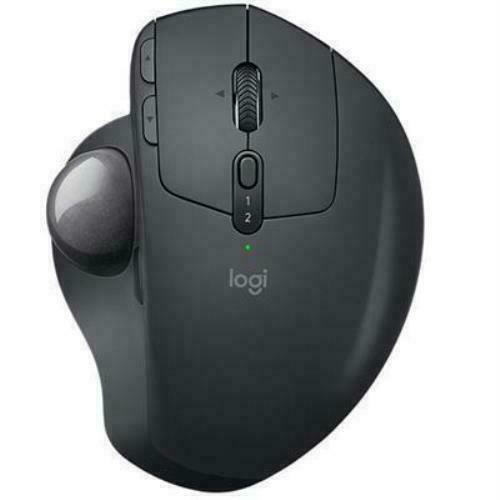
Logitechs most advanced trackball for trackball enthusiasts and consumers searching for alternatives to mice and touchpads. Delivers 20% less muscular strain compared to a regular mouse. MX ERGO features a unique adjustable hinge for personalized comfort and the latest tracking, scrolling and power management technology. Logitech FLOW enables effortless cross computer control.
Logitechs most advanced trackball for trackball enthusiasts and consumers searching for alternatives to mice and touchpads. Delivers 20% less muscular strain compared to a regular mouse. MX ERGO features a unique adjustable hinge for personalized comfort and the latest tracking, scrolling and power management technology. Logitech FLOW enables effortless cross computer control.
in 3 offers
The lowest price for MX Ergo right now is $100.00 at Harvey Norman, compared across 3 retailers.
The all-time low was $51.98 on 29 May 2026 — today's price is 92% above the lowest ever. It has been notably cheaper before — worth setting a price alert.
Prices last updated 14 July 2026.
MX Ergo
Logitechs most advanced trackball for trackball enthusiasts and consumers searching for alternatives to mice and touchpads. Delivers 20% less muscular strain compared to a regular mouse. MX ERGO features a unique adjustable hinge for personalized comfort and the latest tracking, scrolling and power management technology. Logitech FLOW enables effortless cross computer control.
Logitechs most advanced trackball for trackball enthusiasts and consumers searching for alternatives to mice and touchpads. Delivers 20% less muscular strain compared to a regular mouse. MX ERGO features a unique adjustable hinge for personalized comfort and the latest tracking, scrolling and power management technology. Logitech FLOW enables effortless cross computer control.
Last updated at 14/07/2026 10:25:29
Logitech MX Ergo Wireless Trackball Mouse
Logitech MX Ergo Wireless Trackball Mouse
Delivery between 17–21 July $10
Logitech Mx Ergo Advanced Wireless Trackball Mouse
Free delivery between 17–28 July
originally posted on walmart.ca
Amazing mouse, ergonomic and covers my whole palm. I had upgraded from the M570, which seemed more like an intro model. The bluetooth/dongle would constantly lag ad pointer would skip, the ball was loose and got dirty quickly and the buttons were finicky. The ball on the ergo is sturdy, the buttons and wheels feel great and the multi angles make resting my hand a breeze. I opted for a ball mouse because my wrist became really sore from using a conventional mouse at the office all day. This took the pain away and all i use is my thumb which rests comfortably on the ball. I wouldn't recommend any other mouse due to the vigorous movement of the wrist which the pain can keep you up at night, especially if working with documents and spreadsheets. Definitely recommend ... MoreAmazing mouse, ergonomic and covers my whole palm. I had upgraded from the M570, which seemed more like an intro model. The bluetooth/dongle would constantly lag ad pointer would skip, the ball was loose and got dirty quickly and the buttons were finicky. The ball on the ergo is sturdy, the buttons and wheels feel great and the multi angles make resting my hand a breeze. I opted for a ball mouse because my wrist became really sore from using a conventional mouse at the office all day. This took the pain away and all i use is my thumb which rests comfortably on the ball. I wouldn't recommend any other mouse due to the vigorous movement of the wrist which the pain can keep you up at night, especially if working with documents and spreadsheets. Definitely recommend this mouse.
originally posted on logitech.com
I have been using this computer mouse for nearly two years, averaging around four hours of daily usage. However, I have encountered an issue with the mouse's rubber material, which has become detached from the devices bottom. Consequently, I am now faced with the choice of purchasing a replacement pad if that is even possible or resorting to the use of a mouse pad, as the exposed slippery metal surface hampers the mouse's movement. This design flaw could have been easily avoided.Furthermore, after approximately a year of use, I noticed a lag in the mouse sensor's responsiveness. This occasional delay has proven to be problematic, especially when working on time-sensitive projects. Unfortunately, the MX Ergo mouse cannot be relied upon to consistently perform ... MoreI have been using this computer mouse for nearly two years, averaging around four hours of daily usage. However, I have encountered an issue with the mouse's rubber material, which has become detached from the devices bottom. Consequently, I am now faced with the choice of purchasing a replacement pad if that is even possible or resorting to the use of a mouse pad, as the exposed slippery metal surface hampers the mouse's movement. This design flaw could have been easily avoided.Furthermore, after approximately a year of use, I noticed a lag in the mouse sensor's responsiveness. This occasional delay has proven to be problematic, especially when working on time-sensitive projects. Unfortunately, the MX Ergo mouse cannot be relied upon to consistently perform flawlessly.Despite the frustrations and inconvenience caused, I would recommend this mouse to video editors and colorists seeking enhanced efficiency in their work. Personally, I would be willing to purchase another unit, had it not been for an unresolved issue regarding a refund for a keypad I purchased alongside the mouse. The lack of trust stems from my interactions with Logitech's support team, who have repeatedly provided false assurances regarding the reimbursement, creating an unpleasant experience.
originally posted on bestbuy.ca
This trackball mouse is excellent. It fits comfortably into my hand, and the tracking quality is good. Learning to use the trackball took less than an hour, and the physical effort required is much less than with a traditional mouse. A benefit of this product's design is two tilt options - slight vs moderate. I find that the moderate tilt option provides the key benefits of a "vertical" mouse, while allowing the hand to rest more comfortably. As a bonus, the mouse looks good on the desktop - quite stylish. All in all, my expectations have been exceeded with this product.
Logitech MX Ergo Wireless Trackball Mouse
Logitech MX Ergo Wireless Trackball Mouse
Delivery between 17–21 July $10
Logitech Mx Ergo Advanced Wireless Trackball Mouse
Free delivery between 17–28 July
Amazing mouse, ergonomic and covers my whole palm. I had upgraded from the M570, which seemed more like an intro model. The bluetooth/dongle would constantly lag ad pointer would skip, the ball was loose and got dirty quickly and the buttons were finicky. The ball on the ergo is sturdy, the buttons and wheels feel great and the multi angles make resting my hand a breeze. I opted for a ball mouse because my wrist became really sore from using a conventional mouse at the office all day. This took the pain away and all i use is my thumb which rests comfortably on the ball. I wouldn't recommend any other mouse due to the vigorous movement of the wrist which the pain can keep you up at night, especially if working with documents and spreadsheets. Definitely recommend ... MoreAmazing mouse, ergonomic and covers my whole palm. I had upgraded from the M570, which seemed more like an intro model. The bluetooth/dongle would constantly lag ad pointer would skip, the ball was loose and got dirty quickly and the buttons were finicky. The ball on the ergo is sturdy, the buttons and wheels feel great and the multi angles make resting my hand a breeze. I opted for a ball mouse because my wrist became really sore from using a conventional mouse at the office all day. This took the pain away and all i use is my thumb which rests comfortably on the ball. I wouldn't recommend any other mouse due to the vigorous movement of the wrist which the pain can keep you up at night, especially if working with documents and spreadsheets. Definitely recommend this mouse.
I have been using this computer mouse for nearly two years, averaging around four hours of daily usage. However, I have encountered an issue with the mouse's rubber material, which has become detached from the devices bottom. Consequently, I am now faced with the choice of purchasing a replacement pad if that is even possible or resorting to the use of a mouse pad, as the exposed slippery metal surface hampers the mouse's movement. This design flaw could have been easily avoided.Furthermore, after approximately a year of use, I noticed a lag in the mouse sensor's responsiveness. This occasional delay has proven to be problematic, especially when working on time-sensitive projects. Unfortunately, the MX Ergo mouse cannot be relied upon to consistently perform ... MoreI have been using this computer mouse for nearly two years, averaging around four hours of daily usage. However, I have encountered an issue with the mouse's rubber material, which has become detached from the devices bottom. Consequently, I am now faced with the choice of purchasing a replacement pad if that is even possible or resorting to the use of a mouse pad, as the exposed slippery metal surface hampers the mouse's movement. This design flaw could have been easily avoided.Furthermore, after approximately a year of use, I noticed a lag in the mouse sensor's responsiveness. This occasional delay has proven to be problematic, especially when working on time-sensitive projects. Unfortunately, the MX Ergo mouse cannot be relied upon to consistently perform flawlessly.Despite the frustrations and inconvenience caused, I would recommend this mouse to video editors and colorists seeking enhanced efficiency in their work. Personally, I would be willing to purchase another unit, had it not been for an unresolved issue regarding a refund for a keypad I purchased alongside the mouse. The lack of trust stems from my interactions with Logitech's support team, who have repeatedly provided false assurances regarding the reimbursement, creating an unpleasant experience.
This trackball mouse is excellent. It fits comfortably into my hand, and the tracking quality is good. Learning to use the trackball took less than an hour, and the physical effort required is much less than with a traditional mouse. A benefit of this product's design is two tilt options - slight vs moderate. I find that the moderate tilt option provides the key benefits of a "vertical" mouse, while allowing the hand to rest more comfortably. As a bonus, the mouse looks good on the desktop - quite stylish. All in all, my expectations have been exceeded with this product.
I have the original MX Ergo "unifying" version of this trackball. One of a long family or trackballs, my preferred form factor.My old one was wearing out after six years. So I jumped at a release offer to get the discounted upgrade. These are expensive devices.In operation there is not much difference between the two. However, the Ergo S is a big improvement on how "Flow" works.The original MX Ergo had a hard time maintaining its Flow connection. I have two PCs side by side and move between them all the time. Not with the MX Ergo. I often ended up doing a manual switch. Now it rarely fails.A few niggles. Like its predecessor, the MX Ergo S has an unreadable product label on the bottom. What design genius chose to print grey on a back background? Very user ... MoreI have the original MX Ergo "unifying" version of this trackball. One of a long family or trackballs, my preferred form factor.My old one was wearing out after six years. So I jumped at a release offer to get the discounted upgrade. These are expensive devices.In operation there is not much difference between the two. However, the Ergo S is a big improvement on how "Flow" works.The original MX Ergo had a hard time maintaining its Flow connection. I have two PCs side by side and move between them all the time. Not with the MX Ergo. I often ended up doing a manual switch. Now it rarely fails.A few niggles. Like its predecessor, the MX Ergo S has an unreadable product label on the bottom. What design genius chose to print grey on a back background? Very user hostile.Then again, Netgear is generally into design over function. They keep adding bells and whistles. I just want a keyboard and trackball that work.I had to replace my illuminated keyboard with an MX Keys S because Logitech's backlit keyboards have a habit of developing "keyboard rot". The letters rub off or break after a few years.At least the trackball won't suffer from that one. But after six years the surface of the old MX Ergo does look decided ratty.
I bought the MX Ergo at the start of the pandemic to optimize the ergonomics of my dining-room-table-turned-office. I've loved everything about this mouse and appreciate its versatility--from how its positioned to the settings. However, two years in, it started acting quirky, so we figured it needed a new battery. The only battery we could find was a generic brand coming out of China; there was nothing from Logitech about battery replacements, so we took the chance and replaced the battery. The battery worked for about six months, and now my mouse has stopped working. Sometimes it gets a slight charge and works; other times, scrolling moves the cursor in any direction except the direction I want it to go; and other times, it stops working altogether. I honestly ... MoreI bought the MX Ergo at the start of the pandemic to optimize the ergonomics of my dining-room-table-turned-office. I've loved everything about this mouse and appreciate its versatility--from how its positioned to the settings. However, two years in, it started acting quirky, so we figured it needed a new battery. The only battery we could find was a generic brand coming out of China; there was nothing from Logitech about battery replacements, so we took the chance and replaced the battery. The battery worked for about six months, and now my mouse has stopped working. Sometimes it gets a slight charge and works; other times, scrolling moves the cursor in any direction except the direction I want it to go; and other times, it stops working altogether. I honestly expected a $100 mouse to have a legitimate battery replacement option and for there to be some indication that the mouse is dying. It seems so wasteful to buy a mouse every 2-3 years. I still love the mouse, though, but I don't know if I'll buy another MX Ergo.
I really wanted to like this. It's almost impossible to find a vertical trackball, and I was thrilled to see Logitech offer one. It doesn't feel like a finished product, though. I really hope Logitech continues to develop it into a better version.The body is well-built but the most important part, the ball, feels cheap. It's light-weight, and the tracking is a bit sticky and jerky --- definitely not the smooth tracking experience of high-end trackballs. The ball is also very small, which means that it's hard to cover large areas on my monitor while maintaining any ability to do detailed image editing.The buttons are very loud. I really like quite mouse buttons, and the sharp clicks of these drive me nuts.I was delighted to see if offer both USB and bluetooth. But ... MoreI really wanted to like this. It's almost impossible to find a vertical trackball, and I was thrilled to see Logitech offer one. It doesn't feel like a finished product, though. I really hope Logitech continues to develop it into a better version.The body is well-built but the most important part, the ball, feels cheap. It's light-weight, and the tracking is a bit sticky and jerky --- definitely not the smooth tracking experience of high-end trackballs. The ball is also very small, which means that it's hard to cover large areas on my monitor while maintaining any ability to do detailed image editing.The buttons are very loud. I really like quite mouse buttons, and the sharp clicks of these drive me nuts.I was delighted to see if offer both USB and bluetooth. But it's weird that USB mean a dongle and not the USB charging cord. For whatever reason, Logitech decided to not let the mouse connect to the computer through the USB charging cord. Also, there's no space to store the USB dongle in the mouse's body, which doesn't bother me, but could make travel more annoying.Photos show it next to my Mojo MJ-156, which I love.
I spend way too much time in front of a computer, both for work and as a pastime.Between Photoshop, tech work, video editing, and video games, my wrist was shot. I decided rather than cycling between going to hard and recovering that I would check out some ergonomic mice.My main mouse was the G502, so I tried getting the Logitech Lift, and it's a decent mouse. It was easier on my wrist the motions still meant I experienced discomfort occasionally.Then I tried the MX ERGO and it's now my go-to for everything outside video games and even some games. It's angle is adjustable and I find full tilt to be great. The ball is very smooth, though I've heard it's worth finding an aftermarket upgrade.The additional buttons are easy to reach and programmable by ... MoreI spend way too much time in front of a computer, both for work and as a pastime.Between Photoshop, tech work, video editing, and video games, my wrist was shot. I decided rather than cycling between going to hard and recovering that I would check out some ergonomic mice.My main mouse was the G502, so I tried getting the Logitech Lift, and it's a decent mouse. It was easier on my wrist the motions still meant I experienced discomfort occasionally.Then I tried the MX ERGO and it's now my go-to for everything outside video games and even some games. It's angle is adjustable and I find full tilt to be great. The ball is very smooth, though I've heard it's worth finding an aftermarket upgrade.The additional buttons are easy to reach and programmable by application with the Logitech software. The scroll wheel is smooth and has additional buttons when tilted left/right.It also works both with the RF dongle and Bluetooth which means I can use it with multiple machines without having to swap the dongle or worry about which machine it will pair with.The battery is rechargeable and lasts months. It charges using micro-USB, which might mean it charges slowly but since I make sure to plug it in every 4-8 weeks, I've never been in a spot where I can't use it because it needs to charge.
I was hesitant about switching to a trackball, but the Logitech MX ERGO Plus won me over quickly. The adjustable tilt feature is a lifesaver, especially if you spend hours clicking and scrolling. My wrist feels better at the end of the day, which is a significant improvement during long sessions at the computer.The trackball is incredibly smooth and precise. It works well for selecting text, editing images, or managing multiple open windows without requiring much desk space. I'm also impressed with the battery life, which seems to last for an extended period. Additionally, the customizable buttons allow me to set shortcuts for my most-used tools.While using the trackball is a pleasure, I’ve noticed that dust can occasionally accumulate around the sensor, causing ... MoreI was hesitant about switching to a trackball, but the Logitech MX ERGO Plus won me over quickly. The adjustable tilt feature is a lifesaver, especially if you spend hours clicking and scrolling. My wrist feels better at the end of the day, which is a significant improvement during long sessions at the computer.The trackball is incredibly smooth and precise. It works well for selecting text, editing images, or managing multiple open windows without requiring much desk space. I'm also impressed with the battery life, which seems to last for an extended period. Additionally, the customizable buttons allow me to set shortcuts for my most-used tools.While using the trackball is a pleasure, I’ve noticed that dust can occasionally accumulate around the sensor, causing the cursor to jump. Fortunately, this is an easy fix, just pop the ball out and give it a quick blast of compressed air, and you’re good to go.Overall, this mouse is a solid choice if you want something comfortable, reliable, and hassle-free for everyday use. It has transformed my work routine, and my wrist is grateful for it. If you’re curious about trackballs, the MX ERGO Plus is an excellent place to start.
I've been using this MX ERGO trackball for a few months now. It's very comfortable, quick, accurate, and stable. I didn't think I'd like the optional two-angle stand it comes with, but I've grown to love it. I'll switch between angles throughout a work day to change up the muscles I use a bit. I find long sessions are fine, maybe 4-5 hours at time now, then I'll need to switch to track-pad or mouse for a bit. The first week was around 3-4 hours until my thumb got tired of doing all the work, so I expect that duration to continue to extend over time. Overall I look forward to my sessions with this device everyday. Since it requires very little space, and doesn't move across the surface, I can have comfortable accurate computing from just about anywhere. I'll set it ... MoreI've been using this MX ERGO trackball for a few months now. It's very comfortable, quick, accurate, and stable. I didn't think I'd like the optional two-angle stand it comes with, but I've grown to love it. I'll switch between angles throughout a work day to change up the muscles I use a bit. I find long sessions are fine, maybe 4-5 hours at time now, then I'll need to switch to track-pad or mouse for a bit. The first week was around 3-4 hours until my thumb got tired of doing all the work, so I expect that duration to continue to extend over time. Overall I look forward to my sessions with this device everyday. Since it requires very little space, and doesn't move across the surface, I can have comfortable accurate computing from just about anywhere. I'll set it on my recliner arm, on my bed next to me, on the couch - just about anywhere suddenly becomes a solid work environment with minimal space. For this reason, I take it when I travel now because hunting for mouse surfaces on the go is futile. Problem solved. As for gaming - I wouldn't use this for any FPS style games that require quick sudden accuracy, but for slower paced games, and all other modes, it works a treat.
I've owned a ton of iterations of Logitech's trackball mice over the years and like the others, the MX Ergo Plus is an excellent unit. I actually wasn't expecting the magnetic metal plate at the bottom (didn't quite read through the specs there lol), so that was a really pleasant surprise. The magnetic plate helps you easily switch between a more upright or flat hand placement. The thumb button on the side is set to a very clever "precision" mode, that essentially lowers the DPI if you're doing something like taking a peculiar screenshot or highlighting text. Of course, all of the mouse buttons can be customized with the Logitech Options+ (free) app. I've programmed the up and down button to be a Cmd + C and Cmd + V function for copy/paste, while the left and right ... MoreI've owned a ton of iterations of Logitech's trackball mice over the years and like the others, the MX Ergo Plus is an excellent unit. I actually wasn't expecting the magnetic metal plate at the bottom (didn't quite read through the specs there lol), so that was a really pleasant surprise. The magnetic plate helps you easily switch between a more upright or flat hand placement. The thumb button on the side is set to a very clever "precision" mode, that essentially lowers the DPI if you're doing something like taking a peculiar screenshot or highlighting text. Of course, all of the mouse buttons can be customized with the Logitech Options+ (free) app. I've programmed the up and down button to be a Cmd + C and Cmd + V function for copy/paste, while the left and right scroll wheel button are set to Cmd + Option + Left and Cmd + Option + Right to switch tabs quickly. It's the perfect mouse for my virtual office setup, fits great on a lap desk and doesn't slide the cursor all over the place when I change positions. Excellent job, as usual from Logi!