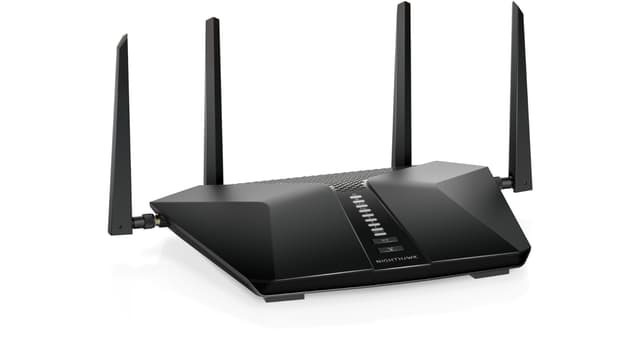
Netgear Nighthawk AX6 6-Stream AX4300 Wifi 6 Router (RAX45-100NAS)
Faster WiFi download & upload speeds at the same time 6-Stream AX WiFi - Stream smooth 4K UHD content to smart TVs, mobile devices, and gaming consoles Greater than 1Gbps WiFi Speeds Enjoy greater than 1Gbps WiFi speeds for blazing-fast streaming and downloading to newer mobile devices Powerful Triple-core 1.5GHz Processor More processing power increases the overall performance of your network. ULTIMATE RANGEWiFi coverage throughout very large homes WiFi 6 for Today's Smart Devices The NETGEAR Nighthawk AX6 6-Stream AX4300 WiFi Router delivers a new level of Gigabit WiFi connectivity so you can connect, stream and download faster to handle up to 25 devices in your growing home network. Powerful 1.5GHz triple-core processor with a fully offloaded CPU increases overall performance of the network. Engineered to deliver up to 4 times the data capacity over previous standards, WiFi 6 technology with OFDMA and 160MHz channel allows more devices to connect and stream simultaneously, without impacting speed or reliability. High-power amplifiers increase range for reliable whole home coverage. With NETGEAR Armor, you get the best-in-class cybersecurity to protect your family from malware, stolen passwords, identity theft, and hacker attacks. WiFi 6Ready for Today and Tomorrows Smart Home Delivering four times better performance than AC WiFi, WiFi 6 allows more devices to connect and stream simultaneously, without impacting speed or reliability, by efficiently packing and scheduling data. With innovative technologies, such as Orthogonal Frequency-Division Multiple-Access (OFDMA) and intelligent scheduling, WiFi 6 delivers a huge boost in speed and total capacity. Rising to the challenges of modern smart home demands, this new standard of WiFi is ready to support more devices with better reliability and faster speeds.
Faster WiFi download & upload speeds at the same time 6-Stream AX WiFi - Stream smooth 4K UHD content to smart TVs, mobile devices, and gaming consoles Greater than 1Gbps WiFi Speeds Enjoy greater than 1Gbps WiFi speeds for blazing-fast streaming and downloading to newer mobile devices Powerful Triple-core 1.5GHz Processor More processing power increases the overall performance of your network. ULTIMATE RANGEWiFi coverage throughout very large homes WiFi 6 for Today's Smart Devices The NETGEAR Nighthawk AX6 6-Stream AX4300 WiFi Router delivers a new level of Gigabit WiFi connectivity so you can connect, stream and download faster to handle up to 25 devices in your growing home network. Powerful 1.5GHz triple-core processor with a fully offloaded CPU increases overall performance of the network. Engineered to deliver up to 4 times the data capacity over previous standards, WiFi 6 technology with OFDMA and 160MHz channel allows more devices to connect and stream simultaneously, without impacting speed or reliability. High-power amplifiers increase range for reliable whole home coverage. With NETGEAR Armor, you get the best-in-class cybersecurity to protect your family from malware, stolen passwords, identity theft, and hacker attacks. WiFi 6Ready for Today and Tomorrows Smart Home Delivering four times better performance than AC WiFi, WiFi 6 allows more devices to connect and stream simultaneously, without impacting speed or reliability, by efficiently packing and scheduling data. With innovative technologies, such as Orthogonal Frequency-Division Multiple-Access (OFDMA) and intelligent scheduling, WiFi 6 delivers a huge boost in speed and total capacity. Rising to the challenges of modern smart home demands, this new standard of WiFi is ready to support more devices with better reliability and faster speeds.
Faster WiFi download & upload speeds at the same time 6-Stream AX WiFi - Stream smooth 4K UHD content to smart TVs, mobile devices, and gaming consoles Greater than 1Gbps WiFi Speeds Enjoy greater than 1Gbps WiFi speeds for blazing-fast streaming and downloading to newer mobile devices Powerful Triple-core 1.5GHz Processor More processing power increases the overall performance of your network. ULTIMATE RANGEWiFi coverage throughout very large homes WiFi 6 for Today's Smart Devices The NETGEAR Nighthawk AX6 6-Stream AX4300 WiFi Router delivers a new level of Gigabit WiFi connectivity so you can connect, stream and download faster to handle up to 25 devices in your growing home network. Powerful 1.5GHz triple-core processor with a fully offloaded CPU increases overall performance of the network. Engineered to deliver up to 4 times the data capacity over previous standards, WiFi 6 technology with OFDMA and 160MHz channel allows more devices to connect and stream simultaneously, without impacting speed or reliability. High-power amplifiers increase range for reliable whole home coverage. With NETGEAR Armor, you get the best-in-class cybersecurity to protect your family from malware, stolen passwords, identity theft, and hacker attacks. WiFi 6Ready for Today and Tomorrows Smart Home Delivering four times better performance than AC WiFi, WiFi 6 allows more devices to connect and stream simultaneously, without impacting speed or reliability, by efficiently packing and scheduling data. With innovative technologies, such as Orthogonal Frequency-Division Multiple-Access (OFDMA) and intelligent scheduling, WiFi 6 delivers a huge boost in speed and total capacity. Rising to the challenges of modern smart home demands, this new standard of WiFi is ready to support more devices with better reliability and faster speeds.
Faster WiFi download & upload speeds at the same time 6-Stream AX WiFi - Stream smooth 4K UHD content to smart TVs, mobile devices, and gaming consoles Greater than 1Gbps WiFi Speeds Enjoy greater than 1Gbps WiFi speeds for blazing-fast streaming and downloading to newer mobile devices Powerful Triple-core 1.5GHz Processor More processing power increases the overall performance of your network. ULTIMATE RANGEWiFi coverage throughout very large homes WiFi 6 for Today's Smart Devices The NETGEAR Nighthawk AX6 6-Stream AX4300 WiFi Router delivers a new level of Gigabit WiFi connectivity so you can connect, stream and download faster to handle up to 25 devices in your growing home network. Powerful 1.5GHz triple-core processor with a fully offloaded CPU increases overall performance of the network. Engineered to deliver up to 4 times the data capacity over previous standards, WiFi 6 technology with OFDMA and 160MHz channel allows more devices to connect and stream simultaneously, without impacting speed or reliability. High-power amplifiers increase range for reliable whole home coverage. With NETGEAR Armor, you get the best-in-class cybersecurity to protect your family from malware, stolen passwords, identity theft, and hacker attacks. WiFi 6Ready for Today and Tomorrows Smart Home Delivering four times better performance than AC WiFi, WiFi 6 allows more devices to connect and stream simultaneously, without impacting speed or reliability, by efficiently packing and scheduling data. With innovative technologies, such as Orthogonal Frequency-Division Multiple-Access (OFDMA) and intelligent scheduling, WiFi 6 delivers a huge boost in speed and total capacity. Rising to the challenges of modern smart home demands, this new standard of WiFi is ready to support more devices with better reliability and faster speeds.
in 7 offers
The lowest price for Netgear Nighthawk AX6 6-Stream AX4300 Wifi 6 Router (RAX45-100NAS) right now is $86.80 at eBay.com.au, compared across 2 retailers.
The all-time low was $76.00 on 14 June 2026 — today's price is 14% above the lowest ever. That's a little above the best price we've seen.
Prices last updated 18 Oct 2026.
Last updated at 18/10/2026 11:13:22
Netgear Nighthawk Ax6 6-stream Ax4300 Wifi 6 Router (rax45-100nas)
Delivery $64.69
Affiliate Disclosure: We may receive a small commission for purchases made through this link at no extra cost to you. This helps support our site. Thank you!
Netgear Nighthawk AX6 6-Stream AX4300 WiFi 6 Router (RAX45-100NAS) (Renewed)
Free delivery between 27–30 Oct
originally posted on netgear.com
In a home that may have cameras, connected garage doors, smart phones, laptops, TV's, streaming devices, light switches, etc. this device will not work beyond having 25 devices: It will not assign unique internal IP's addresses to more than this number of devices. I will soon be forced to buy a new router from another mfr. that doesn't have this cap. I certainly won't be buying another Netgear router any time soon as a result of this practice. Initially bought two (one for a 2nd home), but was able to return one to store (had > 25 devices, many are Ethernet connected). This one will be relegated to serve as a wifi access point / Ethernet switch shortly. This 25 devices limit is noted on the data sheet but it isn't clear that it is a hard limit presumably set in ... MoreIn a home that may have cameras, connected garage doors, smart phones, laptops, TV's, streaming devices, light switches, etc. this device will not work beyond having 25 devices: It will not assign unique internal IP's addresses to more than this number of devices. I will soon be forced to buy a new router from another mfr. that doesn't have this cap. I certainly won't be buying another Netgear router any time soon as a result of this practice. Initially bought two (one for a 2nd home), but was able to return one to store (had > 25 devices, many are Ethernet connected). This one will be relegated to serve as a wifi access point / Ethernet switch shortly. This 25 devices limit is noted on the data sheet but it isn't clear that it is a hard limit presumably set in firmware or by hardware.
originally posted on netgear.com
I bought this because my ISP said the old one wasn't working anymore.Issues.1. It randomly drops connections on the 5G. I eventually turned it off because I had so much problems with it.2. Automatic channel selection had to be turned off. See above.3. Users randomly have network connection but can't access the internet until the router gets rebooted.4. I need to access a DRAC for work. This P0S router blocks port 443 responses as a DoS attack so I can't work from home.5. Tech support is worthless. I explained by situation and he tried to get me to turn off Access Control. WHAT????????6. Despite my protests he insisted I "Factory Reset" the P0S. Then left me on hold for 20 minutes. Of course it didn't fix anything just like I said.7. I had to insist ... MoreI bought this because my ISP said the old one wasn't working anymore.Issues.1. It randomly drops connections on the 5G. I eventually turned it off because I had so much problems with it.2. Automatic channel selection had to be turned off. See above.3. Users randomly have network connection but can't access the internet until the router gets rebooted.4. I need to access a DRAC for work. This P0S router blocks port 443 responses as a DoS attack so I can't work from home.5. Tech support is worthless. I explained by situation and he tried to get me to turn off Access Control. WHAT????????6. Despite my protests he insisted I "Factory Reset" the P0S. Then left me on hold for 20 minutes. Of course it didn't fix anything just like I said.7. I had to insist if he can't help me turn off the DoS attack on port 443, that he forward me to someone who could. I have been on the phone for two hours and keep telling me if I register my product (which I have already done) I would get "priority access to our expert support technicians"Netgear you can take this P0S and put it back where it came from. I will never buy from you again.
originally posted on netgear.com
I replaced my R6700 router with the AX4300 for the WiFi 6 and other advanced features. Several devices I had connected to the internet would not connect through the AX4300. Technical support had me disable WiFi 6 and Smart Connect. Afterwards, I had to manually connect several devices. After working with technical support for two weeks, the router still won't properly connect my wireless mfd/printer and computers. To make it work, I have to turn on the printer first before I turn on any of my computers. As a result, I invested in a WiFi 6 router with advanced features where WiFi 6 and the advanced features have to be disabled to use even though the advertising claims it's backwards compatible. Another feature, "Includes NETGEAR Armor™", is misleading as you only get ... MoreI replaced my R6700 router with the AX4300 for the WiFi 6 and other advanced features. Several devices I had connected to the internet would not connect through the AX4300. Technical support had me disable WiFi 6 and Smart Connect. Afterwards, I had to manually connect several devices. After working with technical support for two weeks, the router still won't properly connect my wireless mfd/printer and computers. To make it work, I have to turn on the printer first before I turn on any of my computers. As a result, I invested in a WiFi 6 router with advanced features where WiFi 6 and the advanced features have to be disabled to use even though the advertising claims it's backwards compatible. Another feature, "Includes NETGEAR Armor™", is misleading as you only get a 30 day trial.
| Max Transfer Rate | 3840 Mbps (Maximum Wireless Data Rate) |
| Wireless Speed Rating | AX4300 |
| Wireless Standard | Wi-Fi 6 |
| Wireless Band Count | Dual-Band |
| Wireless Highlights | 6-Stream |
Netgear Nighthawk Ax6 6-stream Ax4300 Wifi 6 Router (rax45-100nas)
Delivery $64.69
Affiliate Disclosure: We may receive a small commission for purchases made through this link at no extra cost to you. This helps support our site. Thank you!
Netgear Nighthawk AX6 6-Stream AX4300 WiFi 6 Router (RAX45-100NAS) (Renewed)
Free delivery between 27–30 Oct
In a home that may have cameras, connected garage doors, smart phones, laptops, TV's, streaming devices, light switches, etc. this device will not work beyond having 25 devices: It will not assign unique internal IP's addresses to more than this number of devices. I will soon be forced to buy a new router from another mfr. that doesn't have this cap. I certainly won't be buying another Netgear router any time soon as a result of this practice. Initially bought two (one for a 2nd home), but was able to return one to store (had > 25 devices, many are Ethernet connected). This one will be relegated to serve as a wifi access point / Ethernet switch shortly. This 25 devices limit is noted on the data sheet but it isn't clear that it is a hard limit presumably set in ... MoreIn a home that may have cameras, connected garage doors, smart phones, laptops, TV's, streaming devices, light switches, etc. this device will not work beyond having 25 devices: It will not assign unique internal IP's addresses to more than this number of devices. I will soon be forced to buy a new router from another mfr. that doesn't have this cap. I certainly won't be buying another Netgear router any time soon as a result of this practice. Initially bought two (one for a 2nd home), but was able to return one to store (had > 25 devices, many are Ethernet connected). This one will be relegated to serve as a wifi access point / Ethernet switch shortly. This 25 devices limit is noted on the data sheet but it isn't clear that it is a hard limit presumably set in firmware or by hardware.
I bought this because my ISP said the old one wasn't working anymore.Issues.1. It randomly drops connections on the 5G. I eventually turned it off because I had so much problems with it.2. Automatic channel selection had to be turned off. See above.3. Users randomly have network connection but can't access the internet until the router gets rebooted.4. I need to access a DRAC for work. This P0S router blocks port 443 responses as a DoS attack so I can't work from home.5. Tech support is worthless. I explained by situation and he tried to get me to turn off Access Control. WHAT????????6. Despite my protests he insisted I "Factory Reset" the P0S. Then left me on hold for 20 minutes. Of course it didn't fix anything just like I said.7. I had to insist ... MoreI bought this because my ISP said the old one wasn't working anymore.Issues.1. It randomly drops connections on the 5G. I eventually turned it off because I had so much problems with it.2. Automatic channel selection had to be turned off. See above.3. Users randomly have network connection but can't access the internet until the router gets rebooted.4. I need to access a DRAC for work. This P0S router blocks port 443 responses as a DoS attack so I can't work from home.5. Tech support is worthless. I explained by situation and he tried to get me to turn off Access Control. WHAT????????6. Despite my protests he insisted I "Factory Reset" the P0S. Then left me on hold for 20 minutes. Of course it didn't fix anything just like I said.7. I had to insist if he can't help me turn off the DoS attack on port 443, that he forward me to someone who could. I have been on the phone for two hours and keep telling me if I register my product (which I have already done) I would get "priority access to our expert support technicians"Netgear you can take this P0S and put it back where it came from. I will never buy from you again.
I replaced my R6700 router with the AX4300 for the WiFi 6 and other advanced features. Several devices I had connected to the internet would not connect through the AX4300. Technical support had me disable WiFi 6 and Smart Connect. Afterwards, I had to manually connect several devices. After working with technical support for two weeks, the router still won't properly connect my wireless mfd/printer and computers. To make it work, I have to turn on the printer first before I turn on any of my computers. As a result, I invested in a WiFi 6 router with advanced features where WiFi 6 and the advanced features have to be disabled to use even though the advertising claims it's backwards compatible. Another feature, "Includes NETGEAR Armor™", is misleading as you only get ... MoreI replaced my R6700 router with the AX4300 for the WiFi 6 and other advanced features. Several devices I had connected to the internet would not connect through the AX4300. Technical support had me disable WiFi 6 and Smart Connect. Afterwards, I had to manually connect several devices. After working with technical support for two weeks, the router still won't properly connect my wireless mfd/printer and computers. To make it work, I have to turn on the printer first before I turn on any of my computers. As a result, I invested in a WiFi 6 router with advanced features where WiFi 6 and the advanced features have to be disabled to use even though the advertising claims it's backwards compatible. Another feature, "Includes NETGEAR Armor™", is misleading as you only get a 30 day trial.
I have generally been a huge fan of NetGear, but I'm not so sure anymore. I bought this in mid May 2020 and have had nothing but problems and 10 days into support ticket with NetGear we are nowhere near to any resolution. In fact, NetGear has completely ignored me for the past 7 days despite calling and emailing them daily. Totally unlike them in the past.All devices consistently register a connection to the Wifi signal, but 2.4Ghz devices are randomly blocked to anything past the router (other LAN devices and Internet). All devices get inconsistent Internet speeds. I have a rock solid CMS1000 cable modem more than capable of delivering my provider's 300/10Mbps speeds. In fact putting another router in place I DO get the consistent speeds to every device. But this ... MoreI have generally been a huge fan of NetGear, but I'm not so sure anymore. I bought this in mid May 2020 and have had nothing but problems and 10 days into support ticket with NetGear we are nowhere near to any resolution. In fact, NetGear has completely ignored me for the past 7 days despite calling and emailing them daily. Totally unlike them in the past.All devices consistently register a connection to the Wifi signal, but 2.4Ghz devices are randomly blocked to anything past the router (other LAN devices and Internet). All devices get inconsistent Internet speeds. I have a rock solid CMS1000 cable modem more than capable of delivering my provider's 300/10Mbps speeds. In fact putting another router in place I DO get the consistent speeds to every device. But this router will randomly drop speeds to a particular device to as low as 30-50/4Mbps speeds. The only fix is to reboot the router.
I've been buying Netgear products since before anyone knew what a wireless router was and I'm also a Network Engineer by trade, so I have a little bit of experience with this realm. With that pretentiousness aside, let's do this review!I want to let everyone know I purchased this with my own money at Costco and it's replacing an older AC1900 router that's worked fine, but it's range was limited and I wanted a new toy.This router seems to do a lot of things right, but has some serious downfalls in a few key area. I'll break it down in a thorough pros/cons list below.Pros:2.4/5.0ghz range is adequate. This single unit can now cover my 1800 sqft rancher with no real issues. Previously I had 2 units to cover this same area. Range is not an issue with this ... MoreI've been buying Netgear products since before anyone knew what a wireless router was and I'm also a Network Engineer by trade, so I have a little bit of experience with this realm. With that pretentiousness aside, let's do this review!I want to let everyone know I purchased this with my own money at Costco and it's replacing an older AC1900 router that's worked fine, but it's range was limited and I wanted a new toy.This router seems to do a lot of things right, but has some serious downfalls in a few key area. I'll break it down in a thorough pros/cons list below.Pros:2.4/5.0ghz range is adequate. This single unit can now cover my 1800 sqft rancher with no real issues. Previously I had 2 units to cover this same area. Range is not an issue with this router.Compatibility with all my devices is great. I have several IoT devices, from cams, smart plugs and thermostats. I'm not having any real issues with any of them after the initial connection process.Hardware seems to be built well, antennas are nice and sturdy, unit doesn't look awful. Gigabit ports are nice and USB 3.1 is nice for those that leverage it for file sharing or the like.Cons:The iPhone app is slow. The web interface is slow. Changing any setting on this router is slow. Everything about any way you interface with the RAX45 is slow.Netgear Armor provides decent protection (I've used a few of these built in AV/Security products in the past) but not better than many other free versions that come with other manufacturers gear. The price they want you to pay for Netgear Armor is ridiculous, it's not worth half the price they're asking for. The setup of Netgear Armor requires your phone, for no other reason than to be able to charge you through that method. Yeah, I'll pass on this, give this out for free Netgear.QoS on this device as of firmware V1.0.2.20_2.0.31 is broken. I mean, it's completely broken. I'm not sure who did the math for you on this one, but please fix it. Xbox downloads slow to a crawl on this and that's not acceptable.Port Scan and DoS Protection absolutely cripple certain websites and apps to the point that they become unusable. This is because the DoS protection kicks in when it sees some of these connection attempts as DoS attacks and attempts to "mitigate them" by completely mitigating your connection apparently.Hardware is solid, but my router has coil whine. You know, like a video card might have, but luckily it only makes noise (fizzing, hissing, popping) when using the wireless connection, you know..on this wireless router.So no, I don't want to send my router in as I can return it to Costco at any point. But I do want you to know about these issues. Some can be fixed via firmware and they should, quickly, before you guys move onto WiFi 6e and abandon this product completely.
The router was easy to set up thanks to the Netgear Nighthawk mobile app. The Nighthawk includes a free subscription to BitLocker security. With the mobile app, I can monitor all confection to my network through the router remotely and disconnect any device, see notifications of vulnerabilities and threats, and see recommended improvements to improve security. The mobile app makes includes other features to check internet speed, parental controls, monitor/change WIFI settings, reach tech support and a traffic meter. All this means I can remotely manage and trouble shoot my network when I am away from home and my wife calls to say the internet is not working. Happy wife, happy life. :-)
I installed this router 2 days ago for use in a 1,000 square foot apartment. The signal range is decent, but the speed of connection is wildly inconsistent. For a 600 mbps connection, on the 2.4GHz band I average 3-5 Mbps from about 30 feet away in my office and about 12 Mbps right next to the router. The 5Ghz band fares significantly better and gives me the speeds that I would expect, but is wildly inconsistent in doing so. From the same spot with no other variables, I have had speeds from anywhere between 50 Mbps and 550 Mbps. Spent 2 and a half hours with support today and was essentially told to just continually reset the router in different ways. Will be returning this router ASAP. STAY AWAY.
I bought this router from Costco on sale and thought I had found a bargain for a WiFi 6 device. Speed and range are excellent compared to my old Asus router from 10 years ago. However, after just a few days of use, I was proven wrong.I have Comcast for an ISP and for some reason this router kept on thinking that the default gateway I had setup (I don't use the 192.168.1.1 default address) was on the same network as my modem and changed the gateway address every afternoon. I initially thought this was a fluke caused by my ISP, but this happen daily at around 3 PM. To fix, I would go in and reset my default gateway back to what is was and all was fine - obviously my modem's address was not conflicting with my LAN.Now who would write firmware that overrides the ... MoreI bought this router from Costco on sale and thought I had found a bargain for a WiFi 6 device. Speed and range are excellent compared to my old Asus router from 10 years ago. However, after just a few days of use, I was proven wrong.I have Comcast for an ISP and for some reason this router kept on thinking that the default gateway I had setup (I don't use the 192.168.1.1 default address) was on the same network as my modem and changed the gateway address every afternoon. I initially thought this was a fluke caused by my ISP, but this happen daily at around 3 PM. To fix, I would go in and reset my default gateway back to what is was and all was fine - obviously my modem's address was not conflicting with my LAN.Now who would write firmware that overrides the user config without asking for confirmation? Apparently NetGear. This behavior took my LAN and WiFi offline daily on a schedule. And as this product is so new, no help online either.On top of that, there is absolutely no parental control on this model. Sure I can disable an address using a schedule or a service port using a schedule, but these are all very heavy-handed approaches when simply blocking a MAC address would do.On top of that, the default OOTB settings for the WiFi were terrible. There is a setting set to be on by default called co-exist. This is pretty much nice mode for WiFi that if it finds other WiFi signals near by, it goes into low band mode which totally kills the through-put of the router. Disabling this feature brought my link speed up from 89 Mbps to 668 Mbps on the 5 Ghz band.Stay away from this router until it has had much more time to get all the bugs killed and the features ironed out.
I rid of that janky Fios router that was ugly and unreliable and bought this router that was on sale. Easy setup setup, connected to Fios ONT reliably and FAST. I like it so much I bought another one on sale as a backup unit. You can't go wrong with this one.I do NOT recommend the NetGear Armor they include with the purchase. Very buggy and it never worked right. NetGear makes great products but their customer service IS TERRIBLE. You have to call and make an appointment then some guy in India who you can barely understand tries to tell you what to do while you're trying to figure out what he's saying ugh! Then they hang up on you. It's clear NetGear cheaped out on customer service because it doesn't exist. I just wound up deleting that dopey software it doesn't work.
I have no idea what I'm doing but I followed the very limited instructions. First, seems like you need a smart phone to setup, which I have but it's not obvious from the box that you'll need one. Second, spent hours yesterday and now again today trying to get our second laptop connected. Third, what is this paid subscription to NetGear Armor after the 30 day free trial? Am I forced to have Armor? Is that the only way my router is protected? How much does it cost per month if I don't stop the subscription, which I haven't found a way to stop in the first place? There's no mention of cost and no way to unsubscribe. One more hour of this frustration and it's going back to Costco. I live in a very low tech small 900 sq ft condo.
| Max Transfer Rate | 3840 Mbps (Maximum Wireless Data Rate) |
| Wireless Speed Rating | AX4300 |
| Wireless Standard | Wi-Fi 6 |
| Wireless Band Count | Dual-Band |
| Wireless Highlights | 6-Stream |