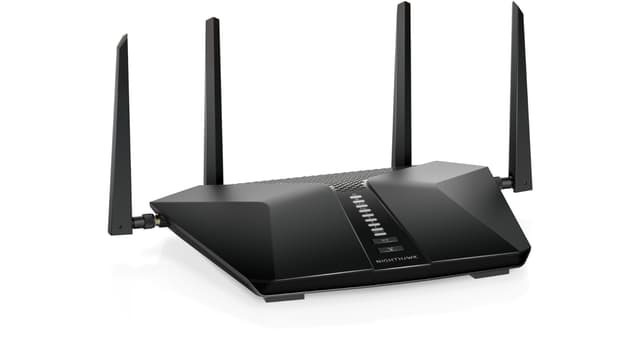
Netgear Nighthawk AX6 Wi-Fi 6 IEEE 802.11ax Cable Modem/Wireless Router
Upgrade your home connectivity with the NETGEAR Nighthawk AX2700 Router (CAX30S-100NAS), featuring a built-in 32 x 8 DOCSIS 3.1 cable modem for ultra-fast internet access. Experience lightning-fast speeds up to 2.7 Gbps with Wi-Fi 6 technology, enabling smooth streaming and gaming on multiple devices simultaneously. This dual-band router supports up to 25 connected devices and features advanced security with NETGEAR Armor protection, safeguarding your data against online threats. The Nighthawk app allows for easy setup and management, bringing seamless control to your fingertips. Enjoy expanded Wi-Fi coverage of up to 2500 square feet, ensuring your smart devices remain connected throughout your home. With 4 Gigabit Ethernet ports, you can connect wired devices at impressive speeds of 1000 Mbps. Designed with energy efficiency in mind, this ENERGY STAR certified router not only enhances performance but also helps reduce energy consumption. Elevate your internet experience with the NETGEAR Nighthawk AX2700 — where speed meets reliability!
Upgrade your home connectivity with the NETGEAR Nighthawk AX2700 Router (CAX30S-100NAS), featuring a built-in 32 x 8 DOCSIS 3.1 cable modem for ultra-fast internet access. Experience lightning-fast speeds up to 2.7 Gbps with Wi-Fi 6 technology, enabling smooth streaming and gaming on multiple devices simultaneously. This dual-band router supports up to 25 connected devices and features advanced security with NETGEAR Armor protection, safeguarding your data against online threats. The Nighthawk app allows for easy setup and management, bringing seamless control to your fingertips. Enjoy expanded Wi-Fi coverage of up to 2500 square feet, ensuring your smart devices remain connected throughout your home. With 4 Gigabit Ethernet ports, you can connect wired devices at impressive speeds of 1000 Mbps. Designed with energy efficiency in mind, this ENERGY STAR certified router not only enhances performance but also helps reduce energy consumption. Elevate your internet experience with the NETGEAR Nighthawk AX2700 — where speed meets reliability!
Upgrade your home connectivity with the NETGEAR Nighthawk AX2700 Router (CAX30S-100NAS), featuring a built-in 32 x 8 DOCSIS 3.1 cable modem for ultra-fast internet access. Experience lightning-fast speeds up to 2.7 Gbps with Wi-Fi 6 technology, enabling smooth streaming and gaming on multiple devices simultaneously. This dual-band router supports up to 25 connected devices and features advanced security with NETGEAR Armor protection, safeguarding your data against online threats. The Nighthawk app allows for easy setup and management, bringing seamless control to your fingertips. Enjoy expanded Wi-Fi coverage of up to 2500 square feet, ensuring your smart devices remain connected throughout your home. With 4 Gigabit Ethernet ports, you can connect wired devices at impressive speeds of 1000 Mbps. Designed with energy efficiency in mind, this ENERGY STAR certified router not only enhances performance but also helps reduce energy consumption. Elevate your internet experience with the NETGEAR Nighthawk AX2700 — where speed meets reliability!
Upgrade your home connectivity with the NETGEAR Nighthawk AX2700 Router (CAX30S-100NAS), featuring a built-in 32 x 8 DOCSIS 3.1 cable modem for ultra-fast internet access. Experience lightning-fast speeds up to 2.7 Gbps with Wi-Fi 6 technology, enabling smooth streaming and gaming on multiple devices simultaneously. This dual-band router supports up to 25 connected devices and features advanced security with NETGEAR Armor protection, safeguarding your data against online threats. The Nighthawk app allows for easy setup and management, bringing seamless control to your fingertips. Enjoy expanded Wi-Fi coverage of up to 2500 square feet, ensuring your smart devices remain connected throughout your home. With 4 Gigabit Ethernet ports, you can connect wired devices at impressive speeds of 1000 Mbps. Designed with energy efficiency in mind, this ENERGY STAR certified router not only enhances performance but also helps reduce energy consumption. Elevate your internet experience with the NETGEAR Nighthawk AX2700 — where speed meets reliability!
in 14 offers
The lowest price for Netgear Nighthawk AX6 Wi-Fi 6 IEEE 802.11ax Cable Modem/Wireless Router right now is $385.22 at Snapklik AU, compared across 7 retailers.
The all-time low was $268.87 on 25 Dec 2024 — today's price is 43% above the lowest ever. It has been notably cheaper before — worth setting a price alert.
Prices last updated 21 Oct 2026.
Last updated at 21/10/2026 00:41:47
NETGEAR - Nighthawk CAX30 AX2700 WiFi 6 Cable Modem Router
Affiliate Disclosure: We may receive a small commission for purchases made through this link at no extra cost to you. This helps support our site. Thank you!
NETGEAR Nighthawk Modem Router Combo DOCSIS 3.1 Cable Modem And WiFi 6 Router - AX2700 2.7 Gbps - Compatible With Xfinity, Spectrum, Cox, And More -
Delivery $28.52
NETGEAR Nighthawk Modem Router Combo (CAX30) DOCSIS 3.1 Cable Modem and WiFi 6 Router - AX2700 2.7 Gbps - Compatible with Xfinity, Spectrum, Cox, and
Free delivery between 30 Oct – 4 Nov
Nighthawk CAX30S AX2700 WiFi 6 Cable Modem Router [Up to 2.7Gbps] (Renewed)
Delivery between 27–30 Oct $29
NETGEAR Nighthawk Cable Modem and WiFi 6 Router Combo CAX80 - Compatible with All Major
Delivery $86.92
Netgear Nighthawk AX2700 DOCSIS 3.1 Two-in-One Cable Modem + WiFi Router, 2.7Gbps, CAX30S-100NAS, 90-Day of Netgear Armor Included
Delivery $91
NETGEAR Nighthawk Cable Modem + WiFi 6 Router Combo with 90-day Armor Subscription (CAX30S) - Compatible with Major Cable Providers incl. Xfinity, Spe
Free delivery between 30 Oct – 4 Nov
originally posted on netgear.com
My old router finally died, and I replaced it with this one. The previous one, for its entire lifespan, needed to be reset about every week and still constantly dropped connections. I've had the CAX30 running for about two weeks now and have not yet had a single connection drop. Wi-Fi signal seems strong throughout the house.I also really appreciate how fully-featured it is; unfortunately setup with Xfinity didn't go as smoothly as I'd have liked and they were trying to tell me that I probably had a bad coax cable, but thanks to the cable diagnostics I was able to rule that problem out. Besides the ISP tangle (not Netgear's fault, and somewhat inevitable anyway) setup was easy.If I really had to nitpick, I'd have liked if the box included an extra copy of the ... MoreMy old router finally died, and I replaced it with this one. The previous one, for its entire lifespan, needed to be reset about every week and still constantly dropped connections. I've had the CAX30 running for about two weeks now and have not yet had a single connection drop. Wi-Fi signal seems strong throughout the house.I also really appreciate how fully-featured it is; unfortunately setup with Xfinity didn't go as smoothly as I'd have liked and they were trying to tell me that I probably had a bad coax cable, but thanks to the cable diagnostics I was able to rule that problem out. Besides the ISP tangle (not Netgear's fault, and somewhat inevitable anyway) setup was easy.If I really had to nitpick, I'd have liked if the box included an extra copy of the device's MAC and CMAC addresses on a slip of paper or something. The way the bottom of this device is angled and labeled, you kind of need three hands to be able to see the MAC/CMAC and either take a picture or copy them down so you can send them to your ISP.
originally posted on ebay.com
I checked "no" for easy to set up, however that is probably more my fault than the modem/router. Someone more knowledgeable or experienced would probably have minimal to no problems. Since this was a refurb and was previously used by someone, be sure to reset the modem/router first thing before you try to set it up. I didn't and could not login to the modem/router with the username and password printed on the device because it must have been changed. I was surprised that the refurb didn't reset it. After reset, all was fine. Comcast provides a list of recommended modem/routers to buy if you do not want to rent one of theirs. This Netgear CAX30 was on that list. It is definitely an improvement over my previous 5 year old modem/router. Faster downloads, sharper images ... MoreI checked "no" for easy to set up, however that is probably more my fault than the modem/router. Someone more knowledgeable or experienced would probably have minimal to no problems. Since this was a refurb and was previously used by someone, be sure to reset the modem/router first thing before you try to set it up. I didn't and could not login to the modem/router with the username and password printed on the device because it must have been changed. I was surprised that the refurb didn't reset it. After reset, all was fine. Comcast provides a list of recommended modem/routers to buy if you do not want to rent one of theirs. This Netgear CAX30 was on that list. It is definitely an improvement over my previous 5 year old modem/router. Faster downloads, sharper images and videos, and greater range. I am glad I made the upgrade. I use 5G on my laptop, where I watch the videos, faster download speed. I use 2.4 on my phone, greater range.
originally posted on bestbuy.com
I was renting my modem from xfinity. After I had upgraded to their newest model, I had nothing but issues. My speeds had dropped significantly (as low as 25Mbps) and the modem would disconnect several times I day. I spent 2 months with xfinity trying to fix the issue, but nothing they did worked. I was starting to get frustrated because I was paying for services and equipment that were not working. I work from home a couple of days a week, so I need reliable internet. I had decided to stop renting and buy the Netgear Nighthawk AX6. It was very easy to set up with Xfinity and it only took a couple of minutes to set up with the Xfinity app. I’ve been using it for a couple of months now and it was worth the money! I have the gigabit plan. My speeds have been ... MoreI was renting my modem from xfinity. After I had upgraded to their newest model, I had nothing but issues. My speeds had dropped significantly (as low as 25Mbps) and the modem would disconnect several times I day. I spent 2 months with xfinity trying to fix the issue, but nothing they did worked. I was starting to get frustrated because I was paying for services and equipment that were not working. I work from home a couple of days a week, so I need reliable internet. I had decided to stop renting and buy the Netgear Nighthawk AX6. It was very easy to set up with Xfinity and it only took a couple of minutes to set up with the Xfinity app. I’ve been using it for a couple of months now and it was worth the money! I have the gigabit plan. My speeds have been consistently around 900Mbps and the modem / router has been very reliable. You can download the Nighthawk app and use it to revoke access to any connected device, pause the internet on any connected device, check your speeds, check your data usage, reboot the modem and even create a guest WiFi with a different password. You can access your network remotely with the app. It also has a “Smart Connect” option, which automatically selects the fastest WiFi band for every device. I’m very happy with this modem and would recommend it to anyone who wants to get away from renting one from their provider or if you’re looking to upgrade
| Max Transfer Rate | 2.7 Gbps |
| Wireless Speed Rating | AX2700 |
| Wireless Standard | Wi-Fi 6, 802.11ax |
| Wireless Band Count | Dual-Band |
| Wireless Highlights | Wi-Fi Protected Setup (WPS) |

NETGEAR - Nighthawk CAX30 AX2700 WiFi 6 Cable Modem Router
Affiliate Disclosure: We may receive a small commission for purchases made through this link at no extra cost to you. This helps support our site. Thank you!
NETGEAR Nighthawk Modem Router Combo DOCSIS 3.1 Cable Modem And WiFi 6 Router - AX2700 2.7 Gbps - Compatible With Xfinity, Spectrum, Cox, And More -
Delivery $28.52
NETGEAR Nighthawk Modem Router Combo (CAX30) DOCSIS 3.1 Cable Modem and WiFi 6 Router - AX2700 2.7 Gbps - Compatible with Xfinity, Spectrum, Cox, and
Free delivery between 30 Oct – 4 Nov
Nighthawk CAX30S AX2700 WiFi 6 Cable Modem Router [Up to 2.7Gbps] (Renewed)
Delivery between 27–30 Oct $29
NETGEAR Nighthawk Cable Modem and WiFi 6 Router Combo CAX80 - Compatible with All Major
Delivery $86.92
My old router finally died, and I replaced it with this one. The previous one, for its entire lifespan, needed to be reset about every week and still constantly dropped connections. I've had the CAX30 running for about two weeks now and have not yet had a single connection drop. Wi-Fi signal seems strong throughout the house.I also really appreciate how fully-featured it is; unfortunately setup with Xfinity didn't go as smoothly as I'd have liked and they were trying to tell me that I probably had a bad coax cable, but thanks to the cable diagnostics I was able to rule that problem out. Besides the ISP tangle (not Netgear's fault, and somewhat inevitable anyway) setup was easy.If I really had to nitpick, I'd have liked if the box included an extra copy of the ... MoreMy old router finally died, and I replaced it with this one. The previous one, for its entire lifespan, needed to be reset about every week and still constantly dropped connections. I've had the CAX30 running for about two weeks now and have not yet had a single connection drop. Wi-Fi signal seems strong throughout the house.I also really appreciate how fully-featured it is; unfortunately setup with Xfinity didn't go as smoothly as I'd have liked and they were trying to tell me that I probably had a bad coax cable, but thanks to the cable diagnostics I was able to rule that problem out. Besides the ISP tangle (not Netgear's fault, and somewhat inevitable anyway) setup was easy.If I really had to nitpick, I'd have liked if the box included an extra copy of the device's MAC and CMAC addresses on a slip of paper or something. The way the bottom of this device is angled and labeled, you kind of need three hands to be able to see the MAC/CMAC and either take a picture or copy them down so you can send them to your ISP.
I checked "no" for easy to set up, however that is probably more my fault than the modem/router. Someone more knowledgeable or experienced would probably have minimal to no problems. Since this was a refurb and was previously used by someone, be sure to reset the modem/router first thing before you try to set it up. I didn't and could not login to the modem/router with the username and password printed on the device because it must have been changed. I was surprised that the refurb didn't reset it. After reset, all was fine. Comcast provides a list of recommended modem/routers to buy if you do not want to rent one of theirs. This Netgear CAX30 was on that list. It is definitely an improvement over my previous 5 year old modem/router. Faster downloads, sharper images ... MoreI checked "no" for easy to set up, however that is probably more my fault than the modem/router. Someone more knowledgeable or experienced would probably have minimal to no problems. Since this was a refurb and was previously used by someone, be sure to reset the modem/router first thing before you try to set it up. I didn't and could not login to the modem/router with the username and password printed on the device because it must have been changed. I was surprised that the refurb didn't reset it. After reset, all was fine. Comcast provides a list of recommended modem/routers to buy if you do not want to rent one of theirs. This Netgear CAX30 was on that list. It is definitely an improvement over my previous 5 year old modem/router. Faster downloads, sharper images and videos, and greater range. I am glad I made the upgrade. I use 5G on my laptop, where I watch the videos, faster download speed. I use 2.4 on my phone, greater range.
I was renting my modem from xfinity. After I had upgraded to their newest model, I had nothing but issues. My speeds had dropped significantly (as low as 25Mbps) and the modem would disconnect several times I day. I spent 2 months with xfinity trying to fix the issue, but nothing they did worked. I was starting to get frustrated because I was paying for services and equipment that were not working. I work from home a couple of days a week, so I need reliable internet. I had decided to stop renting and buy the Netgear Nighthawk AX6. It was very easy to set up with Xfinity and it only took a couple of minutes to set up with the Xfinity app. I’ve been using it for a couple of months now and it was worth the money! I have the gigabit plan. My speeds have been ... MoreI was renting my modem from xfinity. After I had upgraded to their newest model, I had nothing but issues. My speeds had dropped significantly (as low as 25Mbps) and the modem would disconnect several times I day. I spent 2 months with xfinity trying to fix the issue, but nothing they did worked. I was starting to get frustrated because I was paying for services and equipment that were not working. I work from home a couple of days a week, so I need reliable internet. I had decided to stop renting and buy the Netgear Nighthawk AX6. It was very easy to set up with Xfinity and it only took a couple of minutes to set up with the Xfinity app. I’ve been using it for a couple of months now and it was worth the money! I have the gigabit plan. My speeds have been consistently around 900Mbps and the modem / router has been very reliable. You can download the Nighthawk app and use it to revoke access to any connected device, pause the internet on any connected device, check your speeds, check your data usage, reboot the modem and even create a guest WiFi with a different password. You can access your network remotely with the app. It also has a “Smart Connect” option, which automatically selects the fastest WiFi band for every device. I’m very happy with this modem and would recommend it to anyone who wants to get away from renting one from their provider or if you’re looking to upgrade
I purchased this router/modem combo to replace a previous NETGEAR router/modem. That one worked fine for about five years... until it just stopped working.POSITIVE: I've had this one running for about 6 weeks now and it does a great job for personal and work from home duty. We use it mainly for general Internet browsing via laptops/mobile phone, Netflix streaming and video conferencing for work and there are no issues. (Our Internet is provided by cable with 800 MB service.) Each computer / TV has multiple walls (all on the same floor) between the device and the router/modem but speed is still good.NEGATIVE: The set-up process was a HUGE pain. Looking back, I think where the process really went off the rails was when I tried to change the network name and ... MoreI purchased this router/modem combo to replace a previous NETGEAR router/modem. That one worked fine for about five years... until it just stopped working.POSITIVE: I've had this one running for about 6 weeks now and it does a great job for personal and work from home duty. We use it mainly for general Internet browsing via laptops/mobile phone, Netflix streaming and video conferencing for work and there are no issues. (Our Internet is provided by cable with 800 MB service.) Each computer / TV has multiple walls (all on the same floor) between the device and the router/modem but speed is still good.NEGATIVE: The set-up process was a HUGE pain. Looking back, I think where the process really went off the rails was when I tried to change the network name and password during the initial set-up, to reuse what I had with my previous modem/router. This is actually RECOMMENDED by NETGEAR as part of the set-up process.After several days of frustration and NETGEAR blaming the cable company and the cable company blaming NETGEAR, I finally spoke to someone at NETGEAR who said you should NEVER try to change the network name / password away from the default values during the initial set up. They said wait at least 24 hours before making that change. So when I started over and used that approach, things worked much better and the next day it did accept the old values and things continued to work fine.If making this change causes issues during initial set-up, then it should NOT be recommended by NETGEAR as part of the set-up process. Knowing this up front would have saved me hours of wasted time and a lot of frustration.Overall the product seems to work well, but the set-up almost made me want to take it back and get another brand.
Purchased a AX2700 (CAX30) because I thought my old modem\router stopped working. I found out that the cable outside my home was the issue. I decided to keep the AX2700 anyways because the boost in performance. My LAN speeds went from 550 Mbps to 800 Mbps. My WiFi went from 350 Mbps to 650 Mbps. The WiFi range was about the same as my old AC1900.There is one negative thing about the AC2700. The unit has some sort of compatibility issue with Xfinity and can only go up to 800 Mbps even though the connection service I purchased can go up to 1,200 Mbps. The more expensive model AX6000 (CAX80) supposedly does not have this compatibility issue. I actually purchased the AX6000 but immediately returned it because the WiFi was much slower then the AX2700. The LAN connected ... MorePurchased a AX2700 (CAX30) because I thought my old modem\router stopped working. I found out that the cable outside my home was the issue. I decided to keep the AX2700 anyways because the boost in performance. My LAN speeds went from 550 Mbps to 800 Mbps. My WiFi went from 350 Mbps to 650 Mbps. The WiFi range was about the same as my old AC1900.There is one negative thing about the AC2700. The unit has some sort of compatibility issue with Xfinity and can only go up to 800 Mbps even though the connection service I purchased can go up to 1,200 Mbps. The more expensive model AX6000 (CAX80) supposedly does not have this compatibility issue. I actually purchased the AX6000 but immediately returned it because the WiFi was much slower then the AX2700. The LAN connected to my gaming desktop PC was blazing fast (1,200 Mbps). However, most of my other devices are WiFi connected. I might not be getting the max speeds, but I'm happy with the AX2700 overall performance. Get the AX2700, you won't be disappointed.
I am writing a review after using this equipment for more that a year! At first, it was giving so lany issues, it would reboot on its on, cut the connection randomly during a day and sometime internet would drop. And no matter what i did, never were able to figure out the issue. That’s until half yeat ago lol it’s going to sound dump so i hope this helps someone along the way here! Things I discovered little by little after many troubleshooting: alway be sure to update firmware through the app, use the original power cable it came with to power the device, plug the power cable on a stand along surge protector or stright to the wall. These things will save you so much headache a lonf the way trust me. All this time the random reboot was caused because my surge ... MoreI am writing a review after using this equipment for more that a year! At first, it was giving so lany issues, it would reboot on its on, cut the connection randomly during a day and sometime internet would drop. And no matter what i did, never were able to figure out the issue. That’s until half yeat ago lol it’s going to sound dump so i hope this helps someone along the way here! Things I discovered little by little after many troubleshooting: alway be sure to update firmware through the app, use the original power cable it came with to power the device, plug the power cable on a stand along surge protector or stright to the wall. These things will save you so much headache a lonf the way trust me. All this time the random reboot was caused because my surge protector was overwhelmed and didn’t have enough power for the device to run consistently. Also i was using my old modem power cable so i made aire to use the one came with the both to get the right amount of votls transmitted. Also, if you game a lot, just please use ethernet connection. Wi-Fi depending on where you machine is at home, may fluctuate in data rate being delivered. You will have interruptions based on what type of device you own.
I liked the design and features when I purchased this modem in Sep 2021. Never really encountered any issues until recently. Came home from work to no wifi, figured modem needed a restart. Restarted modem multiple times, and didnt see any of the lights flashing like they normally would when it would reboot. The reset button on the back didnt work at all. The “1 2 3 4” lights for the ethernet ports would stay on solid every time i would restart the modem. Looked up the symptoms for this issue, and from what I found from the “Netgear Experts” is the unit is just done. A month prior to this happening, I experienced something similar to this. Yet the modem lights flashed as they would on a normal reboot. Took me roughly an hour to get the internet back up, no outages in ... MoreI liked the design and features when I purchased this modem in Sep 2021. Never really encountered any issues until recently. Came home from work to no wifi, figured modem needed a restart. Restarted modem multiple times, and didnt see any of the lights flashing like they normally would when it would reboot. The reset button on the back didnt work at all. The “1 2 3 4” lights for the ethernet ports would stay on solid every time i would restart the modem. Looked up the symptoms for this issue, and from what I found from the “Netgear Experts” is the unit is just done. A month prior to this happening, I experienced something similar to this. Yet the modem lights flashed as they would on a normal reboot. Took me roughly an hour to get the internet back up, no outages in my area whatsoever. barely over 2 years after purchasing, this thing is done. Replaced with an Arris, wasnt paying netgear $300+ for another piece of junk.
After owning a Motorola Modem/router for over 12 years, It was time for an up-grade. I purchased this NETGEAR - Nighthawk AX2700 Router with 32 x 8 DOCSIS 3.1 Cable Modem at the recommendation of the ISP technician that came to my house to diagnose a minor issue I was having with my internet. I have to say, and I hate using this cliche, but the set-up of this modem/router was so easy that a caveman could do it, but it was!It took me longer to remove my old Motorola and un-box the NETGEAR modem than it took to set it up! Once it was plugged in and hooked up to my P.C. & cable, I called my ISP, gave them the I.P. address & model number, and within 10 minutes I was surfing the internet! Total set-up time was approx. 40 minutes! Then all I had to do was change password ... MoreAfter owning a Motorola Modem/router for over 12 years, It was time for an up-grade. I purchased this NETGEAR - Nighthawk AX2700 Router with 32 x 8 DOCSIS 3.1 Cable Modem at the recommendation of the ISP technician that came to my house to diagnose a minor issue I was having with my internet. I have to say, and I hate using this cliche, but the set-up of this modem/router was so easy that a caveman could do it, but it was!It took me longer to remove my old Motorola and un-box the NETGEAR modem than it took to set it up! Once it was plugged in and hooked up to my P.C. & cable, I called my ISP, gave them the I.P. address & model number, and within 10 minutes I was surfing the internet! Total set-up time was approx. 40 minutes! Then all I had to do was change password for the router & create a unique passcode for the devices to connect to it! Then I performed a speed test from my ISP's website, and just by upgrading to this NETGEAR AX2700, I gained 124mbps!It's been 3 weeks now and no issues! I have a good strong signal thought out my house and it hasn't dropped of the internet once since I hooked it up!In closing, I highly recommend purchasing this NETGEAR - Nighthawk AX2700 Router with 32 x 8 DOCSIS 3.1 Cable Modem as it was easy to set-up, it’s really fast & reliable!
I recently purchased this router/modem to replace my old Netgear router/modem, which was nine years old. So far, I've encountered no major issues, aside from a minor connection hiccup that was mostly due to operator error.The most noticeable improvement over my old router is the streaming quality. The setup process was straightforward. I accessed the router by entering routerlogin.net, 192.168.0.1, or 192.168.1.0 into my web browser. The Spectrum website appeared during setup, where I had to enter the MAC address. It then offered an option to create an account or download an app for easy access and control, which was a very straightforward process. However, I once forgot a character when creating the password, but a call to customer service resolved the issue. The ... MoreI recently purchased this router/modem to replace my old Netgear router/modem, which was nine years old. So far, I've encountered no major issues, aside from a minor connection hiccup that was mostly due to operator error.The most noticeable improvement over my old router is the streaming quality. The setup process was straightforward. I accessed the router by entering routerlogin.net, 192.168.0.1, or 192.168.1.0 into my web browser. The Spectrum website appeared during setup, where I had to enter the MAC address. It then offered an option to create an account or download an app for easy access and control, which was a very straightforward process. However, I once forgot a character when creating the password, but a call to customer service resolved the issue. The customer service experience was excellent, with the agent going the extra mile to help me set up.The quality of service has been great, especially for using internet phone/video services to contact family overseas.This router displays a unique password on the device itself, enhancing security.There's no need to disable Dynamic Host Configuration Protocol and assign static addresses to your devices with this router.It offers an open VPN option.I wouldn't recommend purchasing the cheapest modem available, as it could lead to compromised speeds and security.For your setup, you won't need a switch, as this router/modem combo already functions effectively as one.Overall, this device is easy to set up and works well. While it may lack some advanced features found in routers like Juniper, I believe the price is fair considering its performance. I would definitely recommend it.
I had on and off internet while using an older Motorola modem+router (MG 7540) with my Xfinity 800M plan. I knew it might be some issues with my Motorola device because I had no issue with my rental xFi Gateway. I finally decided to buy this expensive device because Xfinity recommends this and it has more advanced parameters. I’m glad that I no longer have the internet issue. It’s very stable with 10 device. On the other hand, I’ll not be surprised if this one stops working in 5 years because of the updated technology from Xfinity instead of the device per se. what happened to my Motorola's was that it was also recommended by Xfinity but stopped functioning well at some point. I bought it in 2017 and costed me $150. My best guess is that Xfinity doesn’t want you to ... MoreI had on and off internet while using an older Motorola modem+router (MG 7540) with my Xfinity 800M plan. I knew it might be some issues with my Motorola device because I had no issue with my rental xFi Gateway. I finally decided to buy this expensive device because Xfinity recommends this and it has more advanced parameters. I’m glad that I no longer have the internet issue. It’s very stable with 10 device. On the other hand, I’ll not be surprised if this one stops working in 5 years because of the updated technology from Xfinity instead of the device per se. what happened to my Motorola's was that it was also recommended by Xfinity but stopped functioning well at some point. I bought it in 2017 and costed me $150. My best guess is that Xfinity doesn’t want you to use an older device so they will not be compatible with older device. I also contacted Motorola and they didnt give me any solutions as well. So I won’t be surprised if Netgear fails to fix in the future one Xfinity stops the support for this device. For anyone who is thinking about this device, I’d say this one works perfect now but expect to get a new one in the future
| Max Transfer Rate | 2.7 Gbps |
| Wireless Speed Rating | AX2700 |
| Wireless Standard | Wi-Fi 6, 802.11ax |
| Wireless Band Count | Dual-Band |
| Wireless Highlights | Wi-Fi Protected Setup (WPS) |