Last updated at 18/06/2026 06:09:26
Noctua NF-P12 PWM, Premium Quiet Fan, 4-Pin (120mm, Brown)
Affiliate Disclosure: We may receive a small commission for purchases made through this link at no extra cost to you. This helps support our site. Thank you!
Noctua 120mm NF-P12 PWM Fan
Delivery between 29 June – 1 July $10
Noctua NF-P12 PWM, Premium Quiet Fan, 4-Pin (120mm, Brown)
originally posted on lazada.com.ph
As expected, it is premium. The accessories is complete. The box is not damaged. The wrapping is very good and well packed. The fans is 100% working as expected for all of my Noctua Fans. The price is good as the fans. This SP fans help my i7 10700k and RTX 3070 drop 2 degrees even in my NZXT h500 case.
originally posted on newegg.com
I am using these fans and when I play Battlefield 1 with my FPS capped at 200, which pretty much means that it's uncapped for me because my gpu is only a gtx 1060 and I can't reach 200 fps at ultra pre-set but only in the range or 100 fps, I get amazing temperature readings. I am using a xeon 1241 v3, pretty much the same as a i7 4770, and the CPU does not reach over 58 degrees celsius with these fans. So if you're thinking of replacing your old CPU fan with these, it works really well. Obviously, they are more expansive but they are a joy to use and they are really high quality fans.
originally posted on newegg.com
The supplied rubber pins didn't fit with my radiator block. Fortunately Noctua also included conventional self-tapping screws that were able to mount into my case and hold the weight of the radiator and two fans. The supplied Y-cable doesn't support PWM (it's 3 pins on both outputs), but my motherboard has voltage control. The airflow is good, but not amazing. These are for radiators, etc. where there is a lot of obstruction to the airflow and pressure is what's required. If you need high CFM to move lots of air, pick a different fan. At stock clocks, my GPUs run 44C idle and 67C at full load after 30 minutes of rendering. About 3 minutes to return to idle after stopping the render. This is almost a 10C improvement in idle over the stock fans, full load is about the ... MoreThe supplied rubber pins didn't fit with my radiator block. Fortunately Noctua also included conventional self-tapping screws that were able to mount into my case and hold the weight of the radiator and two fans. The supplied Y-cable doesn't support PWM (it's 3 pins on both outputs), but my motherboard has voltage control. The airflow is good, but not amazing. These are for radiators, etc. where there is a lot of obstruction to the airflow and pressure is what's required. If you need high CFM to move lots of air, pick a different fan. At stock clocks, my GPUs run 44C idle and 67C at full load after 30 minutes of rendering. About 3 minutes to return to idle after stopping the render. This is almost a 10C improvement in idle over the stock fans, full load is about the same. Cooldown is almost twice as fast. That says to me these fans are doing their job, but cooling is limited by the performance of the card's pump. The R9-295X2 was a PSU-killing beast of a card, so a more conventional thermal load will have no problem running these fans! The polymer frames are thicker than typical 120mm fans. If your radiator has short mounting screws, be sure to check that they will fit! The ugly color scheme warranted knocking off half an egg, and the price is a bit much, even given how much you're getting with this product. At $15 these would be a fantastic deal!
| General | |
| Product Type | Case fan |
| Package Content | Low-Noise Adaptor (L.N.A.), Y-Split cable, 4 vibration isolators |
| Width | 12 cm |
| Depth | 12 cm |
Noctua NF-P12 PWM, Premium Quiet Fan, 4-Pin (120mm, Brown)
Affiliate Disclosure: We may receive a small commission for purchases made through this link at no extra cost to you. This helps support our site. Thank you!
Noctua 120mm NF-P12 PWM Fan
Delivery between 29 June – 1 July $10
Noctua NF-P12 PWM, Premium Quiet Fan, 4-Pin (120mm, Brown)
As expected, it is premium. The accessories is complete. The box is not damaged. The wrapping is very good and well packed. The fans is 100% working as expected for all of my Noctua Fans. The price is good as the fans. This SP fans help my i7 10700k and RTX 3070 drop 2 degrees even in my NZXT h500 case.
I am using these fans and when I play Battlefield 1 with my FPS capped at 200, which pretty much means that it's uncapped for me because my gpu is only a gtx 1060 and I can't reach 200 fps at ultra pre-set but only in the range or 100 fps, I get amazing temperature readings. I am using a xeon 1241 v3, pretty much the same as a i7 4770, and the CPU does not reach over 58 degrees celsius with these fans. So if you're thinking of replacing your old CPU fan with these, it works really well. Obviously, they are more expansive but they are a joy to use and they are really high quality fans.
The supplied rubber pins didn't fit with my radiator block. Fortunately Noctua also included conventional self-tapping screws that were able to mount into my case and hold the weight of the radiator and two fans. The supplied Y-cable doesn't support PWM (it's 3 pins on both outputs), but my motherboard has voltage control. The airflow is good, but not amazing. These are for radiators, etc. where there is a lot of obstruction to the airflow and pressure is what's required. If you need high CFM to move lots of air, pick a different fan. At stock clocks, my GPUs run 44C idle and 67C at full load after 30 minutes of rendering. About 3 minutes to return to idle after stopping the render. This is almost a 10C improvement in idle over the stock fans, full load is about the ... MoreThe supplied rubber pins didn't fit with my radiator block. Fortunately Noctua also included conventional self-tapping screws that were able to mount into my case and hold the weight of the radiator and two fans. The supplied Y-cable doesn't support PWM (it's 3 pins on both outputs), but my motherboard has voltage control. The airflow is good, but not amazing. These are for radiators, etc. where there is a lot of obstruction to the airflow and pressure is what's required. If you need high CFM to move lots of air, pick a different fan. At stock clocks, my GPUs run 44C idle and 67C at full load after 30 minutes of rendering. About 3 minutes to return to idle after stopping the render. This is almost a 10C improvement in idle over the stock fans, full load is about the same. Cooldown is almost twice as fast. That says to me these fans are doing their job, but cooling is limited by the performance of the card's pump. The R9-295X2 was a PSU-killing beast of a card, so a more conventional thermal load will have no problem running these fans! The polymer frames are thicker than typical 120mm fans. If your radiator has short mounting screws, be sure to check that they will fit! The ugly color scheme warranted knocking off half an egg, and the price is a bit much, even given how much you're getting with this product. At $15 these would be a fantastic deal!
Bought two of these to cool a case, intaking the air from exterior to interior, hoping to bring as well a few degrees out from the CPU through its surrounding. No great effect on temperature sadly. They are silent, IF you operate at a low-mid level. At 70% you do hear them and I don't like that. I am regulating them according to temperature oscillation also, so at some points they go up and down with their noise output: not really satisfied yet. Maybe a fixed rotation is best for noise.
If you're looking to add these to your case, I would have to say that these fans (for 120mm's) are some of the best you can buy. Specifically, if you're looking for a solution that will not add a lot of noise to your setup. With these you can add as many as you desire, without really increasing your noticeable db much at all. I ended up adding two to my case, on top of the 2x240mm fans and 1x120mm I already had and my system is still very tolerable. However, if you're looking to add one of these to aide in cooling your chip/heatsink, then you should consider other options. Its performance in cooling my chip was very lackluster at best. If you're not overclocking or only doing mild overclocks then you could probably get away with it. But, if you want to really push ... MoreIf you're looking to add these to your case, I would have to say that these fans (for 120mm's) are some of the best you can buy. Specifically, if you're looking for a solution that will not add a lot of noise to your setup. With these you can add as many as you desire, without really increasing your noticeable db much at all. I ended up adding two to my case, on top of the 2x240mm fans and 1x120mm I already had and my system is still very tolerable. However, if you're looking to add one of these to aide in cooling your chip/heatsink, then you should consider other options. Its performance in cooling my chip was very lackluster at best. If you're not overclocking or only doing mild overclocks then you could probably get away with it. But, if you want to really push your chip, you're going to need something better. Just check the RPM and CFM stats, it doesn't spin fast enough or move enough air to keep a highly overclocked chip cool. They can say what they want about the blade design, it still doesn't move enough air, evident by the CFM. Depending on your setup, I would say anything past a 4.5GHz clock will require a better fan, or two in a push/pull configuration. This ran about 10 degrees hotter than the old cpu fan I had replaced it with. That's in gaming, I wouldn't even run the fan with Prime95 stress. 2700k @ 4.7GHz 1.33 volts
I bought 2 of these as my very first Noctua investment. I was not impressed. The description states "Pressure-optimized Nine-Blade Design Specifically developed for high-impedance applications such as CPU coolers, water-cooling radiators or cases with tight fan grills, the NF-P12 provides superior pressure and airflow performance." It does not do this. On a push/pull setup for my evo 212 cooler, the 2 noctua fans do not move any air through the cooler unless they are both on 80% or more which make them very audible. The 2 year old fan that came with my old $25 case is quieter and pushes more air than these $30 fans, effectively keeping my cpu a few degrees cooler at idle. i did not test the noctuas under a load. I will consider giving noctua a second chance in the ... MoreI bought 2 of these as my very first Noctua investment. I was not impressed. The description states "Pressure-optimized Nine-Blade Design Specifically developed for high-impedance applications such as CPU coolers, water-cooling radiators or cases with tight fan grills, the NF-P12 provides superior pressure and airflow performance." It does not do this. On a push/pull setup for my evo 212 cooler, the 2 noctua fans do not move any air through the cooler unless they are both on 80% or more which make them very audible. The 2 year old fan that came with my old $25 case is quieter and pushes more air than these $30 fans, effectively keeping my cpu a few degrees cooler at idle. i did not test the noctuas under a load. I will consider giving noctua a second chance in the future but not any time soon. My case is much quieter without these fans and i do not see a difference in temperature or performance.
My system is hot. Moderately overvolted, overclocked i7-3930k (hex) with 10 drives, 32G mem, gtx 680, Areca SAS RAID on a Sabertooth x79. I was informed previously to building that it would be a hot setup. 3930k (4.4Ghz) is beast, far and away the fastest single processor I've ever used. Before: Lian Li Stock fans x6 - 2front - 2mid - 2exhaust CPU temps: 44C idle / 70-75C load (intel burn test) Mobo: 48C After: Noc NF-P12 x6 CPU temps: 38C idle / 65-70C load (intel burn test) Mobo: 37C Another nice thing about my little situation. The Lower Exhaust fan is perfectly inline with the HSF which is a Noctua D14. That means there are 3 Noc fans inline [120] [140/120mm] blowing out the back which moves some serious air over all of the important bits, including the mosfets, ... MoreMy system is hot. Moderately overvolted, overclocked i7-3930k (hex) with 10 drives, 32G mem, gtx 680, Areca SAS RAID on a Sabertooth x79. I was informed previously to building that it would be a hot setup. 3930k (4.4Ghz) is beast, far and away the fastest single processor I've ever used. Before: Lian Li Stock fans x6 - 2front - 2mid - 2exhaust CPU temps: 44C idle / 70-75C load (intel burn test) Mobo: 48C After: Noc NF-P12 x6 CPU temps: 38C idle / 65-70C load (intel burn test) Mobo: 37C Another nice thing about my little situation. The Lower Exhaust fan is perfectly inline with the HSF which is a Noctua D14. That means there are 3 Noc fans inline [120] [140/120mm] blowing out the back which moves some serious air over all of the important bits, including the mosfets, sa, mem and rear peripheral ports. All while being pretty darn quiet. Too bad the machine is in a machine room most of the time. But when I do have to take it out and travel. It's nice to have only a low hum. Definitely beats Scythes. Still heats up a room like crazy though :P
The colour scheme is different. I don't mind it because I don't spend all my time looking at my fans. Sure, I would prefer a red LED but really I don't care. It's unique to Noctua and that's something. It comes with very good self-threading screws if you're going to do that. The H80i comes with very long screws to attach the fans to the radiator so I just used those and used the self-threading screws on another fan I was getting as well. I also used one of the resistor cables on the other fan. I don't know who would need to further reduce whatever noise is left but if you DO want to get absolutely inaudible fans, you can use one or both of the included resistance cables. That's something you would want to put on something like a Hyper 212 for a home theater just to ... MoreThe colour scheme is different. I don't mind it because I don't spend all my time looking at my fans. Sure, I would prefer a red LED but really I don't care. It's unique to Noctua and that's something. It comes with very good self-threading screws if you're going to do that. The H80i comes with very long screws to attach the fans to the radiator so I just used those and used the self-threading screws on another fan I was getting as well. I also used one of the resistor cables on the other fan. I don't know who would need to further reduce whatever noise is left but if you DO want to get absolutely inaudible fans, you can use one or both of the included resistance cables. That's something you would want to put on something like a Hyper 212 for a home theater just to supplement something that almost works perfectly well without forced flow to begin with.
The cable is really long. I bought two of these, one for my HTPC since it was too loud and for my main rig. Both fans are on CoolerMaster Hyper Evo 212s. These fans are very quiet. I thought the only reason reason my gaming rig sounded like a jet at load was the GTX480, but the stock fan on the evo was a big part of it. Now, it is noticeable at load, but essentially inaudible otherwise. It cools at least as well as the CM stock fan, maybe a little better (1 degree, but its been cold so hard to say). The cord is too long if using on a cpu cooler, but it can be threaded behind the rubber mounts. Very high quality build, solid plastic. I wish they made 200mm fans. You get what you pay for.
| General | |
| Product Type | Case fan |
| Package Content | Low-Noise Adaptor (L.N.A.), Y-Split cable, 4 vibration isolators |
| Width | 12 cm |
| Depth | 12 cm |
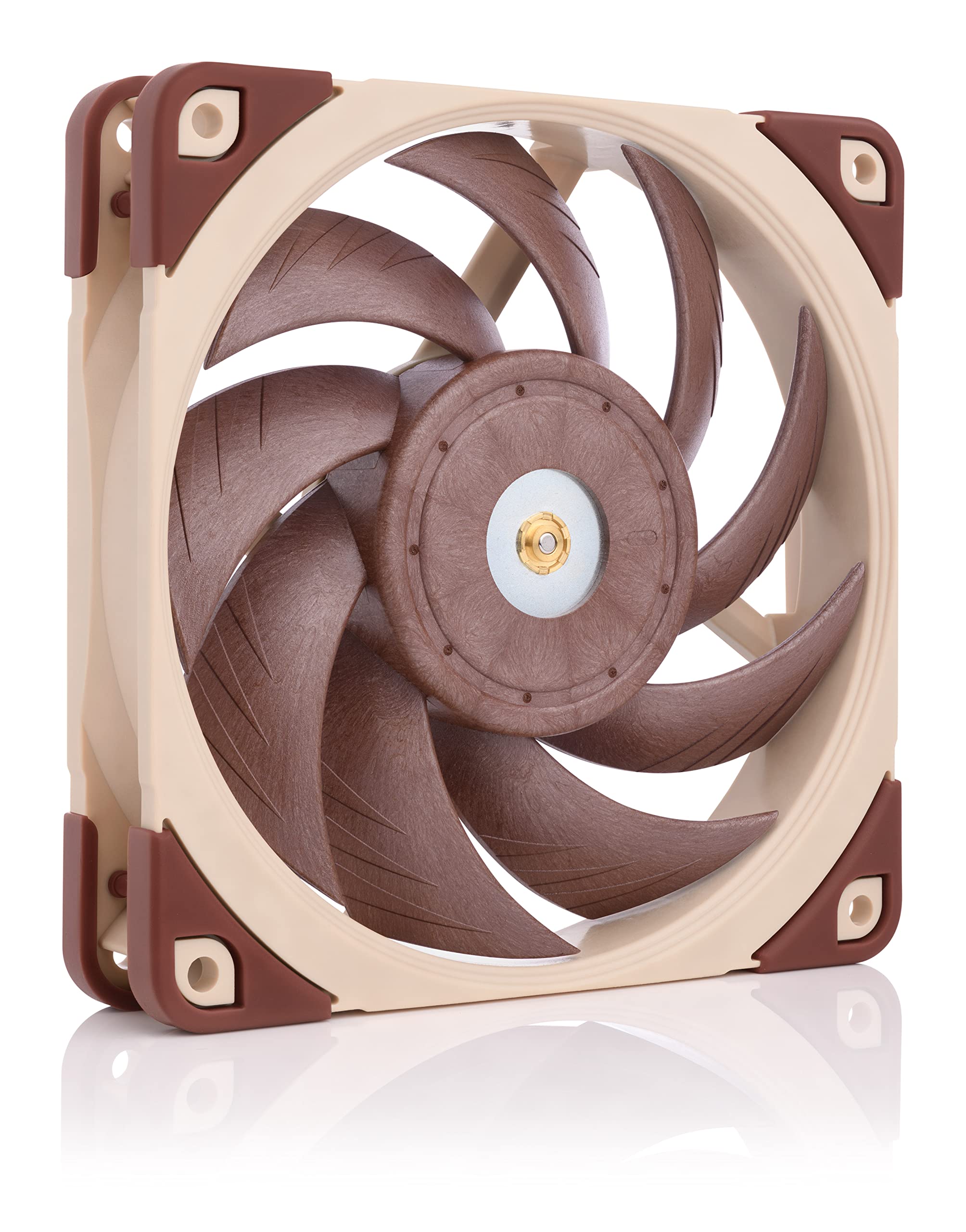
Noctua NF-P12 PWM 120mm Fan
The NF-P12 has been specifically developed for applications such as CPU coolers that demand superior pressure and airflow performance. Thanks to psychoacoustic optimizations like the Vortex-Control Notches the new SCD drive system and Noctuas premium-grade SSO-Bearing the NF-P12 achieves exceptional quietness and long-term stability.The pressure-optimized Nine Blade Design of the NF-P12 (P stands for pressure power and performance) has been specifically developed for high-impedance applications such as CPU coolers water-cooling radiators power supplies or cases with restrictive fan grills. It achieves outstanding static pressure and high airflow at very low noise levels. While most conventional 120mm rotors possess seven comparably narrow fan blades the NF-P12‘s Nine-Blade Design uses nine large closely spaced blades with a relatively low angle of attack in order to achieve maximum static pressure and high airflow. As a result the NF-P12 provides no less than 1.68 mm H²O at 1300 rpm which is something that other fans merely achieve at 1600 rpm or more. CPU coolers with tight fin-spacing. Water-cooling radiators with tight fin-spacing. Power supplies. Storage solutions. Cases with very restrictive fan grills and filters. All applications with significant obstruction to airflow.
The NF-P12 has been specifically developed for applications such as CPU coolers that demand superior pressure and airflow performance. Thanks to psychoacoustic optimizations like the Vortex-Control Notches the new SCD drive system and Noctuas premium-grade SSO-Bearing the NF-P12 achieves exceptional quietness and long-term stability.The pressure-optimized Nine Blade Design of the NF-P12 (P stands for pressure power and performance) has been specifically developed for high-impedance applications such as CPU coolers water-cooling radiators power supplies or cases with restrictive fan grills. It achieves outstanding static pressure and high airflow at very low noise levels. While most conventional 120mm rotors possess seven comparably narrow fan blades the NF-P12‘s Nine-Blade Design uses nine large closely spaced blades with a relatively low angle of attack in order to achieve maximum static pressure and high airflow. As a result the NF-P12 provides no less than 1.68 mm H²O at 1300 rpm which is something that other fans merely achieve at 1600 rpm or more. CPU coolers with tight fin-spacing. Water-cooling radiators with tight fin-spacing. Power supplies. Storage solutions. Cases with very restrictive fan grills and filters. All applications with significant obstruction to airflow.
The NF-P12 has been specifically developed for applications such as CPU coolers that demand superior pressure and airflow performance. Thanks to psychoacoustic optimizations like the Vortex-Control Notches the new SCD drive system and Noctuas premium-grade SSO-Bearing the NF-P12 achieves exceptional quietness and long-term stability.The pressure-optimized Nine Blade Design of the NF-P12 (P stands for pressure power and performance) has been specifically developed for high-impedance applications such as CPU coolers water-cooling radiators power supplies or cases with restrictive fan grills. It achieves outstanding static pressure and high airflow at very low noise levels. While most conventional 120mm rotors possess seven comparably narrow fan blades the NF-P12‘s Nine-Blade Design uses nine large closely spaced blades with a relatively low angle of attack in order to achieve maximum static pressure and high airflow. As a result the NF-P12 provides no less than 1.68 mm H²O at 1300 rpm which is something that other fans merely achieve at 1600 rpm or more. CPU coolers with tight fin-spacing. Water-cooling radiators with tight fin-spacing. Power supplies. Storage solutions. Cases with very restrictive fan grills and filters. All applications with significant obstruction to airflow.
The NF-P12 has been specifically developed for applications such as CPU coolers that demand superior pressure and airflow performance. Thanks to psychoacoustic optimizations like the Vortex-Control Notches the new SCD drive system and Noctuas premium-grade SSO-Bearing the NF-P12 achieves exceptional quietness and long-term stability.The pressure-optimized Nine Blade Design of the NF-P12 (P stands for pressure power and performance) has been specifically developed for high-impedance applications such as CPU coolers water-cooling radiators power supplies or cases with restrictive fan grills. It achieves outstanding static pressure and high airflow at very low noise levels. While most conventional 120mm rotors possess seven comparably narrow fan blades the NF-P12‘s Nine-Blade Design uses nine large closely spaced blades with a relatively low angle of attack in order to achieve maximum static pressure and high airflow. As a result the NF-P12 provides no less than 1.68 mm H²O at 1300 rpm which is something that other fans merely achieve at 1600 rpm or more. CPU coolers with tight fin-spacing. Water-cooling radiators with tight fin-spacing. Power supplies. Storage solutions. Cases with very restrictive fan grills and filters. All applications with significant obstruction to airflow.
in 3 offers
The lowest price for Noctua NF-P12 PWM 120mm Fan right now is $39.00 at Austin computers, compared across 3 retailers.
The all-time low was $13.00 on 8 Feb 2026 — today's price is 200% above the lowest ever. It has been notably cheaper before — worth setting a price alert.
Prices last updated 18 June 2026.

