Noctua NH-L9i Intel Low-Profile CPU Cooler
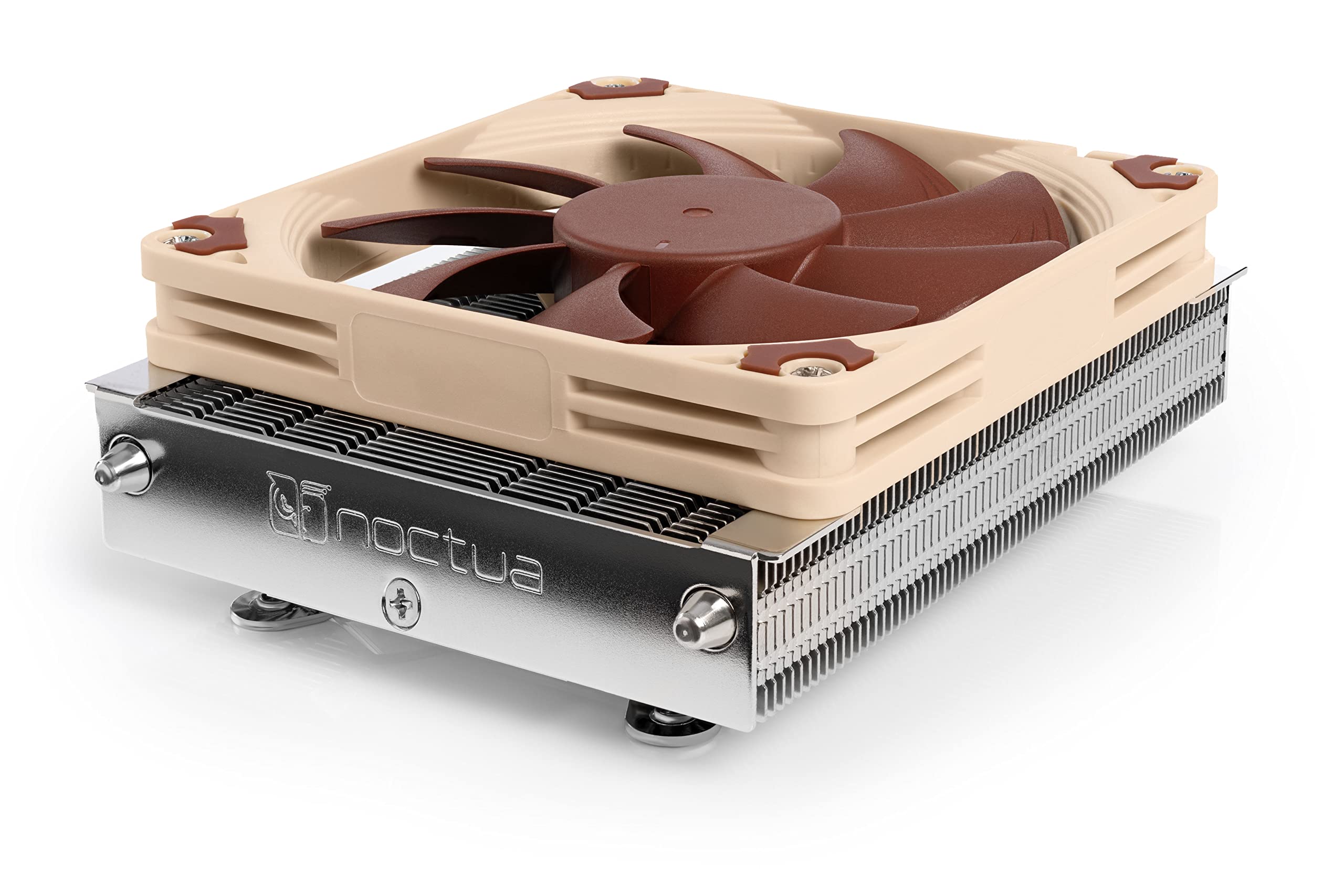
Noctua NH-L9i Low Profile Intel CPU CoolerThe NH-L9i is a premium quality quiet CPU cooler for Intel LGA115x based HTPCs and small form factor systems. At a super low profile of only 37mm, the NH-L9i is ideal for extremely slim cases and due to its 95×95mm footprint, it provides excellent compatibility with tall RAM modules and other components on mini ITX mainboards. The custom designed SecuFirm2 mounting system for LGA115x makes installation a childs play and thanks to the highly optimised NF-A9×14 premium fan that supports fully automatic speed control via PWM, the NH-L9i runs remarkably quiet. Topped off with Noctuas renowned NT-H1 thermal compound, the NH-L9i fuses everything users have come to expect from Noctuas larger coolers into a super compact package for slim HTPC systems.
Noctua NH-L9i Low Profile Intel CPU CoolerThe NH-L9i is a premium quality quiet CPU cooler for Intel LGA115x based HTPCs and small form factor systems. At a super low profile of only 37mm, the NH-L9i is ideal for extremely slim cases and due to its 95×95mm footprint, it provides excellent compatibility with tall RAM modules and other components on mini ITX mainboards. The custom designed SecuFirm2 mounting system for LGA115x makes installation a childs play and thanks to the highly optimised NF-A9×14 premium fan that supports fully automatic speed control via PWM, the NH-L9i runs remarkably quiet. Topped off with Noctuas renowned NT-H1 thermal compound, the NH-L9i fuses everything users have come to expect from Noctuas larger coolers into a super compact package for slim HTPC systems.
Noctua NH-L9i Low Profile Intel CPU CoolerThe NH-L9i is a premium quality quiet CPU cooler for Intel LGA115x based HTPCs and small form factor systems. At a super low profile of only 37mm, the NH-L9i is ideal for extremely slim cases and due to its 95×95mm footprint, it provides excellent compatibility with tall RAM modules and other components on mini ITX mainboards. The custom designed SecuFirm2 mounting system for LGA115x makes installation a childs play and thanks to the highly optimised NF-A9×14 premium fan that supports fully automatic speed control via PWM, the NH-L9i runs remarkably quiet. Topped off with Noctuas renowned NT-H1 thermal compound, the NH-L9i fuses everything users have come to expect from Noctuas larger coolers into a super compact package for slim HTPC systems.
Noctua NH-L9i Low Profile Intel CPU CoolerThe NH-L9i is a premium quality quiet CPU cooler for Intel LGA115x based HTPCs and small form factor systems. At a super low profile of only 37mm, the NH-L9i is ideal for extremely slim cases and due to its 95×95mm footprint, it provides excellent compatibility with tall RAM modules and other components on mini ITX mainboards. The custom designed SecuFirm2 mounting system for LGA115x makes installation a childs play and thanks to the highly optimised NF-A9×14 premium fan that supports fully automatic speed control via PWM, the NH-L9i runs remarkably quiet. Topped off with Noctuas renowned NT-H1 thermal compound, the NH-L9i fuses everything users have come to expect from Noctuas larger coolers into a super compact package for slim HTPC systems.
in 9 offers
The lowest price for Noctua NH-L9i Intel Low-Profile CPU Cooler right now is $77.00 at Newegg, compared across 9 retailers.
The all-time low was $35.00 on 6 June 2026 — today's price is 120% above the lowest ever. It has been notably cheaper before — worth setting a price alert.
Prices last updated 6 Sept 2026.
Last updated at 06/09/2026 16:57:57
Noctua NH-L9i, Premium Low-Profile CPU Cooler for Intel LGA1200 & LGA115x (Brown)
Noctua NH-L9i Low Profile Intel CPU Cooler
Free delivery between 9–16 Sept
Noctua Low Profile Intel CPU Cooler NH L9i - CPU Cooling
Delivery $13.95
Noctua Low Profile Intel CPU Cooler NH L9i - CPU Cooling
Delivery $13
Noctua NH-L9i Low Profile Intel CPU Cooler [PC]
Delivery between 8–14 Sept $12.70
Noctua NH-L9i Low Profile Intel CPU Cooler
Delivery $13
Noctua NH-L9i Low Profile Intel CPU Cooler
Delivery $13
Noctua Low Profile Intel CPU Cooler (NH-L9i)
Delivery $21
Noctua Low Profile Intel CPU Cooler (NH-L9i)
Delivery between 9–17 Sept $10
originally posted on cclonline.com
Not as quiet as it claims, but is pretty slim after all.Using it to cool an AMD Ryzen 5 3600 (the NH-L9i and NHL9a both require a kit to work with AM4 sockets, the AM4 model wasn't available when I bought this). Easy to fit with the kit and fits well. Note that it needs a back plate fitted, so if your case doesn't have a slot cut out you'll need access to the rear of the mainboard to fit it.Despite its quiet claims and rating being good enough for the chip, it is almost constantly audible. I work from home a lot and need a quiet PC for work. Even just with little more than the browser open I can constantly hear the fan running, and spinning up and down every couple of minutes. Before setting the profile to quiet in the BIOS it was even worse.It does a decent ... MoreNot as quiet as it claims, but is pretty slim after all.Using it to cool an AMD Ryzen 5 3600 (the NH-L9i and NHL9a both require a kit to work with AM4 sockets, the AM4 model wasn't available when I bought this). Easy to fit with the kit and fits well. Note that it needs a back plate fitted, so if your case doesn't have a slot cut out you'll need access to the rear of the mainboard to fit it.Despite its quiet claims and rating being good enough for the chip, it is almost constantly audible. I work from home a lot and need a quiet PC for work. Even just with little more than the browser open I can constantly hear the fan running, and spinning up and down every couple of minutes. Before setting the profile to quiet in the BIOS it was even worse.It does a decent job of keeping the CPU cool-ish though, so if you have a slim case and don't need it completely silent then this cooler is OK. But, if you need silence and you have the space in your case, get something bigger and quieter for the same price.
originally posted on scan.co.uk
I got this for my silverstone sg13 and works flawlesly, as long as you understand its limitations. It is not a fan for CPU that run hot, but it will work perfectly as long as you first dont overclock and/or second you dont exceed 95 W TDP.Build quality is excellent, when you open it feels premium, installation is as easy as it gets, and looks great, fits perfectly most if not all (ITX). Runs silent as well.So as long as you use a processor that doesnt run hot you will be fine, otherwise you might need to underclock.Remember to install the fins parallel to the RAM.While I got this to run on my 9700k stock temperatures would be on the high 40s when idle and over 85 degrees during CPU-Z stress tests. I did not run prime 95 on this fan since temperatures would ... MoreI got this for my silverstone sg13 and works flawlesly, as long as you understand its limitations. It is not a fan for CPU that run hot, but it will work perfectly as long as you first dont overclock and/or second you dont exceed 95 W TDP.Build quality is excellent, when you open it feels premium, installation is as easy as it gets, and looks great, fits perfectly most if not all (ITX). Runs silent as well.So as long as you use a processor that doesnt run hot you will be fine, otherwise you might need to underclock.Remember to install the fins parallel to the RAM.While I got this to run on my 9700k stock temperatures would be on the high 40s when idle and over 85 degrees during CPU-Z stress tests. I did not run prime 95 on this fan since temperatures would have likely reach 100C.
originally posted on neweggbusiness.com
Noctua NH-L9i (or L9a for AMD) is about as small as it can get before exotic engineering of proprietary and custom packaged laptop cooling. It has laptop attributes though: copper base, aluminum fins, and heat pipes to make outer fins effective. It gets the job done for light systems. It may not be effective if you try to cool an I7 on ITX based gaming rig. You need a bigger case and a bigger cooler to handle the heat. It keeps the CPU cool, the fan can often slow down to idle, and its quiet even at medium speeds anyway. Compare to stock. With an I3 or I5 based HTPC, the stock cooler will usually fit. However stock struggles to cool in such a tight package, stock is a lump of aluminum, and stock has no heat pipes to enhance the benefit of the outer fins. Stock fan ... MoreNoctua NH-L9i (or L9a for AMD) is about as small as it can get before exotic engineering of proprietary and custom packaged laptop cooling. It has laptop attributes though: copper base, aluminum fins, and heat pipes to make outer fins effective. It gets the job done for light systems. It may not be effective if you try to cool an I7 on ITX based gaming rig. You need a bigger case and a bigger cooler to handle the heat. It keeps the CPU cool, the fan can often slow down to idle, and its quiet even at medium speeds anyway. Compare to stock. With an I3 or I5 based HTPC, the stock cooler will usually fit. However stock struggles to cool in such a tight package, stock is a lump of aluminum, and stock has no heat pipes to enhance the benefit of the outer fins. Stock fan is loud in dB but also has poor frequency tuning to further amplify the annoyance experience. So stock gets hotter, the fan needs to move faster, and it is noisier at all speeds.
| General | |
| Product Type | Processor cooler |
| Package Content | Thermal paste, screws, Low-Noise Adaptor (L.N.A.), metal case-badge |
| Width | 9.5 cm |
| Depth | 9.5 cm |
Noctua NH-L9i, Premium Low-Profile CPU Cooler for Intel LGA1200 & LGA115x (Brown)
Noctua NH-L9i Low Profile Intel CPU Cooler
Free delivery between 9–16 Sept
Noctua Low Profile Intel CPU Cooler NH L9i - CPU Cooling
Delivery $13.95
Noctua Low Profile Intel CPU Cooler NH L9i - CPU Cooling
Delivery $13
Noctua NH-L9i Low Profile Intel CPU Cooler [PC]
Delivery between 8–14 Sept $12.70
Not as quiet as it claims, but is pretty slim after all.Using it to cool an AMD Ryzen 5 3600 (the NH-L9i and NHL9a both require a kit to work with AM4 sockets, the AM4 model wasn't available when I bought this). Easy to fit with the kit and fits well. Note that it needs a back plate fitted, so if your case doesn't have a slot cut out you'll need access to the rear of the mainboard to fit it.Despite its quiet claims and rating being good enough for the chip, it is almost constantly audible. I work from home a lot and need a quiet PC for work. Even just with little more than the browser open I can constantly hear the fan running, and spinning up and down every couple of minutes. Before setting the profile to quiet in the BIOS it was even worse.It does a decent ... MoreNot as quiet as it claims, but is pretty slim after all.Using it to cool an AMD Ryzen 5 3600 (the NH-L9i and NHL9a both require a kit to work with AM4 sockets, the AM4 model wasn't available when I bought this). Easy to fit with the kit and fits well. Note that it needs a back plate fitted, so if your case doesn't have a slot cut out you'll need access to the rear of the mainboard to fit it.Despite its quiet claims and rating being good enough for the chip, it is almost constantly audible. I work from home a lot and need a quiet PC for work. Even just with little more than the browser open I can constantly hear the fan running, and spinning up and down every couple of minutes. Before setting the profile to quiet in the BIOS it was even worse.It does a decent job of keeping the CPU cool-ish though, so if you have a slim case and don't need it completely silent then this cooler is OK. But, if you need silence and you have the space in your case, get something bigger and quieter for the same price.
I got this for my silverstone sg13 and works flawlesly, as long as you understand its limitations. It is not a fan for CPU that run hot, but it will work perfectly as long as you first dont overclock and/or second you dont exceed 95 W TDP.Build quality is excellent, when you open it feels premium, installation is as easy as it gets, and looks great, fits perfectly most if not all (ITX). Runs silent as well.So as long as you use a processor that doesnt run hot you will be fine, otherwise you might need to underclock.Remember to install the fins parallel to the RAM.While I got this to run on my 9700k stock temperatures would be on the high 40s when idle and over 85 degrees during CPU-Z stress tests. I did not run prime 95 on this fan since temperatures would ... MoreI got this for my silverstone sg13 and works flawlesly, as long as you understand its limitations. It is not a fan for CPU that run hot, but it will work perfectly as long as you first dont overclock and/or second you dont exceed 95 W TDP.Build quality is excellent, when you open it feels premium, installation is as easy as it gets, and looks great, fits perfectly most if not all (ITX). Runs silent as well.So as long as you use a processor that doesnt run hot you will be fine, otherwise you might need to underclock.Remember to install the fins parallel to the RAM.While I got this to run on my 9700k stock temperatures would be on the high 40s when idle and over 85 degrees during CPU-Z stress tests. I did not run prime 95 on this fan since temperatures would have likely reach 100C.
Noctua NH-L9i (or L9a for AMD) is about as small as it can get before exotic engineering of proprietary and custom packaged laptop cooling. It has laptop attributes though: copper base, aluminum fins, and heat pipes to make outer fins effective. It gets the job done for light systems. It may not be effective if you try to cool an I7 on ITX based gaming rig. You need a bigger case and a bigger cooler to handle the heat. It keeps the CPU cool, the fan can often slow down to idle, and its quiet even at medium speeds anyway. Compare to stock. With an I3 or I5 based HTPC, the stock cooler will usually fit. However stock struggles to cool in such a tight package, stock is a lump of aluminum, and stock has no heat pipes to enhance the benefit of the outer fins. Stock fan ... MoreNoctua NH-L9i (or L9a for AMD) is about as small as it can get before exotic engineering of proprietary and custom packaged laptop cooling. It has laptop attributes though: copper base, aluminum fins, and heat pipes to make outer fins effective. It gets the job done for light systems. It may not be effective if you try to cool an I7 on ITX based gaming rig. You need a bigger case and a bigger cooler to handle the heat. It keeps the CPU cool, the fan can often slow down to idle, and its quiet even at medium speeds anyway. Compare to stock. With an I3 or I5 based HTPC, the stock cooler will usually fit. However stock struggles to cool in such a tight package, stock is a lump of aluminum, and stock has no heat pipes to enhance the benefit of the outer fins. Stock fan is loud in dB but also has poor frequency tuning to further amplify the annoyance experience. So stock gets hotter, the fan needs to move faster, and it is noisier at all speeds.
Bought this for a customers PC upgrade and he couldn't be happier. He has a small case so I went for a mATX motherboard and the Noctua NH-L9i. This is perfect for small form factor builds as it is very small. Really small. Small doesn't mean inneffective though as this thing kept his CPU in the low 20's idle, His intention is to use the PC for music production so it was important that the cooler was quiet. This thing isn't just quiet, it is silent. If you have a larger build you'll probably want a larger cooler, if only for aesthetics. You won't go wrong in choosing Noctua products though. I've built many PC's and they are generally my choice of air cooler. This is very easy to fit, just pop the backplate on the reverse of your MoBo and screw the cooler into place. ... MoreBought this for a customers PC upgrade and he couldn't be happier. He has a small case so I went for a mATX motherboard and the Noctua NH-L9i. This is perfect for small form factor builds as it is very small. Really small. Small doesn't mean inneffective though as this thing kept his CPU in the low 20's idle, His intention is to use the PC for music production so it was important that the cooler was quiet. This thing isn't just quiet, it is silent. If you have a larger build you'll probably want a larger cooler, if only for aesthetics. You won't go wrong in choosing Noctua products though. I've built many PC's and they are generally my choice of air cooler. This is very easy to fit, just pop the backplate on the reverse of your MoBo and screw the cooler into place. Good length on the cable so you can arrange the position to your liking and for cable management. Overall, a superb air cooler for any build, but small form factor ones in particular.
I bought this cooler to replace the H100i in my Corsair Air 240. The H100i was great, but the Corsair link software was nothing but headaches. I wanted to go back to the simplicity of air cooling, but there were only a couple of air coolers that would fit my motherboard and case. I chose this one because it is the best one available that also fit in my rig. I have this cooler installed over an i5 4670k on an MSI Z87i Gaming AC mITX motherboard. The CPU is running at 4000MHz on 1.240 Vcore. I got a bad chip that takes a lot of voltage to OC, and this cooler does a surprisingly good job at keeping the temps in check. At 24C ambient, the core temps never go over 88C in Prime95 stress testing. It seems a bit hot, but in everyday use, the cores stay under 65C during ... MoreI bought this cooler to replace the H100i in my Corsair Air 240. The H100i was great, but the Corsair link software was nothing but headaches. I wanted to go back to the simplicity of air cooling, but there were only a couple of air coolers that would fit my motherboard and case. I chose this one because it is the best one available that also fit in my rig. I have this cooler installed over an i5 4670k on an MSI Z87i Gaming AC mITX motherboard. The CPU is running at 4000MHz on 1.240 Vcore. I got a bad chip that takes a lot of voltage to OC, and this cooler does a surprisingly good job at keeping the temps in check. At 24C ambient, the core temps never go over 88C in Prime95 stress testing. It seems a bit hot, but in everyday use, the cores stay under 65C during intensive gaming and video editing. There are 2 key things to remember with this cooler. #1 is to make sure the cooler is arranged so that the hot air coming out of the heat sink is not being directed at your RAM. The RAM modules can impede air flow over the heat sink if they are blocking the fin gaps. #2 is to make sure you have a lot of air flowing through you case. This is a downdraft cooler, so it is already at a natural disadvantage. You don't want to stifle the poor little guy with inadequate case air flow. In short, the NH-L9 coolers are surprisingly good for their ultra low profile. Interestingly, the metal case badge that comes with the L9 is exactly the same size as the Corsair badge on the front of the Air 240. I took the Corsair badge out and replaced it with the metal Noctua one. It looks like a factory part!
A Really nice product.A very nifty little cooler. Neat, compact, quiet, and perfect for SFF ITX cpu cooling. Really easy to install. I have mine installed in a CM Elite 120 Advanced case which has the PSU mounted above the Mobo and very limited space for coolers. Many Low profile coolers have difficulty fitting in the 60 mm head room space in this case, but this fits with ease and room to spare for unrestricted airflow.I have mine cooling my i5 3570k OC'd @ 4.2Ghz which runs happily at 60-61 degrees. I have had it up to 4.7 Ghz but it was getting a bit noisy and too hot for extended gaming use.OC service was their usual high standard.
I bought this Noctua NH-L9i CPU cooler awhile ago. It was on a HTPC that quit working. In the process of moving the Noctua cooler to its new home, I lost one of the screws for the back of the board that holds the cooler in place. What to do? I emailed Noctua Customer support to see if I could buy a screw. With a little bit of information from me they sent me a replacement at no charge. Unfortunately, the wrong size was shipped. Mistakes happen. Now remember this is coming from Austria. What to do? After all they already mailed out one package. I was thinking, It wasn't their fault the screw was lost. They could say I didn't send the right information or some such and just write me off. Well I emailed them back. I informed them that somehow the wrong screw was ... MoreI bought this Noctua NH-L9i CPU cooler awhile ago. It was on a HTPC that quit working. In the process of moving the Noctua cooler to its new home, I lost one of the screws for the back of the board that holds the cooler in place. What to do? I emailed Noctua Customer support to see if I could buy a screw. With a little bit of information from me they sent me a replacement at no charge. Unfortunately, the wrong size was shipped. Mistakes happen. Now remember this is coming from Austria. What to do? After all they already mailed out one package. I was thinking, It wasn't their fault the screw was lost. They could say I didn't send the right information or some such and just write me off. Well I emailed them back. I informed them that somehow the wrong screw was mistakenly shipped. I sent a picture of the wrong screw and the correct screw side by side. Customer Support quickly responded with an apology. They immediately sent out a package of the correct screws. They did this all without charge to me even after I offered to pay. I don't believe there are many companies that would have done that, at least in my experience. I recently built a portable desktop computer in a Lian Li case. The case comes without fans. I bet you can guess what fans I purchased for it.
Having bought a new CPU and board, I thought I'd treat myself to something better than the stock plastic 'push-pin' mount cooler.The L9i is supplied with a low noise adapter, tube of NT-H1 thermal paste and a Noctua branded case badge. Obviously, these additional items and the insane 'presentation pack' retail packaging all add to the price of what is essentially a fan screwed to a heat sink.However, as would be expected from Noctua, this is a very well engineered product that exudes quality, with the overall build and finish being excellent. The 92mm low profile fan is virtually inaudible even at high speeds.The mounting bracket is attached to the heat sink, no backplate required, just four bolts from the rear of the motherboard.Despite it being only 95mm ... MoreHaving bought a new CPU and board, I thought I'd treat myself to something better than the stock plastic 'push-pin' mount cooler.The L9i is supplied with a low noise adapter, tube of NT-H1 thermal paste and a Noctua branded case badge. Obviously, these additional items and the insane 'presentation pack' retail packaging all add to the price of what is essentially a fan screwed to a heat sink.However, as would be expected from Noctua, this is a very well engineered product that exudes quality, with the overall build and finish being excellent. The 92mm low profile fan is virtually inaudible even at high speeds.The mounting bracket is attached to the heat sink, no backplate required, just four bolts from the rear of the motherboard.Despite it being only 95mm square, it only just about clears the VRM heat sink on my Asus Z97-K board. It's actually quite easy to jam the L9i against the VRM and not make full contact with the CPU.It does fit and operation is totally fine, but definitely requires some extra care when fitting, if you have a similar board to mine.Pros: Built to last, compact, quiet, sturdy mounting arrangement.Cons: Price, wasteful packaging, unnecessary included extras.
Bought two of these today from Overclockers. Went and collected direct from their premises, extremely helpful staff member behind the counter. Easy to fit as the cases are HAF912 so have the hole to allow access to rear of motherboard. Cannot believe how quiet the PC now is. Running the two PC's together, you can hear how loud the old Intel stock fan really is. Checking on temperatures, it has lowered the mobo temp. by 1 degree. But the cpu and gpu run anywhere from 4-5 degree's cooler at idle. Also the fan runs 300 rpm slower. I have not fitted the low noise adaptor as it does not need it. Would recommend this cooler to anyone.
The build quality is top notch which makes it worth the price as installation is simple - Keeping my i3 below 60 degrees at load and 34 degrees idle despite being a tiny case with restricted airflow. Most importantly for an HTPC in the lounge it really is completely silent! At 500-1200 rpm it remains inaudible. Never had to go above this during use yet when testing it was still "quiet" even at full tilt.The included generous tube of thermal paste, Y splitter, low noise adaptor, screws and rubber mounts are all a nice touch making it much better value than "just a cooler".Amazing for only 37mm tall! Nothing else compares at this size.
| General | |
| Product Type | Processor cooler |
| Package Content | Thermal paste, screws, Low-Noise Adaptor (L.N.A.), metal case-badge |
| Width | 9.5 cm |
| Depth | 9.5 cm |