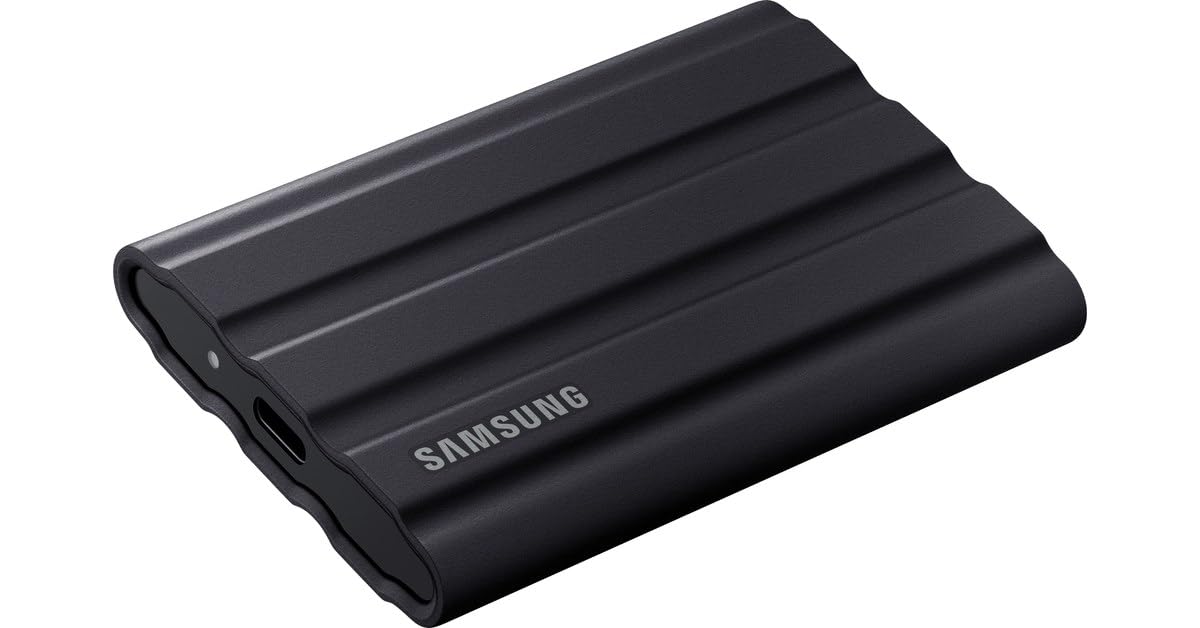
Samsung 1TB T7 Touch Portable SSD (Black)
Whether you’re carrying games, movies or sensitive work files, the Samsung Portable SSD T7 Touch 1TB gives you speed and security in a palm-sized package. Experience the next level of external storage. Sequential reads up to 1500Mbps Sequential write up to 1000Mbps Shock-resistance Password protection Multi-device compatibility Transfer in a flash You can transfer massive files within seconds with the incredible speed of USB 3.2 Gen2 on the T7 Touch. The embedded PCIe NVMe technology facilitates sequential read/write speeds of up to 1,050/1,000MB/s respectively. Durable and safe design SSD stands for Solid State Drive, which means it’s built with no moving parts. A sturdy metal body encases the immobile hardware, keeping your data intact from falls of up to 2 metres. Secure with a touch Keep your private files secure without sacrificing convenience. The built-in security options on the T7 Touch utilise the AES 256-bit encryption and gives you the option of unlocking with a touch of your finger or with a password. Enlightening motion LED The T7 Touch features an illuminated LED square to keep you informed of what your SSD is doing at a glance. Sleek and compact style Pocket-sized and slim, the lightweight body comes standard on the T7 Touch. Roughly the size of a credit card and weighing less, the solid aluminium unibody construction can fit comfortably in the palm of your hand.
Whether you’re carrying games, movies or sensitive work files, the Samsung Portable SSD T7 Touch 1TB gives you speed and security in a palm-sized package. Experience the next level of external storage. Sequential reads up to 1500Mbps Sequential write up to 1000Mbps Shock-resistance Password protection Multi-device compatibility Transfer in a flash You can transfer massive files within seconds with the incredible speed of USB 3.2 Gen2 on the T7 Touch. The embedded PCIe NVMe technology facilitates sequential read/write speeds of up to 1,050/1,000MB/s respectively. Durable and safe design SSD stands for Solid State Drive, which means it’s built with no moving parts. A sturdy metal body encases the immobile hardware, keeping your data intact from falls of up to 2 metres. Secure with a touch Keep your private files secure without sacrificing convenience. The built-in security options on the T7 Touch utilise the AES 256-bit encryption and gives you the option of unlocking with a touch of your finger or with a password. Enlightening motion LED The T7 Touch features an illuminated LED square to keep you informed of what your SSD is doing at a glance. Sleek and compact style Pocket-sized and slim, the lightweight body comes standard on the T7 Touch. Roughly the size of a credit card and weighing less, the solid aluminium unibody construction can fit comfortably in the palm of your hand.
Whether you’re carrying games, movies or sensitive work files, the Samsung Portable SSD T7 Touch 1TB gives you speed and security in a palm-sized package. Experience the next level of external storage. Sequential reads up to 1500Mbps Sequential write up to 1000Mbps Shock-resistance Password protection Multi-device compatibility Transfer in a flash You can transfer massive files within seconds with the incredible speed of USB 3.2 Gen2 on the T7 Touch. The embedded PCIe NVMe technology facilitates sequential read/write speeds of up to 1,050/1,000MB/s respectively. Durable and safe design SSD stands for Solid State Drive, which means it’s built with no moving parts. A sturdy metal body encases the immobile hardware, keeping your data intact from falls of up to 2 metres. Secure with a touch Keep your private files secure without sacrificing convenience. The built-in security options on the T7 Touch utilise the AES 256-bit encryption and gives you the option of unlocking with a touch of your finger or with a password. Enlightening motion LED The T7 Touch features an illuminated LED square to keep you informed of what your SSD is doing at a glance. Sleek and compact style Pocket-sized and slim, the lightweight body comes standard on the T7 Touch. Roughly the size of a credit card and weighing less, the solid aluminium unibody construction can fit comfortably in the palm of your hand.
Whether you’re carrying games, movies or sensitive work files, the Samsung Portable SSD T7 Touch 1TB gives you speed and security in a palm-sized package. Experience the next level of external storage. Sequential reads up to 1500Mbps Sequential write up to 1000Mbps Shock-resistance Password protection Multi-device compatibility Transfer in a flash You can transfer massive files within seconds with the incredible speed of USB 3.2 Gen2 on the T7 Touch. The embedded PCIe NVMe technology facilitates sequential read/write speeds of up to 1,050/1,000MB/s respectively. Durable and safe design SSD stands for Solid State Drive, which means it’s built with no moving parts. A sturdy metal body encases the immobile hardware, keeping your data intact from falls of up to 2 metres. Secure with a touch Keep your private files secure without sacrificing convenience. The built-in security options on the T7 Touch utilise the AES 256-bit encryption and gives you the option of unlocking with a touch of your finger or with a password. Enlightening motion LED The T7 Touch features an illuminated LED square to keep you informed of what your SSD is doing at a glance. Sleek and compact style Pocket-sized and slim, the lightweight body comes standard on the T7 Touch. Roughly the size of a credit card and weighing less, the solid aluminium unibody construction can fit comfortably in the palm of your hand.
in 7 offers
The lowest price for Samsung 1TB T7 Touch Portable SSD (Black) right now is $159.00 at www.i-tech.com.au, compared across 7 retailers.
The all-time low was $119.00 on 30 May 2023 — today's price is 34% above the lowest ever. It has been notably cheaper before — worth setting a price alert.
Prices last updated 30 Aug 2026.
Last updated at 30/08/2026 15:40:20
Samsung 1TB T7 Touch USB 3.2 Portable SSD Black MU-PC1T0K/WW, Fingerprint and Password Security
Save $10 for orders over $500
Samsung T7 Touch Portable Hard Drive SSD 1TB - Black
Free delivery between Wed – Sat
Samsung 1TB T7 Touch USB 3.2 Portable SSD - Black
Samsung 1TB T7 Touch USB 3.2 Portable SSD - Black
30-day returns
Samsung 1TB T7 Touch USB 3.2 Portable SSD - Black
30-day returns
Samsung T7 Touch 1TB USB 3.2 Portable SSD - Black
Free delivery
Samsung T7 Touch Portable SSD - 1 TB - USB 3.2 Gen.2 External SSD Metallic Black (MU-PC1T0K/WW)
Delivery between 4–8 Sept $35.88
originally posted on thegoodguys.com.au
Have been using the touch for about 7 weeks now on an almost daily basis.The number 1 thing I like about this SSD is its size and weight. I invested in it to carry with me on a several months trip. So far, it has worked really well attached to my laptop except for one hitch that occurred early in its use - I will come to this later. It is fast (though thats a relatively term) but I havent really compared it to other SSDs to determine if it is better or worse - honestly, if we're measuring in seconds, its irrelevant. The files I transfer are raw image files off my camera's SD card and each is approximately 25Mb. The number of images varies from day to day (probably up to a max of 200 per day). It never takes me more than a few mins to transfer all the files from the ... MoreHave been using the touch for about 7 weeks now on an almost daily basis.The number 1 thing I like about this SSD is its size and weight. I invested in it to carry with me on a several months trip. So far, it has worked really well attached to my laptop except for one hitch that occurred early in its use - I will come to this later. It is fast (though thats a relatively term) but I havent really compared it to other SSDs to determine if it is better or worse - honestly, if we're measuring in seconds, its irrelevant. The files I transfer are raw image files off my camera's SD card and each is approximately 25Mb. The number of images varies from day to day (probably up to a max of 200 per day). It never takes me more than a few mins to transfer all the files from the SD card (vai my laptop) to the SSD. Accessing the files to edit is also fast (no wait time using Adobe Lightroom), though I think accessing files that are on my laptop hard drive is slightly faster.I purchased this drive as a special buy on TGG. The touch version was cheaper than the non-touch version being sold by other retailers. So it was a bargain. Setting up the fingerprint security was easy same as youd do on a smartphone. Unfortunately, this is where things didnt go to plan. There was going to be nothing worth securing on the drive so I really didn't need to set up the fingerprint security feature, but it was available, so I did. After setting up, I started using the drive while still at home and all worked fine but within the first few days of storing my image after aI started traveling (so about 3 weeks later), the drive stopped recognising my fingerprint. I had only used the print from one finger in the setup, so I didnt have the option of using the prints from a different finger to unlock the drive. Scoured the internet for a solution but nothing worked. It was a panic situation as the final suggested solution was to wipe the drive and start again. Nope - refused to do that. I don't remember what I eventually did but I did finally "break in". After this little scare, I decided there and then that it was too much of a risk to continue using the touch facility. It was really just an additional step in accessing my files that wasnt really needed. I dont care what anyone (like Samsung) might say to me to explain why this might have happened (be it user or software error), but I would never use the feature again - not worth any "trauma" that may eventuate. Since I purchased it for less than the non-touch version, I didnt feel it was a loss in terms of cost.Other than that, I do really like it for its almost weightlessness and ease of fitting in with all my luggage.
originally posted on samsung.com
First of all, the only instructions in the box are how to plug it into your phone or computer which it just shows a picture of it being plugged in by USB. There are no use directions or instructions at all.Secondly it has not been working as advertised, or at all I should say.Tried on multiple Samsung phones, Z-fold 4, Z-flip, Galaxy 20... This is a Samsung drive, that does not work on Samsungs? But... how the...All I got was a message things at the drive had been disconnected and I needed to restart my phone. I thought maybe The drive needed to be charged before I realized it's powered by the phone when it's plugged in.I installed the app for Samsung SSD and also the Samsung portable SSD app 1.0.At first I was able to open up the storage path that showed ... MoreFirst of all, the only instructions in the box are how to plug it into your phone or computer which it just shows a picture of it being plugged in by USB. There are no use directions or instructions at all.Secondly it has not been working as advertised, or at all I should say.Tried on multiple Samsung phones, Z-fold 4, Z-flip, Galaxy 20... This is a Samsung drive, that does not work on Samsungs? But... how the...All I got was a message things at the drive had been disconnected and I needed to restart my phone. I thought maybe The drive needed to be charged before I realized it's powered by the phone when it's plugged in.I installed the app for Samsung SSD and also the Samsung portable SSD app 1.0.At first I was able to open up the storage path that showed the available file folders. But after I closed and reopened the application, all I was able to do was change the name of the drive. I chose not to use security because I had seen some reviews warning about the problems with fingerprint and password recognition.The app is completely useless. It will only allow me to change the name or enable security. I don't see any ability to view file folders or storage at all.After reading countless reviews I've found some that say it doesn't work with a z-fold 4, or the Mac m1, or a lot of Android devices, which leaves me to wonder what the hell it does work with.Extremely pathetic and disappointing for Samsung. First of all it's entirely unfriendly for the user. I suppose it's supposed to be intuitive, but it's as intuitive as a rock. It does nothing.I'm scratching my head because I just keep feeling like there must be something else, it simply does.... nothing.I've tried restarting the phones, I've tried both of the applications, I've tried without the applications, I've tried on different devices. There doesn't seem to be a way for this to properly work at all.This attempt to be more like Apple, which honestly if I wanted I would buy a freaking apple, is entirely infuriating.Include instructions, included user interface, don't require an app, or make an app that works. Seems like a really easy thing to create a hard drive... We've had them for a while now... And yet Samsung, which has been my preference for years, has fallen flat on their faces on this ridiculously endeavor.I'm not going to screw around, I see so many reviews in the frustration of futility dealing with Samsung's customer service.I don't have any idea how this could have possibly received such a high rating.Shame on you Samsung. Go back to doing what made you Samsung, instead of Riding on apples wake.
originally posted on scan.co.uk
The T7 Touch is fast and reasonable value for money.In normal operation, it's almost as fast as the internal SSD in my laptop. It's used as a directly attached storage drive so I can keep certain high volume data off my laptop. When I initially copied the data, the drive became really hot but doesn't seem to have suffered any ill effects. This is a known characteristic of these drives when moving large volumes.When I installed it at first, the cable wasn't as securely attached as I'd thought. I had to really make sure it was fully inserted into the sockets at both ends to avoid disconnections if I moved the disk or laptop around.I elected to use the password security feature, but having lived with it for a few weeks, I'm not convinced it's worth it, for me ... MoreThe T7 Touch is fast and reasonable value for money.In normal operation, it's almost as fast as the internal SSD in my laptop. It's used as a directly attached storage drive so I can keep certain high volume data off my laptop. When I initially copied the data, the drive became really hot but doesn't seem to have suffered any ill effects. This is a known characteristic of these drives when moving large volumes.When I installed it at first, the cable wasn't as securely attached as I'd thought. I had to really make sure it was fully inserted into the sockets at both ends to avoid disconnections if I moved the disk or laptop around.I elected to use the password security feature, but having lived with it for a few weeks, I'm not convinced it's worth it, for me anyway. The data isn't particularly sensitive and I have to re-enter the password via free but extra app every time the laptop enters sleep mode or is shut down.
| General | |
| Device Type | Solid state drive - external (portable) |
| Capacity | 1 TB |
| Hardware Encryption | Yes |
| Encryption Algorithm | 256-bit AES |
Samsung 1TB T7 Touch USB 3.2 Portable SSD Black MU-PC1T0K/WW, Fingerprint and Password Security
Save $10 for orders over $500
Samsung T7 Touch Portable Hard Drive SSD 1TB - Black
Free delivery between Wed – Sat
Samsung 1TB T7 Touch USB 3.2 Portable SSD - Black
Samsung 1TB T7 Touch USB 3.2 Portable SSD - Black
30-day returns
Samsung 1TB T7 Touch USB 3.2 Portable SSD - Black
30-day returns
Have been using the touch for about 7 weeks now on an almost daily basis.The number 1 thing I like about this SSD is its size and weight. I invested in it to carry with me on a several months trip. So far, it has worked really well attached to my laptop except for one hitch that occurred early in its use - I will come to this later. It is fast (though thats a relatively term) but I havent really compared it to other SSDs to determine if it is better or worse - honestly, if we're measuring in seconds, its irrelevant. The files I transfer are raw image files off my camera's SD card and each is approximately 25Mb. The number of images varies from day to day (probably up to a max of 200 per day). It never takes me more than a few mins to transfer all the files from the ... MoreHave been using the touch for about 7 weeks now on an almost daily basis.The number 1 thing I like about this SSD is its size and weight. I invested in it to carry with me on a several months trip. So far, it has worked really well attached to my laptop except for one hitch that occurred early in its use - I will come to this later. It is fast (though thats a relatively term) but I havent really compared it to other SSDs to determine if it is better or worse - honestly, if we're measuring in seconds, its irrelevant. The files I transfer are raw image files off my camera's SD card and each is approximately 25Mb. The number of images varies from day to day (probably up to a max of 200 per day). It never takes me more than a few mins to transfer all the files from the SD card (vai my laptop) to the SSD. Accessing the files to edit is also fast (no wait time using Adobe Lightroom), though I think accessing files that are on my laptop hard drive is slightly faster.I purchased this drive as a special buy on TGG. The touch version was cheaper than the non-touch version being sold by other retailers. So it was a bargain. Setting up the fingerprint security was easy same as youd do on a smartphone. Unfortunately, this is where things didnt go to plan. There was going to be nothing worth securing on the drive so I really didn't need to set up the fingerprint security feature, but it was available, so I did. After setting up, I started using the drive while still at home and all worked fine but within the first few days of storing my image after aI started traveling (so about 3 weeks later), the drive stopped recognising my fingerprint. I had only used the print from one finger in the setup, so I didnt have the option of using the prints from a different finger to unlock the drive. Scoured the internet for a solution but nothing worked. It was a panic situation as the final suggested solution was to wipe the drive and start again. Nope - refused to do that. I don't remember what I eventually did but I did finally "break in". After this little scare, I decided there and then that it was too much of a risk to continue using the touch facility. It was really just an additional step in accessing my files that wasnt really needed. I dont care what anyone (like Samsung) might say to me to explain why this might have happened (be it user or software error), but I would never use the feature again - not worth any "trauma" that may eventuate. Since I purchased it for less than the non-touch version, I didnt feel it was a loss in terms of cost.Other than that, I do really like it for its almost weightlessness and ease of fitting in with all my luggage.
First of all, the only instructions in the box are how to plug it into your phone or computer which it just shows a picture of it being plugged in by USB. There are no use directions or instructions at all.Secondly it has not been working as advertised, or at all I should say.Tried on multiple Samsung phones, Z-fold 4, Z-flip, Galaxy 20... This is a Samsung drive, that does not work on Samsungs? But... how the...All I got was a message things at the drive had been disconnected and I needed to restart my phone. I thought maybe The drive needed to be charged before I realized it's powered by the phone when it's plugged in.I installed the app for Samsung SSD and also the Samsung portable SSD app 1.0.At first I was able to open up the storage path that showed ... MoreFirst of all, the only instructions in the box are how to plug it into your phone or computer which it just shows a picture of it being plugged in by USB. There are no use directions or instructions at all.Secondly it has not been working as advertised, or at all I should say.Tried on multiple Samsung phones, Z-fold 4, Z-flip, Galaxy 20... This is a Samsung drive, that does not work on Samsungs? But... how the...All I got was a message things at the drive had been disconnected and I needed to restart my phone. I thought maybe The drive needed to be charged before I realized it's powered by the phone when it's plugged in.I installed the app for Samsung SSD and also the Samsung portable SSD app 1.0.At first I was able to open up the storage path that showed the available file folders. But after I closed and reopened the application, all I was able to do was change the name of the drive. I chose not to use security because I had seen some reviews warning about the problems with fingerprint and password recognition.The app is completely useless. It will only allow me to change the name or enable security. I don't see any ability to view file folders or storage at all.After reading countless reviews I've found some that say it doesn't work with a z-fold 4, or the Mac m1, or a lot of Android devices, which leaves me to wonder what the hell it does work with.Extremely pathetic and disappointing for Samsung. First of all it's entirely unfriendly for the user. I suppose it's supposed to be intuitive, but it's as intuitive as a rock. It does nothing.I'm scratching my head because I just keep feeling like there must be something else, it simply does.... nothing.I've tried restarting the phones, I've tried both of the applications, I've tried without the applications, I've tried on different devices. There doesn't seem to be a way for this to properly work at all.This attempt to be more like Apple, which honestly if I wanted I would buy a freaking apple, is entirely infuriating.Include instructions, included user interface, don't require an app, or make an app that works. Seems like a really easy thing to create a hard drive... We've had them for a while now... And yet Samsung, which has been my preference for years, has fallen flat on their faces on this ridiculously endeavor.I'm not going to screw around, I see so many reviews in the frustration of futility dealing with Samsung's customer service.I don't have any idea how this could have possibly received such a high rating.Shame on you Samsung. Go back to doing what made you Samsung, instead of Riding on apples wake.
The T7 Touch is fast and reasonable value for money.In normal operation, it's almost as fast as the internal SSD in my laptop. It's used as a directly attached storage drive so I can keep certain high volume data off my laptop. When I initially copied the data, the drive became really hot but doesn't seem to have suffered any ill effects. This is a known characteristic of these drives when moving large volumes.When I installed it at first, the cable wasn't as securely attached as I'd thought. I had to really make sure it was fully inserted into the sockets at both ends to avoid disconnections if I moved the disk or laptop around.I elected to use the password security feature, but having lived with it for a few weeks, I'm not convinced it's worth it, for me ... MoreThe T7 Touch is fast and reasonable value for money.In normal operation, it's almost as fast as the internal SSD in my laptop. It's used as a directly attached storage drive so I can keep certain high volume data off my laptop. When I initially copied the data, the drive became really hot but doesn't seem to have suffered any ill effects. This is a known characteristic of these drives when moving large volumes.When I installed it at first, the cable wasn't as securely attached as I'd thought. I had to really make sure it was fully inserted into the sockets at both ends to avoid disconnections if I moved the disk or laptop around.I elected to use the password security feature, but having lived with it for a few weeks, I'm not convinced it's worth it, for me anyway. The data isn't particularly sensitive and I have to re-enter the password via free but extra app every time the laptop enters sleep mode or is shut down.
When I purchased the T7 Touch, I knew just from the specs that it had the potential to be super fast -- but would it be super fast with MY computer?I put the T7 Touch to the test with my 2015 MacBook Pro using the included USB Type A cable since my computer is too old for USB Type C. I decided I would use an 11+ GB video file that I recorded the other day for my test file. Not only did it copy with without hesitation or stutter, but it copied faster than I would have even expected it to copy from a brand new computer!But what happened next was an even bigger surprise. Something that is true for all SSDs is that the read speeds and the write speeds are usually different due to the way an SSD works. So I decided that I would test the video playback while opening ... MoreWhen I purchased the T7 Touch, I knew just from the specs that it had the potential to be super fast -- but would it be super fast with MY computer?I put the T7 Touch to the test with my 2015 MacBook Pro using the included USB Type A cable since my computer is too old for USB Type C. I decided I would use an 11+ GB video file that I recorded the other day for my test file. Not only did it copy with without hesitation or stutter, but it copied faster than I would have even expected it to copy from a brand new computer!But what happened next was an even bigger surprise. Something that is true for all SSDs is that the read speeds and the write speeds are usually different due to the way an SSD works. So I decided that I would test the video playback while opening the video from the T7 Touch SSD and see how the performance compared to opening the same video from my Mac's internal SSD.Opening the video with QuickTime Player seemed to take the exact same time regardless of where the video was stored. However, during video playback there was a very noticeable difference. I made an effort to skip ahead and back to several places throughout the video while playing in order to see how long it would take for the video to resume. When playing from my Mac's internal SSD, there was a little bit of lag before the video would automatically resume from the new point in the video; but when playing the video from the T7 Touch SSD, the video instantly resumed playing as soon as I chose a new spot in the video. I continued to do this test for a solid 5 minutes because I thought it might be a fluke -- but it worked every single time!Besides the performance, I was able to successfully use four different fingerprints to unlock the T7 Touch. To put it simply, the device unlocks with my fingerprint much faster than any cell phone I've used.In summary, I'm not easily impressed, but the T7 Touch has knocked my socks off so far.
The 2-star rating applies to using this SSD with a MacBook Air (M2) and with Samsung Galaxy S21 Ultra and S8+ tablet. With windows laptop, the SSD works flawlessly. With a Mac and my other Samsung devices, it's a nightmare. On the Mac, the Samsung SSD laptop software doesn't show the SSD as attached and periodically I have to delete the software and reinstall it (which is why I'm visiting the Samsung website today).On the S21 Ultra and S8+, even if the Samsung mobile app is working and you manage to access the SSD, 2 things happen - the Phone and Tablet both want to 'fix' the SSD and re-format it (deleting all my files).. I ignore this, but it freaks me out every time. The second thing is that the Phone/Table send a persistent notification to restart the ... MoreThe 2-star rating applies to using this SSD with a MacBook Air (M2) and with Samsung Galaxy S21 Ultra and S8+ tablet. With windows laptop, the SSD works flawlessly. With a Mac and my other Samsung devices, it's a nightmare. On the Mac, the Samsung SSD laptop software doesn't show the SSD as attached and periodically I have to delete the software and reinstall it (which is why I'm visiting the Samsung website today).On the S21 Ultra and S8+, even if the Samsung mobile app is working and you manage to access the SSD, 2 things happen - the Phone and Tablet both want to 'fix' the SSD and re-format it (deleting all my files).. I ignore this, but it freaks me out every time. The second thing is that the Phone/Table send a persistent notification to restart the Phone/Tablet, which I eventually do just to get rid of the notification. I'm pretty sure the issue relates to having 'security' enabled and the structure of the drive having an un-protected volume and protected volume and the un-protected volume being 'ejected' when you log into the protected volume. I'm also sure this could be fixed (definitely by disabling security - but what is the point of an unprotected SSD??) or formatting the drive to only have one volume - but that's way beyond my technical capability. I just expect the SSD to work. Incidentally, I don't have any of these problems with Sandisk SSDs.Its funny that's the manufacturers Samsung devices seems to have the most issue with, is other Samsung devices...! Would I buy a Samsung SSD again? no way (unless it was to be used exclusively with a windows laptop)
I am writing this review for the Portable SSD T7 TOUCH USB 3.2, which I purchased a year ago. About four months after purchase, I updated the SSD firmware, which unfortunately resulted in several issues. Whenever I tried to connect the device to my MacBook Pro 2019, the finder froze, and I had to force an erase. It was disappointing to realize that Samsung's troubleshooting tool only works on PC, as I had a Mac. Although I was able to get the device to work decently after the firmware update, I still experienced occasional freezing issues, especially when I tried to connect it to a computer other than mine. Windows didn't recognize it at all.One significant drawback that I encountered is that I was unable to use the fingerprint feature, as it caused the device to ... MoreI am writing this review for the Portable SSD T7 TOUCH USB 3.2, which I purchased a year ago. About four months after purchase, I updated the SSD firmware, which unfortunately resulted in several issues. Whenever I tried to connect the device to my MacBook Pro 2019, the finder froze, and I had to force an erase. It was disappointing to realize that Samsung's troubleshooting tool only works on PC, as I had a Mac. Although I was able to get the device to work decently after the firmware update, I still experienced occasional freezing issues, especially when I tried to connect it to a computer other than mine. Windows didn't recognize it at all.One significant drawback that I encountered is that I was unable to use the fingerprint feature, as it caused the device to freeze. In summary, my experience with the Portable SSD T7 TOUCH USB 3.2 has been mixed, and I would recommend doing some research before buying.
Looking for years for a convenient system to transfer photos from SD camera cards through Samsung cell and to cloud for safety. Finally, a simple and reliable system. Has great added security too. I don't enjoy taking a laptop on extended vacations, but want a reliable backup system with ease of convenience to transfer and save large RAW files. Thanks, with this & a small hub I can link all without an additional power device. Quicker transfer speeds than when using HDD drives. Love it.
Depending on what operating systems you use this with, its OK, but not great. On MacOS it is not great. On my old MacBook Pro I could never eject it without force ejecting (which is always a little worrying). I assumed that was due to software I'd downloaded continuing to 'read' the SSD. However, on a new MacBook Air M2 with no software added yet (other than the Samsung software to access the SDD settings and security), I still need to force eject.The SSD works flawlessly with Android except Samsung Phones. On the Galaxy S10+ and now with my Galaxy S21 Ultra, as soon as you plug the SSD into the phone, you get a message to re-start your phone due to an issue with the SSD (though the SSD works fine and unmount). You have to re-start your phone to get rid of this ... MoreDepending on what operating systems you use this with, its OK, but not great. On MacOS it is not great. On my old MacBook Pro I could never eject it without force ejecting (which is always a little worrying). I assumed that was due to software I'd downloaded continuing to 'read' the SSD. However, on a new MacBook Air M2 with no software added yet (other than the Samsung software to access the SDD settings and security), I still need to force eject.The SSD works flawlessly with Android except Samsung Phones. On the Galaxy S10+ and now with my Galaxy S21 Ultra, as soon as you plug the SSD into the phone, you get a message to re-start your phone due to an issue with the SSD (though the SSD works fine and unmount). You have to re-start your phone to get rid of this persistent notification. This doesn't occur with other android phones.In my experience, Samsung products work fine with all other brands except other Samsung products...
Working as an IT Manager, portability, performance, and most importantly security is key for my data. The Samsung T7 Touch portable SSD checks off all those and more! I bounce back and forth from my MacBook Pro, iPad Pro, and Windows 10 Pro workstations. Having a small compact method of transferring and transporting my data is crucial in my field. The T7 is small and lightweight and at the perfect 1Tb size storage to fit my needs. The performance is as advertised, my MacBook Pro Late 2017 sees Write Speeds of 836MB/s Write and 893MB/s Read. Looking to upgrade to MacBook Pro 16 2020 for up to 10G speeds. Plenty fast for my day to day, mainly move files in sizes ranging 5-10GB, so easy to move them security with the built-in fingerprint sensor or built-in password ... MoreWorking as an IT Manager, portability, performance, and most importantly security is key for my data. The Samsung T7 Touch portable SSD checks off all those and more! I bounce back and forth from my MacBook Pro, iPad Pro, and Windows 10 Pro workstations. Having a small compact method of transferring and transporting my data is crucial in my field. The T7 is small and lightweight and at the perfect 1Tb size storage to fit my needs. The performance is as advertised, my MacBook Pro Late 2017 sees Write Speeds of 836MB/s Write and 893MB/s Read. Looking to upgrade to MacBook Pro 16 2020 for up to 10G speeds. Plenty fast for my day to day, mainly move files in sizes ranging 5-10GB, so easy to move them security with the built-in fingerprint sensor or built-in password support. The ability to move from iPad Pro to my MacBook is great! The Files built-in support on iPad OS is great allows for seamless operation between Mac, iOS, and PC. The built-in software makes it easy to check for firmware updates and to add a new fingerprint to the sensor. It does erase your fingerprints and passwords after firmware updates, but no biggie, it's easy and simple to add them back in. Since this is an SSD and not conventional spinning drive, I have no worries with its durability, the exterior casing is not only nice to look at it but strong aluminum unibody that matches the look of my MacBook and iPad. Built to not only perform but to also look good while doing it. The Security options make this a must for anyone looking for encryption for those sensitive files and data you need to transfer on the go. I would highly recommend the T7 for anyone looking for the fastest, portable, and most secure way to carry your data, not only for IT professionals but anyone looking for Samsung reliability and reputation for being the world's best brand in flash memory.
As someone who has used (now outdated) external HDDs for my expandable storage purposes, it is a breath of fresh air to use something as modern and diverse as the Samsung T7 Touch. As soon as you open the box it is evident that care was placed into every detail of this product, down to the packaging and included accessories. The SSD is neatly-packed and comes with both USB-C to USB-C and USB-A to USB-C cables for maximum computer compatibility out-of-the box and while also relatively future-proofing the drive. After opening the packaging and plugging in the appropriate cable for my laptop, it was time to visit the product's website to install the software which allowed me to configure my password and fingerprints to maximize security (which is one of the main ... MoreAs someone who has used (now outdated) external HDDs for my expandable storage purposes, it is a breath of fresh air to use something as modern and diverse as the Samsung T7 Touch. As soon as you open the box it is evident that care was placed into every detail of this product, down to the packaging and included accessories. The SSD is neatly-packed and comes with both USB-C to USB-C and USB-A to USB-C cables for maximum computer compatibility out-of-the box and while also relatively future-proofing the drive. After opening the packaging and plugging in the appropriate cable for my laptop, it was time to visit the product's website to install the software which allowed me to configure my password and fingerprints to maximize security (which is one of the main reasons I was interested in this product). Setup was a breeze and after a quick password entry and painless fingerprint registration (maximum of 4 fingerprints can be registered at one time), it was time to start using the drive! While total transfer speeds are somewhat limited by my current laptop not having USB-C, it is evident that the drive is leaps and bounds faster than the older HDD that I have been using for a few years. Files are clearly more responsive and open quicker when accessed from my new T7 drive in comparison which has alleviated frustrations inherent to HDDs (taking time fo the drive to 'wake up' and start spinning before the drive is available). I use my drive for both personal and professional use so being able to access information more quickly helps improve my workflow. Moreso, the small footprint and durability of the device is great for tossing the drive into a bag and taking it to/from work. Finally, the generous 1TB drive size has allowed me to consolidate 3 of my prior HDDs into this one device allowing me to travel with less devices saving me time and decreasing weight in my travel bags. I love that nobody can access the drive without my permission (which I tested with family's fingerprints) and this gives me further peace of mind when traveling with potentially sensitive professional information. Overall, a great drive which is a solid step forward in the industry and particularly in regards to my woefully archaic prior HDDs. Thank you Samsung!
| General | |
| Device Type | Solid state drive - external (portable) |
| Capacity | 1 TB |
| Hardware Encryption | Yes |
| Encryption Algorithm | 256-bit AES |