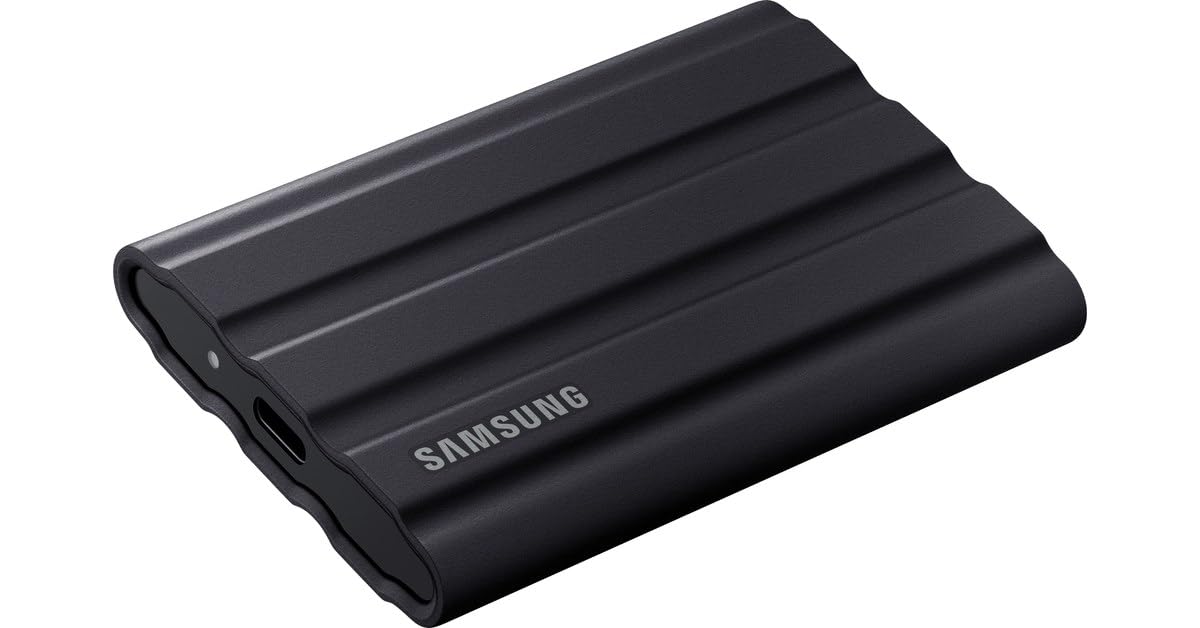
Samsung SSD Portable T7 1TB
Reduce waiting times and speed up your workflow. With USB 3.2 Gen 2 and NVMe technologies, the T7 delivers sequential read/write speeds of up to 1,000/1,050 MB/s. Take it with you wherever you go. As small as a credit card and weighing only 58 grams, the T7 fits easily into small pockets. The rounded unibody fits comfortably in the palm of your hand. With the included USB type C-to-C and type C-to-A cables, you can connect the T7 to a wide variety of devices, including Windows PCs, Macs, Android devices, game consoles and more. With no moving parts and packed in a solid aluminum case, the T7 protects your data even when dropped from up to 2 m. With password protection based on AES 256-bit hardware encryption, your files are safe. With built-in intuitive software for PC and Mac, you can easily set your password, check capacity and download the latest firmware updates. You can also download the app for Android smartphones and tablets.
Reduce waiting times and speed up your workflow. With USB 3.2 Gen 2 and NVMe technologies, the T7 delivers sequential read/write speeds of up to 1,000/1,050 MB/s. Take it with you wherever you go. As small as a credit card and weighing only 58 grams, the T7 fits easily into small pockets. The rounded unibody fits comfortably in the palm of your hand. With the included USB type C-to-C and type C-to-A cables, you can connect the T7 to a wide variety of devices, including Windows PCs, Macs, Android devices, game consoles and more. With no moving parts and packed in a solid aluminum case, the T7 protects your data even when dropped from up to 2 m. With password protection based on AES 256-bit hardware encryption, your files are safe. With built-in intuitive software for PC and Mac, you can easily set your password, check capacity and download the latest firmware updates. You can also download the app for Android smartphones and tablets.
Reduce waiting times and speed up your workflow. With USB 3.2 Gen 2 and NVMe technologies, the T7 delivers sequential read/write speeds of up to 1,000/1,050 MB/s. Take it with you wherever you go. As small as a credit card and weighing only 58 grams, the T7 fits easily into small pockets. The rounded unibody fits comfortably in the palm of your hand. With the included USB type C-to-C and type C-to-A cables, you can connect the T7 to a wide variety of devices, including Windows PCs, Macs, Android devices, game consoles and more. With no moving parts and packed in a solid aluminum case, the T7 protects your data even when dropped from up to 2 m. With password protection based on AES 256-bit hardware encryption, your files are safe. With built-in intuitive software for PC and Mac, you can easily set your password, check capacity and download the latest firmware updates. You can also download the app for Android smartphones and tablets.
Reduce waiting times and speed up your workflow. With USB 3.2 Gen 2 and NVMe technologies, the T7 delivers sequential read/write speeds of up to 1,000/1,050 MB/s. Take it with you wherever you go. As small as a credit card and weighing only 58 grams, the T7 fits easily into small pockets. The rounded unibody fits comfortably in the palm of your hand. With the included USB type C-to-C and type C-to-A cables, you can connect the T7 to a wide variety of devices, including Windows PCs, Macs, Android devices, game consoles and more. With no moving parts and packed in a solid aluminum case, the T7 protects your data even when dropped from up to 2 m. With password protection based on AES 256-bit hardware encryption, your files are safe. With built-in intuitive software for PC and Mac, you can easily set your password, check capacity and download the latest firmware updates. You can also download the app for Android smartphones and tablets.
in 55 offers
The lowest price for Samsung SSD Portable T7 1TB right now is $30.00 at superplume.com.au, compared across 32 retailers.
The all-time low was $30.00 on 17 Aug 2026. That's the lowest price we've ever tracked — a great time to buy.
Prices last updated 25 Oct 2026.
Last updated at 25/10/2026 00:20:40
Samsung T7 Portable SSD, 1TB External Solid State Drive, Speeds Up to 1,050MB/s, USB 3.2 Gen 2, Reliable Storage for Gaming, Students, Professionals,
Free delivery
Affiliate Disclosure: We may receive a small commission for purchases made through this link at no extra cost to you. This helps support our site. Thank you!
Samsung Ssd 1TB
Samsung T7 1TB Portable External SSD - Titan Grey (MU-PC1T0T/WW)
Affiliate Disclosure: We may receive a small commission for purchases made through this link at no extra cost to you. This helps support our site. Thank you!
Samsung 1TB T7 USB-C Portable SSD, Titan Grey
Delivery $14
Samsung T7 1TB Portable SSD - Titan Grey
Free delivery between Tue – Fri
Samsung T7 Mu-pc1t0t 1tb External Ssd Black
Delivery $19.49
Samsung 1TB T7 USB 3 2 Portable SSD Grey - External SSD Hard Drives
Delivery $15.16
Samsung 1TB T7 USB 3 2 Portable SSD Grey - External SSD Hard Drives
Delivery $12
Samsung T7 1TB Portable SSD Grey
Free delivery
Samsung T7 1TB Portable External SSD - Titan Grey - USB 3.2 Gen2 (10Gbps) - Read up to 1050MB/s - Password Protection
Free delivery between 29 Oct – 3 Nov
originally posted on bhphotovideo.com
Got this to use as my working projects drive with my M1 Mac. It's an SSD so it's certainly faster than the 'rugged' La Cie it replaced. (you should replace your external drive every year or so, better to replace them before they start getting flaky, while you still have full access to the contents!) However I only get about 700mbps out of it, the internal storage on this laptop is about 5 times faster. So there is no benefit to using this as a scratch disc. It does work great to stick footage on instead of letting all that clutter up my system disk. I'm going to make proxies anyway, which will playback from the system disk then get trashed when I am finished. It does satisfy my two main requirements; bus powered faster than an HDD. It cost about the same as a La Cie ... MoreGot this to use as my working projects drive with my M1 Mac. It's an SSD so it's certainly faster than the 'rugged' La Cie it replaced. (you should replace your external drive every year or so, better to replace them before they start getting flaky, while you still have full access to the contents!) However I only get about 700mbps out of it, the internal storage on this laptop is about 5 times faster. So there is no benefit to using this as a scratch disc. It does work great to stick footage on instead of letting all that clutter up my system disk. I'm going to make proxies anyway, which will playback from the system disk then get trashed when I am finished. It does satisfy my two main requirements; bus powered faster than an HDD. It cost about the same as a La Cie HDD of the same capacity so a no brainer. It is also a LOT smaller and lighter than a spinning disk. I suspect it draws a lot less current as well, simply judging by the amount of heat given off under heavy use compared to an equivalent rotating disk. I would buy again. Just as an aside, I used to work in broadcast IT. La Cie ruggeds are nothing special. They look cool, but they have no real heat mitigation, they aren't fast and they aren't more rugged than other comparable drives. My advice, instead of sweating over which is the best drive for the buck. Just get one from a tier one manufacturer like Samsung for SSD or WD for spinning disks. And replace your external drives frequently!
originally posted on bestbuy.com
The SSD is fast and a large capacity. Even if according to specification, it is slower than the internal SSD on my laptop, I cannot really tell the difference. I use it for running Virtual Machine and software development. Where I had trouble is with Samsung Portable SSD software and Samsung Magician. I installed the Portable SSD software and got some very weird issues: I was NOT using encryption and the SSD start losing some changes. When I swap the SSD to another machine, folder or files created done on that machine were not appearing on the original machine. At one point, I reformatted the drive and it continues reporting the old folder, even though they were completely inaccessible. After I finally removed the Samsung Portable software, the problem went away. ... MoreThe SSD is fast and a large capacity. Even if according to specification, it is slower than the internal SSD on my laptop, I cannot really tell the difference. I use it for running Virtual Machine and software development. Where I had trouble is with Samsung Portable SSD software and Samsung Magician. I installed the Portable SSD software and got some very weird issues: I was NOT using encryption and the SSD start losing some changes. When I swap the SSD to another machine, folder or files created done on that machine were not appearing on the original machine. At one point, I reformatted the drive and it continues reporting the old folder, even though they were completely inaccessible. After I finally removed the Samsung Portable software, the problem went away. That software is only require for using encryption. Another issue was with Samsung Magician software. It updated the firmware, which was good. I had it for over a month and strangely, the laptop was no longer able to sleep, took me a while to figure out that the issue was with the external SSD. Uninstalling Samsung Magician fix the issue. None of Samsung software is required for basic use. But it was time consuming to troubleshot and figure out that Samsung software cause more harm than good.
originally posted on bestbuy.com
I was in the market for a portable SSD to accompany my laptop. This little guy works great. CrystalDiskInfo shows it has 1.03TB written. In terms of endurance, 1TB written means this drive is obviously used, however, that's still is pretty low. Samsung doesn't post endurance numbers for the T7 series, but if you look at their most basic 870QVO; their 1TB is rated at 360TBW. So assuming this uses a similar NAND flash, I would at least expect a life expectancy of at least 180TBW. Performance is also great, my USB-C 3.2 connection shows a read of ~985MBps and a Write speed of ~958MBps; very fast for an external drive. Also, keep in mind that this is a cache-less drive, so extended writing performance may suffer. But not bad. As for packaging, it came in the original ... MoreI was in the market for a portable SSD to accompany my laptop. This little guy works great. CrystalDiskInfo shows it has 1.03TB written. In terms of endurance, 1TB written means this drive is obviously used, however, that's still is pretty low. Samsung doesn't post endurance numbers for the T7 series, but if you look at their most basic 870QVO; their 1TB is rated at 360TBW. So assuming this uses a similar NAND flash, I would at least expect a life expectancy of at least 180TBW. Performance is also great, my USB-C 3.2 connection shows a read of ~985MBps and a Write speed of ~958MBps; very fast for an external drive. Also, keep in mind that this is a cache-less drive, so extended writing performance may suffer. But not bad. As for packaging, it came in the original retail packaging with manual, USB-C, and USB-A cables. all documentation was included. Upon connecting to my computer, it appears Geek Squad essentially deleted the partition with parted magic or something. That extended 1TB that was written may have been Best Buy's doing to ensure the drive was "wiped" so I couldn't see prior owner's data. That said, you'll need to initialize, partition, and format the disk using Disk Manager in Windows or Disk Utility in Mac OS before using it.
| General | |
| Device Type | Solid state drive - external (portable) |
| Capacity | 1 TB |
| Hardware Encryption | Yes |
| Encryption Algorithm | 256-bit AES |

Samsung T7 Portable SSD, 1TB External Solid State Drive, Speeds Up to 1,050MB/s, USB 3.2 Gen 2, Reliable Storage for Gaming, Students, Professionals,
Free delivery
Affiliate Disclosure: We may receive a small commission for purchases made through this link at no extra cost to you. This helps support our site. Thank you!
Samsung Ssd 1TB
Samsung T7 1TB Portable External SSD - Titan Grey (MU-PC1T0T/WW)
Affiliate Disclosure: We may receive a small commission for purchases made through this link at no extra cost to you. This helps support our site. Thank you!
Samsung 1TB T7 USB-C Portable SSD, Titan Grey
Delivery $14
Samsung T7 1TB Portable SSD - Titan Grey
Free delivery between Tue – Fri
Got this to use as my working projects drive with my M1 Mac. It's an SSD so it's certainly faster than the 'rugged' La Cie it replaced. (you should replace your external drive every year or so, better to replace them before they start getting flaky, while you still have full access to the contents!) However I only get about 700mbps out of it, the internal storage on this laptop is about 5 times faster. So there is no benefit to using this as a scratch disc. It does work great to stick footage on instead of letting all that clutter up my system disk. I'm going to make proxies anyway, which will playback from the system disk then get trashed when I am finished. It does satisfy my two main requirements; bus powered faster than an HDD. It cost about the same as a La Cie ... MoreGot this to use as my working projects drive with my M1 Mac. It's an SSD so it's certainly faster than the 'rugged' La Cie it replaced. (you should replace your external drive every year or so, better to replace them before they start getting flaky, while you still have full access to the contents!) However I only get about 700mbps out of it, the internal storage on this laptop is about 5 times faster. So there is no benefit to using this as a scratch disc. It does work great to stick footage on instead of letting all that clutter up my system disk. I'm going to make proxies anyway, which will playback from the system disk then get trashed when I am finished. It does satisfy my two main requirements; bus powered faster than an HDD. It cost about the same as a La Cie HDD of the same capacity so a no brainer. It is also a LOT smaller and lighter than a spinning disk. I suspect it draws a lot less current as well, simply judging by the amount of heat given off under heavy use compared to an equivalent rotating disk. I would buy again. Just as an aside, I used to work in broadcast IT. La Cie ruggeds are nothing special. They look cool, but they have no real heat mitigation, they aren't fast and they aren't more rugged than other comparable drives. My advice, instead of sweating over which is the best drive for the buck. Just get one from a tier one manufacturer like Samsung for SSD or WD for spinning disks. And replace your external drives frequently!
The SSD is fast and a large capacity. Even if according to specification, it is slower than the internal SSD on my laptop, I cannot really tell the difference. I use it for running Virtual Machine and software development. Where I had trouble is with Samsung Portable SSD software and Samsung Magician. I installed the Portable SSD software and got some very weird issues: I was NOT using encryption and the SSD start losing some changes. When I swap the SSD to another machine, folder or files created done on that machine were not appearing on the original machine. At one point, I reformatted the drive and it continues reporting the old folder, even though they were completely inaccessible. After I finally removed the Samsung Portable software, the problem went away. ... MoreThe SSD is fast and a large capacity. Even if according to specification, it is slower than the internal SSD on my laptop, I cannot really tell the difference. I use it for running Virtual Machine and software development. Where I had trouble is with Samsung Portable SSD software and Samsung Magician. I installed the Portable SSD software and got some very weird issues: I was NOT using encryption and the SSD start losing some changes. When I swap the SSD to another machine, folder or files created done on that machine were not appearing on the original machine. At one point, I reformatted the drive and it continues reporting the old folder, even though they were completely inaccessible. After I finally removed the Samsung Portable software, the problem went away. That software is only require for using encryption. Another issue was with Samsung Magician software. It updated the firmware, which was good. I had it for over a month and strangely, the laptop was no longer able to sleep, took me a while to figure out that the issue was with the external SSD. Uninstalling Samsung Magician fix the issue. None of Samsung software is required for basic use. But it was time consuming to troubleshot and figure out that Samsung software cause more harm than good.
I was in the market for a portable SSD to accompany my laptop. This little guy works great. CrystalDiskInfo shows it has 1.03TB written. In terms of endurance, 1TB written means this drive is obviously used, however, that's still is pretty low. Samsung doesn't post endurance numbers for the T7 series, but if you look at their most basic 870QVO; their 1TB is rated at 360TBW. So assuming this uses a similar NAND flash, I would at least expect a life expectancy of at least 180TBW. Performance is also great, my USB-C 3.2 connection shows a read of ~985MBps and a Write speed of ~958MBps; very fast for an external drive. Also, keep in mind that this is a cache-less drive, so extended writing performance may suffer. But not bad. As for packaging, it came in the original ... MoreI was in the market for a portable SSD to accompany my laptop. This little guy works great. CrystalDiskInfo shows it has 1.03TB written. In terms of endurance, 1TB written means this drive is obviously used, however, that's still is pretty low. Samsung doesn't post endurance numbers for the T7 series, but if you look at their most basic 870QVO; their 1TB is rated at 360TBW. So assuming this uses a similar NAND flash, I would at least expect a life expectancy of at least 180TBW. Performance is also great, my USB-C 3.2 connection shows a read of ~985MBps and a Write speed of ~958MBps; very fast for an external drive. Also, keep in mind that this is a cache-less drive, so extended writing performance may suffer. But not bad. As for packaging, it came in the original retail packaging with manual, USB-C, and USB-A cables. all documentation was included. Upon connecting to my computer, it appears Geek Squad essentially deleted the partition with parted magic or something. That extended 1TB that was written may have been Best Buy's doing to ensure the drive was "wiped" so I couldn't see prior owner's data. That said, you'll need to initialize, partition, and format the disk using Disk Manager in Windows or Disk Utility in Mac OS before using it.
As a late-to-the-party convert from a portable hard drive to an SSD such as the Samsung T7 I did not realise how impressive the difference in speed, performance and reliability would be. The Samsung T7 is thinner than a pack of tic tacs and not much larger! Convenient to keep in your coat pocket, backpack side pouch or tucked inside your laptop case without you barely noticing. The speeds are unbelievable and the Samsung brand along with warranty offered provides me comfort knowing my 'too lazy to sort through and delete unnecessary files' are safe, plus my laptop definitely appreciates the extra breathing space on its own internal SSD. If you're still on the fence and struggle to justify the price vs need, remember this device is likely to last longer than most of ... MoreAs a late-to-the-party convert from a portable hard drive to an SSD such as the Samsung T7 I did not realise how impressive the difference in speed, performance and reliability would be. The Samsung T7 is thinner than a pack of tic tacs and not much larger! Convenient to keep in your coat pocket, backpack side pouch or tucked inside your laptop case without you barely noticing. The speeds are unbelievable and the Samsung brand along with warranty offered provides me comfort knowing my 'too lazy to sort through and delete unnecessary files' are safe, plus my laptop definitely appreciates the extra breathing space on its own internal SSD. If you're still on the fence and struggle to justify the price vs need, remember this device is likely to last longer than most of your relationships. Who wouldn't want such a dependable friend through the ups and downs of life. Plus I'm pretty sure formatting of this SSD would help you move on faster than a slower and cheaper portable hard drive or any other manufacturer.
Having recently purchased a brand new MacBook Pro M1 Pro with 1TB SSD, I wanted a really good external SSD for Time Machine Backups. I already own a much smaller Samsung SSD which has served me really well for the last few years. So I knew in advance the Samsung T7 2TB would be the perfect choice for the task at hand. It's simply amazing you can get portable SSD drives with so much real and usable storage, for the price of admission in this T7. It came nicely packaged with every you need, including a little owners manual and a high quality USB C to USB C cable. This drive is incredibly fast and was able to download hundreds of gigabytes of data quickly. It's built to the best standards with durable thermal construction, which Samsung says defends against impact or ... MoreHaving recently purchased a brand new MacBook Pro M1 Pro with 1TB SSD, I wanted a really good external SSD for Time Machine Backups. I already own a much smaller Samsung SSD which has served me really well for the last few years. So I knew in advance the Samsung T7 2TB would be the perfect choice for the task at hand. It's simply amazing you can get portable SSD drives with so much real and usable storage, for the price of admission in this T7. It came nicely packaged with every you need, including a little owners manual and a high quality USB C to USB C cable. This drive is incredibly fast and was able to download hundreds of gigabytes of data quickly. It's built to the best standards with durable thermal construction, which Samsung says defends against impact or overheating. Out of the box, it was recognized on my new MacBook and using Disc Utility, I formatted it appropriately for a Mac (using APFS) and while data is downloading, the little Blue LED blinks to let you know data is being accepted, then turns solid blue when the data transfer is complete. You can password protect the drive and it includes 256-BIT AES hardware encryption, which scrambles data to make it nearly impossible to hack. It's small, elegant, incredibly well made, protects your data and simply couldn't be easier to use. If you've ever lost data before, you know how awful the feeling. This T7 SSD from Samsung will ensure I can never lose data. For the money, I simply can't recommend this enough.
This was a replacement purchase before my old drive (non-Samsung) completely crashed on me. I love the convenient size; not bulky. The download speed is awesome. A little pricey but I got in on a decent sale to try it out and I'm glad I did. Very sleek look. Made me realize I need to step up my laptop game to match its performance and connections. I originally was using with my older laptop and it did not support USB 3.2 so I was not seeing the potential until my updated laptop arrived and the combo is unstoppable. I'm weary of some of the reviews complaining about the performance and it not working properly after awhile if at all. So far it has been a great experience for me and I would recommend. You might not be as pleased with performance if using an older ... MoreThis was a replacement purchase before my old drive (non-Samsung) completely crashed on me. I love the convenient size; not bulky. The download speed is awesome. A little pricey but I got in on a decent sale to try it out and I'm glad I did. Very sleek look. Made me realize I need to step up my laptop game to match its performance and connections. I originally was using with my older laptop and it did not support USB 3.2 so I was not seeing the potential until my updated laptop arrived and the combo is unstoppable. I'm weary of some of the reviews complaining about the performance and it not working properly after awhile if at all. So far it has been a great experience for me and I would recommend. You might not be as pleased with performance if using an older laptop that does not have any USB-C ports, but it will still get the job done with an older USD connection to USB-C cable; just a tad slower when importing/exporting.
I wish I knew about these a long time ago. After upgrading my editing system I was still having lag issues with large projects, and realized the write speeds to/from my external hard drives were woeful. I tried another brand SSD external and it ended up crashing my system repeatedly (extremely frustrating). These work effortlessly and flawlessly. Love em. Even 2TB drives fill up fast however, so what I've worked out for my process is I use the large external non-ssd drives for *storing* completed projects, and I use these drives for *completing* projects. I love the color options and this makes it super easy to keep track of different projects, i.e. project A is on the red drive, project B is on the blue drive and so on. Make more colors Samsung! Maybe an ... MoreI wish I knew about these a long time ago. After upgrading my editing system I was still having lag issues with large projects, and realized the write speeds to/from my external hard drives were woeful. I tried another brand SSD external and it ended up crashing my system repeatedly (extremely frustrating). These work effortlessly and flawlessly. Love em. Even 2TB drives fill up fast however, so what I've worked out for my process is I use the large external non-ssd drives for *storing* completed projects, and I use these drives for *completing* projects. I love the color options and this makes it super easy to keep track of different projects, i.e. project A is on the red drive, project B is on the blue drive and so on. Make more colors Samsung! Maybe an upsell/option to create a custom color? Much more classy/professional than stickers ha! My wish: make this same unit in 4TB and/or larger capacities, they would be worth the cost. Thank you Samsung for these fantastic drives!
For its speed and size, this is really well priced. The capacity is big enough to handle just about any video shoot I've thrown at it. And is fast enough to both be directly recorded to from the camera and then turn around and edit all of that footage straight off of the drive with no lag or stutter at all. At least when plugged into USB 3.1 ports and higher. Its also incredible how light and compact it is despite being able to handle that kind of work load. I really appreciate that both a USB C to A and a C to C cable were included, as more and more thin laptops are coming with only Type C ports this allows compatability with a broad range of devices to work with. Including my smartphone. I guess my only nitpick about it is that the external casing could be a bit ... MoreFor its speed and size, this is really well priced. The capacity is big enough to handle just about any video shoot I've thrown at it. And is fast enough to both be directly recorded to from the camera and then turn around and edit all of that footage straight off of the drive with no lag or stutter at all. At least when plugged into USB 3.1 ports and higher. Its also incredible how light and compact it is despite being able to handle that kind of work load. I really appreciate that both a USB C to A and a C to C cable were included, as more and more thin laptops are coming with only Type C ports this allows compatability with a broad range of devices to work with. Including my smartphone. I guess my only nitpick about it is that the external casing could be a bit more protective. But a hardshell case for these things is not expensive and will likely do a better job of keeping it safe anyway. So thats really not a big deal at all.
The drive would be great if not a "refurbished" model. It certainly looked in good physical condition, but on the digital side it isn't so pretty. I saw 4TB had been written to the drive, which *should* indicate lots of life left...right? I work in IT so didn't have any issue partitioning the drive, but immediately had problems trying to use the drive afterward. I've updated the firmware multiple times now via the Samsung Magician (Windows) or Samsung Portable SSD (OS X) software but still the drive freezes until you unplug it and plug it back in, eventually turning corrupt or unreadable at random. Re-downloading games to it is difficult as these large sets of files (RDR2 is 123.4GB, for example) sometimes barely get started before you'll see "Installation stopped" ... MoreThe drive would be great if not a "refurbished" model. It certainly looked in good physical condition, but on the digital side it isn't so pretty. I saw 4TB had been written to the drive, which *should* indicate lots of life left...right? I work in IT so didn't have any issue partitioning the drive, but immediately had problems trying to use the drive afterward. I've updated the firmware multiple times now via the Samsung Magician (Windows) or Samsung Portable SSD (OS X) software but still the drive freezes until you unplug it and plug it back in, eventually turning corrupt or unreadable at random. Re-downloading games to it is difficult as these large sets of files (RDR2 is 123.4GB, for example) sometimes barely get started before you'll see "Installation stopped" and the download or transfer can only be cancelled and restarted. Thought it was a networking issue but the same happens when trying to transfer the games from another drive to this one. If you can eventually get the games installed or files transferred, eventually this drive needs to be formatted again to resume working. Very poor refurbishment from Best Buy. Along with my recent refurbished GoPro, and I think there was another refurb before that, I have determined that if it looks good and powers on for a while, that's as thorough of testing as the products will get. At least Best Buy does offer a 90-day warranty so risk is minimal. It's a gamble; you only lose some time and gas money when you have to return it, and it could fail right outside the 90-day window, but if you can get a working one it's a hell of a deal.
Great price for a great SSD. Why buy new when you can get a great quality used one guaranteed to work for a fraction of the cost. Just one issue but it’s not the fault of the SSD. I’ve ordered two of these at separate times. Both times they came in the box with everything included even all paperwork. They both looked practically new and in great condition. But I noticed that they were a slightly different color and the text on one was slightly bigger. Which was no big deal, just an interesting observation. Until I plug them in and go to format them. One has more formatting options than the other, including my preferred mac settings. So there I realized while they are both the T7, and same cost, they are slightly different generations/models. Granted, it still serves ... MoreGreat price for a great SSD. Why buy new when you can get a great quality used one guaranteed to work for a fraction of the cost. Just one issue but it’s not the fault of the SSD. I’ve ordered two of these at separate times. Both times they came in the box with everything included even all paperwork. They both looked practically new and in great condition. But I noticed that they were a slightly different color and the text on one was slightly bigger. Which was no big deal, just an interesting observation. Until I plug them in and go to format them. One has more formatting options than the other, including my preferred mac settings. So there I realized while they are both the T7, and same cost, they are slightly different generations/models. Granted, it still serves my purposes, but as one has slightly more reformat options, one would think that could’ve been reflected in the price. I’m sure it’s hard to sort their refurbished product when they are practically the same, but it’s still up in the air which you will receive when ordering. Great product and price but the lack of five stars is for that reason alone.
| General | |
| Device Type | Solid state drive - external (portable) |
| Capacity | 1 TB |
| Hardware Encryption | Yes |
| Encryption Algorithm | 256-bit AES |