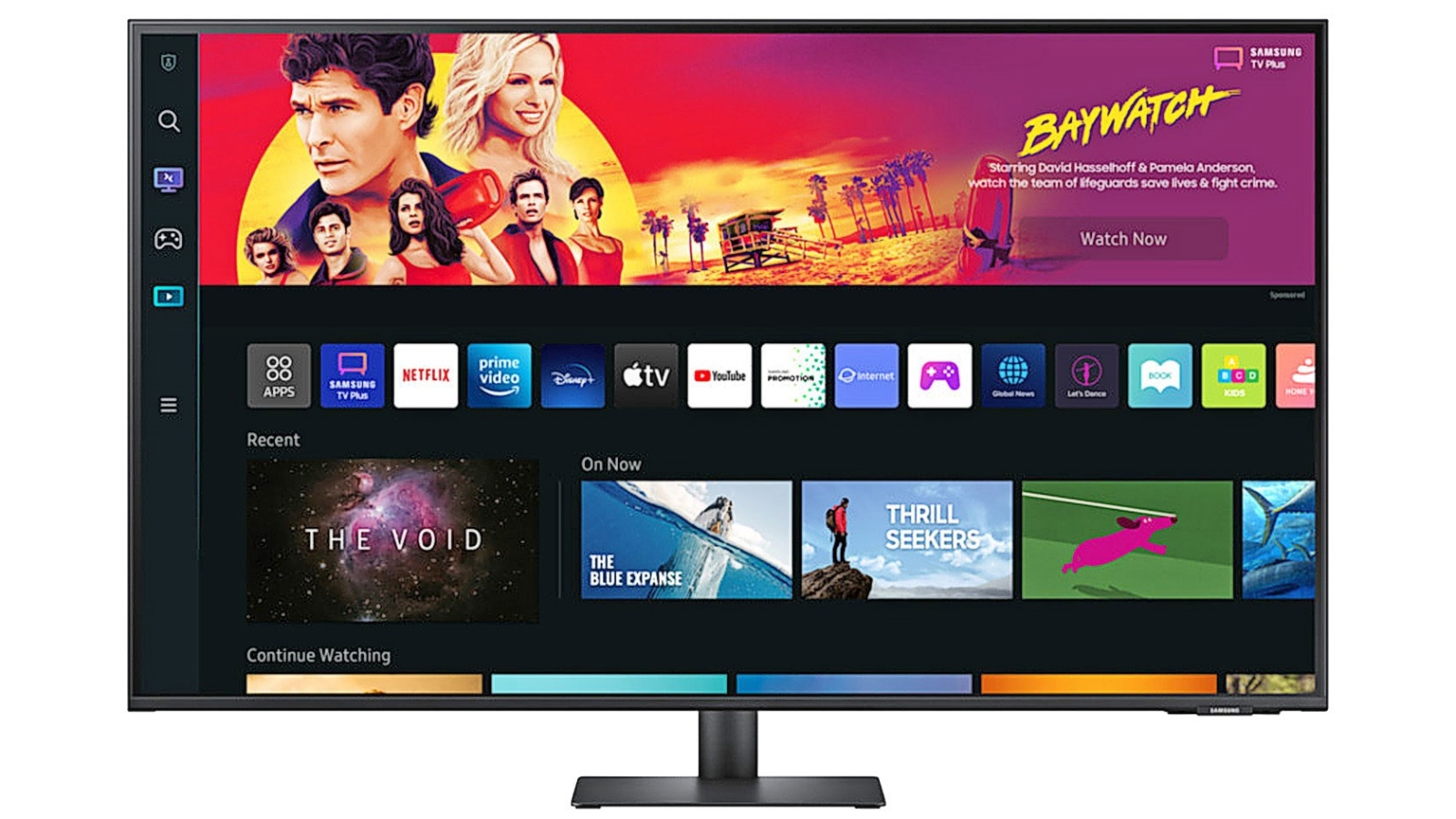
This Samsung Smart Monitor is a great way to make the most out of a small space. You can stream OTT content directly from the monitor or tune into Samsung TV Plus at no additional cost¹. Plus, you can play the biggest games from top streaming partners with no PC or console with the Samsung Gaming Hub².
This Samsung Smart Monitor is a great way to make the most out of a small space. You can stream OTT content directly from the monitor or tune into Samsung TV Plus at no additional cost¹. Plus, you can play the biggest games from top streaming partners with no PC or console with the Samsung Gaming Hub².
in 4 offers
The lowest price for Samsung 32" M70D UHD Smart Monitor right now is $499.00 at Domayne, compared across 4 retailers.
The all-time low was $347.00 on 19 Dec 2024 — today's price is 44% above the lowest ever. It has been notably cheaper before — worth setting a price alert.
Prices last updated 18 Oct 2026.
Samsung 32" M70D UHD Smart Monitor
This Samsung Smart Monitor is a great way to make the most out of a small space. You can stream OTT content directly from the monitor or tune into Samsung TV Plus at no additional cost¹. Plus, you can play the biggest games from top streaming partners with no PC or console with the Samsung Gaming Hub².
This Samsung Smart Monitor is a great way to make the most out of a small space. You can stream OTT content directly from the monitor or tune into Samsung TV Plus at no additional cost¹. Plus, you can play the biggest games from top streaming partners with no PC or console with the Samsung Gaming Hub².
Last updated at 18/10/2026 03:56:45
Samsung LS32DM700UEXXY 32" 4K Ultra HD HDR10 Smart Monitor with Speakers - 3840x2160, USB-C, HDMI, WiFi, Bluetooth, Smart Hub for TV streaming, Catch
Delivery $16.20
Affiliate Disclosure: We may receive a small commission for purchases made through this link at no extra cost to you. This helps support our site. Thank you!
Samsung 32-inch M70D UHD Smart Monitor
Samsung Ls32dm700uexxy 32" 4k Ultra Hd Hdr10 Smart Monitor With
Delivery $15
Affiliate Disclosure: We may receive a small commission for purchases made through this link at no extra cost to you. This helps support our site. Thank you!
Samsung LS32DM700UEXXY 32" 4K Ultra HD HDR10 Smart Monitor with Speakers
Delivery $20.35
originally posted on lazada.com.ph
In terms of product quality, this M7 Smart monitor is superb. Stunning display quality, vivid and lifelike colors (needs tweaking of settings, though), fast and responsive performance, and crystal-clear resolution (at times, though, screen may appear so-so, but overall still miles ahead of non-4K display). I liked that I can use this monitor both as a second and/or mirror display for my Mac, and at the same time use it as a bedroom TV, eliminating the need to have two separate displays in the room. The included remote is fantastic as well --- it can be charged either via USB-C, or, through its solar panel at the back of the remote control. It;s also easy to use, no learning curve necessary. Tizen OS for me is not as great as LG's WebOS but still no major complaints ... MoreIn terms of product quality, this M7 Smart monitor is superb. Stunning display quality, vivid and lifelike colors (needs tweaking of settings, though), fast and responsive performance, and crystal-clear resolution (at times, though, screen may appear so-so, but overall still miles ahead of non-4K display). I liked that I can use this monitor both as a second and/or mirror display for my Mac, and at the same time use it as a bedroom TV, eliminating the need to have two separate displays in the room. The included remote is fantastic as well --- it can be charged either via USB-C, or, through its solar panel at the back of the remote control. It;s also easy to use, no learning curve necessary. Tizen OS for me is not as great as LG's WebOS but still no major complaints there; it's just that I prefer the UI/UX of LG. The only thing that prevented me from giving this a 5 star rating is due to the poor delivery experience. I was aware that it was a pre-order item and would take longer than usual; however, the lack of communication from the seller to manage customer expectations was something they need to improve a lot on. I had to contact Samsung's online CS team (via the website) 3x just to get updates.
originally posted on Samsung
Good screen, not without its faults.Pros:- Nice looking screen, both when turned off and when turned on.- Good price for 4K, I think.- Colors are good.- Small bezels.Cons:- The stand that the monitor comes with is very short and not height-adjustable. You will need to either stack up some reams of paper or mount it on an arm.- The VESA mount is only 75x75, and it's recessed into the back of the monitor so you can't fit a mount that's compatible with 100x100 (and I have never seen one smaller). I had to make myself a little extension bracket out of a piece of metal. The mount is also too close to the top of the monitor, so you need to get a mount with a lot of height to cancel that out. The mounting holes are on a pretty flimsy piece of sheet metal - in ... MoreGood screen, not without its faults.Pros:- Nice looking screen, both when turned off and when turned on.- Good price for 4K, I think.- Colors are good.- Small bezels.Cons:- The stand that the monitor comes with is very short and not height-adjustable. You will need to either stack up some reams of paper or mount it on an arm.- The VESA mount is only 75x75, and it's recessed into the back of the monitor so you can't fit a mount that's compatible with 100x100 (and I have never seen one smaller). I had to make myself a little extension bracket out of a piece of metal. The mount is also too close to the top of the monitor, so you need to get a mount with a lot of height to cancel that out. The mounting holes are on a pretty flimsy piece of sheet metal - in particular, you don't want to be grabbing the monitor and tilting it upwards because you will probably bend it.- Some details when adjusting the settings - set contrast to 75 because 76 or higher makes the screen take on a slight green tinge, and make sure to set sharpness to 48 or 52 (50 is not available because it moves in steps of 4) to prevent any blurring/sharpening of the sacred image coming from your PC.- The "HDR" support is pointless because it only goes to 300 nits. I tried enabling HDR in Windows but it requires some headroom above SDR white and so Windows wouldn't let me set SDR white to more than 80% (IIRC) which just wasn't bright enough. Don't buy this monitor if you want to use HDR.- No local dimming.- Only 60 Hz.- Honestly at this size 4K is just OK for text. My next monitor when I'm rich will be 8K.- OSD popup for a few seconds every time the screen turns on is annoying.- Constant flashing blue LED whenever the screen is asleep is annoying.
originally posted on samsung.com
The internal features are nice, but the build quality is cheap and poor. Thin plastic bezel is weak and cheap. Mine came off and it isn't covered in warranty. But they will repair for a charge. There is also a software issue with type-c connection, it doesn't always pick up the c-type connection. Don't buy this product, go for something more solid metal frame bezel and one full piece bezel. I bought this during covid direct from Samsung it came with this fault. I didn't send it back at the time as monitors were scarce and held on to it as it comes with 2 year warranty. They assessed my product via pictures for warranty now and said it was not covered by warranty for repair. They will fix it for a fee, but they would need to see it in person to give me a quote when ... MoreThe internal features are nice, but the build quality is cheap and poor. Thin plastic bezel is weak and cheap. Mine came off and it isn't covered in warranty. But they will repair for a charge. There is also a software issue with type-c connection, it doesn't always pick up the c-type connection. Don't buy this product, go for something more solid metal frame bezel and one full piece bezel. I bought this during covid direct from Samsung it came with this fault. I didn't send it back at the time as monitors were scarce and held on to it as it comes with 2 year warranty. They assessed my product via pictures for warranty now and said it was not covered by warranty for repair. They will fix it for a fee, but they would need to see it in person to give me a quote when clearly it's a manufacturing fault, which isn't covered in the warranty and they only cover technical software issues in warranty not build faults. Buyer beware!!! Extremely disappointed I will think twice before buying large items from Samsung as their warranty is terrible and doesn't cover build faults in manufacturing. Buy at own risk. Customers service will do anything not to repair within warranty and get you to pay for it. Disappointed as this is the first time I actually had any issue with their one of the products and it was handle so poorly. No goodwill was shown. This has now made me not want to purchase larger products from Samsung and triggered me to move away from the brand as a whole. Really disgusted!!
| Screen Size (Inches) | 32 |
| Display Resolution (px) | 3840 x 2160 4K |
| Contrast Ratio | 3000-1 |
| Peak Brightness (Nits) | 300 |
| Connections | 2x HDMI 2.0 3x USB C WiFi 5 Bluetooth v5.2 |

Samsung LS32DM700UEXXY 32" 4K Ultra HD HDR10 Smart Monitor with Speakers - 3840x2160, USB-C, HDMI, WiFi, Bluetooth, Smart Hub for TV streaming, Catch
Delivery $16.20
Affiliate Disclosure: We may receive a small commission for purchases made through this link at no extra cost to you. This helps support our site. Thank you!
Samsung 32-inch M70D UHD Smart Monitor
Samsung Ls32dm700uexxy 32" 4k Ultra Hd Hdr10 Smart Monitor With
Delivery $15
Affiliate Disclosure: We may receive a small commission for purchases made through this link at no extra cost to you. This helps support our site. Thank you!
Samsung LS32DM700UEXXY 32" 4K Ultra HD HDR10 Smart Monitor with Speakers
Delivery $20.35
In terms of product quality, this M7 Smart monitor is superb. Stunning display quality, vivid and lifelike colors (needs tweaking of settings, though), fast and responsive performance, and crystal-clear resolution (at times, though, screen may appear so-so, but overall still miles ahead of non-4K display). I liked that I can use this monitor both as a second and/or mirror display for my Mac, and at the same time use it as a bedroom TV, eliminating the need to have two separate displays in the room. The included remote is fantastic as well --- it can be charged either via USB-C, or, through its solar panel at the back of the remote control. It;s also easy to use, no learning curve necessary. Tizen OS for me is not as great as LG's WebOS but still no major complaints ... MoreIn terms of product quality, this M7 Smart monitor is superb. Stunning display quality, vivid and lifelike colors (needs tweaking of settings, though), fast and responsive performance, and crystal-clear resolution (at times, though, screen may appear so-so, but overall still miles ahead of non-4K display). I liked that I can use this monitor both as a second and/or mirror display for my Mac, and at the same time use it as a bedroom TV, eliminating the need to have two separate displays in the room. The included remote is fantastic as well --- it can be charged either via USB-C, or, through its solar panel at the back of the remote control. It;s also easy to use, no learning curve necessary. Tizen OS for me is not as great as LG's WebOS but still no major complaints there; it's just that I prefer the UI/UX of LG. The only thing that prevented me from giving this a 5 star rating is due to the poor delivery experience. I was aware that it was a pre-order item and would take longer than usual; however, the lack of communication from the seller to manage customer expectations was something they need to improve a lot on. I had to contact Samsung's online CS team (via the website) 3x just to get updates.
Good screen, not without its faults.Pros:- Nice looking screen, both when turned off and when turned on.- Good price for 4K, I think.- Colors are good.- Small bezels.Cons:- The stand that the monitor comes with is very short and not height-adjustable. You will need to either stack up some reams of paper or mount it on an arm.- The VESA mount is only 75x75, and it's recessed into the back of the monitor so you can't fit a mount that's compatible with 100x100 (and I have never seen one smaller). I had to make myself a little extension bracket out of a piece of metal. The mount is also too close to the top of the monitor, so you need to get a mount with a lot of height to cancel that out. The mounting holes are on a pretty flimsy piece of sheet metal - in ... MoreGood screen, not without its faults.Pros:- Nice looking screen, both when turned off and when turned on.- Good price for 4K, I think.- Colors are good.- Small bezels.Cons:- The stand that the monitor comes with is very short and not height-adjustable. You will need to either stack up some reams of paper or mount it on an arm.- The VESA mount is only 75x75, and it's recessed into the back of the monitor so you can't fit a mount that's compatible with 100x100 (and I have never seen one smaller). I had to make myself a little extension bracket out of a piece of metal. The mount is also too close to the top of the monitor, so you need to get a mount with a lot of height to cancel that out. The mounting holes are on a pretty flimsy piece of sheet metal - in particular, you don't want to be grabbing the monitor and tilting it upwards because you will probably bend it.- Some details when adjusting the settings - set contrast to 75 because 76 or higher makes the screen take on a slight green tinge, and make sure to set sharpness to 48 or 52 (50 is not available because it moves in steps of 4) to prevent any blurring/sharpening of the sacred image coming from your PC.- The "HDR" support is pointless because it only goes to 300 nits. I tried enabling HDR in Windows but it requires some headroom above SDR white and so Windows wouldn't let me set SDR white to more than 80% (IIRC) which just wasn't bright enough. Don't buy this monitor if you want to use HDR.- No local dimming.- Only 60 Hz.- Honestly at this size 4K is just OK for text. My next monitor when I'm rich will be 8K.- OSD popup for a few seconds every time the screen turns on is annoying.- Constant flashing blue LED whenever the screen is asleep is annoying.
The internal features are nice, but the build quality is cheap and poor. Thin plastic bezel is weak and cheap. Mine came off and it isn't covered in warranty. But they will repair for a charge. There is also a software issue with type-c connection, it doesn't always pick up the c-type connection. Don't buy this product, go for something more solid metal frame bezel and one full piece bezel. I bought this during covid direct from Samsung it came with this fault. I didn't send it back at the time as monitors were scarce and held on to it as it comes with 2 year warranty. They assessed my product via pictures for warranty now and said it was not covered by warranty for repair. They will fix it for a fee, but they would need to see it in person to give me a quote when ... MoreThe internal features are nice, but the build quality is cheap and poor. Thin plastic bezel is weak and cheap. Mine came off and it isn't covered in warranty. But they will repair for a charge. There is also a software issue with type-c connection, it doesn't always pick up the c-type connection. Don't buy this product, go for something more solid metal frame bezel and one full piece bezel. I bought this during covid direct from Samsung it came with this fault. I didn't send it back at the time as monitors were scarce and held on to it as it comes with 2 year warranty. They assessed my product via pictures for warranty now and said it was not covered by warranty for repair. They will fix it for a fee, but they would need to see it in person to give me a quote when clearly it's a manufacturing fault, which isn't covered in the warranty and they only cover technical software issues in warranty not build faults. Buyer beware!!! Extremely disappointed I will think twice before buying large items from Samsung as their warranty is terrible and doesn't cover build faults in manufacturing. Buy at own risk. Customers service will do anything not to repair within warranty and get you to pay for it. Disappointed as this is the first time I actually had any issue with their one of the products and it was handle so poorly. No goodwill was shown. This has now made me not want to purchase larger products from Samsung and triggered me to move away from the brand as a whole. Really disgusted!!
Bought 1 month ago as a replacement work monitor. Screen size is perfect for multitasking, the 4k resolution is good, and the additional smart features are great. There are a couple of things that bother me though:- Monitor will sometimes not recognise PCs connected to it via USB, and the only fix so far has been to unplug the monitor and hard reset it. When it works it's great, but very frustrating when it doesn't.- Using the integrated USB hub is a nightmare, frequently devices aren't recognised and the passthrough is inconsistent. I've stopped using this feature as it doesn't work well enough- Remote desktop is not great, and has trouble with screen resolution, and no settings to override which means it can't be fixed. I use a thin client instead.- No Picture ... MoreBought 1 month ago as a replacement work monitor. Screen size is perfect for multitasking, the 4k resolution is good, and the additional smart features are great. There are a couple of things that bother me though:- Monitor will sometimes not recognise PCs connected to it via USB, and the only fix so far has been to unplug the monitor and hard reset it. When it works it's great, but very frustrating when it doesn't.- Using the integrated USB hub is a nightmare, frequently devices aren't recognised and the passthrough is inconsistent. I've stopped using this feature as it doesn't work well enough- Remote desktop is not great, and has trouble with screen resolution, and no settings to override which means it can't be fixed. I use a thin client instead.- No Picture in Picture, given the amount of inputs and screen size it would be a handy feature to have.Overall the monitor is good at this price point but some smart features are a bit glitchy and limited. If you need a monitor/Netflix machine then this is great, but if you don't need that then consider other options.
After considering many different options, I chose this M80C for my new desk space. I use it to work from home half the week; my desk is also my sewing space in my free time; I occasionally want a screen larger than my phone for life admin and web browsing; and the room is also a guest bedroom. This smart monitor works seamlessly with my work laptop for working from home. I connect via USB-C and close the laptop, though I could also keep it open if I wanted the extra screen (the 32" is enough most days). The included webcam works great (I read some reviews that suggested its movement was limited, but I don't have any issues with angling it to suit and find it captures most of the room). I enjoy using the screen to show my sewing pattern instructions or have a movie ... MoreAfter considering many different options, I chose this M80C for my new desk space. I use it to work from home half the week; my desk is also my sewing space in my free time; I occasionally want a screen larger than my phone for life admin and web browsing; and the room is also a guest bedroom. This smart monitor works seamlessly with my work laptop for working from home. I connect via USB-C and close the laptop, though I could also keep it open if I wanted the extra screen (the 32" is enough most days). The included webcam works great (I read some reviews that suggested its movement was limited, but I don't have any issues with angling it to suit and find it captures most of the room). I enjoy using the screen to show my sewing pattern instructions or have a movie playing while I'm sewing. I've used it with and without a laptop for life admin and web browsing - sometimes connecting with my phone via DeX. I know my guests will enjoy being able to stream music and video content when they visit.My challenges/cons so far are minimal compared to the pros: I wish I could connect the monitor direct to my Sonos speaker, as the sound would be more enjoyable this way. I'm also finding web browsing without a connected laptop to be a bit clunkier than I imagined - I hoped to access Google products (Drive, Docs, Calendar, Chrome) just as easy as it is to open those apps on my Samsung phone (maybe I just haven't looked in the right spot yet). I could always continue connecting my phone with DeX, but I expected the ease of using these popular productivity apps to be included in the Smart Monitor.
Honestly, based on the specs and initial use this should actually be a great alternative to the apple studio display (assuming you are ok losing your fn key functionality) which in the case for our office (this was purchased for a workstation mac mini) we were willing to accept some of the woes of not being an apple product, and being able to control sound, brightness etc. from the keyboard. The tradeoff was that we would get a matte finished screen with a superior web camera setup which in theory was (sort of) an advantage for the viewfinity. Unfortunately to this monitors demise, it comes with samsung's god awful Tizen OS which has been an absolute nightmare since day one. Again, a feature that I guess is sort of interesting in theory but in practical use as a ... MoreHonestly, based on the specs and initial use this should actually be a great alternative to the apple studio display (assuming you are ok losing your fn key functionality) which in the case for our office (this was purchased for a workstation mac mini) we were willing to accept some of the woes of not being an apple product, and being able to control sound, brightness etc. from the keyboard. The tradeoff was that we would get a matte finished screen with a superior web camera setup which in theory was (sort of) an advantage for the viewfinity. Unfortunately to this monitors demise, it comes with samsung's god awful Tizen OS which has been an absolute nightmare since day one. Again, a feature that I guess is sort of interesting in theory but in practical use as a monitor is almost completely useless. The Tizen OS causes constant input connection issues when the computer goes into sleep mode. Because it is technically acting as a TV more than a monitor, when the computer sleeps the monitor treats it as a loss of input connection, you get this ugly blue reconnection screen, before finally shutting down due to not being able to establish a connection. The deal breaker is that it is such a pain to reconnect. A mouse jiggle or keyboard click to wake the computer many times will fail to reestablish an input connection with the monitor and so far the only thing that works is unplugging everything and waiting 30 seconds before plugging everything back in. Imagine having to do this every day which is the frequency we have experienced. This is a massive flaw as I would say that 90% of people are using this exclusively as a computer monitor and not trying to watch tv or netflix on their 27" computer monitor. Really the only market I could see this TV feature being attractive to is students in dorms, but even still, they are not purchasing a $2000 monitor. They'll either buy a cheep M7 or M8 or can buy a typical 27" monitor for 150$ and a 55" tv for $600 and save over $1000. So do yourself a favor and just buy the apple studio display and avoid the stress. If it wasn't past the return period this thing would be going back to the store immediately. Imagine you have a gorgeous new car with all the bells and whistles, incredible reliability, tons of performance and drives amazingly, but every time you started the car you needed to jump start it with jumper cables. You would probably be super annoyed and want to just drive your old beat up civic right? This monitor is that car.
Bought this because I wanted something for a multifunctional room that we use for work during the day and personal computing / TV at night. Smart TV is ok, apps hang from time to time and there is no way I can find to froce them closed. No physical power button only on remote which puts the device to sleep not powers off, have to pull out the power cable to turn the thing off completely. Annoying but not our main TV so could live with it. Picture is good ethernet port would have been brilliant but WiFi works well enough. The speakers are really weak but again I could forgive that. The biggest problem I have is that we constantly change between laptops on the USB C and a desktop via the HDMI. It will not switch between the our two Dell laptops no power delivery no ... MoreBought this because I wanted something for a multifunctional room that we use for work during the day and personal computing / TV at night. Smart TV is ok, apps hang from time to time and there is no way I can find to froce them closed. No physical power button only on remote which puts the device to sleep not powers off, have to pull out the power cable to turn the thing off completely. Annoying but not our main TV so could live with it. Picture is good ethernet port would have been brilliant but WiFi works well enough. The speakers are really weak but again I could forgive that. The biggest problem I have is that we constantly change between laptops on the USB C and a desktop via the HDMI. It will not switch between the our two Dell laptops no power delivery no video signal. After plugging and unplugging many time.it might just connect. When it's connected it's great picture and resolution are spot on for our needs. But unplug and.plug in another laptop and it's another 20 minute fight to get it to connect. As asecont TV and if you only use one device with it it pretty good but just too frustrating for our use case.
I have recently bought a Samsung smart monitor S43BM70 to replace my standard 32-inch monitor. At the time of buying, my decision was mostly based on the large screen size which I hope would help with my poor eye sight. Following are my review and feedback after having used this monitor for a couple of months.• Getting started, this monitor does not work well with the Samsung provided 1M USB-C cable. It is way too short for your laptop unless you want your face to be really close to the screen (note that 1/3 of the cable length was running hidden behind the monitor). My best effort on this was getting visuals to work over the 4K Ultra-HD USB-C cable or the USB-C Thunderbolt cable. I got no sound still. Despite all efforts to reinstall various USB drivers on the PC, ... MoreI have recently bought a Samsung smart monitor S43BM70 to replace my standard 32-inch monitor. At the time of buying, my decision was mostly based on the large screen size which I hope would help with my poor eye sight. Following are my review and feedback after having used this monitor for a couple of months.• Getting started, this monitor does not work well with the Samsung provided 1M USB-C cable. It is way too short for your laptop unless you want your face to be really close to the screen (note that 1/3 of the cable length was running hidden behind the monitor). My best effort on this was getting visuals to work over the 4K Ultra-HD USB-C cable or the USB-C Thunderbolt cable. I got no sound still. Despite all efforts to reinstall various USB drivers on the PC, it would not resolve this issue. The incentive of using USB-C interface is to charge my laptop while it is in use without extra power source. But I had to give up using USB-C to connect it to my laptop in the end.• In terms of interfaces and connectivity, HDMI is more predictable if this monitor is connected to the laptop as external display. Initially I could only get visuals to work using HDMI. In order to get both visuals and audio to work, I had to run Windows troubleshooting and ended up reinstalling display drivers a number of times. The connectivity appeared to be more stable after that but no where near error free. I am still experiencing the following issues:(1) Intermittent screen shutdown (completely gone black) and restart (screen refresh) while in use. While this does not require any manual intervention, this is really annoying.(2) Audio delay from 3-5 secs when playing mp3 from Windows Media Player and any applications generating sound. As an example this problem is always experienced from playing youtube, from the time when any video is played, you would not get any audio sound until approximately 3 seconds later. I have upgraded the monitor firmware to a fairly recent version and followed Samsung recommendations with reset sound and tried different sound mode but have been unable to fix this problem.(3) From time to time I got screen flickering and flashing running across the monitor screen. To get rid off this symptom, I normally had to power off and on the monitor. Again this is very annoying.• While the size of this monitor is a plus if I need to show the screen to a couple of people, the feedback I got from people around me is that the image and text clarity is not great and image quality degrade at angle, audio sound is quite poor. I have now switched back to my old 32-inch standard monitor and I absolutely agree with the above feedback myself.• This monitor has very limited ergonomics, users can not adjust height or fine adjust its tilting or leveling. Remote control is a bit tricky to use.• Regarding other smart monitor features, it is a decent monitor overall for most uses.• Unfortunately for my simple uses, I will have to return this product.
I trust samsung. Have samsung fold, my wife has samsung phone, samsung laptop. I had really great experience with support/repairs for the phones.This thing though:- terrible absoluteöy atrocious delivery (dhl), not really Samsungs fault BUT im a customer I DO NOT care why it was not delivered properly- absolutely no feedback/complaint line, returns are such a chore. They hide behind the wall from customwr complaints about delivery etc.- thunderbolt port is absolutely terrible, its upsidedown with no latch, all plastic that screeches and shakes, cable frequently just disconnects because u tilted the monitor- teerible just absolutely terrible picture quality and low frequency, so u get neither- the popup about resolution - just omg, just so you understand every ... MoreI trust samsung. Have samsung fold, my wife has samsung phone, samsung laptop. I had really great experience with support/repairs for the phones.This thing though:- terrible absoluteöy atrocious delivery (dhl), not really Samsungs fault BUT im a customer I DO NOT care why it was not delivered properly- absolutely no feedback/complaint line, returns are such a chore. They hide behind the wall from customwr complaints about delivery etc.- thunderbolt port is absolutely terrible, its upsidedown with no latch, all plastic that screeches and shakes, cable frequently just disconnects because u tilted the monitor- teerible just absolutely terrible picture quality and low frequency, so u get neither- the popup about resolution - just omg, just so you understand every time you chnage resolution (basically any game etc) u get a 20s popupPros- It has thunderbolt- can be uded as a hub (a lot of ports and a Lan port)- big with high res, great stand- im extra thankful for great packaging, easy to carry and is just a plain cupboard so does not attract attention.I honestly have no idea how u can buy this apart from buying online if u have never seen it IRL.IPS sucks, delivery sucks, quality sucks, support sucks, price sucks.
I bought this because of advertised wireless work capability. But there's really only two options: 1) use built in office. This leads to conflict with my laptop over the wireless keyboard and trackpad. 2) use screen mirroring, which doesn't seems to enable 4k resolution. So the only way to get 4k is using USB-C. Far from the laptop less and wireless work screen advertised. The build quality is also not great for something at this price point. The plastic framing the screen is flimsy. I hope it's recycled at least.If I leave my laptop plugged into the screen with USB-C, the screen causes some critical errors while the laptop tries to sleep. So I come back to it and have to turn it on an recover work. This is new and is not a problem with the laptop (I used to leave ... MoreI bought this because of advertised wireless work capability. But there's really only two options: 1) use built in office. This leads to conflict with my laptop over the wireless keyboard and trackpad. 2) use screen mirroring, which doesn't seems to enable 4k resolution. So the only way to get 4k is using USB-C. Far from the laptop less and wireless work screen advertised. The build quality is also not great for something at this price point. The plastic framing the screen is flimsy. I hope it's recycled at least.If I leave my laptop plugged into the screen with USB-C, the screen causes some critical errors while the laptop tries to sleep. So I come back to it and have to turn it on an recover work. This is new and is not a problem with the laptop (I used to leave it plugged into my previous Samsung screen). So there's a clear conflict between the screen and the laptop.On the plus side, the stand is good. Adjustable stands are essential - all monitors should have them. Also 90 degree screen rotation is valuable.The camera is average. Washed out colours and no where near as crisp as the Macbook's built in camera. I was hoping not to have to open my laptop for meetings, but will probably have to presenting in important meetings.I don't need all the entertainment junk that is thrown on this. Add more productivity features - it's a monitor first, TV (for those who want it) second. It's clear how to add entertainment apps but not productivity apps. Much more work and updates needed on this front. Even the remote has quick launch buttons for entertainment, but nothing for productivity. Where is the Office quick launch button if Samsung is going to feature that so much?
| Screen Size (Inches) | 32 |
| Display Resolution (px) | 3840 x 2160 4K |
| Contrast Ratio | 3000-1 |
| Peak Brightness (Nits) | 300 |
| Connections | 2x HDMI 2.0 3x USB C WiFi 5 Bluetooth v5.2 |