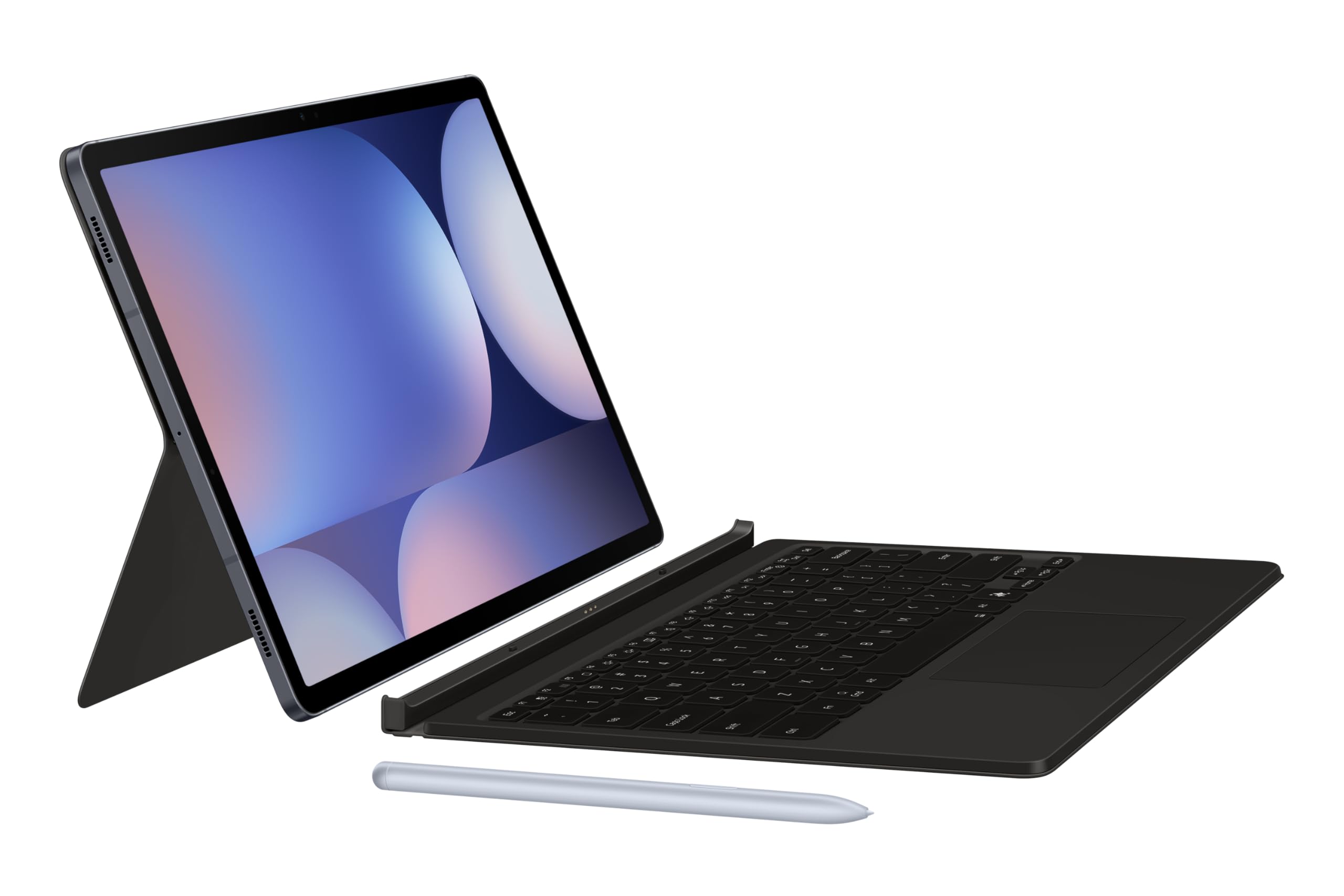
Samsung Galaxy Tab S9+, S10+ Book Cover Keyboard Slim — AI Key (Black)
With the Samsung Galaxy Tab S10 Plus/S9 Plus/S9 FE Plus Slim Keyboard Cover QWERTZ Black, you can quickly and comfortably type emails and long texts on your tablet. Thanks to the built-in stand, you can place the Tab S10 Plus, Tab S9 Plus, or Tab S9 FE Plus upright at the angle you want. That's useful while you type or when you watch a movie or series. You can store your S Pen stylus in the storage compartment on the back of the cover. That way, you don't lose it. Thanks to the auto-wake function, your tablet turns on and off automatically when you open or close the cover. Want to easily navigate through your tablet and have backlit keys? Choose a keyboard cover with a touchpad.
With the Samsung Galaxy Tab S10 Plus/S9 Plus/S9 FE Plus Slim Keyboard Cover QWERTZ Black, you can quickly and comfortably type emails and long texts on your tablet. Thanks to the built-in stand, you can place the Tab S10 Plus, Tab S9 Plus, or Tab S9 FE Plus upright at the angle you want. That's useful while you type or when you watch a movie or series. You can store your S Pen stylus in the storage compartment on the back of the cover. That way, you don't lose it. Thanks to the auto-wake function, your tablet turns on and off automatically when you open or close the cover. Want to easily navigate through your tablet and have backlit keys? Choose a keyboard cover with a touchpad.
With the Samsung Galaxy Tab S10 Plus/S9 Plus/S9 FE Plus Slim Keyboard Cover QWERTZ Black, you can quickly and comfortably type emails and long texts on your tablet. Thanks to the built-in stand, you can place the Tab S10 Plus, Tab S9 Plus, or Tab S9 FE Plus upright at the angle you want. That's useful while you type or when you watch a movie or series. You can store your S Pen stylus in the storage compartment on the back of the cover. That way, you don't lose it. Thanks to the auto-wake function, your tablet turns on and off automatically when you open or close the cover. Want to easily navigate through your tablet and have backlit keys? Choose a keyboard cover with a touchpad.
With the Samsung Galaxy Tab S10 Plus/S9 Plus/S9 FE Plus Slim Keyboard Cover QWERTZ Black, you can quickly and comfortably type emails and long texts on your tablet. Thanks to the built-in stand, you can place the Tab S10 Plus, Tab S9 Plus, or Tab S9 FE Plus upright at the angle you want. That's useful while you type or when you watch a movie or series. You can store your S Pen stylus in the storage compartment on the back of the cover. That way, you don't lose it. Thanks to the auto-wake function, your tablet turns on and off automatically when you open or close the cover. Want to easily navigate through your tablet and have backlit keys? Choose a keyboard cover with a touchpad.
in 29 offers
The lowest price for Samsung Galaxy Tab S9+, S10+ Book Cover Keyboard Slim — AI Key (Black) right now is $90.00 at CeX, compared across 21 retailers.
The all-time low was $49.00 on 5 June 2026 — today's price is 84% above the lowest ever. It has been notably cheaper before — worth setting a price alert.
Prices last updated 29 Sept 2026.
Last updated at 29/09/2026 01:41:59
Samsung Galaxy Book Cover Keyboard Slim Tab S10+/Tab S9+/Tab S9 FE+ -Black
Free delivery
Samsung Galaxy Tab S10+ Plus /S9+ Plus/S9 FE+ Plus Book Cover Keyboard Slim (AI Key,EF-DX820U) - Black
Free next-day delivery
Samsung Galaxy Tab S10+ Plus /S9+ Plus/S9 FE+ Plus Book Cover Keyboard Slim (AI Key,EF-DX820U) - Black
Free delivery between 2–13 Oct
Samsung Galaxy Tab S10+ Plus /S9+ Plus/S9 FE+ Plus Book Cover Keyboard Slim (AI Key,EF-DX820U) - Black
Free delivery between Wed – Thu
Samsung Galaxy Tab S10+ / S9+ /S9 FE+ Book Cover Keyboard Slim - AI Key - Black
Free delivery
Samsung Galaxy Tab S10+ / S9+ /S9 FE+ Book Cover Keyboard Slim - AI Key - Black
Free delivery
Samsung Galaxy Tab S10+ Plus /S9+ Plus/S9 FE+ Plus Book Cover Keyboard Slim (AI Key,EF-DX820U) - Black
Free delivery
Samsung Galaxy Tab S10+ Plus /s9+ Plus/s9 Fe+ Plus Book Cover Keyboard
Free delivery
Affiliate Disclosure: We may receive a small commission for purchases made through this link at no extra cost to you. This helps support our site. Thank you!
Samsung Galaxy Tab S10+ / Tab S9+ / Tab S9 FE+ Book Cover Keyboard Slim Black - Slim and lightweight, Wireless Sharing, AI Key,1 Year Warranty EF-
Save $10 for orders over $500
Samsung Galaxy Tab S10+ / S9+ /S9 FE+ Book Cover Keyboard Slim - AI Key - Black
Delivery between 3–9 Oct $9
originally posted on samsung.com
Canadians, this keyboard ain't it. I regret having let time pass. Now, I cannot return this keyboard. The only pros I can give to this keyboard is that it works (?) and the split-up capability to separate the keyboard from the tablet, which is useful when I go from using my tablet as a laptop to wanting to annotate or getting more space on my desk. The cons: my biggest complaint is the layout. With all due respect, I don't know what was so complicated about manufacturing keyboards in different languages, so the customer can pick the one he/she likes the most. Now, going to the fact that we are in Canada; as an Allophone, I wouldn't mind having a keyboard that is EITHER in English OR in French. What really annoys me is the fact that it is multilingual. In other ... MoreCanadians, this keyboard ain't it. I regret having let time pass. Now, I cannot return this keyboard. The only pros I can give to this keyboard is that it works (?) and the split-up capability to separate the keyboard from the tablet, which is useful when I go from using my tablet as a laptop to wanting to annotate or getting more space on my desk. The cons: my biggest complaint is the layout. With all due respect, I don't know what was so complicated about manufacturing keyboards in different languages, so the customer can pick the one he/she likes the most. Now, going to the fact that we are in Canada; as an Allophone, I wouldn't mind having a keyboard that is EITHER in English OR in French. What really annoys me is the fact that it is multilingual. In other words, you have two different inputs in one keyboard. This means that the problem is not about Québec or Francophones, it is about not having created two different keyboard options. To give you a better insight, you will have to be clicking on the "Lang" key every 10 seconds to change the language input to write the specific symbols or accents you need, which extremely sucks. Moreover, there are some symbols that are switched (due to the two different inputs on the same keyboard, English and French) and they are not labelled, so you kinda have to guess where those symbols are because they are not shown on the keyboard. For example, if I'm typing in English and want to type and apostrophe ("), I have two options: switching to French input just type it using shift + 2 or sticking to English input and click on shift, and click on 3 different keys (guessing) till you find it. As I said, some symbols are simply not labelled. Now, after 5 months, I have had got used to it (otherwise, the keyboard would be unusable), but it doesn't mean that I like it, nor that it is comfortable. This experience makes me rethink about having bought my Tab S9+, which I reviewed too (with 5 stars), but I didn't want to bias my review on the tablet because of the keyboard. Don't get me wrong, the tablet is a very good product, but the keyboard definitely affects the tablet's experience. Also, a couple of things I did not mention: the fact that it lacks backlit doesn't bother me because I always work in bright or iluminated spaces and the trackpad gestures are not as responsive or as fluid as you would expect them to be, the trackpad sometimes does random double clicks which are annoying too.My conclusion: first, a tablet CANNOT replace a laptop. Second, if I had a second chance, I would have purchased a Tab S9 because I need one for my lectures in college and there's no loss in going from an S9+ to a S9 because the only big difference is the screen size (it might even be more friendly for gaming) and a laptop to do all the rest (apps fully optimized and a single input keyboard). The worst part is that if I was to buy a laptop, I could not recommend Samsung's because as far as I know, they all come with the same multilingual layout, so no matter how powerful, good looking and intelligent (AI) they are, this multilingual problem is a huge no for me. If they only fixed this basic problem, they would crash their direct competitor without doubt. A keyboard should enhance a tablet's experience... Hope my advice helps.
originally posted on samsung.com
I hesitated buying this keyboard because of the language issue mentioned in the other review. But I had already been using a Samsung bilingual keyboard for over 9 years with my S4, so I thought I'd give it a try. I am glad that I did.The fix is simple: there is a key just beside the space bar on the right hand side written "Lang" and a picture of a small keyboard. With one tap, you can switch between english to french. This is how my previous keyboard worked. If you hit it by mistake, you'll know - but it's an easy fix. And it's very practical if you are bi- or multilingual and deal with correspondence in more than one language. If you want a different language or even more than 2, you just need to go to the Keyboard Settings on your S9 and choose the desired ... MoreI hesitated buying this keyboard because of the language issue mentioned in the other review. But I had already been using a Samsung bilingual keyboard for over 9 years with my S4, so I thought I'd give it a try. I am glad that I did.The fix is simple: there is a key just beside the space bar on the right hand side written "Lang" and a picture of a small keyboard. With one tap, you can switch between english to french. This is how my previous keyboard worked. If you hit it by mistake, you'll know - but it's an easy fix. And it's very practical if you are bi- or multilingual and deal with correspondence in more than one language. If you want a different language or even more than 2, you just need to go to the Keyboard Settings on your S9 and choose the desired languages and then your keyboard will flip from one language to another with a simple tap of the button.All in all, it's great for those who love to write or take notes in type and who need a keyboard in more than one language because of the different symbols. You'll get a brief display that will let you know which keyboard you are using every time you switch over.Also, the magnetized case makes it easy to slip on or take off and the stylus slips incognito behind the tablet while staying in position in a rather sturdy manner. The case provides a space for it. Over all, I really like it.
originally posted on samsung.com
Overall this keyboard is what I was expecting from a tablet keyboard minus the backlighting keyboard. For the money of this thing, I honestly don’t understand why it doesn’t have that basic feature? I like to type in dark lit spaces at night when the kids are in bed asleep. This is the reason for the minus 1 star. Other than that it works well with the S9 plus tablet. I like how it snaps onto the tablet seamlessly! Again, if you don’t need the backlighting so much then you should be pleased with this tablet in terms of performance and usability. My last wish or hope would be for Samsung to 1) do a better job at naming your accessories (yeah, I mistakenly bought the other keyboard); and 2) find a cheaper way to make these keyboards for the consumer especially after ... MoreOverall this keyboard is what I was expecting from a tablet keyboard minus the backlighting keyboard. For the money of this thing, I honestly don’t understand why it doesn’t have that basic feature? I like to type in dark lit spaces at night when the kids are in bed asleep. This is the reason for the minus 1 star. Other than that it works well with the S9 plus tablet. I like how it snaps onto the tablet seamlessly! Again, if you don’t need the backlighting so much then you should be pleased with this tablet in terms of performance and usability. My last wish or hope would be for Samsung to 1) do a better job at naming your accessories (yeah, I mistakenly bought the other keyboard); and 2) find a cheaper way to make these keyboards for the consumer especially after shelling out $1000 for a tablet. Show some love.
| Interface | POGO |
| Keys Quantity | 80 |
| Dimension (WxHxD) | 286.5x188.4x14.0 mm |
| Compatible Models | Galaxy Tab S10+, Galaxy Tab S9+, Galaxy Tab S9 FE+ |
Samsung Galaxy Book Cover Keyboard Slim Tab S10+/Tab S9+/Tab S9 FE+ -Black
Free delivery
Samsung Galaxy Tab S10+ Plus /S9+ Plus/S9 FE+ Plus Book Cover Keyboard Slim (AI Key,EF-DX820U) - Black
Free next-day delivery
Samsung Galaxy Tab S10+ Plus /S9+ Plus/S9 FE+ Plus Book Cover Keyboard Slim (AI Key,EF-DX820U) - Black
Free delivery between 2–13 Oct
Samsung Galaxy Tab S10+ Plus /S9+ Plus/S9 FE+ Plus Book Cover Keyboard Slim (AI Key,EF-DX820U) - Black
Free delivery between Wed – Thu
Samsung Galaxy Tab S10+ / S9+ /S9 FE+ Book Cover Keyboard Slim - AI Key - Black
Free delivery
Canadians, this keyboard ain't it. I regret having let time pass. Now, I cannot return this keyboard. The only pros I can give to this keyboard is that it works (?) and the split-up capability to separate the keyboard from the tablet, which is useful when I go from using my tablet as a laptop to wanting to annotate or getting more space on my desk. The cons: my biggest complaint is the layout. With all due respect, I don't know what was so complicated about manufacturing keyboards in different languages, so the customer can pick the one he/she likes the most. Now, going to the fact that we are in Canada; as an Allophone, I wouldn't mind having a keyboard that is EITHER in English OR in French. What really annoys me is the fact that it is multilingual. In other ... MoreCanadians, this keyboard ain't it. I regret having let time pass. Now, I cannot return this keyboard. The only pros I can give to this keyboard is that it works (?) and the split-up capability to separate the keyboard from the tablet, which is useful when I go from using my tablet as a laptop to wanting to annotate or getting more space on my desk. The cons: my biggest complaint is the layout. With all due respect, I don't know what was so complicated about manufacturing keyboards in different languages, so the customer can pick the one he/she likes the most. Now, going to the fact that we are in Canada; as an Allophone, I wouldn't mind having a keyboard that is EITHER in English OR in French. What really annoys me is the fact that it is multilingual. In other words, you have two different inputs in one keyboard. This means that the problem is not about Québec or Francophones, it is about not having created two different keyboard options. To give you a better insight, you will have to be clicking on the "Lang" key every 10 seconds to change the language input to write the specific symbols or accents you need, which extremely sucks. Moreover, there are some symbols that are switched (due to the two different inputs on the same keyboard, English and French) and they are not labelled, so you kinda have to guess where those symbols are because they are not shown on the keyboard. For example, if I'm typing in English and want to type and apostrophe ("), I have two options: switching to French input just type it using shift + 2 or sticking to English input and click on shift, and click on 3 different keys (guessing) till you find it. As I said, some symbols are simply not labelled. Now, after 5 months, I have had got used to it (otherwise, the keyboard would be unusable), but it doesn't mean that I like it, nor that it is comfortable. This experience makes me rethink about having bought my Tab S9+, which I reviewed too (with 5 stars), but I didn't want to bias my review on the tablet because of the keyboard. Don't get me wrong, the tablet is a very good product, but the keyboard definitely affects the tablet's experience. Also, a couple of things I did not mention: the fact that it lacks backlit doesn't bother me because I always work in bright or iluminated spaces and the trackpad gestures are not as responsive or as fluid as you would expect them to be, the trackpad sometimes does random double clicks which are annoying too.My conclusion: first, a tablet CANNOT replace a laptop. Second, if I had a second chance, I would have purchased a Tab S9 because I need one for my lectures in college and there's no loss in going from an S9+ to a S9 because the only big difference is the screen size (it might even be more friendly for gaming) and a laptop to do all the rest (apps fully optimized and a single input keyboard). The worst part is that if I was to buy a laptop, I could not recommend Samsung's because as far as I know, they all come with the same multilingual layout, so no matter how powerful, good looking and intelligent (AI) they are, this multilingual problem is a huge no for me. If they only fixed this basic problem, they would crash their direct competitor without doubt. A keyboard should enhance a tablet's experience... Hope my advice helps.
I hesitated buying this keyboard because of the language issue mentioned in the other review. But I had already been using a Samsung bilingual keyboard for over 9 years with my S4, so I thought I'd give it a try. I am glad that I did.The fix is simple: there is a key just beside the space bar on the right hand side written "Lang" and a picture of a small keyboard. With one tap, you can switch between english to french. This is how my previous keyboard worked. If you hit it by mistake, you'll know - but it's an easy fix. And it's very practical if you are bi- or multilingual and deal with correspondence in more than one language. If you want a different language or even more than 2, you just need to go to the Keyboard Settings on your S9 and choose the desired ... MoreI hesitated buying this keyboard because of the language issue mentioned in the other review. But I had already been using a Samsung bilingual keyboard for over 9 years with my S4, so I thought I'd give it a try. I am glad that I did.The fix is simple: there is a key just beside the space bar on the right hand side written "Lang" and a picture of a small keyboard. With one tap, you can switch between english to french. This is how my previous keyboard worked. If you hit it by mistake, you'll know - but it's an easy fix. And it's very practical if you are bi- or multilingual and deal with correspondence in more than one language. If you want a different language or even more than 2, you just need to go to the Keyboard Settings on your S9 and choose the desired languages and then your keyboard will flip from one language to another with a simple tap of the button.All in all, it's great for those who love to write or take notes in type and who need a keyboard in more than one language because of the different symbols. You'll get a brief display that will let you know which keyboard you are using every time you switch over.Also, the magnetized case makes it easy to slip on or take off and the stylus slips incognito behind the tablet while staying in position in a rather sturdy manner. The case provides a space for it. Over all, I really like it.
Overall this keyboard is what I was expecting from a tablet keyboard minus the backlighting keyboard. For the money of this thing, I honestly don’t understand why it doesn’t have that basic feature? I like to type in dark lit spaces at night when the kids are in bed asleep. This is the reason for the minus 1 star. Other than that it works well with the S9 plus tablet. I like how it snaps onto the tablet seamlessly! Again, if you don’t need the backlighting so much then you should be pleased with this tablet in terms of performance and usability. My last wish or hope would be for Samsung to 1) do a better job at naming your accessories (yeah, I mistakenly bought the other keyboard); and 2) find a cheaper way to make these keyboards for the consumer especially after ... MoreOverall this keyboard is what I was expecting from a tablet keyboard minus the backlighting keyboard. For the money of this thing, I honestly don’t understand why it doesn’t have that basic feature? I like to type in dark lit spaces at night when the kids are in bed asleep. This is the reason for the minus 1 star. Other than that it works well with the S9 plus tablet. I like how it snaps onto the tablet seamlessly! Again, if you don’t need the backlighting so much then you should be pleased with this tablet in terms of performance and usability. My last wish or hope would be for Samsung to 1) do a better job at naming your accessories (yeah, I mistakenly bought the other keyboard); and 2) find a cheaper way to make these keyboards for the consumer especially after shelling out $1000 for a tablet. Show some love.
Ok... Keyboard itself and quality of the build are great so far. BUT... Despite saying "English" on the box and depicting a US keyboard layout on the webpage, it is a French/English bilinqual keyboard. I can type on it just fine, but the special characters don't line up with what is shown on the keys... all well and good until I need to hunt for a special key when I'm trying to enter a complex password.Tried chatting with Tech Support and they kept trying to tell me to use the function keys or function-lock. That's not my issue.Why can't we get a proper english language keyboard in Canada??? That's all it would take for me to give it a 5-star rating. But 2 stars it is. If I was including the chat support response, I'd consider a 1.
As it is made by Samsung it is a perfect fit for the device and nicely holds the S-Pen in place. It looks good and does offer limited protection from scrapes and scratches etc. However, thats where the pro's end and the con's begin. It feels filmsy, especially if working from an uneven surface, such as a lap. The keys feel cheap. The connection to the device continuously fails and has to be detached and re-attached in order to make it work again, although while working the keys are generally responsive and accurate. In use, there is only one viewing angle that the cover supports, which really only suits being sat at a table. Sadly, the greatest failing is that the keyboard cover offers the tablet virtually no protection from being dropped, as happened to me. The ... MoreAs it is made by Samsung it is a perfect fit for the device and nicely holds the S-Pen in place. It looks good and does offer limited protection from scrapes and scratches etc. However, thats where the pro's end and the con's begin. It feels filmsy, especially if working from an uneven surface, such as a lap. The keys feel cheap. The connection to the device continuously fails and has to be detached and re-attached in order to make it work again, although while working the keys are generally responsive and accurate. In use, there is only one viewing angle that the cover supports, which really only suits being sat at a table. Sadly, the greatest failing is that the keyboard cover offers the tablet virtually no protection from being dropped, as happened to me. The magnetic clasp is not strong enough to withstand a drop, even from waist height, causing the tablet to be ejected from the case. Also the corners and edges of the device have no protection whatsoever, resulting, at least for me, in a smashed screen and scuffed edges. For this quality, I would expect the cover to be less than a 3rd of the price. At least I got mine free with the tablet. At the full price I cannot recommend it at all.
If you live in Canada, the keyboard only comes in a french layout, compared to english that america gets. After seeing the reviews I was just going to buy it and return it if it was actually the case of being the french layout. Unfortunately it's was a french keyboard but it isn't as bad as some say, even though it is a french keyboard it works just fine. Some of the keys are moved to a different key but they still work from where theyre supposed to be if your system layout is english US. (The ? key is moved to where 6 is. The / key image was replaced with a E, but the E and ? still works from where it's supposed to be. The left shift key is smaller). You have to be a user that does not need to look at your hands when typing as your muscle memory will be able to ... MoreIf you live in Canada, the keyboard only comes in a french layout, compared to english that america gets. After seeing the reviews I was just going to buy it and return it if it was actually the case of being the french layout. Unfortunately it's was a french keyboard but it isn't as bad as some say, even though it is a french keyboard it works just fine. Some of the keys are moved to a different key but they still work from where theyre supposed to be if your system layout is english US. (The ? key is moved to where 6 is. The / key image was replaced with a E, but the E and ? still works from where it's supposed to be. The left shift key is smaller). You have to be a user that does not need to look at your hands when typing as your muscle memory will be able to know where the keys are, if you are a user that can type without looking this keyboard will be just fine. The build quality is great and the clicks have some travel. There is no backlit keyboard tho, only on the S9 ultra.In summary only buy this keyboard if you're a experienced typer, do not buy this keyboard you still need to look at your hands when typing.
The Samsung Galaxy Tab 9+/FE+ Book Cover Keyboard is a great accessory. Good: (1) Light Weight compact profile, (2) protected and removable storage space for the S-Pen enabling a fully charged and ready S-Pen, (3) handsome folio appeal and, (4) fully functional keyboard. Bad: (1) In contrast to S7+ and S8+ keyboard cover slim, the storage slot for the pen no longer follows the keyboard leaving a feel of a less stable keyboard cover when seated on the lap - the back feels like it dips as opposed to remaining a solid component. (2) Material picks up finger prints easily. (3) Only 1 viewing position. (4) Cover does not protect outer edges or corners of the tablet. (5) No backlighting for the keys.Bottom Line: Recommended. Despite the noted deficiencies, the book ... MoreThe Samsung Galaxy Tab 9+/FE+ Book Cover Keyboard is a great accessory. Good: (1) Light Weight compact profile, (2) protected and removable storage space for the S-Pen enabling a fully charged and ready S-Pen, (3) handsome folio appeal and, (4) fully functional keyboard. Bad: (1) In contrast to S7+ and S8+ keyboard cover slim, the storage slot for the pen no longer follows the keyboard leaving a feel of a less stable keyboard cover when seated on the lap - the back feels like it dips as opposed to remaining a solid component. (2) Material picks up finger prints easily. (3) Only 1 viewing position. (4) Cover does not protect outer edges or corners of the tablet. (5) No backlighting for the keys.Bottom Line: Recommended. Despite the noted deficiencies, the book cover keyboard slim performs as advertised and serves as the basis to enable productivity. Pair this with an external blue tooth mouse or utilization of the S-Pen and you've converted the tablet into a a fully operational workstation. What would make this tablet great is protection on the corners, back lighted keyboard, and return of the optional storage after the keyboard without removing the protected S-Pen charging storage.
Given 4 stars because initially I struggled to install the cover around the tablet. Once you get used to where parts fit around the tablet everything is OK. This part was a free gift at time of purchase with my Samsung Galaxy Tab S9+.Provides excellent all round protection for the tablet. The front and rear of the tablet are covered. The rear cover incorporates storage slot for the tablet stylus.Nice keyboard, the keys gave excellent feedback.This part is very expensive. I would not purchase this part due to cost. Very poor value for money.Summing up.Pros: The cover provides excellent protection for my Samsung Tablet.Cons: Way too expensive. Very poor value for money.
Experience with cover/keyboard for new tablet has been fine. However, real problem with tablet when trying to set up, entering codes, passwords, etc. Tablet screen timed out continously making working on setup extremely difficult and resulted in screen lock out problem requiring complete reset by outside authorized repair techs. Tried to correct problem with Samsung on line techs. Failed. In person repair cost me $80 and was successful. Again, factory set screen timing too short to allow proper entry of a screen unlock password or PIN should be reviewed by Samsung. Resultant error left me with expensive device could not use. Saved only by work of outside authorized techs.
The keyboard is nice and light. It snaps in easily and holds the pen nicely. The problem is that the layout does not match what you see on the keys. Ifound a work around (kind of) on Samsung supporthttps://eu.community.samsung.com/t5/tablets/solved-keys-not-mapped-properly-on-samsung-keyboard-cover/td-p/6801123The problem with thiss approach is that it only works if you have memorized the English layout. I don't mind a Bilingual keyboard but the layout should give the input you will receive by hitting the key. The user should not have to memorize the keys. Perhaps Samsung could provide English overlay stickers. Otherwise, the rating would be a 5 (similar to CSMART)
| Interface | POGO |
| Keys Quantity | 80 |
| Dimension (WxHxD) | 286.5x188.4x14.0 mm |
| Compatible Models | Galaxy Tab S10+, Galaxy Tab S9+, Galaxy Tab S9 FE+ |