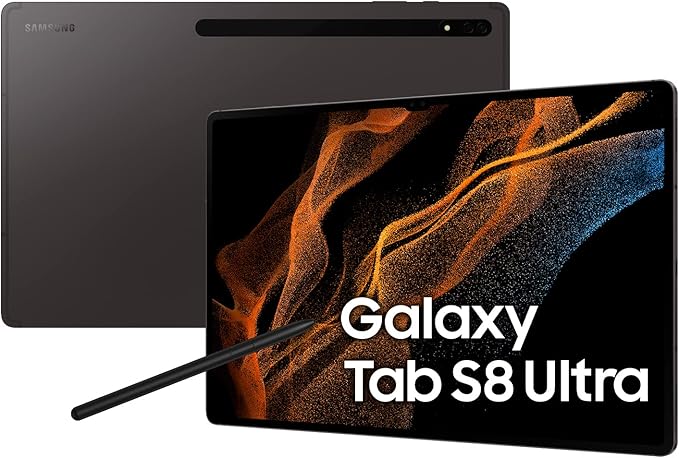
Samsung SM-X806BZAAXSA Galaxy Tab S8+ 5G 12.4" 128GB - Graphite
Enter the streamlined world of the Samsung Galaxy Tab S8+, a handy companion for productivity and entertainment. It has an ultra-wide 12.4" display, which is ideal for split-screening multiple apps, and is supported by a stutter-free 120 Hz display. Using the S-Pen, you can easily edit documents and take notes with a responsive feel.
Enter the streamlined world of the Samsung Galaxy Tab S8+, a handy companion for productivity and entertainment. It has an ultra-wide 12.4" display, which is ideal for split-screening multiple apps, and is supported by a stutter-free 120 Hz display. Using the S-Pen, you can easily edit documents and take notes with a responsive feel.
Enter the streamlined world of the Samsung Galaxy Tab S8+, a handy companion for productivity and entertainment. It has an ultra-wide 12.4" display, which is ideal for split-screening multiple apps, and is supported by a stutter-free 120 Hz display. Using the S-Pen, you can easily edit documents and take notes with a responsive feel.
Enter the streamlined world of the Samsung Galaxy Tab S8+, a handy companion for productivity and entertainment. It has an ultra-wide 12.4" display, which is ideal for split-screening multiple apps, and is supported by a stutter-free 120 Hz display. Using the S-Pen, you can easily edit documents and take notes with a responsive feel.
in 14 offers
The lowest price for Samsung SM-X806BZAAXSA Galaxy Tab S8+ 5G 12.4" 128GB - Graphite right now is $489.00 at Phonebot, compared across 8 retailers.
The all-time low was $224.10 on 24 May 2026 — today's price is 118% above the lowest ever. It has been notably cheaper before — worth setting a price alert.
Prices last updated 29 Sept 2026.
Last updated at 29/09/2026 12:45:22
Samsung Galaxy Tab S8 Plus 5G (128GB) [Grade B]
Free delivery
Samsung Galaxy Tab S8 Plus 5G (128GB) [Grade A]
Free delivery
Samsung Galaxy Tab S8 Plus 5G (256GB) [Like New]
Free delivery
Samsung Galaxy Tab S8 Plus 5G (128GB) [Brand New]
Free delivery
Samsung Galaxy Tab S8 Plus 5G 128GB WIFI+Cellular Graphite Brand New
Free delivery between 2–7 Oct
Samsung Galaxy Tab S8+ Plus 5G 128GB Dark Grey [Refurbished] - Excellent
Free delivery between Wed – Thu
Samsung Galaxy Tab S8+ Plus 5G (128GB/8GB, 12.4'') - Dark Grey
Free delivery between Wed – Thu
Samsung Galaxy Tab S8+ Plus 5G 128GB Dark Grey [Refurbished] - Excellent
Samsung Galaxy Tab S8+ Plus 5G (128GB/8GB, 12.4'') - Dark Grey
Samsung Galaxy Tab S8+ Plus 5G 128GB Dark Grey [Refurbished] - Excellent
originally posted on samsung.com
First off I want to say that I did not expect the size of this tablet. I saw the specs but coming from a Galaxy tab s6 it threw me for a loop for how big it was. I'm not complaining because it actually comes in handy due to the excellent multi-tasking functionality. One of the main reasons why I use this tablet is to browse articles, social media or videos. With this tablet I'm able to do two or three of these things at the same time. I can even be on a web conferencing call while taking notes using Samsung notes. The speed of this tablet is also excellent. It has to be if it wants to handle running two or three apps at the same time. And also allows me to stream Xbox games directly to my tablet seamlessly. The expandable storage is also a plus. I can download all ... MoreFirst off I want to say that I did not expect the size of this tablet. I saw the specs but coming from a Galaxy tab s6 it threw me for a loop for how big it was. I'm not complaining because it actually comes in handy due to the excellent multi-tasking functionality. One of the main reasons why I use this tablet is to browse articles, social media or videos. With this tablet I'm able to do two or three of these things at the same time. I can even be on a web conferencing call while taking notes using Samsung notes. The speed of this tablet is also excellent. It has to be if it wants to handle running two or three apps at the same time. And also allows me to stream Xbox games directly to my tablet seamlessly. The expandable storage is also a plus. I can download all kinds of videos books or whatever to my tablet without worrying about running it out of space. It is very useful when taking long trips. I also want to say that Samsung Dex is pretty useful. If I ever want to move up to the big screen I can very easily without worrying about transferring files to a different computer. My only issue with it is that it could be easier to switch between sounds coming from the tablet or the USB-C connection. Overall this is a great tablet for tablet lovers and those who multitask.
originally posted on samsung.com
When it first released, it took a long time to get this tablet, but since I arrived it, I must say it has worked almost flawlessly. The flaws are more so software related in some instances and they're third party. Samsung should continue to promote and ensure that when new versions of apps are released that those that especially benefit from a large screen such as for watching movies and drawing are made to work right away on the latest Android version for tablets. In terms of Samsung's own software, there is little to complain about. From split screen features, to S Pen use and the innovative Bixby Routines, pretty much everything works quite well. The screen is right up there where Samsung is in a category of its own with the Super Amoled type display. As a owner ... MoreWhen it first released, it took a long time to get this tablet, but since I arrived it, I must say it has worked almost flawlessly. The flaws are more so software related in some instances and they're third party. Samsung should continue to promote and ensure that when new versions of apps are released that those that especially benefit from a large screen such as for watching movies and drawing are made to work right away on the latest Android version for tablets. In terms of Samsung's own software, there is little to complain about. From split screen features, to S Pen use and the innovative Bixby Routines, pretty much everything works quite well. The screen is right up there where Samsung is in a category of its own with the Super Amoled type display. As a owner of a couple other premium devices from competitors, unless my device needs recharging, pretty much all my media consumption is done on the Tab S8 Ultra. Same when it comes to mobile productivity. Being able to use three apps at once, in addition to having others floating can be very useful. From watching informative videos, taking notes using Samsung Notes and if need be to use the calculator as part of it, it can all be done seemlessly. The SPen is included and is clearly an integral part of the experience. I use it all the time, there are so many uses for it. The nib is perfect for writing and drawing. Interestingly although I use it every day the equivalent of a few pages worth of writing daily, I have not needed to replace the nib. The recharging of the Spen happens so quickly that there has not been a single instance where I was delayed from performing a given action. As a preorder I got the keyboard case and must say it is also right up there with some of the best. It is backlit and comfortable to type with, the keys are deep enough and responsive. The row of extra functions and shortcuts are well thought out. From time to time there are updates to the keyboard improving on an already very good product. Two features that would be interesting to see in the future would be that the keyboard is at an angle on flat surfaces, like in the MS Surface keyboard, which further improves the typing experience given the more natural angle it creates for the wrists, allowing longer use. Finally, an integrated fingerprint scanner with the keyboard would be interesting. The back cover is sturdy and protects well the tablet while ensuring that the SPen is not lost, even though the magnets attaching it to the back of the tablet are quite strong. DEX is an excellent window based environment which Samsung should continue to innnovate with. While I don't use it too often given that the One UI interface provides so many features, further accentuated by the Good Lock apps, it is still quite interesting to have two fully performing environments to work in. After 6 months with this tablet, the performance has continued to be excellent, perhaps the main challenge for Samsung for future iterations is to find new areas to innovate in. Wireless power sharing would be a good feature and wireless charging with a dock at an angle to allow continuous use would be also a valuable feature. Otherwise continuing to work with apps that are seemingly designed only for phones so that they adapt to the screen size and orientation, would also be valuable. And for those wondering, the camera notch is barely noticeable with a screen this size, and software features allow to cover it by adjusting size of images while retaining great viewing aspect ratio.
originally posted on samsung.com
The Tab 8+ is the perfect size, and paired with last year's keyboard cover (that covers the pen, and allows the keyboard to detach from the kickstand), and Samsung Dex, it's a fabulous laptop replacement when I travel. The screensize allows the keyboard to be big enough to not be cramped feeling, yet it's still small enough for me to hold in one hand and write notes with the other. I love that it integrates perfectly with my S22 Ultra, and my Buds 2 Pro's. I can easily send and receive texts, and if I'm watching media on my tablet, and my phone rings, my media is paused and the buds automatically switch to my phone. Honestly, the device is just a perfect tool. Its flexibility is so useful. Within a day, I can attach it to the keyboard and using Samsung Dex, I can do ... MoreThe Tab 8+ is the perfect size, and paired with last year's keyboard cover (that covers the pen, and allows the keyboard to detach from the kickstand), and Samsung Dex, it's a fabulous laptop replacement when I travel. The screensize allows the keyboard to be big enough to not be cramped feeling, yet it's still small enough for me to hold in one hand and write notes with the other. I love that it integrates perfectly with my S22 Ultra, and my Buds 2 Pro's. I can easily send and receive texts, and if I'm watching media on my tablet, and my phone rings, my media is paused and the buds automatically switch to my phone. Honestly, the device is just a perfect tool. Its flexibility is so useful. Within a day, I can attach it to the keyboard and using Samsung Dex, I can do a quick morning check of my emails. As it works seamlessly with the Microsoft office suite my employer uses, I can create or edit files as needed. Then as I jump into meetings, I can take notes, continuing with the keyboard and Dex, or, take the keyboard off, then it to a portrait orientation and write notes by hand. The forward facing camera is great fir a Team's meeting, and I can use the pen to collaborate with my colleagues using the Teams whiteboard. Out of work, I pop off the keyboard and enjoy the gorgeous display as I watch streaming movies, and can easily transfer photos from my phone to edit them on the larger screen. It might be the most useful piece of technology that I've ever purchased.
| Storage Size | 128GB |
| Screen Size | 12.4 inches |
| Operating System | Android |
| Wi-Fi | Yes |
| Display Resolution | 2800 x 1752 |
Samsung Galaxy Tab S8 Plus 5G (128GB) [Grade B]
Free delivery
Samsung Galaxy Tab S8 Plus 5G (128GB) [Grade A]
Free delivery
Samsung Galaxy Tab S8 Plus 5G (256GB) [Like New]
Free delivery
Samsung Galaxy Tab S8 Plus 5G (128GB) [Brand New]
Free delivery
Samsung Galaxy Tab S8 Plus 5G 128GB WIFI+Cellular Graphite Brand New
Free delivery between 2–7 Oct
First off I want to say that I did not expect the size of this tablet. I saw the specs but coming from a Galaxy tab s6 it threw me for a loop for how big it was. I'm not complaining because it actually comes in handy due to the excellent multi-tasking functionality. One of the main reasons why I use this tablet is to browse articles, social media or videos. With this tablet I'm able to do two or three of these things at the same time. I can even be on a web conferencing call while taking notes using Samsung notes. The speed of this tablet is also excellent. It has to be if it wants to handle running two or three apps at the same time. And also allows me to stream Xbox games directly to my tablet seamlessly. The expandable storage is also a plus. I can download all ... MoreFirst off I want to say that I did not expect the size of this tablet. I saw the specs but coming from a Galaxy tab s6 it threw me for a loop for how big it was. I'm not complaining because it actually comes in handy due to the excellent multi-tasking functionality. One of the main reasons why I use this tablet is to browse articles, social media or videos. With this tablet I'm able to do two or three of these things at the same time. I can even be on a web conferencing call while taking notes using Samsung notes. The speed of this tablet is also excellent. It has to be if it wants to handle running two or three apps at the same time. And also allows me to stream Xbox games directly to my tablet seamlessly. The expandable storage is also a plus. I can download all kinds of videos books or whatever to my tablet without worrying about running it out of space. It is very useful when taking long trips. I also want to say that Samsung Dex is pretty useful. If I ever want to move up to the big screen I can very easily without worrying about transferring files to a different computer. My only issue with it is that it could be easier to switch between sounds coming from the tablet or the USB-C connection. Overall this is a great tablet for tablet lovers and those who multitask.
When it first released, it took a long time to get this tablet, but since I arrived it, I must say it has worked almost flawlessly. The flaws are more so software related in some instances and they're third party. Samsung should continue to promote and ensure that when new versions of apps are released that those that especially benefit from a large screen such as for watching movies and drawing are made to work right away on the latest Android version for tablets. In terms of Samsung's own software, there is little to complain about. From split screen features, to S Pen use and the innovative Bixby Routines, pretty much everything works quite well. The screen is right up there where Samsung is in a category of its own with the Super Amoled type display. As a owner ... MoreWhen it first released, it took a long time to get this tablet, but since I arrived it, I must say it has worked almost flawlessly. The flaws are more so software related in some instances and they're third party. Samsung should continue to promote and ensure that when new versions of apps are released that those that especially benefit from a large screen such as for watching movies and drawing are made to work right away on the latest Android version for tablets. In terms of Samsung's own software, there is little to complain about. From split screen features, to S Pen use and the innovative Bixby Routines, pretty much everything works quite well. The screen is right up there where Samsung is in a category of its own with the Super Amoled type display. As a owner of a couple other premium devices from competitors, unless my device needs recharging, pretty much all my media consumption is done on the Tab S8 Ultra. Same when it comes to mobile productivity. Being able to use three apps at once, in addition to having others floating can be very useful. From watching informative videos, taking notes using Samsung Notes and if need be to use the calculator as part of it, it can all be done seemlessly. The SPen is included and is clearly an integral part of the experience. I use it all the time, there are so many uses for it. The nib is perfect for writing and drawing. Interestingly although I use it every day the equivalent of a few pages worth of writing daily, I have not needed to replace the nib. The recharging of the Spen happens so quickly that there has not been a single instance where I was delayed from performing a given action. As a preorder I got the keyboard case and must say it is also right up there with some of the best. It is backlit and comfortable to type with, the keys are deep enough and responsive. The row of extra functions and shortcuts are well thought out. From time to time there are updates to the keyboard improving on an already very good product. Two features that would be interesting to see in the future would be that the keyboard is at an angle on flat surfaces, like in the MS Surface keyboard, which further improves the typing experience given the more natural angle it creates for the wrists, allowing longer use. Finally, an integrated fingerprint scanner with the keyboard would be interesting. The back cover is sturdy and protects well the tablet while ensuring that the SPen is not lost, even though the magnets attaching it to the back of the tablet are quite strong. DEX is an excellent window based environment which Samsung should continue to innnovate with. While I don't use it too often given that the One UI interface provides so many features, further accentuated by the Good Lock apps, it is still quite interesting to have two fully performing environments to work in. After 6 months with this tablet, the performance has continued to be excellent, perhaps the main challenge for Samsung for future iterations is to find new areas to innovate in. Wireless power sharing would be a good feature and wireless charging with a dock at an angle to allow continuous use would be also a valuable feature. Otherwise continuing to work with apps that are seemingly designed only for phones so that they adapt to the screen size and orientation, would also be valuable. And for those wondering, the camera notch is barely noticeable with a screen this size, and software features allow to cover it by adjusting size of images while retaining great viewing aspect ratio.
The Tab 8+ is the perfect size, and paired with last year's keyboard cover (that covers the pen, and allows the keyboard to detach from the kickstand), and Samsung Dex, it's a fabulous laptop replacement when I travel. The screensize allows the keyboard to be big enough to not be cramped feeling, yet it's still small enough for me to hold in one hand and write notes with the other. I love that it integrates perfectly with my S22 Ultra, and my Buds 2 Pro's. I can easily send and receive texts, and if I'm watching media on my tablet, and my phone rings, my media is paused and the buds automatically switch to my phone. Honestly, the device is just a perfect tool. Its flexibility is so useful. Within a day, I can attach it to the keyboard and using Samsung Dex, I can do ... MoreThe Tab 8+ is the perfect size, and paired with last year's keyboard cover (that covers the pen, and allows the keyboard to detach from the kickstand), and Samsung Dex, it's a fabulous laptop replacement when I travel. The screensize allows the keyboard to be big enough to not be cramped feeling, yet it's still small enough for me to hold in one hand and write notes with the other. I love that it integrates perfectly with my S22 Ultra, and my Buds 2 Pro's. I can easily send and receive texts, and if I'm watching media on my tablet, and my phone rings, my media is paused and the buds automatically switch to my phone. Honestly, the device is just a perfect tool. Its flexibility is so useful. Within a day, I can attach it to the keyboard and using Samsung Dex, I can do a quick morning check of my emails. As it works seamlessly with the Microsoft office suite my employer uses, I can create or edit files as needed. Then as I jump into meetings, I can take notes, continuing with the keyboard and Dex, or, take the keyboard off, then it to a portrait orientation and write notes by hand. The forward facing camera is great fir a Team's meeting, and I can use the pen to collaborate with my colleagues using the Teams whiteboard. Out of work, I pop off the keyboard and enjoy the gorgeous display as I watch streaming movies, and can easily transfer photos from my phone to edit them on the larger screen. It might be the most useful piece of technology that I've ever purchased.
I set out to find a tablet I could use as a command center in my truck for safety, OBd2 monitoring, music, cameras etc. It needed to have a larger touch screen with keyboard capabilities, android OS, be usable at home as a highly used device with long battery life, and 5g Hotspot capabilities for supporting other devices on the road or at home (the wife's a online tutor). I had moved to iOS in 2018 from android as I needed a change with both tablets and phones. I wished I hadn't swjtched as Android has really developed into a solid robust operating system. Samsung product line is far less expensive, less restrictive and far more capable than iOS imo. I had been using an iPad pro and iPhone 12 pro max (about to trade it in for a s22 ultra). Wow I have been absolutely ... MoreI set out to find a tablet I could use as a command center in my truck for safety, OBd2 monitoring, music, cameras etc. It needed to have a larger touch screen with keyboard capabilities, android OS, be usable at home as a highly used device with long battery life, and 5g Hotspot capabilities for supporting other devices on the road or at home (the wife's a online tutor). I had moved to iOS in 2018 from android as I needed a change with both tablets and phones. I wished I hadn't swjtched as Android has really developed into a solid robust operating system. Samsung product line is far less expensive, less restrictive and far more capable than iOS imo. I had been using an iPad pro and iPhone 12 pro max (about to trade it in for a s22 ultra). Wow I have been absolutely blown away. It took me a few days to get the feel back with how android functions and the changes they have made. The screen quality is nothing short of stunning when watching 4k or higher resolution movies. The S-Pen makes quick work of editing photos and I'm still trying to learn how to use it to it'1s full potential (the erase feature of objects in photos is incredible. The new Dex operating system is fantastic for those who are accustomed to using windows ( it looks and feels just like it). The processor speed is the fastest I have ever experienced. I've built many PC's over several decades and I can say with absolute honestly say its lightening fast and could be compared to high end gaming PC's. I haven't put it through rigorous benchmark testing yet. But, I will post about my results once I get it done. All in all I absolutely love it and anyonemon the fence should have no reservations.
This had all the tick boxes I was looking for besides cellular capability. The only disappointment I have is I need to use my S10 to provide internet when I'm not near Wi-Fi and wireless charging isn’t built in. I have a workhorse PC and my laptop will soon need to be retired so this will probably be my replacement for the laptop. I immediately went and bought a 256Gb micro sd card so I can have my data on the removable media. Competition doesn't have this feature. I would consider myself a power user pushing the limits a little further than the average user. I love the pen. When I change to my S10 I am trying to use the pen on it, I guess the next S ultra will be on the list. I have been using it to complete drawings and it has worked well. The handwriting works ... MoreThis had all the tick boxes I was looking for besides cellular capability. The only disappointment I have is I need to use my S10 to provide internet when I'm not near Wi-Fi and wireless charging isn’t built in. I have a workhorse PC and my laptop will soon need to be retired so this will probably be my replacement for the laptop. I immediately went and bought a 256Gb micro sd card so I can have my data on the removable media. Competition doesn't have this feature. I would consider myself a power user pushing the limits a little further than the average user. I love the pen. When I change to my S10 I am trying to use the pen on it, I guess the next S ultra will be on the list. I have been using it to complete drawings and it has worked well. The handwriting works nicely and can interpret mine with ease. Still getting used to the motions of the pen so I don't have to use the onscreen keyboard for deleting and backspacing. The battery seems decent. I can go for most of a workday using it pretty heavily and it will still have some charge when I head home. The only worry is I'm going to leave the pen somewhere. Hopefully, I put the pen in the back of the case that I bought for the S8+ (I have turned on the left the pen behind feature so hopefully I look before leaving it). I use it connected to a smart tv periodically for PowerPoints. Nice to be able to project to the tv directly. I have also used it as a wireless display with my laptop which is a nice feature. The plan is to use it on the dive boat as an alternative to a laptop. I have 2 action cameras that I can download wirelessly from, and this is powerful enough to watch the 4k video on. I love and hate the size. It isn't small which is great (since I am getting older, and my eyesight isn't what it used to be). It can get heavy if you are walking and using it. Sitting on a chair at a table with a case with a stand was a good investment. It is slippery without a case so research your needs and get it in one early. I have hooked up several items to the USB-C connector. I don't have a Bluetooth mouse yet, so I have used a hub and transceiver to connect an external keyboard and mouse. The file manager is nice that it will connect to a PC or Windows Server. I can move files back and forth wirelessly for backup purposes. Integration with other Samsung products is seamless. I was worried I would have to turn on my wireless tethering each time but when my phone sees the S8+ and I hit the internet there is a brief delay and then it connects to the cell phone. Overall I don’t have any complaints other than I considered the competitor's product because of the cellular integration but I have workarounds for that.
Great Tablet and superb screen resolution. Processor is quick and DEX mode makes it more like a proper laptop. I do not like the S Pen holder arrangement and without the keyboard cover case I have now bought it kept getting knocked off when in use. For what it is the keyboard cover is really expensive. I am also fed up with the Samsung pricing policy as just after I purchased the tablet Sammsung had a cashback special and this was really annoying. Nobody at Samsung customer service ever replies to e-mails and this has been consistent with other products like my Samsung washing machine. As such any after service seems non-existent. I have had to scour the interned and YouTube for tutorials and do's and dont's re using the tablet and this is frustrating too - you ... MoreGreat Tablet and superb screen resolution. Processor is quick and DEX mode makes it more like a proper laptop. I do not like the S Pen holder arrangement and without the keyboard cover case I have now bought it kept getting knocked off when in use. For what it is the keyboard cover is really expensive. I am also fed up with the Samsung pricing policy as just after I purchased the tablet Sammsung had a cashback special and this was really annoying. Nobody at Samsung customer service ever replies to e-mails and this has been consistent with other products like my Samsung washing machine. As such any after service seems non-existent. I have had to scour the interned and YouTube for tutorials and do's and dont's re using the tablet and this is frustrating too - you would think Samsung woould have better dedicated support for their high end products. It is of note that Apple do! That said, the tablet oozes quality and is fast with really good sound and resolution. I just fear if anything goes wrong I will be left in the wilderness and do not feel valued by Samsung despite being a really loyal customer ( Washing machine, 55 inch QLED TV, Galaxy Earbuds, S22 Ultra Phone, Tab8 Ultra). Enough said!
Okay, lets start at beginning, my S8 Ultra was bought as a crossover to enable access to both reports, research sites, (via MS WORD and PDF's) and the tablet for use with clients (va websites) . The first thing to note is the software is written for phones, not highspec tablets, so the MS Office is exceptionally poor and as a result cannot perfom one of my basic requirements. It cannot act as a crossover. I cannot get the multiscreen to work, so am restriced to one screen at a time, slowing me down. As a new Samsung user I assume some of the difficulties are due to not knowing their system, though they have nothing to show me how to use it! Some of the manual is well written and makes sense, while much is written for experienced Samsung users, I assume! The speed of ... MoreOkay, lets start at beginning, my S8 Ultra was bought as a crossover to enable access to both reports, research sites, (via MS WORD and PDF's) and the tablet for use with clients (va websites) . The first thing to note is the software is written for phones, not highspec tablets, so the MS Office is exceptionally poor and as a result cannot perfom one of my basic requirements. It cannot act as a crossover. I cannot get the multiscreen to work, so am restriced to one screen at a time, slowing me down. As a new Samsung user I assume some of the difficulties are due to not knowing their system, though they have nothing to show me how to use it! Some of the manual is well written and makes sense, while much is written for experienced Samsung users, I assume! The speed of the tablet is adequate, but not fast; my 10 year old Sony Vaio Z series running Windows 2010 is much faster, even now. This is supposed to be a high-end tablet, so where is the high-end perfomance? However, picture quality is on a par with the Sony Vaio, which is good, and when showing Netflix is again on a par. However, sound quality on the S8 is excellent for mobile tech. Build quality also apprears to be adequate, though time will tell. The keyboard is good and appears to be well-built. Accessing support from MS to investigate oprtions for software problems said the basic issue was a result of Samsung, who could have enabled the tablet to work with the full MS Office, and who after many hours trying to help me find solutions had to give up. Accessing suppport from Samsung produced 'quality' that ranged from awful, to excellent. They sent me the manual and found me a possible siolution to the MS issue, though this proved inadequate; but it was good they could offer an option. Overall, the S8 is hype, and I will have to give it away to a family member so they can use it as a social media tool. I am very disappointed in my first move into the world of Samsung.
It is important to note that this specific tablet is not a laptop. It is a tablet before a laptop, if you want a more laptop oriented device with the same versatility of a tablet then get the surface pro. Absolutely stellar design. The multitasking of the tablet helps with business, conference calls, and even school work. This specific model has a sim card, one that fits with my AT&T data plan. The cellular data is cheap, and being able to carry the tablet around and use it to get any work done is very very convenient. The OLED screen is definitely worth the extra price up from the regular S8. S pen really shines on the S8, the new os helps make the pen viable, and often time better than some of the other smart pens out there. Great for digital art, as I originally ... MoreIt is important to note that this specific tablet is not a laptop. It is a tablet before a laptop, if you want a more laptop oriented device with the same versatility of a tablet then get the surface pro. Absolutely stellar design. The multitasking of the tablet helps with business, conference calls, and even school work. This specific model has a sim card, one that fits with my AT&T data plan. The cellular data is cheap, and being able to carry the tablet around and use it to get any work done is very very convenient. The OLED screen is definitely worth the extra price up from the regular S8. S pen really shines on the S8, the new os helps make the pen viable, and often time better than some of the other smart pens out there. Great for digital art, as I originally got this tablet to help work on digital art. Although its become quite the workhorse. Battery is absolutely worth it over the Surface pro (6-7 hours heavy use for S8+), I often feel you get more power with the surface pro but you sacrifice other specifications for that. The tablet looks great and runs smoothly despite only having 8gb of ram. Adding more storage allows this device to remain being used for quite a while, the extra 1tb really helps longevity. Gaming (if your into mobile gaming) is quite good, big screen, connect controller, and it works really well. Typing with the tablet keyboard case is comfortable and is most definitely a needed item for this tablet. That was quite a lot to write about, i hope I got everything, but if your wondering weather its worth it. It definitely is.
Bought this with my S22 Ultra, mainly because of the discount for pre-ordering and bundling them, and because I heard very good things about the S7+. Before this I hadn't owned a tablet in 6 years because they just weren't worth it, and there are still problems with apps and android itself not being optimized for tablets, which will hopefully be at least partially remedied with Android 12L later this year. This tablet isn't perfect, for instance I wish for this price it had an ultrasonic fingerprint sensor, I have dry skin and often my hands are cracked and so I uave trouble with fp sensors, but never with the ultrasonic ones in my old S20+ and S22 ultra, but unfortunately I do often have problems with the optical sensor in my tab S8+, to the point that it isn't ... MoreBought this with my S22 Ultra, mainly because of the discount for pre-ordering and bundling them, and because I heard very good things about the S7+. Before this I hadn't owned a tablet in 6 years because they just weren't worth it, and there are still problems with apps and android itself not being optimized for tablets, which will hopefully be at least partially remedied with Android 12L later this year. This tablet isn't perfect, for instance I wish for this price it had an ultrasonic fingerprint sensor, I have dry skin and often my hands are cracked and so I uave trouble with fp sensors, but never with the ultrasonic ones in my old S20+ and S22 ultra, but unfortunately I do often have problems with the optical sensor in my tab S8+, to the point that it isn't usable at times. I also with the cameras were slightly better, I know it's a tablet, but the 6mp sensor is a joke, and the others aren't great either. The 12mp on the front is decent bit I know Samsung has cheap sensors that are better than the rear sensors on this (they put them in their A and M series phones) and I wish there was an option for 12gb ram in the S8+ not just the S8 ultra which really isn't for everyone. The S8+ is definitely the workhorse of the 3, Samsung knows this it's the only one with an option for 5g, I know other countries have the option for cell service in the S8 and I think maybe the S8 ultra, as well as S8+ models with 12gb ram, they just don't offer them in the US, which is annoying. All that said, I still give it 5 stars because it is the only real option for a flagship quality android tablet, and because the display is beautiful (even if I wish it had adaptive refresh rate,) Samsung tablets are the only tablets with dex mode, you can use it as an extra screen for a laptop, or use a TV or monitor as an extra display for the S8+, and it's designed to work very well with Samsung phones, so notes etc can be continued on my phone and vice versa. It also comes with an S Pen, something apple should take note of, and the S Pen integration is great plus air actions is very useful and the s pen itself works great, latency is super low (in certain apps, some are limited by software latency) the form factor is also great, it's a large tablet but it's almost all screen, and it's very thin which is great because when you add a case it doesn't end up too bulky. Despite being thin, they are very tough as Zack from JerryRigEverything proved when he couldn't bend/break an S8 ultra (unlike the ipad pro which folded in half easily,) so apparently the "armor aluminum" is actually very strong. The Snapdragon 8 gen 1 performs very well too, despite it's shortcomings, the heating issue doesn't appear to be as much of an issue in tablets which have a larger surface area for cooling, so there is no option to throttle the performance because there is no need to, and despite not measuring as well as the M1 on paper, it stacks up quite well in benchmarks and gaming tests, at times outperforming the M1 with respect to frame rate and image quality. Overall, despite a number of shortcomings, and the fact that it really feels like using an oversized phone at times because Android isn't currently set up for tablets (though Samsung does make improvements over normal Android with their One UI skin) I do love this tablet, the S Pen and beautiful display definitely make up for a lot of the problems, and I firmly believe this is the only real option for a high quality Android tablet
I use my tablet as a backup to my S7 Ultra and for "basic" internet usage. Blue tooth and physical connectivity to my S7 Ultra, is seamless and fast; truly plug and Play. WiFi connectivity is flawless. The dual speakers provide excellent sound reproduction throughout their sound level capabilities, supporting high and low notes from blues to rock to opera without distortion. Human to machine interface is stuck at voice, (with all the attendant early 21st century clumsiness), and a good start at using a pen as input device. Voice input editing requires coming out of voice by touching the screen, or hitting a keyboard button, while use of the pen for input into a form, such as this, is not supported at all. Occasionally voice to text arbitrarily capitalizes some ... MoreI use my tablet as a backup to my S7 Ultra and for "basic" internet usage. Blue tooth and physical connectivity to my S7 Ultra, is seamless and fast; truly plug and Play. WiFi connectivity is flawless. The dual speakers provide excellent sound reproduction throughout their sound level capabilities, supporting high and low notes from blues to rock to opera without distortion. Human to machine interface is stuck at voice, (with all the attendant early 21st century clumsiness), and a good start at using a pen as input device. Voice input editing requires coming out of voice by touching the screen, or hitting a keyboard button, while use of the pen for input into a form, such as this, is not supported at all. Occasionally voice to text arbitrarily capitalizes some words. When AI gets to be real, maybe we will be able to intersperse commands (and punction) with text. That said, the above faults represent the state of the art of publicly available human-machine interface. Currently noo publicly available machine does better. In a zoom session, you will wish your selfie to be "closer", while maintaining the realization of others on the call. Unfortunately, you cannot pinch to zoom the "selfie"/forward facing camera, so that to others on the zoom call, you appear closer to the screen. That is a major design specification/fault. The screen is bright and easily dimmed to easily accommodate background lighting. Color faithfulness are typical of all Samsung devices.
| Storage Size | 128GB |
| Screen Size | 12.4 inches |
| Operating System | Android |
| Wi-Fi | Yes |
| Display Resolution | 2800 x 1752 |