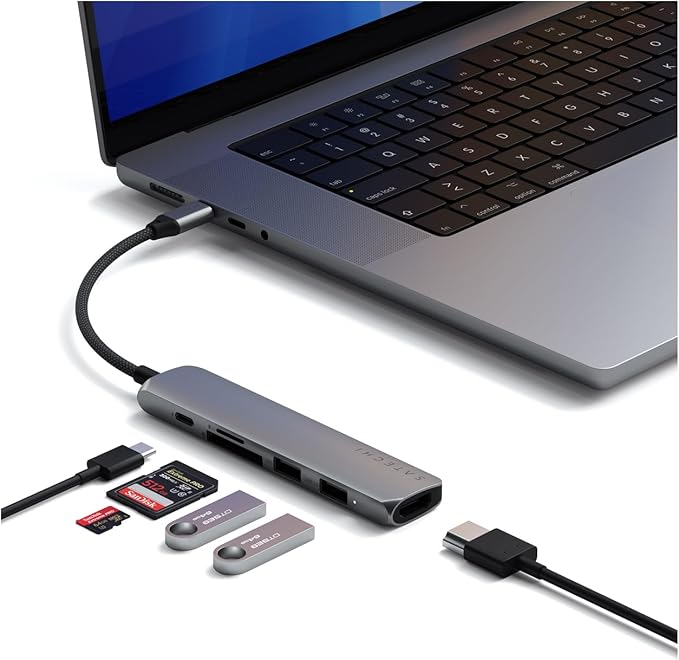
Satechi USB-C Slim Multi-port Adapter (Space Grey)
Satechi USB-C Multi-Port Hub space gray This luxury Satechi USB-C adapter is specifically designed for use with the Thunderbolt 3 connector on MacBook and MacBook Pro, but works with all laptops, smartphones and tablets that have a USB-C connector. The Satechi adapter not only offers a 4K HDMI connection, but also two standard USB 3.0 connections and a USB passthrough port which makes it possible to charge your device while the Satechi adapter is connected. With the help of this adapter it is for example possible to directly connect your charger, an external HDMI display and two USB devices such as a printer and hard drive with one USB-C plug. Especially if you use your MacBook or laptop for business purposes this will make an expensive dock superfluous. The small size makes the USB-C Hub easy to carry in your bag, backpack or laptop case. No matter where you go, you'll always have access to your favorite USB devices!
Satechi USB-C Multi-Port Hub space gray This luxury Satechi USB-C adapter is specifically designed for use with the Thunderbolt 3 connector on MacBook and MacBook Pro, but works with all laptops, smartphones and tablets that have a USB-C connector. The Satechi adapter not only offers a 4K HDMI connection, but also two standard USB 3.0 connections and a USB passthrough port which makes it possible to charge your device while the Satechi adapter is connected. With the help of this adapter it is for example possible to directly connect your charger, an external HDMI display and two USB devices such as a printer and hard drive with one USB-C plug. Especially if you use your MacBook or laptop for business purposes this will make an expensive dock superfluous. The small size makes the USB-C Hub easy to carry in your bag, backpack or laptop case. No matter where you go, you'll always have access to your favorite USB devices!
Satechi USB-C Multi-Port Hub space gray This luxury Satechi USB-C adapter is specifically designed for use with the Thunderbolt 3 connector on MacBook and MacBook Pro, but works with all laptops, smartphones and tablets that have a USB-C connector. The Satechi adapter not only offers a 4K HDMI connection, but also two standard USB 3.0 connections and a USB passthrough port which makes it possible to charge your device while the Satechi adapter is connected. With the help of this adapter it is for example possible to directly connect your charger, an external HDMI display and two USB devices such as a printer and hard drive with one USB-C plug. Especially if you use your MacBook or laptop for business purposes this will make an expensive dock superfluous. The small size makes the USB-C Hub easy to carry in your bag, backpack or laptop case. No matter where you go, you'll always have access to your favorite USB devices!
Satechi USB-C Multi-Port Hub space gray This luxury Satechi USB-C adapter is specifically designed for use with the Thunderbolt 3 connector on MacBook and MacBook Pro, but works with all laptops, smartphones and tablets that have a USB-C connector. The Satechi adapter not only offers a 4K HDMI connection, but also two standard USB 3.0 connections and a USB passthrough port which makes it possible to charge your device while the Satechi adapter is connected. With the help of this adapter it is for example possible to directly connect your charger, an external HDMI display and two USB devices such as a printer and hard drive with one USB-C plug. Especially if you use your MacBook or laptop for business purposes this will make an expensive dock superfluous. The small size makes the USB-C Hub easy to carry in your bag, backpack or laptop case. No matter where you go, you'll always have access to your favorite USB devices!
in 15 offers
The lowest price for Satechi USB-C Slim Multi-port Adapter (Space Grey) right now is $49.49 at Kayell Australia, compared across 14 retailers.
The all-time low was $39.00 on 4 Mar 2026 — today's price is 27% above the lowest ever. It has been notably cheaper before — worth setting a price alert.
Prices last updated 27 Oct 2026.
Last updated at 27/10/2026 04:46:27
Satechi 72w USB-C PD Car Charger (Space Grey)
Delivery $16.50
Satechi USB-C Slim Multi-Port Adapter - Space Grey
Free delivery between 30 Oct – 3 Nov
Satechi Type-c Slim Multi-port Adapter Usb Type-c/usb 3.0/4k Hdmi
Free delivery
Affiliate Disclosure: We may receive a small commission for purchases made through this link at no extra cost to you. This helps support our site. Thank you!
Satechi Usb-C Multiport 4K Grey USB Hub
Delivery $15
Satechi USB-C Slim Multi-Port Adapter - Space Grey
Satechi Slim USB-C Multiport Adapter (V1) (Space Grey)
Delivery by 3 Nov $9.70
Satechi Slim USB-C Multiport Adapter (V1) (Space Grey)
Delivery $9.90
Satechi Slim USB-C Multiport Adapter - Space Grey
Delivery between 30 Oct – 4 Nov $7.95
Satechi Slim USB-C MultiPort Adapter (Space Grey)
30-day returns
Satechi Slim USB-C Multiport Adapter (V1) Space Grey
Delivery $20
originally posted on pbtech.co.nz
I needed a Surface Pro dock and so googled where I could find one. A few options came up then there was this J5 one that seem to fit the bill. I then checked with the live chat as to how this product is and more importantly, how fast am I going to receive it as I needed it ASAP. The guy I chatted with was very good with his response. I then realised that the J5 product would leave me with no option to plug my headset. I mentioned this to the guy I was chatting with and he quickly recommended another option that would fit my requirements and would ship out the same day. This was the Satechi dock. I thanked him, and proceeded to order it. I was crossing my fingers to receive it the next day, but it being a Friday, I wasn't so sure. Well less than 24 hours after I ... MoreI needed a Surface Pro dock and so googled where I could find one. A few options came up then there was this J5 one that seem to fit the bill. I then checked with the live chat as to how this product is and more importantly, how fast am I going to receive it as I needed it ASAP. The guy I chatted with was very good with his response. I then realised that the J5 product would leave me with no option to plug my headset. I mentioned this to the guy I was chatting with and he quickly recommended another option that would fit my requirements and would ship out the same day. This was the Satechi dock. I thanked him, and proceeded to order it. I was crossing my fingers to receive it the next day, but it being a Friday, I wasn't so sure. Well less than 24 hours after I ordered it, it was delivered to my doorstep. I still had a few hours left of my Friday work time to check and use it. Been very helpful with my home office set up. Thanks, again.
originally posted on satechi.net
Totally LOVE this gadget! I can still charge my Macbook 12" with this dongle while using other ports as well (including an HDMI port). That solves the problem for my Samsung external monitor at home. For the Dell external monitor at the office (it has no HDMI port), I was using a dongle that I bought for AUD 20 in eBay. Although it connects directly from USB C to VGA port, it does not allow me to charge the laptop while I am using the VGA port. Hence, I can only charge my laptop when I ۪m on a lunch break or away from the desk for a while. Thus, for the Dell external monitor I bought Rankie HDMI to VGA dongle from Amazon. To connect the Rankie dongle with my Macbook, I use this Satechi HDMI port. So, it is Macbook-Satechi HDMI-Rankie HDMI to VGA-Dell monitor. A long ... MoreTotally LOVE this gadget! I can still charge my Macbook 12" with this dongle while using other ports as well (including an HDMI port). That solves the problem for my Samsung external monitor at home. For the Dell external monitor at the office (it has no HDMI port), I was using a dongle that I bought for AUD 20 in eBay. Although it connects directly from USB C to VGA port, it does not allow me to charge the laptop while I am using the VGA port. Hence, I can only charge my laptop when I ۪m on a lunch break or away from the desk for a while. Thus, for the Dell external monitor I bought Rankie HDMI to VGA dongle from Amazon. To connect the Rankie dongle with my Macbook, I use this Satechi HDMI port. So, it is Macbook-Satechi HDMI-Rankie HDMI to VGA-Dell monitor. A long way to go to the external monitor, but I can still charge my Macbook when I need to, while I ۪m also still using the external monitor. Oh, and the rose gold is amazing and matches my rose gold Macbook perfectly! The only thing I would change is the male port, I like the short one like the Satechi Type-C Pass Through USB Hub with USb_C Charging Port (Rose Gold).
originally posted on satechi.net
Nice little device that looks good & mostly works well. Problem is mostly with the marketing because the website has buried the the tech specs behind a "+" key that shows the gadget's limitations -- including that it doesn't support devices requiring power (e.g., Apple's SuperDrive). For $60, one'd think that it'd be easy to provide juice to connected devices (Apple's $19 adapter does it), but my bad for not reviewing the specs closely. Oh, well. Live & learn and remember always to shop around.
| Compatible OS | Mac OS |
| Compatible Brand | Apple |
| Compatible Device Type | Laptop, Desktop |
| Universal Compatibility | Compatible with various laptop and tablet models |
| Supported Resolutions | 4K (HDMI) |
Satechi 72w USB-C PD Car Charger (Space Grey)
Delivery $16.50
Satechi USB-C Slim Multi-Port Adapter - Space Grey
Free delivery between 30 Oct – 3 Nov
Satechi Type-c Slim Multi-port Adapter Usb Type-c/usb 3.0/4k Hdmi
Free delivery
Affiliate Disclosure: We may receive a small commission for purchases made through this link at no extra cost to you. This helps support our site. Thank you!
Satechi Usb-C Multiport 4K Grey USB Hub
Delivery $15
Satechi USB-C Slim Multi-Port Adapter - Space Grey
I needed a Surface Pro dock and so googled where I could find one. A few options came up then there was this J5 one that seem to fit the bill. I then checked with the live chat as to how this product is and more importantly, how fast am I going to receive it as I needed it ASAP. The guy I chatted with was very good with his response. I then realised that the J5 product would leave me with no option to plug my headset. I mentioned this to the guy I was chatting with and he quickly recommended another option that would fit my requirements and would ship out the same day. This was the Satechi dock. I thanked him, and proceeded to order it. I was crossing my fingers to receive it the next day, but it being a Friday, I wasn't so sure. Well less than 24 hours after I ... MoreI needed a Surface Pro dock and so googled where I could find one. A few options came up then there was this J5 one that seem to fit the bill. I then checked with the live chat as to how this product is and more importantly, how fast am I going to receive it as I needed it ASAP. The guy I chatted with was very good with his response. I then realised that the J5 product would leave me with no option to plug my headset. I mentioned this to the guy I was chatting with and he quickly recommended another option that would fit my requirements and would ship out the same day. This was the Satechi dock. I thanked him, and proceeded to order it. I was crossing my fingers to receive it the next day, but it being a Friday, I wasn't so sure. Well less than 24 hours after I ordered it, it was delivered to my doorstep. I still had a few hours left of my Friday work time to check and use it. Been very helpful with my home office set up. Thanks, again.
Totally LOVE this gadget! I can still charge my Macbook 12" with this dongle while using other ports as well (including an HDMI port). That solves the problem for my Samsung external monitor at home. For the Dell external monitor at the office (it has no HDMI port), I was using a dongle that I bought for AUD 20 in eBay. Although it connects directly from USB C to VGA port, it does not allow me to charge the laptop while I am using the VGA port. Hence, I can only charge my laptop when I ۪m on a lunch break or away from the desk for a while. Thus, for the Dell external monitor I bought Rankie HDMI to VGA dongle from Amazon. To connect the Rankie dongle with my Macbook, I use this Satechi HDMI port. So, it is Macbook-Satechi HDMI-Rankie HDMI to VGA-Dell monitor. A long ... MoreTotally LOVE this gadget! I can still charge my Macbook 12" with this dongle while using other ports as well (including an HDMI port). That solves the problem for my Samsung external monitor at home. For the Dell external monitor at the office (it has no HDMI port), I was using a dongle that I bought for AUD 20 in eBay. Although it connects directly from USB C to VGA port, it does not allow me to charge the laptop while I am using the VGA port. Hence, I can only charge my laptop when I ۪m on a lunch break or away from the desk for a while. Thus, for the Dell external monitor I bought Rankie HDMI to VGA dongle from Amazon. To connect the Rankie dongle with my Macbook, I use this Satechi HDMI port. So, it is Macbook-Satechi HDMI-Rankie HDMI to VGA-Dell monitor. A long way to go to the external monitor, but I can still charge my Macbook when I need to, while I ۪m also still using the external monitor. Oh, and the rose gold is amazing and matches my rose gold Macbook perfectly! The only thing I would change is the male port, I like the short one like the Satechi Type-C Pass Through USB Hub with USb_C Charging Port (Rose Gold).
Nice little device that looks good & mostly works well. Problem is mostly with the marketing because the website has buried the the tech specs behind a "+" key that shows the gadget's limitations -- including that it doesn't support devices requiring power (e.g., Apple's SuperDrive). For $60, one'd think that it'd be easy to provide juice to connected devices (Apple's $19 adapter does it), but my bad for not reviewing the specs closely. Oh, well. Live & learn and remember always to shop around.
I purchased a "Satechi USB-C Slim Aluminium Multiport Adapter (HDMI, USB 3.0)" in May 2018. Initially it worked fine and I was satisfied. Nice to the eye, not too big, it has the number of ports I needed. After a year of use, however, it overheats when attached to an external monitor, produces a hiss when connected (even without hardware connected to it). The connection is unstable and every time you move the cable, the image gets destabilized and you have to find the "sweet-spot" again.
My Mac book air has 3 ports.a 3.5mm jack, a USB C charging port and a USB C port- It's basically NOTHING.When buying my Mac-book Air I never considered buying it at the time but thankfully an employee recommended it to me and I have so so many headaches saved ahead of time.But if you own a new Apple product: get this and save yourself time.
Like the rest of the negative reviews here, I found the same issue once the cord starts to wear out with the screen becoming glitchy, wrapping around the screen etc. Do not recommend buying this. Mine only last just over 2 years
This is a high quality product, but I wish I had known this before I bought it. You may use it differently, but be aware to avoid becoming disappointed:— 4K - yes, but it's not HDMI 2.0. 4k@30hz is supported by almost all old HDMI ports, and at 30hz you can't use a mouse because it's too laggy.— USB A ports. Yes, but you can't use all the power that the USB C port of you MacBook Pro can hand out. iPhones will for example discharge rather than charge, especially if you share internet connection from it.— FORWARD CHARGING - yes but It can only forward 49W and the standard 15" charger is 87W, so if you have a 15" your computer will slowly discharge and die if you use this feature.— USB C PORT. This port is for forward charging only, you can't connect anything else ... MoreThis is a high quality product, but I wish I had known this before I bought it. You may use it differently, but be aware to avoid becoming disappointed:— 4K - yes, but it's not HDMI 2.0. 4k@30hz is supported by almost all old HDMI ports, and at 30hz you can't use a mouse because it's too laggy.— USB A ports. Yes, but you can't use all the power that the USB C port of you MacBook Pro can hand out. iPhones will for example discharge rather than charge, especially if you share internet connection from it.— FORWARD CHARGING - yes but It can only forward 49W and the standard 15" charger is 87W, so if you have a 15" your computer will slowly discharge and die if you use this feature.— USB C PORT. This port is for forward charging only, you can't connect anything else to it
Dont waste your money. This adapter never worked properly from the start. It connects and disconnects from my laptop every few seconds so is unusable. Ive tried Multiple USB Devices, mouse, keyboard, headset and portable Hard drives. They all continually disconnect. The HDMI port has never worked from my Windows 10 laptop to my Samsung Monitor.
This product completes the MBP as if it were meant to be made by Apple. The materials and style of this product feel like an Apple design. And I greatly prefer using this accessory for plugging in my desktop accessories with one simple USB-C/Thunderbolt 3 cable to my 2016 MBP than having to plug in multiple cables into the older MBPs. I can leave my HDMI monitor, USB-A iPhone docking station, USB-A Logitech Unity dongle and USB-C power chord plugged into this device and disconnect to go mobile with one simple, easy to connect USB-C cable. And If I want to bring this with me, its so small and portable that I can quickly disconnect the cables and drop it into my computer bag to take it with me. I might just buy two of them and keep one in my bag to make life simple. ... MoreThis product completes the MBP as if it were meant to be made by Apple. The materials and style of this product feel like an Apple design. And I greatly prefer using this accessory for plugging in my desktop accessories with one simple USB-C/Thunderbolt 3 cable to my 2016 MBP than having to plug in multiple cables into the older MBPs. I can leave my HDMI monitor, USB-A iPhone docking station, USB-A Logitech Unity dongle and USB-C power chord plugged into this device and disconnect to go mobile with one simple, easy to connect USB-C cable. And If I want to bring this with me, its so small and portable that I can quickly disconnect the cables and drop it into my computer bag to take it with me. I might just buy two of them and keep one in my bag to make life simple. That way I'll always have an easy way to connect to an HDMI projector on the go.Great product that makes the new MBP a really winner.
I bought this that year for my new macbook pro. It was a good buy and it worked well for a whole year (some issues with sound not being adjustable on my laptop when plugged into hdmi but that was resolved). I use it everyday in the classroom to connect to the board. Lately the transmission to my interactive board has been glitching (visuals shake back and forth randomly, white lines appear on screen, screen starts in middle of the board and wraps around). I tried different HDMI cords but it still happens. I think the cord between the dongle and the macbook has become worn out. I'm a bit disappointed with the lifetime of this product but I was happy with it whilst it worked.
| Compatible OS | Mac OS |
| Compatible Brand | Apple |
| Compatible Device Type | Laptop, Desktop |
| Universal Compatibility | Compatible with various laptop and tablet models |
| Supported Resolutions | 4K (HDMI) |