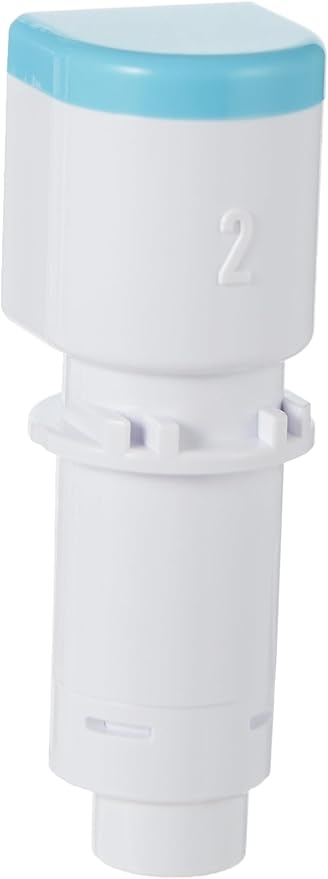
Silhouette - Cameo 4 Autoblade
For Select Cameo 4 and Portrait 3 Cutting Machines. This AutoBlade Type B (2nd Generation) from Silhouette can be used with select Cameo 4 and Portrait 3 cutting machines. It features a high-performance tungsten alloy blade with an adjustable blade length range of 0.1-1mm. The Silhouette Studio software program provides recommended cut settings for common material types which can be adjusted in the software as needed. When the job is sent to the cutting machine the AutoBlade will automatically be adjusted according to the selected setting from the software.
For Select Cameo 4 and Portrait 3 Cutting Machines. This AutoBlade Type B (2nd Generation) from Silhouette can be used with select Cameo 4 and Portrait 3 cutting machines. It features a high-performance tungsten alloy blade with an adjustable blade length range of 0.1-1mm. The Silhouette Studio software program provides recommended cut settings for common material types which can be adjusted in the software as needed. When the job is sent to the cutting machine the AutoBlade will automatically be adjusted according to the selected setting from the software.
For Select Cameo 4 and Portrait 3 Cutting Machines. This AutoBlade Type B (2nd Generation) from Silhouette can be used with select Cameo 4 and Portrait 3 cutting machines. It features a high-performance tungsten alloy blade with an adjustable blade length range of 0.1-1mm. The Silhouette Studio software program provides recommended cut settings for common material types which can be adjusted in the software as needed. When the job is sent to the cutting machine the AutoBlade will automatically be adjusted according to the selected setting from the software.
For Select Cameo 4 and Portrait 3 Cutting Machines. This AutoBlade Type B (2nd Generation) from Silhouette can be used with select Cameo 4 and Portrait 3 cutting machines. It features a high-performance tungsten alloy blade with an adjustable blade length range of 0.1-1mm. The Silhouette Studio software program provides recommended cut settings for common material types which can be adjusted in the software as needed. When the job is sent to the cutting machine the AutoBlade will automatically be adjusted according to the selected setting from the software.
in 14 offers
The lowest price for Silhouette - Cameo 4 Autoblade right now is $22.00 at Filaments.ca, compared across 9 retailers.
The all-time low was $17.99 on 23 Jan 2025 — today's price is 22% above the lowest ever. It has been notably cheaper before — worth setting a price alert.
Prices last updated 3 Oct 2026.
Last updated at 03/10/2026 19:11:46
SILHOUETTE of America AUTOBLADE, for use with Cameo 4 only, one Size | Silhouette Studio-Controlled Blade Automatically Adjusts from 0.1mm to 1mm for
Delivery $9.95
Affiliate Disclosure: We may receive a small commission for purchases made through this link at no extra cost to you. This helps support our site. Thank you!
Silhouette AutoBlade (Type B)
Silhouette Cameo 4/5 Blade- Autoblade
Delivery $10.20
Silhouette Cameo 4 Autoblade
Silhouette Cameo 4 Auto Blade with Sintered Tungsten Alloy - 1 Pack
Delivery between 11–14 Oct $29
Silhouette - Cameo 4 Autoblade
Delivery $10.99
Silhouette Cameo 4 Autoblade Silh-blade-auto-2 Also Works With
Delivery $25.66
Affiliate Disclosure: We may receive a small commission for purchases made through this link at no extra cost to you. This helps support our site. Thank you!
AEE8-Precision Cutting For Vinyl, Cardstock, And More - Auto Adjusting Blades For Silhouette Cameo
Delivery $5.45
Silhouette 4
Free delivery between 14–16 Oct
originally posted on joann.com
This is the best Silhouette blade. So easy to use.I make cake toppers and this is the blade that I use the most.I don't have to switch between blades for different materials, like cardstock, vinyl, vellum, or even acetate sheets.Another plus is that it is automatic, so when you're a making a project with different materials, you don't have to worry about removing the blade everytime you want to cut something different.100% recommend!
originally posted on michaels.com
So these usually work pretty well. I won't give them five stars for two reasons: one, they are expensive to replace and unlike the cricut blades, don't have the option to replace just the blade part. This is wasteful both in terms of money and the environment. The second issue is that they don't really last that long. Cutting on card stock will wear them out in as little as a month.
originally posted on michaels.com
This is my second and last autoblade. Both were defective, would not hold a blade position throughout a long cut, and never made a cut that did not require finishing by hand with a craft knife no matter how many times the cut settings were tweaked. The premium blades released during the cameo 3 iteration are still superior, though you will need an adapter to use them with the cameo 4. Like the rest of the changes with cameo 4, the autoblade is more hype than substance. Even the original black rachet blades cut better than the autoblade.
| Assembly required | No |
| Number of pieces | 1 |
| Batteries required | No |
| Operation mode | Automatic |
| Print media | Paper (plain) |

SILHOUETTE of America AUTOBLADE, for use with Cameo 4 only, one Size | Silhouette Studio-Controlled Blade Automatically Adjusts from 0.1mm to 1mm for
Delivery $9.95
Affiliate Disclosure: We may receive a small commission for purchases made through this link at no extra cost to you. This helps support our site. Thank you!
Silhouette AutoBlade (Type B)
Silhouette Cameo 4/5 Blade- Autoblade
Delivery $10.20
Silhouette Cameo 4 Autoblade
Silhouette Cameo 4 Auto Blade with Sintered Tungsten Alloy - 1 Pack
Delivery between 11–14 Oct $29
This is the best Silhouette blade. So easy to use.I make cake toppers and this is the blade that I use the most.I don't have to switch between blades for different materials, like cardstock, vinyl, vellum, or even acetate sheets.Another plus is that it is automatic, so when you're a making a project with different materials, you don't have to worry about removing the blade everytime you want to cut something different.100% recommend!
So these usually work pretty well. I won't give them five stars for two reasons: one, they are expensive to replace and unlike the cricut blades, don't have the option to replace just the blade part. This is wasteful both in terms of money and the environment. The second issue is that they don't really last that long. Cutting on card stock will wear them out in as little as a month.
This is my second and last autoblade. Both were defective, would not hold a blade position throughout a long cut, and never made a cut that did not require finishing by hand with a craft knife no matter how many times the cut settings were tweaked. The premium blades released during the cameo 3 iteration are still superior, though you will need an adapter to use them with the cameo 4. Like the rest of the changes with cameo 4, the autoblade is more hype than substance. Even the original black rachet blades cut better than the autoblade.
The blade works fine for a few cuts, but far less than I would like. Without a way to resharpen these blades, it's just a waste at the end of the day. More plastic in the environment. We need a recycling method for these blades.
I have used the Silhouette Cameo 4 AutoBlade, for many months, and have completed all projects successfully. Correctly using the cutting instructions according to the type of material, it cuts perfectly. This tool is designed not only for home projects, but also for commercial projects, as is my case.
I have used a Cameo machine since they came out (10 years now). This is by far the worse blade design and worse functioning machine Silhouette has come out with. Good grief... why? Why do I need the blade to un-ratchet then ratchet every.single.time I hit send? It should allow you to hold a setting when using the exact same material. It is a huge waste of time and machine wear to constantly have it ratchet before if makes a cut. Ugh!!! I am selling this POCrud and going back to my Cameo 2 with a black ratchet blade! Sorry Silhouette... I am no longer a fan.
This is the 2nd time that the auto blade has failed on me within 10 cuts. I think it's the constant pound of the machine changing it to the correct setting that throws it off. The blade will not even come out of the housing. This happened with the original that came with the machine, the last one I purchased and now this one that I purchased less than 2 weeks ago. Thank goodness I have 1 other Silhouette with a ratchet blade and 2 Cricuts to keep my business going. I will stick to the ratchet blades from now on.
I bought this blade and ended up having one of the strangest things happen. The package said cameo 4 it was fully sealed and everything. When I opened it up I ended up with a cameo 3 auto blade. It must have been a manufacture error but it was odd none the less. The nice people at my local store were just as confused as I was. All is well now but make sure you check your blade! If it doesn’t fit or register it may be the wrong one!
| Assembly required | No |
| Number of pieces | 1 |
| Batteries required | No |
| Operation mode | Automatic |
| Print media | Paper (plain) |