Manuals for VRD-MC3
Manuals for VRD-MC3
in 3 offers
The lowest price for Sony VRDMC3 DVDirect DVD Recorder right now is $54.91 at eBay.com.au, compared across 2 retailers.
The all-time low was $27.05 on 11 Mar 2026 — today's price is 103% above the lowest ever. It has been notably cheaper before — worth setting a price alert.
Prices last updated 21 June 2026.
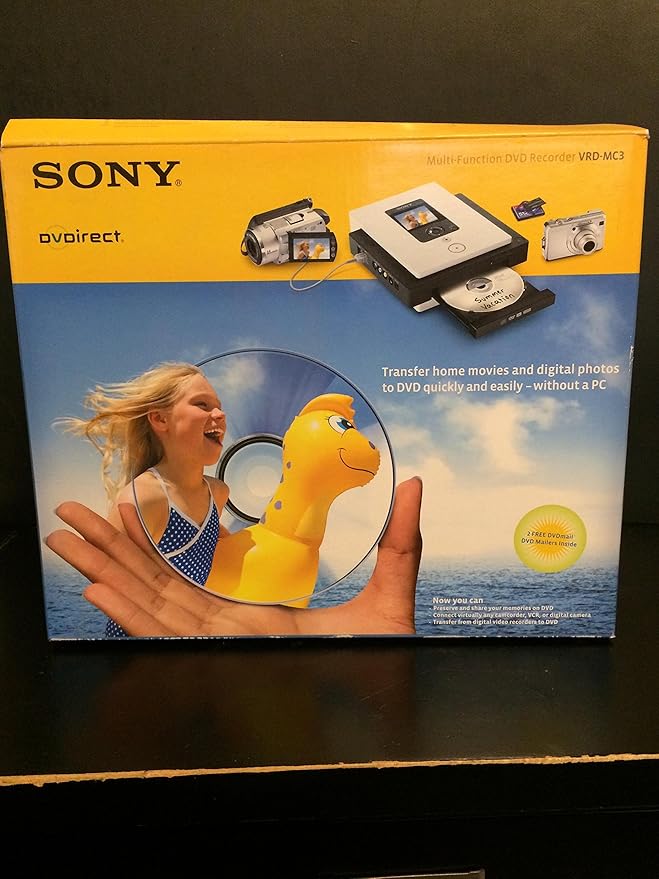
Sony VRDMC3 DVDirect DVD Recorder
Manuals for VRD-MC3
Manuals for VRD-MC3
Last updated at 21/06/2026 15:30:09
Sony VRDMC3 DVDirect DVD Recorder
Affiliate Disclosure: We may receive a small commission for purchases made through this link at no extra cost to you. This helps support our site. Thank you!
Sony Dvdirect Vrd-mc3 Multi Function Dvd Video Recorder Works - No
Delivery $106.53
Affiliate Disclosure: We may receive a small commission for purchases made through this link at no extra cost to you. This helps support our site. Thank you!
Sony Vrd-mc3 Dvd Recorder Dvdirect Multi-function - Convert From Av
Delivery $39.95
Affiliate Disclosure: We may receive a small commission for purchases made through this link at no extra cost to you. This helps support our site. Thank you!
originally posted on ebay.com
Had issues at first trying to record.....but once i got the right blank dvds it has been amazing to transfer all my old 8mm cassettes onto dvds. Next project....transfer all my old sd cards
originally posted on ebay.com
First thing I must say is that I am electronically illiterate!!! My l9yr old son got this dvd recorder going. I purchased this unit since I read in a magazine that the VHS tapes only have a certain amount of life before the tape becomes brittle and will no longer play on the vcr. I have so many tapes from my wedding to my childrens whole life.( 23yrs and l9yrs) I would be devastated if I lost all those memories. The unit is wonderful since know I have the dvd's which take up less space when storing and last a life time. It's a time consuming chore but one well worth it. My son is doing them when he has free time. He just gets them going and can do other things and return to check on it until it is complete. He would highly recommend this item.
originally posted on abt.com
I've used this drive with 2 computers. The first a newer laptop, worked first time. The second an older desktop, I spent 12 hours trying to get the computer to recognize the drive, I spent 3 hours with Sony Tech support, they couldn't solve it. Finally, I realized that my system did not have USB 2.0 connections. When I installed a USB 2.0 card and plugged into that, it worked perfectly.NOTE!!!! The Nero software is buggy!! DON'T load the disk that comes with the drive, go to Nero's web site and download and install the newest version. ALSO, remove any other NERO versions you may have loaded FIRST! AND NERO does not co-exist with Easy CD Creator, you MUST uninstall the other programs first, then load the NERO software. This is not a problem with the drive, but ... MoreI've used this drive with 2 computers. The first a newer laptop, worked first time. The second an older desktop, I spent 12 hours trying to get the computer to recognize the drive, I spent 3 hours with Sony Tech support, they couldn't solve it. Finally, I realized that my system did not have USB 2.0 connections. When I installed a USB 2.0 card and plugged into that, it worked perfectly.NOTE!!!! The Nero software is buggy!! DON'T load the disk that comes with the drive, go to Nero's web site and download and install the newest version. ALSO, remove any other NERO versions you may have loaded FIRST! AND NERO does not co-exist with Easy CD Creator, you MUST uninstall the other programs first, then load the NERO software. This is not a problem with the drive, but problems with the bundled software Sony has choosen to use. The drive worked flawlessly once I had USB 2.0 ports.
| General | |
| Device Type | DVD±RW (±R DL) drive - external |
| Interface | USB 2.0 |
| Supported Flash Memory | Memory Stick, SD Memory Card, Memory Stick Duo, xD-Picture Card, CompactFlash Card |
| Built-in Devices | Display |
Sony VRDMC3 DVDirect DVD Recorder
Affiliate Disclosure: We may receive a small commission for purchases made through this link at no extra cost to you. This helps support our site. Thank you!
Sony Dvdirect Vrd-mc3 Multi Function Dvd Video Recorder Works - No
Delivery $106.53
Affiliate Disclosure: We may receive a small commission for purchases made through this link at no extra cost to you. This helps support our site. Thank you!
Sony Vrd-mc3 Dvd Recorder Dvdirect Multi-function - Convert From Av
Delivery $39.95
Affiliate Disclosure: We may receive a small commission for purchases made through this link at no extra cost to you. This helps support our site. Thank you!
Had issues at first trying to record.....but once i got the right blank dvds it has been amazing to transfer all my old 8mm cassettes onto dvds. Next project....transfer all my old sd cards
First thing I must say is that I am electronically illiterate!!! My l9yr old son got this dvd recorder going. I purchased this unit since I read in a magazine that the VHS tapes only have a certain amount of life before the tape becomes brittle and will no longer play on the vcr. I have so many tapes from my wedding to my childrens whole life.( 23yrs and l9yrs) I would be devastated if I lost all those memories. The unit is wonderful since know I have the dvd's which take up less space when storing and last a life time. It's a time consuming chore but one well worth it. My son is doing them when he has free time. He just gets them going and can do other things and return to check on it until it is complete. He would highly recommend this item.
I've used this drive with 2 computers. The first a newer laptop, worked first time. The second an older desktop, I spent 12 hours trying to get the computer to recognize the drive, I spent 3 hours with Sony Tech support, they couldn't solve it. Finally, I realized that my system did not have USB 2.0 connections. When I installed a USB 2.0 card and plugged into that, it worked perfectly.NOTE!!!! The Nero software is buggy!! DON'T load the disk that comes with the drive, go to Nero's web site and download and install the newest version. ALSO, remove any other NERO versions you may have loaded FIRST! AND NERO does not co-exist with Easy CD Creator, you MUST uninstall the other programs first, then load the NERO software. This is not a problem with the drive, but ... MoreI've used this drive with 2 computers. The first a newer laptop, worked first time. The second an older desktop, I spent 12 hours trying to get the computer to recognize the drive, I spent 3 hours with Sony Tech support, they couldn't solve it. Finally, I realized that my system did not have USB 2.0 connections. When I installed a USB 2.0 card and plugged into that, it worked perfectly.NOTE!!!! The Nero software is buggy!! DON'T load the disk that comes with the drive, go to Nero's web site and download and install the newest version. ALSO, remove any other NERO versions you may have loaded FIRST! AND NERO does not co-exist with Easy CD Creator, you MUST uninstall the other programs first, then load the NERO software. This is not a problem with the drive, but problems with the bundled software Sony has choosen to use. The drive worked flawlessly once I had USB 2.0 ports.
This product is deceiving. Not only does it not record but it doesnt work with VCRs so unable to do what it says. Doesnt come with instructions so unable to use. Waste of money. Get a different product
This unit works real good to transfer your old super 8 movies or pictures from cameras " in the time period the unit was made" and old VHS home videos, but it wont work with the new digital video cam coders or new digital cameras, even with a digital to analog adapter in the line, the unit wont "turn on" to record as it don't "see the signal" from them. other than that, its a good quality built unit.
This was purchased to transfer my VHS tapes to DVD. It has not been used for any other purpose. Creates a really good DVD if the tape is really good. This recorder will not copy VHS that is "copy protected". But sometimes it senses copy protection where none exists, such as home-recorded tapes that are less than perfect. It will typically not record from VHS tapes with poor video on the tape. If you buy one of these recorders, it probably will be a used one since these have been replaced by a newer model. The real test of a recorder is to see how well a DVD created on that recorder will play back on YOUR player. Most sellers just test to see if the machine responds to the record command and then declare it to be perfect. If you buy a recorder, immediately see if the ... MoreThis was purchased to transfer my VHS tapes to DVD. It has not been used for any other purpose. Creates a really good DVD if the tape is really good. This recorder will not copy VHS that is "copy protected". But sometimes it senses copy protection where none exists, such as home-recorded tapes that are less than perfect. It will typically not record from VHS tapes with poor video on the tape. If you buy one of these recorders, it probably will be a used one since these have been replaced by a newer model. The real test of a recorder is to see how well a DVD created on that recorder will play back on YOUR player. Most sellers just test to see if the machine responds to the record command and then declare it to be perfect. If you buy a recorder, immediately see if the DVD recorded on it will play back properly.
The product is very easy to use. If you need a manual go to the Sony website and download it. My only advice is to make sure you finalize the disc when done and to never grab the machine by the lower right hand or left hand corner because you might accidentally turn it off or eject the DVD while its burning.
Well the DVD Recorder was in new boxed condition not a scratch or any were and tair at all All parts were there and rapped up like it had just been bought from the ship, all I had to was find the correct lead to fit my camera, in the end I made up a cable, and read instructions It powered up and it asked a blank DVD disk, put one in and it asked me, To select an input so I plugged in the Analogue leads, played my camera, and picture came up on the small screen I pressed Record and after a 30 min recording i pressed stop it said wait, after 3 min, I selected finalise from the menu and after 10 min it was complete and ended up with a perfect DVD copy of my Video tape, a great product ideal for Transferring old VHS Videos to DVD without a computer, it also dose photo ... MoreWell the DVD Recorder was in new boxed condition not a scratch or any were and tair at all All parts were there and rapped up like it had just been bought from the ship, all I had to was find the correct lead to fit my camera, in the end I made up a cable, and read instructions It powered up and it asked a blank DVD disk, put one in and it asked me, To select an input so I plugged in the Analogue leads, played my camera, and picture came up on the small screen I pressed Record and after a 30 min recording i pressed stop it said wait, after 3 min, I selected finalise from the menu and after 10 min it was complete and ended up with a perfect DVD copy of my Video tape, a great product ideal for Transferring old VHS Videos to DVD without a computer, it also dose photo disc's too from SD card once you get the hang of it, it's Very Easy to use I recommend this product if you have chance.
This is a hot piece of gear. Just don't try to get it to do something it isn't specifically designed to do. For example, it won't play back a disc except in a limited preview mode (with no audio, no fast forward, etc.). It cannot be used with a PC unless you switch modes -- which usually requires a power down cycle. It has an approved media list and you MUST stick to that list or you will get weird errors. The most frustrating thing is that static is frequently mistaken for copy protection. This is an obnoxious design element, especially when many of the old camcorder tapes people want to transfer have tracking or static problems. You may disregard the reviewer who talked about everything being widescreen. That is an optional input type, and he probably changed the ... MoreThis is a hot piece of gear. Just don't try to get it to do something it isn't specifically designed to do. For example, it won't play back a disc except in a limited preview mode (with no audio, no fast forward, etc.). It cannot be used with a PC unless you switch modes -- which usually requires a power down cycle. It has an approved media list and you MUST stick to that list or you will get weird errors. The most frustrating thing is that static is frequently mistaken for copy protection. This is an obnoxious design element, especially when many of the old camcorder tapes people want to transfer have tracking or static problems. You may disregard the reviewer who talked about everything being widescreen. That is an optional input type, and he probably changed the input mode without realizing it. It's an easy mistake given the arrangement of the buttons, but R T F M. Beware: The writer inside is pretty cheap. Some will be bad out of the box. Sony should really use better
This unit burns video from a camera, card or fire-wire conection. It is useful for burning home video or pictures to DVD.. The screen is small but does show you what is in the unit or ready to burn. It burns. relatively quick and permanently. I had another unit that would work similar to this one but it too had its burning parameters. Overall works good for movies or pictures convert tape or card files to DVD
| General | |
| Device Type | DVD±RW (±R DL) drive - external |
| Interface | USB 2.0 |
| Supported Flash Memory | Memory Stick, SD Memory Card, Memory Stick Duo, xD-Picture Card, CompactFlash Card |
| Built-in Devices | Display |

