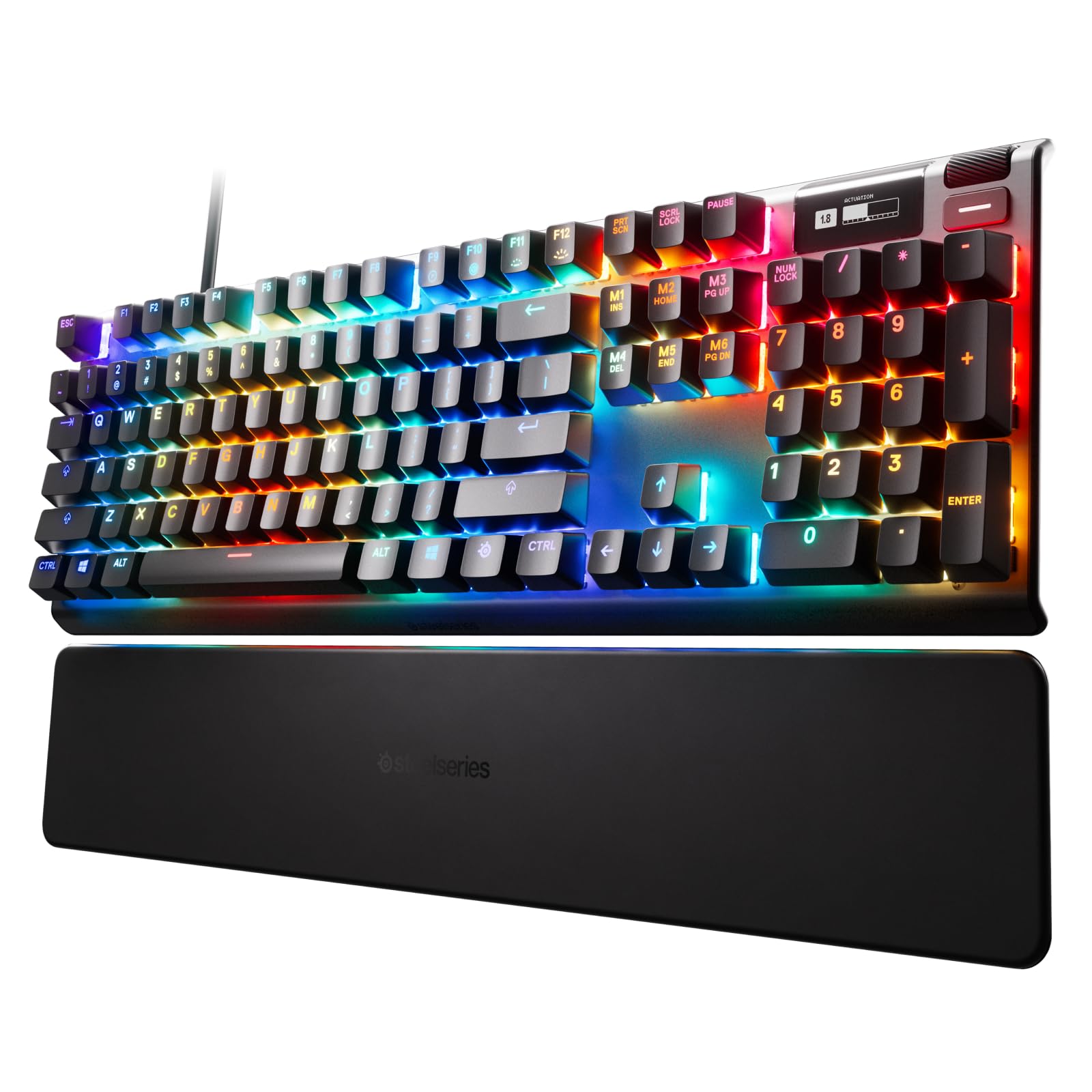
SteelSeries Apex 5 Hybrid Mechanical Gaming Keyboard
Best of Both Worlds The Apex 5 combines the smoothness of a membrane switch with the added durability, performance, and satisfying tactile click of a blue mechanical switch, for a premium gaming experience where you don’t have to choose one over the other. OLED Smart Display Customize the OLED screen with your favorite gifs, view on-the-fly game info, incoming Discord messages, settings, and more. Aircraft Grade Aluminum Alloy The Series 5000 metal frame is manufactured for a lifetime of unbreakable durability and sturdiness, making it the perfect centerpiece of any high-end setup. Premium Magnetic Wrist Rest The perfect keyboard accessory, with a simple magnetic solution for easy and secure attachment, full palm support, and durable soft touch finish, so you’re comfortable typing and gaming for as long as you want. Dedicated Multimedia Controls A clickable metal roller and media keys allow you to adjust volume and settings on the fly: change brightness, rewind, skip, pause and more, all at the touch of a button. Three-Way Cable Routing Prevent your cable from stretching, pulling, and getting in the way. The frame has built-in channels that allow you to choose from one of three possible places for your cable to exit, keeping your desk tidy. Glow Up Best-in-class affordable products with SteelSeries’ cutting-edge innovation and premium performance. Dynamic Per-Key RGB Illumination Millions of color options and reactive typing effects make you the designer of your ultimate setup. Sync up with your other SteelSeries gear for the most gorgeous setup ever.
Best of Both Worlds The Apex 5 combines the smoothness of a membrane switch with the added durability, performance, and satisfying tactile click of a blue mechanical switch, for a premium gaming experience where you don’t have to choose one over the other. OLED Smart Display Customize the OLED screen with your favorite gifs, view on-the-fly game info, incoming Discord messages, settings, and more. Aircraft Grade Aluminum Alloy The Series 5000 metal frame is manufactured for a lifetime of unbreakable durability and sturdiness, making it the perfect centerpiece of any high-end setup. Premium Magnetic Wrist Rest The perfect keyboard accessory, with a simple magnetic solution for easy and secure attachment, full palm support, and durable soft touch finish, so you’re comfortable typing and gaming for as long as you want. Dedicated Multimedia Controls A clickable metal roller and media keys allow you to adjust volume and settings on the fly: change brightness, rewind, skip, pause and more, all at the touch of a button. Three-Way Cable Routing Prevent your cable from stretching, pulling, and getting in the way. The frame has built-in channels that allow you to choose from one of three possible places for your cable to exit, keeping your desk tidy. Glow Up Best-in-class affordable products with SteelSeries’ cutting-edge innovation and premium performance. Dynamic Per-Key RGB Illumination Millions of color options and reactive typing effects make you the designer of your ultimate setup. Sync up with your other SteelSeries gear for the most gorgeous setup ever.
Best of Both Worlds The Apex 5 combines the smoothness of a membrane switch with the added durability, performance, and satisfying tactile click of a blue mechanical switch, for a premium gaming experience where you don’t have to choose one over the other. OLED Smart Display Customize the OLED screen with your favorite gifs, view on-the-fly game info, incoming Discord messages, settings, and more. Aircraft Grade Aluminum Alloy The Series 5000 metal frame is manufactured for a lifetime of unbreakable durability and sturdiness, making it the perfect centerpiece of any high-end setup. Premium Magnetic Wrist Rest The perfect keyboard accessory, with a simple magnetic solution for easy and secure attachment, full palm support, and durable soft touch finish, so you’re comfortable typing and gaming for as long as you want. Dedicated Multimedia Controls A clickable metal roller and media keys allow you to adjust volume and settings on the fly: change brightness, rewind, skip, pause and more, all at the touch of a button. Three-Way Cable Routing Prevent your cable from stretching, pulling, and getting in the way. The frame has built-in channels that allow you to choose from one of three possible places for your cable to exit, keeping your desk tidy. Glow Up Best-in-class affordable products with SteelSeries’ cutting-edge innovation and premium performance. Dynamic Per-Key RGB Illumination Millions of color options and reactive typing effects make you the designer of your ultimate setup. Sync up with your other SteelSeries gear for the most gorgeous setup ever.
Best of Both Worlds The Apex 5 combines the smoothness of a membrane switch with the added durability, performance, and satisfying tactile click of a blue mechanical switch, for a premium gaming experience where you don’t have to choose one over the other. OLED Smart Display Customize the OLED screen with your favorite gifs, view on-the-fly game info, incoming Discord messages, settings, and more. Aircraft Grade Aluminum Alloy The Series 5000 metal frame is manufactured for a lifetime of unbreakable durability and sturdiness, making it the perfect centerpiece of any high-end setup. Premium Magnetic Wrist Rest The perfect keyboard accessory, with a simple magnetic solution for easy and secure attachment, full palm support, and durable soft touch finish, so you’re comfortable typing and gaming for as long as you want. Dedicated Multimedia Controls A clickable metal roller and media keys allow you to adjust volume and settings on the fly: change brightness, rewind, skip, pause and more, all at the touch of a button. Three-Way Cable Routing Prevent your cable from stretching, pulling, and getting in the way. The frame has built-in channels that allow you to choose from one of three possible places for your cable to exit, keeping your desk tidy. Glow Up Best-in-class affordable products with SteelSeries’ cutting-edge innovation and premium performance. Dynamic Per-Key RGB Illumination Millions of color options and reactive typing effects make you the designer of your ultimate setup. Sync up with your other SteelSeries gear for the most gorgeous setup ever.
in 13 offers
The lowest price for SteelSeries Apex 5 Hybrid Mechanical Gaming Keyboard right now is $212.00 at Kogan.com, compared across 13 retailers.
The all-time low was $60.00 on 29 May 2026 — today's price is 253% above the lowest ever. It has been notably cheaper before — worth setting a price alert.
Prices last updated 24 Oct 2026.
Last updated at 24/10/2026 09:55:53
Steelseries Apex 5 Hybrid Mechanical Gaming Keyboard (US)
Delivery $29.99
Steelseries Apex 5 Hybrid Mechanical Gaming Keyboard (US)
Delivery $29.99
Steelseries Apex 5 Hybrid Mechanical Gaming Keyboard (US)
Delivery $29.99
Steelseries Apex 5 Hybrid Mechanical Gaming Keyboard (US)
Delivery between Wed – Fri $7.74
Steelseries Apex 5 Hybrid Mechanical Gaming Keyboard (US)
14-day returns
Steelseries Apex 5 Rgb Gaming Keyboard ,magnetic Wrist Rest, Oled
Delivery $20.25
Affiliate Disclosure: We may receive a small commission for purchases made through this link at no extra cost to you. This helps support our site. Thank you!
SteelSeries Apex 5 Hybrid Mechanical Gaming Keyboard
Delivery $14
SteelSeries APEX 5 Hybrid Mechanical Gaming Keyboard
Delivery between 27 Oct – 1 Nov $7.95
SteelSeries APEX 5 Hybrid Mechanical Gaming Keyboard
Delivery between 27 Oct – 1 Nov $7.95
SteelSeries APEX 5 Hybrid Mechanical Gaming Keyboard
Delivery between 27 Oct – 1 Nov $7.95
originally posted on pegasusselectronics.com
I bought this sometime ago and you might think I smashed and abused the keyboard in order to damage the LEDs. Nothing of the sort, as you will see that keys like F12 and M3/page up and windows key have these problem as well. It first began with the F12 key, and progressively other LEDs began to fail. All of these began to happen after 6 months of use, and since more keys began to fail, you should think twice and look elsewhere before spending so much for a keyboard. I am stuck with this without being able to reclaim the warranty since it happened because I Live outside the US and I bought it there during a trip, and I just couldn’t go through all the extra hassle to get a replacement. A nice keyboard, with a good feel when typing, but extremely cheap LEDs.
originally posted on homeessentialsdirect.com
2 month review. I got this for my home office and it works great. I've used several mechanical keyboards over the years and this one is excellent. Some gaming keyboards are indeed great, but not for typing. I use this one as my keyboard for my job. I type on it for 8+ hours a day. The feel is a little heavy compared to membrane kbs, but I like that since I don't find myself accidentally activating keys by laying my fingers on the keys. It isn't a loud keyboard like the old school clickers, but in an office setting your cube mates could probably hear you fairly well. At home, my dog doesn't seem to be bothered by my typing. At the office, I have a mechanical Logi "G"-something that is also pretty darn good and more quiet. I would still take this SS Apex 7 as my #1 ... More2 month review. I got this for my home office and it works great. I've used several mechanical keyboards over the years and this one is excellent. Some gaming keyboards are indeed great, but not for typing. I use this one as my keyboard for my job. I type on it for 8+ hours a day. The feel is a little heavy compared to membrane kbs, but I like that since I don't find myself accidentally activating keys by laying my fingers on the keys. It isn't a loud keyboard like the old school clickers, but in an office setting your cube mates could probably hear you fairly well. At home, my dog doesn't seem to be bothered by my typing. At the office, I have a mechanical Logi "G"-something that is also pretty darn good and more quiet. I would still take this SS Apex 7 as my #1 KB. The backlighting is nice by default. No need to install any software just to adjust/change the lighting from an annoying animation. By default, the colors are a spectrum that SLOWY scroll (top to bottom). When you type the keys turn white and white expands L&R from the key you pressed and across the row. Not annoying compared to some other brand's default lighting behavior.
originally posted on microcenter.com
SteelSeries knows that to stand out from all the other similar keyboards, they need something unique. Their RGB engine is every bit as flexible and colourful as the other top name brands. They have a macro engine, onboard profiles, multimedia control and more. So in that respect, they’re very competitive. The aluminium construction is sublime, and the USB pass-through is a welcome addition too. I guess the real unique features are the magnetic wrist rest and the stunning OLED display. Overall though, it’s a pretty complete package that any PC user and gamer can appreciate.
| General | |
| Device Type | Keyboard |
| Backlit | RGB |
| Interface | USB |
| Input Device |
Steelseries Apex 5 Hybrid Mechanical Gaming Keyboard (US)
Delivery $29.99
Steelseries Apex 5 Hybrid Mechanical Gaming Keyboard (US)
Delivery $29.99
Steelseries Apex 5 Hybrid Mechanical Gaming Keyboard (US)
Delivery $29.99
Steelseries Apex 5 Hybrid Mechanical Gaming Keyboard (US)
Delivery between Wed – Fri $7.74
Steelseries Apex 5 Hybrid Mechanical Gaming Keyboard (US)
14-day returns
I bought this sometime ago and you might think I smashed and abused the keyboard in order to damage the LEDs. Nothing of the sort, as you will see that keys like F12 and M3/page up and windows key have these problem as well. It first began with the F12 key, and progressively other LEDs began to fail. All of these began to happen after 6 months of use, and since more keys began to fail, you should think twice and look elsewhere before spending so much for a keyboard. I am stuck with this without being able to reclaim the warranty since it happened because I Live outside the US and I bought it there during a trip, and I just couldn’t go through all the extra hassle to get a replacement. A nice keyboard, with a good feel when typing, but extremely cheap LEDs.
2 month review. I got this for my home office and it works great. I've used several mechanical keyboards over the years and this one is excellent. Some gaming keyboards are indeed great, but not for typing. I use this one as my keyboard for my job. I type on it for 8+ hours a day. The feel is a little heavy compared to membrane kbs, but I like that since I don't find myself accidentally activating keys by laying my fingers on the keys. It isn't a loud keyboard like the old school clickers, but in an office setting your cube mates could probably hear you fairly well. At home, my dog doesn't seem to be bothered by my typing. At the office, I have a mechanical Logi "G"-something that is also pretty darn good and more quiet. I would still take this SS Apex 7 as my #1 ... More2 month review. I got this for my home office and it works great. I've used several mechanical keyboards over the years and this one is excellent. Some gaming keyboards are indeed great, but not for typing. I use this one as my keyboard for my job. I type on it for 8+ hours a day. The feel is a little heavy compared to membrane kbs, but I like that since I don't find myself accidentally activating keys by laying my fingers on the keys. It isn't a loud keyboard like the old school clickers, but in an office setting your cube mates could probably hear you fairly well. At home, my dog doesn't seem to be bothered by my typing. At the office, I have a mechanical Logi "G"-something that is also pretty darn good and more quiet. I would still take this SS Apex 7 as my #1 KB. The backlighting is nice by default. No need to install any software just to adjust/change the lighting from an annoying animation. By default, the colors are a spectrum that SLOWY scroll (top to bottom). When you type the keys turn white and white expands L&R from the key you pressed and across the row. Not annoying compared to some other brand's default lighting behavior.
SteelSeries knows that to stand out from all the other similar keyboards, they need something unique. Their RGB engine is every bit as flexible and colourful as the other top name brands. They have a macro engine, onboard profiles, multimedia control and more. So in that respect, they’re very competitive. The aluminium construction is sublime, and the USB pass-through is a welcome addition too. I guess the real unique features are the magnetic wrist rest and the stunning OLED display. Overall though, it’s a pretty complete package that any PC user and gamer can appreciate.
WOW. At last, I found the perfect LED gaming keyboard, for Macs or Windows pc. I have purchased 13 different gaming keyboards in 18 months, for 7 teens in my fam who are serious gamers. 12 duds until I found THIS keyboard. Spent as much as $750 on 1 keyboard and this is THE BEST, IMO and according to all 7 teens. BTW, They're 17-19 y/o- not 13 year olds who are new to gaming. All 7 teens tried all 13 keyboards. They all say this Steel series LED gaming keyboard is hands down the best, period. Its also excellent for people who type so fast, that the keyboard can't keep up.... absolutely no issues there as long as you can deal with the clicking every time you hit a key.Although totally awesome, This is NOT quiet like some reviews say. Not sure what people define ... MoreWOW. At last, I found the perfect LED gaming keyboard, for Macs or Windows pc. I have purchased 13 different gaming keyboards in 18 months, for 7 teens in my fam who are serious gamers. 12 duds until I found THIS keyboard. Spent as much as $750 on 1 keyboard and this is THE BEST, IMO and according to all 7 teens. BTW, They're 17-19 y/o- not 13 year olds who are new to gaming. All 7 teens tried all 13 keyboards. They all say this Steel series LED gaming keyboard is hands down the best, period. Its also excellent for people who type so fast, that the keyboard can't keep up.... absolutely no issues there as long as you can deal with the clicking every time you hit a key.Although totally awesome, This is NOT quiet like some reviews say. Not sure what people define "quiet" as, but this sure isnt it. Not a deal breaker for my fam tho.It doesnt help with carpel tunnel either like some say. I have carpel tunnel. A split keyboard is what is needed (much cheaper also), Not a flat gaming keyboard.For people claiming this doesnt work "fully" on a macbook.. also NOT TRUE. That happens if you do not have the correct OS (10.11 or newer) for macs. This keyboard is working perfectly on 4 macbooks (all different years & diff OS) and 3 windows pcs- diff brands.As far as LED lights stopping or turning off and not coming back on.. yes you can easily shut the lights off accidentally. I did initially. You can just as easily change any of the colors or turn them off completely. Just read the manual to avoid these things instead of bashing a 5 star keyboard because you never read the manual... its not long and most companies dont even provide one in the box.I see NO issues at all- for 7 of these keyboards over 18 months time. The only thing I personally would change is the 6 ft usb wire which sounds long; however, it isnt if you plan to add another monitor, depending on monitor/desk size. Thats on me though, so im not going to dock stars for that or for parking at BB (since when is parking included in a product review?).Do yourself a favor and just avoid the Steel series app. MUCH easier to set up without considering the app absolutely blows. Constantly glitches and then dissapears on both mac and windows pc. 7 diff computers, same result. Reviews concur.I highly recommend steel develop an app that actually works, or just get rid of it all together. Thats my only complaint. Im not reviewing the app tho, Thus the 5 stars. Buy this if you have a gamer who needs an awesome keyboard with excellent led lighting.Best buy has great curbside service also. Very prompt & professional regardless of how busy they are. HIGHLY RECOMMEND.
I bought an Apex 7 Red. I was considering an Apex 5 and impulse-bought the Apex 7 for $60 more because it has a USB passthrough port and I value being able to plug my mouse into my keyboard. But I misunderstood that, on gaming keyboards, a "passthrough" USB is just that. There's no USB hub inside the keyboard, so you have to plug in TWO USBs at your computer, and one is passed through to the USB port on the keyboard. To me, that's pointless. But I have another keyboard that has the hub, and I assumed it would work the same. That's on me for not doing my research.But then the real problems began. When this monstrosity powers up, its Arm processor shows off by sweeping vistas of light across the keyboard. So impressive! So... ANNOYING. Every keystroke creates a wave ... MoreI bought an Apex 7 Red. I was considering an Apex 5 and impulse-bought the Apex 7 for $60 more because it has a USB passthrough port and I value being able to plug my mouse into my keyboard. But I misunderstood that, on gaming keyboards, a "passthrough" USB is just that. There's no USB hub inside the keyboard, so you have to plug in TWO USBs at your computer, and one is passed through to the USB port on the keyboard. To me, that's pointless. But I have another keyboard that has the hub, and I assumed it would work the same. That's on me for not doing my research.But then the real problems began. When this monstrosity powers up, its Arm processor shows off by sweeping vistas of light across the keyboard. So impressive! So... ANNOYING. Every keystroke creates a wave of color across the keys. I want a backlight, but I don't want a circus act. But, hey, it's fully configurable, so I downloaded their software and learned how to subdue the backlights and make them one color. But the color intensity was too strong, I wanted to tone it down. There was a button to "reduce intensity by 50%" or something like that, but when I pressed it, the backlights turned off. I couldn't un-press the button. I tabbed into some other place and the default values for the profile I had selected (config 5) switched back in. Yuk. So I toned it down again and decided to live with higher-than-desired intensity until I had more time to spend learning how to configure the keyboard. Made sure to save config 5, and I was up and running.I investigated the built in menu items using the little screen and buttons in the upper right, being careful not to save anything. Then I unplugged the keyboard from the USB and plugged it back in, and it went back to defaults. Bad programming. That wasn't my doing. I had been careful to not change a config after saving.I was getting pretty annoyed with myself for having bought this grandiose garbage for far too much money, so I quickly reconfigured it with a single backlight color, and started working.But as I began doing work, I noticed that some of the keys weren't working correctly. I focused specifically on PgDn. It just didn't work. But there were others I didn't bother to write down. At this point, I thought "maybe I screwed it up", because on this keyboard every single key can be configured. So I had to pull up their Windows software again. Checked around, and the PgDn key looked OK. So I went online and searched for a way to manually reset the keyboard to factory defaults, and found a page on the Steel Series website that had a procedure: unplug the keyboard, press the volume wheel and button below it simultaneously while plugging it back in to the USB. When I did this, the whole keyboard started flashing red backlighting, and just stayed in that mode. When will it finish? I let it go for about a minute, then removed/reinserted the USB, and it still had my single-toned backlight color, so I guess that didn't work. The web page is here: https://support.steelseries.com/hc/en-us/articles/360043313811-My-keyboard-is-experiencing-software-issuesThere is a video on that same web page that shows how to reset to factory defaults using the built-in menus, and that seemed to work, but it didn't change the fact that the PgDn key didn't work. So I pulled the PgDn keycap off of the underlying switch, and used my thumbnail to press down hard on the switch, and was able to send a PgDn event to the PC. Well, folks this is a brand new keyboard. A switch like that should never have made it out of the factory. And I'm 90% sure PgDn wasn't the only bad key. That's just bad quality control.So I took the Steelseries Apex 7 back, and I'm typing this on my new Razer BlackWidow V3, which is a lot cheaper than the circus freak that I wasted two hours on.
This is my first SteelSeries keyboard ever and I'm so far very happy with it. I was looking about the store to get a new keyboard after my previous Razer Ornate Chroma that last for 3 years until the leather wrist-rest wore out. So I came through the SteelSeries Apex line, and I wanted to change from the membrane switch which is more clicky, needing a tiny bit more force to press to brown switch and I'm loving it, the tactile while being so much smoother change the way I feel about it whenever I gaming and do designing work.To the board itself, this is a very well-built aesthetic looking keyboard, the aluminum frame looks amazing and defuses much more color than black plastic thanks to the holy bright RGB individual lighting. This is a no no wireless and have ... MoreThis is my first SteelSeries keyboard ever and I'm so far very happy with it. I was looking about the store to get a new keyboard after my previous Razer Ornate Chroma that last for 3 years until the leather wrist-rest wore out. So I came through the SteelSeries Apex line, and I wanted to change from the membrane switch which is more clicky, needing a tiny bit more force to press to brown switch and I'm loving it, the tactile while being so much smoother change the way I feel about it whenever I gaming and do designing work.To the board itself, this is a very well-built aesthetic looking keyboard, the aluminum frame looks amazing and defuses much more color than black plastic thanks to the holy bright RGB individual lighting. This is a no no wireless and have split cable USB, 1 head for powering the keyboard and one for powering the USB port in front, 1 thing I notice is how thick the cord itself but that doesn't bother me much. The wow factor I would say for me is the super smooth rubberize magnetic wrist-rest, it feels so nice even sometimes I don't notice my hand weighing on it like leather or plastic one. The magnets are locate it on either side of the wrist-rest, it isn't as strong like you can lift the keyboard along with the wrist-rest up but great to hold them together. Some cool things are the bone structural like of the bottom of the keyboard, pass-through cable for whichever direction of your wiring go, and especially the smart OLED screen with multimedia scroller that is clickable with the menu button below it, they can be used to dial volumn, play, pause, skip songs, changing lighting preset, macros, profile (5 profiles onboard), monitoring your system. The OLED screen can be modified and drawn from the Engine software within, you can even make it GIF and upload to your OLED screen and let it play!For the keys themselves, I wish though the keycaps would be Doubleshot PBT but since this is ABS so I went for the HyperX pudding keycaps, the lighting really helps the upper half of the keycaps floating on the board. I guess they are a perfect couples from now on, and I still keep that one Steelseries logo keycap on for its brand showcase and reminds me to use for meta-layer binding everytime I press it.Overall, Apex 7 TKL Brown switch is a very solid board, pure aesthetic looking beauty with cool features they can offer, leading me into not using the numpad and minimize my desk space, I will have to play around with it more for the next few weeks to see what I can do with this amazing keyboard and keep updating if there's something new!Thanks for reading.
I spend quite a bit of money, time and thought on my peripherals and accessories. Usually the amount of research I do into a product is measured in hours or days. I ultimately settled on this because comparatively speaking with the other big brands and reputations, it was cheaper and with better materials. For the price you get metal construction and a metal, notched volume barrel. It's nice and sturdy all the way around. The keycaps feel good and look good, the lights are bright and accurate and my brown switches are fantastic. Long story short, for big name products, this is a very solid choice. At the time of writing this I only have about a month worth of heavy use. My Logitech keyboard had LED failures after about a year and a half(in the same price range). For ... MoreI spend quite a bit of money, time and thought on my peripherals and accessories. Usually the amount of research I do into a product is measured in hours or days. I ultimately settled on this because comparatively speaking with the other big brands and reputations, it was cheaper and with better materials. For the price you get metal construction and a metal, notched volume barrel. It's nice and sturdy all the way around. The keycaps feel good and look good, the lights are bright and accurate and my brown switches are fantastic. Long story short, for big name products, this is a very solid choice. At the time of writing this I only have about a month worth of heavy use. My Logitech keyboard had LED failures after about a year and a half(in the same price range). For as long as this review doesn't have an (edit) on it, assume my opinion hasn't changed.
Bought this to replace my Anne Pro that died unexpectedly. I have an Arctis 7 headset so I wanted something that would use some existing software I have and that turned out to be a great decision. The Steel Series software has TONS of options for this board. It can control lighting, it can remap keys, it can handle macros and layers. Its really cool software.Some fun things I discovered with the board:you can set a lighting effect "screen saver" if you don't touch your keyboard for X amount of time.The screen is not 100% gimmicky, you can actually change a large variety of settings and states all from the screen and wheel/button next to the screen. Including saving and deleting macros. Really nice if you are in a game and dont want to alt-tab out.
The media could not be loaded. This keyboard exceeded my expectations. I play a lot of different games for long sessions including mmos so I needed a keyboard that was going to give me more feedback than the one I was currently using. I decided to try out this steelseries one because I am a huge fan of their mouse lineup. This keyboard exceeded my expectations. Pros: - I got the blue keys so they are very clicky and tactile which I love. You can feel an instant press. - The rgb lighting is bright but not too bright with a ton of customizable options - Font on the keyboard is large and easy for me to read - The OLED screen isnt too extravagant but being able to add a cute little gif is a plus in my book - The scroll wheel by the OLED screen is great for easy volume ... MoreThe media could not be loaded. This keyboard exceeded my expectations. I play a lot of different games for long sessions including mmos so I needed a keyboard that was going to give me more feedback than the one I was currently using. I decided to try out this steelseries one because I am a huge fan of their mouse lineup. This keyboard exceeded my expectations. Pros: - I got the blue keys so they are very clicky and tactile which I love. You can feel an instant press. - The rgb lighting is bright but not too bright with a ton of customizable options - Font on the keyboard is large and easy for me to read - The OLED screen isnt too extravagant but being able to add a cute little gif is a plus in my book - The scroll wheel by the OLED screen is great for easy volume control - I am a num pad user and despite this keyboard being full sized its perfectly compact and organized without too much spacing - the keyboard is metal and very firm, this will not bend or break easily at all Cons: - the wrist rest is comfortable but definitely not plush. It could take some getting used to. - the wrist rest is also rubber and a fingerprint magnet - cord is thick but not braided
I bought this keyboard just over 1 year before writing this review and while it worked fine for that time, it definitely isn't worth the price. The switches are no better than other boards I've used and are nowhere near as reliable as even my old membrane keyboard that I used for 10 or so years prior. Particularly during gameplay certain keys would just not register, it seemed to happen when there was a lot of WASD movement and was not isolated to one game. The key caps got permanently glossy quickly, which I was very disappointed with as it made it look cheap after only 1 to 2 months. Washing them would kind of fix the problem but not entirely and it would just happen again after a while. My old membrane keyboard still looks better which was also half the price of ... MoreI bought this keyboard just over 1 year before writing this review and while it worked fine for that time, it definitely isn't worth the price. The switches are no better than other boards I've used and are nowhere near as reliable as even my old membrane keyboard that I used for 10 or so years prior. Particularly during gameplay certain keys would just not register, it seemed to happen when there was a lot of WASD movement and was not isolated to one game. The key caps got permanently glossy quickly, which I was very disappointed with as it made it look cheap after only 1 to 2 months. Washing them would kind of fix the problem but not entirely and it would just happen again after a while. My old membrane keyboard still looks better which was also half the price of this one ten years ago. The LCD is quite gimmicky. It's too small and low resolution to be able to glance at it mid game for details, which is what they market it as. The apps on it are very limited and any bugs take literal months to get updated. Magnetic wrist rest is very nice though.All in all this board is very overpriced, it has unreliable switches, cheap looking keycaps and a mostly useless LCD screen.
| General | |
| Device Type | Keyboard |
| Backlit | RGB |
| Interface | USB |
| Input Device |