SteelSeries Apex 5 RGB Hybrid Mechanical Gaming Keyboard - Blue Switches
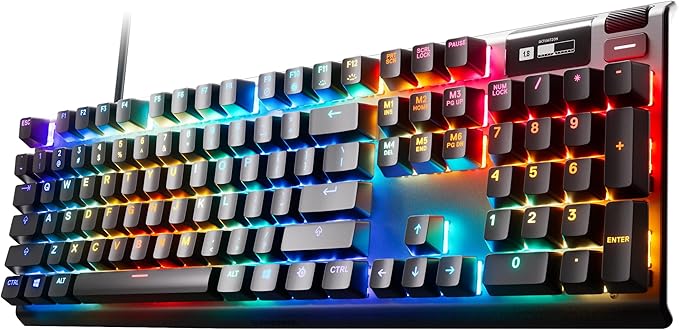
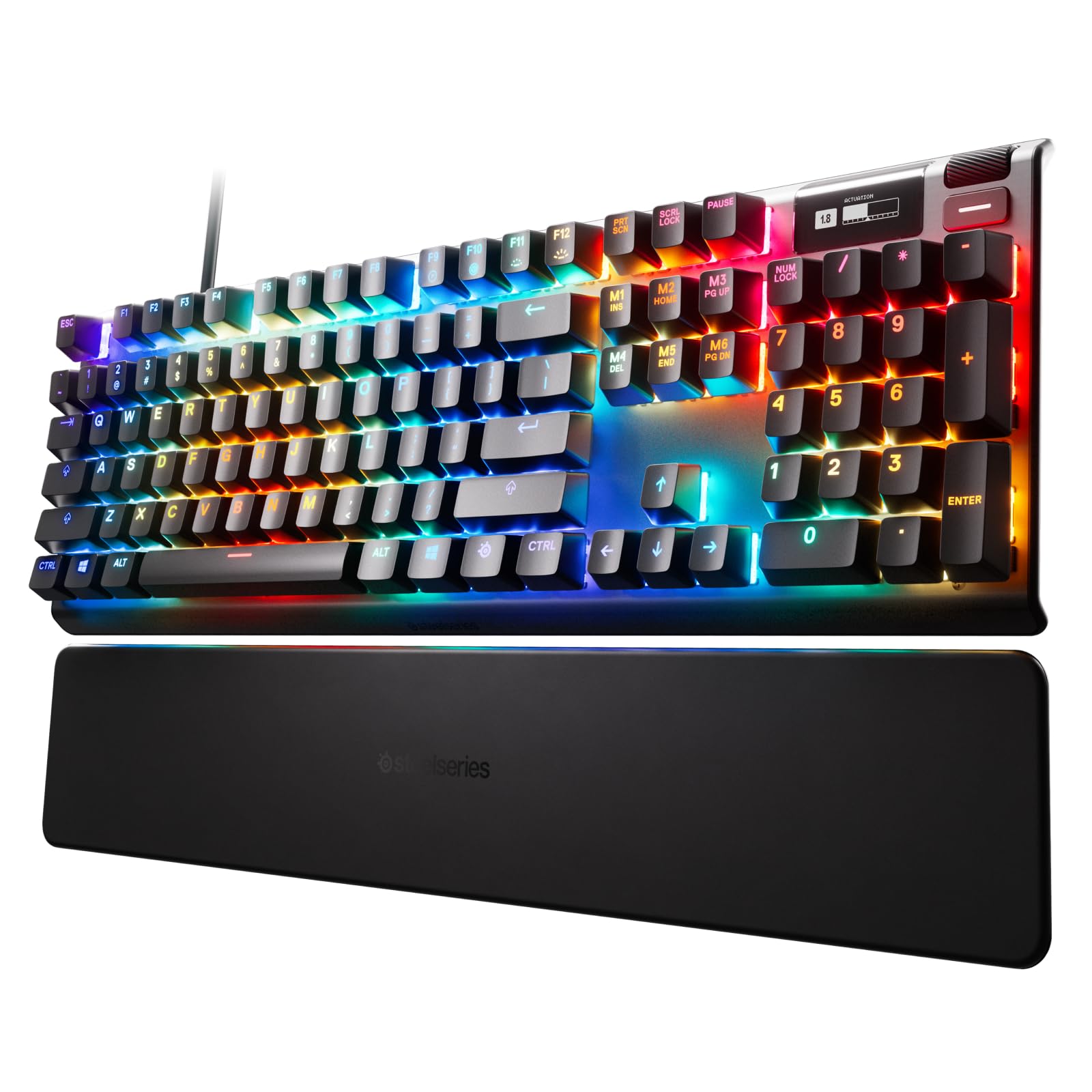
Best of Both Worlds The Apex 5 combines the smoothness of a membrane switch with the added durability, performance, and satisfying tactile click of a blue mechanical switch, for a premium gaming experience where you don’t have to choose one over the other. OLED Smart Display Customize the OLED screen with your favorite gifs, view on-the-fly game info, incoming Discord messages, settings, and more. Aircraft Grade Aluminum Alloy The Series 5000 metal frame is manufactured for a lifetime of unbreakable durability and sturdiness, making it the perfect centerpiece of any high-end setup. Premium Magnetic Wrist Rest The perfect keyboard accessory, with a simple magnetic solution for easy and secure attachment, full palm support, and durable soft touch finish, so you’re comfortable typing and gaming for as long as you want. Dedicated Multimedia Controls A clickable metal roller and media keys allow you to adjust volume and settings on the fly: change brightness, rewind, skip, pause and more, all at the touch of a button. Three-Way Cable Routing Prevent your cable from stretching, pulling, and getting in the way. The frame has built-in channels that allow you to choose from one of three possible places for your cable to exit, keeping your desk tidy. Glow Up Best-in-class affordable products with SteelSeries’ cutting-edge innovation and premium performance. Dynamic Per-Key RGB Illumination Millions of color options and reactive typing effects make you the designer of your ultimate setup. Sync up with your other SteelSeries gear for the most gorgeous setup ever.
Best of Both Worlds The Apex 5 combines the smoothness of a membrane switch with the added durability, performance, and satisfying tactile click of a blue mechanical switch, for a premium gaming experience where you don’t have to choose one over the other. OLED Smart Display Customize the OLED screen with your favorite gifs, view on-the-fly game info, incoming Discord messages, settings, and more. Aircraft Grade Aluminum Alloy The Series 5000 metal frame is manufactured for a lifetime of unbreakable durability and sturdiness, making it the perfect centerpiece of any high-end setup. Premium Magnetic Wrist Rest The perfect keyboard accessory, with a simple magnetic solution for easy and secure attachment, full palm support, and durable soft touch finish, so you’re comfortable typing and gaming for as long as you want. Dedicated Multimedia Controls A clickable metal roller and media keys allow you to adjust volume and settings on the fly: change brightness, rewind, skip, pause and more, all at the touch of a button. Three-Way Cable Routing Prevent your cable from stretching, pulling, and getting in the way. The frame has built-in channels that allow you to choose from one of three possible places for your cable to exit, keeping your desk tidy. Glow Up Best-in-class affordable products with SteelSeries’ cutting-edge innovation and premium performance. Dynamic Per-Key RGB Illumination Millions of color options and reactive typing effects make you the designer of your ultimate setup. Sync up with your other SteelSeries gear for the most gorgeous setup ever.
Best of Both Worlds The Apex 5 combines the smoothness of a membrane switch with the added durability, performance, and satisfying tactile click of a blue mechanical switch, for a premium gaming experience where you don’t have to choose one over the other. OLED Smart Display Customize the OLED screen with your favorite gifs, view on-the-fly game info, incoming Discord messages, settings, and more. Aircraft Grade Aluminum Alloy The Series 5000 metal frame is manufactured for a lifetime of unbreakable durability and sturdiness, making it the perfect centerpiece of any high-end setup. Premium Magnetic Wrist Rest The perfect keyboard accessory, with a simple magnetic solution for easy and secure attachment, full palm support, and durable soft touch finish, so you’re comfortable typing and gaming for as long as you want. Dedicated Multimedia Controls A clickable metal roller and media keys allow you to adjust volume and settings on the fly: change brightness, rewind, skip, pause and more, all at the touch of a button. Three-Way Cable Routing Prevent your cable from stretching, pulling, and getting in the way. The frame has built-in channels that allow you to choose from one of three possible places for your cable to exit, keeping your desk tidy. Glow Up Best-in-class affordable products with SteelSeries’ cutting-edge innovation and premium performance. Dynamic Per-Key RGB Illumination Millions of color options and reactive typing effects make you the designer of your ultimate setup. Sync up with your other SteelSeries gear for the most gorgeous setup ever.
Best of Both Worlds The Apex 5 combines the smoothness of a membrane switch with the added durability, performance, and satisfying tactile click of a blue mechanical switch, for a premium gaming experience where you don’t have to choose one over the other. OLED Smart Display Customize the OLED screen with your favorite gifs, view on-the-fly game info, incoming Discord messages, settings, and more. Aircraft Grade Aluminum Alloy The Series 5000 metal frame is manufactured for a lifetime of unbreakable durability and sturdiness, making it the perfect centerpiece of any high-end setup. Premium Magnetic Wrist Rest The perfect keyboard accessory, with a simple magnetic solution for easy and secure attachment, full palm support, and durable soft touch finish, so you’re comfortable typing and gaming for as long as you want. Dedicated Multimedia Controls A clickable metal roller and media keys allow you to adjust volume and settings on the fly: change brightness, rewind, skip, pause and more, all at the touch of a button. Three-Way Cable Routing Prevent your cable from stretching, pulling, and getting in the way. The frame has built-in channels that allow you to choose from one of three possible places for your cable to exit, keeping your desk tidy. Glow Up Best-in-class affordable products with SteelSeries’ cutting-edge innovation and premium performance. Dynamic Per-Key RGB Illumination Millions of color options and reactive typing effects make you the designer of your ultimate setup. Sync up with your other SteelSeries gear for the most gorgeous setup ever.
in 5 offers
The lowest price for SteelSeries Apex 5 RGB Hybrid Mechanical Gaming Keyboard - Blue Switches right now is $142.98 at Big Apple Buddy, compared across 4 retailers.
The all-time low was $60.00 on 27 Apr 2026 — today's price is 138% above the lowest ever. It has been notably cheaper before — worth setting a price alert.
Prices last updated 3 Aug 2026.
Last updated at 03/08/2026 17:55:11
SteelSeries Apex 5 64532 Full-Size Wired Mechanical Hybrid Keyboard, RGB, Black
Delivery $161.30
SteelSeries USB Apex 5 Hybrid Mechanical Gaming Keyboard – Per-Key RGB Illumination – Aircraft Grade Aluminum Alloy Frame – OLED Smart Display (Hybrid
SteelSeries USB Apex 5 Hybrid Mechanical Gaming Keyboard
SteelSeries Apex 5 Hybrid Mechanical RGB Gaming Keyboard - Blue Switches, 64532 Keyboards
Free delivery between 6–13 Aug
SteelSeries APEX 5 Hybrid Mechanical Gaming Keyboard
Free delivery between Wed – Sat
originally posted on microcenter.com
Beware of most of the "hybrid" keyboards out there... many of them are straight up cheap membrane keyboards with a noisemaker built into the key to make the "clicky" noise. That's not what the Apex 5 does. The switches are legit spring loaded mechanicals on the top end and they have that satisfying "blue" click and feel at first... but they don't bottom out hard like true mechanicals. They have a nice soft finish due to the membrane on the bottom end.I'm a bit of a keyboard gypsy, never staying with one model for long. I bought an Apex 5 about a year ago, used it for 6-7 months and then built my own custom board with Panda switches. The Apex 5 went to my son. About 5 months after I gave it to my son, his PC had some issues... so I was working on it for an hour or ... MoreBeware of most of the "hybrid" keyboards out there... many of them are straight up cheap membrane keyboards with a noisemaker built into the key to make the "clicky" noise. That's not what the Apex 5 does. The switches are legit spring loaded mechanicals on the top end and they have that satisfying "blue" click and feel at first... but they don't bottom out hard like true mechanicals. They have a nice soft finish due to the membrane on the bottom end.I'm a bit of a keyboard gypsy, never staying with one model for long. I bought an Apex 5 about a year ago, used it for 6-7 months and then built my own custom board with Panda switches. The Apex 5 went to my son. About 5 months after I gave it to my son, his PC had some issues... so I was working on it for an hour or two one night... and I realized how much I missed the truly unique typing feel of the Steelseries hybrid blue configuration. I went to Microcenter the next day I bought myself another Apex 5. The Panda switches were great, but they bottom out hard and loud. This one has a certain smoothness in long typing sessions that I haven't found in a true mechanical. So this Apex 5 hybrid is a perfect balance for me, obviously your mileage may vary.Pros:- I personally love what Steelseries did with the hybrid approach- lots of customization and effects options with the RGB lighting out of the box, even more with the Steelseries software (but the software is also a con, see below)- rigid metal chassis, just feels quality / well built- keycaps are removable / replaceable for further customizationCons:- Steelseries software doesn't * require * a unique account as of now, but they seem to be heading that direction... it's approaching bloatware.- The magnetic wrist rest has a matte finish that shows every bit of schmutz and the surface wears rather quickly- The OLED screen is a bit gimmicky, would like to see a cheaper version without this teeny screen.Overall, this is the best keyboard I've ever owned for under $100... and I've owned it twice. I've built custom keyboards that cost twice as much and I still find the Apex 5 to be the most satisfying for regular typing work.
originally posted on bestbuy.com
If I had to sum up this review in one sentence, it is that at 100 dollars, this keyboard comes jam-packed with features and quality that make it a supremely good choice for anyone looking for a new keyboard! I will be happy to explain why I feel this is true though!Here is what I think you need to know before you make a purchasing decision:-The hybrid-mechanical blue (clicky) switches feel and sound amazing. I have a fair bit of experience with keyboards, and I would say the discernable difference of feel between this and a regular keyboard is that there is perhaps a bit softer of a bump at the bottom of the keystroke. I can type on this keyboard as fast as I can with any of my keyboards and I love how it feels. It is a genuine mechanical switch and cap as well, ... MoreIf I had to sum up this review in one sentence, it is that at 100 dollars, this keyboard comes jam-packed with features and quality that make it a supremely good choice for anyone looking for a new keyboard! I will be happy to explain why I feel this is true though!Here is what I think you need to know before you make a purchasing decision:-The hybrid-mechanical blue (clicky) switches feel and sound amazing. I have a fair bit of experience with keyboards, and I would say the discernable difference of feel between this and a regular keyboard is that there is perhaps a bit softer of a bump at the bottom of the keystroke. I can type on this keyboard as fast as I can with any of my keyboards and I love how it feels. It is a genuine mechanical switch and cap as well, so you can replace these caps with most compatible Cherry MX keycaps.-The material used is great. The caps do not feel cheap at all, I like the bold, large font, and the frame is made of aluminum! It may not be the brushed aluminum of higher-end keyboards like my Logitech G513, but it still looks and feels like high-quality material.-Individual RGB programmable keys using the Steelseries Engine software. The thing I love about these keys, and I must emphasize, is that the secondary key functions are lit up as well! That means in the dark, unlike a lot of traditional big-name mechanical keyboards, you can actually see the secondary functions like the asterisk symbol, semicolon, etc. that you may not have memorized if you are an average typist. This is a huge deal to me and I want to make sure people know this.-The OLED screen is actually pretty fun! I downloaded some GIFs off of the internet to experiment with and sure enough, through the Steelseries engine software, you get to upload compatible GIFs and see them displayed on your keyboard's little OLED screen; that is kind of fun and the status updates and Discord connection that are forthcoming should be cool too!-This has a dedicated volume scroll wheel and button that acts as a play/pause button or whatever you would prefer to program either as. Having dedicated multimedia buttons at this price point is awesome, especially considering that many higher-end keyboards from competitors don't even included this at a much higher cost!Overall I am super happy with this keyboard. I will say that they are apparently updating the Steelseries Engine 3 software and boy, does it need it. It is functional and smooth, but there are only a fraction of the amount of customizable patterns available for the RGB that other companies like Razer and Logitech have. The only room for improvements for the keyboard itself I can think of like USB-A passthrough and a braided USB cable would launch this out of the awesome price-point this is at. If you can afford to build a $1000 dollar PC, you can afford to purchase a $100 dollar keyboard to compliment it. Remember that PCs are like cars. You can have a really souped-up engine, but if the tires suck, it ruins the ride. If your mouse and keyboard suck, then the PC is just not going to feel right. Spend some money and get something awesome like this Apex 5!
originally posted on bestbuy.com
I’m a certifiable computer geek, and get paid to do it for a living, which requires a lot of typing that requires correctness (coding mostly) and I can sustain 90 wpm if I know what I’m typing, though I’ve never had proper classroom instruction. Decades of typing (C++ only has 1 symbol you’re not likely to have in code or configuration files in a practical situation, the backtick,” ` ” seen between the double quotes.This is a hybrid keyboard switch, part membrane (cheaper system, most computers have these, they’re cheaper and make it impossible to replace an individual key switch, and when the keyboard fails, it can’t be repaired, and they have a much shorter lifespan than mechanical keyboards) and part mechanical switches (much longer lifespan, easily serviced ... MoreI’m a certifiable computer geek, and get paid to do it for a living, which requires a lot of typing that requires correctness (coding mostly) and I can sustain 90 wpm if I know what I’m typing, though I’ve never had proper classroom instruction. Decades of typing (C++ only has 1 symbol you’re not likely to have in code or configuration files in a practical situation, the backtick,” ` ” seen between the double quotes.This is a hybrid keyboard switch, part membrane (cheaper system, most computers have these, they’re cheaper and make it impossible to replace an individual key switch, and when the keyboard fails, it can’t be repaired, and they have a much shorter lifespan than mechanical keyboards) and part mechanical switches (much longer lifespan, easily serviced for individual key switches and key caps).This keyboard also has a high enough rollover combined with the firmware that you aren’t going to get doubled keys or ghost keys (keystrokes you never typed) as artifacts of the switch types (membrane versus mechanical, and how the grids are wired for keys combined). In the time I’ve had it thus far, I can state with certainty all typos are my fault.This keyboard has switches comparable to the Cherry MX Blues, which makes them have a nice tactile feedback and lots of glorious noise. If you hear the key click, you don’t need to press farther, by then a keypress has already been registered, well before the bottom of key travel, and if you bottom out, it won’t change what you typed. Be warned: if you love keyboard feedback with noise, this keyboard is for you, but if you want a “silent” keyboard, this is NOT your keyboard, and was never meant to be. If those around you insist on a quiet keyboard, this will make them unhappy.I bought it, unplanned for what I got, because my unused Microsoft Natural Ergonomic 4000 keyboard doesn’t have working function keys, no matter what I could do (bought a new M1 Mac Mini, don’t like Bluetooth keyboards for a number of reasons) and I need all keys working. This keyboard is multi-platform compatible out of the box, and the added software for configuration makes it more powerful. It’s not completely the most user-friendly and blatantly obvious how it works, and the Mac software has some issues, but this very reconfigurable keyboard is more limited by the user than by the tech. You can define macros for it via their configuration software, you can make the RGB backlights do whatever you want with default patterns or custom layouts from the configuration software, and you can readily use compatible software define various events to cause keyboard backlight color changes as desired.For a $99 keyboard that very much acts and feels like a pure mechanical keyboard, it’s great value for the money, and it can readily double as a psychedelic changing nightlight if you leave your computer on. Cats could be very entertained!Sadly, due to long-standing issues with shoulders (needed PT, had that several years ago) the worst situation for me is I need an ergonomic keyboard, and SteelSeries doesn’t make one, or I’d gladly buy it. This sets practical limits on how much time I can safely spend using any traditional non-ergonomic keyboard. The magnetic wrist rest works quite well on this (it’s a fairly hard material, I suggest you test it in the store first, if you can) but that still doesn’t change the fact that this is a very good bang for the buck traditional PC QWERTY keyboard with lots of power and pretty lights, that’s a joy to type on otherwise.
| General | |
| Device Type | Keyboard |
| Backlit | RGB |
| Interface | USB |
| Input Device |
SteelSeries Apex 5 64532 Full-Size Wired Mechanical Hybrid Keyboard, RGB, Black
Delivery $161.30
SteelSeries USB Apex 5 Hybrid Mechanical Gaming Keyboard – Per-Key RGB Illumination – Aircraft Grade Aluminum Alloy Frame – OLED Smart Display (Hybrid
SteelSeries USB Apex 5 Hybrid Mechanical Gaming Keyboard
SteelSeries Apex 5 Hybrid Mechanical RGB Gaming Keyboard - Blue Switches, 64532 Keyboards
Free delivery between 6–13 Aug
SteelSeries APEX 5 Hybrid Mechanical Gaming Keyboard
Free delivery between Wed – Sat
Beware of most of the "hybrid" keyboards out there... many of them are straight up cheap membrane keyboards with a noisemaker built into the key to make the "clicky" noise. That's not what the Apex 5 does. The switches are legit spring loaded mechanicals on the top end and they have that satisfying "blue" click and feel at first... but they don't bottom out hard like true mechanicals. They have a nice soft finish due to the membrane on the bottom end.I'm a bit of a keyboard gypsy, never staying with one model for long. I bought an Apex 5 about a year ago, used it for 6-7 months and then built my own custom board with Panda switches. The Apex 5 went to my son. About 5 months after I gave it to my son, his PC had some issues... so I was working on it for an hour or ... MoreBeware of most of the "hybrid" keyboards out there... many of them are straight up cheap membrane keyboards with a noisemaker built into the key to make the "clicky" noise. That's not what the Apex 5 does. The switches are legit spring loaded mechanicals on the top end and they have that satisfying "blue" click and feel at first... but they don't bottom out hard like true mechanicals. They have a nice soft finish due to the membrane on the bottom end.I'm a bit of a keyboard gypsy, never staying with one model for long. I bought an Apex 5 about a year ago, used it for 6-7 months and then built my own custom board with Panda switches. The Apex 5 went to my son. About 5 months after I gave it to my son, his PC had some issues... so I was working on it for an hour or two one night... and I realized how much I missed the truly unique typing feel of the Steelseries hybrid blue configuration. I went to Microcenter the next day I bought myself another Apex 5. The Panda switches were great, but they bottom out hard and loud. This one has a certain smoothness in long typing sessions that I haven't found in a true mechanical. So this Apex 5 hybrid is a perfect balance for me, obviously your mileage may vary.Pros:- I personally love what Steelseries did with the hybrid approach- lots of customization and effects options with the RGB lighting out of the box, even more with the Steelseries software (but the software is also a con, see below)- rigid metal chassis, just feels quality / well built- keycaps are removable / replaceable for further customizationCons:- Steelseries software doesn't * require * a unique account as of now, but they seem to be heading that direction... it's approaching bloatware.- The magnetic wrist rest has a matte finish that shows every bit of schmutz and the surface wears rather quickly- The OLED screen is a bit gimmicky, would like to see a cheaper version without this teeny screen.Overall, this is the best keyboard I've ever owned for under $100... and I've owned it twice. I've built custom keyboards that cost twice as much and I still find the Apex 5 to be the most satisfying for regular typing work.
If I had to sum up this review in one sentence, it is that at 100 dollars, this keyboard comes jam-packed with features and quality that make it a supremely good choice for anyone looking for a new keyboard! I will be happy to explain why I feel this is true though!Here is what I think you need to know before you make a purchasing decision:-The hybrid-mechanical blue (clicky) switches feel and sound amazing. I have a fair bit of experience with keyboards, and I would say the discernable difference of feel between this and a regular keyboard is that there is perhaps a bit softer of a bump at the bottom of the keystroke. I can type on this keyboard as fast as I can with any of my keyboards and I love how it feels. It is a genuine mechanical switch and cap as well, ... MoreIf I had to sum up this review in one sentence, it is that at 100 dollars, this keyboard comes jam-packed with features and quality that make it a supremely good choice for anyone looking for a new keyboard! I will be happy to explain why I feel this is true though!Here is what I think you need to know before you make a purchasing decision:-The hybrid-mechanical blue (clicky) switches feel and sound amazing. I have a fair bit of experience with keyboards, and I would say the discernable difference of feel between this and a regular keyboard is that there is perhaps a bit softer of a bump at the bottom of the keystroke. I can type on this keyboard as fast as I can with any of my keyboards and I love how it feels. It is a genuine mechanical switch and cap as well, so you can replace these caps with most compatible Cherry MX keycaps.-The material used is great. The caps do not feel cheap at all, I like the bold, large font, and the frame is made of aluminum! It may not be the brushed aluminum of higher-end keyboards like my Logitech G513, but it still looks and feels like high-quality material.-Individual RGB programmable keys using the Steelseries Engine software. The thing I love about these keys, and I must emphasize, is that the secondary key functions are lit up as well! That means in the dark, unlike a lot of traditional big-name mechanical keyboards, you can actually see the secondary functions like the asterisk symbol, semicolon, etc. that you may not have memorized if you are an average typist. This is a huge deal to me and I want to make sure people know this.-The OLED screen is actually pretty fun! I downloaded some GIFs off of the internet to experiment with and sure enough, through the Steelseries engine software, you get to upload compatible GIFs and see them displayed on your keyboard's little OLED screen; that is kind of fun and the status updates and Discord connection that are forthcoming should be cool too!-This has a dedicated volume scroll wheel and button that acts as a play/pause button or whatever you would prefer to program either as. Having dedicated multimedia buttons at this price point is awesome, especially considering that many higher-end keyboards from competitors don't even included this at a much higher cost!Overall I am super happy with this keyboard. I will say that they are apparently updating the Steelseries Engine 3 software and boy, does it need it. It is functional and smooth, but there are only a fraction of the amount of customizable patterns available for the RGB that other companies like Razer and Logitech have. The only room for improvements for the keyboard itself I can think of like USB-A passthrough and a braided USB cable would launch this out of the awesome price-point this is at. If you can afford to build a $1000 dollar PC, you can afford to purchase a $100 dollar keyboard to compliment it. Remember that PCs are like cars. You can have a really souped-up engine, but if the tires suck, it ruins the ride. If your mouse and keyboard suck, then the PC is just not going to feel right. Spend some money and get something awesome like this Apex 5!
I’m a certifiable computer geek, and get paid to do it for a living, which requires a lot of typing that requires correctness (coding mostly) and I can sustain 90 wpm if I know what I’m typing, though I’ve never had proper classroom instruction. Decades of typing (C++ only has 1 symbol you’re not likely to have in code or configuration files in a practical situation, the backtick,” ` ” seen between the double quotes.This is a hybrid keyboard switch, part membrane (cheaper system, most computers have these, they’re cheaper and make it impossible to replace an individual key switch, and when the keyboard fails, it can’t be repaired, and they have a much shorter lifespan than mechanical keyboards) and part mechanical switches (much longer lifespan, easily serviced ... MoreI’m a certifiable computer geek, and get paid to do it for a living, which requires a lot of typing that requires correctness (coding mostly) and I can sustain 90 wpm if I know what I’m typing, though I’ve never had proper classroom instruction. Decades of typing (C++ only has 1 symbol you’re not likely to have in code or configuration files in a practical situation, the backtick,” ` ” seen between the double quotes.This is a hybrid keyboard switch, part membrane (cheaper system, most computers have these, they’re cheaper and make it impossible to replace an individual key switch, and when the keyboard fails, it can’t be repaired, and they have a much shorter lifespan than mechanical keyboards) and part mechanical switches (much longer lifespan, easily serviced for individual key switches and key caps).This keyboard also has a high enough rollover combined with the firmware that you aren’t going to get doubled keys or ghost keys (keystrokes you never typed) as artifacts of the switch types (membrane versus mechanical, and how the grids are wired for keys combined). In the time I’ve had it thus far, I can state with certainty all typos are my fault.This keyboard has switches comparable to the Cherry MX Blues, which makes them have a nice tactile feedback and lots of glorious noise. If you hear the key click, you don’t need to press farther, by then a keypress has already been registered, well before the bottom of key travel, and if you bottom out, it won’t change what you typed. Be warned: if you love keyboard feedback with noise, this keyboard is for you, but if you want a “silent” keyboard, this is NOT your keyboard, and was never meant to be. If those around you insist on a quiet keyboard, this will make them unhappy.I bought it, unplanned for what I got, because my unused Microsoft Natural Ergonomic 4000 keyboard doesn’t have working function keys, no matter what I could do (bought a new M1 Mac Mini, don’t like Bluetooth keyboards for a number of reasons) and I need all keys working. This keyboard is multi-platform compatible out of the box, and the added software for configuration makes it more powerful. It’s not completely the most user-friendly and blatantly obvious how it works, and the Mac software has some issues, but this very reconfigurable keyboard is more limited by the user than by the tech. You can define macros for it via their configuration software, you can make the RGB backlights do whatever you want with default patterns or custom layouts from the configuration software, and you can readily use compatible software define various events to cause keyboard backlight color changes as desired.For a $99 keyboard that very much acts and feels like a pure mechanical keyboard, it’s great value for the money, and it can readily double as a psychedelic changing nightlight if you leave your computer on. Cats could be very entertained!Sadly, due to long-standing issues with shoulders (needed PT, had that several years ago) the worst situation for me is I need an ergonomic keyboard, and SteelSeries doesn’t make one, or I’d gladly buy it. This sets practical limits on how much time I can safely spend using any traditional non-ergonomic keyboard. The magnetic wrist rest works quite well on this (it’s a fairly hard material, I suggest you test it in the store first, if you can) but that still doesn’t change the fact that this is a very good bang for the buck traditional PC QWERTY keyboard with lots of power and pretty lights, that’s a joy to type on otherwise.
The SteelSeries - Apex 5 Wired Gaming Hybrid Mechanical Blue Switch Keyboard with RGB Back Lighting is a pleasure to use. The aluminum body gives the keyboard a nice heavy weight and sturdy premium feel. I've had no trouble with it moving around the desk while using it, unlike some of the lighter plastic keyboards I've used. The quality construction is consistent in all aspects including the body, keys, switches, underside feet, and the incredible customization software that is available for the keyboard on the Steel Series website. The magnetically detachable wrist rest is quite comfortable and has a satin finish feel to it. It also has a nice weight and quality feel to it. The magenetic bond is good and it even stays connected when I lift the keyboard off the ... MoreThe SteelSeries - Apex 5 Wired Gaming Hybrid Mechanical Blue Switch Keyboard with RGB Back Lighting is a pleasure to use. The aluminum body gives the keyboard a nice heavy weight and sturdy premium feel. I've had no trouble with it moving around the desk while using it, unlike some of the lighter plastic keyboards I've used. The quality construction is consistent in all aspects including the body, keys, switches, underside feet, and the incredible customization software that is available for the keyboard on the Steel Series website. The magnetically detachable wrist rest is quite comfortable and has a satin finish feel to it. It also has a nice weight and quality feel to it. The magenetic bond is good and it even stays connected when I lift the keyboard off the desk. No issues with it moving around or coming detached while typing. It is prone to picking up anything oily on your hands, as I figured out after using some hand lotion, but I was able to wipe it down and remove most of the are where my palm had been resting. It might be pretty hard to keep this looking pristine over time, if that's something that concerns you.The hybrid switches in the keys provides a good amount of bounce and resistance to the keys, which is very nice. Some mechanical keyboards have very little resistance and it feels very strange after working on membrane keyboards for so many years now. I prefer this hybrid feel that gives the mechanical clicking satisfaction but has some of the membrane feel so I'm not accidentally pressing keys when my fingers are resting on them.Where this keyboard really shines in my opinion is the innovative reactive RGB effects that have to be seen to appreciate, and incredible customization software for fine tuning all aspects of the keyboard from key bindings to macro creation and editing to RGB effects. The reactive effects are something I have not seen on any of the other RGB gaming keyboards I've used, and are quite fun to experience and play with. When you press a key, the lights react to each key press, so you end up with a lightshow of colors flowing out from your fingers as you type. It's pretty darn cool! This can also be toned down so that only each key reacts to where it's just adjusting the lighting of an individual key and not creating wave patterns of colors moving across the keyboard. So, whatever you prefer for effects, this keyboard can provide!The macro editor is pretty slick too! They keyboard allows you to record on-the-fly macros by pressing the Steel Series function key and the macro record key for 3 seconds, and then turn off recording with the same combination when finished. This is great, but the real power is when you open the macro editor and see your macro vizualised in a UI editor that lets you adjust everything down to the millisecond for delays, mouse clicks, key presses and it's presented in a visual layout that's really easy to see exactly what is happening. Very impressed with this software. It's very polished, and quite nice for keyboard software I have to say!One thing to note: The keys are quite loud so this is definitely not for a place you need to keey the clicking sounds down :) But, I would say most people wanting a mechanical keyboard are well aware of the clicking sounds and are seeking that out, so just something to be aware of. It's got some click!! :)The keyboard also has a nice little display and control scroll wheel that allows you to cycle through the keyboard settings even when you don't have the software running on your desktop, which is quite nice! You can switch between profiles, adjust the illumination settings, change the lighting timeout, save new profiles. When not in setting edit mode, the scroll wheel and control button allow you to do some multimedia control like pause/play music or video and adjust the volume up or down, mute the sound, skip forward and back. This is a pretty handy feature that not all keyboards have, especially as a convenient scroll wheel setup. There is also an image editor in the Steel Series software that lets you customize the image that displays in the little lcd display window on the keyboard. I thought this was a nice touch.Oh, another very cool thing about this keyboard is the app platform that the software allows for. It's open for people to develop their own apps, so the list of available apps will most definitely be growing over time. Currently there are about 20 apps available. One app lets you turn the keyboard instantly into an RGB spectrum analyzer to the music / sound playing through your PC, another one integrates with Discord and lets you customize effects that happen when events in Discord happen. There is a Minecraft app, DOTA 2, CS GO, MK 11, Neverwinter, and several other games. Will be nice to see more games added to the list. You can also sync your lighting across multiple Steel Series devices using the PRISMSYNC app, and put animated GIF's so the play across the keyboard lighting using the IMAGESYNC app, or create your own! There is an app slot that takes you right to the Techblog site that has all the information for creating your own apps, if that's something you are interested in.The Library section of the Steel Series Engine software scans your game library and then allows you to pick or customize a profile for each game for each Steel Series device you are using. The options are limitless!So, overall I'm quite impressed with this keyboard! It's attention to detail and quality are quite nice, and the price is excellent! I've paid way more for other manufacturers keyboards that offer way less than this keyboard.Excellent job, Steel Series!
I had a Blackwidow Elite and I broke the left leg literally through the bottom of the board, and not from gaming. I am not a gamer. The keys on that board were great but over time I got tired of it and switched the keys to the pudding keys made by Hyper X to have more light come through. The board was great for typing. The wrist rest pads that come with Razer boards are horrible. Not strong enough to stay on the board.I than ordered another Razer to try to stay in the Razer ecosystem. I got the Huntsman. Came with an indentation in the front of the housing. Lighting, in my opinion, still as bad as the Elite, and keys on both the boards were too slippery and pick up all oils from finger tips. The wrist rest for the Huntsman was way too big, and the light around the ... MoreI had a Blackwidow Elite and I broke the left leg literally through the bottom of the board, and not from gaming. I am not a gamer. The keys on that board were great but over time I got tired of it and switched the keys to the pudding keys made by Hyper X to have more light come through. The board was great for typing. The wrist rest pads that come with Razer boards are horrible. Not strong enough to stay on the board.I than ordered another Razer to try to stay in the Razer ecosystem. I got the Huntsman. Came with an indentation in the front of the housing. Lighting, in my opinion, still as bad as the Elite, and keys on both the boards were too slippery and pick up all oils from finger tips. The wrist rest for the Huntsman was way too big, and the light around the perimeter of it is a total waste because unless you are on the side of the board, you can't even see it. The worst part is the light around the wrist rest flickered. It was apparently defective. No way would I stay with a less than 1 day old board at 159 bucks with an indentation on the housing, a ridiculous wrist rest, bad, defective lighting, and oh by the way, some of the weakest legs on a board.I got the Apex 5 and it is the first so-called hybrid that I have ever had and you would be nuts to ever get another membrane, actual membrane, ever again. this board DOES NOT feel nor type like it has any sort of membrane technology in it. It feels totally mechanical. DO NOT listen to any online reviewer that downplays this board. Again, I am just a typist, but wow it does a great job. Every key feels even and with the same sound. By the way, the Huntsman space key was horrific. Super loud unlike every other key on the board. The Apex lighting, supposedly not the brightest, but it is more than acceptable. The wrist rest is magnetized but strong and comfortable. The legs on the board are strong and it elevates the board way more and better than the Elite or the Huntsman. And I don't know why Razer has braided cables when they DON'T stay in place in the underneath routing system built in. The cable on the Apex stays perfectly in place and the routing system is perfect. I paired this board with the Rival 3 and that mouse is perfect so far for only 30 bucks. I typed this review on the Apex 5 and I RARELY made an error. Feels magnificent to type on.
Initially, I was looking at the Apex 7, but it was out of stock and opted for the Apex 5. Overall, I am impressed with the keyboard, as the options to set the lighting is "set it and forget it" vice that of a Razer Blackwidow V3 that never keeps my settings, especially after a software update. The Apex 5 just works and also there is no splash screen appearing approximately 10-20 seconds after logging on my system, as is the case with Razer keyboard. Though, I purchased this for the "Blue Cherry-ish" response of the keys but it's also Win/MacOS compatible. The OLED display for settings is an added plus BTW. Cheers.
I have been using the Apex 5 keyboard for a little over a week now and I am really enjoying the experience of using it. I enjoy the clackety sound of the keys as you type on them and they do have a satisfying feel to them with some great range of motion. This is a hybrid design of a keyboard, not fully mechanical and as such has a membrane design underneath. The individual keys can be programmed (using the SteelSeries Engine 3) in the software and I found that easy to understand and use. There are a range of options and my favorites were to select the NUM LOCK, Caps lock, and scroll lock to be a different color than the rest of the keyboard when you have them set. There is no other indicator for them being activated as is the case normally on keyboards. This is a ... MoreI have been using the Apex 5 keyboard for a little over a week now and I am really enjoying the experience of using it. I enjoy the clackety sound of the keys as you type on them and they do have a satisfying feel to them with some great range of motion. This is a hybrid design of a keyboard, not fully mechanical and as such has a membrane design underneath. The individual keys can be programmed (using the SteelSeries Engine 3) in the software and I found that easy to understand and use. There are a range of options and my favorites were to select the NUM LOCK, Caps lock, and scroll lock to be a different color than the rest of the keyboard when you have them set. There is no other indicator for them being activated as is the case normally on keyboards. This is a very reasonably priced keyboard for gaming, and I found it to preform just as well as my more expensive ones. One of my favorite features on the Apex 5 is the inclusion of a wrist resting area. It is not padded but it is comfortable, and you can easily remove it. It connects via magnets and just snaps into place with ease. The matte surface does show stains on it, for example, if I just put some lotion on my hands and the oil leaves residue upon it, however, it is easy to clean up. The keyboard itself is a pretty standard size and all the standard windows keys are right where you expect them to be and the 10 key is easily used as well. The OLED screen in the upper right corner is pretty interesting. You can scroll thru multiple profiles using the scroll wheel, adjust volume. This little screen is 128 x 40 and you can program little animated icons as well. I haven’t played around too much with that as it wasn’t a big feature for me. The USB cord is thick and is well built and I don’t see any issues there. The more I use this keyboard the more I enjoy it and you will enjoy it as well.
I hate the cord, but I dont want to go wireless for gaming on a PC due to latency. no matter what they say there is. I tried a wireless mouse and I am digging it, but I wanted the keyboard wired. I love the mechanical sound and feel of the click so I can tell that Im actually pushing the buttons done.cons - noise. late at night it can be annoying if you live with someone, however I deal with it.I will say that the lights are irrelevant to me outside of helping me see for work @ night, but as far as customize you can do a ton of stuff, but thats not for me. I really like the quick touch for sound / volume though. that alone is a game changer
Have been using the same keyboard since 2016, which was the Razer Black Widow Ultimate 2016 Edition, has been difficult for me to find a keyboard worth the price for me to buy a new one. The switches were also a big concern, I do love the clicky noise and feel of the Razer. I typed on at least 15 different keyboards at Microcenter and kept coming back to this one, so I bought it. After getting it home and putting it in place of the Razer, I honestly haven't looked back. This hybrid mechanical/membrane keyboard has the clicky I'm looking for but the feel of typing is so darn good. Great product with no problems so far.
The keyboard has an amazing amount of customization for both lights and key functions. You can change the brightness, color schemes, and a wave effect that occurs during normal key use. As per the key functions, the variety of customization feels nearly endless. For example, you can set the Esc key to function as the #3 key, same as you can set the #7 key to function as Enter. I personally haven’t found a use for the key settings but still find it interesting and thought about different uses they could possible have.The palm rest attaches magnetically and I personally chose to not use it based on my comfort level.The keyboard accommodates both light and heavy strokes from its users. It’s not the most quiet keyboard, but I must admit I kinda enjoy the clickity, ... MoreThe keyboard has an amazing amount of customization for both lights and key functions. You can change the brightness, color schemes, and a wave effect that occurs during normal key use. As per the key functions, the variety of customization feels nearly endless. For example, you can set the Esc key to function as the #3 key, same as you can set the #7 key to function as Enter. I personally haven’t found a use for the key settings but still find it interesting and thought about different uses they could possible have.The palm rest attaches magnetically and I personally chose to not use it based on my comfort level.The keyboard accommodates both light and heavy strokes from its users. It’s not the most quiet keyboard, but I must admit I kinda enjoy the clickity, clackity sounds when I don’t need to focus nor when I’m in a voice chat.The keyboard features a small screen located on the upper right corner which by default displays the company logo. It can be customized and utilized in various ways. While the screen is both small and black and white in color, you can set various custom or pre-downloaded images or gifs to be displayed. On top of these options, the downloaded software allows for communication between supported software. This allows for said software to control the keyboard lights and screen in different manners. While my screen is engaged on a different activity, I can nonetheless still be aware of who is currently speaking within a chat, using the keyboard’s display.The keyboard is slightly more responsive than most keyboards.The most notable annoyance I’ve had is the keys being at a slight angle which while annoying at first, becomes less bothersome with use. Possibly the keys are angled to help prevent wrist fatigue?
| General | |
| Device Type | Keyboard |
| Backlit | RGB |
| Interface | USB |
| Input Device |