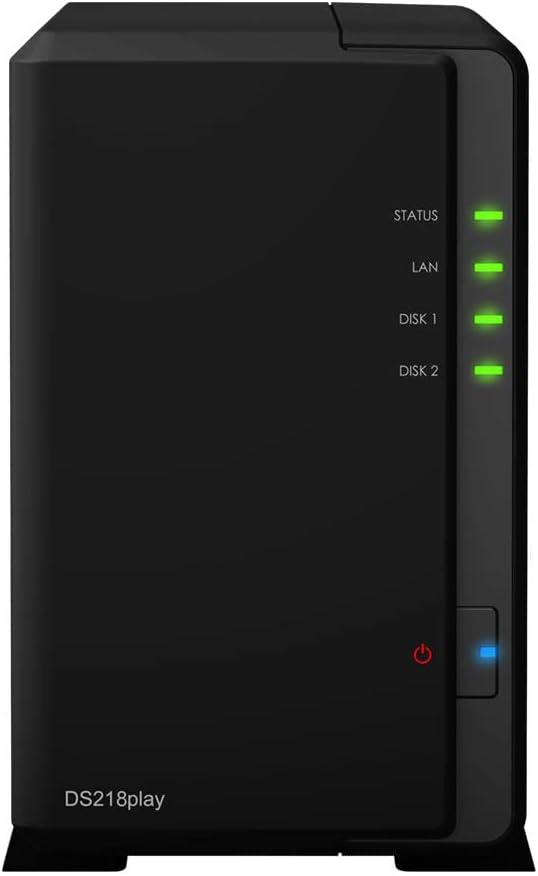
Synology DS218 DiskStation 2-Bay NAS
Download Center - DS218
Download Center - DS218
Download Center - DS218
Download Center - DS218
in 8 offers
The lowest price for Synology DS218 DiskStation 2-Bay NAS right now is $319.00 at PCByte AU, compared across 8 retailers.
The all-time low was $77.05 on 5 Sept 2026 — today's price is 314% above the lowest ever. It has been notably cheaper before — worth setting a price alert.
Prices last updated 2 Oct 2026.
Last updated at 02/10/2026 02:25:08
Synology DS218 2-Bay 3.5' Diskless 1xGbE NAS (HMB), Realtek RTD1296 Quad-core 1.4GHz DiskStation
Affiliate Disclosure: We may receive a small commission for purchases made through this link at no extra cost to you. This helps support our site. Thank you!
Synology DiskStation 2-Bay NAS (DS218)
Synology DiskStation 2-Bay NAS (DS218)
30-day returns
Synology DiskStation 2-Bay NAS (DS218)
30-day returns
"Synology DiskStation DS218 2-Bay 3.5"Diskless 1xGbE NAS"
Delivery $11.99
SYNOLOGY DISKSTATION DS218 2 Bay 3.5 Inch Diskless 1xGbE NAS Tower Black
Delivery between 9–13 Oct $9.95
Synology DS218 DiskStation (SYN-DS218 - Network-attached storage (NAS) Networking)
Delivery $20
Synology DiskStation DS218 Mini Desktop NAS Server, Intel Celeron J3355 Dual-Core, 6GB DDR3L SDRAM, 1TB SSD, DSM Software
Delivery between 7–11 Oct $41
originally posted on bhphotovideo.com
My first Synology units, a pair of DS110J's, we're still going strong after 11 years, despite the firmware being out of support for two years. I finally caved and bought a DS218 when the hard drive in one of DS110J units crashed. So far, pleasantly surprised with the improved features and functionality, and how easy it was to backup the living 110 (DSM5.2) and restore on the new DS218 (DSM7.1). I really like the configurability of the Copy button so I can plug in a USB drive and it will automagically copy everything from the NAS to the USB drive and then eject it.
originally posted on newegg.com
I have learned a lot about networking since purchasing the NAS. I bought it originally as a backup for my photos but it has since turned into a media server. If you're new the NAS game like I was, prepare to go down quite a few rabbit holes. But it's a pretty neat device with lots of capabilities. I love all of the software at your disposal. There's also no shortage of guides out there to help you because Synology is such a king when it comes to thisarea. As a big lover of movies, I really love the media server stuff. I use the Plex application to "direct play" 4k & regular blu-rays to my Nvidia shield. Be warned... unless you're playing content within your home network, don't count on the NAS and it's CPU to transcode for remote play. It is very slow and quite ... MoreI have learned a lot about networking since purchasing the NAS. I bought it originally as a backup for my photos but it has since turned into a media server. If you're new the NAS game like I was, prepare to go down quite a few rabbit holes. But it's a pretty neat device with lots of capabilities. I love all of the software at your disposal. There's also no shortage of guides out there to help you because Synology is such a king when it comes to thisarea. As a big lover of movies, I really love the media server stuff. I use the Plex application to "direct play" 4k & regular blu-rays to my Nvidia shield. Be warned... unless you're playing content within your home network, don't count on the NAS and it's CPU to transcode for remote play. It is very slow and quite frankly inadequate. You're definitely going to want a dedicated media server running on a computer or something. It can't even transcode content very efficiently on the LOCAL area network. Direct play is really the only viable option for today's level of HD content. (this is where your device reads the file directly from the NAS and play its on your screen without processing any video or audio. kind of like loading a video on a computer drive.) Despite that... great product!
originally posted on bhphotovideo.com
The Synology DS218 and dual hard drives were easy to set up and begin using. The booklet had illustrations on how to get up and running, but that's about it. Fortunately I had watched a few videos online before receiving my NAS so I somewhat knew what to expect and what steps to take. The NAS itself is great, and more powerful than I expected, but Synology really should provide better documentation on how to get things set up. They have good video tutorials, but someone less tech savvy might not know where to begin.
| General | |
| Device Type | NAS server |
| Host Connectivity | Gigabit Ethernet |
| Total Storage Capacity | 0 GB |
| Max Supported Capacity | 24 TB |

Synology DS218 2-Bay 3.5' Diskless 1xGbE NAS (HMB), Realtek RTD1296 Quad-core 1.4GHz DiskStation
Affiliate Disclosure: We may receive a small commission for purchases made through this link at no extra cost to you. This helps support our site. Thank you!
Synology DiskStation 2-Bay NAS (DS218)
Synology DiskStation 2-Bay NAS (DS218)
30-day returns
Synology DiskStation 2-Bay NAS (DS218)
30-day returns
"Synology DiskStation DS218 2-Bay 3.5"Diskless 1xGbE NAS"
Delivery $11.99
My first Synology units, a pair of DS110J's, we're still going strong after 11 years, despite the firmware being out of support for two years. I finally caved and bought a DS218 when the hard drive in one of DS110J units crashed. So far, pleasantly surprised with the improved features and functionality, and how easy it was to backup the living 110 (DSM5.2) and restore on the new DS218 (DSM7.1). I really like the configurability of the Copy button so I can plug in a USB drive and it will automagically copy everything from the NAS to the USB drive and then eject it.
I have learned a lot about networking since purchasing the NAS. I bought it originally as a backup for my photos but it has since turned into a media server. If you're new the NAS game like I was, prepare to go down quite a few rabbit holes. But it's a pretty neat device with lots of capabilities. I love all of the software at your disposal. There's also no shortage of guides out there to help you because Synology is such a king when it comes to thisarea. As a big lover of movies, I really love the media server stuff. I use the Plex application to "direct play" 4k & regular blu-rays to my Nvidia shield. Be warned... unless you're playing content within your home network, don't count on the NAS and it's CPU to transcode for remote play. It is very slow and quite ... MoreI have learned a lot about networking since purchasing the NAS. I bought it originally as a backup for my photos but it has since turned into a media server. If you're new the NAS game like I was, prepare to go down quite a few rabbit holes. But it's a pretty neat device with lots of capabilities. I love all of the software at your disposal. There's also no shortage of guides out there to help you because Synology is such a king when it comes to thisarea. As a big lover of movies, I really love the media server stuff. I use the Plex application to "direct play" 4k & regular blu-rays to my Nvidia shield. Be warned... unless you're playing content within your home network, don't count on the NAS and it's CPU to transcode for remote play. It is very slow and quite frankly inadequate. You're definitely going to want a dedicated media server running on a computer or something. It can't even transcode content very efficiently on the LOCAL area network. Direct play is really the only viable option for today's level of HD content. (this is where your device reads the file directly from the NAS and play its on your screen without processing any video or audio. kind of like loading a video on a computer drive.) Despite that... great product!
The Synology DS218 and dual hard drives were easy to set up and begin using. The booklet had illustrations on how to get up and running, but that's about it. Fortunately I had watched a few videos online before receiving my NAS so I somewhat knew what to expect and what steps to take. The NAS itself is great, and more powerful than I expected, but Synology really should provide better documentation on how to get things set up. They have good video tutorials, but someone less tech savvy might not know where to begin.
Firstly the pre-sale advice, sale and price from Scorptec were great. I did have a problem with the initial unit (the CMOS battery had become detached in transit) - and it took me about a week to organise an exchange - but once I was speaking to the right person, the problem was resolved swiftly, and with ease.This is a fantastic product. I’m hindsight, I’d have probably paid extra to get the 4 bay - but this will more than meet my needs (hobbiest photographer) for the next couple of years. It makes some noise - but not distracting to work in the same room as it.I have this set up as redundant RAID, and all of my photos stored on there - which Lightroom can now access wirelessly from anywhere in the world. Today I am connecting an external drive - to backup the ... MoreFirstly the pre-sale advice, sale and price from Scorptec were great. I did have a problem with the initial unit (the CMOS battery had become detached in transit) - and it took me about a week to organise an exchange - but once I was speaking to the right person, the problem was resolved swiftly, and with ease.This is a fantastic product. I’m hindsight, I’d have probably paid extra to get the 4 bay - but this will more than meet my needs (hobbiest photographer) for the next couple of years. It makes some noise - but not distracting to work in the same room as it.I have this set up as redundant RAID, and all of my photos stored on there - which Lightroom can now access wirelessly from anywhere in the world. Today I am connecting an external drive - to backup the NAS. Then my next step is toSet my camera up, to FTP images to the Synology NAS.SpaceRex on YT is an amazing resource for all things Synology - and explained setup in the simplest terms.I believe this will last me for many years.
Being my first time using a NAS I didn't really know what to expect other than it made sense as a choice for my increasing storage needs and because those cloud storage fees do add up. Synology makes the process as simple as possible for first-time users with no previous NAS experience but who want to benefit from having a centralized content hub accessible from any devices on the same network — or even out of it. My needs are of the type of backing up personal data, streaming video and music at high resolution across all my home devices, and this NAS does it all flawlessly — in fact I have left most of the settings at its defaults for now. You can leave the settings as they come or you can go as customized and complex as you want. Synology's installable packages ... MoreBeing my first time using a NAS I didn't really know what to expect other than it made sense as a choice for my increasing storage needs and because those cloud storage fees do add up. Synology makes the process as simple as possible for first-time users with no previous NAS experience but who want to benefit from having a centralized content hub accessible from any devices on the same network — or even out of it. My needs are of the type of backing up personal data, streaming video and music at high resolution across all my home devices, and this NAS does it all flawlessly — in fact I have left most of the settings at its defaults for now. You can leave the settings as they come or you can go as customized and complex as you want. Synology's installable packages are a huge asset that simplifies the personal cloud experience greatly. This unit comes without any hard drives — those are up to your choice. Personally I decided to invest right from the start and included two Seagate Ironwolf (NAS-optimized) drives with it, expecting they can handle years of intense usage. You can set these on RAID 0 or 1, depending on whether you prefer as much space as possible or having a backup disk. The unit is lightweight, rather compact (easily conceivable) and makes little noise if any, other than a beep to announce bootup/restart completion.
I bought this DiskStation to replace an aging Western Digital MyCloud device. I wanted a unit that supported RAID 1 disk duplication and allowed for future disk upgrades to a larger capacity. This unit nicely met those requirements. Installing the hard drives in the DiskStation was easy, I just followed the diagrams in the instructions. The instructions then gave me a link to a web address where I registered the product and downloaded the disk management system. The system installed and then formatted the hard drives. I opted to do a disk check as part of the formatting, so I let it run overnight. Next day it was finished and ready to go. I use this device to store system backups from six different PCs over my home network. I was able to modify my existing backup ... MoreI bought this DiskStation to replace an aging Western Digital MyCloud device. I wanted a unit that supported RAID 1 disk duplication and allowed for future disk upgrades to a larger capacity. This unit nicely met those requirements. Installing the hard drives in the DiskStation was easy, I just followed the diagrams in the instructions. The instructions then gave me a link to a web address where I registered the product and downloaded the disk management system. The system installed and then formatted the hard drives. I opted to do a disk check as part of the formatting, so I let it run overnight. Next day it was finished and ready to go. I use this device to store system backups from six different PCs over my home network. I was able to modify my existing backup scripts to point to the new device. I was also able to copy files from my old device to the new one over the network. So far it has worked flawlessly. It is quiet and I like that it spins down the disks when they have been inactive for a period of time. As an added bonus, it backs up my systems faster than the old device did.
Bought this so I could create my own personal cloud storage so I wouldn't have to pay for Dropbox or Onedrive forever. Works exactly like I thought it did and does the job very well. I'm already finding new uses for it too. Automatic backups? Check. A place to upload unlimited photos and videos when I'm traveling instead of carrying a dozen memory cards? Check. A central place to store all my research and notes between my computers? Check. Accessible anywhere in the world? Cool.I didn't realize how customizable the software is, these are certainly aimed at the tech-savy and seems to have enough features to make an IT department happy. I wish there was an express mode or a way of hiding all the super advanced options and settings, or a way for me to focus on the ... MoreBought this so I could create my own personal cloud storage so I wouldn't have to pay for Dropbox or Onedrive forever. Works exactly like I thought it did and does the job very well. I'm already finding new uses for it too. Automatic backups? Check. A place to upload unlimited photos and videos when I'm traveling instead of carrying a dozen memory cards? Check. A central place to store all my research and notes between my computers? Check. Accessible anywhere in the world? Cool.I didn't realize how customizable the software is, these are certainly aimed at the tech-savy and seems to have enough features to make an IT department happy. I wish there was an express mode or a way of hiding all the super advanced options and settings, or a way for me to focus on the most common settings I need to worry about. I would not recommend this for the computer novice. However, if you're skilled with network and file sharing stuff then this is a wet dream come true.For Christmas this year I need a t-shirt that says I AM the cloud.
I use the DS218 with 2x Seagate Ironwolf 4TB in RAID1 (actually Synology Hybrid Raid, BTRFS), primarily for media storage and system backups on my home network. Setting up the hardware is extremely simple, and while the software requires slightly more knowledge, it is still not difficult due to the abundance of tutorials and forums online. I set it up for remote access, syncing with my other cloud accounts, etc. In only a couple hours. So far everything is working as it should! Performance is as expected, I can saturate the gigabit ethernet connection fairly easily. More than sufficient for my needs. Browsing the interface is also quite smooth. The apps and software are well designed and are fairly self-explanatory. If there is an issue or question, Googling leads ... MoreI use the DS218 with 2x Seagate Ironwolf 4TB in RAID1 (actually Synology Hybrid Raid, BTRFS), primarily for media storage and system backups on my home network. Setting up the hardware is extremely simple, and while the software requires slightly more knowledge, it is still not difficult due to the abundance of tutorials and forums online. I set it up for remote access, syncing with my other cloud accounts, etc. In only a couple hours. So far everything is working as it should! Performance is as expected, I can saturate the gigabit ethernet connection fairly easily. More than sufficient for my needs. Browsing the interface is also quite smooth. The apps and software are well designed and are fairly self-explanatory. If there is an issue or question, Googling leads to quick and well-explained answers. No complaints so far in terms of performance. The NAS runs fairly quietly with the fan on "Quiet Mode". Noise primarily comes from the hard drives spinning, which isn't Synology's fault and can be alleviated with SSDs (but the price - ouch). Other nice aesthetic/environmental features for me are the control over light brightness and the ability to schedule turning the lights off, as I don't want the super bright lights on my desk during the day, and I don't want them on at night at all. Didn't think those were things I needed, but they're nice to have. Environment/aesthetics wise, I'm pleased with this NAS.
Purchased the Synology Diskstation DS218 kit with two WD Red Plus NAS drives to replace a pair of aging consumer level single drive network drives from another brand. I chose the DS218 over the newer and more powerful DS220+ as I wanted the additional USB port for use with a UPS while retaining the ability to connect a backup drive at the rear. I did not feel I needed the redundant LAN connection and while the Celeron processor would have been nice I do not anticipate needing the processing power. I am liking the benefits of the Raid 1 configuration and the recycle bin not provided by my previous boxes. Initial setup was straight forward as far as getting the DS218 up and running. After that it can be a bit overwhelming as there are many options available in ... MorePurchased the Synology Diskstation DS218 kit with two WD Red Plus NAS drives to replace a pair of aging consumer level single drive network drives from another brand. I chose the DS218 over the newer and more powerful DS220+ as I wanted the additional USB port for use with a UPS while retaining the ability to connect a backup drive at the rear. I did not feel I needed the redundant LAN connection and while the Celeron processor would have been nice I do not anticipate needing the processing power. I am liking the benefits of the Raid 1 configuration and the recycle bin not provided by my previous boxes. Initial setup was straight forward as far as getting the DS218 up and running. After that it can be a bit overwhelming as there are many options available in settings that were not offered in my earlier home user oriented drives. Fortunately, there is a lot of information and advise available through Synology and other internet sources. Liking the recycle bin, snapshots, and other features that were lacking in my old setup.
Now that i have this up and running its great. But what hassle getting it set up. Unbelievably there is NO guidance for setting this up and despite watching youtube reviews and so on i had a relative nightmare getting this going. Now that may be because im not as tech savvy as some and it did need my IT department to log on and sort things out. In the end i just hadnt clicked on a few buttons to make cerain files visible but it would have been so easy to write some documentation to get you going. Still giving it 4 stars because as a unit its great. Small, sits out of the way in complete silence doing its thing. I think 2 hard drives will be plenty for most people and i have started with 2x3Gb which i think we will see me good for a number of years. If you have ... MoreNow that i have this up and running its great. But what hassle getting it set up. Unbelievably there is NO guidance for setting this up and despite watching youtube reviews and so on i had a relative nightmare getting this going. Now that may be because im not as tech savvy as some and it did need my IT department to log on and sort things out. In the end i just hadnt clicked on a few buttons to make cerain files visible but it would have been so easy to write some documentation to get you going. Still giving it 4 stars because as a unit its great. Small, sits out of the way in complete silence doing its thing. I think 2 hard drives will be plenty for most people and i have started with 2x3Gb which i think we will see me good for a number of years. If you have thousands of large photos, perhaps taken on an slr then you will probably need bigger. But as i said, once running it think its great, well built and discreet. Once im using the full features of what it can do this will be a gamechanger i reckon. So far im just touching the tip of the iceberg with using Plex for movies. On a significant sidenote: Be warned that if you think you're just going to plop all your blurays and dvds on this thing then think this through. Again, not being massively tech savvy, i had no idea that the transcoding process is so paaaaaaaaaaaaainstaaaaaaaaaaaking. It would be better to call it a labour of love, because oh my god its labour intensive. My PC has been on 24/7 for the last couple of months first converting the bluray to mkv file and then transcoding using handbrake which literally takes 2-12 hours per Bluray and i have a i7 6700. It does crunch a 40Gb to between 2-8Gb but it involves a lot of attention and ideally a powerful CP. But in the end its worth it and after 2 months i have gone through about 180blu rays so far!
| General | |
| Device Type | NAS server |
| Host Connectivity | Gigabit Ethernet |
| Total Storage Capacity | 0 GB |
| Max Supported Capacity | 24 TB |