Thrustmaster TM-2960694 T.Flight Stick x Joystick for PC & PS3
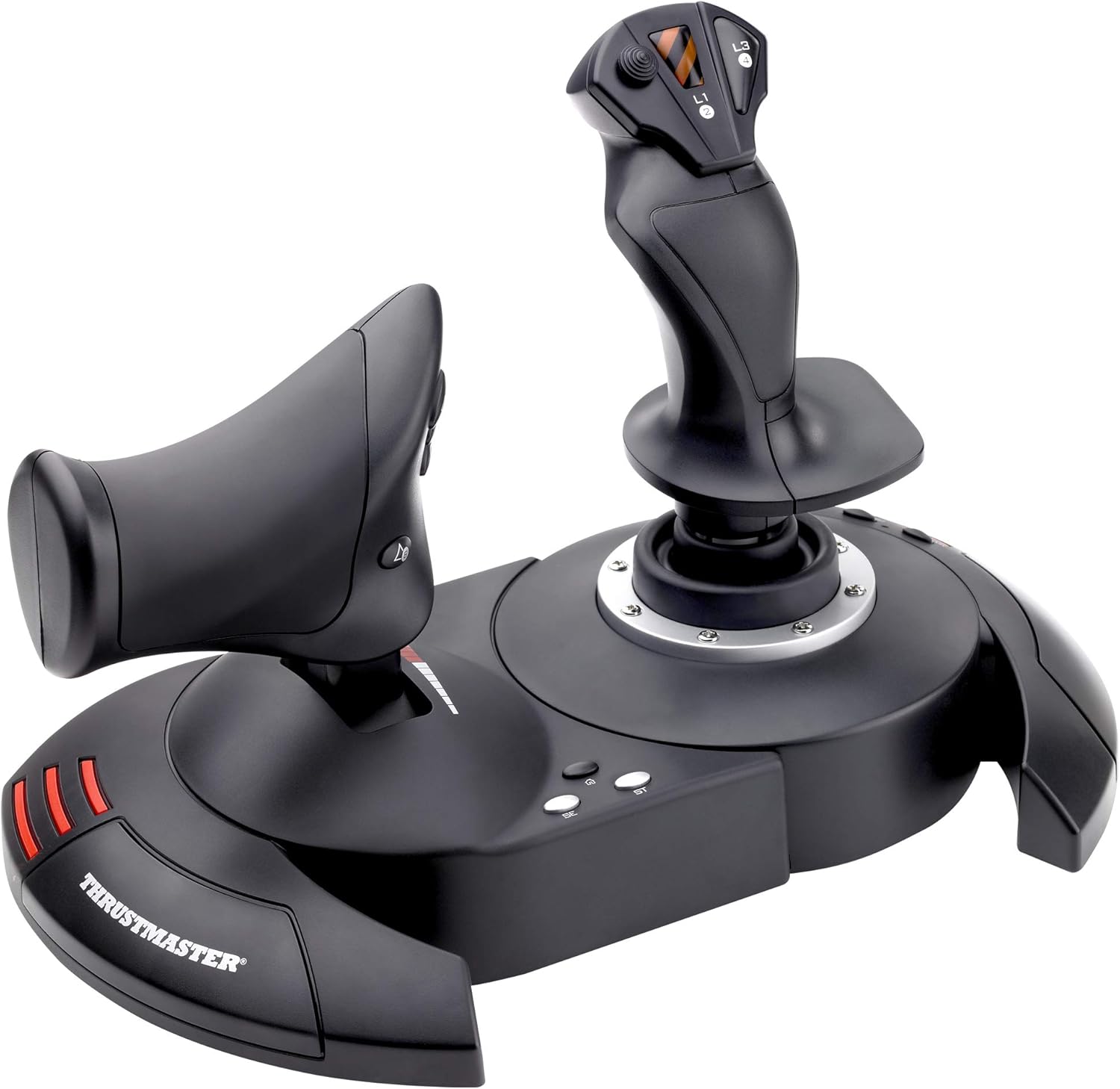
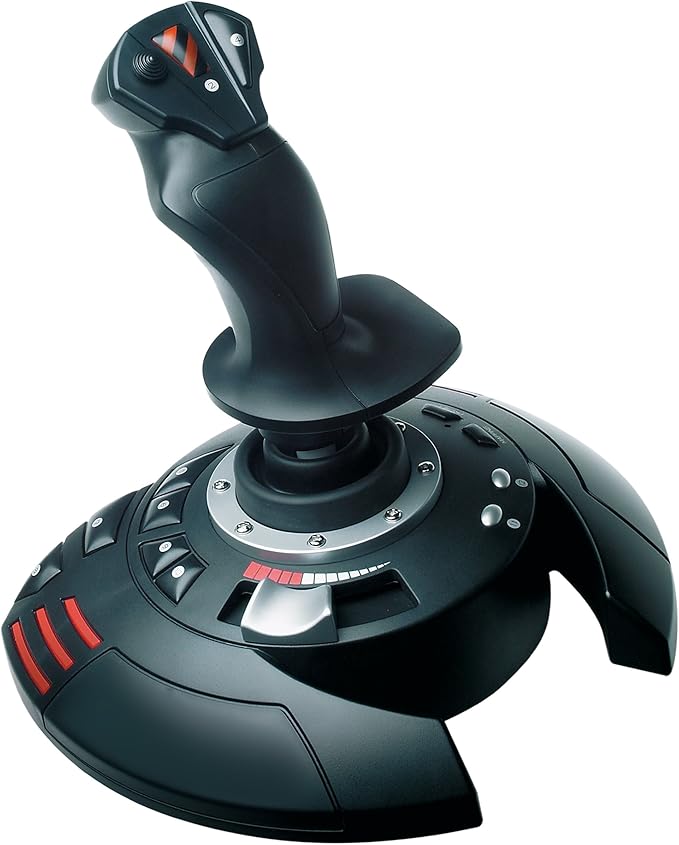
Product Description Experience ultimate control with the T.Flight Stick X, designed to deliver exceptional precision in your PC games. Featuring 12 action buttons, 4 axes, and a built-in throttle, take full advantage of the joystick's capabilities for an unparalleled gaming experience. Stability and Comfort The joystick's weighted base ensures optimal stability, while the wide palm rest provides ideal comfort during long gaming sessions. Quick and Easy Installation Compatible with PCs, the T.Flight Stick X is easy to install and can be used with the best flight simulation games. With preconfigured functions, it's a "Plug & Play" product that lets you take off immediately, with no additional configuration required. Highlighted Features Rotating tiller handle with integrated locking system for quick and intuitive handling at all times. Exclusive preset button that allows you to instantly switch between settings. Mapping button that allows you to instantly change various functions. Internal memory that allows you to save all your settings even if the joystick is disconnected. The T.Flight Stick X joystick offers exceptional performance and an unparalleled gaming experience for flight simulation and PC gaming enthusiasts.
Product Description Experience ultimate control with the T.Flight Stick X, designed to deliver exceptional precision in your PC games. Featuring 12 action buttons, 4 axes, and a built-in throttle, take full advantage of the joystick's capabilities for an unparalleled gaming experience. Stability and Comfort The joystick's weighted base ensures optimal stability, while the wide palm rest provides ideal comfort during long gaming sessions. Quick and Easy Installation Compatible with PCs, the T.Flight Stick X is easy to install and can be used with the best flight simulation games. With preconfigured functions, it's a "Plug & Play" product that lets you take off immediately, with no additional configuration required. Highlighted Features Rotating tiller handle with integrated locking system for quick and intuitive handling at all times. Exclusive preset button that allows you to instantly switch between settings. Mapping button that allows you to instantly change various functions. Internal memory that allows you to save all your settings even if the joystick is disconnected. The T.Flight Stick X joystick offers exceptional performance and an unparalleled gaming experience for flight simulation and PC gaming enthusiasts.
Product Description Experience ultimate control with the T.Flight Stick X, designed to deliver exceptional precision in your PC games. Featuring 12 action buttons, 4 axes, and a built-in throttle, take full advantage of the joystick's capabilities for an unparalleled gaming experience. Stability and Comfort The joystick's weighted base ensures optimal stability, while the wide palm rest provides ideal comfort during long gaming sessions. Quick and Easy Installation Compatible with PCs, the T.Flight Stick X is easy to install and can be used with the best flight simulation games. With preconfigured functions, it's a "Plug & Play" product that lets you take off immediately, with no additional configuration required. Highlighted Features Rotating tiller handle with integrated locking system for quick and intuitive handling at all times. Exclusive preset button that allows you to instantly switch between settings. Mapping button that allows you to instantly change various functions. Internal memory that allows you to save all your settings even if the joystick is disconnected. The T.Flight Stick X joystick offers exceptional performance and an unparalleled gaming experience for flight simulation and PC gaming enthusiasts.
Product Description Experience ultimate control with the T.Flight Stick X, designed to deliver exceptional precision in your PC games. Featuring 12 action buttons, 4 axes, and a built-in throttle, take full advantage of the joystick's capabilities for an unparalleled gaming experience. Stability and Comfort The joystick's weighted base ensures optimal stability, while the wide palm rest provides ideal comfort during long gaming sessions. Quick and Easy Installation Compatible with PCs, the T.Flight Stick X is easy to install and can be used with the best flight simulation games. With preconfigured functions, it's a "Plug & Play" product that lets you take off immediately, with no additional configuration required. Highlighted Features Rotating tiller handle with integrated locking system for quick and intuitive handling at all times. Exclusive preset button that allows you to instantly switch between settings. Mapping button that allows you to instantly change various functions. Internal memory that allows you to save all your settings even if the joystick is disconnected. The T.Flight Stick X joystick offers exceptional performance and an unparalleled gaming experience for flight simulation and PC gaming enthusiasts.
in 38 offers
The lowest price for Thrustmaster TM-2960694 T.Flight Stick x Joystick for PC & PS3 right now is $49.95 at eBay.com.au, compared across 17 retailers.
The all-time low was $47.02 on 27 Aug 2026 — today's price is 6% above the lowest ever. That's a little above the best price we've seen.
Prices last updated 18 Oct 2026.
Last updated at 18/10/2026 20:46:44
Thrustmaster Flight Stick X (PC & PS3)
Affiliate Disclosure: We may receive a small commission for purchases made through this link at no extra cost to you. This helps support our site. Thank you!
Thrustmaster T Flight Stick X PC Joystick Aviation Sim Wired USB Ergonomic Black
Delivery $14.95
Affiliate Disclosure: We may receive a small commission for purchases made through this link at no extra cost to you. This helps support our site. Thank you!
Thrustmaster T.Flight Stick X for PS3, PC
Delivery between Wed – Sat $10
Thrustmaster T Flight Stick X Joystick For PC
7-day returns
Thrustmaster Flight Stick X Joystick Silver
Delivery $41.99
Thrustmaster T.Flight Stick X Joystick PC,Playstation 3 Black,Red,Silver
Free delivery
Thrustmaster Flight Stick X (PC)
Delivery $23.99
Thrustmaster Flight Stick X (PC)
Delivery $23.99
Thrustmaster Flight Stick X (PC)
Delivery $23.99
Thrustmaster Flight Stick X (PC)
Delivery between 22–27 Oct $7.74
originally posted on walmart.com
I purchased this joystick almost a year ago and it's still working great. I used it almost daily. Underneath the joystick is a knob to tighten or loosen the joystick axis which is very useful. It has a very large base which helps prevent tipping, although it takes up more space on the desk. At first I thought it was too tall making it awkward to use on a desk surface, but after a while I found it to be comfortable to use. I found it helps to use taller chairs with taller joysticks by the way (I'm short). It has many more buttons than I need, but that is a good thing for other people.
originally posted on newegg.com
Because this flight stick (joystick) does NOT include any software please check to make sure that it will work with the program you are interested in. For playing a game such as WoW you will need a Joystick/Gamepad to Keyboard mapping program, such as xPadder. Other games, like PS2, support non-keyboard controllers, yet you need to check the configuration window and do a manual set-up. This joystick uses the generic drivers that Microsoft released back in 2006, so it doesn't need to supply it's own, nor does it. I have used a joystick in the past that would tilt off of my keyboard try just because it was a light-weight unit. This has some size and heft to it, and it has not raised off of the desk surface yet. The key/button placement around the base is a bit ... MoreBecause this flight stick (joystick) does NOT include any software please check to make sure that it will work with the program you are interested in. For playing a game such as WoW you will need a Joystick/Gamepad to Keyboard mapping program, such as xPadder. Other games, like PS2, support non-keyboard controllers, yet you need to check the configuration window and do a manual set-up. This joystick uses the generic drivers that Microsoft released back in 2006, so it doesn't need to supply it's own, nor does it. I have used a joystick in the past that would tilt off of my keyboard try just because it was a light-weight unit. This has some size and heft to it, and it has not raised off of the desk surface yet. The key/button placement around the base is a bit strange. You raise the index finger of your right hand to press up on button 3 - strange at best, awkward at worst. While my right hand is on the joystick my left hand could be resting on the base, with my thumb operation the throttle, ring finger on button 5, middle finger on #6, and index finger on #7, and stretching to reach button 8. That leaves buttons 9 through 12 without a finger to operate without taking your hand(s) out of their resting place. Also, I keep my left hand on a keyboard, so buttons 5 - 12 really don't do me any good. I do think they got button #2 and the PoV (Point of View) hat switch, yet it works. Again, check the game(s) you want to use this joystick with to make sure it is supported. If it is not then you will need to invest a few more dollars in a software program that can map the actions of the joystick, and it's buttons, to the keyboard, and mouse. And because of the rudder action of the hand grip you will want to make sure that the program supports that as well. Because of the lack of a way to map the joystick to a keyboard/mouse I can not recommend this flight stick. Other manufactures include software to program their sticks, even in this price range, so having to spend another ten dollars does not seem correct. It does seem to be a good, sturdy, controller, yet I just can't get over the lack of any real support for games that do not have an alternative controller configuration built in. And yes, this is worth deducting one and a half eggs for (button placement is worth another half to whole egg).
originally posted on pccasegear.com
I have been flying X Plane for about 4 years now using the mouse. Decided to upgrade to the Thrustmaster and can’t believe what I have been missing out on. What a great experience. Thank you.
| Compatible OS | Windows |
| Compatible Systems | PC |
| VR Controller? | No |
| Connectivity Type | Wired |
| Connector Type | USB |

Thrustmaster Flight Stick X (PC & PS3)
Affiliate Disclosure: We may receive a small commission for purchases made through this link at no extra cost to you. This helps support our site. Thank you!
Thrustmaster T Flight Stick X PC Joystick Aviation Sim Wired USB Ergonomic Black
Delivery $14.95
Affiliate Disclosure: We may receive a small commission for purchases made through this link at no extra cost to you. This helps support our site. Thank you!
Thrustmaster T.Flight Stick X for PS3, PC
Delivery between Wed – Sat $10
Thrustmaster T Flight Stick X Joystick For PC
7-day returns
Thrustmaster Flight Stick X Joystick Silver
Delivery $41.99
I purchased this joystick almost a year ago and it's still working great. I used it almost daily. Underneath the joystick is a knob to tighten or loosen the joystick axis which is very useful. It has a very large base which helps prevent tipping, although it takes up more space on the desk. At first I thought it was too tall making it awkward to use on a desk surface, but after a while I found it to be comfortable to use. I found it helps to use taller chairs with taller joysticks by the way (I'm short). It has many more buttons than I need, but that is a good thing for other people.
Because this flight stick (joystick) does NOT include any software please check to make sure that it will work with the program you are interested in. For playing a game such as WoW you will need a Joystick/Gamepad to Keyboard mapping program, such as xPadder. Other games, like PS2, support non-keyboard controllers, yet you need to check the configuration window and do a manual set-up. This joystick uses the generic drivers that Microsoft released back in 2006, so it doesn't need to supply it's own, nor does it. I have used a joystick in the past that would tilt off of my keyboard try just because it was a light-weight unit. This has some size and heft to it, and it has not raised off of the desk surface yet. The key/button placement around the base is a bit ... MoreBecause this flight stick (joystick) does NOT include any software please check to make sure that it will work with the program you are interested in. For playing a game such as WoW you will need a Joystick/Gamepad to Keyboard mapping program, such as xPadder. Other games, like PS2, support non-keyboard controllers, yet you need to check the configuration window and do a manual set-up. This joystick uses the generic drivers that Microsoft released back in 2006, so it doesn't need to supply it's own, nor does it. I have used a joystick in the past that would tilt off of my keyboard try just because it was a light-weight unit. This has some size and heft to it, and it has not raised off of the desk surface yet. The key/button placement around the base is a bit strange. You raise the index finger of your right hand to press up on button 3 - strange at best, awkward at worst. While my right hand is on the joystick my left hand could be resting on the base, with my thumb operation the throttle, ring finger on button 5, middle finger on #6, and index finger on #7, and stretching to reach button 8. That leaves buttons 9 through 12 without a finger to operate without taking your hand(s) out of their resting place. Also, I keep my left hand on a keyboard, so buttons 5 - 12 really don't do me any good. I do think they got button #2 and the PoV (Point of View) hat switch, yet it works. Again, check the game(s) you want to use this joystick with to make sure it is supported. If it is not then you will need to invest a few more dollars in a software program that can map the actions of the joystick, and it's buttons, to the keyboard, and mouse. And because of the rudder action of the hand grip you will want to make sure that the program supports that as well. Because of the lack of a way to map the joystick to a keyboard/mouse I can not recommend this flight stick. Other manufactures include software to program their sticks, even in this price range, so having to spend another ten dollars does not seem correct. It does seem to be a good, sturdy, controller, yet I just can't get over the lack of any real support for games that do not have an alternative controller configuration built in. And yes, this is worth deducting one and a half eggs for (button placement is worth another half to whole egg).
I have been flying X Plane for about 4 years now using the mouse. Decided to upgrade to the Thrustmaster and can’t believe what I have been missing out on. What a great experience. Thank you.
I've owned several joysticks over the years. A Microsoft Sidewinder, then a Logitech Attack 3, a Saitek X52, then this. This is by far the most comfortable to use and best feeling joystick that I've had. Far more precise and better feeling than the X52 which is now sitting on a shelf. Of course the X52 had more buttons and the separate throttle, but I could never get used to the way it felt and unless you play something like DCS, you may never even use all of those buttons. The Saitek was probably better in terms of quality control, however. On this Thrustmaster there is a triangular piece of plastic on the front of the joystick (against the palm) that squeaks if you grip with any force. Much worse than the squeakiness is the poor soldering job done on the throttle ... MoreI've owned several joysticks over the years. A Microsoft Sidewinder, then a Logitech Attack 3, a Saitek X52, then this. This is by far the most comfortable to use and best feeling joystick that I've had. Far more precise and better feeling than the X52 which is now sitting on a shelf. Of course the X52 had more buttons and the separate throttle, but I could never get used to the way it felt and unless you play something like DCS, you may never even use all of those buttons. The Saitek was probably better in terms of quality control, however. On this Thrustmaster there is a triangular piece of plastic on the front of the joystick (against the palm) that squeaks if you grip with any force. Much worse than the squeakiness is the poor soldering job done on the throttle wires. There are three wires connected to the throttle slider and they move with it. With enough movement, the thin soldering will snap and the throttle will become unusable. I decided to fix them myself rather than send it in for repairs or a replacement. If you are unwilling or unable to fix a potential issue like this, I would look for a different joystick. Despite the issues I had, I would say I am happy with this stick simply based on its price and performance.
I needed a flight stick type joystick for the new game coming out SC and a few other space combat titles. I needed combat funtionality and good response. This joystick had a good number of buttons and they were well placed. The base is solid and gives me a stable base. They are programmable and I was able to reassign them in the game. I also use a voice command program which makes using it even better since it lets me use the joystick almost exlusively for critical functions. Being able to twist it to roll is very important for good flying especially for games that have black out during high-g maneuvers. The only con is the hat is a bit stiff and very linear and doesnt allow fluid rolling of the hat. The styling is nothing to write home about but I'm all about ... MoreI needed a flight stick type joystick for the new game coming out SC and a few other space combat titles. I needed combat funtionality and good response. This joystick had a good number of buttons and they were well placed. The base is solid and gives me a stable base. They are programmable and I was able to reassign them in the game. I also use a voice command program which makes using it even better since it lets me use the joystick almost exlusively for critical functions. Being able to twist it to roll is very important for good flying especially for games that have black out during high-g maneuvers. The only con is the hat is a bit stiff and very linear and doesnt allow fluid rolling of the hat. The styling is nothing to write home about but I'm all about functionality anyway. I think it's a great buy for my money and feeling good about playing all the new space sims coming out soon with it.
I'll be honest; I don't really know how to rate this joystick. I've been using computers and playing games for decades, but joysticks are not that common a peripheral for me. The last one I had would have been purchased between 10-13 years ago, and the sheer increase in quality is instantly noticeable with this Thrustmaster T.Flight Stick X.I primarily bought it for flying in ArmA (something that really requires some form of throttle for analogue thrust, like the one this model provides). I imagine it will take me a while to get used to flying with a stick instead of a keyboard, and to get it's sensitivity into a personal sweet spot; both the physical stick's resistance can be adjusted along with sensitivity sliders inside the game. But otherwise the joystick is ... MoreI'll be honest; I don't really know how to rate this joystick. I've been using computers and playing games for decades, but joysticks are not that common a peripheral for me. The last one I had would have been purchased between 10-13 years ago, and the sheer increase in quality is instantly noticeable with this Thrustmaster T.Flight Stick X.I primarily bought it for flying in ArmA (something that really requires some form of throttle for analogue thrust, like the one this model provides). I imagine it will take me a while to get used to flying with a stick instead of a keyboard, and to get it's sensitivity into a personal sweet spot; both the physical stick's resistance can be adjusted along with sensitivity sliders inside the game. But otherwise the joystick is working exactly as I expected and was a breeze to get working. Physically speaking it seems sturdy enough, and it has left me with no reason to suspect that it isn't worth the price.
I use the T.FlightStick X Joystick on my PC. I primarily play ARMA 3 and this joystick auto set pretty well to it. Only thing that didn't auto set was the throttle and that was an easy 2 second fix. Sensitivity is good and response is good. Center is perfect with no variance. I bought this to replace an old wireless Thrustmaster because it was getting old swapping batteries. No I have to readjust because the response time is a little faster with the wired joystick. This joystick is bulky and takes up a good bit of desktop. My only con. I would buy again for the low price. Well worth it.
This flight stick is a good solid piece of technology and material. Plug and play makes it easier to use though buttons can be reassigned to suit your game play. Its ergonomically designed with a smooth "z" axis control. Its weight allows for its use on the platform without it moving/sliding as its being used. A good buy for flight sim. operators
I have been suckered into to buying 5 each of these Thrustmaster T-flight sticks (being gifts to family members and friends) BEWARE they are defective products. The sliders fail in a matter of a few hours of use, then they go totally inoperative. Thrustmaster will send you some software claiming it's a software problem. However all they do is "mask over" the existing Microsoft joy stick software (so your not really getting anything that will correct the defective joystick) also when that fails they suggest their calibration software (because obviously they already knew masking over the Microsoft joy.cpl won't fix the defect problem) and here Microsoft rejected and refused to install their calibration software. Mostly do the fact their software is outdated and ... MoreI have been suckered into to buying 5 each of these Thrustmaster T-flight sticks (being gifts to family members and friends) BEWARE they are defective products. The sliders fail in a matter of a few hours of use, then they go totally inoperative. Thrustmaster will send you some software claiming it's a software problem. However all they do is "mask over" the existing Microsoft joy stick software (so your not really getting anything that will correct the defective joystick) also when that fails they suggest their calibration software (because obviously they already knew masking over the Microsoft joy.cpl won't fix the defect problem) and here Microsoft rejected and refused to install their calibration software. Mostly do the fact their software is outdated and totally useless, and they seem to know this as well. I said "suckered into buying" thinking this would make a nice gift for a reasonable price and provide hours of entertainment; but it only provided aggravation and disappointment coupled with a waste of good monies for what is simply a "defective product" being sold. Made in China "dirt cheap" and sold to the American public for whatever price they can bleed you for, here some outlets are asking for $80 dollars, but most outlets sell these very same flight sticks for $30 dollars. I would not only NOT RECOMMEND this product; I will WARN YOU that you are wasting your money. The idea they make a pathetic attempt to say it's a software problem, does not hide the fact; that all 5 joysticks purchased had the very same problem, being a defective slider (throttle) which of course renders the entire joystick totally useless. BUYER BEWARE and hope you heed the advice and don't waste your hard earned money.
I am not a serious gamer, but the next best thing to actual flying is a flight simulator or an air combat game. And no one flies using a computer keyboard! After much thinking and review research, I took a huge chance. Other retailers wanted sky high prices, but not giving up, over several days, B&H Video, of all places in New York City, which is a world away from Spokane, Washington, had the Thrustmaster at a very reasonable price. And without asking, did not charge me shipping. What company does that today! Oh, by the way, out of the box, into a USB port, nothing else to do but enjoy the game!!!!!!!!!!!!!! I will definitely purchase from B&H again. I'm looking for that special pair of binoculars!
| Compatible OS | Windows |
| Compatible Systems | PC |
| VR Controller? | No |
| Connectivity Type | Wired |
| Connector Type | USB |