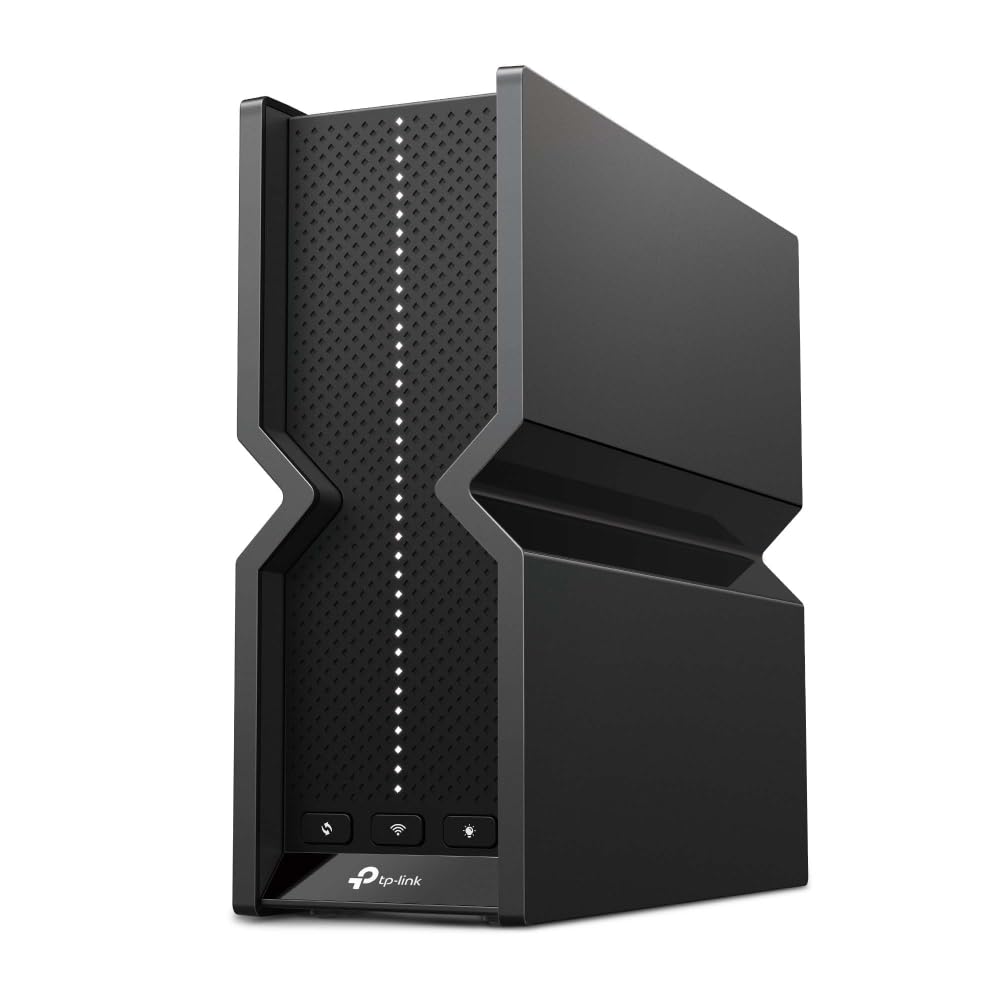
TP-Link Archer BE800 BE19000 Tri-Band Wi-Fi 7 Router
Take your home wireless network to the next level with the TP-LINK BE19000 Tri-Band Wi-Fi 7 Router. This powerful router delivers blazing-fast speeds up to 19Gbps and expanded coverage so you can connect more devices at once. With the latest Wi-Fi 7 technology, it provides ultra-low latency gaming, 8K video streaming, VR immersion and lag-free conferencing. The quad-core processor ensures smooth performance even with multiple users, while Beamforming focuses signals directly to your devices. Setup is a breeze with the intuitive Tether app. With robust parental controls, antivirus and data encryption, you'll have complete peace of mind. Experience the cutting edge of wireless performance with the feature-packed TP-LINK BE19000 Tri-Band Wi-Fi 7 Router.
Take your home wireless network to the next level with the TP-LINK BE19000 Tri-Band Wi-Fi 7 Router. This powerful router delivers blazing-fast speeds up to 19Gbps and expanded coverage so you can connect more devices at once. With the latest Wi-Fi 7 technology, it provides ultra-low latency gaming, 8K video streaming, VR immersion and lag-free conferencing. The quad-core processor ensures smooth performance even with multiple users, while Beamforming focuses signals directly to your devices. Setup is a breeze with the intuitive Tether app. With robust parental controls, antivirus and data encryption, you'll have complete peace of mind. Experience the cutting edge of wireless performance with the feature-packed TP-LINK BE19000 Tri-Band Wi-Fi 7 Router.
Take your home wireless network to the next level with the TP-LINK BE19000 Tri-Band Wi-Fi 7 Router. This powerful router delivers blazing-fast speeds up to 19Gbps and expanded coverage so you can connect more devices at once. With the latest Wi-Fi 7 technology, it provides ultra-low latency gaming, 8K video streaming, VR immersion and lag-free conferencing. The quad-core processor ensures smooth performance even with multiple users, while Beamforming focuses signals directly to your devices. Setup is a breeze with the intuitive Tether app. With robust parental controls, antivirus and data encryption, you'll have complete peace of mind. Experience the cutting edge of wireless performance with the feature-packed TP-LINK BE19000 Tri-Band Wi-Fi 7 Router.
Take your home wireless network to the next level with the TP-LINK BE19000 Tri-Band Wi-Fi 7 Router. This powerful router delivers blazing-fast speeds up to 19Gbps and expanded coverage so you can connect more devices at once. With the latest Wi-Fi 7 technology, it provides ultra-low latency gaming, 8K video streaming, VR immersion and lag-free conferencing. The quad-core processor ensures smooth performance even with multiple users, while Beamforming focuses signals directly to your devices. Setup is a breeze with the intuitive Tether app. With robust parental controls, antivirus and data encryption, you'll have complete peace of mind. Experience the cutting edge of wireless performance with the feature-packed TP-LINK BE19000 Tri-Band Wi-Fi 7 Router.
in 29 offers
The lowest price for TP-Link Archer BE800 BE19000 Tri-Band Wi-Fi 7 Router right now is $686.64 at 友和 Yoho, compared across 26 retailers.
The all-time low was $24.75 on 23 Jan 2025 — today's price is 2674% above the lowest ever. It has been notably cheaper before — worth setting a price alert.
Prices last updated 18 Oct 2026.
Last updated at 18/10/2026 15:44:20
TP-Link Archer BE800 BE19000 Tri Band Wi-Fi 7 Router, MLO, 10Gbps, 2.5Gbps
Free delivery
Affiliate Disclosure: We may receive a small commission for purchases made through this link at no extra cost to you. This helps support our site. Thank you!
Mastercard $100 OFF | TP-Link Archer BE800 BE19000 10G WAN/SFP Tri-Band WiFi 7 Router
Delivery $106.23
Tp-link Archer Be800 Router Silver EU Plug 220V
Delivery $118.99
TP-Link Tri-Band BE19000 WiFi 7 Router (Archer BE800)
Delivery between 24–27 Oct $29
TP-Link BE19000 Tri-Band Wi-Fi 7 Router, 2.4GHz, 5GHz & 6GHz Frequency, Up to 11520 Mbps WiFi Speed, 8x Optimally Positioned Antennas, Beamforming, Bl
Delivery between 22–28 Oct $83.37
TP-Link Tri-Band BE19000 WiFi 7 Router (Archer BE800) | 12-Stream 19 Gbps | 2 × 10G + 4 × 2.5G Ports | LED Screen | 8 High-Performance Antennas |
Delivery between 23–27 Oct $41
TP-Link Archer BE800 BE19000 Tri-Band Wi-Fi 7 Router
Delivery between Wed – Sat $10
TP-Link Archer BE800 (BE19000) Tri-Band WiFi 7 Router 10GbE x2 / 10G SFP+ x1 / 2.5GbE x4 / USB 3.0 x1
Free delivery between 23–28 Oct
TP-Link Archer BE800 BE19000 Tri-Band Wi-Fi 7 Router (WIFI7) Archer BE800
TP-Link ARCHER-BE800 BE19000 Tri-Band Wi-Fi 7 Router
Delivery between 22–27 Oct $9.70
originally posted on bestbuy.com
I'll preface this with, it needs some severe love on the firmware update side, and this is coming from a NetEng individual for a large and international company. Either that, or apparently I got a bum model(unlikely), as compared to some of my "peers" giving this glowing 5 stars. My review will be more in line with the negative reviews by other purchasers. Starting with design, this looks like some flawed hourglass timer or rejected Xbox. You have the novelty LED display on the front, if, for some reason, you decide to display this in a visible area. It allows you to view the time, weather, or emojis, and boasts Alexa support, but let's be realistic, this might only be useful if you don't have a smart home device or phone right by you to tell you the exact same ... MoreI'll preface this with, it needs some severe love on the firmware update side, and this is coming from a NetEng individual for a large and international company. Either that, or apparently I got a bum model(unlikely), as compared to some of my "peers" giving this glowing 5 stars. My review will be more in line with the negative reviews by other purchasers. Starting with design, this looks like some flawed hourglass timer or rejected Xbox. You have the novelty LED display on the front, if, for some reason, you decide to display this in a visible area. It allows you to view the time, weather, or emojis, and boasts Alexa support, but let's be realistic, this might only be useful if you don't have a smart home device or phone right by you to tell you the exact same info.Moving on to functionality, other claims have proved true for me on the lack of range, even in the 2.4/5GHz bands. The 6GHz range is even less. In comparison testing to my current tri-band Asus Wifi 6 router, I'm getting about -10dbm less in signal strength from this TP Link BE800 on all channels and bands. They were located in the exact same spot and tested one after the other, and then even simultaneously to try and differentiate the BE800's claims for Wifi 7, which isn't even adopted or official yet, that it can help strengthen signals on crowded network areas. I simply didn't see that put into action or any measurable difference. The area where this shines and stands out amongst other options is its multi-gig ports for connectivity. Though, how useful this is for the vast majority of users is probably very limited. Not all areas support gig internet yet, and even fewer people choose to opt for the top tier speed. And even then, unless you're using NAS, which 99% of homes are not, you'll likely again, not see any meaningful benefit to having those gig ports. They're a nice to have, just like the potential increased throughput WiFi 7 has. Speaking of which, with the standard not even ironed out, expect lots of updates to this router over the next year or so as they adjust it. There have been some meaningful improvement already, but compared to cost vs value, in today's world, and even into next year, you'll likely not see any real world difference in wifi speeds. As prior noted, it already doesn't have the range to compete with a wifi 6 router that's roughly $200 cheaper.In reality, there is no point in owning this router until wifi 7 is officially adopted, and devices start rolling out. At which point they will have likey patched all of the firmware issues so it will be a much better contender. Unless, of course, you just have to be at the bleeding edge of tech and like to punish yourself, professionally, I see no real push for this yet. Most consumer devices have just started to finally standardize and outnumber gen 5 with gen 6 wifi, so seeing many wifi 7 devices that can take advantage of this router are likely 12-18 months into the future as we look at next gen chips to roll out standardly then.
originally posted on bestbuy.com
I recently upgraded my home network, and the TP-Link Archer BE800 BE19000 Tri-Band WiFi 7 Router has blown me away. This router is a true WiFi powerhouse that has transformed my internet experience. From lightning-fast speeds to excellent coverage, this router has exceeded all my expectations.Let's start with the performance. With WiFi 7 technology and tri-band capabilities, this router delivers incredible speeds that keep up with all my devices' demands. Whether it's streaming 4K videos, online gaming, or downloading large files, the Archer BE800 handles it all with ease. The blazing-fast speeds ensure smooth, uninterrupted connections, even during peak usage times.The coverage has been very good in my ranch home. I have WiFi from my den, where this router is ... MoreI recently upgraded my home network, and the TP-Link Archer BE800 BE19000 Tri-Band WiFi 7 Router has blown me away. This router is a true WiFi powerhouse that has transformed my internet experience. From lightning-fast speeds to excellent coverage, this router has exceeded all my expectations.Let's start with the performance. With WiFi 7 technology and tri-band capabilities, this router delivers incredible speeds that keep up with all my devices' demands. Whether it's streaming 4K videos, online gaming, or downloading large files, the Archer BE800 handles it all with ease. The blazing-fast speeds ensure smooth, uninterrupted connections, even during peak usage times.The coverage has been very good in my ranch home. I have WiFi from my den, where this router is located, to my living room.The design of the Archer BE800 is sleek and modern, with its black color blending seamlessly into my home decor. The router feels well-built and sturdy, and the LED indicators on the front provide clear status updates without being overly distracting. It's a router that you won't mind showcasing in your living room.In terms of connectivity options, the Archer BE800 offers an array of ports, including (2) 10G Ethernet ports and (4) 2.5G Ethernet ports. These ports allow for seamless wired connections and the ability to share files and media across devices on the network.Technology is changing so fast these days. WiFi 6E still hasn’t been fully implemented in most companies and public spaces, and we are already at the dawn of WiFi 7. This router is future-proofed with WiFi 7 technology, ensuring it can handle the increasing demands of modern homes for years to come.In conclusion, the TP-Link Archer BE800 BE19000 Tri-Band WiFi 7 Router is a true gem. It delivers unparalleled speed, coverage, and reliability, making it an ideal choice for power users, gamers, and large households. If you're looking for a top-of-the-line router that will elevate your internet experience, this Archer is undoubtedly the one to consider.
originally posted on bestbuy.com
For me, the TP-Link - Archer BE800 BE19000 Tri-Band Wi-Fi 7 Router is a mixed bag.On the one hand, it has a great assortment of features and connections that you would expect with a higher-priced router: New design, LED screen, Tri-Band WiFi 7, Multi-Link Operation (MLO), Dual 10G ports, 1× 10 Gbps Ethernet/Fiber Combo WAN/LAN port + 1× 10 Gbps WAN/LAN port + 4× 2.5 Gbps ports +1× USB ports, EasyMesh-Compatible, TP-Link HomeShield.There are genuine benefits to each of these features and, together, they reflect the impressive state of modern routers today. Granted, an LED screen with emojis (and base info) is definitely a matter of individual taste. For me it feels like something added for the sake of marketing more than practical use - others may find the ... MoreFor me, the TP-Link - Archer BE800 BE19000 Tri-Band Wi-Fi 7 Router is a mixed bag.On the one hand, it has a great assortment of features and connections that you would expect with a higher-priced router: New design, LED screen, Tri-Band WiFi 7, Multi-Link Operation (MLO), Dual 10G ports, 1× 10 Gbps Ethernet/Fiber Combo WAN/LAN port + 1× 10 Gbps WAN/LAN port + 4× 2.5 Gbps ports +1× USB ports, EasyMesh-Compatible, TP-Link HomeShield.There are genuine benefits to each of these features and, together, they reflect the impressive state of modern routers today. Granted, an LED screen with emojis (and base info) is definitely a matter of individual taste. For me it feels like something added for the sake of marketing more than practical use - others may find the displayed information useful.I have been setting up and using routers for many years. As a result, I've seen routers go through significant seasons of feature upgrades. Adding multiple bands, using powerful processors, developing smartphone apps, and the continually improving ability to prioritize devices according to activity are the kinds of things that have kept me impressed - and happy. Including the latest standards, even before they're official adopted, has usually proven to be a good move, though it often means you won't see the benefits until your devices are also upgraded.Unfortunately, like many others, I had a lot of trouble setting this unit up due to the fact that it needed a firmware update. I suppose I should have paid more attention to that up front, but my previous experience with firmware upgrades on brand new products has been a matter of minor issues and not something that is essential to an easy set up. After the upgrade I was able to get it working and have had a chance to interact with most of the features, but it did leave a bad impression. Setting that aside, I found the set up to be middle-of-the-road. I've had other units that were much easier to set up and work with - and also some which were more difficult and frustrating. A mixed bag.Perhaps I'm spoiled, but I've come away with a kind of 'meh' feeling towards this product. There is some degradation of wifi speed and signal depending on what part of our house I'm in, but that's normal in my experience. Some measurements were much slower, and others not as much.The main reason I did not give it a higher rating is this: As new features become more common-place, the prices of routers tend to decrease as they are widely adopted. New routers with new features that provide significant improvements (ones that you easily notice) are worth once-again paying the higher prices. I did not find the 'new' features of the TP-Link - Archer BE800 BE19000 Tri-Band Wi-Fi 7 Router to be worth the price.Once you update the firmware it is a good, solid product. Just wait for it to go on sale.
| Wireless Speed Rating | BE19000 |
| Wireless Standard | Wi-Fi 7 |
| Wireless Band Count | Tri-Band |
| Max Range Indoors | 105 feet |
| Wireless Highlights | Wi-Fi Protected Setup (WPS) |

TP-Link Archer BE800 BE19000 Tri Band Wi-Fi 7 Router, MLO, 10Gbps, 2.5Gbps
Free delivery
Affiliate Disclosure: We may receive a small commission for purchases made through this link at no extra cost to you. This helps support our site. Thank you!
Mastercard $100 OFF | TP-Link Archer BE800 BE19000 10G WAN/SFP Tri-Band WiFi 7 Router
Delivery $106.23
Tp-link Archer Be800 Router Silver EU Plug 220V
Delivery $118.99
TP-Link Tri-Band BE19000 WiFi 7 Router (Archer BE800)
Delivery between 24–27 Oct $29
TP-Link BE19000 Tri-Band Wi-Fi 7 Router, 2.4GHz, 5GHz & 6GHz Frequency, Up to 11520 Mbps WiFi Speed, 8x Optimally Positioned Antennas, Beamforming, Bl
Delivery between 22–28 Oct $83.37
I'll preface this with, it needs some severe love on the firmware update side, and this is coming from a NetEng individual for a large and international company. Either that, or apparently I got a bum model(unlikely), as compared to some of my "peers" giving this glowing 5 stars. My review will be more in line with the negative reviews by other purchasers. Starting with design, this looks like some flawed hourglass timer or rejected Xbox. You have the novelty LED display on the front, if, for some reason, you decide to display this in a visible area. It allows you to view the time, weather, or emojis, and boasts Alexa support, but let's be realistic, this might only be useful if you don't have a smart home device or phone right by you to tell you the exact same ... MoreI'll preface this with, it needs some severe love on the firmware update side, and this is coming from a NetEng individual for a large and international company. Either that, or apparently I got a bum model(unlikely), as compared to some of my "peers" giving this glowing 5 stars. My review will be more in line with the negative reviews by other purchasers. Starting with design, this looks like some flawed hourglass timer or rejected Xbox. You have the novelty LED display on the front, if, for some reason, you decide to display this in a visible area. It allows you to view the time, weather, or emojis, and boasts Alexa support, but let's be realistic, this might only be useful if you don't have a smart home device or phone right by you to tell you the exact same info.Moving on to functionality, other claims have proved true for me on the lack of range, even in the 2.4/5GHz bands. The 6GHz range is even less. In comparison testing to my current tri-band Asus Wifi 6 router, I'm getting about -10dbm less in signal strength from this TP Link BE800 on all channels and bands. They were located in the exact same spot and tested one after the other, and then even simultaneously to try and differentiate the BE800's claims for Wifi 7, which isn't even adopted or official yet, that it can help strengthen signals on crowded network areas. I simply didn't see that put into action or any measurable difference. The area where this shines and stands out amongst other options is its multi-gig ports for connectivity. Though, how useful this is for the vast majority of users is probably very limited. Not all areas support gig internet yet, and even fewer people choose to opt for the top tier speed. And even then, unless you're using NAS, which 99% of homes are not, you'll likely again, not see any meaningful benefit to having those gig ports. They're a nice to have, just like the potential increased throughput WiFi 7 has. Speaking of which, with the standard not even ironed out, expect lots of updates to this router over the next year or so as they adjust it. There have been some meaningful improvement already, but compared to cost vs value, in today's world, and even into next year, you'll likely not see any real world difference in wifi speeds. As prior noted, it already doesn't have the range to compete with a wifi 6 router that's roughly $200 cheaper.In reality, there is no point in owning this router until wifi 7 is officially adopted, and devices start rolling out. At which point they will have likey patched all of the firmware issues so it will be a much better contender. Unless, of course, you just have to be at the bleeding edge of tech and like to punish yourself, professionally, I see no real push for this yet. Most consumer devices have just started to finally standardize and outnumber gen 5 with gen 6 wifi, so seeing many wifi 7 devices that can take advantage of this router are likely 12-18 months into the future as we look at next gen chips to roll out standardly then.
I recently upgraded my home network, and the TP-Link Archer BE800 BE19000 Tri-Band WiFi 7 Router has blown me away. This router is a true WiFi powerhouse that has transformed my internet experience. From lightning-fast speeds to excellent coverage, this router has exceeded all my expectations.Let's start with the performance. With WiFi 7 technology and tri-band capabilities, this router delivers incredible speeds that keep up with all my devices' demands. Whether it's streaming 4K videos, online gaming, or downloading large files, the Archer BE800 handles it all with ease. The blazing-fast speeds ensure smooth, uninterrupted connections, even during peak usage times.The coverage has been very good in my ranch home. I have WiFi from my den, where this router is ... MoreI recently upgraded my home network, and the TP-Link Archer BE800 BE19000 Tri-Band WiFi 7 Router has blown me away. This router is a true WiFi powerhouse that has transformed my internet experience. From lightning-fast speeds to excellent coverage, this router has exceeded all my expectations.Let's start with the performance. With WiFi 7 technology and tri-band capabilities, this router delivers incredible speeds that keep up with all my devices' demands. Whether it's streaming 4K videos, online gaming, or downloading large files, the Archer BE800 handles it all with ease. The blazing-fast speeds ensure smooth, uninterrupted connections, even during peak usage times.The coverage has been very good in my ranch home. I have WiFi from my den, where this router is located, to my living room.The design of the Archer BE800 is sleek and modern, with its black color blending seamlessly into my home decor. The router feels well-built and sturdy, and the LED indicators on the front provide clear status updates without being overly distracting. It's a router that you won't mind showcasing in your living room.In terms of connectivity options, the Archer BE800 offers an array of ports, including (2) 10G Ethernet ports and (4) 2.5G Ethernet ports. These ports allow for seamless wired connections and the ability to share files and media across devices on the network.Technology is changing so fast these days. WiFi 6E still hasn’t been fully implemented in most companies and public spaces, and we are already at the dawn of WiFi 7. This router is future-proofed with WiFi 7 technology, ensuring it can handle the increasing demands of modern homes for years to come.In conclusion, the TP-Link Archer BE800 BE19000 Tri-Band WiFi 7 Router is a true gem. It delivers unparalleled speed, coverage, and reliability, making it an ideal choice for power users, gamers, and large households. If you're looking for a top-of-the-line router that will elevate your internet experience, this Archer is undoubtedly the one to consider.
For me, the TP-Link - Archer BE800 BE19000 Tri-Band Wi-Fi 7 Router is a mixed bag.On the one hand, it has a great assortment of features and connections that you would expect with a higher-priced router: New design, LED screen, Tri-Band WiFi 7, Multi-Link Operation (MLO), Dual 10G ports, 1× 10 Gbps Ethernet/Fiber Combo WAN/LAN port + 1× 10 Gbps WAN/LAN port + 4× 2.5 Gbps ports +1× USB ports, EasyMesh-Compatible, TP-Link HomeShield.There are genuine benefits to each of these features and, together, they reflect the impressive state of modern routers today. Granted, an LED screen with emojis (and base info) is definitely a matter of individual taste. For me it feels like something added for the sake of marketing more than practical use - others may find the ... MoreFor me, the TP-Link - Archer BE800 BE19000 Tri-Band Wi-Fi 7 Router is a mixed bag.On the one hand, it has a great assortment of features and connections that you would expect with a higher-priced router: New design, LED screen, Tri-Band WiFi 7, Multi-Link Operation (MLO), Dual 10G ports, 1× 10 Gbps Ethernet/Fiber Combo WAN/LAN port + 1× 10 Gbps WAN/LAN port + 4× 2.5 Gbps ports +1× USB ports, EasyMesh-Compatible, TP-Link HomeShield.There are genuine benefits to each of these features and, together, they reflect the impressive state of modern routers today. Granted, an LED screen with emojis (and base info) is definitely a matter of individual taste. For me it feels like something added for the sake of marketing more than practical use - others may find the displayed information useful.I have been setting up and using routers for many years. As a result, I've seen routers go through significant seasons of feature upgrades. Adding multiple bands, using powerful processors, developing smartphone apps, and the continually improving ability to prioritize devices according to activity are the kinds of things that have kept me impressed - and happy. Including the latest standards, even before they're official adopted, has usually proven to be a good move, though it often means you won't see the benefits until your devices are also upgraded.Unfortunately, like many others, I had a lot of trouble setting this unit up due to the fact that it needed a firmware update. I suppose I should have paid more attention to that up front, but my previous experience with firmware upgrades on brand new products has been a matter of minor issues and not something that is essential to an easy set up. After the upgrade I was able to get it working and have had a chance to interact with most of the features, but it did leave a bad impression. Setting that aside, I found the set up to be middle-of-the-road. I've had other units that were much easier to set up and work with - and also some which were more difficult and frustrating. A mixed bag.Perhaps I'm spoiled, but I've come away with a kind of 'meh' feeling towards this product. There is some degradation of wifi speed and signal depending on what part of our house I'm in, but that's normal in my experience. Some measurements were much slower, and others not as much.The main reason I did not give it a higher rating is this: As new features become more common-place, the prices of routers tend to decrease as they are widely adopted. New routers with new features that provide significant improvements (ones that you easily notice) are worth once-again paying the higher prices. I did not find the 'new' features of the TP-Link - Archer BE800 BE19000 Tri-Band Wi-Fi 7 Router to be worth the price.Once you update the firmware it is a good, solid product. Just wait for it to go on sale.
I’m using The BE800 to replace a 3-node Linksys Atlas Pro setup and while overall coverage isn’t quite on par, it’s very close for a singular device and I’m pulling down much higher speeds over Wi-Fi in all but the farthest corner of my basement and the high-speed Ethernet ports are great to have. There are Wi-Fi 6E routers that offer a lot of what the BE800 has and Wi-Fi 7 is a ways off from being mainstream, but even taking Wi-Fi 7 out of the equation I think the BE800 has enough performance and features to mostly justify its cost, though you might want to wait for a sale.Some background: I live in a 2-story split-level home. My internet comes in on the edge of my main floor and from there has to cover the living room, 3-bedrooms, and my basement. Originally I ... MoreI’m using The BE800 to replace a 3-node Linksys Atlas Pro setup and while overall coverage isn’t quite on par, it’s very close for a singular device and I’m pulling down much higher speeds over Wi-Fi in all but the farthest corner of my basement and the high-speed Ethernet ports are great to have. There are Wi-Fi 6E routers that offer a lot of what the BE800 has and Wi-Fi 7 is a ways off from being mainstream, but even taking Wi-Fi 7 out of the equation I think the BE800 has enough performance and features to mostly justify its cost, though you might want to wait for a sale.Some background: I live in a 2-story split-level home. My internet comes in on the edge of my main floor and from there has to cover the living room, 3-bedrooms, and my basement. Originally I had a Wi-Fi 6 dual-band mesh system from Linksys that worked well, but in general I wasn’t reaching the speed of the 940 Mbps CenturyLink fiber plan I paid for. I had previously tried the RAXE500 from Netgear and while the speeds were great in the same room, they fell off at range and I ended up returning it. So far that seems to much less of a problem with the BE800.The BE800 is a very large device; larger than I was expecting even from the pictures, but it’s mostly tall and deep and should fit on the edge of most end tables or shelves without taking up too much space. On the back there are 6 Ethernet ports, 2 of which are 10G, and the other 4 are 2.5G. One of the 10G ports is used for the internet connection and there’s even a fiber combo port on one of them. It’s nice to see better than gigabit speeds on all the ports and it makes this great central networking device if you are wiring Ethernet through your home. The router is advertised with a speed of 19 Gbps, but that is spread across the 3 bands and most of that speed (11.5 Gbps) lives on the shorter-range 6GHz band. It’s still plenty of capacity for larger networks though. There’s also a USB 3.0 port you can connect a network storage device to. I would describe the overall design as inoffensive; it reminds me of some kind of video game console concept. It’s not the prettiest router out there, but at least it doesn’t have a thousand antennas sticking out of it like some other high-end routers.The setup process was great. I setup via the web interface and not the Tether app and I was able to configure my CenturyLink internet connection with my special username and password right from the initial setup instead of having to dig into the manual settings after the fact like I’ve had to do on previous routers. I was connected to the internet within a few minutes and updated to the latest firmware (1.0.2 currently as I write this).I usually have around 20-25 devices on my network at any given moment. Most of them are all on the 2.4GHz or 5GHz band, but I do have a few Wi-Fi 6E devices. Testing the speed in my living room where the router is located I got extremely high speeds and was generally able to hit between 850-900 Mbps of my 940 Mbps connection on both Wi-Fi 6 and Wi-Fi 6E. The Wi-Fi 6E connections are especially fast, but I was able to travel more than a bedroom or two away before it dropped off to the point of being unreliable. Sticking to the 5GHz band and testing on various devices, I was able to pull down around 650-700 Mbps in the farther bedrooms and 500-600 Mbps in most of my basement except for the farthest corner where my speeds dropped down to 100-200 Mbps. It’s still usable, but on my mesh system I was able to get 200-300 Mbps in this area. I plan on running an Ethernet cable to this portion of my house eventually and I think if I were able to get the main router placed more centrally within my house that I wouldn’t even need to do that. The BE800 also supports EasyMesh and can be transformed into a mesh system with another compatible router or range extender, which I plan on investing in the future for my basement using an Ethernet backhaul. I’ve seen earlier reviews complaining about stability, but my experience has been rock solid so far and even the slowest portions of my house still offer a relatively stable connection.The Tether app on my phone helps manage all the settings and is organized and works well. The web interface also offers a lot of configuration options. It’s good to see in a high-end router as a lot of this flexibility seems to be going away on mesh systems.As a final side-note, the LED screen was fun to play with for about 20 minutes, but became something of an annoyance to me and I ended up turning it off.Overall I’m very happy with the BE800. Its performance for me has been great and I really don’t have much to complain about it for the product itself. It’s definitely something for the early adopters though and a lot of the features could go underutilized and thus not really justify the price for everyone. It’s important to consider your specific needs when picking a router or mesh system, but if you want it all the BE800 has it.
I had a rock solid ASUS gigabit network for years that annoyingly came to be compromised due to a network intrusion. Moving forward, I felt I had to move away from the vendor as a whole and so at the same time, in an attempt to upgrade my home network to something approaching 10gbE for the critical data-moving devices and 2.5 gbE for the remaining media consumers (with 30 or so IoT devices thrown in for good measure), I decided to go with this router as it was the only device with 4 x 2.5gbE LAN (for my four wall jacks) plus 2x10gbE WAN/LAN ports (one being a sfp+ port). On paper, it was a dream come true for my needs. I proceeded to invest in all the requisite NIC cards, switches, DAC cables, and on and on (I even used the opportunity to shell out for a new QNAP ... MoreI had a rock solid ASUS gigabit network for years that annoyingly came to be compromised due to a network intrusion. Moving forward, I felt I had to move away from the vendor as a whole and so at the same time, in an attempt to upgrade my home network to something approaching 10gbE for the critical data-moving devices and 2.5 gbE for the remaining media consumers (with 30 or so IoT devices thrown in for good measure), I decided to go with this router as it was the only device with 4 x 2.5gbE LAN (for my four wall jacks) plus 2x10gbE WAN/LAN ports (one being a sfp+ port). On paper, it was a dream come true for my needs. I proceeded to invest in all the requisite NIC cards, switches, DAC cables, and on and on (I even used the opportunity to shell out for a new QNAP NAS). I have symmetrical gigabit that does 950 mbps up/down without breaking a sweat. I rarely have bad network days. That all changed when I connected this flakey disappointment. The first thing that made me scratch my head was the separate IoT network feature whose default setting was to be both visible and controllable by the main network. You know, the opposite of the whole reason you’d setup a separate IoT network in the first place? There is an add-on feature called “device isolation” that you can enable on a per device basis, but in doing so you’ll add what should be a completely unnecessary, but unfortunately is absolutely necessary, layer of complexity to a home network that, last I checked, hasn’t gotten simpler on its own over the years. There were many other problems, annoyances, poorly implemented good ideas, underselling documentation/explanations, and on the whole the entire Wi-Fi system was maddeningly unreliable. Connecting 8 kasa smart plugs reliably and incorporating them into HomeKit took, I kid you not, 9 hours. Oh never mind, two of the plugs have disappeared as I type this. I’m done here. This router sucks and I’m very annoyed I had to travel for work so it’s now beyond the return period. Look elsewhere! The stars
Packaging is sleek and router feels and looks premium, the setup is straightforward, just connect the RJ45 Ethernet Cable or a Optical Module (Fiber-Optic Cable), then Setup the network by downloading the 'Tether' app or Via Web Browser.The app is user friendly, the options by default are for the basic users, of course the app includes the options for the most advance network users as well, here is a list of some of them:* Network Tab:- Network Status (Shows the CPU and Memory Usage)- Clients (Shows the connected devices the what to do with them)- Traffic Usage (Displays the traffic and the Network Usage of the devices that are connected )- Screen Display (lets you set up the LED Screen with the Time, Date, Weather, Temperature, Emojis or any Custom Text along ... MorePackaging is sleek and router feels and looks premium, the setup is straightforward, just connect the RJ45 Ethernet Cable or a Optical Module (Fiber-Optic Cable), then Setup the network by downloading the 'Tether' app or Via Web Browser.The app is user friendly, the options by default are for the basic users, of course the app includes the options for the most advance network users as well, here is a list of some of them:* Network Tab:- Network Status (Shows the CPU and Memory Usage)- Clients (Shows the connected devices the what to do with them)- Traffic Usage (Displays the traffic and the Network Usage of the devices that are connected )- Screen Display (lets you set up the LED Screen with the Time, Date, Weather, Temperature, Emojis or any Custom Text along with the Speed of the Slides)* Family Tab:- Lets you set the parent control* Security Tab:- Shows you any Router Security Risk and offers you a 'Homeshield Pro' Features for a Monthly/Yearly Price* More Tab:- Tab with miscellaneous options such as Internet Connection which shows you the IPv4/v6 details, Guest Network, Iot Network, Block List, EasyMesh (Which let you add more EasyMesh routers), Network Diagnostics , Wifi Settings (To Modify/Disable the 2.4GHz, 5GHz and 6GHz network and the MLO Network which is a Wifi7 Feature) and of course the Advance features.I came from a Google Wifi Router so this Wifi 7 Router is a Huge Upgrade, I noticed my cellphone started showing the Wifi6 Icon offering a great speed along with my other devices.Keep in mind that this router can Auto Update its Firmware.Well, Wi-Fi 7 is so new that almost no consumer devices currently support it, but its good to know that Tp-Link is ahead of time and already released a router that will be able to support Wi-Fi7 (Also I do not know how that gonna work because I only see a 2.4, 5 and 6 GHz networks, maybe with a Firmware Update?).for most people ATM upgrading to Wi-Fi 7 is not still needed as they won't notice a significant difference with Wi-Fi 6. but Its good to know that we already have a Wi-Fi 7 compatible router for future proofing.Apart from that this router works like a charm and I'm really happy with it.
This is one of the newest routers from TP-Link with the latest generation Wi-Fi 7 technology. The design is sleek and blends with other devices on the TV console or on a side table. This is no small router compared to a traditional one, you might even mistake it for a gaming console. The router supports Tri-bands of 2.4 Ghz, 5 Ghz, and 6 Ghz with combined speeds of up to 19 Gbps. The setup was easy, you can use the Tether app or do it via the web interface. Both options provide you with all the customization to manage your network settings. First things first, make sure you update the firmware settings before you start with your setup.The router comes with two 10 Gbps and four 2.5 Gbps Ethernet ports. This helps with getting the maximum speed from your service ... MoreThis is one of the newest routers from TP-Link with the latest generation Wi-Fi 7 technology. The design is sleek and blends with other devices on the TV console or on a side table. This is no small router compared to a traditional one, you might even mistake it for a gaming console. The router supports Tri-bands of 2.4 Ghz, 5 Ghz, and 6 Ghz with combined speeds of up to 19 Gbps. The setup was easy, you can use the Tether app or do it via the web interface. Both options provide you with all the customization to manage your network settings. First things first, make sure you update the firmware settings before you start with your setup.The router comes with two 10 Gbps and four 2.5 Gbps Ethernet ports. This helps with getting the maximum speed from your service provider on your connection and supports Multi-Link Operation. After setting this router, I connected all my devices to this router to test the speed and was pleasantly surprised to see an overall boost throughout the house, even at far end corners. If you have Wi-Fi 6E devices, then you will see the difference in connection speeds with this router. There are eight antennas placed inside the case that provide high coverage. This router also supports whole home mesh Wi-Fi setup with compatible EasyMesh devices.There is an LED screen on the face of the router along with three physical buttons. The LED displays the router status as well as weather, date, time, text, or emojis. You have the option to set schedules when you want the LED to display these. But if it is an annoyance to you, you will appreciate the option of completely turning off the LED screen. There are two features I really like in this router. First, having the VPN connection and an ordinary internet connection run at the same time without using any external software. Second is the option to set up a dedicated Wi-Fi network for all your IoT devices, enhancing the security.This is a premium and powerful router from TP-Link with plenty of features that is geared towards future technology while keeping the backwards compatibility.
Choosing a router shouldn't be so complicated, however there are currently a huge number of models and brands to choose from. While it is true that there are relatively inexpensive devices that fulfill their function, they do not always meet the customer's expectations. So we can say that the main thing is to know as customers what we need, it may be that we just need a good wifi connection and nothing more, it may also be that we are looking for a wired connection because we are pc gamers, or maybe we work from home or in a place where more people connect to a local network and we need a higher bandwidth to transfer and share data more quickly and effectively, so based on what result we seek is that we will choose the router we need. This particular Tp-link Archer ... MoreChoosing a router shouldn't be so complicated, however there are currently a huge number of models and brands to choose from. While it is true that there are relatively inexpensive devices that fulfill their function, they do not always meet the customer's expectations. So we can say that the main thing is to know as customers what we need, it may be that we just need a good wifi connection and nothing more, it may also be that we are looking for a wired connection because we are pc gamers, or maybe we work from home or in a place where more people connect to a local network and we need a higher bandwidth to transfer and share data more quickly and effectively, so based on what result we seek is that we will choose the router we need. This particular Tp-link Archer BE800 router can perform the tasks mentioned above, all of them.In the box comes the router, an RJ45 ethernet cable, power adapter and a quick installation guide. I like the design although it looks more like a video game console, but something that makes it look better is its led screen, it can play emojis, show the weather, the time or a custom design, I like it a lot. The router has 1 port 10 Gbps Ethernet/Fiber Combo WAN/LAN, 1 port 10 Gbps WAN/LAN, 4 ports 2.5 Gbps, 1 USB port, Tri-Band Wi-Fi 2.4Ghz, 5Ghz and 6Ghz. Installation is simple and with the help of the Tether app the configuration is very easy. From the app you can customize the network very completely, you can create separate networks depending on the frequency so that devices compatible with those frequencies take advantage of the speed, you can create a guest network (for security), prioritize the most important devices or those that require a wider and more stable connection all the time never lose speed or connection, you can also make a network analysis and check one by one which devices are connected and if necessary block them or limit them in speed, etc.. I consider that the app is a great help both for configuration and for daily use, it is important to always have control of the local network, it is our personal data that are at stake.Regarding the performance, the device fulfills its function, in my case my ISP gives me a speed of 500 Mbps, I have exceeded 630 Mbps via ethernet and wirelessly more than 400 Mbps, I have more than 12 devices connected to the router and the connection is stable, I can access my wireless cameras, play online on PC, have several phones connected at the same time, tvs and tablets, everything flows correctly, it seems that with each firmware update the performance is improving. The same app has the option to automatically update the router firmware to keep it always up to date. Regarding the 10 Gbps WAN connection, I do not have a local network in which I can confirm the speed or an internet greater than 1 Gbps, however for those who have a NAS or share information locally on different PCs on the same network, it can be of great help, just remember that to use the 10 Gbps connection you need a network cable, network card, switch if necessary, compatible with the 10 Gbps standard.As I mentioned at the beginning, it depends on the needs of the router that we will choose, in my case everything I need to connect to the network works correctly and this router is enough for me, if at some point I want to create a local network and transfer data between devices, I can do it with either 2.5 Gbps or 10 Gbps connection if necessary, it is clear that very few need so much data transfer speed but if you work with multimedia files, such as for editing work, it is very good to have a fast router.In conclusion, this TP-link Archer BE800 Router is able to improve the wifi and ethernet connection speed, whether for mobile devices, PCs, printers, security cameras, local networks, IoT. It has an app that allows you to customize the network to improve security and experience. It has multiple wifi bands to connect compatible devices and take advantage of the maximum internet speed that your ISP allows. 2.5 Gbps and 10 Gbps WAN\LAN ports. It is easy to install and configure. If you have many devices and want to manage them in a better way and get the most out of your internet, this is a good option.
I wanted to pair this TP-Link - Archer BE800 BE19000 Tri-Band Wi-Fi 7 Router with my 1Gb fiber internet service and to replace my 10-year old ASUS RT-AC87R router which I made it as an access point for my numerous existing SmartThing, Ring, Nest devices.Did my usual extensive research which included being able to future proof my wi-fi speeds beyond 6e, feature 10G and/or 2.5Gb ports to support my 1Gb+ fiber download/upload speeds as well as connecting to my Synology 10Gb NAS.This TP-Link router purchase from BestBuy was one of my best decisions. The router was available at my local store for same day purchase. The nice person at the store made the purchase very smooth and I was out the door in under 10 minutes.The installation process literally took less than ... MoreI wanted to pair this TP-Link - Archer BE800 BE19000 Tri-Band Wi-Fi 7 Router with my 1Gb fiber internet service and to replace my 10-year old ASUS RT-AC87R router which I made it as an access point for my numerous existing SmartThing, Ring, Nest devices.Did my usual extensive research which included being able to future proof my wi-fi speeds beyond 6e, feature 10G and/or 2.5Gb ports to support my 1Gb+ fiber download/upload speeds as well as connecting to my Synology 10Gb NAS.This TP-Link router purchase from BestBuy was one of my best decisions. The router was available at my local store for same day purchase. The nice person at the store made the purchase very smooth and I was out the door in under 10 minutes.The installation process literally took less than 2 hours to complete including the firmware upgrade. I have the router for about 30 days and have not experienced any glitches. It is connected to a 1200W UPS to protect the device and continuous internet service from the occasional electrical surges or brownouts.The router has two 10Gb ports - one is connected to the 5Gb outbound port on my AT&T gateway while the second 10Gb goes to my 10Gb ethernet port on my NAS. One of the four 2.5Gb ports is connected to an 8-port 2.5Gb switch in my basement which in turn provides reliable down/upload speeds to key end devices in my home network. One of the other port of this 2.5Gb switch is linked to the other two 24-port 1Gb switches that serves to the rest of my house. No issues seen with the hardwired part of this router. Been testing with speedtest app which confirms this.The wifi 6 range for the router is able to reach past several walls in the house and stayed strong and stable. My mobile phones, iPad, tablets, Windows 11 and MacBook Pro are running on wifi 6 and speedtest results show over 300Mbps down/up speeds which is a lot quicker than my old (understandably so) ASUS wi-fi router.No regrets with this purchase and will update if anything changes.
The TP-Link Archer BE800 BE19000 is a tri-band Wi-Fi 7 router that delivers high-speed internet connection with a breath-taking range of functionalities. Tailored for the needs of a highly digital and connected era, the Archer BE800 is the embodiment of technological brilliance. This router emerges as the perfect companion for HD video streaming on Apple TV, Firesticks, Smart TV’s and the like and provides unbeatable performance for multiple devices even with heavy online gaming usage.Starting with its Wi-Fi speeds, the router operates on three bands: 6 GHz, 5 GHz, and 2.4 GHz, with speeds of 11520 Mbps, 5760 Mbps, and 1376 Mbps respectively, thanks to the 802.11be standard. This tri-band technology allows devices to be allocated to different bands, optimizing ... MoreThe TP-Link Archer BE800 BE19000 is a tri-band Wi-Fi 7 router that delivers high-speed internet connection with a breath-taking range of functionalities. Tailored for the needs of a highly digital and connected era, the Archer BE800 is the embodiment of technological brilliance. This router emerges as the perfect companion for HD video streaming on Apple TV, Firesticks, Smart TV’s and the like and provides unbeatable performance for multiple devices even with heavy online gaming usage.Starting with its Wi-Fi speeds, the router operates on three bands: 6 GHz, 5 GHz, and 2.4 GHz, with speeds of 11520 Mbps, 5760 Mbps, and 1376 Mbps respectively, thanks to the 802.11be standard. This tri-band technology allows devices to be allocated to different bands, optimizing performance. The speed capabilities are outstanding, even for a router of this caliber. For those with a need for 8K streaming, VR/AR, high-speed downloads, and intensive online gaming, the Archer BE800 is a dream come true.Coupled with this, the router is designed to cover up to 4-bedroom houses effectively, thanks to eight optimally positioned antennas that form a signal-boosting array. The device uses Beamforming technology, which concentrates wireless signal strength towards clients to expand the Wi-Fi range. This router also boasts of a high-power FEM (Front-End Module) that enhances transmission power to bolster signal coverage, promising a strong and reliable connection irrespective of where you are in your house.A crazy good feature of the Archer BE800 is its capacity to support up to 100 devices simultaneously without compromising on speed or stability, thanks to the 4x4 MU-MIMO (Multi-User Multiple Input Multiple Output) and OFDMA (Orthogonal Frequency Division Multiple Access) technologies. Additionally, it employs DFS (Dynamic Frequency Selection) to access an extra band and reduce congestion.The Archer BE800 does not just stop at high-speed internet; it offers a suite of advanced functionalities like Multi-Link Operation (MLO), 320 MHz Channel, 4K-QAM, Multi-RUs, and compatibility with EasyMesh, Alexa, and Google Assistant. The MLO increases throughput, reduces latency, and improves reliability, while the 320 MHz channel effectively doubles the speed. The 4K-QAM technology allows for 20% more data packing than Wi-Fi 6, thus further amplifying the router's speed.The router's compatibility with EasyMesh ensures that there are no dead zones in your house. If you do encounter a coverage problem, all you need to do is add another EasyMesh router or range extender to further enhance your multi-gigabit mesh Wi-Fi. I added two other Easy Mesh access points and now I even have robust Wi-Fi coverage outside on my deck, in my driveway and the yard. Also, the Alexa and Google Assistant compatibility adds a layer of smart home functionality to your internet experience, while the IoT Network feature opens up a world of possibilities.The Archer BE800 comes with advanced HomeShield Parental Controls, allowing users to set custom profiles, utilize a professional content filter library, schedule off-time, bedtime, and even reward children with additional online time. This thoughtful addition underscores TP-Link's commitment to not only offer a high-performance product but also to consider the safety and well-being of its users.If you need a state of the art, latest and greatest Wi-Fi system for your home, don’t hesitate to grab one.
| Wireless Speed Rating | BE19000 |
| Wireless Standard | Wi-Fi 7 |
| Wireless Band Count | Tri-Band |
| Max Range Indoors | 105 feet |
| Wireless Highlights | Wi-Fi Protected Setup (WPS) |