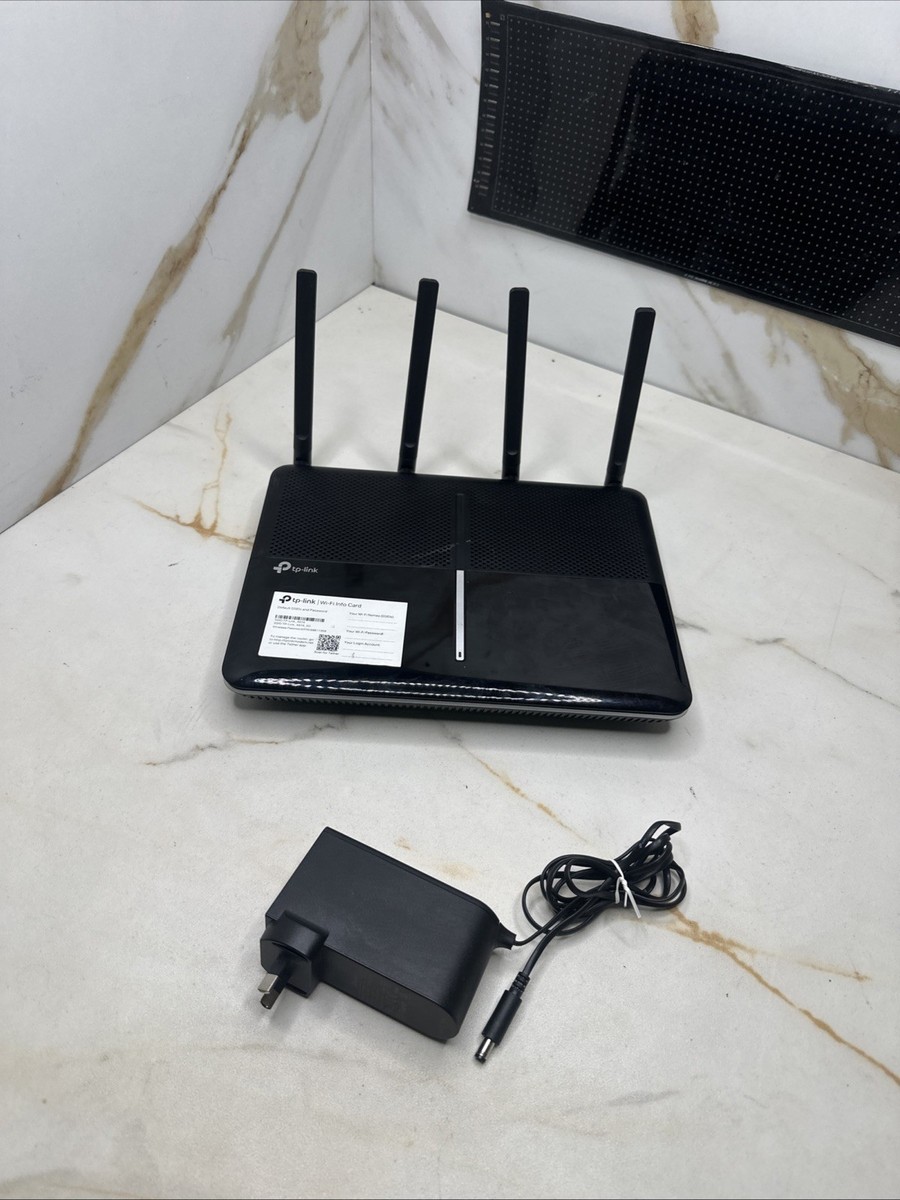
TP-Link ARCHER-VR2800, Wireless AC2800 MU-MIMO VDSL/ADSL Modem Router
AC2800 Wireless MU-MIMO VDSL/ADSL Modem Router
AC2800 Wireless MU-MIMO VDSL/ADSL Modem Router
AC2800 Wireless MU-MIMO VDSL/ADSL Modem Router
AC2800 Wireless MU-MIMO VDSL/ADSL Modem Router
in 13 offers
The lowest price for TP-Link ARCHER-VR2800, Wireless AC2800 MU-MIMO VDSL/ADSL Modem Router right now is $130.99 at Retro Unit, compared across 12 retailers.
The all-time low was $130.99 on 13 June 2026. That's the lowest price we've ever tracked — a great time to buy.
Prices last updated 13 June 2026.
Last updated at 13/06/2026 04:58:48
TP-Link Archer VR2800 4 Port 100Mbps Wireless Modem Router NBN Compatible
Delivery $17.95
TP-Link Archer VR2800 MU-MIMO VDSL/ADSL Modem Router (Open Box)
TP-Link Archer VR2800 MU-MIMO VDSL/ADSL Modem Router
60-day returns
TP-LINK Archer VR300 AC1200 1200Mbps Wireless VDSL/ADSL Modem Router 1.2Gbps 867Mbps@5GHz [email protected] 3xLAN 1xWAN 1xRJ11 4xAntennas
Delivery $10
TP-Link Wireless AC2800 MU-MIMO VDSL/ADSL Modem Router (Archer VR2800)
TP-Link Wireless AC2800 MU-MIMO VDSL/ADSL Modem Router (Archer VR2800)
30-day returns
TP-Link Archer VR2800 AC2800 Dual Band Wireless MU-MIMO VDSL/ADSL Modem Router
Delivery $13.45
TP-Link Archer VR2800 AC2800 2.8Gbps Wireless MU-MIMO VDSL/ADSL Modem Router 2167Mbps@5GHz [email protected] 4x1Gbps LAN/WAN 2xUSB 4xAntennas
Delivery $18
TP-Link Archer VR2800 AC2800 Wireless MU-MIMO VDSL/ADSL Modem Router - NBN Ready [PC]
Delivery between 16–22 June $12.70
TP-Link Archer VR2800 AC2800 Wireless MU-MIMO VDSL/ADSL Modem Router for Whole Home Wi-Fi
Delivery between Tue – Thu $13.50
originally posted on Google Customer Reviews
So far so good. Easy enough to set up but the app wouldn’t let me change the necessary settings. I had to connect directly and it was straight forward.Connected to my ISP quickly and is providing a stable connection with about all the speed I can expect from FTTN.Plenty of ventilation so I am hoping it doesn’t overheat like my old one.
originally posted on cclonline.com
The preconfigured "Easy setup" list of providers on this router do not list our ISP, Vodafone,but, after choosing BT as the provider and inserting my user name and password it configures and connects in a few seconds to Vodafone Superfast Broadband (FTTC) perfectly.However, the hoped for gain in performance over the Vodafone Wi-Fi Hub did not happen, due in part I feel, that Vodafone have throttled the "up to 47.64Mbps" to 29Mbps.Other than that, the VR2800 is stable and without the drop outs we suffered using the Vodafone router.Wi-Fi is good, even to our garden chalet approx 25mtrs away. The MU-MIMO is excellent as we have as many as 14 conected devices on the network at various times without problems. The configuration settings are quite straightforward and ... MoreThe preconfigured "Easy setup" list of providers on this router do not list our ISP, Vodafone,but, after choosing BT as the provider and inserting my user name and password it configures and connects in a few seconds to Vodafone Superfast Broadband (FTTC) perfectly.However, the hoped for gain in performance over the Vodafone Wi-Fi Hub did not happen, due in part I feel, that Vodafone have throttled the "up to 47.64Mbps" to 29Mbps.Other than that, the VR2800 is stable and without the drop outs we suffered using the Vodafone router.Wi-Fi is good, even to our garden chalet approx 25mtrs away. The MU-MIMO is excellent as we have as many as 14 conected devices on the network at various times without problems. The configuration settings are quite straightforward and fairly easy to find and set. Overall,a well made and unobtrusive piece of kit.
originally posted on webuy.com
Bought this to replace my broadband supplier's provided TP-link TD-W9970, and it's been great so far. Wireless performance has been noticeably improved on mobile devices, both when near to the router and further away, it's pretty attractive, and it was easy to set up. It also arrived in its original box with all accessories, which was appreciated. It has wall-mounts on the back, which I was already using for the previous router and which are worth using as the router itself is pretty huge. I knew this going into it, but it might catch you out if you don't check the measurements first!
| General | |
| Device Type | Wireless router - 4-port switch (integrated) |
| Enclosure Type | Desktop |
| Connectivity Technology | Wireless, wired |
| Data Link Protocol | Ethernet, Fast Ethernet, Gigabit Ethernet, IEEE 802.11b, IEEE 802.11a, IEEE 802.11g, IEEE 802.11n, IEEE 802.11ac |
TP-Link Archer VR2800 4 Port 100Mbps Wireless Modem Router NBN Compatible
Delivery $17.95
TP-Link Archer VR2800 MU-MIMO VDSL/ADSL Modem Router (Open Box)
TP-Link Archer VR2800 MU-MIMO VDSL/ADSL Modem Router
60-day returns
TP-LINK Archer VR300 AC1200 1200Mbps Wireless VDSL/ADSL Modem Router 1.2Gbps 867Mbps@5GHz [email protected] 3xLAN 1xWAN 1xRJ11 4xAntennas
Delivery $10
TP-Link Wireless AC2800 MU-MIMO VDSL/ADSL Modem Router (Archer VR2800)
So far so good. Easy enough to set up but the app wouldn’t let me change the necessary settings. I had to connect directly and it was straight forward.Connected to my ISP quickly and is providing a stable connection with about all the speed I can expect from FTTN.Plenty of ventilation so I am hoping it doesn’t overheat like my old one.
The preconfigured "Easy setup" list of providers on this router do not list our ISP, Vodafone,but, after choosing BT as the provider and inserting my user name and password it configures and connects in a few seconds to Vodafone Superfast Broadband (FTTC) perfectly.However, the hoped for gain in performance over the Vodafone Wi-Fi Hub did not happen, due in part I feel, that Vodafone have throttled the "up to 47.64Mbps" to 29Mbps.Other than that, the VR2800 is stable and without the drop outs we suffered using the Vodafone router.Wi-Fi is good, even to our garden chalet approx 25mtrs away. The MU-MIMO is excellent as we have as many as 14 conected devices on the network at various times without problems. The configuration settings are quite straightforward and ... MoreThe preconfigured "Easy setup" list of providers on this router do not list our ISP, Vodafone,but, after choosing BT as the provider and inserting my user name and password it configures and connects in a few seconds to Vodafone Superfast Broadband (FTTC) perfectly.However, the hoped for gain in performance over the Vodafone Wi-Fi Hub did not happen, due in part I feel, that Vodafone have throttled the "up to 47.64Mbps" to 29Mbps.Other than that, the VR2800 is stable and without the drop outs we suffered using the Vodafone router.Wi-Fi is good, even to our garden chalet approx 25mtrs away. The MU-MIMO is excellent as we have as many as 14 conected devices on the network at various times without problems. The configuration settings are quite straightforward and fairly easy to find and set. Overall,a well made and unobtrusive piece of kit.
Bought this to replace my broadband supplier's provided TP-link TD-W9970, and it's been great so far. Wireless performance has been noticeably improved on mobile devices, both when near to the router and further away, it's pretty attractive, and it was easy to set up. It also arrived in its original box with all accessories, which was appreciated. It has wall-mounts on the back, which I was already using for the previous router and which are worth using as the router itself is pretty huge. I knew this going into it, but it might catch you out if you don't check the measurements first!
For 10 years Ive had a separate modem and router (without aerials) supplied by my broadband provider, Plusnet. Its been ok, but the Wi-Fi signal was fairly weak and dropped out occasionally. I decided to get a new combined modem/router and this one seemed to tick all the boxes. When it arrived it was easy to set up and gives me a much stronger and more stable Wi-Fi and broadband connection. 10 / 10
Good Points: - Easy to set up- Good strong 2.4 & 5 Ghz wifi that penetrated my stone and brick walls- Video calling (zoom, teams, face time etc) and TV apps like Netflix's and NOW TV and Apple TV all smooth over wifi, (HD1080= tested, 4K=unknown)- Works with SKY broadband (adsl/vdsl) and fibre including MER connection options.- big plus, option to add a common name identifier to a mac address- Plenty of admin config options including port forwarding / virtual server, remote access, vpn & remote error logging.- Good web browser config interphase- Easy backup and restore of your saved configurations- Has QoS functions so you can give network traffic prioritisation. I.e. Perhaps you want to ensure your office laptop gets internet access priority over someone ... MoreGood Points: - Easy to set up- Good strong 2.4 & 5 Ghz wifi that penetrated my stone and brick walls- Video calling (zoom, teams, face time etc) and TV apps like Netflix's and NOW TV and Apple TV all smooth over wifi, (HD1080= tested, 4K=unknown)- Works with SKY broadband (adsl/vdsl) and fibre including MER connection options.- big plus, option to add a common name identifier to a mac address- Plenty of admin config options including port forwarding / virtual server, remote access, vpn & remote error logging.- Good web browser config interphase- Easy backup and restore of your saved configurations- Has QoS functions so you can give network traffic prioritisation. I.e. Perhaps you want to ensure your office laptop gets internet access priority over someone else watching Netflix on the same network.- Can turn device lights off if you want to maintain a dark room- Can connect a mobile sim dongle so has a fall back option if internet service providers cable or fibre fails.Improvement Points: Everything about this router is pretty good so I could not find any negatives for users who do not plan to delve into the many admin options. It's easy to configure for those who 'just want it to work' but it also has plenty of additional controls for techs to tweak.The only points of note are for techs n geeks who need to take advantage of the more amin type functions.The only negative I found was there is a max limit to the number of IP address reservations. This will NOT affect 99% of users so it's only an issue for users who need to identify more than circa 15 network devices by a reserved address, where the router itself is acting as dhcp. Most people will use the dynamic ip pool so will never be affected. None the less, why has a limit been set that is significantly below the possible.I did have rebooting issues in its first week of use but I believe this was caused by the broadband connection identifying and testing the new router, after the first week the router stabilised and is now rock solid and has not required a reboot for weeks.The tether app for your mobile devices can handle all the basic actions to make changes to your router and view connection details but if you want to do more complicated admin changes you will need to use the web browser interphase, (not really a negative point, but why have an app if it cannot mimic all the functionality of the web browser interphase).For the super geeky, Note (as per most routers) the error logging messages look like protocol extractions so are not immediately obvious as to what they mean but importantly, they are there.
Been having WiFi issues with Virgin for years. Tried WiFi adapters, Ethernet plugs, complaining to Virgin, multiple setting changes and even though it would show full or half strength on our devices, it would buffer constantly or not load at all. We ended up just tethering to our 4G/5G devices and uses all our data. In the end I knew I needed a better router. After lots of research, I went for this. It was expensive compared to the WiFi adapters etc but I needed to do try something like this. My only issue was the setup. It took a long time to setup because the included instructions were not very clear but it was worth it. Got full and fast WiFi all over the house now. Multiple devices connected and no issues at all. Worth every penny. Wife and kids all happy and ... MoreBeen having WiFi issues with Virgin for years. Tried WiFi adapters, Ethernet plugs, complaining to Virgin, multiple setting changes and even though it would show full or half strength on our devices, it would buffer constantly or not load at all. We ended up just tethering to our 4G/5G devices and uses all our data. In the end I knew I needed a better router. After lots of research, I went for this. It was expensive compared to the WiFi adapters etc but I needed to do try something like this. My only issue was the setup. It took a long time to setup because the included instructions were not very clear but it was worth it. Got full and fast WiFi all over the house now. Multiple devices connected and no issues at all. Worth every penny. Wife and kids all happy and glad I did it.
The VPN feature of this product is useless if you want to access your internal network. The product has the option for enabling it as a "VPN Server", but doesn't allow access to your internal subnet range. Having read forums of similar issues, responses from TP-Link have been that the VPN traffic once connect to the router is still treated as "external", so you have to open up ports using NAT and expose your internal network, as you do not have any control in the NAT options for where the external traffic is coming from. If you could choose the source as the VPN traffic it wouldn't be so much of an issue, but this cannot be done. This makes the VPN server feature of this router totally pointless. There is a hack for manually creating a route on your VPN connected ... MoreThe VPN feature of this product is useless if you want to access your internal network. The product has the option for enabling it as a "VPN Server", but doesn't allow access to your internal subnet range. Having read forums of similar issues, responses from TP-Link have been that the VPN traffic once connect to the router is still treated as "external", so you have to open up ports using NAT and expose your internal network, as you do not have any control in the NAT options for where the external traffic is coming from. If you could choose the source as the VPN traffic it wouldn't be so much of an issue, but this cannot be done. This makes the VPN server feature of this router totally pointless. There is a hack for manually creating a route on your VPN connected computer to access the internal network, but this has been flakey to get operational and inconsistent. Having chatted to TP-Link support directly about it, they claim that "This router is a VPN pass-through only". Yet the router clearly has the option for enabling it as a "VPN Server" and is spruced as being VPN capable. If TP-Link allowed you to issue IP's to VPN connections from your internal address range, or allowed routing between the two networks, this would fix this issue. Yet the request has fallen on deaf ears.Don't buy it for its supposed VPN capabilities, you will be disappointed.
| General | |
| Device Type | Wireless router - 4-port switch (integrated) |
| Enclosure Type | Desktop |
| Connectivity Technology | Wireless, wired |
| Data Link Protocol | Ethernet, Fast Ethernet, Gigabit Ethernet, IEEE 802.11b, IEEE 802.11a, IEEE 802.11g, IEEE 802.11n, IEEE 802.11ac |

