TP-Link (RE220) AC750 (300+433) Dual Band Wall-Plug Wi-Fi Range Extender UK Plug
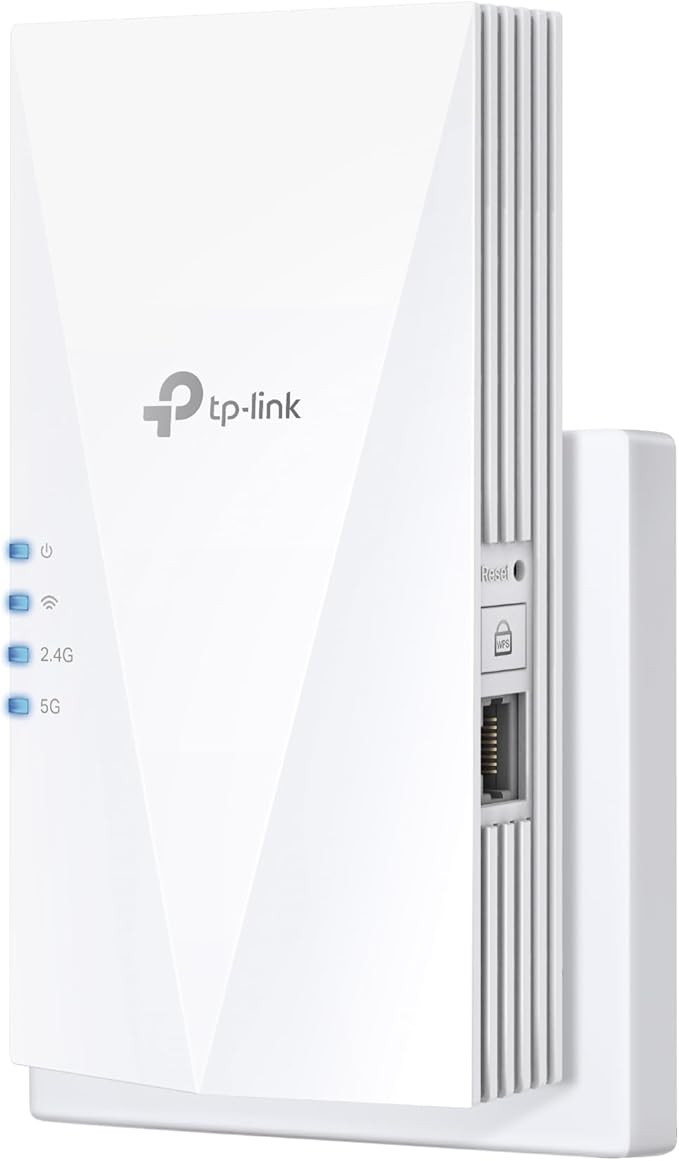
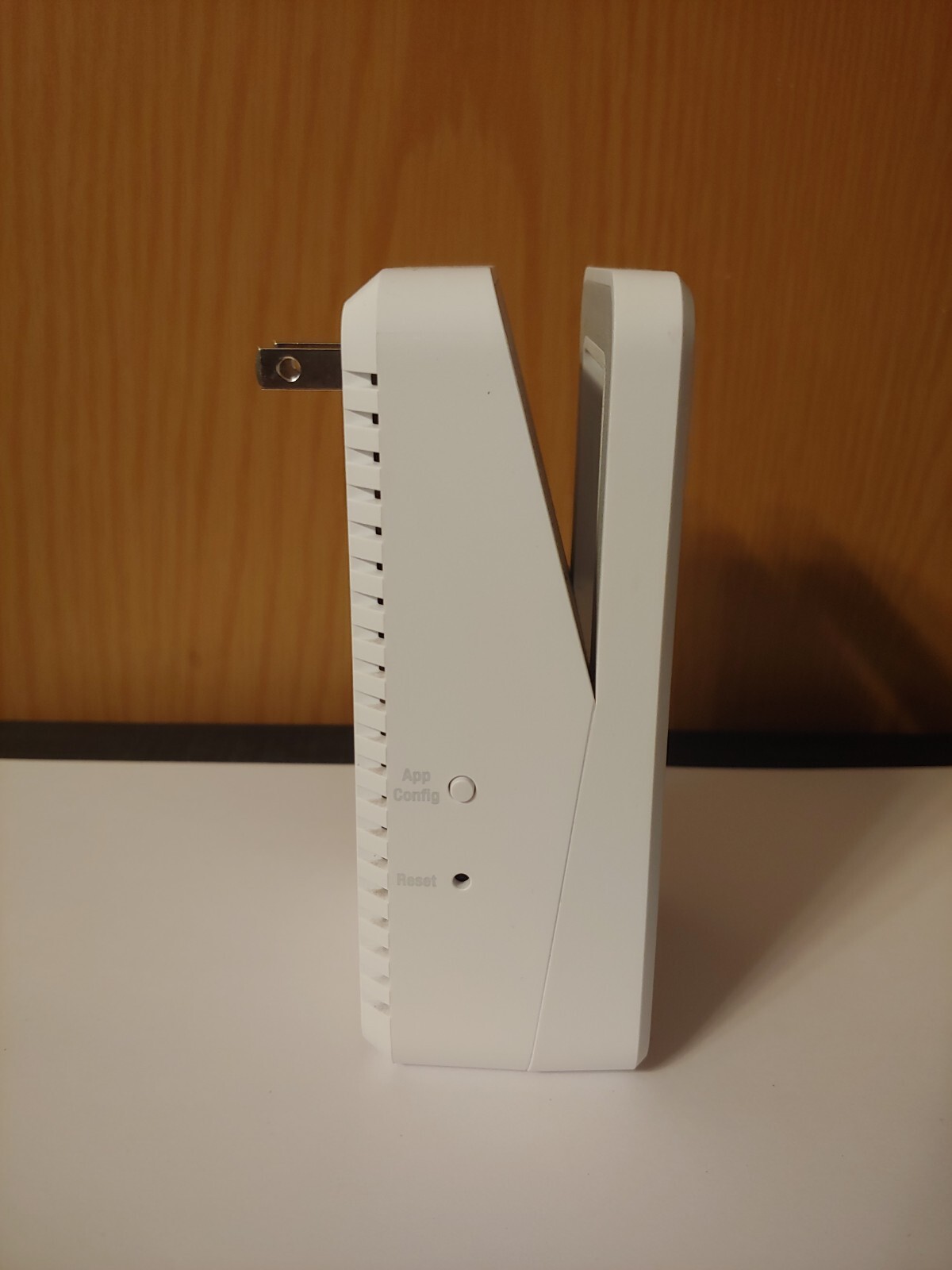
TP-Link RE220 AC750 Wi-Fi Range Extender Boost Your Wi-Fi to hard-to-reach Areas, Place the RE220 between your wireless router and wireless devices, expanding Wi-Fi coverage while eliminating Wi-Fi dead zones. The dual-band Wi-Fi up to 750 Mbps can not only extend to 32,00 sq. ft. 300m2 with the router, but also make good use of your high ISP speed, ideal for HD video streaming, online games and other bandwidth-intensive tasks. The RE220u2019s Wireless AC technology creates faster and stronger Wi-Fi connections across your home and extends dual band Wi-Fi up to 750 Mbps. Dual 2.4 GHz and 5 GHz bands provide Wi-Fi connections to up to 32 devices, allowing you to enjoy stable and drop-free experience on all your devices. The Ethernet port of RE220 can easily turn your wired Internet connection into a wireless access point. And it can also function as a wireless adapter to connect wired devices. Also, RE220 is compatible with any of your existing Wi-Fi router or access point, making .
TP-Link RE220 AC750 Wi-Fi Range Extender Boost Your Wi-Fi to hard-to-reach Areas, Place the RE220 between your wireless router and wireless devices, expanding Wi-Fi coverage while eliminating Wi-Fi dead zones. The dual-band Wi-Fi up to 750 Mbps can not only extend to 32,00 sq. ft. 300m2 with the router, but also make good use of your high ISP speed, ideal for HD video streaming, online games and other bandwidth-intensive tasks. The RE220u2019s Wireless AC technology creates faster and stronger Wi-Fi connections across your home and extends dual band Wi-Fi up to 750 Mbps. Dual 2.4 GHz and 5 GHz bands provide Wi-Fi connections to up to 32 devices, allowing you to enjoy stable and drop-free experience on all your devices. The Ethernet port of RE220 can easily turn your wired Internet connection into a wireless access point. And it can also function as a wireless adapter to connect wired devices. Also, RE220 is compatible with any of your existing Wi-Fi router or access point, making .
TP-Link RE220 AC750 Wi-Fi Range Extender Boost Your Wi-Fi to hard-to-reach Areas, Place the RE220 between your wireless router and wireless devices, expanding Wi-Fi coverage while eliminating Wi-Fi dead zones. The dual-band Wi-Fi up to 750 Mbps can not only extend to 32,00 sq. ft. 300m2 with the router, but also make good use of your high ISP speed, ideal for HD video streaming, online games and other bandwidth-intensive tasks. The RE220u2019s Wireless AC technology creates faster and stronger Wi-Fi connections across your home and extends dual band Wi-Fi up to 750 Mbps. Dual 2.4 GHz and 5 GHz bands provide Wi-Fi connections to up to 32 devices, allowing you to enjoy stable and drop-free experience on all your devices. The Ethernet port of RE220 can easily turn your wired Internet connection into a wireless access point. And it can also function as a wireless adapter to connect wired devices. Also, RE220 is compatible with any of your existing Wi-Fi router or access point, making .
TP-Link RE220 AC750 Wi-Fi Range Extender Boost Your Wi-Fi to hard-to-reach Areas, Place the RE220 between your wireless router and wireless devices, expanding Wi-Fi coverage while eliminating Wi-Fi dead zones. The dual-band Wi-Fi up to 750 Mbps can not only extend to 32,00 sq. ft. 300m2 with the router, but also make good use of your high ISP speed, ideal for HD video streaming, online games and other bandwidth-intensive tasks. The RE220u2019s Wireless AC technology creates faster and stronger Wi-Fi connections across your home and extends dual band Wi-Fi up to 750 Mbps. Dual 2.4 GHz and 5 GHz bands provide Wi-Fi connections to up to 32 devices, allowing you to enjoy stable and drop-free experience on all your devices. The Ethernet port of RE220 can easily turn your wired Internet connection into a wireless access point. And it can also function as a wireless adapter to connect wired devices. Also, RE220 is compatible with any of your existing Wi-Fi router or access point, making .
in 3 offers
The lowest price for TP-Link (RE220) AC750 (300+433) Dual Band Wall-Plug Wi-Fi Range Extender UK Plug right now is $39.03 at microless.com, compared across 3 retailers.
The all-time low was $10.76 on 25 Apr 2026 — today's price is 263% above the lowest ever. It has been notably cheaper before — worth setting a price alert.
Prices last updated 10 July 2026.
Last updated at 10/07/2026 14:11:08
TP-Link WiFi Extender Booster, Dual Band AC750 Mbps WiFi Range Extender Repeater, Internet Booster with Ethernet Port, Ultraxtend Coverage App Control
Delivery $17.37
Affiliate Disclosure: We may receive a small commission for purchases made through this link at no extra cost to you. This helps support our site. Thank you!
TP-Link AC750 Dual Band Wi-Fi Range Extender, 2.4GHz & 5GHz, 3x Internal Antennas, Up to 750Mbps Data Rate, 6.5W Power Consumption, Universal Compatib
Delivery between 15–21 July $34.44
TP-Link RE220 WiFi Extender Booster, Dual-Band AC750 Mbps Range Extender Repeater with Ethernet Port, Connect Wired Devices, Works as a Wireless Adapt
Delivery between 16–19 July $29
originally posted on ebay.com
So I need something to help with my internet connection issues with my consoles. I have a ps4 pro and a xbox one s. The pro needs a wired connection and the xbox can do wireless just fine. I hooked up the booster to the router, which took me like 5 minutes. hit the WPS button on your router then right after Hit the little refresh button on the booster. I downloaded the app for it and scanned the code on the box. Made everything real simple. Hooked it up to my ps4 and now it can be online very steadily. Note, the upload speed is no different, so for me, that is fine. The download speed was doubled with the booster, so downloading stuff was much better than usual. The xbox hooked up to it wirelessly and it works really well. Same upload, double download speed, which ... MoreSo I need something to help with my internet connection issues with my consoles. I have a ps4 pro and a xbox one s. The pro needs a wired connection and the xbox can do wireless just fine. I hooked up the booster to the router, which took me like 5 minutes. hit the WPS button on your router then right after Hit the little refresh button on the booster. I downloaded the app for it and scanned the code on the box. Made everything real simple. Hooked it up to my ps4 and now it can be online very steadily. Note, the upload speed is no different, so for me, that is fine. The download speed was doubled with the booster, so downloading stuff was much better than usual. The xbox hooked up to it wirelessly and it works really well. Same upload, double download speed, which I'm more than fine with. What I wanted mostly is stability, on the hour, and this booster gives me that. I'm very satisfied with this. I know there are more expensive and even better boosters out there but this one is pretty good considering the price. I'd recommend for sure.
originally posted on dell.com
This product is fairly nice. The app that goes with it is very good in that it is easy to use and gives you information about what devices are connected and what band they connected to. I have a Dyson air purifier that can only use the 2.5 GHz band. Even though it is right around the corner to it, it still gets a fair signal, per my router app. All in all this device beats paying a monthly fee to my internet provider for an extender. I would recommend it. I just wish the signal strength was stronger.
originally posted on neweggbusiness.com
I live in a one-bedroom, 675 sq ft apartment. I have a 50 Mbps internet plan which is what I get in the living room. When you move to my bedroom, the speed drops to 16-18 mbps. Remember, not a big apartment. I placed the extender in an outlet by the bathroom sink which is just outside my bedroom. It increased my speed from 16-18 Mbps to approximately 34-36 megabytes per second. I am thrilled that it increased my speed so much for such a low price item. Tech is now working properly in the bedroom. It wasn't difficult to set up. I pressed the WPS button on my router and the same button on the extender and they connected automatically. It will create a new Wi-Fi link automatically. For example if your modem is called Modem 5G, it will create the Wi-Fi link of Modem ... MoreI live in a one-bedroom, 675 sq ft apartment. I have a 50 Mbps internet plan which is what I get in the living room. When you move to my bedroom, the speed drops to 16-18 mbps. Remember, not a big apartment. I placed the extender in an outlet by the bathroom sink which is just outside my bedroom. It increased my speed from 16-18 Mbps to approximately 34-36 megabytes per second. I am thrilled that it increased my speed so much for such a low price item. Tech is now working properly in the bedroom. It wasn't difficult to set up. I pressed the WPS button on my router and the same button on the extender and they connected automatically. It will create a new Wi-Fi link automatically. For example if your modem is called Modem 5G, it will create the Wi-Fi link of Modem 5G_EXT. Just log on to the new EXT link with the same password as your original modem and you are good to go.
| Firmware upgradeable | Yes |
| Data transfer rate | 750 Mbit/s |
| WPS push button | Yes |
| Operating relative humidity (H-H) | 10 - 90% |
| Storage relative humidity (H-H) | 5 - 90% |
TP-Link WiFi Extender Booster, Dual Band AC750 Mbps WiFi Range Extender Repeater, Internet Booster with Ethernet Port, Ultraxtend Coverage App Control
Delivery $17.37
Affiliate Disclosure: We may receive a small commission for purchases made through this link at no extra cost to you. This helps support our site. Thank you!
TP-Link AC750 Dual Band Wi-Fi Range Extender, 2.4GHz & 5GHz, 3x Internal Antennas, Up to 750Mbps Data Rate, 6.5W Power Consumption, Universal Compatib
Delivery between 15–21 July $34.44
TP-Link RE220 WiFi Extender Booster, Dual-Band AC750 Mbps Range Extender Repeater with Ethernet Port, Connect Wired Devices, Works as a Wireless Adapt
Delivery between 16–19 July $29
So I need something to help with my internet connection issues with my consoles. I have a ps4 pro and a xbox one s. The pro needs a wired connection and the xbox can do wireless just fine. I hooked up the booster to the router, which took me like 5 minutes. hit the WPS button on your router then right after Hit the little refresh button on the booster. I downloaded the app for it and scanned the code on the box. Made everything real simple. Hooked it up to my ps4 and now it can be online very steadily. Note, the upload speed is no different, so for me, that is fine. The download speed was doubled with the booster, so downloading stuff was much better than usual. The xbox hooked up to it wirelessly and it works really well. Same upload, double download speed, which ... MoreSo I need something to help with my internet connection issues with my consoles. I have a ps4 pro and a xbox one s. The pro needs a wired connection and the xbox can do wireless just fine. I hooked up the booster to the router, which took me like 5 minutes. hit the WPS button on your router then right after Hit the little refresh button on the booster. I downloaded the app for it and scanned the code on the box. Made everything real simple. Hooked it up to my ps4 and now it can be online very steadily. Note, the upload speed is no different, so for me, that is fine. The download speed was doubled with the booster, so downloading stuff was much better than usual. The xbox hooked up to it wirelessly and it works really well. Same upload, double download speed, which I'm more than fine with. What I wanted mostly is stability, on the hour, and this booster gives me that. I'm very satisfied with this. I know there are more expensive and even better boosters out there but this one is pretty good considering the price. I'd recommend for sure.
This product is fairly nice. The app that goes with it is very good in that it is easy to use and gives you information about what devices are connected and what band they connected to. I have a Dyson air purifier that can only use the 2.5 GHz band. Even though it is right around the corner to it, it still gets a fair signal, per my router app. All in all this device beats paying a monthly fee to my internet provider for an extender. I would recommend it. I just wish the signal strength was stronger.
I live in a one-bedroom, 675 sq ft apartment. I have a 50 Mbps internet plan which is what I get in the living room. When you move to my bedroom, the speed drops to 16-18 mbps. Remember, not a big apartment. I placed the extender in an outlet by the bathroom sink which is just outside my bedroom. It increased my speed from 16-18 Mbps to approximately 34-36 megabytes per second. I am thrilled that it increased my speed so much for such a low price item. Tech is now working properly in the bedroom. It wasn't difficult to set up. I pressed the WPS button on my router and the same button on the extender and they connected automatically. It will create a new Wi-Fi link automatically. For example if your modem is called Modem 5G, it will create the Wi-Fi link of Modem ... MoreI live in a one-bedroom, 675 sq ft apartment. I have a 50 Mbps internet plan which is what I get in the living room. When you move to my bedroom, the speed drops to 16-18 mbps. Remember, not a big apartment. I placed the extender in an outlet by the bathroom sink which is just outside my bedroom. It increased my speed from 16-18 Mbps to approximately 34-36 megabytes per second. I am thrilled that it increased my speed so much for such a low price item. Tech is now working properly in the bedroom. It wasn't difficult to set up. I pressed the WPS button on my router and the same button on the extender and they connected automatically. It will create a new Wi-Fi link automatically. For example if your modem is called Modem 5G, it will create the Wi-Fi link of Modem 5G_EXT. Just log on to the new EXT link with the same password as your original modem and you are good to go.
We have ours in our garage. The 5ghz signal does not reach the garage in any usable way. The 2.4 reaches the garage at about 55%. So, our RE200 is in 'high speed mode.' That is to say, it grabs the 2.4 signal and extends it on 5ghz band exclusively. We routinely get on the extended 5ghz SSID 25-30 mbs on our download. That may seem slow, but for 2.4 bandwith, that's just 'ok.' If you are in the room with the main router on 2.4 ghz, you may punch up to 40 mbs. Pros: - Options in advanced mode to receive on one band, extend on the other (thus, not losing much bandwith) - Extends reasonably well. - Small footprint - Signal covers a room or two Cons: - No DFS 5ghz channels. - No more firmware support. - No 'router' mode where you can extend a wired connection to create ... MoreWe have ours in our garage. The 5ghz signal does not reach the garage in any usable way. The 2.4 reaches the garage at about 55%. So, our RE200 is in 'high speed mode.' That is to say, it grabs the 2.4 signal and extends it on 5ghz band exclusively. We routinely get on the extended 5ghz SSID 25-30 mbs on our download. That may seem slow, but for 2.4 bandwith, that's just 'ok.' If you are in the room with the main router on 2.4 ghz, you may punch up to 40 mbs. Pros: - Options in advanced mode to receive on one band, extend on the other (thus, not losing much bandwith) - Extends reasonably well. - Small footprint - Signal covers a room or two Cons: - No DFS 5ghz channels. - No more firmware support. - No 'router' mode where you can extend a wired connection to create a hotspot. This little unit does some things very specifically and does them decently well. If you are in an area of high traffic on the original 5ghz band's 8 channels, you could be in for a bit of interference and congestion. I recommend configuring it in high speed mode to get as much bandwith as possible out of it. Don't expect massive coverage especially on 5ghz, due to having internal antennas, the best use for the RE200 is to augment a corner of your place that's on the fringe of the signal. Ours is in the garage and covers that area in addition to the driveway and front porch. By the time your are in the house, the RE200 becomes very weak. Summation: if 20-35mbs download is good enough from the extender, at a cheap price, it's a viable option. If you have a 250mbs package and want that full speed into other parts of your property. I'd look at another option that supports an access point mode that you can get your full bandwith.
Living in an apt is hard to modify the place and wired it. I have the router on living room and one of bedroom the signal would drop around the room. Was thinking about wiring but found this extender and works great!!. Install took 5 seconds. Out of the box and plug into an outlet. Simple enough. Download the tp link app to setup and again took only couple of mins as long as you follow the app prompts. It creates 2 other ssid (if using both 2.4 and 5ghz signals) called same as ur current wifi but with Ext at the end. During setup you disconnect from ur wifi and connect temporarly to the extender then you can choose which one to connect to. Also simple to check what clients are connected to it. Its recommended to put between the router and the dead zone. Remember the ... MoreLiving in an apt is hard to modify the place and wired it. I have the router on living room and one of bedroom the signal would drop around the room. Was thinking about wiring but found this extender and works great!!. Install took 5 seconds. Out of the box and plug into an outlet. Simple enough. Download the tp link app to setup and again took only couple of mins as long as you follow the app prompts. It creates 2 other ssid (if using both 2.4 and 5ghz signals) called same as ur current wifi but with Ext at the end. During setup you disconnect from ur wifi and connect temporarly to the extender then you can choose which one to connect to. Also simple to check what clients are connected to it. Its recommended to put between the router and the dead zone. Remember the weaker the signal it recieves the weakest will transmit is not a magic box, keep ir in mind while deciding where to install. Speed is great and now finally whole apt is covered. Definitively will get more when we move to a bigger place. Note: sometimes ur device will switch wifi ssid automatically but like our apartment sometimes it doesnt, if your speed start slowing down always check to what device you connected to.
I have long been having problems with slow wifi speeds in my kitchen, I'm sure due to the distance and number of walls between my pc and router. I purchased this in an attempt to boost my speeds. The set up was very simple, although the directions could have been written better. I was up and running in about 5 min. Since setting it up I have been doing speed tests several times per day and have noticed a marked improvement in my wifi. Before, my speeds were mostly around 20 - 25 Mbs and went as low as 5 Mbs. Now I am regularly getting 38 - 52 Mbs. But of course the bottom line is I have noticed an improvement in the performance online. I recommend this product to anyone having issues with their wifi.
I researched all options for WiFi repeaters for the Dead zone in my house. All of them had good/bad reviews. Some were very pricey and the ones that were cheaper always made me think, So does it really work since its way cheaper then the others? This one seemed to have the least amount of bad reviews and I figured for the price I couldnt pass it up. After a few trial and error attempts to set up, I nailed it! Wasnt super complicated but it does require taking your time and reading the directions thoroughly. The item does exactly what it says. My WiFi was was at about half speed towards the back of my home, after completing set up, moved it to the slower part of my house and tested the speed and it was almost to the max limit. Very satisfied with the product so far! ... MoreI researched all options for WiFi repeaters for the Dead zone in my house. All of them had good/bad reviews. Some were very pricey and the ones that were cheaper always made me think, So does it really work since its way cheaper then the others? This one seemed to have the least amount of bad reviews and I figured for the price I couldnt pass it up. After a few trial and error attempts to set up, I nailed it! Wasnt super complicated but it does require taking your time and reading the directions thoroughly. The item does exactly what it says. My WiFi was was at about half speed towards the back of my home, after completing set up, moved it to the slower part of my house and tested the speed and it was almost to the max limit. Very satisfied with the product so far! Was worth every penny compared to other WiFi repeaters/extenders prices. Would highly recommend trying it if you are looking for one. Attached is a photo for the completed test. I couldnt believe it!
Research state... "Easy Set Up - 2 Simple taps and you are ready to connect, smart indicator light helps to install in best optimal location!" That was why I ordered it, looking for a device that a senior citizen could easy set up and use. So far unable to set up, will have to ask some one if they can set it up. Not good value, etc. if you are unable to use it
The TP-Link AC750 was very easy to install. Our router is in one end of the house while the TV is in the diagonally opposite end. When I checked signal strength it was about 39% and the TV tends to buffer when streaming movies, so we could use more signal. With TP-Link signal strength jumped to about 90%. Sweet!Our TV is a Samsung smart 55, not terribly old, and generally works well. I could not get the TV to recognize the TP_LInk as a valid link, although it could 'see' the signal which registered 'strong'. I'm no stranger to TV or router configurations or settings, so add the TP-Link as a valid link on the router and entered its MAC address as required. My laptop finds and accesses TP link well as well as a Raspberry Pi, but the TV simply won't allow ... MoreThe TP-Link AC750 was very easy to install. Our router is in one end of the house while the TV is in the diagonally opposite end. When I checked signal strength it was about 39% and the TV tends to buffer when streaming movies, so we could use more signal. With TP-Link signal strength jumped to about 90%. Sweet!Our TV is a Samsung smart 55, not terribly old, and generally works well. I could not get the TV to recognize the TP_LInk as a valid link, although it could 'see' the signal which registered 'strong'. I'm no stranger to TV or router configurations or settings, so add the TP-Link as a valid link on the router and entered its MAC address as required. My laptop finds and accesses TP link well as well as a Raspberry Pi, but the TV simply won't allow pass-through.Now I discover I'm not the only victim of Samsung's inadequate software; other wifi extenders share this problem.With regrets I'll return this to B&H, and take a store credit. My router is several years old and has a single channel, so I'll look for a replacement at B&H, who have always done well by me. Thank you B&H!
One of my outdoor Nest cameras was having a hard time streaming live video, apparently because the wifi signal in that location was just not strong enough. I bought this device to see if would help. It has been in use for a little over two months now and the camera performance has been improved, so mission accomplished.I did some head scratching during the initial setup. My main router is configured to block connection from any device which does not have it's MAC address in the access control list. So before plugging in the extender, I added the MAC that was shown on the extender. Couldn't complete setup. Eventually I saw (by temporarily allowing ALL new connections) that the MAC address the extender registered with the main router was different in it's most ... MoreOne of my outdoor Nest cameras was having a hard time streaming live video, apparently because the wifi signal in that location was just not strong enough. I bought this device to see if would help. It has been in use for a little over two months now and the camera performance has been improved, so mission accomplished.I did some head scratching during the initial setup. My main router is configured to block connection from any device which does not have it's MAC address in the access control list. So before plugging in the extender, I added the MAC that was shown on the extender. Couldn't complete setup. Eventually I saw (by temporarily allowing ALL new connections) that the MAC address the extender registered with the main router was different in it's most significant digits than the one printed on the device. Furthermore, it seems to require an additional MAC address on the main router for each wireless channel. So after completing setup, I allowed those 3 additional MAC addresses and reset to blocking all others.The only problem so far occurred when I sat down to write this review. I ran the Tether app on my phone to check on the extender, but the app could not find it. But all was well after unplugging the extender for a few seconds then plugging it back in. (That was easier than trying to push the tiny recessed reset button.) In about 90 seconds, everything was working as expected.
| Firmware upgradeable | Yes |
| Data transfer rate | 750 Mbit/s |
| WPS push button | Yes |
| Operating relative humidity (H-H) | 10 - 90% |
| Storage relative humidity (H-H) | 5 - 90% |