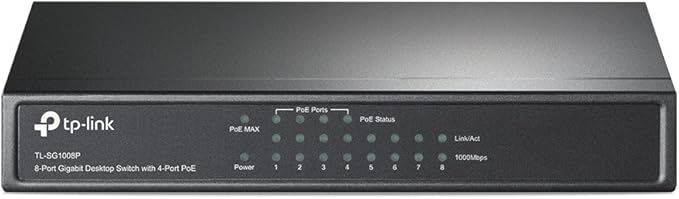
Increase the speed of your network server and backbone connections, or make Gigabit to the desktop a reality. Plug and Play design, with no configuration required, makes the product easy to use. Moreover, TL-SG108 adopts lower power consumption design. With the innovative energy-efficient technology, the TL-SG108 can save power consumption, making it an eco-friendly solution for your home or office network. Gigabit Switch Featured with 8 10/100/1000Mbps ports, TL-SG108 greatly expands your network capacity, enabling instant large files transferring. So, power users in the home, office, workgroup, or creative production environment can now move large, bandwidth-intensive files faster. Transfer graphics, CGI, CAD, or multimedia files across the network instantly. Go Green With Your Ethernet You now have the choice to go green when upgrading to a gigabit network! This new generation TL-SG108 8-Port 10/100/1000Mbps Desktop Switch features the latest innovative energy-efficient technologies that can greatly expand your network capacity with much less power. It automatically adjusts power consumption according to the link status and cable length to limit the carbon footprint of your network. Traffic Optimization 802.1p and DSCP QoS enable smooth latency-sensitive traffic such as voice and video, and IGMP Snooping optimizes the Multicast data stream. Easy to use The auto features of this gigabit switch make installation plug and play and hassle-free. No configuring is required. Auto MDI/MDIX eliminate the need for crossover cables. Auto-negotiation on each port senses the link speed of a network device (either 10, 100, or 1000 Mbps) and intelligently adjusts for compatibility and optimal performance. Moreover, the fanless design ensures quiet operation.
Increase the speed of your network server and backbone connections, or make Gigabit to the desktop a reality. Plug and Play design, with no configuration required, makes the product easy to use. Moreover, TL-SG108 adopts lower power consumption design. With the innovative energy-efficient technology, the TL-SG108 can save power consumption, making it an eco-friendly solution for your home or office network. Gigabit Switch Featured with 8 10/100/1000Mbps ports, TL-SG108 greatly expands your network capacity, enabling instant large files transferring. So, power users in the home, office, workgroup, or creative production environment can now move large, bandwidth-intensive files faster. Transfer graphics, CGI, CAD, or multimedia files across the network instantly. Go Green With Your Ethernet You now have the choice to go green when upgrading to a gigabit network! This new generation TL-SG108 8-Port 10/100/1000Mbps Desktop Switch features the latest innovative energy-efficient technologies that can greatly expand your network capacity with much less power. It automatically adjusts power consumption according to the link status and cable length to limit the carbon footprint of your network. Traffic Optimization 802.1p and DSCP QoS enable smooth latency-sensitive traffic such as voice and video, and IGMP Snooping optimizes the Multicast data stream. Easy to use The auto features of this gigabit switch make installation plug and play and hassle-free. No configuring is required. Auto MDI/MDIX eliminate the need for crossover cables. Auto-negotiation on each port senses the link speed of a network device (either 10, 100, or 1000 Mbps) and intelligently adjusts for compatibility and optimal performance. Moreover, the fanless design ensures quiet operation.
in 3 offers
TP-Link TL-SG108 8 Port Desktop Gigabit Switch
Increase the speed of your network server and backbone connections, or make Gigabit to the desktop a reality. Plug and Play design, with no configuration required, makes the product easy to use. Moreover, TL-SG108 adopts lower power consumption design. With the innovative energy-efficient technology, the TL-SG108 can save power consumption, making it an eco-friendly solution for your home or office network. Gigabit Switch Featured with 8 10/100/1000Mbps ports, TL-SG108 greatly expands your network capacity, enabling instant large files transferring. So, power users in the home, office, workgroup, or creative production environment can now move large, bandwidth-intensive files faster. Transfer graphics, CGI, CAD, or multimedia files across the network instantly. Go Green With Your Ethernet You now have the choice to go green when upgrading to a gigabit network! This new generation TL-SG108 8-Port 10/100/1000Mbps Desktop Switch features the latest innovative energy-efficient technologies that can greatly expand your network capacity with much less power. It automatically adjusts power consumption according to the link status and cable length to limit the carbon footprint of your network. Traffic Optimization 802.1p and DSCP QoS enable smooth latency-sensitive traffic such as voice and video, and IGMP Snooping optimizes the Multicast data stream. Easy to use The auto features of this gigabit switch make installation plug and play and hassle-free. No configuring is required. Auto MDI/MDIX eliminate the need for crossover cables. Auto-negotiation on each port senses the link speed of a network device (either 10, 100, or 1000 Mbps) and intelligently adjusts for compatibility and optimal performance. Moreover, the fanless design ensures quiet operation.
Increase the speed of your network server and backbone connections, or make Gigabit to the desktop a reality. Plug and Play design, with no configuration required, makes the product easy to use. Moreover, TL-SG108 adopts lower power consumption design. With the innovative energy-efficient technology, the TL-SG108 can save power consumption, making it an eco-friendly solution for your home or office network. Gigabit Switch Featured with 8 10/100/1000Mbps ports, TL-SG108 greatly expands your network capacity, enabling instant large files transferring. So, power users in the home, office, workgroup, or creative production environment can now move large, bandwidth-intensive files faster. Transfer graphics, CGI, CAD, or multimedia files across the network instantly. Go Green With Your Ethernet You now have the choice to go green when upgrading to a gigabit network! This new generation TL-SG108 8-Port 10/100/1000Mbps Desktop Switch features the latest innovative energy-efficient technologies that can greatly expand your network capacity with much less power. It automatically adjusts power consumption according to the link status and cable length to limit the carbon footprint of your network. Traffic Optimization 802.1p and DSCP QoS enable smooth latency-sensitive traffic such as voice and video, and IGMP Snooping optimizes the Multicast data stream. Easy to use The auto features of this gigabit switch make installation plug and play and hassle-free. No configuring is required. Auto MDI/MDIX eliminate the need for crossover cables. Auto-negotiation on each port senses the link speed of a network device (either 10, 100, or 1000 Mbps) and intelligently adjusts for compatibility and optimal performance. Moreover, the fanless design ensures quiet operation.
The lowest price for TP-Link TL-SG108 8 Port Desktop Gigabit Switch right now is $68.05.
The all-time low was $30.00 on 26 Sept 2023 — today's price is 127% above the lowest ever. It has been notably cheaper before — worth setting a price alert.
Prices last updated 24 July 2024.
Last updated at 24/07/2024 20:06:56
originally posted on pccasegear.com
Super cheap and awesome switch great for placing at tv units where there’s multiple devices that can use Ethernet but the wall plate is only single port. Love it and have bought 2 more since buying this one because there so awesome. Would be nice if it used a different plug like usb c or that 2 circle thing that’s on the Apple TV and soundbars etc Other than that it’s absolutely awesome and I love it
originally posted on bhphotovideo.com
I'm a Sr. Network Engineer running a massive network (Around 80,000 connections, 9000 WiFi AP's, yeah, it's big). So I know networking. I wouldn't use this in an enterprise application, because that's not appropriate, use an enterprise managed network for that. But that's not what this is for. This is a great solution for a home network that needs some expansion, or a small office. I have two of these, and they are pretty reliable for user grade electronics (e.g. switches marketed to the general public, not enterprise switches which are many times more expensive). My home network, as you might expect, is a bit more complex than most. There are two places where I just needed more ports but didn't want a big switch, and didn't need management features, just wanted to ... MoreI'm a Sr. Network Engineer running a massive network (Around 80,000 connections, 9000 WiFi AP's, yeah, it's big). So I know networking. I wouldn't use this in an enterprise application, because that's not appropriate, use an enterprise managed network for that. But that's not what this is for. This is a great solution for a home network that needs some expansion, or a small office. I have two of these, and they are pretty reliable for user grade electronics (e.g. switches marketed to the general public, not enterprise switches which are many times more expensive). My home network, as you might expect, is a bit more complex than most. There are two places where I just needed more ports but didn't want a big switch, and didn't need management features, just wanted to plug it in and go. So I did. I've been running one of them in between my two work computers and it's been absolutely flawless for 3 years now, so when I needed to do the same thing in my work studio it was a no brainer to just get another one. At this price point I would have expected a crash or two over a few years, but nope, rock solid. Seems better than linksys or netgear, based on how many times I've had to tell people to get those off the network... Doesn't get hot, doesn't take much power, just does the job and doesn't slow things down. (Yeah, I tested it, line rate FTW). Gigabit is fast enough for 99.99% of use cases, so there you go. 10Gig can be nice for really big file transfers, but most people don't have files big enough to warrant the cost. (Well, in 2022, YMMV depending on when you read this).
originally posted on bhphotovideo.com
The Eero router we got only has one spare ethernet port but I need more to connect the Smart TV, Blu-ray player, Apple TV and others by wired means. This is solving that problem. While it's nice to have wireless device, if they're really close to the router, I'd rather have them connected directly wired to minimize interference. Faster data speed too. I've bought a TP-link router before too but I didn't get to even connect it since it comes with a mini-cd disc for installation. Plus you still have to create an account etc. This new version is indeed plug-and-play. I just wish they have labeled the ports as to input/output. I just assumed that number 1 is the input and the rest is for output devices to connect to. That's why I took one star. Seems to be working well ... MoreThe Eero router we got only has one spare ethernet port but I need more to connect the Smart TV, Blu-ray player, Apple TV and others by wired means. This is solving that problem. While it's nice to have wireless device, if they're really close to the router, I'd rather have them connected directly wired to minimize interference. Faster data speed too. I've bought a TP-link router before too but I didn't get to even connect it since it comes with a mini-cd disc for installation. Plus you still have to create an account etc. This new version is indeed plug-and-play. I just wish they have labeled the ports as to input/output. I just assumed that number 1 is the input and the rest is for output devices to connect to. That's why I took one star. Seems to be working well so far.
| General | |
| Device Type | Switch - 8 ports - unmanaged |
| Enclosure Type | Desktop |
| Subtype | Gigabit Ethernet |
| Ports | 8 x 10/100/1000 |
Super cheap and awesome switch great for placing at tv units where there’s multiple devices that can use Ethernet but the wall plate is only single port. Love it and have bought 2 more since buying this one because there so awesome. Would be nice if it used a different plug like usb c or that 2 circle thing that’s on the Apple TV and soundbars etc Other than that it’s absolutely awesome and I love it
I'm a Sr. Network Engineer running a massive network (Around 80,000 connections, 9000 WiFi AP's, yeah, it's big). So I know networking. I wouldn't use this in an enterprise application, because that's not appropriate, use an enterprise managed network for that. But that's not what this is for. This is a great solution for a home network that needs some expansion, or a small office. I have two of these, and they are pretty reliable for user grade electronics (e.g. switches marketed to the general public, not enterprise switches which are many times more expensive). My home network, as you might expect, is a bit more complex than most. There are two places where I just needed more ports but didn't want a big switch, and didn't need management features, just wanted to ... MoreI'm a Sr. Network Engineer running a massive network (Around 80,000 connections, 9000 WiFi AP's, yeah, it's big). So I know networking. I wouldn't use this in an enterprise application, because that's not appropriate, use an enterprise managed network for that. But that's not what this is for. This is a great solution for a home network that needs some expansion, or a small office. I have two of these, and they are pretty reliable for user grade electronics (e.g. switches marketed to the general public, not enterprise switches which are many times more expensive). My home network, as you might expect, is a bit more complex than most. There are two places where I just needed more ports but didn't want a big switch, and didn't need management features, just wanted to plug it in and go. So I did. I've been running one of them in between my two work computers and it's been absolutely flawless for 3 years now, so when I needed to do the same thing in my work studio it was a no brainer to just get another one. At this price point I would have expected a crash or two over a few years, but nope, rock solid. Seems better than linksys or netgear, based on how many times I've had to tell people to get those off the network... Doesn't get hot, doesn't take much power, just does the job and doesn't slow things down. (Yeah, I tested it, line rate FTW). Gigabit is fast enough for 99.99% of use cases, so there you go. 10Gig can be nice for really big file transfers, but most people don't have files big enough to warrant the cost. (Well, in 2022, YMMV depending on when you read this).
The Eero router we got only has one spare ethernet port but I need more to connect the Smart TV, Blu-ray player, Apple TV and others by wired means. This is solving that problem. While it's nice to have wireless device, if they're really close to the router, I'd rather have them connected directly wired to minimize interference. Faster data speed too. I've bought a TP-link router before too but I didn't get to even connect it since it comes with a mini-cd disc for installation. Plus you still have to create an account etc. This new version is indeed plug-and-play. I just wish they have labeled the ports as to input/output. I just assumed that number 1 is the input and the rest is for output devices to connect to. That's why I took one star. Seems to be working well ... MoreThe Eero router we got only has one spare ethernet port but I need more to connect the Smart TV, Blu-ray player, Apple TV and others by wired means. This is solving that problem. While it's nice to have wireless device, if they're really close to the router, I'd rather have them connected directly wired to minimize interference. Faster data speed too. I've bought a TP-link router before too but I didn't get to even connect it since it comes with a mini-cd disc for installation. Plus you still have to create an account etc. This new version is indeed plug-and-play. I just wish they have labeled the ports as to input/output. I just assumed that number 1 is the input and the rest is for output devices to connect to. That's why I took one star. Seems to be working well so far.
I'm a network engineer, I run a network the size of a small city. I don't use this for that, because that's enterprise networking and a lot more expensive and with different requirements. Where this shines is at home or in a small office where you just need a simple solution for switching 8 ports of gig ethernet. (it does 100mb too). My #1 requirement for a network device is reliability. And this is actually my 2nd SG108 because the first one has been flawless for three years of constant 24/7 operation. I've seen a lot of these sorts of switches over the years and many of them are pretty crappy, mostly bad firmware. Netgear, linksys, etc etc. I cannot count the number of times I've been called out for a network issue that turned out that somebody had one of those ... MoreI'm a network engineer, I run a network the size of a small city. I don't use this for that, because that's enterprise networking and a lot more expensive and with different requirements. Where this shines is at home or in a small office where you just need a simple solution for switching 8 ports of gig ethernet. (it does 100mb too). My #1 requirement for a network device is reliability. And this is actually my 2nd SG108 because the first one has been flawless for three years of constant 24/7 operation. I've seen a lot of these sorts of switches over the years and many of them are pretty crappy, mostly bad firmware. Netgear, linksys, etc etc. I cannot count the number of times I've been called out for a network issue that turned out that somebody had one of those under their desk and it crashed. My network was fine, but my time was wasted anyway. So yeah, I'm pretty critical about reliability. TP-Link has a good rep for reliability, so when I needed something small at home, figured I'd give them a try. My sample size of one isn't statistically great, but I can say so far it's been rock solid for a very long time, so it's my go-to for this sort of cheap user-grade switch. If you need just a few more ports, it's a no brainer. It's line rate as far as I can tell, so it won't slow things down.
The reason of choice is due to the unit being made of mental, has side ventilation, and naturally eight ports. In addition, you have the option of mounting it to any surface. I would have preferred that each port had two LED's (Green/ Yellow) as opposed to one (Green). How long will it last? Well, that's anyone's guess.
Great value and seems to perform well.One star less on durability as its TPLink so will break in 3 years. I will come back and correct this if its still going in 2021.Update 20190525The Pro version of this has a WebUI TPLink TLSG108EFirstly Ive not done this yet but it looks easy enoughThey call this an unmanaged switch but actually it has a WebUI and you can do some smart things with this like VLANs and Link Aggregation. If you dont want these fancy features then save your money and buy a cheaper 1gig switch, it will work just as well.The switch actually has an internal bandwidth of 16gig even though the ports are only 1gig. The reason for this is that each port can handle 1gbs in and 1gbs out at the same time and there are 8 of them. This means your PC can drag a ... MoreGreat value and seems to perform well.One star less on durability as its TPLink so will break in 3 years. I will come back and correct this if its still going in 2021.Update 20190525The Pro version of this has a WebUI TPLink TLSG108EFirstly Ive not done this yet but it looks easy enoughThey call this an unmanaged switch but actually it has a WebUI and you can do some smart things with this like VLANs and Link Aggregation. If you dont want these fancy features then save your money and buy a cheaper 1gig switch, it will work just as well.The switch actually has an internal bandwidth of 16gig even though the ports are only 1gig. The reason for this is that each port can handle 1gbs in and 1gbs out at the same time and there are 8 of them. This means your PC can drag a file from the server and dump it on your PC at 1gbs speed but effectively using 2gbs of bandwith since two ports are running at 1gbs.So what would happen if you could use two Ethernet ports at once connected to your PC and two connected to your server Well you would have 2gbs LAN speedIts called LAG Link Aggregation 802.3ad and is under the Switch section of the WebUI of the TPLink. You can have two groups. Add two ports to one group and two ports to the other. Then on the Linux server and PC youve got to BOND two ports together but the drivers are already built into the Kernel. Plenty of stuff online how to do that.You might just use an aggregated connection to your server so that it can handle two people using 1gbs.For 27 this is a seriously smart switch.
Over the years I have always enjoyed using TPLink products. They have seemed to offer great value for money without compromising functionality. They also tend to last as well..These five port metal housed switches are so well made I can only imagine that they would survive the toughest of environments. For me it was worth paying the small difference in price to have the metal cased version over that of the plastic.I have included three photos of these V5 five port metal switches. The first photo shows four of the five ports used to connect to devices and then the fifth port to connect to the LAN.The second photo shows the five ports connected and then the rear of the switch where the power supply connects.The third photo shows the throughput over the LAN with three ... MoreOver the years I have always enjoyed using TPLink products. They have seemed to offer great value for money without compromising functionality. They also tend to last as well..These five port metal housed switches are so well made I can only imagine that they would survive the toughest of environments. For me it was worth paying the small difference in price to have the metal cased version over that of the plastic.I have included three photos of these V5 five port metal switches. The first photo shows four of the five ports used to connect to devices and then the fifth port to connect to the LAN.The second photo shows the five ports connected and then the rear of the switch where the power supply connects.The third photo shows the throughput over the LAN with three of these switches connected.Of course the actual throughput will vary with factors other than just the switches deciding the overall sustained transfer speeds. For me I get sustained 113MBsec transfer speeds on single large files and then a reduced speed if there are many small files being sent across the LAN.The theoretical maximum speed is 125MBsec.The forth photo shows the box they are packaged in, well made and sturdy packaging with a UK based support address.In total I have four of these switches, a fifth on my LAN is an eighth port version. The other type of switch in use is a POE six port Netgear for my CCTV cameras.These five port V5 metal cased switches are a delight to use, robust and solid and they simply work. So why drop a star in the ratings.....The first reason to drop a star is that they dont offer a Yellow light for a 100Mb connection. They do offer the green light for the 1000Mb one, often the green and yellow are on each side of the connected port. This might bother you or not.The other point is the positioning of the power connector. It is on the opposite side to that of the plugged port connections, that means it can never fit up flush to a wall in certain situations as either the front or the back protrude. Aesthetically, for some, it looks cleaner if the connections are all facing on the same side. That being said I do have a couple of Netgear 8 port metal switches and they too have the power port on the opposite side to the LAN ports, altho other models that I have do not have that arrangement.If the above bothers you then look elsewhere.So to summarise, these small metal 5 port switches are unmanaged, simply plug and use but no port or speed etc management via a UI, very well made and simply work with a life time warranty.I do recommend these switches and I do hope that you have found this review useful to help with your buying choices.Best wishes
This provides an ideal way to extend the single CAT5 port from your broadband router or other device to up to four other CAT5 connected devices.This device is packaged in a metal box, blue power coated and very sturdy. It has slide in screw holes on the base so that, if you need to, you can fix it down to whatever surface you put it on. It comes with a power supply 9V DC at 0.6 amps required according to the product label. The product is well packaged, its performant and easy to setup and use.If youre making heavy use of your network and who isnt these days for downloads, playing video, realtime gaming, transferring files around, family photo library, email, internet browsing etc then its fairly important to understand the difference between a network hub and a ... MoreThis provides an ideal way to extend the single CAT5 port from your broadband router or other device to up to four other CAT5 connected devices.This device is packaged in a metal box, blue power coated and very sturdy. It has slide in screw holes on the base so that, if you need to, you can fix it down to whatever surface you put it on. It comes with a power supply 9V DC at 0.6 amps required according to the product label. The product is well packaged, its performant and easy to setup and use.If youre making heavy use of your network and who isnt these days for downloads, playing video, realtime gaming, transferring files around, family photo library, email, internet browsing etc then its fairly important to understand the difference between a network hub and a network switch. A hub just acts as a simple repeater all traffic received is just relayed onto all the other ports. A switch, such as this device, which has embedded intelligence that closely examines the sender and destination of each and every network data packet so that data packets only go to the port via which the destination device can be reached. On a network with lots of busy devices this makes a very great difference to the maximum amount of data you can transfer around your network. Many wifi devices act like hubs, one of several reasons why I dont recommend using WiFi if you have a busy network or you care about security.Before bandwidth guzzlers like video, gaming and massive downloads using a network hub was fine, but those days are all but gone now, so I would always recommend using a switch such as this one. Yes, a bit more expensive than a hub, but the difference in performance makes it well worth it.Alan T
I have a few switches around my house all gigabit as most of my devices are now gigabit enabled I want give my devices the best connection possible. I have tp link gigabit powerline plugs around my house also to link in with the switches and this all works flawlessly. This tp link 8 port switch works great and is built with aluminium too not some plastic rubbish which we have all come to expect from new products nowadays. This switch can can take your normal rj45 cables via the front or if you pop the cover off you can wire the cables directly to rear. The lights do only light green to show a valid data connection but be assured if your device is gigabit enabled th switch will passing the connection through at gigabit speeds. I used to be skeptical of lesser known ... MoreI have a few switches around my house all gigabit as most of my devices are now gigabit enabled I want give my devices the best connection possible. I have tp link gigabit powerline plugs around my house also to link in with the switches and this all works flawlessly. This tp link 8 port switch works great and is built with aluminium too not some plastic rubbish which we have all come to expect from new products nowadays. This switch can can take your normal rj45 cables via the front or if you pop the cover off you can wire the cables directly to rear. The lights do only light green to show a valid data connection but be assured if your device is gigabit enabled th switch will passing the connection through at gigabit speeds. I used to be skeptical of lesser known brands but tp link have proven to be very reliable no failures with powerline plugs in two years and I now have faith in their brand. My network consists of a few cables computers, a firetv two xbox one consoles, three xbox 360 consoles, a media centre, two smart tvs and other wireless devices that connect to my netgear x6 R8000 router that distributes the dhcp to all devices in the house I have some with fixed ips to simplify setup of media items. My network works great and I have never had a streaming problem with hd content to several devices at the same time with these switches. Grab one and give it a go next time you need to add capacity to your own network.
I wanted to be able to connect multiple devices but only use one port on my router. I have found this product to be perfect for my needs, one of my devices is a desktop pc and I have not noticed any internet issues when using it. I have not tested it speed wise, whether I actually needed an ethernet switch is debatable. I have up to 120Mb internet and it seems to handle this speed absolutely fine. Maybe I didnt need an ethernet switch but at least Im future proofed.Another device I have connected to the hub is a network hard drive WD MyBookLive, this again works absolutely fine and I guess there may be a slight speed benefit when the desktop and hard drive talk to each other but I have not tested this, it works how I want it to so thats all I need to know.One thing ... MoreI wanted to be able to connect multiple devices but only use one port on my router. I have found this product to be perfect for my needs, one of my devices is a desktop pc and I have not noticed any internet issues when using it. I have not tested it speed wise, whether I actually needed an ethernet switch is debatable. I have up to 120Mb internet and it seems to handle this speed absolutely fine. Maybe I didnt need an ethernet switch but at least Im future proofed.Another device I have connected to the hub is a network hard drive WD MyBookLive, this again works absolutely fine and I guess there may be a slight speed benefit when the desktop and hard drive talk to each other but I have not tested this, it works how I want it to so thats all I need to know.One thing I have seen coming up in reviews quite a lot is an issue with using dlna through switches like this. The network hard drive I describe above comes with dlna media streaming and it works absolutely fine for me. There is no difference between how it works when connected to this switch versus connected directly to the router I had been concerned about this before purchasing as I use the hard drives media server capabilities to watch family videos on my TV. It does have some issues streaming full 1080p HD videos but the switch is not to blame for that as the issue is still present when the hard drive is connected directly to the router, I guess that could be an issue with my router, hard drive, or the capabilites of wireless N.Anyway, I thoroughly recommend this product if you need to connect multiple devices to one port on your router
| General | |
| Device Type | Switch - 8 ports - unmanaged |
| Enclosure Type | Desktop |
| Subtype | Gigabit Ethernet |
| Ports | 8 x 10/100/1000 |