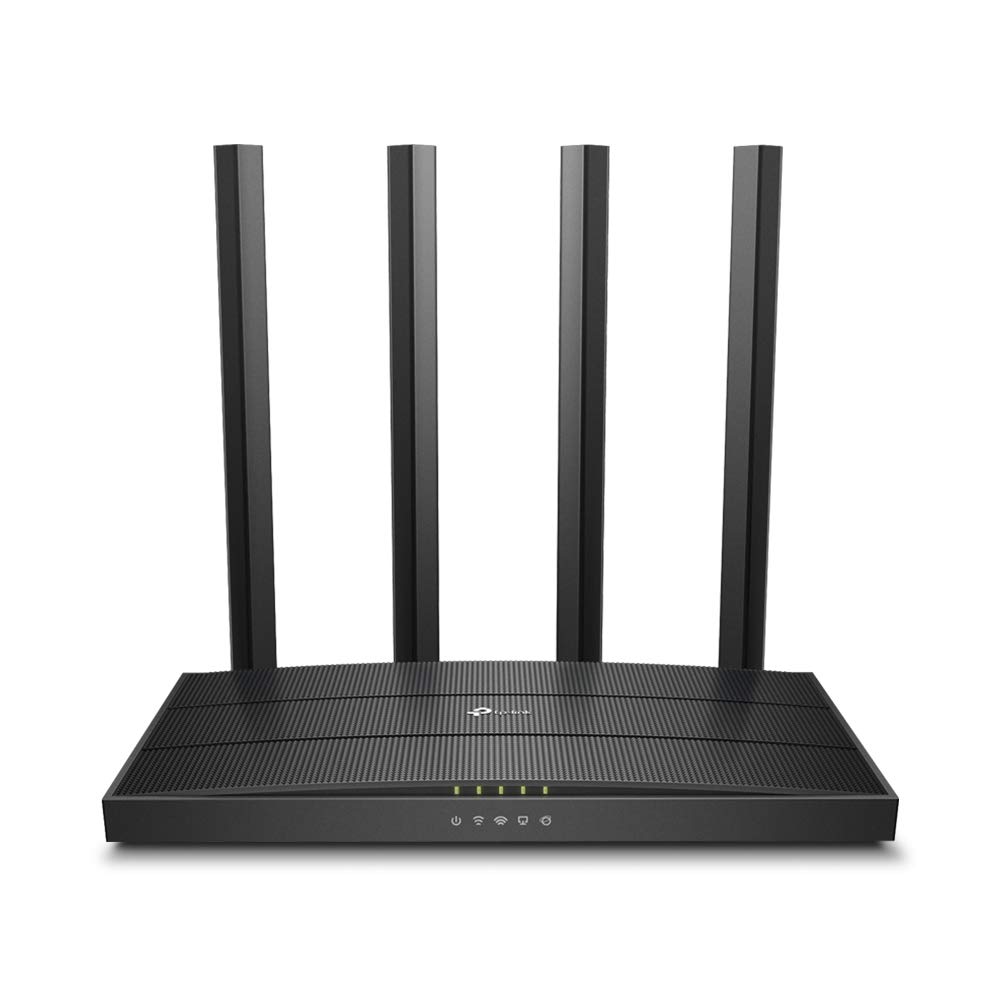
TP-Link Wireless Wi-Fi Tri-Band MU-MIMO Gigabit Router | Archer C5400
With a 1.4 GHz dual-core processor and XStream architecture, the powerful TP-Link Archer C5400 Wirerless Tri-Band MU-MIMO Gigabit Router delivers incredible Tri-Band Wi-Fi speeds up to 5400 Mbps. MU-MIMO creates faster Wi-Fi connections to many devices at the same time, while 4-Stream and NitroQAM greatly increase throughput by 67percent compared to standard Tri-Band routers. XStream architecture allows the Archer C5400 to dedicate one processor to each of its three Wi-Fi bands. These processors handle the traffic for each band, freeing the router's powerful 1.4GHz dual-core CPU to take care of everything else. All this extra brainpower keeps your Wi-Fi running smoothly so everyone in your home can enjoy what they love most, whether that's watching movies in 4K, gaming online, streaming music-or all of the above. 4-Stream and NitroQAM work together to get your devices running faster. 4-Stream adds an extra data stream to each Wi-Fi band for four total streams per band, and NitroQAM helps each stream process data more quickly. Combined, these two advanced features increase total throughput by 67percent compared to standard Tri-Band routers, letting you game at the highest settings while streaming live events without slowing down your Wi-Fi. Wave 2 Tri-Band with MU-MIMO lets the router talk to several devices at once and Smart Connect automatically places each device on the best available Wi-Fi band. With MU-MIMO and Smart Connect working together, consoles and mobile devices always get the best possible Wi-Fi connections and everyone can game at the same time without lag.
With a 1.4 GHz dual-core processor and XStream architecture, the powerful TP-Link Archer C5400 Wirerless Tri-Band MU-MIMO Gigabit Router delivers incredible Tri-Band Wi-Fi speeds up to 5400 Mbps. MU-MIMO creates faster Wi-Fi connections to many devices at the same time, while 4-Stream and NitroQAM greatly increase throughput by 67percent compared to standard Tri-Band routers. XStream architecture allows the Archer C5400 to dedicate one processor to each of its three Wi-Fi bands. These processors handle the traffic for each band, freeing the router's powerful 1.4GHz dual-core CPU to take care of everything else. All this extra brainpower keeps your Wi-Fi running smoothly so everyone in your home can enjoy what they love most, whether that's watching movies in 4K, gaming online, streaming music-or all of the above. 4-Stream and NitroQAM work together to get your devices running faster. 4-Stream adds an extra data stream to each Wi-Fi band for four total streams per band, and NitroQAM helps each stream process data more quickly. Combined, these two advanced features increase total throughput by 67percent compared to standard Tri-Band routers, letting you game at the highest settings while streaming live events without slowing down your Wi-Fi. Wave 2 Tri-Band with MU-MIMO lets the router talk to several devices at once and Smart Connect automatically places each device on the best available Wi-Fi band. With MU-MIMO and Smart Connect working together, consoles and mobile devices always get the best possible Wi-Fi connections and everyone can game at the same time without lag.
With a 1.4 GHz dual-core processor and XStream architecture, the powerful TP-Link Archer C5400 Wirerless Tri-Band MU-MIMO Gigabit Router delivers incredible Tri-Band Wi-Fi speeds up to 5400 Mbps. MU-MIMO creates faster Wi-Fi connections to many devices at the same time, while 4-Stream and NitroQAM greatly increase throughput by 67percent compared to standard Tri-Band routers. XStream architecture allows the Archer C5400 to dedicate one processor to each of its three Wi-Fi bands. These processors handle the traffic for each band, freeing the router's powerful 1.4GHz dual-core CPU to take care of everything else. All this extra brainpower keeps your Wi-Fi running smoothly so everyone in your home can enjoy what they love most, whether that's watching movies in 4K, gaming online, streaming music-or all of the above. 4-Stream and NitroQAM work together to get your devices running faster. 4-Stream adds an extra data stream to each Wi-Fi band for four total streams per band, and NitroQAM helps each stream process data more quickly. Combined, these two advanced features increase total throughput by 67percent compared to standard Tri-Band routers, letting you game at the highest settings while streaming live events without slowing down your Wi-Fi. Wave 2 Tri-Band with MU-MIMO lets the router talk to several devices at once and Smart Connect automatically places each device on the best available Wi-Fi band. With MU-MIMO and Smart Connect working together, consoles and mobile devices always get the best possible Wi-Fi connections and everyone can game at the same time without lag.
With a 1.4 GHz dual-core processor and XStream architecture, the powerful TP-Link Archer C5400 Wirerless Tri-Band MU-MIMO Gigabit Router delivers incredible Tri-Band Wi-Fi speeds up to 5400 Mbps. MU-MIMO creates faster Wi-Fi connections to many devices at the same time, while 4-Stream and NitroQAM greatly increase throughput by 67percent compared to standard Tri-Band routers. XStream architecture allows the Archer C5400 to dedicate one processor to each of its three Wi-Fi bands. These processors handle the traffic for each band, freeing the router's powerful 1.4GHz dual-core CPU to take care of everything else. All this extra brainpower keeps your Wi-Fi running smoothly so everyone in your home can enjoy what they love most, whether that's watching movies in 4K, gaming online, streaming music-or all of the above. 4-Stream and NitroQAM work together to get your devices running faster. 4-Stream adds an extra data stream to each Wi-Fi band for four total streams per band, and NitroQAM helps each stream process data more quickly. Combined, these two advanced features increase total throughput by 67percent compared to standard Tri-Band routers, letting you game at the highest settings while streaming live events without slowing down your Wi-Fi. Wave 2 Tri-Band with MU-MIMO lets the router talk to several devices at once and Smart Connect automatically places each device on the best available Wi-Fi band. With MU-MIMO and Smart Connect working together, consoles and mobile devices always get the best possible Wi-Fi connections and everyone can game at the same time without lag.
in 2 offers
The lowest price for TP-Link Wireless Wi-Fi Tri-Band MU-MIMO Gigabit Router | Archer C5400 right now is $70.00 at eBay.com.au.
The all-time low was $70.00 on 22 Oct 2026. That's the lowest price we've ever tracked — a great time to buy.
Prices last updated 22 Oct 2026.
Last updated at 22/10/2026 07:24:47
Tp-link Archer C5400 Ac5400 Tri-band Wi-fi Router Wifi 5 Router Only
Free delivery
Affiliate Disclosure: We may receive a small commission for purchases made through this link at no extra cost to you. This helps support our site. Thank you!
originally posted on nfm.com
This is a review of a free product received from TP-LINK as part of the review program. The setup of the Archer C5400 is like every other TP-LINK router I've done over the years...simple. The configuration is done through your browser and the interface appears to be pretty close if not identical to every other wireless AC TP-LInk router I've used. One complaint I still have is the lack of an AP mode. This missing mode prevents you from using anything that expects a WAN connection (such as auto-setting the time via NTP). I like the ability to use the TP-LINK tether app on my iphone for quick access to the more common router features. This being a higher-end router means it has a faster CPU and multiple co-processors. These are neccessary in households with many WiFi ... MoreThis is a review of a free product received from TP-LINK as part of the review program. The setup of the Archer C5400 is like every other TP-LINK router I've done over the years...simple. The configuration is done through your browser and the interface appears to be pretty close if not identical to every other wireless AC TP-LInk router I've used. One complaint I still have is the lack of an AP mode. This missing mode prevents you from using anything that expects a WAN connection (such as auto-setting the time via NTP). I like the ability to use the TP-LINK tether app on my iphone for quick access to the more common router features. This being a higher-end router means it has a faster CPU and multiple co-processors. These are neccessary in households with many WiFi devices as it allows the router to quickly handle the device requests with delay. In my household there are about 30 wireless devices connected and it handles the requests quickly as I notice no lag. Lastly, since my upgrade to this router, I noticed there was a dead zone on the op floor of my home on the opposite side from where the router is connected. This deadzone is now gone so it would seem the signal strength is eitehr greater or more efficient than my last router.
originally posted on walmart.com
This is a review of a free product received from TP-LINK for testing and feedback as part of their review program. Good Wi-Fi Range, High Speeds, Supports simultaneous devices.Your home router is a critical digital device. Everything passes through the router, either going between devices, or between devices and Internet. It’s “penny wise and pound foolish” to spend loads of money on Internet service and then have performance degraded by a legacy router. Get the best router you can afford. Besides, owning a router like the state-of-the-art TP-LINK Archer C5400 is less expensive, in the long run, than renting a less capable legacy model from your cable or FIOS company.I’ve tested many routers and, whether you’re a beginner or an expert, I believe you’ll be quite ... MoreThis is a review of a free product received from TP-LINK for testing and feedback as part of their review program. Good Wi-Fi Range, High Speeds, Supports simultaneous devices.Your home router is a critical digital device. Everything passes through the router, either going between devices, or between devices and Internet. It’s “penny wise and pound foolish” to spend loads of money on Internet service and then have performance degraded by a legacy router. Get the best router you can afford. Besides, owning a router like the state-of-the-art TP-LINK Archer C5400 is less expensive, in the long run, than renting a less capable legacy model from your cable or FIOS company.I’ve tested many routers and, whether you’re a beginner or an expert, I believe you’ll be quite pleased with the TP-LINK Archer C5400. The C5400 router can be set up and configured using a web browser interface (via a desktop, laptop, tablet, or smartphone). The Quick Setup menu gets beginners connected to the Internet in 10 minutes. On the Advanced menu, experts will find tons of configuration settings to fiddle with and fine-tune. TP-LINK developed a free, Android and iOS, Tether App which I also frequently use and find quite handy.The C5400 has a dual-core 1.4GHz CPU, three co-processors, and 512 MB of RAM. Simultaneous connections can be maintained without buffering or interruption. The C5400 uses the same Broadcom chipset as competitors. However, TP-LINK somehow manages to sell this router for a lot less. A C5400 will future-proof your router requirements so you won’t need an upgrade for a long time.The black matte finish of the C5400 means that no fingerprints are ever visible. What’s visually distinctive is the 8 folding antenna design. Antennas can fold flat when they are not being used. This is an 802.11ac (backward compatible) triple band router, with one 2.4GHz and two 5.0GHz Wireless Radios. 3 different SSIDs are supported. With 4-Stream technology, 4x4 MU-MIMO, and NitroQam (25% boost), the theoretical total speed at 2.4GHz is 1,000Mbps; each of the two 5.0GHz channels is 2,167Mbps. Add all these numbers up and you’ll get the router’s 5400 designation.The C5400 is the best and fastest router I’ve ever tested. With this router and my Time Warner Cable 200/20 subscription, Ookla speedtest results, measured on an 802.11ac Windows-10 ThinkPad laptop, are routinely 235+/24Mbps. These are conservative benchmark values because there was lots of simultaneous activity on the LAN by other devices.On the front of the router are 9 blue LED indicators, a Wireless On/Off button, WPS button, and an LED On/Off button. On the back are the WAN and four LAN Gigabit ports, USB 3.0 and USB 2.0 ports, Power On/Off button, a recessed Reset, and the Power input. Parental Controls and a Guest Network can be set up on the Advanced user interface menu. You get Whitelist and Blacklist options. The recommended default Wi-Fi security setting is WPA/WPA2-Personal encryption. The C5400 can automatically select the best Channel and Channel Width to use, or you can manually make the choice yourself. A Smart Connect option can help devices run faster, by automatically selecting which devices are assigned to which band, thereby balancing the load. Smart Connect is Off by default.My router is placed on a high bookcase. I like that the C5400 router’s indicator lights and controls are on the front panel, which is very convenient. I well remember that my previous router had indicator lights on top. It was a royal pain to stand on a step stool whenever I wanted to see them.We live in a large old two-story brick detached home with plaster wire-lathe walls. Also I’m in a densely populated urban area with much neighboring Wi-Fi interference. My need for a good router is essential in such a challenging environment. The C5400 gives me the excellent Wi-Fi coverage and throughput that I require. In addition to the C5400 router the following gear is connected: TP-LINK TC-7620 cable modem, SG1008D Switch, RE590T Range Extender, NC200 and NC250 Security Cameras, HS100 and HS110 Smart Plugs, HS200 Smart Switches, Roku Smart TV’s, Android Tablets, Smartphones, VoIP telephones, a lab with new 802.11ac ThinkPad laptops, and PC desktops. In my Smart Home we have Smart Plugs, Smart Switches, and Security Cameras scattered throughout rooms which are far away from the router. The RE590T boosts Wi-Fi for use in my garden. Most of these devices are always connected and active. The router reports 4 Wired Clients and 20-to-25 Wireless Clients.Thankfully, my C5400 router is working flawlessly with all this equipment. I’ve never noticed any buffering and have not had disconnects. What may help is that the TP-LINK products are well designed and very compatible with one another.
originally posted on nfm.com
This is a review of a free product received from TP-LINK for testing and feedback as part of their review program.Your home router is a critical digital device. Everything passes through the router, either going between devices, or between devices and Internet. It's "penny wise and pound foolish" to spend loads of money on Internet service and then have performance degraded by a legacy router. Get the best router you can afford. Besides, owning a router like the state-of-the-art TP-LINK Archer C5400 is less expensive, in the long run, than renting a less capable legacy model from your cable or FIOS company.I've tested many routers and, whether you're a beginner or an expert, I believe you'll be quite pleased with the TP-LINK Archer C5400. The C5400 router can be ... MoreThis is a review of a free product received from TP-LINK for testing and feedback as part of their review program.Your home router is a critical digital device. Everything passes through the router, either going between devices, or between devices and Internet. It's "penny wise and pound foolish" to spend loads of money on Internet service and then have performance degraded by a legacy router. Get the best router you can afford. Besides, owning a router like the state-of-the-art TP-LINK Archer C5400 is less expensive, in the long run, than renting a less capable legacy model from your cable or FIOS company.I've tested many routers and, whether you're a beginner or an expert, I believe you'll be quite pleased with the TP-LINK Archer C5400. The C5400 router can be set up and configured using a web browser interface (via a desktop, laptop, tablet, or smartphone). The Quick Setup menu gets beginners connected to the Internet in 10 minutes. On the Advanced menu, experts will find tons of configuration settings to fiddle with and fine-tune. TP-LINK developed a free, Android and iOS, Tether App which I also frequently use and find quite handy.The C5400 has a dual-core 1.4GHz CPU, three co-processors, and 512 MB of RAM. Simultaneous connections can be maintained without buffering or interruption. The C5400 uses the same Broadcom chipset as competitors. However, TP-LINK somehow manages to sell this router for a lot less. A C5400 will future-proof your router requirements so you won't need an upgrade for a long time.The black matte finish of the C5400 means that no fingerprints are ever visible. What's visually distinctive is the 8 folding antenna design. Antennas can fold flat when they are not being used. This is an 802.11ac (backward compatible) triple band router, with one 2.4GHz and two 5.0GHz Wireless Radios. 3 different SSIDs are supported.
| Wireless Speed Rating | AC5400 |
| Wireless Standard | 802.11ac |
| Wireless Band Count | Tri-Band |
| Wireless Highlights | MU-MIMO |
| Connectivity Ports | Four gigabit Ethernet ports |
Tp-link Archer C5400 Ac5400 Tri-band Wi-fi Router Wifi 5 Router Only
Free delivery
Affiliate Disclosure: We may receive a small commission for purchases made through this link at no extra cost to you. This helps support our site. Thank you!
This is a review of a free product received from TP-LINK as part of the review program. The setup of the Archer C5400 is like every other TP-LINK router I've done over the years...simple. The configuration is done through your browser and the interface appears to be pretty close if not identical to every other wireless AC TP-LInk router I've used. One complaint I still have is the lack of an AP mode. This missing mode prevents you from using anything that expects a WAN connection (such as auto-setting the time via NTP). I like the ability to use the TP-LINK tether app on my iphone for quick access to the more common router features. This being a higher-end router means it has a faster CPU and multiple co-processors. These are neccessary in households with many WiFi ... MoreThis is a review of a free product received from TP-LINK as part of the review program. The setup of the Archer C5400 is like every other TP-LINK router I've done over the years...simple. The configuration is done through your browser and the interface appears to be pretty close if not identical to every other wireless AC TP-LInk router I've used. One complaint I still have is the lack of an AP mode. This missing mode prevents you from using anything that expects a WAN connection (such as auto-setting the time via NTP). I like the ability to use the TP-LINK tether app on my iphone for quick access to the more common router features. This being a higher-end router means it has a faster CPU and multiple co-processors. These are neccessary in households with many WiFi devices as it allows the router to quickly handle the device requests with delay. In my household there are about 30 wireless devices connected and it handles the requests quickly as I notice no lag. Lastly, since my upgrade to this router, I noticed there was a dead zone on the op floor of my home on the opposite side from where the router is connected. This deadzone is now gone so it would seem the signal strength is eitehr greater or more efficient than my last router.
This is a review of a free product received from TP-LINK for testing and feedback as part of their review program. Good Wi-Fi Range, High Speeds, Supports simultaneous devices.Your home router is a critical digital device. Everything passes through the router, either going between devices, or between devices and Internet. It’s “penny wise and pound foolish” to spend loads of money on Internet service and then have performance degraded by a legacy router. Get the best router you can afford. Besides, owning a router like the state-of-the-art TP-LINK Archer C5400 is less expensive, in the long run, than renting a less capable legacy model from your cable or FIOS company.I’ve tested many routers and, whether you’re a beginner or an expert, I believe you’ll be quite ... MoreThis is a review of a free product received from TP-LINK for testing and feedback as part of their review program. Good Wi-Fi Range, High Speeds, Supports simultaneous devices.Your home router is a critical digital device. Everything passes through the router, either going between devices, or between devices and Internet. It’s “penny wise and pound foolish” to spend loads of money on Internet service and then have performance degraded by a legacy router. Get the best router you can afford. Besides, owning a router like the state-of-the-art TP-LINK Archer C5400 is less expensive, in the long run, than renting a less capable legacy model from your cable or FIOS company.I’ve tested many routers and, whether you’re a beginner or an expert, I believe you’ll be quite pleased with the TP-LINK Archer C5400. The C5400 router can be set up and configured using a web browser interface (via a desktop, laptop, tablet, or smartphone). The Quick Setup menu gets beginners connected to the Internet in 10 minutes. On the Advanced menu, experts will find tons of configuration settings to fiddle with and fine-tune. TP-LINK developed a free, Android and iOS, Tether App which I also frequently use and find quite handy.The C5400 has a dual-core 1.4GHz CPU, three co-processors, and 512 MB of RAM. Simultaneous connections can be maintained without buffering or interruption. The C5400 uses the same Broadcom chipset as competitors. However, TP-LINK somehow manages to sell this router for a lot less. A C5400 will future-proof your router requirements so you won’t need an upgrade for a long time.The black matte finish of the C5400 means that no fingerprints are ever visible. What’s visually distinctive is the 8 folding antenna design. Antennas can fold flat when they are not being used. This is an 802.11ac (backward compatible) triple band router, with one 2.4GHz and two 5.0GHz Wireless Radios. 3 different SSIDs are supported. With 4-Stream technology, 4x4 MU-MIMO, and NitroQam (25% boost), the theoretical total speed at 2.4GHz is 1,000Mbps; each of the two 5.0GHz channels is 2,167Mbps. Add all these numbers up and you’ll get the router’s 5400 designation.The C5400 is the best and fastest router I’ve ever tested. With this router and my Time Warner Cable 200/20 subscription, Ookla speedtest results, measured on an 802.11ac Windows-10 ThinkPad laptop, are routinely 235+/24Mbps. These are conservative benchmark values because there was lots of simultaneous activity on the LAN by other devices.On the front of the router are 9 blue LED indicators, a Wireless On/Off button, WPS button, and an LED On/Off button. On the back are the WAN and four LAN Gigabit ports, USB 3.0 and USB 2.0 ports, Power On/Off button, a recessed Reset, and the Power input. Parental Controls and a Guest Network can be set up on the Advanced user interface menu. You get Whitelist and Blacklist options. The recommended default Wi-Fi security setting is WPA/WPA2-Personal encryption. The C5400 can automatically select the best Channel and Channel Width to use, or you can manually make the choice yourself. A Smart Connect option can help devices run faster, by automatically selecting which devices are assigned to which band, thereby balancing the load. Smart Connect is Off by default.My router is placed on a high bookcase. I like that the C5400 router’s indicator lights and controls are on the front panel, which is very convenient. I well remember that my previous router had indicator lights on top. It was a royal pain to stand on a step stool whenever I wanted to see them.We live in a large old two-story brick detached home with plaster wire-lathe walls. Also I’m in a densely populated urban area with much neighboring Wi-Fi interference. My need for a good router is essential in such a challenging environment. The C5400 gives me the excellent Wi-Fi coverage and throughput that I require. In addition to the C5400 router the following gear is connected: TP-LINK TC-7620 cable modem, SG1008D Switch, RE590T Range Extender, NC200 and NC250 Security Cameras, HS100 and HS110 Smart Plugs, HS200 Smart Switches, Roku Smart TV’s, Android Tablets, Smartphones, VoIP telephones, a lab with new 802.11ac ThinkPad laptops, and PC desktops. In my Smart Home we have Smart Plugs, Smart Switches, and Security Cameras scattered throughout rooms which are far away from the router. The RE590T boosts Wi-Fi for use in my garden. Most of these devices are always connected and active. The router reports 4 Wired Clients and 20-to-25 Wireless Clients.Thankfully, my C5400 router is working flawlessly with all this equipment. I’ve never noticed any buffering and have not had disconnects. What may help is that the TP-LINK products are well designed and very compatible with one another.
This is a review of a free product received from TP-LINK for testing and feedback as part of their review program.Your home router is a critical digital device. Everything passes through the router, either going between devices, or between devices and Internet. It's "penny wise and pound foolish" to spend loads of money on Internet service and then have performance degraded by a legacy router. Get the best router you can afford. Besides, owning a router like the state-of-the-art TP-LINK Archer C5400 is less expensive, in the long run, than renting a less capable legacy model from your cable or FIOS company.I've tested many routers and, whether you're a beginner or an expert, I believe you'll be quite pleased with the TP-LINK Archer C5400. The C5400 router can be ... MoreThis is a review of a free product received from TP-LINK for testing and feedback as part of their review program.Your home router is a critical digital device. Everything passes through the router, either going between devices, or between devices and Internet. It's "penny wise and pound foolish" to spend loads of money on Internet service and then have performance degraded by a legacy router. Get the best router you can afford. Besides, owning a router like the state-of-the-art TP-LINK Archer C5400 is less expensive, in the long run, than renting a less capable legacy model from your cable or FIOS company.I've tested many routers and, whether you're a beginner or an expert, I believe you'll be quite pleased with the TP-LINK Archer C5400. The C5400 router can be set up and configured using a web browser interface (via a desktop, laptop, tablet, or smartphone). The Quick Setup menu gets beginners connected to the Internet in 10 minutes. On the Advanced menu, experts will find tons of configuration settings to fiddle with and fine-tune. TP-LINK developed a free, Android and iOS, Tether App which I also frequently use and find quite handy.The C5400 has a dual-core 1.4GHz CPU, three co-processors, and 512 MB of RAM. Simultaneous connections can be maintained without buffering or interruption. The C5400 uses the same Broadcom chipset as competitors. However, TP-LINK somehow manages to sell this router for a lot less. A C5400 will future-proof your router requirements so you won't need an upgrade for a long time.The black matte finish of the C5400 means that no fingerprints are ever visible. What's visually distinctive is the 8 folding antenna design. Antennas can fold flat when they are not being used. This is an 802.11ac (backward compatible) triple band router, with one 2.4GHz and two 5.0GHz Wireless Radios. 3 different SSIDs are supported.
I wanted TP-LINK to knock this one out of the park. After great success with the Archer C9 and the Archer C3150, I had pretty high hopes for this unit. Network wise, it performs very well and coverage is great. Having 3 separate lanes for traffic is also a huge benefit especially for me and wanting to setup a bridge to the 2nd floor via wireless. Where this unit missed the mark and why it isn't receiving 5 stars from me is due to the lag it has on the web interface. Oddly enough, this unit struggles with page refreshes with the unit is busy. I've monitored the HTTP traffic with a monitoring product which has recorded latency as high as 60k msec! This is an eternity to wait for a web page to refresh if you're trying to manage a device. I believe TP-LINK has a couple ... MoreI wanted TP-LINK to knock this one out of the park. After great success with the Archer C9 and the Archer C3150, I had pretty high hopes for this unit. Network wise, it performs very well and coverage is great. Having 3 separate lanes for traffic is also a huge benefit especially for me and wanting to setup a bridge to the 2nd floor via wireless. Where this unit missed the mark and why it isn't receiving 5 stars from me is due to the lag it has on the web interface. Oddly enough, this unit struggles with page refreshes with the unit is busy. I've monitored the HTTP traffic with a monitoring product which has recorded latency as high as 60k msec! This is an eternity to wait for a web page to refresh if you're trying to manage a device. I believe TP-LINK has a couple bugs to work out on this one yet, at least for V2. With all the horsepower this unit has, it should have no trouble especially with something as arbitrary as http traffic. Keep working at it TP-LINK, I'm looking forward to future firmware updates that will hopefully correct these issues.
The Archer C5400 is a great tri-band router. It has a 2.4 GHz band and two 5 GHz bands. It comes with 8 antennas to provide great coverage for your house or workplace. With beam forming technology the router will direct the signals towards the devices that need it the most. It streams 4K movies very well and it is fast with downloads and uploads and the file sharing is faster than my previous router. It is smaller than I thought it would be for a router that does so much. You can download the free TP-Link tether app from the App Store and let you see what is connected to the router and apply parental controls if you want. This is a review of a free product received by TP-LINK as part of the review program.
This is a review of a free product received from TP-LINK as part of the review program. This TP-LINK AC5400 wireless Tri-Band router is amazing. I get constant connection with no drops while my kids use the WiFi heavily for games and streaming movies/music. With the eight antennas this gives you coverage all throughout your house. The AC5400 provides a total of 5400 mbps split between the antennas. The 2.4 GHz gets 1000 mbps and the rest is split between the two 5 GHz bands. The MU-MIMO feature is great for someone who has people in their house that use a lot of bandwidth. The beam forming technology is great because all my devices get great signal wherever they are. Highly recommended for network enthusiasts and others who want great connection through out their house.
We replaced our Archer C7 router (not a bad router at all) with this one, and the differences were impressive. It has much better "reach", giving us full coverage in our house from a basement location. We use a lot of wifi calling, and the C7 just did not have the computing power to keep the phones connected and handle the demands of our computers. We had a lot of dropped calls. That all went away when I hooked up the new one. If you just have one device connected the C7 is fine. For multiple devices, this is a much better choice.
First of all I had some reservations to buy because I checked TP-Link's website and found that there were 2 versions of the device manufactured. I emailed the supplier selling the product and asked if the unit they were selling was version 1 or version 2 as there were great improvements to the version 1 product and, in fact the version 1 product production was discontinued in early to mid 2017 and was not supported with updates after 7/7/2017. Also the version 2 added security features and performed better. I never received a response to my version question so I debated with myself about ordering but, ultimately, decided to go ahead as I convinced myself that no one would sell such an old product. I fact, a similar concern was addressed on Amazon with the answer ... MoreFirst of all I had some reservations to buy because I checked TP-Link's website and found that there were 2 versions of the device manufactured. I emailed the supplier selling the product and asked if the unit they were selling was version 1 or version 2 as there were great improvements to the version 1 product and, in fact the version 1 product production was discontinued in early to mid 2017 and was not supported with updates after 7/7/2017. Also the version 2 added security features and performed better. I never received a response to my version question so I debated with myself about ordering but, ultimately, decided to go ahead as I convinced myself that no one would sell such an old product. I fact, a similar concern was addressed on Amazon with the answer that the version being sold was the version 2 as the other was discontinued a long time ago.When I received the package, I immediately opened it to see that it was version 1 to my great disappointment. Also the the package was damaged - the unit box was placed in a larger plain brown box with no filler to secure the inner contents and there was a puncture type damage to the outer box that went right through to the inner box and the enclosed unit. The puncture caused a scratch to the unit but did not seem to go through the casing. I have not even installed the unit yet as I am busy on other things and am a little in shock over the fact that I got the older unit. When I do install the unit, I hope there is not damage internally as it obviously took a pretty go blow. This is sensitive electronic equipment and can easy be damaged if dropped or hit.2ND complaint is that the offer was for 2 day free shipping on items over $35 . When I placed the order I initially received an email that had my package arriving on a Thursday, 2 days after the order was placed. But after checking the tracking status, I fond that the package was delayed leaving the seller's point of origin for over a week and missed the initial 2 day window by a long shot.We will see when I install the unit whether I am OK with my purchase but whether it works well or not I know I would have been much happier with a current version 2.If the unit, does not work properly I will be filing an official complaint and requesting a return due to damage caused in shipping and lack of proper packaging protection like bubble wrap, etc.
This is a review of a free product received from TP-LINK as part of the review program.The QIG identifies the six easy steps for connecting the router, and, after a few quick entries, you are good to go in under 3 minutes.Performance:The Archer C5400 is a Tri-Band router, with two 5GHz and one 2.4GHz channels.These band speeds are being tweaked via a more powerful router processor (1.4GHz Dual-Core + 3 co-processors), more memory and proprietary chip-specific software in order to provide greater maximum available bandwidth to a larger number of devices simultaneously. The 8 antennas enable communication with 4 devices simultaneously on each band. The advantage of the C5400 is that it can feed all devices, and optimize the overall bandwidth utilization. I did a ... MoreThis is a review of a free product received from TP-LINK as part of the review program.The QIG identifies the six easy steps for connecting the router, and, after a few quick entries, you are good to go in under 3 minutes.Performance:The Archer C5400 is a Tri-Band router, with two 5GHz and one 2.4GHz channels.These band speeds are being tweaked via a more powerful router processor (1.4GHz Dual-Core + 3 co-processors), more memory and proprietary chip-specific software in order to provide greater maximum available bandwidth to a larger number of devices simultaneously. The 8 antennas enable communication with 4 devices simultaneously on each band. The advantage of the C5400 is that it can feed all devices, and optimize the overall bandwidth utilization. I did a few measurements of signal strengths at my main computer and at my worst computer locations, and some data transfer rate measurements via wireless to the router's USB3 attached storage. As can be seen in the attached graphics, the Archer C5400 signal strengths were 9dB better for the 2.4GHz Channel and 37 dB better for the 5GHz channels when compared to the old N600 router, when measured at my main computer location. The data transfer rates for the USB3 attached drive were 25.2 MBps write and 16MBps read. The Archer 5400 signal strengths at my worst computer location were 14dB and 20dB better than the N600 router for the 2.4 GHz and the 5GHz channels, respectively.So, in summary, I can highly recommend the TP-Link Archer C5400 router for anyone who has a myriad of devices using bandwidth simultaneously, especially if some (current or planned) devices are also equipped with newer client cards or chips that can take full advantage of the advanced technologies that are used in this router. I am planning to upgrade the network card in my "worst location" computer, in order to more fully take advantage of this router's expanded capabilities.
This is a review of a free product received from TP-LINK as part of the review program.The Quick Installation Guide clearly identifies the six easy steps for connecting the router, and, after logging into the administrative console, you are good to go in under 3 minutes. The final click tests your internet connection.The Basic Menu has many settings that the typical user will find helpful, and the Network Map display that is found there provides an excellent quick graphical summary of WAN and LAN connection status, all network connected devices, and the status of any USB peripherals. A simple mouse-click on any of these lets you drill down for more detail. The C5400 has Parental Controls for todays' needs and many detailed settings are available in the Advanced ... MoreThis is a review of a free product received from TP-LINK as part of the review program.The Quick Installation Guide clearly identifies the six easy steps for connecting the router, and, after logging into the administrative console, you are good to go in under 3 minutes. The final click tests your internet connection.The Basic Menu has many settings that the typical user will find helpful, and the Network Map display that is found there provides an excellent quick graphical summary of WAN and LAN connection status, all network connected devices, and the status of any USB peripherals. A simple mouse-click on any of these lets you drill down for more detail. The C5400 has Parental Controls for todays' needs and many detailed settings are available in the Advanced Menu. Advanced users will also find lots of great additional tweaking and specialized settings options in the Advanced Menu.Performance: I did a few measurements of signal strengths at my main computer and at my worst computer locations, and some data transfer rate measurements via wireless to the router's USB3 attached storage (25.2 and 16 MB/s).As can be seen in the attached graphics, the Archer C5400 signal strengths were 9dB better for the 2.4GHz Channel and 37 dB better for the 5GHz channels when compared to my old N600 router, when measured at my main computer location. The Archer 5400 signal strengths at my worst computer location were 14dB and 20dB better than the N600 router for the 2.4 GHz and the 5GHz channels, respectively.In summary, I can highly recommend the TP-Link Archer C5400 router for anyone who has a myriad of devices using bandwidth simultaneously, especially if some (current or planned) devices are also equipped with newer client cards or chips that can take full advantage of the advanced technologies used in this router. I am planning to upgrade the network card in my "worst location" computer, in order to more fully take advantage of this router's expanded capabilities.
| Wireless Speed Rating | AC5400 |
| Wireless Standard | 802.11ac |
| Wireless Band Count | Tri-Band |
| Wireless Highlights | MU-MIMO |
| Connectivity Ports | Four gigabit Ethernet ports |