Ubiquiti UniFi 24 Port Managed Gigabit Switch USW-24-POE-AU
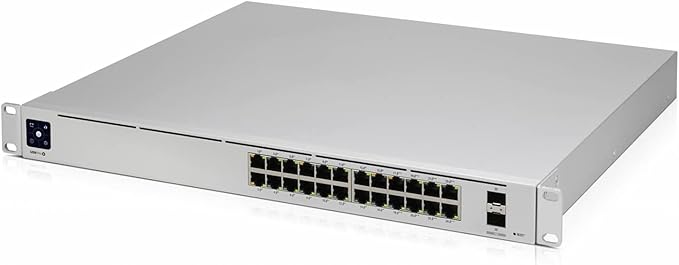
The USW-24-POE is a configurable Gigabit Layer 2 switch with twenty-four Gigabit Ethernet ports including sixteen auto-sensing 802.3at PoE+ ports, and two SFP ports. It provides Gigabit PoE links to your RJ45 Ethernet devices and Gigabit fiber uplink options to your enterprise network. The USW-24-POE features a 1.3' touch LCM to provide status information. With a depth of 7.9', the compact fanless design can be easily installed in a SOHO rack cabinet. Managed and configured by the UniFi Network Controller with UniFi mobile app support, the USW-24-POE offers an extensive suite of advanced Layer 2 switching protocols and features, including operation mode (switching, mirroring, or aggregate) per port. The UniFi Network Controller and mobile app allow admins to configure and monitor virtually all of the switch features in a graphical user interface from anywhere.
The USW-24-POE is a configurable Gigabit Layer 2 switch with twenty-four Gigabit Ethernet ports including sixteen auto-sensing 802.3at PoE+ ports, and two SFP ports. It provides Gigabit PoE links to your RJ45 Ethernet devices and Gigabit fiber uplink options to your enterprise network. The USW-24-POE features a 1.3' touch LCM to provide status information. With a depth of 7.9', the compact fanless design can be easily installed in a SOHO rack cabinet. Managed and configured by the UniFi Network Controller with UniFi mobile app support, the USW-24-POE offers an extensive suite of advanced Layer 2 switching protocols and features, including operation mode (switching, mirroring, or aggregate) per port. The UniFi Network Controller and mobile app allow admins to configure and monitor virtually all of the switch features in a graphical user interface from anywhere.
The USW-24-POE is a configurable Gigabit Layer 2 switch with twenty-four Gigabit Ethernet ports including sixteen auto-sensing 802.3at PoE+ ports, and two SFP ports. It provides Gigabit PoE links to your RJ45 Ethernet devices and Gigabit fiber uplink options to your enterprise network. The USW-24-POE features a 1.3' touch LCM to provide status information. With a depth of 7.9', the compact fanless design can be easily installed in a SOHO rack cabinet. Managed and configured by the UniFi Network Controller with UniFi mobile app support, the USW-24-POE offers an extensive suite of advanced Layer 2 switching protocols and features, including operation mode (switching, mirroring, or aggregate) per port. The UniFi Network Controller and mobile app allow admins to configure and monitor virtually all of the switch features in a graphical user interface from anywhere.
The USW-24-POE is a configurable Gigabit Layer 2 switch with twenty-four Gigabit Ethernet ports including sixteen auto-sensing 802.3at PoE+ ports, and two SFP ports. It provides Gigabit PoE links to your RJ45 Ethernet devices and Gigabit fiber uplink options to your enterprise network. The USW-24-POE features a 1.3' touch LCM to provide status information. With a depth of 7.9', the compact fanless design can be easily installed in a SOHO rack cabinet. Managed and configured by the UniFi Network Controller with UniFi mobile app support, the USW-24-POE offers an extensive suite of advanced Layer 2 switching protocols and features, including operation mode (switching, mirroring, or aggregate) per port. The UniFi Network Controller and mobile app allow admins to configure and monitor virtually all of the switch features in a graphical user interface from anywhere.
in 46 offers
The lowest price for Ubiquiti UniFi 24 Port Managed Gigabit Switch USW-24-POE-AU right now is $650.95 at Amazon.com.au, compared across 34 retailers.
The all-time low was $435.77 on 29 May 2026 — today's price is 49% above the lowest ever. It has been notably cheaper before — worth setting a price alert.
Prices last updated 24 Aug 2026.
Last updated at 24/08/2026 03:03:21
Ubiquiti UniFi 24 Port POE Switch
Free delivery
Affiliate Disclosure: We may receive a small commission for purchases made through this link at no extra cost to you. This helps support our site. Thank you!
Ubiquiti Usw-24-poe Unifi Switch Standard 24 Poe
Delivery $169.35
Affiliate Disclosure: We may receive a small commission for purchases made through this link at no extra cost to you. This helps support our site. Thank you!
Ubiquiti Networks UniFi Switch 24-Ports PoE 1000Mbps Switch
Affiliate Disclosure: We may receive a small commission for purchases made through this link at no extra cost to you. This helps support our site. Thank you!
Ubiquiti USW-24-POE Unifi Gen2 24 Port Managed Switch
Delivery between 26–31 Aug $18.85
24 Port Ubiquiti UniFi USW-24-POE Managed Gigabit Switch with Power over Ethernet | Best Online Computer Store
Delivery $25.25
Ubiquiti UniFi PoE+ 24 Port Gigabit Managed Switch with 2 SFP Ports
Free delivery between 26–31 Aug
Ubiquiti UniFi [USW-24-POE] 24 PoE Switch *While Stocks Last*
Free delivery between 26 Aug – 2 Sept
Ubiquiti USW-24-POE UniFi Standard 24 PoE Layer 2 Switch
Delivery $25.30
Ubiquiti UniFi PoE+ 24 Port Gigabit Managed Switch with 2 SFP Ports [USW-24-POE]
Delivery $20
Ubiquiti UniFi PoE+ 24 Port Gigabit Managed Switch with 2 SFP Ports [USW-24-POE]
Delivery $13.95
originally posted on microcenter.com
I upgraded from a Unifi 24 port non-poe switch (gen 1) to this switch. I was using several POE injectors which were cluttering up my cabinet. They also introduced more points of failure so I was glad to be rid of them. I have not been able to get the Augmented Reality feature working with the Unifi app on my iPhone 13 Pro and this switch, but that's something I can do without. AR does work with my 16 port POE switch, so I wonder if the reason it doesn't work, is I have my switches in 2 different rooms and it gets confused because it can't "see" both of them. I will try AR again when I get around to it and update this review to confirm whether it works. I find the Unifi software to work well and it is always improving. I have 2 links between my 2 switches and one of ... MoreI upgraded from a Unifi 24 port non-poe switch (gen 1) to this switch. I was using several POE injectors which were cluttering up my cabinet. They also introduced more points of failure so I was glad to be rid of them. I have not been able to get the Augmented Reality feature working with the Unifi app on my iPhone 13 Pro and this switch, but that's something I can do without. AR does work with my 16 port POE switch, so I wonder if the reason it doesn't work, is I have my switches in 2 different rooms and it gets confused because it can't "see" both of them. I will try AR again when I get around to it and update this review to confirm whether it works. I find the Unifi software to work well and it is always improving. I have 2 links between my 2 switches and one of them was automatically deactivated but will automatically reactivate if the first link goes down. I can get Unifi gear easily enough online, but I prefer to pick it up at my Detroit area Microcenter. The only drawback is that MC does not stock every piece of Unifi equipment I need.
originally posted on bhphotovideo.com
This is my first managed switch. Since it has the PoE it is going to cut down on the amount of extra cabling for the APs and IP Camera runs I'll have to do. The setup is soooooo easy! The Dashboard for monitoring it is also very easy to use. Setting configs is a piece of cake. Uniquiti has made deploying this a breeze and I would fully recommend this to anyone.
originally posted on bhphotovideo.com
Upgraded my 16 port switch to this, absolutely love Ubiqiuti and their products. Easy to hook up, transfer, set up, everything. Just nothing but the best from Ubiqiuti. Fast shipping for free by B&H as well. Definitely will purchase more though you.
| General | |
| Device Type | Switch - 24 ports - Managed |
| Enclosure Type | Desktop, rack-mountable 1U |
| Subtype | Gigabit Ethernet |
| Ports | 24 x 10/100/1000 (16 PoE+) + 2 x Gigabit SFP |
Ubiquiti UniFi 24 Port POE Switch
Free delivery
Affiliate Disclosure: We may receive a small commission for purchases made through this link at no extra cost to you. This helps support our site. Thank you!
Ubiquiti Usw-24-poe Unifi Switch Standard 24 Poe
Delivery $169.35
Affiliate Disclosure: We may receive a small commission for purchases made through this link at no extra cost to you. This helps support our site. Thank you!
Ubiquiti Networks UniFi Switch 24-Ports PoE 1000Mbps Switch
Affiliate Disclosure: We may receive a small commission for purchases made through this link at no extra cost to you. This helps support our site. Thank you!
Ubiquiti USW-24-POE Unifi Gen2 24 Port Managed Switch
Delivery between 26–31 Aug $18.85
24 Port Ubiquiti UniFi USW-24-POE Managed Gigabit Switch with Power over Ethernet | Best Online Computer Store
Delivery $25.25
I upgraded from a Unifi 24 port non-poe switch (gen 1) to this switch. I was using several POE injectors which were cluttering up my cabinet. They also introduced more points of failure so I was glad to be rid of them. I have not been able to get the Augmented Reality feature working with the Unifi app on my iPhone 13 Pro and this switch, but that's something I can do without. AR does work with my 16 port POE switch, so I wonder if the reason it doesn't work, is I have my switches in 2 different rooms and it gets confused because it can't "see" both of them. I will try AR again when I get around to it and update this review to confirm whether it works. I find the Unifi software to work well and it is always improving. I have 2 links between my 2 switches and one of ... MoreI upgraded from a Unifi 24 port non-poe switch (gen 1) to this switch. I was using several POE injectors which were cluttering up my cabinet. They also introduced more points of failure so I was glad to be rid of them. I have not been able to get the Augmented Reality feature working with the Unifi app on my iPhone 13 Pro and this switch, but that's something I can do without. AR does work with my 16 port POE switch, so I wonder if the reason it doesn't work, is I have my switches in 2 different rooms and it gets confused because it can't "see" both of them. I will try AR again when I get around to it and update this review to confirm whether it works. I find the Unifi software to work well and it is always improving. I have 2 links between my 2 switches and one of them was automatically deactivated but will automatically reactivate if the first link goes down. I can get Unifi gear easily enough online, but I prefer to pick it up at my Detroit area Microcenter. The only drawback is that MC does not stock every piece of Unifi equipment I need.
This is my first managed switch. Since it has the PoE it is going to cut down on the amount of extra cabling for the APs and IP Camera runs I'll have to do. The setup is soooooo easy! The Dashboard for monitoring it is also very easy to use. Setting configs is a piece of cake. Uniquiti has made deploying this a breeze and I would fully recommend this to anyone.
Upgraded my 16 port switch to this, absolutely love Ubiqiuti and their products. Easy to hook up, transfer, set up, everything. Just nothing but the best from Ubiqiuti. Fast shipping for free by B&H as well. Definitely will purchase more though you.
This Gigabit PoE switch is everything I hoped it would be. I bought it to bring order to a jumbled mess of Ethernet cables, multiple 4- and 6-port switches and several PoE injectors. The switch supports 3 Ubiquiti wireless access points, 6 UniFi G3 and G4 cameras, a UniFi NVR, 5 IPTV set-top tuners and a DVR. And it has room for expansion. The control interface for the switch is amazing and the amount of information available about your network is not normally seen in a home environment. I would buy this PoE switch again in a minute should the need arise.
I had two issues 1. the device on first update done the impossible and upgraded firmware to another device in the product line shut down many features and caused issues with devices you plugged in. No one but me would have this occur. I found proper firmware an manually installed it it updated to latest version has been amazing. Second issue was when doing line aggregations I was doing 3 lines I think this issue was the Unifi Dream Machine Pro I had to factory reset the switch and it rebooted I added it and it restored form the DMP working perfectly other than this being my first managed switch I expected many more issues. It has been a dream to use and setup does everything I wanted and much more. Well except the aggregation and almost everyone else has had no ... MoreI had two issues 1. the device on first update done the impossible and upgraded firmware to another device in the product line shut down many features and caused issues with devices you plugged in. No one but me would have this occur. I found proper firmware an manually installed it it updated to latest version has been amazing. Second issue was when doing line aggregations I was doing 3 lines I think this issue was the Unifi Dream Machine Pro I had to factory reset the switch and it rebooted I added it and it restored form the DMP working perfectly other than this being my first managed switch I expected many more issues. It has been a dream to use and setup does everything I wanted and much more. Well except the aggregation and almost everyone else has had no issues dong this with it a few had the same issue be after a reset it worked. They said it was a software bug causing the issue. I think it was actually patents not waiting for the device to upload setting before setting up the second switch. But being I have not tried it between two switches I don't know.
I've used UBNT gear for years. It does everything that I need it to and more. I work in small business and high end residential. The UI is getting easier and easier to use and the bang for the buck is very good.I replaced a 24 port edgeswitch with this box, not because the edgeswitch had any problems, but because I now also have a Dream Machine Pro, which is a hit out of the park. My topology is DM pro -- 24 port POE --and 5 8 port unifi switches.If I was to pick on this box, I would complain that the POE will not work with the Older Access Points, I have 5 of those too , in this install and I still have to use the POE inserters. No big deal, just would be a cleaner install without them.While I'm picking, a comment on the DM pro. A real nice box but it should ... MoreI've used UBNT gear for years. It does everything that I need it to and more. I work in small business and high end residential. The UI is getting easier and easier to use and the bang for the buck is very good.I replaced a 24 port edgeswitch with this box, not because the edgeswitch had any problems, but because I now also have a Dream Machine Pro, which is a hit out of the park. My topology is DM pro -- 24 port POE --and 5 8 port unifi switches.If I was to pick on this box, I would complain that the POE will not work with the Older Access Points, I have 5 of those too , in this install and I still have to use the POE inserters. No big deal, just would be a cleaner install without them.While I'm picking, a comment on the DM pro. A real nice box but it should support ONVIF cameras instead of just UBNT. UBNT isn't there on Cameras. It's not their day job.
It's working great. I was able to get it installed and working with minimal fuss. And I'm by no means a professional with setting up networks.I initially connected it to my router (a brand-new UDM-SE) via a standard Cat6 Ethernet cable. This worked flawlessly and I was up and running in no time.About a week later I decided to order an SFP+ 10G cable and try to connect it that way, since it would be cleaner in my rack. (Not that I really needed 10G, because I'm a residential user and my WAN is a cable modem.) When I connected the SFP+ cable and rebooted both the router and the switch, it failed to connect. After puzzling around on the Interwebs for a bit, I tried manually changing my router's SFP+ port settings from auto-negotiate to 1G, and then rebooted the ... MoreIt's working great. I was able to get it installed and working with minimal fuss. And I'm by no means a professional with setting up networks.I initially connected it to my router (a brand-new UDM-SE) via a standard Cat6 Ethernet cable. This worked flawlessly and I was up and running in no time.About a week later I decided to order an SFP+ 10G cable and try to connect it that way, since it would be cleaner in my rack. (Not that I really needed 10G, because I'm a residential user and my WAN is a cable modem.) When I connected the SFP+ cable and rebooted both the router and the switch, it failed to connect. After puzzling around on the Interwebs for a bit, I tried manually changing my router's SFP+ port settings from auto-negotiate to 1G, and then rebooted the switch. This worked.But I don't fault this unit or Ubiquiti. I didn't pay attention to the SFP details prior to purchasing. Technology is always advancing, so I'm sure they'll come out with a 10G version of this switch at some point down the road.
I needed to replace a Unifi 16 port Passive PoE switch that had died. I could not find one of those, so decided on this Gen2 model. Note it has sixteen 1gb ports with PoE (not passive), and 8 standard 1gb ports. If you have older 24v passive PoE devices you will need to purchase Ubiquiti instant adapters to power them. Other than working through that, this switch is typical Ubiquiti - awesome! I love the management console software and being able to see all my network. This unit is part of a business network in a local church. I highly recommend Ubiquiti products and purchasing them from B&H Photo.
I bought this switch to use on my home network. I'm currently using it without a controller, and it runs just fine.It is completely silent as it doesn't have any fans. Currently I'm using 8 ports, two of them are supplying 8W of power (POE ). With this the switch is just slightly warm to the touch on some areas, but nothing to worry about.Build quality feels good, and since it is not too deep, it fits nicely on a 12 deep rack with plenty of room to spare.The touch screen is a nice addition to play with, although I would like to be able to do some basic configuration through it (other than color and brightness, it will just display information).
This product is squarely between home use and corporate. It excels at neither but is decent at both. It costs a fraction of enterprise class stuff. For my use case, it works well. I wanted vlans. I needed management. Unfortunately the documentation and support are meh, so setup is a small adventure. Its a product for the technically minded. A few notes... (1) management occurs on native vlan 1 (you *can change it, but leaving it will save you a lot of headache), (2) Vlan 1 is the default (but not visible) value assigned to the default network you create in your site, (3) the product co-mingles aspects of L2 and L3 in the setup... but you can manage dhcp and routing elsewhere and just create dumb vlans, (4) I used my own router/firewall for the control plane which ... MoreThis product is squarely between home use and corporate. It excels at neither but is decent at both. It costs a fraction of enterprise class stuff. For my use case, it works well. I wanted vlans. I needed management. Unfortunately the documentation and support are meh, so setup is a small adventure. Its a product for the technically minded. A few notes... (1) management occurs on native vlan 1 (you *can change it, but leaving it will save you a lot of headache), (2) Vlan 1 is the default (but not visible) value assigned to the default network you create in your site, (3) the product co-mingles aspects of L2 and L3 in the setup... but you can manage dhcp and routing elsewhere and just create dumb vlans, (4) I used my own router/firewall for the control plane which works fine and (5) for planning purposes my 3 APS pulling 5 Watts (+/- 0.5 W). So, 15 Watts. I'm glad I bought the fanless USW-24-PoE as it is draws less power than its bigger bothers and I still have plenty of power left (80W) for the future (probably a few cameras). Not to mention it is fanless and silent. The rack ears can be rotated so I mounted this vertically (using a few washers to have it stand off the board .25 and allow air to pass behind) which was a nice space saver (and heat dissipation) in my setup. The only thing missing is some native port statistics, but it runs SNMP so soon enough I'll spin up something in vlan 1 and build the functionality myself.
| General | |
| Device Type | Switch - 24 ports - Managed |
| Enclosure Type | Desktop, rack-mountable 1U |
| Subtype | Gigabit Ethernet |
| Ports | 24 x 10/100/1000 (16 PoE+) + 2 x Gigabit SFP |