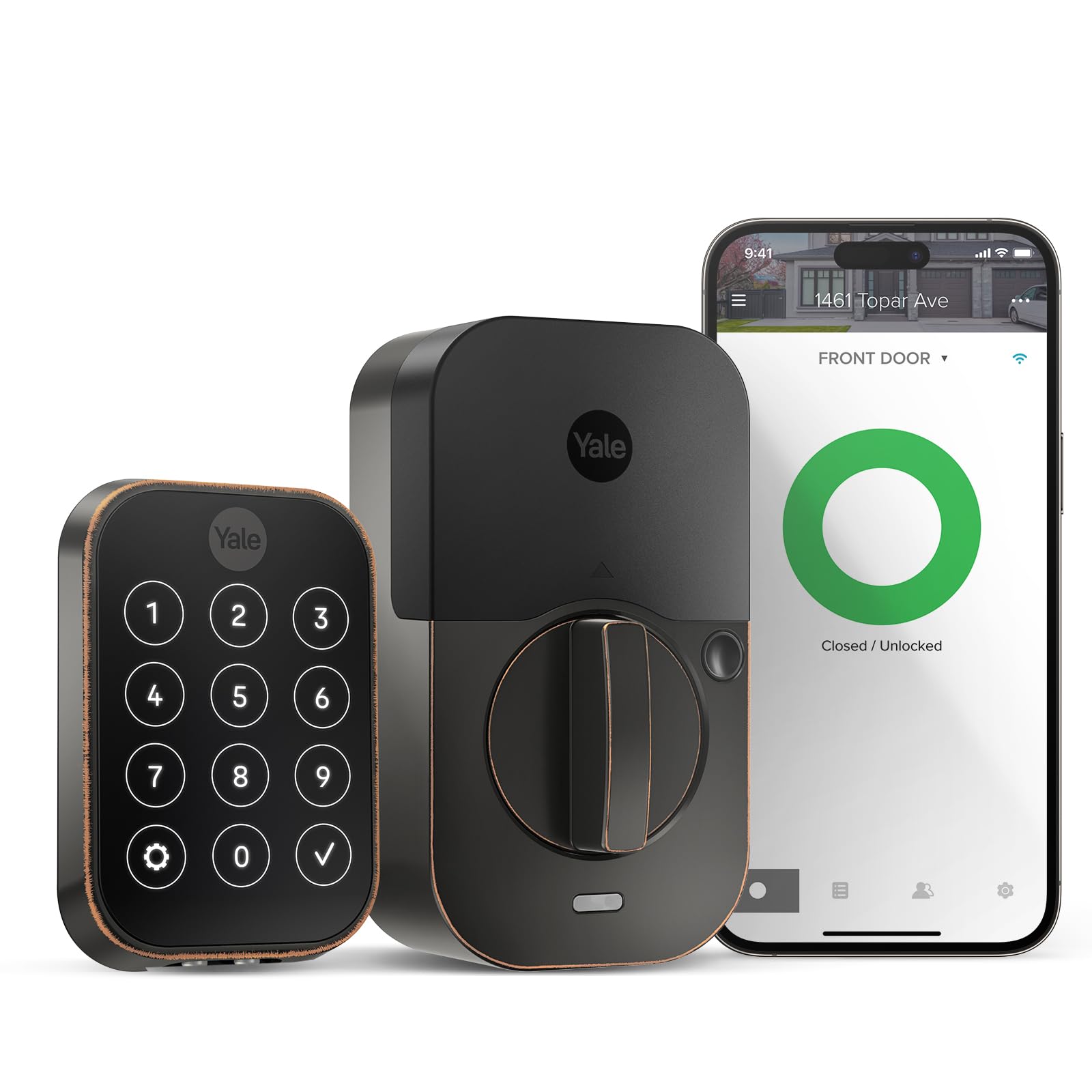
You've got enough on your plate, let Yale get the door. Fitting into any lifestyle, this lock offers increased convenience and security so you can have one less worry during your day. With multiple ways to unlock, the ability to share and track entry codes, and Auto-Lock with DoorSense, the Yale Assure Lock 2 gives you peace of mind, while making it easier to protect your home and family. Advanced security features like biometric verification, two-factor authentication and lost phone features let you rest easy knowing your home is secure.
You've got enough on your plate, let Yale get the door. Fitting into any lifestyle, this lock offers increased convenience and security so you can have one less worry during your day. With multiple ways to unlock, the ability to share and track entry codes, and Auto-Lock with DoorSense, the Yale Assure Lock 2 gives you peace of mind, while making it easier to protect your home and family. Advanced security features like biometric verification, two-factor authentication and lost phone features let you rest easy knowing your home is secure.
in 3 offers
The lowest price for Yale Assure Lock 2 Key-Free Touchscreen with Bluetooth - Black Suede right now is $211.91 at Big Apple Buddy, compared across 2 retailers.
The all-time low was $69.10 on 18 June 2025 — today's price is 207% above the lowest ever. It has been notably cheaper before — worth setting a price alert.
Prices last updated 18 Sept 2026.
Yale Assure Lock 2 Key-Free Touchscreen with Bluetooth - Black Suede
You've got enough on your plate, let Yale get the door. Fitting into any lifestyle, this lock offers increased convenience and security so you can have one less worry during your day. With multiple ways to unlock, the ability to share and track entry codes, and Auto-Lock with DoorSense, the Yale Assure Lock 2 gives you peace of mind, while making it easier to protect your home and family. Advanced security features like biometric verification, two-factor authentication and lost phone features let you rest easy knowing your home is secure.
You've got enough on your plate, let Yale get the door. Fitting into any lifestyle, this lock offers increased convenience and security so you can have one less worry during your day. With multiple ways to unlock, the ability to share and track entry codes, and Auto-Lock with DoorSense, the Yale Assure Lock 2 gives you peace of mind, while making it easier to protect your home and family. Advanced security features like biometric verification, two-factor authentication and lost phone features let you rest easy knowing your home is secure.
Last updated at 18/09/2026 09:29:00
Yale Home Assure Lock 2 Deadbolt, Black Suede Keyless Entry Door Lock with Digital Touchscreen Keypad and Bluetooth Connectivity (No Wi-Fi), YRD450-
Affiliate Disclosure: We may receive a small commission for purchases made through this link at no extra cost to you. This helps support our site. Thank you!
Yale - Assure Lock 2 Smart Lock Touch Key-Free Keypad with Bluetooth - Black Suede - YRD430-F-BLE-BSP
Delivery $86.93
Yale - Assure Lock 2 Touch Key-Free Keypad with Bluetooth - Satin Nickel - YRD430-F-BLE-619
Delivery $86.93
originally posted on bestbuy.com
Smart devices are seeming to be the name of the game these days, having the ability the ability automate life is very important. This smart lock aligns with that mentality. I have had a wonderful experience with this smart lock since opening the box, its is very evident that everything from the unboxing experience through installation and the user experience has been taken into consideration. My family requires ease of use in order to give me the thumbs up, and this lock checks that box with ease. There are 2 primary reasons why I believe this smart lock is a top pick, those reasons are accessibility and customization.When speaking about accessibility and customization this smart device really goes above and beyond when being used properly with the companion app ... MoreSmart devices are seeming to be the name of the game these days, having the ability the ability automate life is very important. This smart lock aligns with that mentality. I have had a wonderful experience with this smart lock since opening the box, its is very evident that everything from the unboxing experience through installation and the user experience has been taken into consideration. My family requires ease of use in order to give me the thumbs up, and this lock checks that box with ease. There are 2 primary reasons why I believe this smart lock is a top pick, those reasons are accessibility and customization.When speaking about accessibility and customization this smart device really goes above and beyond when being used properly with the companion app or other smart devices. I can utilize its DoorSense feature to auto lock and unlock when coming and going. I can also create temporary codes for one time use guests. Once installed (which was a piece of cake) this lock really makes life easy, the only problem I have is that I wish I had one for every entry point on my home. Kids can use this too as creating an entry code is another built in feature. Coupling all of this with a life time warranty and top notch security encryption really gives me the warm and fuzzys.All in all, if you are looking for a smart lock that gives a wide array of customized access abilities that can easily synch with your smart devices then I would recommend this lock to check those boxes!
originally posted on bestbuy.com
I got the Yale Assure Lock 2 to replace my existing, “dumb” deadbolt lock and was excited to freshen the look of my front door (previous handle and deadlock were dark, oiled bronze and I was going to replace the lever lock with satin nickel anyway). I had high hopes for this lock, being a bit of a nerd/lover of tech, and having a real need for the features such as allowing my cat sitter access to the house, and knowing exactly when she arrives and leaves so I can ensure Daria D. Cat is getting the attention she deserves.As much as I consider myself a technical expert, I also admit I am definitely NOT mechanically inclined, and when I got this, I expected I would need to hire a handyman to perform the installation. I even called the one I use most often for an ... MoreI got the Yale Assure Lock 2 to replace my existing, “dumb” deadbolt lock and was excited to freshen the look of my front door (previous handle and deadlock were dark, oiled bronze and I was going to replace the lever lock with satin nickel anyway). I had high hopes for this lock, being a bit of a nerd/lover of tech, and having a real need for the features such as allowing my cat sitter access to the house, and knowing exactly when she arrives and leaves so I can ensure Daria D. Cat is getting the attention she deserves.As much as I consider myself a technical expert, I also admit I am definitely NOT mechanically inclined, and when I got this, I expected I would need to hire a handyman to perform the installation. I even called the one I use most often for an estimate, and he gave a 3 figure price to remove the old and install the new. That was enough to motivate me to attempt the install myself, and I have to say, this was very easy, even for ME! Believe me, that’s really saying something 😊Step 1 was removing the old deadbolt, which was just a matter of unscrewing the screws on the inside of the house and pulling the sections apart; then removing the screws that held the deadbolt plate against the door and removing that part, and finally removing the strike from the door jamb. Easy, 5-minute job, if that.The next step was, using the supplied template, determining the face bore and side bore of the old lock, and then installing the new bolt and securing it to the door with the included screws. You’re basically doing the steps you took when removing the old lock in reverse. Once that is in place, you put the keypad part of the lock in the front of the door, making sure the cable is under the bottom of the lock. Next, you attach the mounting plate/bracket to the inside of the door, fishing the cable through that. Now, you use the correct set of screws to secure the mounting bracket to the door, fastening to the keypad portion of the lock. The instructions will let you know which screws to use based on the thickness of your door. Before you tighten down fully, make sure that your keypad is level on the outside of the door. Now, you’re going to connect the cable from the keypad side of the lock to the interior side of the lock; there is plenty of length to the cable, it isn’t a difficult task. Once that is connected, you simply side the interior portion of the lock onto the mounting bracket until it’s in place. You’re almost done! Now simply remove the battery cover to expose the 2 pre-installed screws that will secure the interior portion of the lock flush against the door. You’ll want to make sure it is level before fully tightening. Now, just pop in the Wi-Fi module (included), install the 4 batteries, and replace the battery cover, which easily slides into place.Next, you’re going to download and install the Yale Access app on your phone, register yourself and your lock, and go through the setup process, which as with the hardware installation, is well documented and easy to follow.The features I love most about this lock are:> The ease of connecting to my Wi-Fi network with no bridge or any other requirements> The ease of setting up the pass code and even separate codes for individuals so you know who is entering your home and when> The ability to check the status of the lock from anywhere, and lock or unlock from your phone.In conclusion, I give the Yale Assure Lock 2 my unconditional recommendation. It looks fantastic, can be installed with minimal tools or mechanical skill, and has amazing features you never knew you needed.
originally posted on bestbuy.com
Smart locks seem to be becoming more and more prevalent and I feel like we are finally getting to the point where they are now becoming a must buy. This lock by Yale has finally been able to give us a nice discreet appearance with all of the smart features you could possibly need all packed into an app with an easy to use user interface.Firstly, right out of the box you can tell it is a quality product as it is not made of simply cheap plastic and has that premium feel. I love the look of this lock as it is extremely discreet compared to the multitude of other smart locks out there. I think this is predominantly due to the key-free aspect of the lock as it eliminates the cylinder, which is preferred for me personally as it results in a more secure lock. The ... MoreSmart locks seem to be becoming more and more prevalent and I feel like we are finally getting to the point where they are now becoming a must buy. This lock by Yale has finally been able to give us a nice discreet appearance with all of the smart features you could possibly need all packed into an app with an easy to use user interface.Firstly, right out of the box you can tell it is a quality product as it is not made of simply cheap plastic and has that premium feel. I love the look of this lock as it is extremely discreet compared to the multitude of other smart locks out there. I think this is predominantly due to the key-free aspect of the lock as it eliminates the cylinder, which is preferred for me personally as it results in a more secure lock. The touchscreen works extremely well and the branding is nice and discreet. The ability to tap the logo on the lock to light up the screen is a nice feature to have at night as well.After getting it unboxed the installation was a breeze! I have installed a couple smart locks at this point and some are much easier than others and I will definitely say that this lock is definitely at the top of the list for ease of install. Then getting the app downloaded and connected to the lock was again just as easy. Again, the ease of setup always seems to be a major hurdle when it comes to smart devices to which I really feel like Yale has focused on this, both when it comes to the actual door hardware and software component within the app.After the quick setup I was finally able to play with the app some and discover all of the things that this lock allows you to do. The first thing I have to mention though is the user interface of the app as it is extremely straightforward and allows you to quickly get to what you are looking for. The features on this lock are all here including your basic key-free access which can be through the keypad, through the app (both on your phone or smartwatch), with voice assistant, and also through the auto-unlock feature which in my opinion is the most convenient and seamless as you don`t have to mess with the keypad or the app. Also within the app the ability to see if the lock is locked or unlocked is a feature that provides peace of mind both when at home and away. The final item I have to mention is the ability to setup temporary codes in the app as this is extremely helpful when you may be out of town or away because the app also provides a log that allows you to see when those temporary codes were used or you can even receive alerts as well.Overall, the discreet appearance of this lock along with the multitude of ways to unlock and lock the lock really set this smart lock apart from its competitors. The ability to provide temporary codes and see an activity feed of not only those temporary codes, but all activity is also a much appreciated feature. I don`t really know what else is left to be desired of a smart lock and for that reason I would not hesitate to recommend this smart lock!
| Product dimensions | 6.35 x 9.4 x 5.84 cm; 1.62 Kilograms |
| Batteries | 4 AA batteries required. (included) |
| Style | Bluetooth (No Module |
| Finish | Painted |
| Shape | Rectangular |

Yale Home Assure Lock 2 Deadbolt, Black Suede Keyless Entry Door Lock with Digital Touchscreen Keypad and Bluetooth Connectivity (No Wi-Fi), YRD450-
Affiliate Disclosure: We may receive a small commission for purchases made through this link at no extra cost to you. This helps support our site. Thank you!
Yale - Assure Lock 2 Smart Lock Touch Key-Free Keypad with Bluetooth - Black Suede - YRD430-F-BLE-BSP
Delivery $86.93
Yale - Assure Lock 2 Touch Key-Free Keypad with Bluetooth - Satin Nickel - YRD430-F-BLE-619
Delivery $86.93
Smart devices are seeming to be the name of the game these days, having the ability the ability automate life is very important. This smart lock aligns with that mentality. I have had a wonderful experience with this smart lock since opening the box, its is very evident that everything from the unboxing experience through installation and the user experience has been taken into consideration. My family requires ease of use in order to give me the thumbs up, and this lock checks that box with ease. There are 2 primary reasons why I believe this smart lock is a top pick, those reasons are accessibility and customization.When speaking about accessibility and customization this smart device really goes above and beyond when being used properly with the companion app ... MoreSmart devices are seeming to be the name of the game these days, having the ability the ability automate life is very important. This smart lock aligns with that mentality. I have had a wonderful experience with this smart lock since opening the box, its is very evident that everything from the unboxing experience through installation and the user experience has been taken into consideration. My family requires ease of use in order to give me the thumbs up, and this lock checks that box with ease. There are 2 primary reasons why I believe this smart lock is a top pick, those reasons are accessibility and customization.When speaking about accessibility and customization this smart device really goes above and beyond when being used properly with the companion app or other smart devices. I can utilize its DoorSense feature to auto lock and unlock when coming and going. I can also create temporary codes for one time use guests. Once installed (which was a piece of cake) this lock really makes life easy, the only problem I have is that I wish I had one for every entry point on my home. Kids can use this too as creating an entry code is another built in feature. Coupling all of this with a life time warranty and top notch security encryption really gives me the warm and fuzzys.All in all, if you are looking for a smart lock that gives a wide array of customized access abilities that can easily synch with your smart devices then I would recommend this lock to check those boxes!
I got the Yale Assure Lock 2 to replace my existing, “dumb” deadbolt lock and was excited to freshen the look of my front door (previous handle and deadlock were dark, oiled bronze and I was going to replace the lever lock with satin nickel anyway). I had high hopes for this lock, being a bit of a nerd/lover of tech, and having a real need for the features such as allowing my cat sitter access to the house, and knowing exactly when she arrives and leaves so I can ensure Daria D. Cat is getting the attention she deserves.As much as I consider myself a technical expert, I also admit I am definitely NOT mechanically inclined, and when I got this, I expected I would need to hire a handyman to perform the installation. I even called the one I use most often for an ... MoreI got the Yale Assure Lock 2 to replace my existing, “dumb” deadbolt lock and was excited to freshen the look of my front door (previous handle and deadlock were dark, oiled bronze and I was going to replace the lever lock with satin nickel anyway). I had high hopes for this lock, being a bit of a nerd/lover of tech, and having a real need for the features such as allowing my cat sitter access to the house, and knowing exactly when she arrives and leaves so I can ensure Daria D. Cat is getting the attention she deserves.As much as I consider myself a technical expert, I also admit I am definitely NOT mechanically inclined, and when I got this, I expected I would need to hire a handyman to perform the installation. I even called the one I use most often for an estimate, and he gave a 3 figure price to remove the old and install the new. That was enough to motivate me to attempt the install myself, and I have to say, this was very easy, even for ME! Believe me, that’s really saying something 😊Step 1 was removing the old deadbolt, which was just a matter of unscrewing the screws on the inside of the house and pulling the sections apart; then removing the screws that held the deadbolt plate against the door and removing that part, and finally removing the strike from the door jamb. Easy, 5-minute job, if that.The next step was, using the supplied template, determining the face bore and side bore of the old lock, and then installing the new bolt and securing it to the door with the included screws. You’re basically doing the steps you took when removing the old lock in reverse. Once that is in place, you put the keypad part of the lock in the front of the door, making sure the cable is under the bottom of the lock. Next, you attach the mounting plate/bracket to the inside of the door, fishing the cable through that. Now, you use the correct set of screws to secure the mounting bracket to the door, fastening to the keypad portion of the lock. The instructions will let you know which screws to use based on the thickness of your door. Before you tighten down fully, make sure that your keypad is level on the outside of the door. Now, you’re going to connect the cable from the keypad side of the lock to the interior side of the lock; there is plenty of length to the cable, it isn’t a difficult task. Once that is connected, you simply side the interior portion of the lock onto the mounting bracket until it’s in place. You’re almost done! Now simply remove the battery cover to expose the 2 pre-installed screws that will secure the interior portion of the lock flush against the door. You’ll want to make sure it is level before fully tightening. Now, just pop in the Wi-Fi module (included), install the 4 batteries, and replace the battery cover, which easily slides into place.Next, you’re going to download and install the Yale Access app on your phone, register yourself and your lock, and go through the setup process, which as with the hardware installation, is well documented and easy to follow.The features I love most about this lock are:> The ease of connecting to my Wi-Fi network with no bridge or any other requirements> The ease of setting up the pass code and even separate codes for individuals so you know who is entering your home and when> The ability to check the status of the lock from anywhere, and lock or unlock from your phone.In conclusion, I give the Yale Assure Lock 2 my unconditional recommendation. It looks fantastic, can be installed with minimal tools or mechanical skill, and has amazing features you never knew you needed.
Smart locks seem to be becoming more and more prevalent and I feel like we are finally getting to the point where they are now becoming a must buy. This lock by Yale has finally been able to give us a nice discreet appearance with all of the smart features you could possibly need all packed into an app with an easy to use user interface.Firstly, right out of the box you can tell it is a quality product as it is not made of simply cheap plastic and has that premium feel. I love the look of this lock as it is extremely discreet compared to the multitude of other smart locks out there. I think this is predominantly due to the key-free aspect of the lock as it eliminates the cylinder, which is preferred for me personally as it results in a more secure lock. The ... MoreSmart locks seem to be becoming more and more prevalent and I feel like we are finally getting to the point where they are now becoming a must buy. This lock by Yale has finally been able to give us a nice discreet appearance with all of the smart features you could possibly need all packed into an app with an easy to use user interface.Firstly, right out of the box you can tell it is a quality product as it is not made of simply cheap plastic and has that premium feel. I love the look of this lock as it is extremely discreet compared to the multitude of other smart locks out there. I think this is predominantly due to the key-free aspect of the lock as it eliminates the cylinder, which is preferred for me personally as it results in a more secure lock. The touchscreen works extremely well and the branding is nice and discreet. The ability to tap the logo on the lock to light up the screen is a nice feature to have at night as well.After getting it unboxed the installation was a breeze! I have installed a couple smart locks at this point and some are much easier than others and I will definitely say that this lock is definitely at the top of the list for ease of install. Then getting the app downloaded and connected to the lock was again just as easy. Again, the ease of setup always seems to be a major hurdle when it comes to smart devices to which I really feel like Yale has focused on this, both when it comes to the actual door hardware and software component within the app.After the quick setup I was finally able to play with the app some and discover all of the things that this lock allows you to do. The first thing I have to mention though is the user interface of the app as it is extremely straightforward and allows you to quickly get to what you are looking for. The features on this lock are all here including your basic key-free access which can be through the keypad, through the app (both on your phone or smartwatch), with voice assistant, and also through the auto-unlock feature which in my opinion is the most convenient and seamless as you don`t have to mess with the keypad or the app. Also within the app the ability to see if the lock is locked or unlocked is a feature that provides peace of mind both when at home and away. The final item I have to mention is the ability to setup temporary codes in the app as this is extremely helpful when you may be out of town or away because the app also provides a log that allows you to see when those temporary codes were used or you can even receive alerts as well.Overall, the discreet appearance of this lock along with the multitude of ways to unlock and lock the lock really set this smart lock apart from its competitors. The ability to provide temporary codes and see an activity feed of not only those temporary codes, but all activity is also a much appreciated feature. I don`t really know what else is left to be desired of a smart lock and for that reason I would not hesitate to recommend this smart lock!
I have been using the Yale Assure Lock 2 at home and with my family for several weeks. This is my first smart lock, even though I have upgraded nearly everything else in my home to something 'smart' over the past several years. The lock is easy to setup, out of the box you have the external keypad, the rear compartment/driving mechanism that holds the battery and (optional) WiFi module, and a variety of striker plates and attachments so you can fit everything to your door/door frame. Fitting to my (wooden) door and door frame took a little over an hour, most of the time was spent making sure the lock was able to open and close smoothly. I probably could have got it done faster, but this is my first time ever installing a proper door lock and I was a little extra ... MoreI have been using the Yale Assure Lock 2 at home and with my family for several weeks. This is my first smart lock, even though I have upgraded nearly everything else in my home to something 'smart' over the past several years. The lock is easy to setup, out of the box you have the external keypad, the rear compartment/driving mechanism that holds the battery and (optional) WiFi module, and a variety of striker plates and attachments so you can fit everything to your door/door frame. Fitting to my (wooden) door and door frame took a little over an hour, most of the time was spent making sure the lock was able to open and close smoothly. I probably could have got it done faster, but this is my first time ever installing a proper door lock and I was a little extra cautious. The lock works as either left or right locking, which is nice. The Yale lock uses 4xAA batteries (included) and the WiFi module slots in easily above the battery compartment. I like that the WiFi module is separate, it means you can (theoretically) upgrade to a better/faster WiFi module or open standards (should a module become available) without losing your lock. Once installed, the rest of the setup and use is all done via the Yale App. The app isn't bad, but my initial experience was not great. It randomly crashed twice on my iPhone and there were some odd bugs where trying to add users or unique access codes/PINs failed. It has been a few weeks now and things have stabilized and across my partner and kids we've had no issues and hard to isolate why the app was misbehaving. I like that everyone can have their own code, you can also set 1 time codes for guests, etc. Worth knowing (not that I used it) but the Yale App also has a standalone function for AirBNB in case you plan to use the lock that way. There's no backup key option, if the battery goes flat, you can use a 9V battery to temporarily power the lock. I have mixed feelings on this and kind of wish I had the key version - because who really carries around a 9V battery? Given the minor app issues I experienced I can't give it 5 stars. I like the lock and trust Yale from a security point of view. I have now shifted the lock to our garage side access door and now plan to get the keyed version for my front door later this year.
The Yale Assure Lock 2 + Wifi by August smart deadbolt is not my first Yale, or August product. The original Yale Assure lock was one of the first smart home products I purchased when I bought my home, and has worked reliably for about 6 years now. One of the great unsung features of the Yale locks is they take regular AA batteries (4 of them). This may not seem like much, but it's a huge boon to not have to keep a supply of different sizes of lithium batteries on hand. Trust me, if you use a lock that requires those strange batteries, they will inevitably die on you at the worst time. With AAs, you probably already have some on hand to keep your lock operating smoothly. The charge drop off is also more gradual in my experience, so you can usually tell the lock is ... MoreThe Yale Assure Lock 2 + Wifi by August smart deadbolt is not my first Yale, or August product. The original Yale Assure lock was one of the first smart home products I purchased when I bought my home, and has worked reliably for about 6 years now. One of the great unsung features of the Yale locks is they take regular AA batteries (4 of them). This may not seem like much, but it's a huge boon to not have to keep a supply of different sizes of lithium batteries on hand. Trust me, if you use a lock that requires those strange batteries, they will inevitably die on you at the worst time. With AAs, you probably already have some on hand to keep your lock operating smoothly. The charge drop off is also more gradual in my experience, so you can usually tell the lock is nearing battery replacement time even before it gives you the heads up through the app or with the audio warning, just from the sound of the motor. The new model the Assure Lock 2, improves the aesthetics on both sides of the door, while including a Wifi module that brings the Yale lock into the August app for easy connectivity via your phone, Samsung Smartthings, or other smart home ecosystems.Install was very easy. The Yale Assure Lock 2 completely replaces your existing deadbolt. While this might seem more daunting than products which only replace the inside part of your deadbolt, it actually doesn't introduce much more complexity and the hardware install only takes about 10 minutes for someone moderatly handy. The addition of the included door open/close sensor fixes the most ccommon problem that I have had with my first gen Assure lock (that lock required some non-standard programming with my Samsung Smartthings system to get it to work with an external door close sensor).The door close sensor is either extremely easy to install (you can just mount it to the surface of the door itself and leave it visible inside the home) or you can drill a small hole just above the deadbolt strikeplate on your frame to completely hide the sensor.Setup of the lock as a smart home product was exceptionally easy. There is a QR code included to set the lock up in your Yale app, and once set up I am able to control it via my Smartthings system (which has an August integration), the Yale app, or the August app. The Yale app goes through all the programming and calibration steps for you.If you haven't taken the leap to a smart door lock yet, definitely take the leap! My first smart lock from Yale made it so I never had to carry a physical key again, or give a copy friends or family when we were out of town. This new lock is an improvement on the original in every way.
I have been using the Yale - assure lock 2 for a few weeks now. The version of the lock I am using is the key-free touchscreen lock with the wi fi module. When I first opened the box, I thought to myself, this thing might be more complicated than I want to tackle. Don't worry, it really is simple to install. I think what made me think this was going to be complicated was the fact that this lock comes with multiple adapters to fit different size doors. One you eliminate the parts you don't have to have to work on your door, instillation is extremely straight forward. first things first, you do have to have an opening for a dead bolt lock above your door handle. Just remove the existing dead bolt lock, find the adapters that fit your particular size door and follow ... MoreI have been using the Yale - assure lock 2 for a few weeks now. The version of the lock I am using is the key-free touchscreen lock with the wi fi module. When I first opened the box, I thought to myself, this thing might be more complicated than I want to tackle. Don't worry, it really is simple to install. I think what made me think this was going to be complicated was the fact that this lock comes with multiple adapters to fit different size doors. One you eliminate the parts you don't have to have to work on your door, instillation is extremely straight forward. first things first, you do have to have an opening for a dead bolt lock above your door handle. Just remove the existing dead bolt lock, find the adapters that fit your particular size door and follow the included instructions. Once installed, download the app and follow the instructions to set up your wi fi enabled door lock. You will set a master pin and go through the process of connecting to your wifi and you are pretty much set. This lock is also bluetooth enabled and will use whichever connection is the best when you use the app to lock or unlock the door. Along with the master pin, you can create additional unlock pins that can be assigned to individuals. If you have kids or a housekeeper, you will be able to determine who is entering the house by know what pin is being used. This lock will also prevent you from giving out extra keys to individuals that you want to have temporary access. Remember, keys can be copied. You can always delete their access code. I have not had any issues with the lock and am seriously wondering why I didn't install this lock five years ago when I built my house. It is really a great product.
I’ve been looking for a solid smart home solution for my front door and this keyless update to the Assure Lock line from Yale is exactly what I was looking for.Ease of installation will vary. But for mine it was as simple as removing the old keyed deadbolt and installing this in place. Only minor modifications are needed to install the DoorSense magnet used to detect the lock mechanism. What I have shown is the surface mount option. However, you can flush mount this magnet inside the door jam with only a 1/2” deep and 5/8” wide. This option keeps it completely hidden when the door is closed.Setup requires a Bluetooth connection from your mobile device. Initial lock settings and Wi-Fi connection options are offered during the process. After which you will need to ... MoreI’ve been looking for a solid smart home solution for my front door and this keyless update to the Assure Lock line from Yale is exactly what I was looking for.Ease of installation will vary. But for mine it was as simple as removing the old keyed deadbolt and installing this in place. Only minor modifications are needed to install the DoorSense magnet used to detect the lock mechanism. What I have shown is the surface mount option. However, you can flush mount this magnet inside the door jam with only a 1/2” deep and 5/8” wide. This option keeps it completely hidden when the door is closed.Setup requires a Bluetooth connection from your mobile device. Initial lock settings and Wi-Fi connection options are offered during the process. After which you will need to calibrate the lock with the DoorSense magnet provided that you have already installed. Integration with smart devices like an Apple Watch are also available and work as well as your connection allows.The best part is the integration with 3rd party software like Amazon Alexa, Apple HomeKit, Google Home, IFTT, Philips Hue, and Airbnb. Being able to lock your door with a voice command or integrate it with other commands such as light settings or just leaving the house is great. It kind of removes the feeling of dread from future conversations when asking “Did we lock the front door?”. And little things like audible confirmation of lock activation and a led indicator showing red/green for locked/unlocked are really appreciated as well.Overall this is an easy install experience, instructions are useful and plenty of tools provided for those who will not need to make any modifications, and the app is clear and easy to use even on wearable tech. I can’t think of much more that I want in a door lock right now.
I recently purchased the Yale Assure Lock 2, Key-Free Touchscreen Lock with Wi-Fi in Satin Nickel from Best Buy, and I am extremely pleased with my purchase. This smart lock has truly transformed the way I secure my home, providing convenience, functionality, and peace of mind.First and foremost, the key-free touchscreen design is a game-changer. I no longer have to fumble around for my keys or worry about misplaced or lost keys. With just a simple touch on the touchscreen pad, I can effortlessly lock or unlock my door. It's incredibly convenient, especially when I have my hands full with groceries or other items.The Wi-Fi connectivity feature is a standout aspect of this lock. By connecting it to my home network, I can remotely access and control the lock from ... MoreI recently purchased the Yale Assure Lock 2, Key-Free Touchscreen Lock with Wi-Fi in Satin Nickel from Best Buy, and I am extremely pleased with my purchase. This smart lock has truly transformed the way I secure my home, providing convenience, functionality, and peace of mind.First and foremost, the key-free touchscreen design is a game-changer. I no longer have to fumble around for my keys or worry about misplaced or lost keys. With just a simple touch on the touchscreen pad, I can effortlessly lock or unlock my door. It's incredibly convenient, especially when I have my hands full with groceries or other items.The Wi-Fi connectivity feature is a standout aspect of this lock. By connecting it to my home network, I can remotely access and control the lock from anywhere using my smartphone. Whether I'm at work or on vacation, I can easily lock or unlock my door, check its status, and even receive notifications when someone enters or exits my home. This level of control and awareness brings me great peace of mind and enhances the security of my property.Installation of the Yale Assure Lock 2 was a breeze. The instructions were clear and easy to follow, and the included hardware made the process straightforward. I appreciate that Yale has designed this lock to fit standard doors, ensuring compatibility and ease of installation for most homeowners.The satin nickel finish of the lock adds a touch of elegance and sophistication to my door. It blends seamlessly with my existing hardware and enhances the overall aesthetic appeal of my home's entryway.The battery life of the lock is impressive. I haven't experienced any issues or concerns regarding battery drain, and the lock even provides low battery alerts to ensure that I never get locked out unintentionally. The peace of mind knowing that my lock will continue to function reliably is invaluable.Lastly, I must commend Best Buy for their excellent service. The purchase process was smooth, and their staff was knowledgeable, answering all my questions and providing helpful guidance.In conclusion, the Yale Assure Lock 2, Key-Free Touchscreen Lock with Wi-Fi is a fantastic investment for anyone seeking enhanced security and convenience for their home. Its key-free operation, Wi-Fi connectivity, easy installation, and stylish design make it a standout choice. I highly recommend this smart lock to anyone looking to upgrade their home's security system. Thank you, Best Buy, for delivering a top-notch product that has exceeded my expectations.
The Assure Lock 2 is our second smart lock from Yale, as we’ve been users of the original Yale Assure Lock (connected by August) for several years. This new model comes in two versions: keyed and keyless, just like the original. This time around we got the keyless version, though it is equipped with an external emergency battery terminal, so even if the batteries do go out while you’re away, a 9V battery is all you need to fire up the keypad and enter your code to unlock the door. If you want fully keyless entry, the doorknob either needs to be left unlocked or replaced with a non-locking knob or paddle. I recommend the latter to eliminate the risk of being locked out.The installation process for this lock is simple and straightforward, as long as your door’s ... MoreThe Assure Lock 2 is our second smart lock from Yale, as we’ve been users of the original Yale Assure Lock (connected by August) for several years. This new model comes in two versions: keyed and keyless, just like the original. This time around we got the keyless version, though it is equipped with an external emergency battery terminal, so even if the batteries do go out while you’re away, a 9V battery is all you need to fire up the keypad and enter your code to unlock the door. If you want fully keyless entry, the doorknob either needs to be left unlocked or replaced with a non-locking knob or paddle. I recommend the latter to eliminate the risk of being locked out.The installation process for this lock is simple and straightforward, as long as your door’s measurements fit the specified requirements. A tear out ruler/guide in the instruction manual will help you verify all the measurements, and the only tool you’ll need is a Phillips head screwdriver. It comes with everything you need to install a new deadbolt if your door doesn’t already have one. If you have an existing deadbolt you’re replacing, in most cases you can simply replace the old latch with the one that comes with this smart lock as it fits a range of door thicknesses and configurations; its length is adjustable to fit either a 2-3/8” backset or 2-3/4” backset, by simply twisting the neck of the deadbolt. Security screws are included if you want to reinforce the strike plate with longer screws.If your existing bore hole is smaller than a 2-1/8” diameter, you can remove the hole adapter, so the interior bracket can fit into smaller 1-1/2” face bores. The unit comes with three different length color-coded mounting screws to accommodate different door thicknesses from 1-3/8” to 2-1/4” thick. Once the deadbolt, exterior keypad, and interior bracket are installed, there’s only one wire connector to clip into the inside lock unit. The attachment screws are located in the battery bay behind the 4 AAA batteries, so they’re hidden for a clean, hardware free look on the outside. There’s an additional DoorSense sensor that can be installed either on the frame adjacent to the interior lock or flush mounted inside the jamb. We choose that latter as we were having issues with the sensor working properly surface-mounted, since our door is recessed a bit from the inside trim.This smart lock communicates with a smartphone via Bluetooth by default, and with the optional WiFi module connects to your home network for remote access from anywhere with an internet connection. It does not require a separate bridge/gateway for WiFi, as the previous model did, so that’s one less thing that you need to have plugged into a nearby outlet. Just be sure not to install or remove the module while the batteries are in the lock!After powering up, you can set up the smart lock using the Yale Access app which is identical to the August Home app, as August was acquired by Yale, and they are pretty much fully integrated. If you already have an August account, you can use those credentials to login into the Yale Access app, otherwise you will need to register a new account. Adding the lock to the app is easy and there are guided steps with pictures and video for each step (including lock installation). At the end of the process, you’ll calibrate the DoorSense sensor, so the lock can detect whether the door is open, closed, or ajar.We are able to easily lock and unlock the door by tapping a button in the app, using voice commands via Alexa integration, and have assigned everyone in our household unique PIN codes for entry (no limit on number of codes). You can create restricted passcodes for guests: recurring - on a weekly schedule, or temporary – with a specific start and end time/date. Just note that for recurring codes, while you can choose multiple days of the week, only one time interval is allowed across all the selected days, so for example if the code is valid on Mondays and Tuesdays from 1 to 3PM the same code cannot also be allowed from 5 to 6PM on a different day; a differing recurring time interval would require a separate code. Users also cannot share the same PIN code on the same lock, so each access code must be a unique number (4-8 digits).Once quirk with the app is that if you have multiple Yale Smart locks on the same property, like we have on the front and back doors, ‘Owners’ will be able to see all the devices listed under their user profile and you can use the same code on both locks. However, guest codes only have one device assigned per user, so if you want someone to have access to more than 1 smart lock, you’ll need to create a ‘duplicate’ user for each additional lock. While you can create multiple entry codes for a ‘new guest’ at the same time (e.g. for front and back doors, though the app doesn’t label which is which), the app won’t allow you to choose the same PIN code for both locks during user setup. After you have a separate guest code for each lock, you can go back and edit the ‘duplicate user’ to use the same PIN for both locks, as long as the code isn’t already in use by another user of that lock.The lock can auto-lock after a set amount of time has elapsed after being unlocked, from 30 seconds to 30 minutes, but only if the accompanying DoorSense indicates that the door is closed; auto-lock won’t trigger if the door is detected as open. You can also pause auto-lock using the passage mode button located in the inside lock panel to the upper right of the thumbturn. Pressing this button temporarily disables auto-lock, for example if you’re taking out the trash, until the door is locked again. There is an auto-unlock feature as well that will automatically unlock the door after it detects you have been away (more than 200m, using your smartphone GPS location) and subsequently returned and are near the door. You can optionally enable a door ajar notification if the door has been left open for a specified amount of time, 1 to 30 minutes, by setting up a Smart Alert in the app. Strangely, there’s no option to turn on push notifications for jams if the deadbolt fails to engage the plate, though the lock unit will audibly beep at the time of the jam.The touch keypad on the outside has a smooth matte finish, which doesn’t pick up fingerprints as readily as the prior model’s glossy finish. When locked, wake the lock by touching anywhere on the keypad, and the numbers will light up. The touchpad is responsive and plays an audible tone each time a key is pressed. For security, the keypad will timeout for 1 minute after a default limit of 5 incorrect entries. You can set the attempt limit from 3 to 10 tries and lockout interval from 10 seconds to 3 minutes in the app. You can one-touch lock the unit by pressing on the Yale logo on the keypad. I like this functionality much better than the prior model’s “touch anywhere” one-touch lock feature as it reduces the likelihood of accidental locking while the door is open.So far, the lock has been working well and we haven’t had any issues. You do have to make sure the door is fully closed because if your door is off by only a sliver, the lock may jam during auto-locking if the deadbolt latch doesn’t line up perfectly with the strike plate. The only unknown at this point is battery life, since we’ve only had the unit for less than a month, and there’s no battery life meter. With the previous model we change the batteries every 6 months or so, though it uses a WiFi bridge to reduce power consumption, so hopefully this lock will perform similarly with the WiFi module and not go through batteries quickly! The LED indicator inside and the gear icon on the keypad flash different colors when the batteries are running low, and you can also set the interior LED to always display a status LED, though this will consume more battery. We love that this lock has AirBnB integration too, as we rent out rooms in our home on the platform, so after booking, a temporary entry code will automatically be created for guests for the duration of their stay.
Good lock that works with Apple HomeKit app and Yale Access app. Decent improvement over their previous version YRD226 which required a Yale Connect Hub for internet access. Wi-Fi is built into this one within the module. Much cleaner set-up and ordering this version gets you everything you need for HK and Wi-Fi (also works with Bluetooth and AppleWatch Yale app). Hardware is slightly condensed over previous model.Yale Support is 24/7 if there are any issues with set-up. I installed two Yale model YRD450 locks so far. Printed and app instructions (with videos/images) for physical installation of lock are quite good. Note, DoorSense (magnet) if installing into door frame, I suggest using a 9/16 spade drill bit. In their literature they show in a picture a 1/2 drill ... MoreGood lock that works with Apple HomeKit app and Yale Access app. Decent improvement over their previous version YRD226 which required a Yale Connect Hub for internet access. Wi-Fi is built into this one within the module. Much cleaner set-up and ordering this version gets you everything you need for HK and Wi-Fi (also works with Bluetooth and AppleWatch Yale app). Hardware is slightly condensed over previous model.Yale Support is 24/7 if there are any issues with set-up. I installed two Yale model YRD450 locks so far. Printed and app instructions (with videos/images) for physical installation of lock are quite good. Note, DoorSense (magnet) if installing into door frame, I suggest using a 9/16 spade drill bit. In their literature they show in a picture a 1/2 drill bit (too small, DoorSense magnet won't fit) and they reference in copy 5/8" drill bit (hole will be slightly too large--a metal door with cause the magnet to pop out and stick to door side--on first door I had to use silicone sealer in the hole to solve the issue "by gluing in the magnet" so it wouldn't pop out. The 9/16" drill bit worked just right on second door--magnet goes in snuggly (takes a few taps from a rubber hammer) and stays in place flush with the door frame.On the first one I had to call support for help (module had HK Code + Yale QR code AND Lock Hardware had different HK Code + Yale QR code--if this happens use the lock HK Code and QR code, not the module. The second lock didn't have this issue and I simply used the codes on the hardware and had no difficulty following the Yale Access app directions.I can recommend. I do hope they last 15+ years. Nice to have remote access to lock and unlock doors, see who is going in/out, provide temp password entry to guests, etc.Now maybe I'll have time to clean and paint my doors!
| Product dimensions | 6.35 x 9.4 x 5.84 cm; 1.62 Kilograms |
| Batteries | 4 AA batteries required. (included) |
| Style | Bluetooth (No Module |
| Finish | Painted |
| Shape | Rectangular |