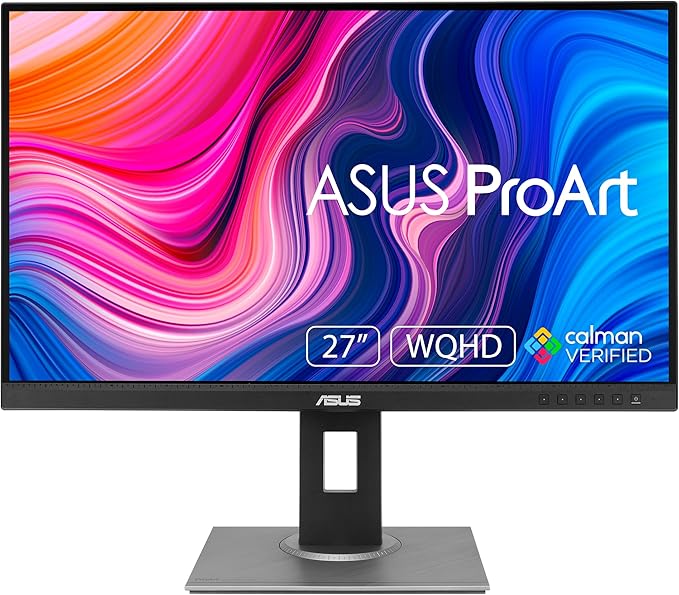
ProArt Display PA27UCX-K|Monitors|ASUS Australia
ProArt Display PA27UCX-K|Monitors|ASUS Australia
in 1 offers
The lowest price for Asus PA27UCX-K ProArt 27-Inch 4K Monitor right now is $2,894.00 at Device Deal.
The all-time low was $2,894.00 on 10 Oct 2025. That's the lowest price we've ever tracked — a great time to buy.
Prices last updated 21 Mar 2026.
Asus PA27UCX-K ProArt 27-Inch 4K Monitor
ProArt Display PA27UCX-K|Monitors|ASUS Australia
ProArt Display PA27UCX-K|Monitors|ASUS Australia
Last updated at 21/03/2026 12:50:25
"ASUS ProArt PA27UCX-K 27"4K UHD Dolby Vision HDR Professional IPS Monitor"
Delivery $14.99
originally posted on bhphotovideo.com
Switched from Dell and I find this monitor pretty well designed. The colours are looks pretty accurate, and most importantly it works with HDR (HLG, HDR-10, Dolby Vision). I can finally edit HDR videos.
originally posted on bhphotovideo.com
Solid image rendering and color accuracy. BUT The autocal software is unstable and a joke. It keeps crashing. Ive had serious compatibility issues with both Mac and Windows. Asus technical support literally told me not to use their Mac OS software. I tried on two different Windows systems and the software crashes EVERY time without fail. I even re-installed firmware 103. I followed all the instructions in detail step by step. They made a Youtube video for the process as well which is very simple. The software is very straightforward. Technical support is in Korea and the tech team's emails were in broken English which was, due to the technical nature of the issue, almost impossible to understand. (nothing against Korean folks, I used to live there happily and I love ... MoreSolid image rendering and color accuracy. BUT The autocal software is unstable and a joke. It keeps crashing. Ive had serious compatibility issues with both Mac and Windows. Asus technical support literally told me not to use their Mac OS software. I tried on two different Windows systems and the software crashes EVERY time without fail. I even re-installed firmware 103. I followed all the instructions in detail step by step. They made a Youtube video for the process as well which is very simple. The software is very straightforward. Technical support is in Korea and the tech team's emails were in broken English which was, due to the technical nature of the issue, almost impossible to understand. (nothing against Korean folks, I used to live there happily and I love Korea and its people). I sent detailed PDF logs of my process, the error message, and the troubleshooting steps taken. I also sent photographs and video in a zip file documenting my process. This has become a nightmare for me. I'm a colorist and a certified calibrator so I'm savvy with this sort of stuff. Its simply a badly designed product on the software side. Its now been six months and they STILL haven't released an updated firmware or software. They know these bugs exist but they aren't supporting their product. I will be selling this display and moving back to LG purely for customer service and product update/care. If you're going to sell a professional product, you have to be willing to invest in product support. Otherwise you're just selling overpriced consumer displays.
originally posted on bhphotovideo.com
First thing I noticed when I used it were the weird button placement in the back of the monitor. It’s a small but annoying characteristic in trying to navigate through settings. Second the magenta gradient on the left side of the monitor. I thought I could fix it with their uniformity feature and calibration but to no avail. Asus calibration tool continuously crashes on my 2018 MacBook Pro. The uniformity is terrible as well. Good color in the center but falls off rapidly. Then there’s the weird hum that is quite noticeable when you switch to HDR mode. I thought I’d supplement my Eizo Cg319x with this monitor but it absolutely is not up to par. I would have just bought a cheaper 4k monitor for my waveforms and scopes if I knew this is what I was getting.
| General | |
| Display Type | LED-backlit LCD monitor / TFT active matrix |
| Energy Class | Class G |
| Energy Class (HDR) | Class G |
| Diagonal Size | 27" |
"ASUS ProArt PA27UCX-K 27"4K UHD Dolby Vision HDR Professional IPS Monitor"
Delivery $14.99
Switched from Dell and I find this monitor pretty well designed. The colours are looks pretty accurate, and most importantly it works with HDR (HLG, HDR-10, Dolby Vision). I can finally edit HDR videos.
Solid image rendering and color accuracy. BUT The autocal software is unstable and a joke. It keeps crashing. Ive had serious compatibility issues with both Mac and Windows. Asus technical support literally told me not to use their Mac OS software. I tried on two different Windows systems and the software crashes EVERY time without fail. I even re-installed firmware 103. I followed all the instructions in detail step by step. They made a Youtube video for the process as well which is very simple. The software is very straightforward. Technical support is in Korea and the tech team's emails were in broken English which was, due to the technical nature of the issue, almost impossible to understand. (nothing against Korean folks, I used to live there happily and I love ... MoreSolid image rendering and color accuracy. BUT The autocal software is unstable and a joke. It keeps crashing. Ive had serious compatibility issues with both Mac and Windows. Asus technical support literally told me not to use their Mac OS software. I tried on two different Windows systems and the software crashes EVERY time without fail. I even re-installed firmware 103. I followed all the instructions in detail step by step. They made a Youtube video for the process as well which is very simple. The software is very straightforward. Technical support is in Korea and the tech team's emails were in broken English which was, due to the technical nature of the issue, almost impossible to understand. (nothing against Korean folks, I used to live there happily and I love Korea and its people). I sent detailed PDF logs of my process, the error message, and the troubleshooting steps taken. I also sent photographs and video in a zip file documenting my process. This has become a nightmare for me. I'm a colorist and a certified calibrator so I'm savvy with this sort of stuff. Its simply a badly designed product on the software side. Its now been six months and they STILL haven't released an updated firmware or software. They know these bugs exist but they aren't supporting their product. I will be selling this display and moving back to LG purely for customer service and product update/care. If you're going to sell a professional product, you have to be willing to invest in product support. Otherwise you're just selling overpriced consumer displays.
First thing I noticed when I used it were the weird button placement in the back of the monitor. It’s a small but annoying characteristic in trying to navigate through settings. Second the magenta gradient on the left side of the monitor. I thought I could fix it with their uniformity feature and calibration but to no avail. Asus calibration tool continuously crashes on my 2018 MacBook Pro. The uniformity is terrible as well. Good color in the center but falls off rapidly. Then there’s the weird hum that is quite noticeable when you switch to HDR mode. I thought I’d supplement my Eizo Cg319x with this monitor but it absolutely is not up to par. I would have just bought a cheaper 4k monitor for my waveforms and scopes if I knew this is what I was getting.
I needed a bright HDR monitor to use for color grading 4k HDR video on my Mac. The Asus 4k ProArt 27 HDR monitor turned out to be a great option. The 27 size is perfect for my 3 screen setup. The wide gamut color, the HDR with mini LED local dimming, the peak brightness of 1000 nits, peak contrast of 1000000:1, and the USB-c connectivity is a combination hard to find at this price point from any manufacturer. Works well with the Mac Studio & Final Cut Pro.
I was using an Asus PG27UQ to edit videos off of and whenever I would watch them on a different screen they would be too bright and the colors would be off. This monitor has a few different modes that are good for photo and video editing. Haloing is not as bad as the PG27UQ but still is there. The HDR is great, on the 27 Inch, its peak brightness is only 1000 nits compared to the 1200 nits on the 32 inch. TBH I didn't see the value and spending an extra $1500 on the 5 inches bigger screen since I already run a multi-monitor set up with other 27 in displays. Overall I like it so far but it's only been a few weeks.
I was in need of an HDR display for grading UHD footage. This ASUS ProArt Display has several useful inputs including HDMI and USB-C. It auto detects HDR content and right out of the box I was able to start grading material. I am using this is a grading video monitor and it's video feed is coming from a video IO box rather than the computer itself. I am sure it would make a great computer display as well.The display was well packed in a sturdy box and the build quality of the display is fantastic which is why it's a bit on the heavy side.Overall a great value for the money especially when looking at other displays such as Eizo or Sony at more than double the cost.
I've used professionally color calibrated workflows for twenty years. Traditionally companies like Eizo and NEC have dominated these fields and Asus along with some others are relatively recent (many years now) entrants. I've purchased a few Asus ProArt monitors for clients and all I can say is that if you want truly accurate color using professional tools STAY AWAY. Asus recently removed their Windows calibration application "ASUS ProArt Calibration Application" from their website. Now their support pretends it never existed. They now only use a new Windows Store application "ProArt Creator Hub" that constantly advertises to you and will not allow you to calibrate their expensive professional monitors without tracking and telemetry (agree to it or it won''t let you ... MoreI've used professionally color calibrated workflows for twenty years. Traditionally companies like Eizo and NEC have dominated these fields and Asus along with some others are relatively recent (many years now) entrants. I've purchased a few Asus ProArt monitors for clients and all I can say is that if you want truly accurate color using professional tools STAY AWAY. Asus recently removed their Windows calibration application "ASUS ProArt Calibration Application" from their website. Now their support pretends it never existed. They now only use a new Windows Store application "ProArt Creator Hub" that constantly advertises to you and will not allow you to calibrate their expensive professional monitors without tracking and telemetry (agree to it or it won''t let you install, no unchecking a box here.) Admins can't use a local installer to securely add functionality and they only support TWO colorimeter models and NO spectrophotometers... What are they afraid of? These are pretty toys with eye catching specs and I'm sure they look nice out of the box, but for the price you can support a company that actually cares about color science, oh... and privacy and data security and not trying to up-sell you on other products while you're trying to make their existing ones work.. Asus is absolutely not that company. They should stick to motherboards.
just received the ASUS ProArt Display PA27UCX-K to replace e my failed 10-year old 32" NEC Monitor. Beautiful results with the 27" ASUS monitor. I almost purchased the 32" version, but did not want to commit for more money at this point.Only REAL complaint is that all new MAC' s like my MacBook Pro M1 max 16" laptop are using thunderbolt 4 technology, which is five generations newer than the older USB-C format. This the USB-C technology on this monitor has issues, such no connection with startup, reboot, etc. using USB-C input. On has to toggle the on/off monitor power switch for everybody to start talking to each other. The HDMI connection works as advertised.
| General | |
| Display Type | LED-backlit LCD monitor / TFT active matrix |
| Energy Class | Class G |
| Energy Class (HDR) | Class G |
| Diagonal Size | 27" |