Last updated at 13/08/2026 06:48:23
ProArt PA278QV 27 Inch 1440p QHD Professional Monitor
Delivery between 19–22 Aug $29
ProArt PA278QV 27 Inch 1440p QHD Professional Monitor | Calman Verified, IPS, Height Adjustable, 100% sRGB, Eye Care, Anti-Glare, Ergonomic Stand, Rec
Free delivery between 21–25 Aug
Asus 27-inch Creator Monitor Proart Pa278qv 3-year Zero Pixel
Delivery $136.30
Affiliate Disclosure: We may receive a small commission for purchases made through this link at no extra cost to you. This helps support our site. Thank you!
originally posted on asus.com
I purchased this monitor about a week ago. When I got it out of the box I immediately could see the build quality that this monitor has. The assembly and set up were very easy. The monitor base is extremely sturdy, so there is no wobbling of the monitor. When I turned on the monitor after hooking it up to my computer I was very impressed with the pre calibrated colors and the sharpness of all the images and copy. I am very happy so far with my purchase and would definitely recommend this monitor to anyone that is on a tight budget, yet wants a monitor that will perform extremely well for years to come. It's hard to find a monitor in this price range that has so much to offer and includes a stand that swivels, tilts, as well as having the ability to raise and lower ... MoreI purchased this monitor about a week ago. When I got it out of the box I immediately could see the build quality that this monitor has. The assembly and set up were very easy. The monitor base is extremely sturdy, so there is no wobbling of the monitor. When I turned on the monitor after hooking it up to my computer I was very impressed with the pre calibrated colors and the sharpness of all the images and copy. I am very happy so far with my purchase and would definitely recommend this monitor to anyone that is on a tight budget, yet wants a monitor that will perform extremely well for years to come. It's hard to find a monitor in this price range that has so much to offer and includes a stand that swivels, tilts, as well as having the ability to raise and lower the monitor screen. Overall I would say that I felt that I got a great monitor at a great price.
originally posted on computeruniverse.net
The ASUS PA278QV ProArt series monitor is designed with color accuracy as a priority. The build quality is good, with good ergonomic flexibility and a home-office aesthetic. The resolution and screen size combination is a popular one and works well for a variety of purposes. The monitor was nicely calibrated with respect to gamma and offered excellent flexibility in the OSD to adjust the gamma and color channels. The color gamut extended just a little beyond sRGB, providing faithful reproduction of sRGB content without obvious oversaturation or undersaturation. The contrast performance was in-line with expectations and panel specifications. The screen surface was agreeable, with a light matte finish that preserved vibrancy and clarity. Gamma consistency was strong, ... MoreThe ASUS PA278QV ProArt series monitor is designed with color accuracy as a priority. The build quality is good, with good ergonomic flexibility and a home-office aesthetic. The resolution and screen size combination is a popular one and works well for a variety of purposes. The monitor was nicely calibrated with respect to gamma and offered excellent flexibility in the OSD to adjust the gamma and color channels. The color gamut extended just a little beyond sRGB, providing faithful reproduction of sRGB content without obvious oversaturation or undersaturation. The contrast performance was in-line with expectations and panel specifications. The screen surface was agreeable, with a light matte finish that preserved vibrancy and clarity. Gamma consistency was strong, so the detail level in dark scenes was appropriately maintained throughout the screen. The monitor also put in a solid 75Hz performance, providing a slight but not revolutionary edge compared to 60Hz models. The monitor also provided Adaptive-Sync.
originally posted on microcenter.com
Truthfully, I bought this monitor after looking at monitors for two hours online. I was looking for a reasonably priced, large monitor that could hook up to my MacBook so I could code on a larger screen than my 13” laptop. I was a bit taken aback by how large 27” truly was. I’m extremely happy with my new monitor because there aren’t any red flag issues. The only downsides to this monitor is that it requires a large enough space to be placed on, as well as enough distance between your eyes and the screen. The only problem I have with this monitor is the lack of display/volume range. Obviously these are because I come from using Apple products, so it might not be an issue for others, but the display’s “night modes” are nowhere dark enough at night so it feels a bit ... MoreTruthfully, I bought this monitor after looking at monitors for two hours online. I was looking for a reasonably priced, large monitor that could hook up to my MacBook so I could code on a larger screen than my 13” laptop. I was a bit taken aback by how large 27” truly was. I’m extremely happy with my new monitor because there aren’t any red flag issues. The only downsides to this monitor is that it requires a large enough space to be placed on, as well as enough distance between your eyes and the screen. The only problem I have with this monitor is the lack of display/volume range. Obviously these are because I come from using Apple products, so it might not be an issue for others, but the display’s “night modes” are nowhere dark enough at night so it feels a bit stressful on my eyes. The sound is also a lot more mechanical sounding than what I’m used to. Besides that, I’m absolutely in love with the fact that I can rotate the monitor in all sorts of different ways and I can code vertically with ease. I highly recommend this monitor for people who need to program, as well as those who love a large monitor to split screen two windows to be able to see more information faster.
| Screen Size | 27" |
| Smart TV | No |
| Resolution | 2560 x 1440 |
| Refresh Rate | 75 Hz |
| Display Tech | FreeSync |
ProArt PA278QV 27 Inch 1440p QHD Professional Monitor
Delivery between 19–22 Aug $29
ProArt PA278QV 27 Inch 1440p QHD Professional Monitor | Calman Verified, IPS, Height Adjustable, 100% sRGB, Eye Care, Anti-Glare, Ergonomic Stand, Rec
Free delivery between 21–25 Aug
Asus 27-inch Creator Monitor Proart Pa278qv 3-year Zero Pixel
Delivery $136.30
Affiliate Disclosure: We may receive a small commission for purchases made through this link at no extra cost to you. This helps support our site. Thank you!
I purchased this monitor about a week ago. When I got it out of the box I immediately could see the build quality that this monitor has. The assembly and set up were very easy. The monitor base is extremely sturdy, so there is no wobbling of the monitor. When I turned on the monitor after hooking it up to my computer I was very impressed with the pre calibrated colors and the sharpness of all the images and copy. I am very happy so far with my purchase and would definitely recommend this monitor to anyone that is on a tight budget, yet wants a monitor that will perform extremely well for years to come. It's hard to find a monitor in this price range that has so much to offer and includes a stand that swivels, tilts, as well as having the ability to raise and lower ... MoreI purchased this monitor about a week ago. When I got it out of the box I immediately could see the build quality that this monitor has. The assembly and set up were very easy. The monitor base is extremely sturdy, so there is no wobbling of the monitor. When I turned on the monitor after hooking it up to my computer I was very impressed with the pre calibrated colors and the sharpness of all the images and copy. I am very happy so far with my purchase and would definitely recommend this monitor to anyone that is on a tight budget, yet wants a monitor that will perform extremely well for years to come. It's hard to find a monitor in this price range that has so much to offer and includes a stand that swivels, tilts, as well as having the ability to raise and lower the monitor screen. Overall I would say that I felt that I got a great monitor at a great price.
The ASUS PA278QV ProArt series monitor is designed with color accuracy as a priority. The build quality is good, with good ergonomic flexibility and a home-office aesthetic. The resolution and screen size combination is a popular one and works well for a variety of purposes. The monitor was nicely calibrated with respect to gamma and offered excellent flexibility in the OSD to adjust the gamma and color channels. The color gamut extended just a little beyond sRGB, providing faithful reproduction of sRGB content without obvious oversaturation or undersaturation. The contrast performance was in-line with expectations and panel specifications. The screen surface was agreeable, with a light matte finish that preserved vibrancy and clarity. Gamma consistency was strong, ... MoreThe ASUS PA278QV ProArt series monitor is designed with color accuracy as a priority. The build quality is good, with good ergonomic flexibility and a home-office aesthetic. The resolution and screen size combination is a popular one and works well for a variety of purposes. The monitor was nicely calibrated with respect to gamma and offered excellent flexibility in the OSD to adjust the gamma and color channels. The color gamut extended just a little beyond sRGB, providing faithful reproduction of sRGB content without obvious oversaturation or undersaturation. The contrast performance was in-line with expectations and panel specifications. The screen surface was agreeable, with a light matte finish that preserved vibrancy and clarity. Gamma consistency was strong, so the detail level in dark scenes was appropriately maintained throughout the screen. The monitor also put in a solid 75Hz performance, providing a slight but not revolutionary edge compared to 60Hz models. The monitor also provided Adaptive-Sync.
Truthfully, I bought this monitor after looking at monitors for two hours online. I was looking for a reasonably priced, large monitor that could hook up to my MacBook so I could code on a larger screen than my 13” laptop. I was a bit taken aback by how large 27” truly was. I’m extremely happy with my new monitor because there aren’t any red flag issues. The only downsides to this monitor is that it requires a large enough space to be placed on, as well as enough distance between your eyes and the screen. The only problem I have with this monitor is the lack of display/volume range. Obviously these are because I come from using Apple products, so it might not be an issue for others, but the display’s “night modes” are nowhere dark enough at night so it feels a bit ... MoreTruthfully, I bought this monitor after looking at monitors for two hours online. I was looking for a reasonably priced, large monitor that could hook up to my MacBook so I could code on a larger screen than my 13” laptop. I was a bit taken aback by how large 27” truly was. I’m extremely happy with my new monitor because there aren’t any red flag issues. The only downsides to this monitor is that it requires a large enough space to be placed on, as well as enough distance between your eyes and the screen. The only problem I have with this monitor is the lack of display/volume range. Obviously these are because I come from using Apple products, so it might not be an issue for others, but the display’s “night modes” are nowhere dark enough at night so it feels a bit stressful on my eyes. The sound is also a lot more mechanical sounding than what I’m used to. Besides that, I’m absolutely in love with the fact that I can rotate the monitor in all sorts of different ways and I can code vertically with ease. I highly recommend this monitor for people who need to program, as well as those who love a large monitor to split screen two windows to be able to see more information faster.
I looked and looked at specs and reviews for a LOT of monitors. It's enough to make your head explode!! I did not have need for the fanciest, most-expensive monitor on the market....I just wanted one with good resolution and color representation. THIS monitor had the specs I was looking for, and more! I edit video and photos, so I was intrigued with the features this monitor offers. I am not a "gamer," but I occasionally enjoy a 'light' game or two. This monitor is just right for me, and the price will not "break the bank." It also has a THREE YEAR WARRANTY. Let me add...the menu buttons are easily accessible from the front panel...no fumbling on the bottom or side of the monitor is necessary. I am happy with it...and I think you will be, too!
Upgrading from my thirteen year old 19 Dell monitor was a long time coming but I tend to keep my belongings until they no longer function, which is what finally happened with the Dell monitor. I really appreciate the size of this 27 ASUS ProArt Display, and the positioning versatility, height, tilt, rotation to portrait orientation, andswivel. Working with two programs or browsers side-by-side is much better on my eyes now. Size does matter in this case.I decided to re-calibrate the monitor using the Spyder4Pro that I have been using for years. I initially used the HMDI connection but found that the highest native resolution option I was given was 2048 x 1152 for some reason. I had to create a custom resolution of 2560 x 1440. Also when using the HMDI connection ... MoreUpgrading from my thirteen year old 19 Dell monitor was a long time coming but I tend to keep my belongings until they no longer function, which is what finally happened with the Dell monitor. I really appreciate the size of this 27 ASUS ProArt Display, and the positioning versatility, height, tilt, rotation to portrait orientation, andswivel. Working with two programs or browsers side-by-side is much better on my eyes now. Size does matter in this case.I decided to re-calibrate the monitor using the Spyder4Pro that I have been using for years. I initially used the HMDI connection but found that the highest native resolution option I was given was 2048 x 1152 for some reason. I had to create a custom resolution of 2560 x 1440. Also when using the HMDI connection the calibration I created with the Spyder4Pro would not automatically load when I boot my PC. I don't know if those two issues are directly caused by the HMDI connection but once I switched to using the DVI connection, 2560 x 1440 was automatically recognized as the highest resolution so I was able to delete the custom one I created, and my calibration now loads without issue after the PC boots.The primary reason I gave 4-stars is because of a missing pixel that was missing from the moment I powered on the monitor for the very first time on Aug. 25, 2021. (See attached image) The missing pixel is very noticeable against dark backgrounds. I know this is a deal breaker for some but not for me. Going through the hassle of returning the monitor and waiting for a replacement monitor that might also have imperfections, which appears to sometimes happen based on reviews I read prior to my purchase, was not worth it to me so I decided to train my brain to ignore the missing pixel.
Using this as my secondary monitor for editing and color grading. My primary is the 4k proart (27 inch) and you have to look very closely to see a difference in resolution at this size. The colors are identical, and I'm really happy with the stand it came with (although I like the design of the 4k stand slightly better. Everything seems perfect for a creative on a budget.It won't really compete with something VERY expensive like a Flanders scientific, but you don't have many options beyond this, the BenQ, and a Dell at this price point. I can say with certainty that this outperforms the Dell monitors by a mile. The BenQ that I looked at in person seemed much cheeper in terms of build quality than I expected.I read about dead pixel issues with this monitor, but ... MoreUsing this as my secondary monitor for editing and color grading. My primary is the 4k proart (27 inch) and you have to look very closely to see a difference in resolution at this size. The colors are identical, and I'm really happy with the stand it came with (although I like the design of the 4k stand slightly better. Everything seems perfect for a creative on a budget.It won't really compete with something VERY expensive like a Flanders scientific, but you don't have many options beyond this, the BenQ, and a Dell at this price point. I can say with certainty that this outperforms the Dell monitors by a mile. The BenQ that I looked at in person seemed much cheeper in terms of build quality than I expected.I read about dead pixel issues with this monitor, but so far, I'm not having any trouble there. It might be worth splurging for the replacement plan if you have those concerns.The only negative I've found with these monitors is backlight bleed. It's honestly pretty minimal on my screens ( I can't even capture it with a camera), but you won't have absolute consistency along the edges in your blacks. I can live with it to save a few thousand dollars.
This is a beautiful monitor with accurate color calibration for editing photos and videos, a screen wide enough that you can have two documents open side by side for editing, blue light filter adjustments to reduce eye strain (don't use this while you're editing photos for color accuracy), four USB ports, HDMI, display port, USB-C port, and an Ethernet port. The monitor adjusts up and down, swivels 90 degrees in either direction, pivots 90 degrees vertically, and tilts. It's compatible with both Mac and Windows. Seriously, what more do you want? For it to get up and dance for you? I spent hours researching monitors before I bought this one and have no regrets. Just buy it already!
I've had a few weeks with this monitor now. I wanted to upsize my older monitor, the Asus MX239. It has the best compromise between in-monitor speakers and external ones, second only to this model(MZ27AQL), and there is virtually zero backlight bleed.The direct next size up (MX279), ASUS downgraded it's speakers by half, so I decided to look for other models. Then I found this one that had 6w speakers with a separate subwoofer and it was the next size up panel wise. I found exactly what I wanted.The panel itself (MZ27AQL) is good but I am disappointed that it does have some backlight bleed in the top right corner. I also don't like that everything is shoved into the on-screen menu. There should at least be hardware buttons for input switching and volume, like ... MoreI've had a few weeks with this monitor now. I wanted to upsize my older monitor, the Asus MX239. It has the best compromise between in-monitor speakers and external ones, second only to this model(MZ27AQL), and there is virtually zero backlight bleed.The direct next size up (MX279), ASUS downgraded it's speakers by half, so I decided to look for other models. Then I found this one that had 6w speakers with a separate subwoofer and it was the next size up panel wise. I found exactly what I wanted.The panel itself (MZ27AQL) is good but I am disappointed that it does have some backlight bleed in the top right corner. I also don't like that everything is shoved into the on-screen menu. There should at least be hardware buttons for input switching and volume, like there is on the MX239. Those are all minor gripes that I can get past.My major gripe is with the speakers. Since it comes with a subwoofer, they thought it was a good idea to take any and all bass out of the speakers and turn the treble up. But, the included subwoofer doesn't add enough bass in my opinion to counteract the treble. It shouldn't need to rely on the subwoofer for all low end sound. It is not all bad though, if you separate out the bass issue. It does sound fuller than the speakers in the MX239 which I thought were pretty good before I heard these. The reason for me wanting good in-monitor speakers is because of I use this monitor both for my PC as well as what I use for my Apple TV. Built in speakers just make it more convenient when I switch the input to the Apple TV.The monitor market is pretty small if you actually want good speakers built-in. I am glad that I got this particular model MX27AQL compared to the MZ27AQ, because of the extra adjustments you can do to the panel. Overall I am satisfied with my choice.
I'm used to have "okay" quality monitors and I think this one (PA278QV) is very good. Best monitor I have ever owned. Nice vivid colors, clean an crisp image, very bright so it's nice to work in a well lit environment. I did a bit of gaming (Battlefield 4) at 1440p 75hz resolution it's an improvement over my other 1080p 60hz monitor. It's sharper and smoother.The only drawback for me, and it's really a personal preference, is that while 27" at 1440p gives very good PPI (pixel per inch), it does make everything on screen very (too) small and it's hard on my eyes and neck. I need to sit too close to the monitor and lean forward. Sure you can use the display scaling in your OS, but I don't like relying on this. Not all apps manage it correctly and using scaling, I'm ... MoreI'm used to have "okay" quality monitors and I think this one (PA278QV) is very good. Best monitor I have ever owned. Nice vivid colors, clean an crisp image, very bright so it's nice to work in a well lit environment. I did a bit of gaming (Battlefield 4) at 1440p 75hz resolution it's an improvement over my other 1080p 60hz monitor. It's sharper and smoother.The only drawback for me, and it's really a personal preference, is that while 27" at 1440p gives very good PPI (pixel per inch), it does make everything on screen very (too) small and it's hard on my eyes and neck. I need to sit too close to the monitor and lean forward. Sure you can use the display scaling in your OS, but I don't like relying on this. Not all apps manage it correctly and using scaling, I'm back at the same "real estate" on screen than with a 1080p and that's the whole point of getting a 1440p instead of a 1080p.I will return the 27" and will get the 31.5" version instead. 1440p at 31.5" has the same PPI than a 24" 1080p which is a sweet spot for me between PPI and visibility.
This Asus ProArt 27in 2K 75hz monitor is just what i wanted as a secondary monitor. It is color accurate, fairly bright, and has decent picture settings adjust ability. Flat stand, a requirement for my setup, very stable and durable, can not stand those "stick" style stands.Sadly, Asus does not have full software settings support, at least on this ProArt line. The only thing they offer is "Asus ProArt Chroma Tune" which simply allows you to change the display preset mode. So, you have to use the monitor itself menus to adjust your settings for each preset mode, but can toggle what mode the monitor is in via right click context menu on your desktop.(My main monitor is a 32in 2K MSI Creator. That one is a brighter, and MSI has full on PC software control of all ... MoreThis Asus ProArt 27in 2K 75hz monitor is just what i wanted as a secondary monitor. It is color accurate, fairly bright, and has decent picture settings adjust ability. Flat stand, a requirement for my setup, very stable and durable, can not stand those "stick" style stands.Sadly, Asus does not have full software settings support, at least on this ProArt line. The only thing they offer is "Asus ProArt Chroma Tune" which simply allows you to change the display preset mode. So, you have to use the monitor itself menus to adjust your settings for each preset mode, but can toggle what mode the monitor is in via right click context menu on your desktop.(My main monitor is a 32in 2K MSI Creator. That one is a brighter, and MSI has full on PC software control of all the settings (Windows only), no need to use the physical buttons on the monitor it self. They also support keyboard shortcuts, to change most settings or switch profiles. This very handy for me as i often change input device, to also stream movies/tv via a Apple Tv, and need several different picture modes.)The only other negative i have with this, is that, when it goes to sleep, ie, you shutdown your pc, the screen lights up at 100% brightness, a full screen blue "death-beam" background, with their "HDMI No signal" message box in the center. It is quite blinding if you are in a dark room. It ignores any preset mode or set brightness level. Kinda negates the "Low blue light" mode/protection they advertise, if it just blasts you with blinding blue light when ever it has no signal.Overall, this Asus is very good for the price. The display is not as sharp as my MSI Creator, even with the Asus Sharpness and Vivid Pixel settings maxed out, but it is much sharper than most other monitors at this size and price range i compared to. Colors and black level also very very good. Built in speakers, are trash, like a cheap laptop level.
| Screen Size | 27" |
| Smart TV | No |
| Resolution | 2560 x 1440 |
| Refresh Rate | 75 Hz |
| Display Tech | FreeSync |
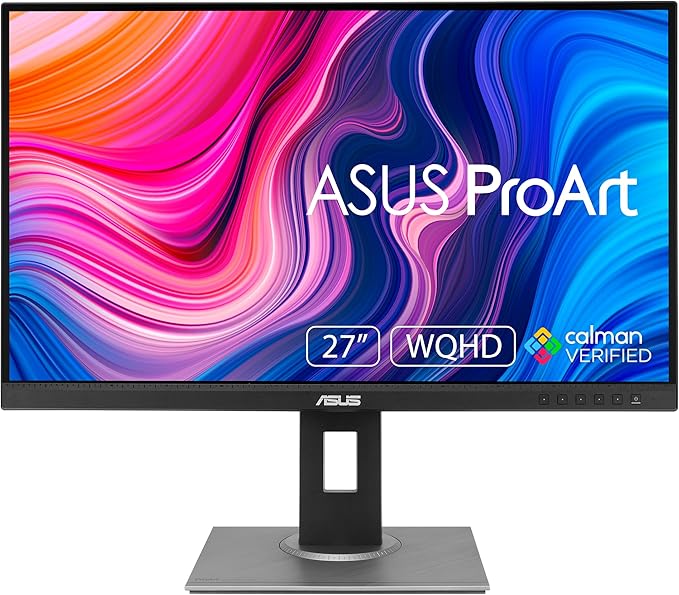


ProArt Display PA278QV|Monitors|ASUS Australia
ProArt Display PA278QV|Monitors|ASUS Australia
in 3 offers
The lowest price for Asus ProArt PA278QV 27" 75Hz WQHD 100% sRGB Professional IPS Monitor right now is $586.30 at desertcart.com.au, compared across 3 retailers.
The all-time low was $342.42 on 11 Feb 2026 — today's price is 71% above the lowest ever. It has been notably cheaper before — worth setting a price alert.
Prices last updated 13 Aug 2026.
Asus ProArt PA278QV 27" 75Hz WQHD 100% sRGB Professional IPS Monitor
ProArt Display PA278QV|Monitors|ASUS Australia
ProArt Display PA278QV|Monitors|ASUS Australia

