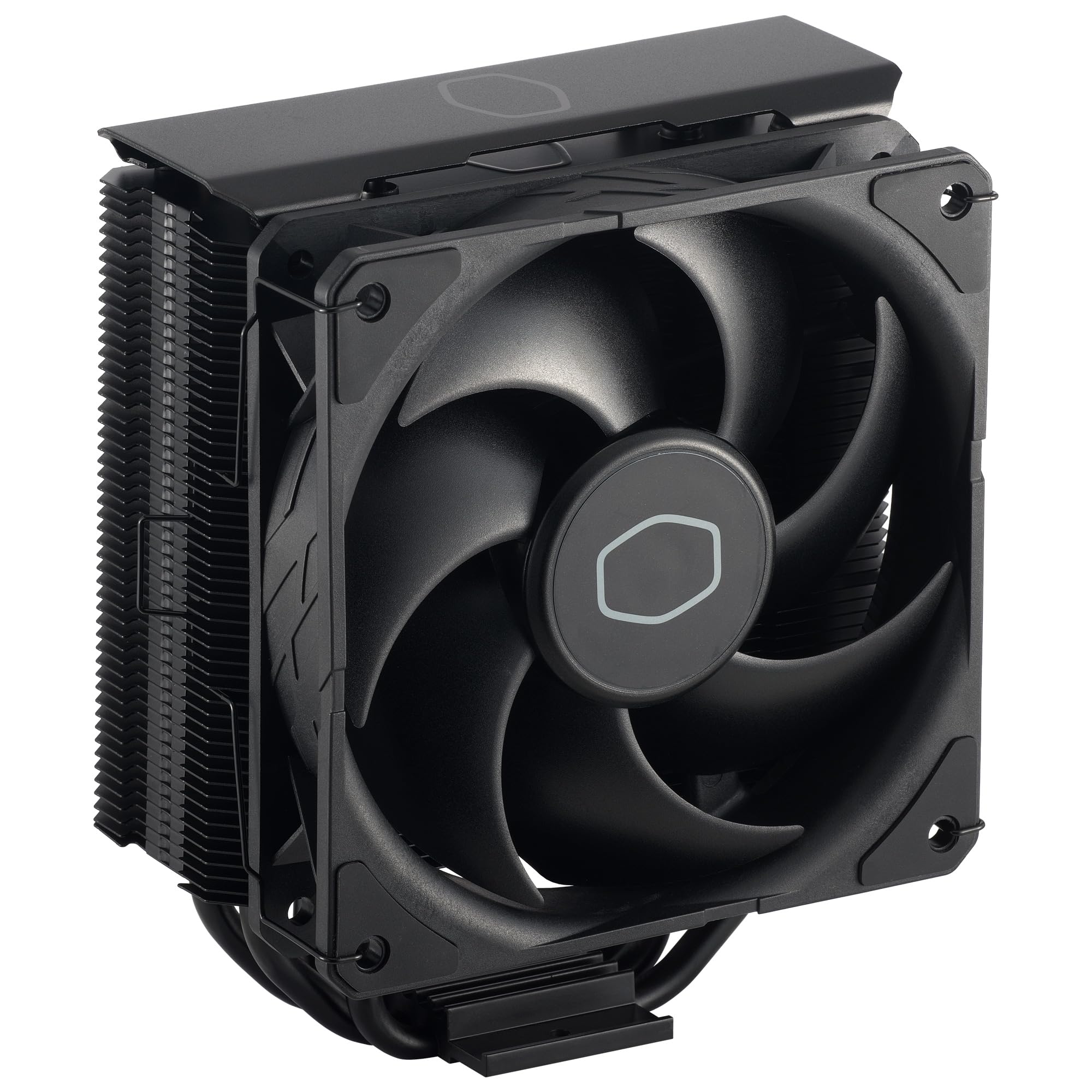
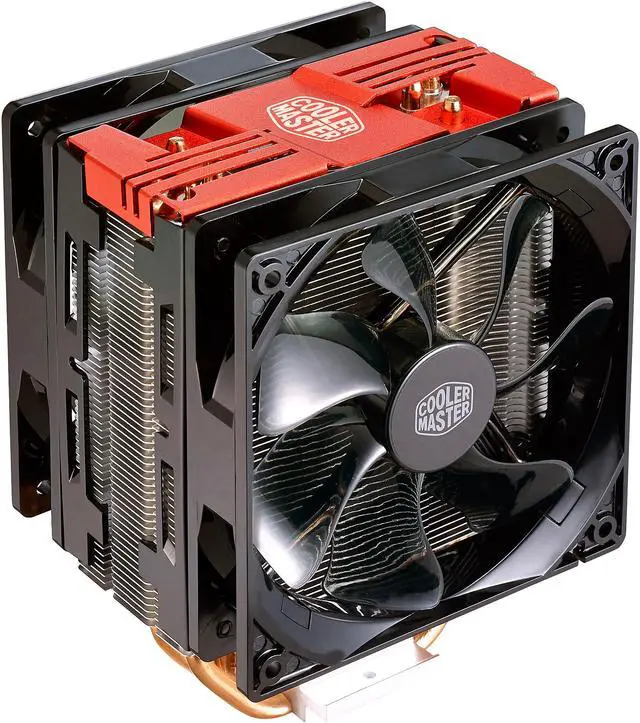
Sleek Finishing Anodised gun-metal black with brushed aluminium surface finish to the top cover for a more refined look. Precise Air Flow with Nickle Black Stacked fin array ensures least airflow resistance which allows cooler air flow into the heatsink. The nickel plated jet black also enhances radiation cooling performance. Direct Contact Technology 4 heat pipes with exclusive Direct Contact Technology providing effective and excellent heat dissipation. The New SF120R RGB Fan Is certified to sync with Motherboard RGB software or controlled by our controller. The wide speed range can be fine-tuned for maximum cooling performance or silent operation. Optional Push-Pull Fan Configuration To avoid dynamic losses and help accelerate heat exhaust, an additional fan helps pulling heat away faster from heatsink. RGB in the Palm of Your Hand with Included Wired RGB Controller A compact size RGB LED controller that allows you to easily customise your RGB devices without the need for either an RGB capable motherboard or software. You can have the colourful rig you ve always wanted with just the touch of a button.
Sleek Finishing Anodised gun-metal black with brushed aluminium surface finish to the top cover for a more refined look. Precise Air Flow with Nickle Black Stacked fin array ensures least airflow resistance which allows cooler air flow into the heatsink. The nickel plated jet black also enhances radiation cooling performance. Direct Contact Technology 4 heat pipes with exclusive Direct Contact Technology providing effective and excellent heat dissipation. The New SF120R RGB Fan Is certified to sync with Motherboard RGB software or controlled by our controller. The wide speed range can be fine-tuned for maximum cooling performance or silent operation. Optional Push-Pull Fan Configuration To avoid dynamic losses and help accelerate heat exhaust, an additional fan helps pulling heat away faster from heatsink. RGB in the Palm of Your Hand with Included Wired RGB Controller A compact size RGB LED controller that allows you to easily customise your RGB devices without the need for either an RGB capable motherboard or software. You can have the colourful rig you ve always wanted with just the touch of a button.
in 2 offers
The lowest price for Cooler Master Hyper 212 RGB Black Edition CPU Cooler right now is $44.00 at Computers & Parts Land, compared across 2 retailers.
The all-time low was $16.72 on 3 June 2026 — today's price is 163% above the lowest ever. It has been notably cheaper before — worth setting a price alert.
Prices last updated 24 Oct 2026.
Cooler Master Hyper 212 RGB Black Edition CPU Cooler
Sleek Finishing Anodised gun-metal black with brushed aluminium surface finish to the top cover for a more refined look. Precise Air Flow with Nickle Black Stacked fin array ensures least airflow resistance which allows cooler air flow into the heatsink. The nickel plated jet black also enhances radiation cooling performance. Direct Contact Technology 4 heat pipes with exclusive Direct Contact Technology providing effective and excellent heat dissipation. The New SF120R RGB Fan Is certified to sync with Motherboard RGB software or controlled by our controller. The wide speed range can be fine-tuned for maximum cooling performance or silent operation. Optional Push-Pull Fan Configuration To avoid dynamic losses and help accelerate heat exhaust, an additional fan helps pulling heat away faster from heatsink. RGB in the Palm of Your Hand with Included Wired RGB Controller A compact size RGB LED controller that allows you to easily customise your RGB devices without the need for either an RGB capable motherboard or software. You can have the colourful rig you ve always wanted with just the touch of a button.
Sleek Finishing Anodised gun-metal black with brushed aluminium surface finish to the top cover for a more refined look. Precise Air Flow with Nickle Black Stacked fin array ensures least airflow resistance which allows cooler air flow into the heatsink. The nickel plated jet black also enhances radiation cooling performance. Direct Contact Technology 4 heat pipes with exclusive Direct Contact Technology providing effective and excellent heat dissipation. The New SF120R RGB Fan Is certified to sync with Motherboard RGB software or controlled by our controller. The wide speed range can be fine-tuned for maximum cooling performance or silent operation. Optional Push-Pull Fan Configuration To avoid dynamic losses and help accelerate heat exhaust, an additional fan helps pulling heat away faster from heatsink. RGB in the Palm of Your Hand with Included Wired RGB Controller A compact size RGB LED controller that allows you to easily customise your RGB devices without the need for either an RGB capable motherboard or software. You can have the colourful rig you ve always wanted with just the touch of a button.
Last updated at 24/10/2026 05:19:01
Cooler Master RR-212S-25PZ-R1 Hyper 212 Pro ARGB CPU Air Cooler
Delivery between 28 Oct – 2 Nov $14.50
Cooler Master Hyper 212 Pro Argb Cpu Cooler - Black Rr-212s-25pz-r1
Delivery $12.99
Affiliate Disclosure: We may receive a small commission for purchases made through this link at no extra cost to you. This helps support our site. Thank you!
originally posted on bestbuy.com
Honestly, this thing looks pretty cool. I wanted an upgrade to my stock CPU fan and pass air through my case. The fan it comes with DOES look a little funny, but it's RGB if you're into that kind of thing. The heat sink is huge and I was a little worried it wouldn't fit in my case when I first got it. But it does! And a very nice thing about this cooler is you can put TWO fans on it, front and back, to allow for even more airflow. Just make sure you mount them facing the right way. Makes my computer look kinda freaky. And I like that.
originally posted on bestbuy.com
Stay a while and listen....So in early 2018 I bought a CyperPowerPC system from BestBuy.com picked up at my local Best Buy brick and mortar store for my son. That system was equipped with a Ryzen 5 1400. Fast Forward to 2021 and except for the case, motherboard and internal cabling, I have pretty much replaced every other component in this thing. Not that anything failed, just upgrades for better performance.So in mid 2019, I swapped out the original Ryzen 5 1400 CPU for a Ryzen 5 2600. The first gen Ryzen 1000 CPU's did not ship with a stock cooler from AMD so my assumption is that the Cooler Master branded cooler in this system used by CyberPowerPC was the equivalent of what is the Wraith Spire that is included in the Ryzen 2000 and Ryzen 3000 series mid tier ... MoreStay a while and listen....So in early 2018 I bought a CyperPowerPC system from BestBuy.com picked up at my local Best Buy brick and mortar store for my son. That system was equipped with a Ryzen 5 1400. Fast Forward to 2021 and except for the case, motherboard and internal cabling, I have pretty much replaced every other component in this thing. Not that anything failed, just upgrades for better performance.So in mid 2019, I swapped out the original Ryzen 5 1400 CPU for a Ryzen 5 2600. The first gen Ryzen 1000 CPU's did not ship with a stock cooler from AMD so my assumption is that the Cooler Master branded cooler in this system used by CyberPowerPC was the equivalent of what is the Wraith Spire that is included in the Ryzen 2000 and Ryzen 3000 series mid tier CPU's. Matter of fact, I upgraded from the Ryzen 5 1400 to the Ryzen 5 2600 and re used the included Cooler Master cooler. I even bought a tube of premium Thermaltake heat sink compound from the same brick and mortal Best Buy I picked up this machine from. Since Ryzen 5 2600 and Ryzen 5 1400 are both TDP 65W CPU's I figured the same cooling solution should work and it did.Now again here in 2021, I upgraded my PC from a Ryzen 9 3900X to a Ryzen 9 5950X and I figured I would once again pass a CPU down to my son in the aforementioned PC. So the 3900X is a 105W TDP and I knew the existing Cooler Master cooler would not work. So after some research, it looks like the Hyper 212 BE is rated for 150W TDP CPU's.So I replaced the Ryzen 5 2600 with the Ryzen 3900X in his PC. I then used the Hyper 212 BE as the new cooler.So my son's CyberPowerPC from Best Buy had a rebranded Cooler Master Masterbox 5 and the motherboard they used was a MSI Bazooka B350M micro ATX board. Yep, let's put a 3900X on an entry level B350 board.So assembling the Hyper 212 BE was not bad. The biggest gripe I had was getting the plastic clips they include for their new backplate to go onto their backplate. I watched several videos of how to assemble the Hyper 212 BE on Youtube so I felt good going into this upgrade. The packed in instructions are good and well marked from a documentation perspective but the commentary and videos on Youtube made me feel more confident.Nevertheless, I struggled to get their clips onto their backplate.Also, the clips that hold the included 120mm fan onto the tower heatsink are a bit touchy. This unit comes with the fan already mounted to the tower but you have to remove it to get clearance to attach the appropriate brackets for your CPU socket to the cooler and also have adequate leverage to get a screw driver to come straight down onto the scrws that secure the cooler tower to the backplate.Mounting the backplate to the motherboard was not a problem and also attaching the tower to the backplate and screwing it down tightly was a decent experience. Unlike the stock AMD clip method that just sucks and I think requires too much pressure to mount a cooler, Once I applied my thermal compound and lined up the tower onto the backplate and started the criss cross pattern to screw this down, once it was all tightened up, it swas solid secure and mounted well.Firing up the system post upgrade, everything works well. Temps are higher than I would like but they are within stock. Again, i am running a 3900X up from a 2600 on a B350 micro ATX board.I did disable PBO in the bios and I do not have any overlclocks applied. Temps according to the MSI Command Center bounce between high 30's to mid 50s C while idling. If I use something like CPU-Z to stress the CPU, I do see that it can get up around 83C under a full 24 thread load.My son basically plays games so a full stress test does not represent a realistic work load so take this with a grain of salt. Also, I am not a professional. The fact the PC still runs after its 3rd CPU is amazing.My son probably sits on his PC too much as it is but he has not complained about anything. To him, the PC still pretty much feels like it did when it was on the 1400 CPU. Which is a good thing.Time will tell if this will fry his VRMs. Looks like there are 4 of them on ths particular board. I did see videos on Youtube of folks trying 3900X in B350 boards as a proof of concept. I think Hot Hardware said that if you shut off PBO and don't overclock, that things do get warm but stay within spec. Of course they were using the included Wraith Prism that come withthe 3900X however, I do not have one of those as my machine came with an AIO closed loop 120mm cooler so that is why I grabbed the Hyper 212 BE.Maybe the Prism would be better since it is a downward cooler. Again time will tell.Anyway, this thing is really nice looking when mounted in his PC case. Sorry to not include a picture.I would recommend this unit. Overall, it seems good quality. Hopefully, I did not do my son a dis service and bite off more than his motherboard can handle.
originally posted on bestbuy.com
I bought this cooler because the cooler that came with my pc was loud and hot. I can say that this cooler is definitely not only quieter, but also performs leaps and bounds better than my old one. I have attached and image of my thermals using this cooler and Thermal Take TG-7 (which you can also get at best buy) as my thermal compound. My test was running 5M based off of GTA5 with graphics mods and reshaders at 1080p Ultra/Very High settings for about 30-45 minutes. I experienced 0 thermal throttles as shown by third party software and at the peak reached 61C averaging around 50C. And this was all done on a Intel I7 boosted to 4.7GHz. Unless you are running some NASA level CPU this cooler with the proper thermal paste should do the job for you just great. If you ... MoreI bought this cooler because the cooler that came with my pc was loud and hot. I can say that this cooler is definitely not only quieter, but also performs leaps and bounds better than my old one. I have attached and image of my thermals using this cooler and Thermal Take TG-7 (which you can also get at best buy) as my thermal compound. My test was running 5M based off of GTA5 with graphics mods and reshaders at 1080p Ultra/Very High settings for about 30-45 minutes. I experienced 0 thermal throttles as shown by third party software and at the peak reached 61C averaging around 50C. And this was all done on a Intel I7 boosted to 4.7GHz. Unless you are running some NASA level CPU this cooler with the proper thermal paste should do the job for you just great. If you find you need more airflow you can also get a second fan as this comes with the mounting brackets for a second fan and a fan splitter so you can run both fans off of the CPU 1 header if your motherboard doesn't have two CPU headers. Installation was honestly pretty easy. And this is coming from someone who just did this for the first time ever. When installing be careful as it is pretty easy to cut your fingers on the blades of the heatsink, but other than that is 15 minutes of work and you're done. I think this cooler will stay with me even when I build a whole new PC in a couple of years. For $40 you cant beat it. As a side note to those of you considering the non RGB version of this cooler it should be know that it moves less air through the heatsink than the RGB version. If you don't want the lights just don't plug in the RGB header as the Higher Cubic Feet per Minute of the RGB version is worth it for an extra dollar.
| Socket Compatibility | LGA1700 Socket, LGA1150 Socket, LGA1151 Socket, LGA1155 Socket, LGA1156 Socket |
| Build Quality | Genuine Cooler Master |
| Cooling Capacity | 150 W (max CPU TDP) |
| Depth | 4.7 in |
| Height | 6.3 in |
Cooler Master RR-212S-25PZ-R1 Hyper 212 Pro ARGB CPU Air Cooler
Delivery between 28 Oct – 2 Nov $14.50
Cooler Master Hyper 212 Pro Argb Cpu Cooler - Black Rr-212s-25pz-r1
Delivery $12.99
Affiliate Disclosure: We may receive a small commission for purchases made through this link at no extra cost to you. This helps support our site. Thank you!
Honestly, this thing looks pretty cool. I wanted an upgrade to my stock CPU fan and pass air through my case. The fan it comes with DOES look a little funny, but it's RGB if you're into that kind of thing. The heat sink is huge and I was a little worried it wouldn't fit in my case when I first got it. But it does! And a very nice thing about this cooler is you can put TWO fans on it, front and back, to allow for even more airflow. Just make sure you mount them facing the right way. Makes my computer look kinda freaky. And I like that.
Stay a while and listen....So in early 2018 I bought a CyperPowerPC system from BestBuy.com picked up at my local Best Buy brick and mortar store for my son. That system was equipped with a Ryzen 5 1400. Fast Forward to 2021 and except for the case, motherboard and internal cabling, I have pretty much replaced every other component in this thing. Not that anything failed, just upgrades for better performance.So in mid 2019, I swapped out the original Ryzen 5 1400 CPU for a Ryzen 5 2600. The first gen Ryzen 1000 CPU's did not ship with a stock cooler from AMD so my assumption is that the Cooler Master branded cooler in this system used by CyberPowerPC was the equivalent of what is the Wraith Spire that is included in the Ryzen 2000 and Ryzen 3000 series mid tier ... MoreStay a while and listen....So in early 2018 I bought a CyperPowerPC system from BestBuy.com picked up at my local Best Buy brick and mortar store for my son. That system was equipped with a Ryzen 5 1400. Fast Forward to 2021 and except for the case, motherboard and internal cabling, I have pretty much replaced every other component in this thing. Not that anything failed, just upgrades for better performance.So in mid 2019, I swapped out the original Ryzen 5 1400 CPU for a Ryzen 5 2600. The first gen Ryzen 1000 CPU's did not ship with a stock cooler from AMD so my assumption is that the Cooler Master branded cooler in this system used by CyberPowerPC was the equivalent of what is the Wraith Spire that is included in the Ryzen 2000 and Ryzen 3000 series mid tier CPU's. Matter of fact, I upgraded from the Ryzen 5 1400 to the Ryzen 5 2600 and re used the included Cooler Master cooler. I even bought a tube of premium Thermaltake heat sink compound from the same brick and mortal Best Buy I picked up this machine from. Since Ryzen 5 2600 and Ryzen 5 1400 are both TDP 65W CPU's I figured the same cooling solution should work and it did.Now again here in 2021, I upgraded my PC from a Ryzen 9 3900X to a Ryzen 9 5950X and I figured I would once again pass a CPU down to my son in the aforementioned PC. So the 3900X is a 105W TDP and I knew the existing Cooler Master cooler would not work. So after some research, it looks like the Hyper 212 BE is rated for 150W TDP CPU's.So I replaced the Ryzen 5 2600 with the Ryzen 3900X in his PC. I then used the Hyper 212 BE as the new cooler.So my son's CyberPowerPC from Best Buy had a rebranded Cooler Master Masterbox 5 and the motherboard they used was a MSI Bazooka B350M micro ATX board. Yep, let's put a 3900X on an entry level B350 board.So assembling the Hyper 212 BE was not bad. The biggest gripe I had was getting the plastic clips they include for their new backplate to go onto their backplate. I watched several videos of how to assemble the Hyper 212 BE on Youtube so I felt good going into this upgrade. The packed in instructions are good and well marked from a documentation perspective but the commentary and videos on Youtube made me feel more confident.Nevertheless, I struggled to get their clips onto their backplate.Also, the clips that hold the included 120mm fan onto the tower heatsink are a bit touchy. This unit comes with the fan already mounted to the tower but you have to remove it to get clearance to attach the appropriate brackets for your CPU socket to the cooler and also have adequate leverage to get a screw driver to come straight down onto the scrws that secure the cooler tower to the backplate.Mounting the backplate to the motherboard was not a problem and also attaching the tower to the backplate and screwing it down tightly was a decent experience. Unlike the stock AMD clip method that just sucks and I think requires too much pressure to mount a cooler, Once I applied my thermal compound and lined up the tower onto the backplate and started the criss cross pattern to screw this down, once it was all tightened up, it swas solid secure and mounted well.Firing up the system post upgrade, everything works well. Temps are higher than I would like but they are within stock. Again, i am running a 3900X up from a 2600 on a B350 micro ATX board.I did disable PBO in the bios and I do not have any overlclocks applied. Temps according to the MSI Command Center bounce between high 30's to mid 50s C while idling. If I use something like CPU-Z to stress the CPU, I do see that it can get up around 83C under a full 24 thread load.My son basically plays games so a full stress test does not represent a realistic work load so take this with a grain of salt. Also, I am not a professional. The fact the PC still runs after its 3rd CPU is amazing.My son probably sits on his PC too much as it is but he has not complained about anything. To him, the PC still pretty much feels like it did when it was on the 1400 CPU. Which is a good thing.Time will tell if this will fry his VRMs. Looks like there are 4 of them on ths particular board. I did see videos on Youtube of folks trying 3900X in B350 boards as a proof of concept. I think Hot Hardware said that if you shut off PBO and don't overclock, that things do get warm but stay within spec. Of course they were using the included Wraith Prism that come withthe 3900X however, I do not have one of those as my machine came with an AIO closed loop 120mm cooler so that is why I grabbed the Hyper 212 BE.Maybe the Prism would be better since it is a downward cooler. Again time will tell.Anyway, this thing is really nice looking when mounted in his PC case. Sorry to not include a picture.I would recommend this unit. Overall, it seems good quality. Hopefully, I did not do my son a dis service and bite off more than his motherboard can handle.
I bought this cooler because the cooler that came with my pc was loud and hot. I can say that this cooler is definitely not only quieter, but also performs leaps and bounds better than my old one. I have attached and image of my thermals using this cooler and Thermal Take TG-7 (which you can also get at best buy) as my thermal compound. My test was running 5M based off of GTA5 with graphics mods and reshaders at 1080p Ultra/Very High settings for about 30-45 minutes. I experienced 0 thermal throttles as shown by third party software and at the peak reached 61C averaging around 50C. And this was all done on a Intel I7 boosted to 4.7GHz. Unless you are running some NASA level CPU this cooler with the proper thermal paste should do the job for you just great. If you ... MoreI bought this cooler because the cooler that came with my pc was loud and hot. I can say that this cooler is definitely not only quieter, but also performs leaps and bounds better than my old one. I have attached and image of my thermals using this cooler and Thermal Take TG-7 (which you can also get at best buy) as my thermal compound. My test was running 5M based off of GTA5 with graphics mods and reshaders at 1080p Ultra/Very High settings for about 30-45 minutes. I experienced 0 thermal throttles as shown by third party software and at the peak reached 61C averaging around 50C. And this was all done on a Intel I7 boosted to 4.7GHz. Unless you are running some NASA level CPU this cooler with the proper thermal paste should do the job for you just great. If you find you need more airflow you can also get a second fan as this comes with the mounting brackets for a second fan and a fan splitter so you can run both fans off of the CPU 1 header if your motherboard doesn't have two CPU headers. Installation was honestly pretty easy. And this is coming from someone who just did this for the first time ever. When installing be careful as it is pretty easy to cut your fingers on the blades of the heatsink, but other than that is 15 minutes of work and you're done. I think this cooler will stay with me even when I build a whole new PC in a couple of years. For $40 you cant beat it. As a side note to those of you considering the non RGB version of this cooler it should be know that it moves less air through the heatsink than the RGB version. If you don't want the lights just don't plug in the RGB header as the Higher Cubic Feet per Minute of the RGB version is worth it for an extra dollar.
My OEM CPU fan was dying and causing overheating issues so I needed a quick replacement. I was a little hesitant to get this one since it was significantly bigger than the original fan, but I've never had trouble with Cooler Master stuff before and I do game a lot, so it was worth getting in the end.I have an MSI B450M Bazooka with an AMD Ryzen 5 2600. This came with all the necessary pieces to install, plus a small tube of thermal paste, which was nice. It was pretty easy to install. I did have to remove my GPU to get the bottom fan bracket on, but that was no problem. The brackets that hold the fan in place had me a little wary at first since they didn't seem super secure, but once I get them on there they were plenty snug. It also comes with extra items in case ... MoreMy OEM CPU fan was dying and causing overheating issues so I needed a quick replacement. I was a little hesitant to get this one since it was significantly bigger than the original fan, but I've never had trouble with Cooler Master stuff before and I do game a lot, so it was worth getting in the end.I have an MSI B450M Bazooka with an AMD Ryzen 5 2600. This came with all the necessary pieces to install, plus a small tube of thermal paste, which was nice. It was pretty easy to install. I did have to remove my GPU to get the bottom fan bracket on, but that was no problem. The brackets that hold the fan in place had me a little wary at first since they didn't seem super secure, but once I get them on there they were plenty snug. It also comes with extra items in case you want to attach a second fan.This fan is incredibly quiet, even when I'm running intensive games. It also keeps my PC much cooler than my old fan. Even though this was kind of an emergency purchase, overall I'm very pleased with it, and it was an inexpensive upgrade from my original fan. I'd definitely recommend it if you're looking to replace your original fan and looking for a middle ground upgrade.
Pros: Option of adding an addition fan. Thermo paste, does what it was designed to doOverall Review: Taking into account the size, be prepared to have to remove the fan. That is, if you intend on populating slot A1. A quick workaround would be placing the fan on the opposite side of the heatsink. This configuration will pull air through the heatsink, as opposed to pushing the air through the heatsink. Motherboard: Asus H570. Another option would be to purchase low profile memory modules.Best Buy's Specifications: Little to be desired. No mention of sockets this product will fit. I don't know about you, but I do not like playing the guessing game.Intel LGA 2066 / 2011-v3 / 2011 / 1700 / 1366 / 1200 / 1156 / 1155 / 1151 / 1150AMD Socket AM4 / AM3+ / AM3 / AM2+ ... MorePros: Option of adding an addition fan. Thermo paste, does what it was designed to doOverall Review: Taking into account the size, be prepared to have to remove the fan. That is, if you intend on populating slot A1. A quick workaround would be placing the fan on the opposite side of the heatsink. This configuration will pull air through the heatsink, as opposed to pushing the air through the heatsink. Motherboard: Asus H570. Another option would be to purchase low profile memory modules.Best Buy's Specifications: Little to be desired. No mention of sockets this product will fit. I don't know about you, but I do not like playing the guessing game.Intel LGA 2066 / 2011-v3 / 2011 / 1700 / 1366 / 1200 / 1156 / 1155 / 1151 / 1150AMD Socket AM4 / AM3+ / AM3 / AM2+ / AM2 / FM2+ / FM2 / FM1
Very attractive, easy to install cooling fan, with lots of adaptors for various processors. On my Ryzen 5700x, it's performing much better than a water cooler and it's fairly quiet, and I think the RGB looks great.It only comes with a single fan, but that's working very well for me. I can add a second fan for push+pull, but with that enormous block of metal I would probably be better off cleaning the unit than stacking fans.Despite its size, it fit between ram, GPU, etc, on my ASUS Tuf B550 motherboard and would have fit in any orientation, though just barely in one direction.It's cheap for the quality and a better purchase than a water cooler, and will certainly last longer.BTW it comes with plenty of arctic silver. Enough for four installations. I bought a ... MoreVery attractive, easy to install cooling fan, with lots of adaptors for various processors. On my Ryzen 5700x, it's performing much better than a water cooler and it's fairly quiet, and I think the RGB looks great.It only comes with a single fan, but that's working very well for me. I can add a second fan for push+pull, but with that enormous block of metal I would probably be better off cleaning the unit than stacking fans.Despite its size, it fit between ram, GPU, etc, on my ASUS Tuf B550 motherboard and would have fit in any orientation, though just barely in one direction.It's cheap for the quality and a better purchase than a water cooler, and will certainly last longer.BTW it comes with plenty of arctic silver. Enough for four installations. I bought a tube and didn't need it.
I love how this product looks and it has brought temps down in my pc. However they need to create more clear instructions on how to install it. The instruction booklet just has pictures and no written documentation to accompany it in the booklet. Which I think could have helped matters quite a bit. The rgb isn't addressable outside of the controller provided. Making it annoying of you wanted to change the colors since you'd have to remove one of either side panels to access it. Hopefully they come out with a version that can be configured right in Windows. Similar to Corsairs ique software. I also found the connector between the controller and the rgb header to be fairly loose. The connector provided snaps into the fairly easily but the rgb header doesn't connect so ... MoreI love how this product looks and it has brought temps down in my pc. However they need to create more clear instructions on how to install it. The instruction booklet just has pictures and no written documentation to accompany it in the booklet. Which I think could have helped matters quite a bit. The rgb isn't addressable outside of the controller provided. Making it annoying of you wanted to change the colors since you'd have to remove one of either side panels to access it. Hopefully they come out with a version that can be configured right in Windows. Similar to Corsairs ique software. I also found the connector between the controller and the rgb header to be fairly loose. The connector provided snaps into the fairly easily but the rgb header doesn't connect so permanently making it easy to accidentally remove. Other than those problems I love having it in my system. Comparing it to the stock cooler it's great how low the temps can go. The cooler design is beautiful to look at and the size isn't too obscene. Though if you want something to fit on a mini case I'd definitely not recommend it. Overall it's a good product. Just wish they put more effort into the rgb and instructions.
This fan is great. It looks fantastic, is super quiet, and so far (1 month in) is cooling my i5 10 core 12th gen 1700 like a dream. One complaint is that the box does not explicitly say that the attachment is compatible with the 1700. Therefore, I purchased a conversion kit (only $7). However, I spent the first 45 min of application trying to figure out how the conversion kit supported the installation. Spoiler alert...it doesn't. The in-box installation parts are sufficient for attachment to a 1700. This is the only reason for the loss of a star. Moral of the story...cooler master: if your product works with a new processor, at least send stickers or a flyer or something to the stores with stock in inventory so that they can inform their customers of the change and ... MoreThis fan is great. It looks fantastic, is super quiet, and so far (1 month in) is cooling my i5 10 core 12th gen 1700 like a dream. One complaint is that the box does not explicitly say that the attachment is compatible with the 1700. Therefore, I purchased a conversion kit (only $7). However, I spent the first 45 min of application trying to figure out how the conversion kit supported the installation. Spoiler alert...it doesn't. The in-box installation parts are sufficient for attachment to a 1700. This is the only reason for the loss of a star. Moral of the story...cooler master: if your product works with a new processor, at least send stickers or a flyer or something to the stores with stock in inventory so that they can inform their customers of the change and save them the 45 - hour of confusion.
Having prior experience with the value MVP Hyper 212, I decided to go with the RGB Black edition since AMD has stopped including coolers with Ryzen 5000-series processors (7 and 9). The directions were sufficient for configuring the backplate and heatsink for an AM4 processor. It took longer to snap or screw the miscellaneous parts together than it did to install the finished product. The fan mounting brackets are superior to the wired clips that competing products utilize. The lower vertical height of the cooler will be beneficial for smaller tower builds. In a micro-ATX case, the top of the cooler isn't coming close to making contact with the window. The one egg reduction is not related to the performance or value of the Hyper 212 RGB Black Edition. Once you've ... MoreHaving prior experience with the value MVP Hyper 212, I decided to go with the RGB Black edition since AMD has stopped including coolers with Ryzen 5000-series processors (7 and 9). The directions were sufficient for configuring the backplate and heatsink for an AM4 processor. It took longer to snap or screw the miscellaneous parts together than it did to install the finished product. The fan mounting brackets are superior to the wired clips that competing products utilize. The lower vertical height of the cooler will be beneficial for smaller tower builds. In a micro-ATX case, the top of the cooler isn't coming close to making contact with the window. The one egg reduction is not related to the performance or value of the Hyper 212 RGB Black Edition. Once you've experienced any other cooling solution that uses the stock backplate, having to modify the configuration of a plastic backplate and connecting it to threaded bolts feels rather archaic by comparison. The lack of an ARGB model presents its own challenges if part of your design goals includes consistent visualization patterns. The 12v RGB headers don't sync perfectly with ARGB fans or internal illumination (motherboard, memory) that is enabled. If an ARGB edition exists and Cooler Master works out a method to use the stock backplate, it would be a five egg product. However, there's slight room for improvement. Overall, I'm happy with the price and performance offered in this newer revision of a timeless, air cooling classic.
While this is a big cooler, it's quite necessary for the type of cooling it does. I have yet to stress test the cooler, but I trust it will live up to its name. Do be wary that this is quite a large cooler, it has almost a 6.25 inch clearance requirement, meaning this won't work on some more compact cases. This may be an issue if you use all 4 RAM slots as well. It only barely hangs over RAM slot 1 and it looks like I could still barely fit another one in, but I have plenty of RAM loaded in 2 and 4 without any issues. Being a side-mounted fan, I expected more difficulty in installing it, but the backplate is quite easy to install and doesn't run into components. Screwing the main heatsink into place was quite easy. Just note it has sliding slots meant for AMD3+ or ... MoreWhile this is a big cooler, it's quite necessary for the type of cooling it does. I have yet to stress test the cooler, but I trust it will live up to its name. Do be wary that this is quite a large cooler, it has almost a 6.25 inch clearance requirement, meaning this won't work on some more compact cases. This may be an issue if you use all 4 RAM slots as well. It only barely hangs over RAM slot 1 and it looks like I could still barely fit another one in, but I have plenty of RAM loaded in 2 and 4 without any issues. Being a side-mounted fan, I expected more difficulty in installing it, but the backplate is quite easy to install and doesn't run into components. Screwing the main heatsink into place was quite easy. Just note it has sliding slots meant for AMD3+ or AMD 4 slot size differences. Measure it once and you won't have to be reapplying thermal paste several times. The best part of this cooler is the fan and the fact you can essentially place whatever 4-pin controllable case fan there you want. It's a true 120mm case fan clip mount that fits perfectly on the aluminum grid. The provided fan is perfectly fine and silent, but having the easily switchable option is a big deal.
| Socket Compatibility | LGA1700 Socket, LGA1150 Socket, LGA1151 Socket, LGA1155 Socket, LGA1156 Socket |
| Build Quality | Genuine Cooler Master |
| Cooling Capacity | 150 W (max CPU TDP) |
| Depth | 4.7 in |
| Height | 6.3 in |