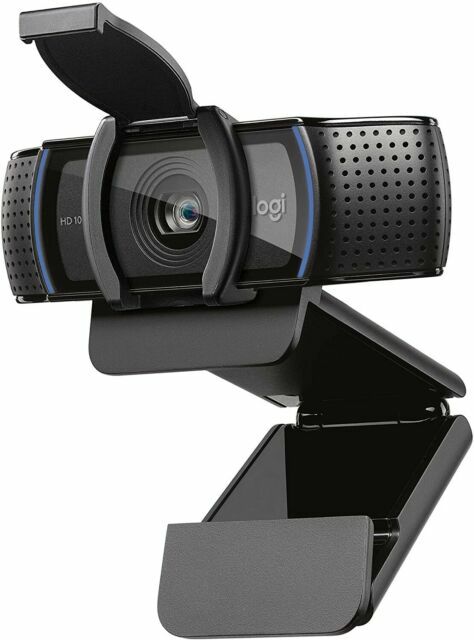
Logitech C920e BUSINESS WEBCAM LOOK PROFESSIONAL. EVERYWHERE. C920e is a work-from-anywhere HD 1080p webcam that surpasses the video and sound quality provided by most laptops. Step up to professional-quality video collaboration at a price point ideal for deployment at scale. YOU. PERFECTLY FRAMED. C920e is ideal for displaying individuals in a well-balanced frame. The fixed 78° field of view captures a “just-right” view of the user and their environment while also providing sufficient room to visually share projects and other items of interest. ACTIVATE MICS WHENEVER NEEDED C920e includes dual integrated omnidirectional mics that can be easily enabled with the Logi Tune Desktop app. When activated, the mics are optimized to clearly capture audio from up to one meter away. KEEP SHARP, AUTOMATICALLY Built-in HD autofocus ensures you’re seen clearly throughout your video calls. Working in tandem with automatic light correction, C920e delivers optics that help you look good in all your video meetings. TAKE CONTROL WITH TUNE DESKTOP The Logi Tune Desktop app simplifies personal device control and customization on select models, including C920e. The mini app works unobtrusively on your screen for uninterrupted video collaboration, including activation of the C920e dual integrated mics, zoom control, color adjustment, and easy download of firmware updates. CERTIFIED FOR BUSINESS C920e is Certified for Microsoft Teams, Zoom, Google Meet, and works with other popular applications including BlueJeans, GoTo Meeting, Pexip, and RingCentral to ensure compatibility and seamless integration in the workplace. ADDITIONAL FEATURES VERSATILE MOUNTING OPTIONS Mount the webcam wherever it works best: screen, notebook, or tabletop. C920e is designed with a sturdy, adjustable clip that makes it easy to mount on any laptop or external monitor. Integrated tripod threads provide extra versatility to mount the webcam on a tabletop or full-size tripod as well1Tripod not included. ATTACHABLE PRIVACY SHADE C920e features an attachable privacy screen that flips up and down to cover or expose the lens. A simple glance at the physical cover confirms for sure if the lens is able to see into your space or not. LOGITECH'S SUSTAINABILITY PROMISE Logitech is committed to creating great customer experiences in ways that are sustainable for the planet and society.
Logitech C920e BUSINESS WEBCAM LOOK PROFESSIONAL. EVERYWHERE. C920e is a work-from-anywhere HD 1080p webcam that surpasses the video and sound quality provided by most laptops. Step up to professional-quality video collaboration at a price point ideal for deployment at scale. YOU. PERFECTLY FRAMED. C920e is ideal for displaying individuals in a well-balanced frame. The fixed 78° field of view captures a “just-right” view of the user and their environment while also providing sufficient room to visually share projects and other items of interest. ACTIVATE MICS WHENEVER NEEDED C920e includes dual integrated omnidirectional mics that can be easily enabled with the Logi Tune Desktop app. When activated, the mics are optimized to clearly capture audio from up to one meter away. KEEP SHARP, AUTOMATICALLY Built-in HD autofocus ensures you’re seen clearly throughout your video calls. Working in tandem with automatic light correction, C920e delivers optics that help you look good in all your video meetings. TAKE CONTROL WITH TUNE DESKTOP The Logi Tune Desktop app simplifies personal device control and customization on select models, including C920e. The mini app works unobtrusively on your screen for uninterrupted video collaboration, including activation of the C920e dual integrated mics, zoom control, color adjustment, and easy download of firmware updates. CERTIFIED FOR BUSINESS C920e is Certified for Microsoft Teams, Zoom, Google Meet, and works with other popular applications including BlueJeans, GoTo Meeting, Pexip, and RingCentral to ensure compatibility and seamless integration in the workplace. ADDITIONAL FEATURES VERSATILE MOUNTING OPTIONS Mount the webcam wherever it works best: screen, notebook, or tabletop. C920e is designed with a sturdy, adjustable clip that makes it easy to mount on any laptop or external monitor. Integrated tripod threads provide extra versatility to mount the webcam on a tabletop or full-size tripod as well1Tripod not included. ATTACHABLE PRIVACY SHADE C920e features an attachable privacy screen that flips up and down to cover or expose the lens. A simple glance at the physical cover confirms for sure if the lens is able to see into your space or not. LOGITECH'S SUSTAINABILITY PROMISE Logitech is committed to creating great customer experiences in ways that are sustainable for the planet and society.
Logitech C920e Business Webcam
Logitech C920e BUSINESS WEBCAM LOOK PROFESSIONAL. EVERYWHERE. C920e is a work-from-anywhere HD 1080p webcam that surpasses the video and sound quality provided by most laptops. Step up to professional-quality video collaboration at a price point ideal for deployment at scale. YOU. PERFECTLY FRAMED. C920e is ideal for displaying individuals in a well-balanced frame. The fixed 78° field of view captures a “just-right” view of the user and their environment while also providing sufficient room to visually share projects and other items of interest. ACTIVATE MICS WHENEVER NEEDED C920e includes dual integrated omnidirectional mics that can be easily enabled with the Logi Tune Desktop app. When activated, the mics are optimized to clearly capture audio from up to one meter away. KEEP SHARP, AUTOMATICALLY Built-in HD autofocus ensures you’re seen clearly throughout your video calls. Working in tandem with automatic light correction, C920e delivers optics that help you look good in all your video meetings. TAKE CONTROL WITH TUNE DESKTOP The Logi Tune Desktop app simplifies personal device control and customization on select models, including C920e. The mini app works unobtrusively on your screen for uninterrupted video collaboration, including activation of the C920e dual integrated mics, zoom control, color adjustment, and easy download of firmware updates. CERTIFIED FOR BUSINESS C920e is Certified for Microsoft Teams, Zoom, Google Meet, and works with other popular applications including BlueJeans, GoTo Meeting, Pexip, and RingCentral to ensure compatibility and seamless integration in the workplace. ADDITIONAL FEATURES VERSATILE MOUNTING OPTIONS Mount the webcam wherever it works best: screen, notebook, or tabletop. C920e is designed with a sturdy, adjustable clip that makes it easy to mount on any laptop or external monitor. Integrated tripod threads provide extra versatility to mount the webcam on a tabletop or full-size tripod as well1Tripod not included. ATTACHABLE PRIVACY SHADE C920e features an attachable privacy screen that flips up and down to cover or expose the lens. A simple glance at the physical cover confirms for sure if the lens is able to see into your space or not. LOGITECH'S SUSTAINABILITY PROMISE Logitech is committed to creating great customer experiences in ways that are sustainable for the planet and society.
Logitech C920e BUSINESS WEBCAM LOOK PROFESSIONAL. EVERYWHERE. C920e is a work-from-anywhere HD 1080p webcam that surpasses the video and sound quality provided by most laptops. Step up to professional-quality video collaboration at a price point ideal for deployment at scale. YOU. PERFECTLY FRAMED. C920e is ideal for displaying individuals in a well-balanced frame. The fixed 78° field of view captures a “just-right” view of the user and their environment while also providing sufficient room to visually share projects and other items of interest. ACTIVATE MICS WHENEVER NEEDED C920e includes dual integrated omnidirectional mics that can be easily enabled with the Logi Tune Desktop app. When activated, the mics are optimized to clearly capture audio from up to one meter away. KEEP SHARP, AUTOMATICALLY Built-in HD autofocus ensures you’re seen clearly throughout your video calls. Working in tandem with automatic light correction, C920e delivers optics that help you look good in all your video meetings. TAKE CONTROL WITH TUNE DESKTOP The Logi Tune Desktop app simplifies personal device control and customization on select models, including C920e. The mini app works unobtrusively on your screen for uninterrupted video collaboration, including activation of the C920e dual integrated mics, zoom control, color adjustment, and easy download of firmware updates. CERTIFIED FOR BUSINESS C920e is Certified for Microsoft Teams, Zoom, Google Meet, and works with other popular applications including BlueJeans, GoTo Meeting, Pexip, and RingCentral to ensure compatibility and seamless integration in the workplace. ADDITIONAL FEATURES VERSATILE MOUNTING OPTIONS Mount the webcam wherever it works best: screen, notebook, or tabletop. C920e is designed with a sturdy, adjustable clip that makes it easy to mount on any laptop or external monitor. Integrated tripod threads provide extra versatility to mount the webcam on a tabletop or full-size tripod as well1Tripod not included. ATTACHABLE PRIVACY SHADE C920e features an attachable privacy screen that flips up and down to cover or expose the lens. A simple glance at the physical cover confirms for sure if the lens is able to see into your space or not. LOGITECH'S SUSTAINABILITY PROMISE Logitech is committed to creating great customer experiences in ways that are sustainable for the planet and society.
in 1 offers
The lowest price for Logitech C920e Business Webcam right now is $119.90 at Zylax Computers.
The all-time low was $118.80 on 22 Aug 2026 — today's price is 1% above the lowest ever. This is at or near its all-time low — a good time to buy.
Prices last updated 7 Sept 2026.
Last updated at 07/09/2026 23:35:25
Logitech C920e Business HD Webcam
originally posted on lenovo.com
I have three monitors set up in my at-home office (two monitors, laptop used as third monitor). I purchased this because I prefer a front-facing camera atop my middle monitor vs the integrated camera on my laptop. This was super easy to install, literally plug and play! Microsoft Teams recognized it immediately as Logi Webcam C920e. Both video and audio quality so far is clear and crisp (although I preferably use a headset for my mic).
originally posted on bhphotovideo.com
Bought this with little to no knowledge of the WebCam market or what was best of the best, but with a name like Logitech it was easy to trust. I purchased it with urgency since starting a new job fully remote I needed to have face/video conferencing available. So far have had it 2 weeks with NO issues whatsoever. Setup was plug n play. Downloaded the utility to configure settings for the camera otherwise, was simply and very user friendly. I highly recommend this Webcam for the novice entry user into the Webcam market. If you're an expert you probably would choose something fancier but this works just fine.
originally posted on bestbuy.com
This is an excellent all-purpose webcam series and product. It works flawlessly with any recent version of Windows or Macintosh. The only really stupid thing Logitech did in this latest version is disable the microphone by default without including any notifications to customers. After wasting a lot of time to troubleshoot the non-working microphone, the customer can discover that they need to install the Logitech app to simply change the default setting to enable the microphone.
Logitech C920e Business HD Webcam
I have three monitors set up in my at-home office (two monitors, laptop used as third monitor). I purchased this because I prefer a front-facing camera atop my middle monitor vs the integrated camera on my laptop. This was super easy to install, literally plug and play! Microsoft Teams recognized it immediately as Logi Webcam C920e. Both video and audio quality so far is clear and crisp (although I preferably use a headset for my mic).
Bought this with little to no knowledge of the WebCam market or what was best of the best, but with a name like Logitech it was easy to trust. I purchased it with urgency since starting a new job fully remote I needed to have face/video conferencing available. So far have had it 2 weeks with NO issues whatsoever. Setup was plug n play. Downloaded the utility to configure settings for the camera otherwise, was simply and very user friendly. I highly recommend this Webcam for the novice entry user into the Webcam market. If you're an expert you probably would choose something fancier but this works just fine.
This is an excellent all-purpose webcam series and product. It works flawlessly with any recent version of Windows or Macintosh. The only really stupid thing Logitech did in this latest version is disable the microphone by default without including any notifications to customers. After wasting a lot of time to troubleshoot the non-working microphone, the customer can discover that they need to install the Logitech app to simply change the default setting to enable the microphone.
I bought this webcam exclusively for the price. I needed a new webcam, nothing fancy, for occasional video conferences, and wanted a budget-friendly option. With that said, this is NOT a pay and play model. I followed the Logitech setup instructions exactly as they were written, but audio would not work. Took me two days of troubleshooting to figure out and then set up the settings on my computer - something the description of this product says won't be necessary. They lied, and I almost gave up and returned this product to B&H. If you're trying to save money, might be worth it. If you have a bigger budget, go with something else.
After a year of people telling me that they couldn't hear me well on business calls unless I pulled the computer REALLY close, I broke down and bought this. Wow, what a difference. Sound is great, picture is much better. I paired it with a tripod (under 15 bucks on Amazon) and I just grab it before Teams calls. Webcame automatically takes over as default, and I have great picture AND great microphone in seconds. Best of all, I no longer have to unhook my docking port like I had to before because the in-computer microphone won't work while computer is docked. Should have been one of my first work-from-home purchases. Just nice all around.
Very simple to attach to the top of my screen and no programs are needed to use this camera. Integration is seamless and the led light feature to notify you that the camera is on is convenient. The quality isn't as high as my Macbook Air, but having the angle from the top of my work desk monitor is very nice.Great purchase and I don't regret it. I'll probably buy another with a higher-quality camera in the future.
I bought a camera before this with 110 degree view angle and it made things look weird especially towards the sides. Straight lines like curtains and wall corners were curved.This camera was a much more natural view. I did need to download software to get the mic to work on a Mac and the lens cover falls off way too easily. Otherwise it's a good camera for the price and I would buy again.
The privacy shutter (which just clips on and can also be easily removed) is a nice little extra feature on this one compared to similar models.Excellent image quality and the sound was decent when tested. To be clear, I refer to the sound captured by the dual/stereo microphone. That's what's on the sides of this and similar webcams. I've seen some complaints about sound quality from the speakers, but this doesn't have speakers, your system speakers are used.One catch with this particular model- it comes with the built in microphones disabled. This is great if you're just wanting to capture images with no audio and are concerned about privacy, but we wanted to use it for Zoom meetings, etc. Instructions were included in the package for how to enable the dual ... MoreThe privacy shutter (which just clips on and can also be easily removed) is a nice little extra feature on this one compared to similar models.Excellent image quality and the sound was decent when tested. To be clear, I refer to the sound captured by the dual/stereo microphone. That's what's on the sides of this and similar webcams. I've seen some complaints about sound quality from the speakers, but this doesn't have speakers, your system speakers are used.One catch with this particular model- it comes with the built in microphones disabled. This is great if you're just wanting to capture images with no audio and are concerned about privacy, but we wanted to use it for Zoom meetings, etc. Instructions were included in the package for how to enable the dual microphone (involved installing driver software, changing a setting, restarting the computer). Pretty painless, and I knew about it ahead of time so not docking any stars. If you don't want this minor hassle and DO want to use the microphones, maybe pick another webcam (even same model with a different letter on the end). I might have gotten a different model, knowing about this issue, but this was the best fit that was in stock and turning the mic on was pretty painless for me.
This camera does not have the same specification of one I bought 2 years ago with the same product number.The difference, which the average customer probably wouldn't notice, is the on board compression was removed from the camera. This is fine for many users, however, for an application I was doing I needed the compression and bought a number of these because I had one that I had used and it worked as expected.These new ones, even though they have the same product number, do not work as expected.I would have given 5 star had changed the product number. It is very misleading and has caused a major setback in my work since I have to work out a return a number of cameras and qualify a new camera. It is a major waste of my time.
As some others stated - the mic does not work. The marketing info missing is that the microphone on this does not come pre-activated. It requires a separate software called Logi-tune to go in and activate it. I contacted LogiTune support and this was their response: "Unfortunately in your case, because you have a Windows 7 computer, the Logi Tune software won't work, however because the activation occur in the microphone itself, it mean that you only need to activate the microphone once on any computer with Windows 10 or Mac for it to work on any other computer. " Be aware this is undisclosed but hopefully someone will read this and recognize what a bad design from Logitech