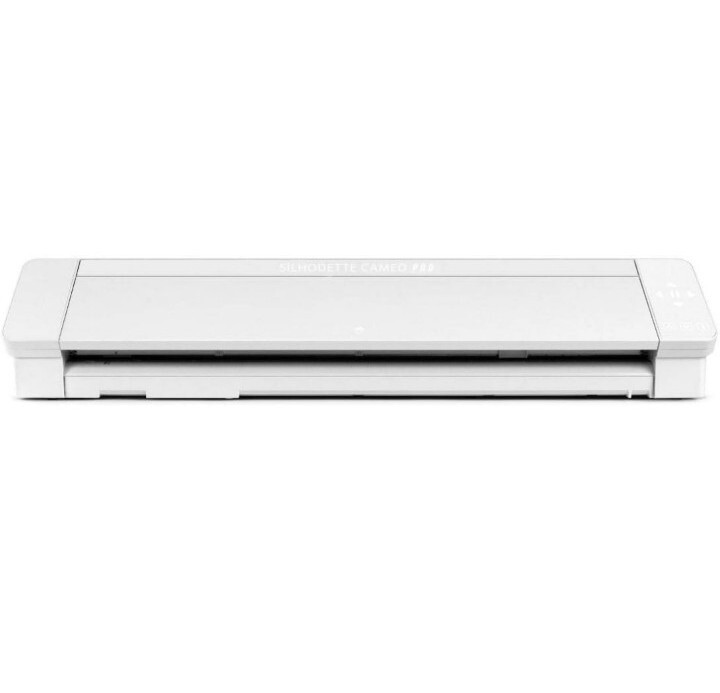
The Silhouette Cameo 4 PRO is the professional cutting plotter. Cut over 100 materials to create an infinite number of beautiful designs. Simply connect the cutter to your PC or Mac like a printer and cut paper, vinyl or other materials in your desired design. The Cameo 4 Pro features Bluetooth, AutoBlade automatic blade, and automatic tool detection.
The Silhouette Cameo 4 PRO is the professional cutting plotter. Cut over 100 materials to create an infinite number of beautiful designs. Simply connect the cutter to your PC or Mac like a printer and cut paper, vinyl or other materials in your desired design. The Cameo 4 Pro features Bluetooth, AutoBlade automatic blade, and automatic tool detection.
in 1 offers
The lowest price for Silhouette Cameo 4 Pro AU/NZ right now is $1,003.41 at desertcart.com.sa.
The all-time low was $500.66 on 11 Mar 2026 — today's price is 100% above the lowest ever. It has been notably cheaper before — worth setting a price alert.
Prices last updated 23 Aug 2026.
Silhouette Cameo 4 Pro AU/NZ
The Silhouette Cameo 4 PRO is the professional cutting plotter. Cut over 100 materials to create an infinite number of beautiful designs. Simply connect the cutter to your PC or Mac like a printer and cut paper, vinyl or other materials in your desired design. The Cameo 4 Pro features Bluetooth, AutoBlade automatic blade, and automatic tool detection.
The Silhouette Cameo 4 PRO is the professional cutting plotter. Cut over 100 materials to create an infinite number of beautiful designs. Simply connect the cutter to your PC or Mac like a printer and cut paper, vinyl or other materials in your desired design. The Cameo 4 Pro features Bluetooth, AutoBlade automatic blade, and automatic tool detection.
Last updated at 23/08/2026 02:25:56
Silhouette Cameo 4 Pro 24 Inch Version - 24" Cutting Mat, Power Cords, Built in Roll Feeder, Silhouette Studio Software
Free delivery between 1–4 Sept
originally posted on michaels.com
I have been a cameo user for several years. I have a commercial business and thought I would look at using the cameo for pro seeing that it cut at a professional width.I was very very disappointed in this machine. It would not cut vinyl or HTV for me, without a mat. I spent hours watching silhouette school getting different suggestions from blogs and such, and it was absolutely not successful. When I used a mat, the cuts were nice and clean and mostly accurate, until the mat started shifting. It was hours of frustration and dollars of wasted medium!!!My advice for those in the commercial business, stick with commercial grade machines and leave the cameo to crafters
originally posted on spotlightstores.com
Consider your experimental ability before getting this machine.It is quite tricky to use and it doesn't come with a quick start manual. You have to go online to the silhoutte page to find the downloadable manual.The cutting software is a little hard to get used to. There is a setting for selecting the mat, so you'll expect that the cameo can sense the mat. Not so, the mat will get itself cut.Repositioning to recut the same area? Forget it, if you didnt get it cut the first time, the second time will be slightly off.Does it cut well? Yes, if it didnt keep getting stuck in the middle when cutting full sized (60x60cm) material on the mat. I am still not sure why it starts getting slanted midway in the cut. The first part is perfect. I am not sure if this is ... MoreConsider your experimental ability before getting this machine.It is quite tricky to use and it doesn't come with a quick start manual. You have to go online to the silhoutte page to find the downloadable manual.The cutting software is a little hard to get used to. There is a setting for selecting the mat, so you'll expect that the cameo can sense the mat. Not so, the mat will get itself cut.Repositioning to recut the same area? Forget it, if you didnt get it cut the first time, the second time will be slightly off.Does it cut well? Yes, if it didnt keep getting stuck in the middle when cutting full sized (60x60cm) material on the mat. I am still not sure why it starts getting slanted midway in the cut. The first part is perfect. I am not sure if this is normal, or my machine has issues with grip or rotation isn't properly calibrated.Cutting smaller items works well enough (I've done up to A3).
originally posted on michaels.com
I WAS very excited to use the Silhouette 4 Pro. Watched videos in preparation as I was looking for a new Silhouette machine. I got my first one in 2015 and have used it a ton since mostly with paper designed I created myself as I am a graphic designer. I wanted a bigger machine for an upcoming project and these machine were sold out everywhere until I found one at Michaels. I should have believed the reviews I read at Michaels because I am having the same issues. The blade doesn't fully cut. I know how to use the silhouette program I've used it for years so I adjusted the cut settings and paper settings and NOTHING changed. I tried looking up solutions from others who may have had this issue but everything I found wasn't for this machine only older versions. It's ... MoreI WAS very excited to use the Silhouette 4 Pro. Watched videos in preparation as I was looking for a new Silhouette machine. I got my first one in 2015 and have used it a ton since mostly with paper designed I created myself as I am a graphic designer. I wanted a bigger machine for an upcoming project and these machine were sold out everywhere until I found one at Michaels. I should have believed the reviews I read at Michaels because I am having the same issues. The blade doesn't fully cut. I know how to use the silhouette program I've used it for years so I adjusted the cut settings and paper settings and NOTHING changed. I tried looking up solutions from others who may have had this issue but everything I found wasn't for this machine only older versions. It's like there is a conspiracy in hiding this machines faults except for the two reviews on Michael's who warned me. I've since placed a formal inquiry to Silhouette America for a solution and hope to have a reply. I'm very likely going to be returning this very expensive machine unless there is a simply glitch that can be fixed. Extremely frustrated and disappointed customer. I see this being a Silhouette America problem and not the Micheal's store unless they won't allow me to return.
Silhouette Cameo 4 Pro 24 Inch Version - 24" Cutting Mat, Power Cords, Built in Roll Feeder, Silhouette Studio Software
Free delivery between 1–4 Sept
I have been a cameo user for several years. I have a commercial business and thought I would look at using the cameo for pro seeing that it cut at a professional width.I was very very disappointed in this machine. It would not cut vinyl or HTV for me, without a mat. I spent hours watching silhouette school getting different suggestions from blogs and such, and it was absolutely not successful. When I used a mat, the cuts were nice and clean and mostly accurate, until the mat started shifting. It was hours of frustration and dollars of wasted medium!!!My advice for those in the commercial business, stick with commercial grade machines and leave the cameo to crafters
Consider your experimental ability before getting this machine.It is quite tricky to use and it doesn't come with a quick start manual. You have to go online to the silhoutte page to find the downloadable manual.The cutting software is a little hard to get used to. There is a setting for selecting the mat, so you'll expect that the cameo can sense the mat. Not so, the mat will get itself cut.Repositioning to recut the same area? Forget it, if you didnt get it cut the first time, the second time will be slightly off.Does it cut well? Yes, if it didnt keep getting stuck in the middle when cutting full sized (60x60cm) material on the mat. I am still not sure why it starts getting slanted midway in the cut. The first part is perfect. I am not sure if this is ... MoreConsider your experimental ability before getting this machine.It is quite tricky to use and it doesn't come with a quick start manual. You have to go online to the silhoutte page to find the downloadable manual.The cutting software is a little hard to get used to. There is a setting for selecting the mat, so you'll expect that the cameo can sense the mat. Not so, the mat will get itself cut.Repositioning to recut the same area? Forget it, if you didnt get it cut the first time, the second time will be slightly off.Does it cut well? Yes, if it didnt keep getting stuck in the middle when cutting full sized (60x60cm) material on the mat. I am still not sure why it starts getting slanted midway in the cut. The first part is perfect. I am not sure if this is normal, or my machine has issues with grip or rotation isn't properly calibrated.Cutting smaller items works well enough (I've done up to A3).
I WAS very excited to use the Silhouette 4 Pro. Watched videos in preparation as I was looking for a new Silhouette machine. I got my first one in 2015 and have used it a ton since mostly with paper designed I created myself as I am a graphic designer. I wanted a bigger machine for an upcoming project and these machine were sold out everywhere until I found one at Michaels. I should have believed the reviews I read at Michaels because I am having the same issues. The blade doesn't fully cut. I know how to use the silhouette program I've used it for years so I adjusted the cut settings and paper settings and NOTHING changed. I tried looking up solutions from others who may have had this issue but everything I found wasn't for this machine only older versions. It's ... MoreI WAS very excited to use the Silhouette 4 Pro. Watched videos in preparation as I was looking for a new Silhouette machine. I got my first one in 2015 and have used it a ton since mostly with paper designed I created myself as I am a graphic designer. I wanted a bigger machine for an upcoming project and these machine were sold out everywhere until I found one at Michaels. I should have believed the reviews I read at Michaels because I am having the same issues. The blade doesn't fully cut. I know how to use the silhouette program I've used it for years so I adjusted the cut settings and paper settings and NOTHING changed. I tried looking up solutions from others who may have had this issue but everything I found wasn't for this machine only older versions. It's like there is a conspiracy in hiding this machines faults except for the two reviews on Michael's who warned me. I've since placed a formal inquiry to Silhouette America for a solution and hope to have a reply. I'm very likely going to be returning this very expensive machine unless there is a simply glitch that can be fixed. Extremely frustrated and disappointed customer. I see this being a Silhouette America problem and not the Micheal's store unless they won't allow me to return.
First off, I’ve been using silhouette since the release of the cameo 3. I absolutely loved my cameo 3. My friend offered to buy it from me so I could upgrade to this model and I was so excited- it was like Christmas..... WRONG! I have shed so many years over this machine. I’m not sure if I got a faulty blade from the beginning but I have to adjust all of my settings to crazy amounts of pressure and/ or force for the simplest materials and even still they won’t cut all the way through. Also, It’s as if the blade cannot make the cut on a specific direction majority of the time and even if it’s cuts the whole project, there will be one direction on the entire thing that never cuts. My next big issue is if you’re planning to use a mat that is not the full size 24x24, ... MoreFirst off, I’ve been using silhouette since the release of the cameo 3. I absolutely loved my cameo 3. My friend offered to buy it from me so I could upgrade to this model and I was so excited- it was like Christmas..... WRONG! I have shed so many years over this machine. I’m not sure if I got a faulty blade from the beginning but I have to adjust all of my settings to crazy amounts of pressure and/ or force for the simplest materials and even still they won’t cut all the way through. Also, It’s as if the blade cannot make the cut on a specific direction majority of the time and even if it’s cuts the whole project, there will be one direction on the entire thing that never cuts. My next big issue is if you’re planning to use a mat that is not the full size 24x24, plan for lots of “slipping”. I’ve lost track of the number of ruined projects I’ve now had because the mat slipped. I ALWAYS check to make sure it’s locked in well and it never seems to fail it’ll get to the end and slip. I have the whole machine on a flat surface with the guide platform underneath for support and I’ve done every troubleshooting thing I can read and I haven’t had any success. I’m to the point of buying another cameo 3 since it’s more reliable than this.
I have a Crircut explore air 2 and I found myself really frustrated by the limited width. I planned on upgrading when Cricut came up with a wider machine but when they came out with a Maker 3 and nothing wider I decided to switch camps. I love that I can make large wall decor and not have to slice it into a bunch of smaller pieces and piece it together like I had to do with the Cricut. I was worried about smaller cuts because I've heard Cricut is better for this, I cut small detailed pumpkins (see photo) for a garland and it cut just as well as my Cricut. I have nothing bad to say about how my cricut cut because it did beautiful cuts but I can't say it cuts better than the Silhouette, I just feel the Cricut is very limited. I absolutely LOVE cutting without a mat, I ... MoreI have a Crircut explore air 2 and I found myself really frustrated by the limited width. I planned on upgrading when Cricut came up with a wider machine but when they came out with a Maker 3 and nothing wider I decided to switch camps. I love that I can make large wall decor and not have to slice it into a bunch of smaller pieces and piece it together like I had to do with the Cricut. I was worried about smaller cuts because I've heard Cricut is better for this, I cut small detailed pumpkins (see photo) for a garland and it cut just as well as my Cricut. I have nothing bad to say about how my cricut cut because it did beautiful cuts but I can't say it cuts better than the Silhouette, I just feel the Cricut is very limited. I absolutely LOVE cutting without a mat, I had zero problems with this. The only thing I struggled with at first was when I tried to cut on the large mat, the mat would start to drift to the side but after watching some videos I realized I needed to adjust where my rollers were and it fixed the problem. I know when these first came out there was a lot of issues but from my experience they seem to be resolved. The first time coming from the Cricut I put my blade in and thought it would be good to go but I realized my blade wasn't all the way in the machine and I also had to reset my auto blade and I always turn my blade up one setting from the auto setting. One of my favorite features is the software, the Cricut software is so far behind. I was a graphic artist and I'm very familiar with Adobe Illustrator and the similarity is wonderful. Due to all the bad reviews when this first came out I almost didn't get one but I'm so glad I took the chance.
is great - until it isn't. I've had a Silhouette Cameo since the first one came out and I bought a Cameo 2 as well. I still have them and they work like a charm (thankfully because I'm stuck ONLY using them now!!) Since I use this for business, I thought the Pro with the 24" capabilities would be AWESOME because I buy 24" roll vinyl. Up until the Pro, I've had to cut it into 12" wide sheets to use with my Cameos. However, I was wrong when it came to this purchase. I can't cut more than about 6" down on a roll at a time or the machine seems to lose track of where it's suppose to cut and starts overlapping the cuts - ruining it every single time. Not a huge deal breaker for me - I can break my cuts up into smaller pieces and just deal with the load, cut, unload, ... Moreis great - until it isn't. I've had a Silhouette Cameo since the first one came out and I bought a Cameo 2 as well. I still have them and they work like a charm (thankfully because I'm stuck ONLY using them now!!) Since I use this for business, I thought the Pro with the 24" capabilities would be AWESOME because I buy 24" roll vinyl. Up until the Pro, I've had to cut it into 12" wide sheets to use with my Cameos. However, I was wrong when it came to this purchase. I can't cut more than about 6" down on a roll at a time or the machine seems to lose track of where it's suppose to cut and starts overlapping the cuts - ruining it every single time. Not a huge deal breaker for me - I can break my cuts up into smaller pieces and just deal with the load, cut, unload, repeat until I get the whole thing done. But it's definitely a deal breaker for someone who wants to cut a large design directly from the roll - you can't do it. About 5 months in, my Pro stopped working correctly. At first, the insides of letters weren't lining up at the start/stop cuts and leaving dangling parts behind when I weeded. Then it stopped cutting circles altogether. Like flat tops/bottoms with curved sides. It was now completely useless to me. Fortunately, I was still under warranty, so after days of chatting with customer service, I paid A LOT to ship it to Silhouette, and they sent me a replacement. I've had my replacement for ONE MONTH, and it's beginning to exhibit the SAME CUTTING PROBLEMS!!! Once again, DAYS with customer service and I'm waiting to see what they say this time. It's looking like this was the biggest waste of so much money. Please do not buy this machine. It has HUGE issues and is not the same quality that you expect from a Cameo. Plus, customer service is dreadful - I've spoken with at least 5 people over the past week - most of whom seemed to ignore my issue and the photos I sent while giving me generic steps to complete - and I'm no where closer to cutting that I was when I sent my first message. This has to be a known issue but they act clueless.
Backstory: I am upgrading from the Cricut Explore Machine and the Cricut Design Space program. My main intent for the machine was to cut items bigger than the basic 12x12 cutting mat offered by the Cricut. I sublimate and use HTV on apparel and cut custom window vinyl and banners for clients and local businesses. I have been using this machine and program for over 4 years.I received the machine in understandable time. Especially with the holidays and the amount of pre-orders claimed. Aesthetically, the machine looks great. It looks sleek with the back lit touch buttons and the general shape of the machine. The functionality of the machine seems to work as intended. Today, 2/6/2021, was the first day I have been able to set some time aside to open it up and start ... MoreBackstory: I am upgrading from the Cricut Explore Machine and the Cricut Design Space program. My main intent for the machine was to cut items bigger than the basic 12x12 cutting mat offered by the Cricut. I sublimate and use HTV on apparel and cut custom window vinyl and banners for clients and local businesses. I have been using this machine and program for over 4 years.I received the machine in understandable time. Especially with the holidays and the amount of pre-orders claimed. Aesthetically, the machine looks great. It looks sleek with the back lit touch buttons and the general shape of the machine. The functionality of the machine seems to work as intended. Today, 2/6/2021, was the first day I have been able to set some time aside to open it up and start getting to know the Cameo Pro and Silhouette Studio. The main goal today was to print/cut a graphic for a tee. It was a memory t-shirt with a heart in the center and some wings wrapping around. Not that much detail when it came to the outline cut for the machine. At least that is what I expected. 3 hours into troubleshooting I can say that I feel drained from the annoyance of the machine. Again, I am comparing to the Cricut Explore. The Cameo Pro is definitely louder. It sounds like an 80's robot that sings with it beeping and bopping. It obviously takes up more space, but with that in mind, a stand would be extremely helpful. Especially for at home crafters and small businesses like myself with limited amounts of space. The loading feature can be such a headache sometimes. I should have looked up the "proper" method to load the mat but I assumed it was a point-shoot situation. I was not able to manage the large mat and push the load button simultaneously. And the auto loading feature sometimes does not register. I would say for me at least 80% of the time if would properly work. I would always feel like the mat would hook onto something when I would try to load the mat as well. This would cause sections of the edge of the mat to fold inward, and not load properly . Or the right adjustable side would feel like it would allow the mat to go further in than the stationary left side. Resulting in the mat loading only one side or completely crooked. My biggest obstacle was the Silhouette Studio program. After a few hours of reading peoples tutorials and watching how to videos, I felt fairly confident I could get the job at hand complete. The initial setup was fast but connecting via bluetooth was a pain. I am using a Xps 13 2 in 1 with plenty of specs to connect properly to the machine. The computer would find two Cameo Pros. A desktop option and the machine option. Connecting to one or the either would not work, and connecting to both did nothing as well. I needed to have it wired in order for me to get the software to register the machine in general. When I was able to cut, the machine would not read the registration marks. I would print, and then send the graphic but the machine would fail to read the registration marks. At times I could not cancel the cut or reset the settings. I would have to close the program completely in order for me to reset the queue and settings for another cut. I was able to come across someone's review regarding this as well when it came to what was on the current page and what the cut setting were. The final straw was when I tried to test the cut when I would get the mat to load correctly. At first the test cut made the small heart shape and letter L perfect and in the right direction. It was when I tried to test cut again that the smaller heart shape was cut correctly but the L shape went the opposite direction off the grid and cut into the mat. Like the software bugged during the test cut and it caused the two shapes to cut in complete different directions. It was at this point that I felt confident all of these complications were not from the user but were from the products.I am sure the best features of this machine is to cut areas bigger than the 12x12. But I feel like I am having to sacrifice user friendliness for bigger cut space. The machine can be complicated at times mechanically and the software seems to bug out causing so much wasted time. I am sure once I invest more time into the machine and program things will become easier. But it definitely is not an easier options when it comes to how straight forward Cricut makes cutting items. Im sure in a few weeks I might be willing to entertain giving the machine a higher rating, but 2 seems to low just in general. So for my first experience with Silhouette Studio and the Cameo Pro, I give it a 3.
I have had this machine over a year and sigh in regret everytime bring it out for a project. Nothing ever works as expected. It doesn't feed well manually or with autofeed, the settings take a lot of testing to get it to cut anything well, and it just sucks the fun out of projects. I bought this machine to cut fabric for quilting and totally gave up on using it with cotton. I wasted so much material trying to get the settings right and the results were so inconsistent using the same fabric. I have completed some paper projects, but I am so sorry I spent so much money and only wish I could take that decision back.
I think the Silhouette Cameo 4 pro is worthy of a 4 out of 5 star review. Overall it does its intended function with little to no issues at all. The Cameo 4 pro isn't overly complicated and is actually pretty straightforward for beginners. It cuts very well so far, and has a range of different adjustments for the tools made for it.I am disappointed by the removal of the lower tray function, which has been replaced with a more in-the-way detachment. I was also pretty displeased with the pro unit being paired with the basic software version. More tool types would be nice too. Overall a solid 4 stars.
I love Silhouette machines - I've been customer since the original Cameo and I have the Cameo 3 as well. As soon as the Cameo 4 Pro was available, I ordered it for my small vinyl business. It has been nothing but a headache. The machine often loses track of where it is on large cuts and overlaps them by a couple of inches. I solved this by cutting no more than 6" down the material at a time - annoying but it worked. Then my first machine stopped cutting files after 6 months. It would flatten out every top/bottom curve no matter what - mat, no mat, new blade, etc. I was given a replacement because it was under warranty. Then a month later, my replacement began to malfunction in the same way and I was sent another warranty replacement (mind you after paying shipping ... MoreI love Silhouette machines - I've been customer since the original Cameo and I have the Cameo 3 as well. As soon as the Cameo 4 Pro was available, I ordered it for my small vinyl business. It has been nothing but a headache. The machine often loses track of where it is on large cuts and overlaps them by a couple of inches. I solved this by cutting no more than 6" down the material at a time - annoying but it worked. Then my first machine stopped cutting files after 6 months. It would flatten out every top/bottom curve no matter what - mat, no mat, new blade, etc. I was given a replacement because it was under warranty. Then a month later, my replacement began to malfunction in the same way and I was sent another warranty replacement (mind you after paying shipping to return each malfunctioning machine). I ended up going back to my Cameo 3 which is still working properly after all of this time. The Cameo 4 Pro is not the same quality. I would not recommend purchasing to anyone.