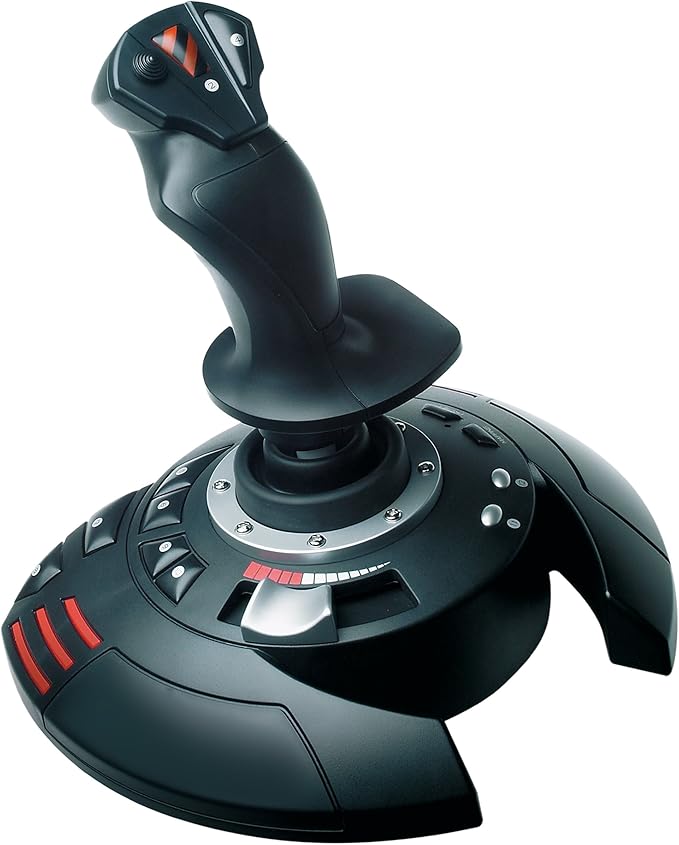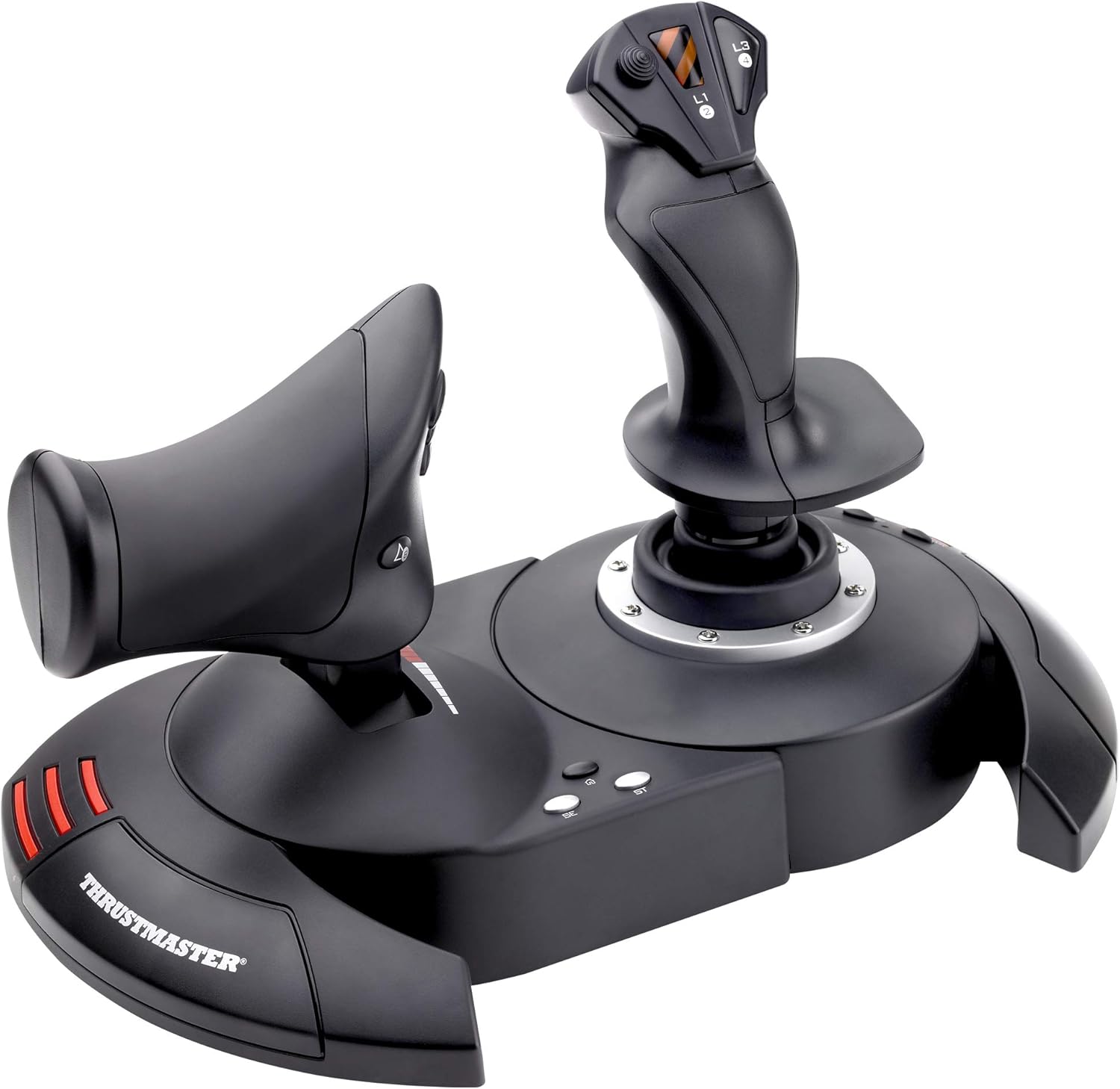
Thrustmaster T.Flight HOTAS x Joystick for PC & PS3
T.Flight Hotas X -
T.Flight Hotas X -
T.Flight Hotas X -
T.Flight Hotas X -
in 76 offers
The lowest price for Thrustmaster T.Flight HOTAS x Joystick for PC & PS3 right now is $89.95 at Everyday Rewards, compared across 17 retailers.
The all-time low was $19.96 on 26 Apr 2026 — today's price is 351% above the lowest ever. It has been notably cheaper before — worth setting a price alert.
Prices last updated 20 Oct 2026.
Last updated at 20/10/2026 17:07:46
Thrust Master T.Flight Hotas X 2960703
Free delivery
Affiliate Disclosure: We may receive a small commission for purchases made through this link at no extra cost to you. This helps support our site. Thank you!
Thrustmaster T.Flight HOTAS X for PS3, PC
Delivery between Fri – Tue $10
Thrustmaster Joystick T-flight Hotas X Black
Delivery $48.49
Thrustmaster T.Flight HOTAS X Joystick For PC & PS3
30-day returns
Thrustmaster T.Flight HOTAS X Joystick For PC & PS3
30-day returns
Thrustmaster T Flight Hotas X, Joystick
Delivery $87.45
Thrustmaster T-Flight Hotas X Flight Stick (PlayStation/PC)
Affiliate Disclosure: We may receive a small commission for purchases made through this link at no extra cost to you. This helps support our site. Thank you!
Thrustmaster Flight HOTAS X (PC)
Delivery $24.99
Thrustmaster Flight HOTAS X (PC)
Delivery $24.99
Thrustmaster Flight HOTAS X (PC)
Delivery between 23–28 Oct $9.24
originally posted on neweggbusiness.com
This purchase was made by me as a remedy to a problem. I have DCS, STAR WARS SQUADRONS, ELITE DANGEROUS, and MSFS 2020 and without a HOTAS I was really limited in how I wanted to play and enjoy these games. I also had purchased a QUEST 2 for the VR and hunting for buttons is NOT IT when you can't see the keyboard. This HOTAS was honestly the ONLY one available at the time. I found that it lacks buttons and is short at least 1 hat switch for DCS WORLD. Having to Remap a full hat switch of buttons makes DCS basically 1000X harder to play in or out of VR. When it comes to MSFS 2020 this HOTAS works beautifully. The rudder control can easily be switched to the stick for for the stick twist Rudder that I prefer. The stick is adjustable for firmness but I find my wrist ... MoreThis purchase was made by me as a remedy to a problem. I have DCS, STAR WARS SQUADRONS, ELITE DANGEROUS, and MSFS 2020 and without a HOTAS I was really limited in how I wanted to play and enjoy these games. I also had purchased a QUEST 2 for the VR and hunting for buttons is NOT IT when you can't see the keyboard. This HOTAS was honestly the ONLY one available at the time. I found that it lacks buttons and is short at least 1 hat switch for DCS WORLD. Having to Remap a full hat switch of buttons makes DCS basically 1000X harder to play in or out of VR. When it comes to MSFS 2020 this HOTAS works beautifully. The rudder control can easily be switched to the stick for for the stick twist Rudder that I prefer. The stick is adjustable for firmness but I find my wrist and arm actually get tired if I do too much maneuvering at high tension. This was easily fixed by loosening the tension on the bottom of the Stick control. Believe me I know how stupid that sounds but I am serious. I would absolutely recommend this stick to anyone who needs it for any number of Flight Sims
originally posted on mediamarkt.nl
I purchased this joystick a week ago and it has revolutionised my playing style in games such as Elite: Dangerous. It's a fantastic peripheral for the PC, though I haven't as yet tried it on the PS3 but expect the same results. There are so many programmable buttons that I barely need use for the keyboard also and the response from the stick is precise and ergonomic.One thing to check if you are using it on the PC is to make sure that the PC button is selected on the back of the Joystick, otherwise the Z axis of both the thrust stick and the movement stick will be locked, thus allowing for a more limited usability. It will still work as a joystick when in PS3 mode but it is prudent to use PC mode for the extra Z axis usability alone.I really cannot express how ... MoreI purchased this joystick a week ago and it has revolutionised my playing style in games such as Elite: Dangerous. It's a fantastic peripheral for the PC, though I haven't as yet tried it on the PS3 but expect the same results. There are so many programmable buttons that I barely need use for the keyboard also and the response from the stick is precise and ergonomic.One thing to check if you are using it on the PC is to make sure that the PC button is selected on the back of the Joystick, otherwise the Z axis of both the thrust stick and the movement stick will be locked, thus allowing for a more limited usability. It will still work as a joystick when in PS3 mode but it is prudent to use PC mode for the extra Z axis usability alone.I really cannot express how great this Hotas joystick is. It has made gaming far more involving and interesting for me and I am now looking for more games so that I can get more use out of it.I will only say one thing about it that may be perceived as a negative for some, though I do not see it as such. It is that the joystick in its entirety is formidably large so if you haven't much space on your desk for it I would check the dimensions. If you haven't enough space for it... get a bigger desk. You need this.
originally posted on bhphotovideo.com
Overall, this is a well built flight stick and throttle. A nice feature is that the two parts separate so you can have the throttle on your left and joystick on your right. The whole thing is plastic, but it doesn't feel too cheap. Another item to note is that although the throttle sometimes feels like it slides too easily, it holds its position and is nice to use. I use this for playing DCS and it works pretty well. I am able to map the needed controls for the SU-25T to all of the buttons on the controller. If you're looking to get started with flight sims, this is a good choice.
| Compatible OS | Windows 10 |
| Compatible Systems | PC |
| VR Controller? | No |
| Connectivity Type | Wired |
| Connector Type | USB |

Thrust Master T.Flight Hotas X 2960703
Free delivery
Affiliate Disclosure: We may receive a small commission for purchases made through this link at no extra cost to you. This helps support our site. Thank you!
Thrustmaster T.Flight HOTAS X for PS3, PC
Delivery between Fri – Tue $10
Thrustmaster Joystick T-flight Hotas X Black
Delivery $48.49
Thrustmaster T.Flight HOTAS X Joystick For PC & PS3
30-day returns
Thrustmaster T.Flight HOTAS X Joystick For PC & PS3
30-day returns
This purchase was made by me as a remedy to a problem. I have DCS, STAR WARS SQUADRONS, ELITE DANGEROUS, and MSFS 2020 and without a HOTAS I was really limited in how I wanted to play and enjoy these games. I also had purchased a QUEST 2 for the VR and hunting for buttons is NOT IT when you can't see the keyboard. This HOTAS was honestly the ONLY one available at the time. I found that it lacks buttons and is short at least 1 hat switch for DCS WORLD. Having to Remap a full hat switch of buttons makes DCS basically 1000X harder to play in or out of VR. When it comes to MSFS 2020 this HOTAS works beautifully. The rudder control can easily be switched to the stick for for the stick twist Rudder that I prefer. The stick is adjustable for firmness but I find my wrist ... MoreThis purchase was made by me as a remedy to a problem. I have DCS, STAR WARS SQUADRONS, ELITE DANGEROUS, and MSFS 2020 and without a HOTAS I was really limited in how I wanted to play and enjoy these games. I also had purchased a QUEST 2 for the VR and hunting for buttons is NOT IT when you can't see the keyboard. This HOTAS was honestly the ONLY one available at the time. I found that it lacks buttons and is short at least 1 hat switch for DCS WORLD. Having to Remap a full hat switch of buttons makes DCS basically 1000X harder to play in or out of VR. When it comes to MSFS 2020 this HOTAS works beautifully. The rudder control can easily be switched to the stick for for the stick twist Rudder that I prefer. The stick is adjustable for firmness but I find my wrist and arm actually get tired if I do too much maneuvering at high tension. This was easily fixed by loosening the tension on the bottom of the Stick control. Believe me I know how stupid that sounds but I am serious. I would absolutely recommend this stick to anyone who needs it for any number of Flight Sims
I purchased this joystick a week ago and it has revolutionised my playing style in games such as Elite: Dangerous. It's a fantastic peripheral for the PC, though I haven't as yet tried it on the PS3 but expect the same results. There are so many programmable buttons that I barely need use for the keyboard also and the response from the stick is precise and ergonomic.One thing to check if you are using it on the PC is to make sure that the PC button is selected on the back of the Joystick, otherwise the Z axis of both the thrust stick and the movement stick will be locked, thus allowing for a more limited usability. It will still work as a joystick when in PS3 mode but it is prudent to use PC mode for the extra Z axis usability alone.I really cannot express how ... MoreI purchased this joystick a week ago and it has revolutionised my playing style in games such as Elite: Dangerous. It's a fantastic peripheral for the PC, though I haven't as yet tried it on the PS3 but expect the same results. There are so many programmable buttons that I barely need use for the keyboard also and the response from the stick is precise and ergonomic.One thing to check if you are using it on the PC is to make sure that the PC button is selected on the back of the Joystick, otherwise the Z axis of both the thrust stick and the movement stick will be locked, thus allowing for a more limited usability. It will still work as a joystick when in PS3 mode but it is prudent to use PC mode for the extra Z axis usability alone.I really cannot express how great this Hotas joystick is. It has made gaming far more involving and interesting for me and I am now looking for more games so that I can get more use out of it.I will only say one thing about it that may be perceived as a negative for some, though I do not see it as such. It is that the joystick in its entirety is formidably large so if you haven't much space on your desk for it I would check the dimensions. If you haven't enough space for it... get a bigger desk. You need this.
Overall, this is a well built flight stick and throttle. A nice feature is that the two parts separate so you can have the throttle on your left and joystick on your right. The whole thing is plastic, but it doesn't feel too cheap. Another item to note is that although the throttle sometimes feels like it slides too easily, it holds its position and is nice to use. I use this for playing DCS and it works pretty well. I am able to map the needed controls for the SU-25T to all of the buttons on the controller. If you're looking to get started with flight sims, this is a good choice.
I bought the "Xbox/PC" version just under two years ago and it developed a fault within a year; The yaw started glitching to the right ever so slightly making it hard to aim sometimes and making cruise impossible. I dealt with it for a while and only just now sent it for warranty and they couldn't replace it because they don't sell the xbox version anymore but I got a full refund and am upgrading to an x52. I used the hotas exclusively for Elite Dangerous and it's amazing. All the pre-mapped controls are fairly easy to get used to within a week of occasional gameplay, and it feels great to play with a real throttle and stick. It comes in extremely handy when playing ED in VR, as it's impossible to miss a button and it makes for an absolutely amazing experience. I ... MoreI bought the "Xbox/PC" version just under two years ago and it developed a fault within a year; The yaw started glitching to the right ever so slightly making it hard to aim sometimes and making cruise impossible. I dealt with it for a while and only just now sent it for warranty and they couldn't replace it because they don't sell the xbox version anymore but I got a full refund and am upgrading to an x52. I used the hotas exclusively for Elite Dangerous and it's amazing. All the pre-mapped controls are fairly easy to get used to within a week of occasional gameplay, and it feels great to play with a real throttle and stick. It comes in extremely handy when playing ED in VR, as it's impossible to miss a button and it makes for an absolutely amazing experience. I haven't heard of anyone else having the problem that I did so I'd say I can recommend this HOTAS for anyone looking for an affordable option.
You get what you pay for. The thing's built solid, but there's a big, sloppy detent mid-throttle and the joystick boot causes a pause so the necessary force to operate the joystick doesn't flow evenly throughout it's range. And buttons. I bought this to try out DCS and YOU WILL NEED EVERY BUTTON YOU CAN GET IN DCS. That's my biggest regret about buying this. Not nearly enough buttons. The is a good beginner's HOTAS setup, don't get me wrong. The purchase and shipping went fine, too. Don't let me forget to get that in. Still learning how to land my Viper . . . .
The joystick has a good feel and is responsive with a similar feel to a real world aircraft but critically, there are separate buttons on the joystick for elevator trim - this is non-intuitive. The hat switch is good as is the central "change view" button but the right hand button marked L3 should be a vertical 2 switch rocker switch programmable for Elevator trim as in the real world for the joystick to be of any use.The throttle does not have the feel of any GA real world aircraft (unlike the Seitek throttle quadrants) and the programmable buttons for flaps and gear down really should not be on the throttle control at all, but would be better located on the base.The rudder function on the joystick is a bad idea. There is no substitute to proper rudder pedals. ... MoreThe joystick has a good feel and is responsive with a similar feel to a real world aircraft but critically, there are separate buttons on the joystick for elevator trim - this is non-intuitive. The hat switch is good as is the central "change view" button but the right hand button marked L3 should be a vertical 2 switch rocker switch programmable for Elevator trim as in the real world for the joystick to be of any use.The throttle does not have the feel of any GA real world aircraft (unlike the Seitek throttle quadrants) and the programmable buttons for flaps and gear down really should not be on the throttle control at all, but would be better located on the base.The rudder function on the joystick is a bad idea. There is no substitute to proper rudder pedals. The joystick also twists fo the rudder. This may be a good thing for gamers but terrible if you want to get close to a real aircraft simulation.The throttle should be located to the RIGHT of the joystick, not to the left and the joystick is moulded for flying with the RIGHT hand. This is no good if you are simulating using the Cirrus SR22which has a left hand joystick. Diamond aircraft however are also flown with the left hand with a central joystick and the throttles controlled with the right hand.Overall this is a nice quality piece of kit but do not think it's going to be anywhere close to the experience of flying any GA real world aircraft. The best thing about the product is that the joystick itself is very realistic and close to the real thing. Pity about the trim, throttle and buttons.The ACME GA02 Digital Analog Vibration PC Gaming Gamepad LN 73998 is overall a better proposition if programmed correctly.
I bought one of these a while back (2014), and overall found it to be a great product by looks and functionality but it falls flat on quality. Especially on internal quality - after about a month of using this device, one of the side buttons stopped working and upon inspection (inside) I saw just how flimsey the plastic switch support mounts are. Very very fragile and given that the particular button was a seldom used thumb button and how it sheared off it's crappy plastic button mount I quickly lost faith in the whole product and would NOT recommend it to anyone especially those who might be a little heavy handed on the buttons. They cannot be repaired once the mount point breaks off.I may have been unlucky with a bad factory release, but if they fix the internal ... MoreI bought one of these a while back (2014), and overall found it to be a great product by looks and functionality but it falls flat on quality. Especially on internal quality - after about a month of using this device, one of the side buttons stopped working and upon inspection (inside) I saw just how flimsey the plastic switch support mounts are. Very very fragile and given that the particular button was a seldom used thumb button and how it sheared off it's crappy plastic button mount I quickly lost faith in the whole product and would NOT recommend it to anyone especially those who might be a little heavy handed on the buttons. They cannot be repaired once the mount point breaks off.I may have been unlucky with a bad factory release, but if they fix the internal design to be more robust it would be a really good controller since all the buttons are at good reachable locations and there are enough of them for most flight games plus the price is excellent, pity the manufacture isn't.I paid $AU89 and chucked it in the bin after it broke (after a month) since it couldn't be repaired.
I totally recommend this stick for this price, like I said, it feels great, probably worth 2x as much and does everything I want it to do. I saw a person say that the cable between the 2 sticks is too short?!? It is easily well over 2ft long and I don't know how wide they are spreading their arms but it is longer than the width of my nice office chair, so unless they are extremely oversized this is not an issue for anyone else. The only real problem I had was getting the thing to stay and that ended up being an actual plus for me cause I created a nicer cockpit feel and made a nice spot to use the stick. And really disconnecting the pieces of wood from the desk only takes 2 minutes and most of the time they are not in the way at all, I just might add a way to slide ... MoreI totally recommend this stick for this price, like I said, it feels great, probably worth 2x as much and does everything I want it to do. I saw a person say that the cable between the 2 sticks is too short?!? It is easily well over 2ft long and I don't know how wide they are spreading their arms but it is longer than the width of my nice office chair, so unless they are extremely oversized this is not an issue for anyone else. The only real problem I had was getting the thing to stay and that ended up being an actual plus for me cause I created a nicer cockpit feel and made a nice spot to use the stick. And really disconnecting the pieces of wood from the desk only takes 2 minutes and most of the time they are not in the way at all, I just might add a way to slide them into the desk one of these days so then only the sticks are sticking out, but it hasn't really been a bother so it works how it is for now. Or I might just look into one of those racing chair setups, but it feels silly to spend $200+ on a chair that I could easily build for a quarter of that cost and would probably look and function better. Anyway, back to the HOTAS X, It is great, you will not find another flight stick that does this much for this price. This basically sets the standard for what a basic flight stick should be.
Started to fly on DCS........But mouse and keyboard just did not work, it felt all wrong! But as soon as i set up the flight gear it all fell into place. I can now enjoy the games with real feelings and feedback. Best thing i have ordered for my computer. Solid smooth controllers and easy to setup....Thanks.
1) The grip is too stubby and round. It's too short for those with larger hands and too big around for those with smaller hands. Definitely NOT ergonomic.2) The two halves of the base simply look STUPID when separated. Why didn't they just make two square or rectangular bases which fit together?3) When the two halves are joined, the throttle and stick are too close together. Push the stick all the way left, twist it (apply rudder), and your right thumb is in the way of the throttle, so you can't use them both at the same time.4) The two halves don't separate fully. They come apart, but are ALWAYS joined by the cord connecting them. Why not just put a connector plug inline somewhere?5) The cord connecting the two halves is too short for this HOTAS to be used ... More1) The grip is too stubby and round. It's too short for those with larger hands and too big around for those with smaller hands. Definitely NOT ergonomic.2) The two halves of the base simply look STUPID when separated. Why didn't they just make two square or rectangular bases which fit together?3) When the two halves are joined, the throttle and stick are too close together. Push the stick all the way left, twist it (apply rudder), and your right thumb is in the way of the throttle, so you can't use them both at the same time.4) The two halves don't separate fully. They come apart, but are ALWAYS joined by the cord connecting them. Why not just put a connector plug inline somewhere?5) The cord connecting the two halves is too short for this HOTAS to be used in a "sim pit." If there was an inline plug (see #4, above), the halves could be separated and an extension cable put between them, to allow MUCH more flexibility of use.6) There are not enough buttons and the layout, both on the stick and the throttle, leaves a LOT to be desired. This is a very poor design.
| Compatible OS | Windows 10 |
| Compatible Systems | PC |
| VR Controller? | No |
| Connectivity Type | Wired |
| Connector Type | USB |