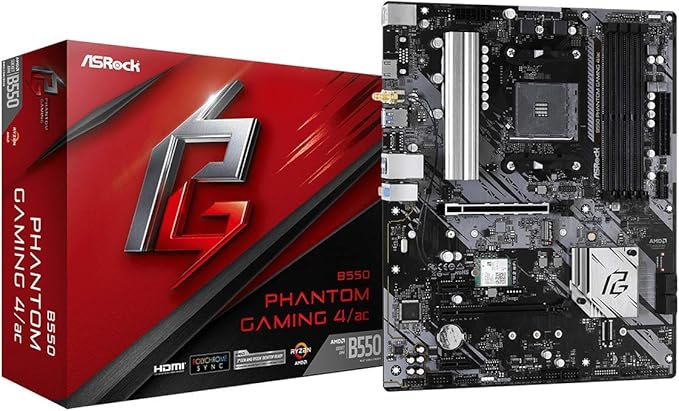
The ASRock X570 Phantom Gaming 4 motherboard is aimed at users who need a reliable and basic motherboard to build a stable computer with an AMD processor. It uses the AM4 socket and supports AMD Ryzen processors. The motherboard features technologies such as PCIe 4.0 for increased data transfer speeds and a wide variety of communication ports, such as USB 3.2 Gen 2 and audio ports. It also supports memory speeds up to DDR4 4666. Overall, the ASRock X570 Phantom Gaming 4 motherboard is aimed at users who need a reliable and simple solution for their system, without excessive features or excessive cost.
The ASRock X570 Phantom Gaming 4 motherboard is aimed at users who need a reliable and basic motherboard to build a stable computer with an AMD processor. It uses the AM4 socket and supports AMD Ryzen processors. The motherboard features technologies such as PCIe 4.0 for increased data transfer speeds and a wide variety of communication ports, such as USB 3.2 Gen 2 and audio ports. It also supports memory speeds up to DDR4 4666. Overall, the ASRock X570 Phantom Gaming 4 motherboard is aimed at users who need a reliable and simple solution for their system, without excessive features or excessive cost.
in 3 offers
The lowest price for ASRock AMD X570 Phantom Gaming 4 ATX AM4 Motherboard right now is $148.69 at AliExpress.com - AliExpress-226247430, compared across 3 retailers.
The all-time low was $143.69 on 5 June 2026 — today's price is 3% above the lowest ever. This is at or near its all-time low — a good time to buy.
Prices last updated 3 July 2026.
ASRock AMD X570 Phantom Gaming 4 ATX AM4 Motherboard
The ASRock X570 Phantom Gaming 4 motherboard is aimed at users who need a reliable and basic motherboard to build a stable computer with an AMD processor. It uses the AM4 socket and supports AMD Ryzen processors. The motherboard features technologies such as PCIe 4.0 for increased data transfer speeds and a wide variety of communication ports, such as USB 3.2 Gen 2 and audio ports. It also supports memory speeds up to DDR4 4666. Overall, the ASRock X570 Phantom Gaming 4 motherboard is aimed at users who need a reliable and simple solution for their system, without excessive features or excessive cost.
The ASRock X570 Phantom Gaming 4 motherboard is aimed at users who need a reliable and basic motherboard to build a stable computer with an AMD processor. It uses the AM4 socket and supports AMD Ryzen processors. The motherboard features technologies such as PCIe 4.0 for increased data transfer speeds and a wide variety of communication ports, such as USB 3.2 Gen 2 and audio ports. It also supports memory speeds up to DDR4 4666. Overall, the ASRock X570 Phantom Gaming 4 motherboard is aimed at users who need a reliable and simple solution for their system, without excessive features or excessive cost.
Last updated at 03/07/2026 23:03:11
ASRock X570 Phantom Gaming 4AM4/USB3.2/HDMI/RJ45 Motherboard
Affiliate Disclosure: We may receive a small commission for purchases made through this link at no extra cost to you. This helps support our site. Thank you!
ASRock X570 PHANTOM GAMING 4-CB motherboard AM4 AMD X570 DDR4 128GB Hyper M.2 ATX support Ryzen 5
Free delivery
Asrock Amd X570 Motherboard Atx X570 Phantom Gaming 4 Am4 Ddr4 Sata3
Free delivery
Affiliate Disclosure: We may receive a small commission for purchases made through this link at no extra cost to you. This helps support our site. Thank you!
originally posted on newegg.com
I spent 3 long days troubleshooting, reinstalling windows, cleaning and reinstalling drivers to find a solution for an odd problem. While the majority of games (including graphic intensive ones) worked without a problem - Ghost Recon Wildlands and Apex Legends would cause a hard crash and leave no information in the event viewer. Apparently games that use Easy Anticheat (like Fortnite and many others) refused to run and refused to leave any error codes where they could be found.My motherboard shipped with bios 3.20. Dated for 8/20 and approved for use with 5000 series processors, I felt like it was sufficiently new and I had no intention of updating my bios. My 5600x seemed to be performing at 100%. Only after exhausting all other options, I used the BIOS's instant ... MoreI spent 3 long days troubleshooting, reinstalling windows, cleaning and reinstalling drivers to find a solution for an odd problem. While the majority of games (including graphic intensive ones) worked without a problem - Ghost Recon Wildlands and Apex Legends would cause a hard crash and leave no information in the event viewer. Apparently games that use Easy Anticheat (like Fortnite and many others) refused to run and refused to leave any error codes where they could be found.My motherboard shipped with bios 3.20. Dated for 8/20 and approved for use with 5000 series processors, I felt like it was sufficiently new and I had no intention of updating my bios. My 5600x seemed to be performing at 100%. Only after exhausting all other options, I used the BIOS's instant flash with a USB drive and fixed the issue with BIOS 3.90. Maybe a tech professional would have been able to find another symptom that makes the BIOS issue more obvious and there may be some other major performance failing in 3.20 that I was unaware of.I don't like reviewing products until owning them for nearly a year, but I had inform others of the Easy Anticheat issue somehow.
originally posted on neweggbusiness.com
I have had this motherboard for over a month and i thoroughly hate it. It has been a head ache since the day it darkened my doorstep which is a shame because online it looks like a good board. Problem 1: I thought it had onboard video. It doesn't so I had to spend more money than planned on a separate video card. If this was the only issue I would just chalk it up to my own misunderstanding. Problem 2: The audio worked for a couple weeks and then quit after a driver update. I've spent hours try to get it working again with no luck. ASRock responded to my request for tech support with link to download the drivers which of course were no help. I am attempting to RMA the board, but the RMA page they sent doesn't work. Problem 3: Does not detect my RAM at the highest ... MoreI have had this motherboard for over a month and i thoroughly hate it. It has been a head ache since the day it darkened my doorstep which is a shame because online it looks like a good board. Problem 1: I thought it had onboard video. It doesn't so I had to spend more money than planned on a separate video card. If this was the only issue I would just chalk it up to my own misunderstanding. Problem 2: The audio worked for a couple weeks and then quit after a driver update. I've spent hours try to get it working again with no luck. ASRock responded to my request for tech support with link to download the drivers which of course were no help. I am attempting to RMA the board, but the RMA page they sent doesn't work. Problem 3: Does not detect my RAM at the highest speed the manual says it should run at. This might be an XMP Profile issue, but what is this the 90s where we have to use manual settings? Maybe I'm just lazy here. Problem 4: Documentation is poor to non existent and the website isn't much better. So if you have a problem (or five) you are pretty much left to fend for yourself. Problem 5: The motherboard layout. The MB far is right under where video card slot. this can't be good for cooling. Also, the left most RAM slot is very close to the CPU so there is a pretty good chance your cooler will cover it. Problem 6: PS/2 port will randomly stop working. Dishonorable mention: The hard drive indicator pinout does not match what is in my case so I can't use it.
originally posted on neweggbusiness.com
I would recommend this motherboard. It wasn't hard to install, it wasn't hard to set-up. As mentioned above I did have issues with trying to buy the same product off amaz. This product is the phantom gaming 4 the one i was trying to get on amaz was the 4s and they never shipped it. So i finally decided to cancel that order and buy off here. I am glad I did. Not only does this motherboard have all the similar specs as the one i was looking at but it also contained more ports. The gpu issue i had was that my gpu was TOO NEW so i had to install bios using an older model but it fixed all the issues once i did that. Once again, HIGHLY RECOMMEND FOR GAMING, SCRIPTING, WORK. This is my build please be aware, my cable management is now better, sorry for this "ugly" picture ... MoreI would recommend this motherboard. It wasn't hard to install, it wasn't hard to set-up. As mentioned above I did have issues with trying to buy the same product off amaz. This product is the phantom gaming 4 the one i was trying to get on amaz was the 4s and they never shipped it. So i finally decided to cancel that order and buy off here. I am glad I did. Not only does this motherboard have all the similar specs as the one i was looking at but it also contained more ports. The gpu issue i had was that my gpu was TOO NEW so i had to install bios using an older model but it fixed all the issues once i did that. Once again, HIGHLY RECOMMEND FOR GAMING, SCRIPTING, WORK. This is my build please be aware, my cable management is now better, sorry for this "ugly" picture but its the clearest one of my motherboard. I am running ryzen 5 3600, asrock challanger radaeon 5600xt, 2 ddr4 2x 8gb(16gigs), 1 500 nvme ssd, 1 250 ssd. Freaking fast. ( i have 6 rgb case fans) freaking beautiful. :D
| General | |
| Product Type | Motherboard - ATX |
| Chipset Type | AMD X570 |
| Processor Socket | Socket AM4 |
| Max Processors Qty | 1 |
ASRock X570 Phantom Gaming 4AM4/USB3.2/HDMI/RJ45 Motherboard
Affiliate Disclosure: We may receive a small commission for purchases made through this link at no extra cost to you. This helps support our site. Thank you!
ASRock X570 PHANTOM GAMING 4-CB motherboard AM4 AMD X570 DDR4 128GB Hyper M.2 ATX support Ryzen 5
Free delivery
Asrock Amd X570 Motherboard Atx X570 Phantom Gaming 4 Am4 Ddr4 Sata3
Free delivery
Affiliate Disclosure: We may receive a small commission for purchases made through this link at no extra cost to you. This helps support our site. Thank you!
I spent 3 long days troubleshooting, reinstalling windows, cleaning and reinstalling drivers to find a solution for an odd problem. While the majority of games (including graphic intensive ones) worked without a problem - Ghost Recon Wildlands and Apex Legends would cause a hard crash and leave no information in the event viewer. Apparently games that use Easy Anticheat (like Fortnite and many others) refused to run and refused to leave any error codes where they could be found.My motherboard shipped with bios 3.20. Dated for 8/20 and approved for use with 5000 series processors, I felt like it was sufficiently new and I had no intention of updating my bios. My 5600x seemed to be performing at 100%. Only after exhausting all other options, I used the BIOS's instant ... MoreI spent 3 long days troubleshooting, reinstalling windows, cleaning and reinstalling drivers to find a solution for an odd problem. While the majority of games (including graphic intensive ones) worked without a problem - Ghost Recon Wildlands and Apex Legends would cause a hard crash and leave no information in the event viewer. Apparently games that use Easy Anticheat (like Fortnite and many others) refused to run and refused to leave any error codes where they could be found.My motherboard shipped with bios 3.20. Dated for 8/20 and approved for use with 5000 series processors, I felt like it was sufficiently new and I had no intention of updating my bios. My 5600x seemed to be performing at 100%. Only after exhausting all other options, I used the BIOS's instant flash with a USB drive and fixed the issue with BIOS 3.90. Maybe a tech professional would have been able to find another symptom that makes the BIOS issue more obvious and there may be some other major performance failing in 3.20 that I was unaware of.I don't like reviewing products until owning them for nearly a year, but I had inform others of the Easy Anticheat issue somehow.
I have had this motherboard for over a month and i thoroughly hate it. It has been a head ache since the day it darkened my doorstep which is a shame because online it looks like a good board. Problem 1: I thought it had onboard video. It doesn't so I had to spend more money than planned on a separate video card. If this was the only issue I would just chalk it up to my own misunderstanding. Problem 2: The audio worked for a couple weeks and then quit after a driver update. I've spent hours try to get it working again with no luck. ASRock responded to my request for tech support with link to download the drivers which of course were no help. I am attempting to RMA the board, but the RMA page they sent doesn't work. Problem 3: Does not detect my RAM at the highest ... MoreI have had this motherboard for over a month and i thoroughly hate it. It has been a head ache since the day it darkened my doorstep which is a shame because online it looks like a good board. Problem 1: I thought it had onboard video. It doesn't so I had to spend more money than planned on a separate video card. If this was the only issue I would just chalk it up to my own misunderstanding. Problem 2: The audio worked for a couple weeks and then quit after a driver update. I've spent hours try to get it working again with no luck. ASRock responded to my request for tech support with link to download the drivers which of course were no help. I am attempting to RMA the board, but the RMA page they sent doesn't work. Problem 3: Does not detect my RAM at the highest speed the manual says it should run at. This might be an XMP Profile issue, but what is this the 90s where we have to use manual settings? Maybe I'm just lazy here. Problem 4: Documentation is poor to non existent and the website isn't much better. So if you have a problem (or five) you are pretty much left to fend for yourself. Problem 5: The motherboard layout. The MB far is right under where video card slot. this can't be good for cooling. Also, the left most RAM slot is very close to the CPU so there is a pretty good chance your cooler will cover it. Problem 6: PS/2 port will randomly stop working. Dishonorable mention: The hard drive indicator pinout does not match what is in my case so I can't use it.
I would recommend this motherboard. It wasn't hard to install, it wasn't hard to set-up. As mentioned above I did have issues with trying to buy the same product off amaz. This product is the phantom gaming 4 the one i was trying to get on amaz was the 4s and they never shipped it. So i finally decided to cancel that order and buy off here. I am glad I did. Not only does this motherboard have all the similar specs as the one i was looking at but it also contained more ports. The gpu issue i had was that my gpu was TOO NEW so i had to install bios using an older model but it fixed all the issues once i did that. Once again, HIGHLY RECOMMEND FOR GAMING, SCRIPTING, WORK. This is my build please be aware, my cable management is now better, sorry for this "ugly" picture ... MoreI would recommend this motherboard. It wasn't hard to install, it wasn't hard to set-up. As mentioned above I did have issues with trying to buy the same product off amaz. This product is the phantom gaming 4 the one i was trying to get on amaz was the 4s and they never shipped it. So i finally decided to cancel that order and buy off here. I am glad I did. Not only does this motherboard have all the similar specs as the one i was looking at but it also contained more ports. The gpu issue i had was that my gpu was TOO NEW so i had to install bios using an older model but it fixed all the issues once i did that. Once again, HIGHLY RECOMMEND FOR GAMING, SCRIPTING, WORK. This is my build please be aware, my cable management is now better, sorry for this "ugly" picture but its the clearest one of my motherboard. I am running ryzen 5 3600, asrock challanger radaeon 5600xt, 2 ddr4 2x 8gb(16gigs), 1 500 nvme ssd, 1 250 ssd. Freaking fast. ( i have 6 rgb case fans) freaking beautiful. :D
This board has been excellent. If you are looking for a board which will allow PCI passthrough this is an excellent one to get. I am running Kubuntu Linux with a Windows 10 gaming Virtual Machine. I have been playing Cyberpunk 2077 with good frame rates. Comparable to Windows running on the bare metal. The biggest bottle neck is the virtual disk where Windows and Cyberpunk are installed, and that's my fault! Could be improved with water proofing, but no one expects that. lol. I spilled coffee on my computer, and it's still working. No idea when it will die, but it's been going strong few the last few months without issue. I'm hoping I can fix it, but if I cannot I will be buying this board again to replace itself.
Update: I had to manually set the speed to 3200 MHz and, most importantly, the voltage had to be increased to 1.36v vs the XMP recommended voltage of 1.35v. I set the timings at 16 18 18 18 36 as recommended by the Ryzen RAM calculator (which also recommended the 1.36v setting). After that change, everything is stable and does not reset after a reboot (which now takes 21 seconds from a cold start). Build consisted of: - Ryzen 5 3600 - Corsair Force MP600 M.2 2280 1TB PCI-Express Gen 4.0 x4 NVMe 3D TLC Internal Solid State Drive (SSD) CSSD-F1000GBMP600 - Corsair Vengeance LPX 32GB (2x16GB) 3200MHz C16 DDR4 DRAM Memory Kit - Reused my RX480 video card and 600W power supply New board fit in my old Antec ATX case, no problems there. Connected power and it booted to the ... MoreUpdate: I had to manually set the speed to 3200 MHz and, most importantly, the voltage had to be increased to 1.36v vs the XMP recommended voltage of 1.35v. I set the timings at 16 18 18 18 36 as recommended by the Ryzen RAM calculator (which also recommended the 1.36v setting). After that change, everything is stable and does not reset after a reboot (which now takes 21 seconds from a cold start). Build consisted of: - Ryzen 5 3600 - Corsair Force MP600 M.2 2280 1TB PCI-Express Gen 4.0 x4 NVMe 3D TLC Internal Solid State Drive (SSD) CSSD-F1000GBMP600 - Corsair Vengeance LPX 32GB (2x16GB) 3200MHz C16 DDR4 DRAM Memory Kit - Reused my RX480 video card and 600W power supply New board fit in my old Antec ATX case, no problems there. Connected power and it booted to the USB I had prepared with a copy of WIN10 which then loaded to the M.2 drive (see photo on speed!!). I was able to reuse my old product key with the clean install (the old key was sitting on the hard drive that was not connected). MS Word, Excel, and Powerpoint registration keys went okay. I had a 10-minute chat with Adobe help and finally got the old keys canceled and reinstalled on my new computer (they wanted me to uninstalled the apps first off the old computer first - which I did not do). Photoshop 4 loads in one second! Web browsing is instantaneous, the screens flash up, no delays (helped by my 200 Mbps connection but my old computer was nowhere near this fast). ASRock has a nice utility for updating all drivers and BIOS - which I used next. The only concern was the location of the M.2 drive, directly under the video card with just enough clearance for the M.2 heatsink. However, it does not overheat and stays at 36C with a run to 43 when under stress but no higher. The RAM goes in slots A2 and B2 if you only have two sticks. However, the board does not set the RAM speed to 3200 automatically (the speed I bought). See the cons, I had to manually set the speed to 3200 (not using XMP) and the voltage to 1.36v and the timing to 16 18 18 18 36 as recommended by the Ryzen RAM calculator (Google to find). This is my second build with ASRock motherboards and the M.2 drive - what a difference in speed!! I used to buy other mfg'er's boards but no more.
Board is solid, the only caveat that holds it back from 5 eggs is two fold and I'm not sure if can be laid at the feet of this board: firstly, the CPU cooler mounting holes were a bit difficult to get the last screw in. I needed to put a nervous amount of force to get the last one to screw in, since is was just barely outside the range of the hole. This was the stock cooler for the Ryzen 5 3600, and I'm monitoring temps overtime since I had to nudge the cooler and therefore the grease that came with it. Secondly, the placement of the RAM slot A1, the nearest to the CPU/cooler, is close enough that any RAM with a heat sink can be obstructed by the cooler's plastic housing. Again, this is coming from the stock Ryzen 5 3600 cooler and I'm using OLOy 2x16GB, so it's a ... MoreBoard is solid, the only caveat that holds it back from 5 eggs is two fold and I'm not sure if can be laid at the feet of this board: firstly, the CPU cooler mounting holes were a bit difficult to get the last screw in. I needed to put a nervous amount of force to get the last one to screw in, since is was just barely outside the range of the hole. This was the stock cooler for the Ryzen 5 3600, and I'm monitoring temps overtime since I had to nudge the cooler and therefore the grease that came with it. Secondly, the placement of the RAM slot A1, the nearest to the CPU/cooler, is close enough that any RAM with a heat sink can be obstructed by the cooler's plastic housing. Again, this is coming from the stock Ryzen 5 3600 cooler and I'm using OLOy 2x16GB, so it's a combination of things. Thankfully, the board recommends using the A2 and B2 slots when using just 2 sticks, which are the furthest away from the CPU/cooler set up. It might be possible to mount the cooler in a different direction, but I just followed the diagrams that came with the parts. In all, it works fine, just not stress-free. BIOS seems to work great so far, it had my RAM settings at the lowest to start, but was took one adjustment to bring them to 3200, no voltage change. AMD RYZEN 5 3600 6-Core 3.6 GHz (4.2 GHz Max Boost) Socket AM4 65W 100-100000031 OLOy 32GB (2 x 16GB) 288-Pin DDR4 SDRAM DDR4 3200 (PC4 25600) Desktop Memory Model MD4U163216CGDA
I care much more about performance per $, thermal efficiency, and compatibility than I do about RGB, brand loyalty, or wow factor. This motherboard has great fit and finish, nothing seemed poorly ground, uneven, or even blemished. Everything worked right out of the box and has performed nonstop for a month now. The gpu pcie 16 slot with the metal base is a nice touch and the 4.0 hyper m.2 memory is insanely fast. The way the plugins are laid out on the board is logical, give a nice "click", and everything seems to be of quality materials. I could afford whatever I wanted, but this Mobo sat right in the sweet spot to give me everything I wanted and room to grow or absorb another one of my PC's. The bios is easy to navigate and was very easy to flash. The software ... MoreI care much more about performance per $, thermal efficiency, and compatibility than I do about RGB, brand loyalty, or wow factor. This motherboard has great fit and finish, nothing seemed poorly ground, uneven, or even blemished. Everything worked right out of the box and has performed nonstop for a month now. The gpu pcie 16 slot with the metal base is a nice touch and the 4.0 hyper m.2 memory is insanely fast. The way the plugins are laid out on the board is logical, give a nice "click", and everything seems to be of quality materials. I could afford whatever I wanted, but this Mobo sat right in the sweet spot to give me everything I wanted and room to grow or absorb another one of my PC's. The bios is easy to navigate and was very easy to flash. The software that comes with the board so far has been useless to me, but that's usually the case. I highly recommend this product and I will certainly buy it again.
Well, this motherboard lasted two months and the nightmare began.Before I go into that, ASUS customer service is the WORSE I've encountered in years. First off, no replacement for the defective part. This means no computer to 10-14 days.Secondly, they wanted me to pay $25 to ship it back them for a processing fee. As this is under warranty the fight is going to occur as that is illegal to charge for a warranty.Now, the motherboard. Sometime after the August BIOS update the motherboard refused to recognize any attempt to enter the BIOS/UEFI. I know of 6 ways of enter into the UEFI and nothing worked.The board will say the usual messages about hitting the F2/DEL key but ignores it. Yes, the keyboard is being recognized because I have it password protected and ... MoreWell, this motherboard lasted two months and the nightmare began.Before I go into that, ASUS customer service is the WORSE I've encountered in years. First off, no replacement for the defective part. This means no computer to 10-14 days.Secondly, they wanted me to pay $25 to ship it back them for a processing fee. As this is under warranty the fight is going to occur as that is illegal to charge for a warranty.Now, the motherboard. Sometime after the August BIOS update the motherboard refused to recognize any attempt to enter the BIOS/UEFI. I know of 6 ways of enter into the UEFI and nothing worked.The board will say the usual messages about hitting the F2/DEL key but ignores it. Yes, the keyboard is being recognized because I have it password protected and I have to enter the password to get to this point.Even after several failed attempts, it tells me to hit the F1 to go into the BIOS. Again, it ignores my enter.Clearing the CMOS, removing the battery, multiple times doesn't work. It does reset the BIOS as it takes nearly a minute to boot after resetting the CMOS. But nothing helps.If you have this motherboard I would recommend at least not to turn on a password on the MOBO. Whether this will help prevent this situation I cannot say but it is one attempt so that you don't end up witha MOBO that you can't do anything with.I discovered this after Microsoft forced a download onto me and it failed to install. At which time I needed to get into the BIOS to change my boot options. Left with a disk that wouldn't boot and a motherboard that I can't use I called support. After several days I got a reply to try and clear the CMOS... All of which I had stated that I had done at least 4 times. They just didn't read ANYTHING that I had typed!!!!!I had relied on ASUS for my last two video cards and motherboard. But I won't be buying any more products of theirs. To add injury to the insult, my ASUS GTX 970 burned out the prior month.
This includes an m.2 wifi chip - that doesn't match the "ASRock X570 PHANTOM GAMING 4 WIFI AX AM4 ATX AMD Motherboard" title. You buy a wifi motherboard to not deal with the hassle of a pcie wifi chip and another thing to order/ install. m2 wifi on this board: The antenna back part is not pre installed to the io backplate. If you do not do this first you have to take apart your ENTIRE build to do this because the metal io cover is in the way. You have to wire this up to the m2 chip with the dumbest smallest connector I have ever seen. Calling this motherboard a wifi motherboard is like calling a motherboard that includes a usb wifi adapter a wifi motherboard. 0/100
overall, this isnt a bad mobo. its the position of one of the m.2 slots and where they put the fan to cool the chipset that makes me lower the eggs a bit. i worry about the chipset overheating because the gpu slot causes gpu to cover most of the opening where the fan is supposed to pull air in at for the chipset.. and then, one of the m.2 slots is basically sandwiched in between the gpu and mobo, which cannot be good for thermals. that being said, at the time of purchase, it was by far the cheapest x570 mobo i could find. it works and the mobo itself looks to be very high quality. it feels substantial when compared to any of the older mobos ive dealt with over the years. well built, but if the m.2 was in a different spot and if they were to design the chipset ... Moreoverall, this isnt a bad mobo. its the position of one of the m.2 slots and where they put the fan to cool the chipset that makes me lower the eggs a bit. i worry about the chipset overheating because the gpu slot causes gpu to cover most of the opening where the fan is supposed to pull air in at for the chipset.. and then, one of the m.2 slots is basically sandwiched in between the gpu and mobo, which cannot be good for thermals. that being said, at the time of purchase, it was by far the cheapest x570 mobo i could find. it works and the mobo itself looks to be very high quality. it feels substantial when compared to any of the older mobos ive dealt with over the years. well built, but if the m.2 was in a different spot and if they were to design the chipset cooling a little different, this would be an incredible board and by far the best money can buy. update: ive had this mobo for about 5 months now and its still going strong as it should. temps are staying decent, but the chipset fan does pretty much run at 100% the entire time. i VERY much recommend keeping a check on it because if any dust builds up, it will overheat. i use a case that has good airflow and a dust filter, so it keeps dust to a minimum, but still want to keep an eye on it. right now, it has a Ryzen 5 3600, GEiL Evo Spear 3200 CL16 ram, Silicon Power 256gb PCIe 3 M.2, WD Blue 500gb SATA SSD, WD Blue 4tb 7200RPM HDD, a random DVD/CD-RW drive ive had for a few years and wanted to use and a RX-580 8gb Red Devil i had sitting around (waiting to get a hold of the RTX 3070 at some point, lol). as a cpu cooler, im using a Deepcool Neptwin V2. at first, i was worried if id be able to clear the ram and gpu, but there is JUST enough room. barely, but fits. posted as it should. everything works and so far, i have zero real complaints other than the chipset fan and position of one of the m.2 slots. other than that, its a good mobo. plus, its x570.
| General | |
| Product Type | Motherboard - ATX |
| Chipset Type | AMD X570 |
| Processor Socket | Socket AM4 |
| Max Processors Qty | 1 |