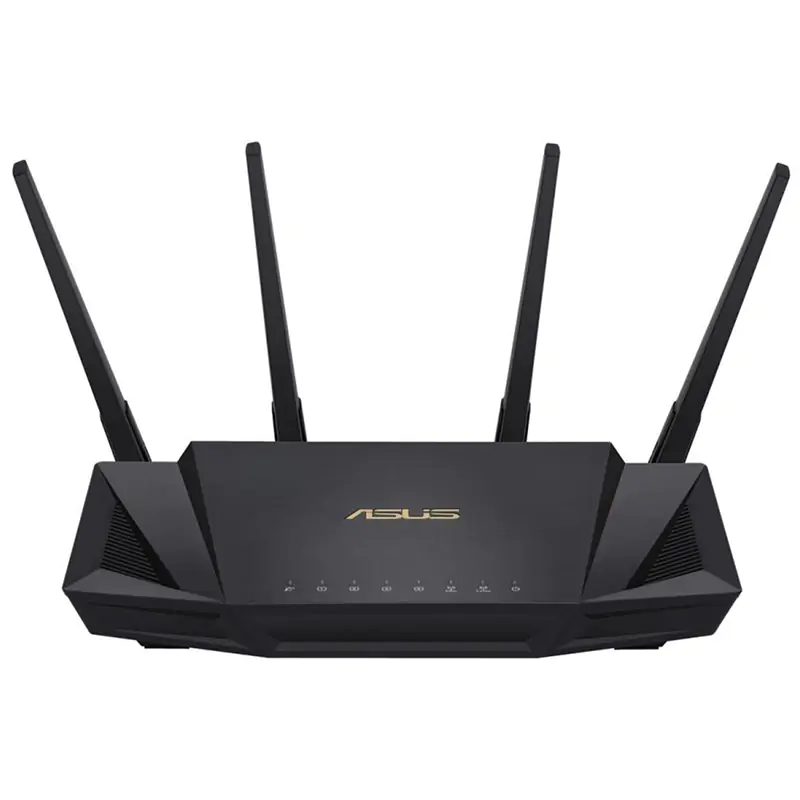
Enjoy low-latency, stable connections, and faster throughput with the RT-AX3000 AX3000 Wireless Dual-Band Gigabit Router from ASUS. This router utilizes the 2.4 GHz and 5 GHz bands, 160 MHz bandwidth, and 1024-QAM modulation to boost total network speeds to 3000 Mb/s. With 2x2 MU-MIMO and OFDMA technologies, the RT-AX3000 can deliver two dedicated upload/download streams per band, and pushes data to all connected devices simultaneously rather than in sequence. Additional features include free lifetime security, mobile power saving technology, and AiMesh whole-home network support. This makes the RT-AX3000 an ideal choice for a home with many devices and a need for fast, stable wireless internet access.
Enjoy low-latency, stable connections, and faster throughput with the RT-AX3000 AX3000 Wireless Dual-Band Gigabit Router from ASUS. This router utilizes the 2.4 GHz and 5 GHz bands, 160 MHz bandwidth, and 1024-QAM modulation to boost total network speeds to 3000 Mb/s. With 2x2 MU-MIMO and OFDMA technologies, the RT-AX3000 can deliver two dedicated upload/download streams per band, and pushes data to all connected devices simultaneously rather than in sequence. Additional features include free lifetime security, mobile power saving technology, and AiMesh whole-home network support. This makes the RT-AX3000 an ideal choice for a home with many devices and a need for fast, stable wireless internet access.
in 3 offers
The lowest price for Asus RT-AX3000 Dual Band Wifi 6 (802.11ax) Router right now is $99.00 at Cash Converters, compared across 3 retailers.
The all-time low was $99.00 on 28 June 2026. That's the lowest price we've ever tracked — a great time to buy.
Prices last updated 28 June 2026.
Asus RT-AX3000 Dual Band Wifi 6 (802.11ax) Router
Enjoy low-latency, stable connections, and faster throughput with the RT-AX3000 AX3000 Wireless Dual-Band Gigabit Router from ASUS. This router utilizes the 2.4 GHz and 5 GHz bands, 160 MHz bandwidth, and 1024-QAM modulation to boost total network speeds to 3000 Mb/s. With 2x2 MU-MIMO and OFDMA technologies, the RT-AX3000 can deliver two dedicated upload/download streams per band, and pushes data to all connected devices simultaneously rather than in sequence. Additional features include free lifetime security, mobile power saving technology, and AiMesh whole-home network support. This makes the RT-AX3000 an ideal choice for a home with many devices and a need for fast, stable wireless internet access.
Enjoy low-latency, stable connections, and faster throughput with the RT-AX3000 AX3000 Wireless Dual-Band Gigabit Router from ASUS. This router utilizes the 2.4 GHz and 5 GHz bands, 160 MHz bandwidth, and 1024-QAM modulation to boost total network speeds to 3000 Mb/s. With 2x2 MU-MIMO and OFDMA technologies, the RT-AX3000 can deliver two dedicated upload/download streams per band, and pushes data to all connected devices simultaneously rather than in sequence. Additional features include free lifetime security, mobile power saving technology, and AiMesh whole-home network support. This makes the RT-AX3000 an ideal choice for a home with many devices and a need for fast, stable wireless internet access.
Last updated at 28/06/2026 13:05:26
Asus Dual Band Wi-Fi Router Ax3000 Black Modem Router
Delivery $14.50
Asus RT-AX3000 V2 WiFi 6 Wireless Router (RT-AX3000 V2)
30-day returns
ASUS RT-AX3000 AX3000 Dual Band MU-MIMO OFDMA WiFi 6 Gigabit Router
Delivery $18.32
originally posted on pbtech.co.nz
Every router I've ever used has been a straight forward set up, but this one was a bit tricky. The Quick Setup Wizard didn't work at all at first. Got me into Router Settings, but no internet and no wireless access. WAP light was red, even after multiple restarts etc. The solution was to download the latest firmware update off the ASUS website on my phone using mobile data. Transferred that to my PC, and then sent the firmware update to the router through the Router Settings page. Rebooted the router again and finally got some internet! Just wrote this down in case anyone has the same struggle. There's no instructions mentioning firmware updates, and if you have no existing working router then you'll have to download that update using mobile data or someone else's ... MoreEvery router I've ever used has been a straight forward set up, but this one was a bit tricky. The Quick Setup Wizard didn't work at all at first. Got me into Router Settings, but no internet and no wireless access. WAP light was red, even after multiple restarts etc. The solution was to download the latest firmware update off the ASUS website on my phone using mobile data. Transferred that to my PC, and then sent the firmware update to the router through the Router Settings page. Rebooted the router again and finally got some internet! Just wrote this down in case anyone has the same struggle. There's no instructions mentioning firmware updates, and if you have no existing working router then you'll have to download that update using mobile data or someone else's internet. Apart from that, great router! Speed and range is excellent! <3
originally posted on bestbuy.com
I teach networking. Wi-Fi6 (and 6E) are emerging still, as the FCC tries to obtain more channels from the ISM band for general-public Wi-Fi use (all the way from 5.0 thru 7.5GHz, with hundreds of bondable channels!). 6E is better than 6 in this regard, but right now, just getting an affordable 802.11ax router is hard. I have quite a few consumer and carrier-grade AP's at my place, and decided to put this little Asus AX3000 up against them. I had an older Asus 802.11ac (wave 1) which I loved, although it finally gave-up to power surges in "lightning-alley" where I live. Short version: it's awesome. I only have 300Mbps on my DOCSIS and 180Mbps on my VDSL2+, but the WIRELESS speeds max at my ISPs' download speeds! (up to 30' away). I only have 1,500 sq ft, so cannot ... MoreI teach networking. Wi-Fi6 (and 6E) are emerging still, as the FCC tries to obtain more channels from the ISM band for general-public Wi-Fi use (all the way from 5.0 thru 7.5GHz, with hundreds of bondable channels!). 6E is better than 6 in this regard, but right now, just getting an affordable 802.11ax router is hard. I have quite a few consumer and carrier-grade AP's at my place, and decided to put this little Asus AX3000 up against them. I had an older Asus 802.11ac (wave 1) which I loved, although it finally gave-up to power surges in "lightning-alley" where I live. Short version: it's awesome. I only have 300Mbps on my DOCSIS and 180Mbps on my VDSL2+, but the WIRELESS speeds max at my ISPs' download speeds! (up to 30' away). I only have 1,500 sq ft, so cannot put distance to a further test, but this thing is right-up there with my other wireless AP's. It won't have the same coverage as a 3-node Wi-Fi6 system, but the 4 MIMO antennas will beamform and add/divide between different devices very well. I can actually see my SSID 150' away in my car. You mileage WILL vary, but this is an excellent performance-price point balance. Remember: put all your Wi-Fi6 devices on one SSID, pref the 5G radio, and get all your slow devices on the slower, more crowded 2.4G radio (or ideally, off of Wi-Fi...you're system is only as fast as your slowest device...think printers, wireless door bells, old computers, old TVs, etc etc etc).
originally posted on bestbuy.com
Netgear products and their support are horrible. I purchased this router and it refused to connect to my laptop. I recently purchased the laptop due to its WiFi6 connectivity and its high ranking for a gaming machine. The router allowed OLDER phones to connect but NOT my WiFi6 laptop. I have never had connection issues of any kind on this laptop (Asus ROG Zephyrus). I installed the updated firmware on the router and still nothing. I called tech support and the person barely spoke english and I could not understand anything except your laptop broke. I took the router back to the store along with my laptop and the techs there tested the Wifi on the laptop and it was running and connecting perfectly. Thank You to the Best Buy team for the quick assistance and patience. ... MoreNetgear products and their support are horrible. I purchased this router and it refused to connect to my laptop. I recently purchased the laptop due to its WiFi6 connectivity and its high ranking for a gaming machine. The router allowed OLDER phones to connect but NOT my WiFi6 laptop. I have never had connection issues of any kind on this laptop (Asus ROG Zephyrus). I installed the updated firmware on the router and still nothing. I called tech support and the person barely spoke english and I could not understand anything except your laptop broke. I took the router back to the store along with my laptop and the techs there tested the Wifi on the laptop and it was running and connecting perfectly. Thank You to the Best Buy team for the quick assistance and patience. I purchased another router from Best Buy and it worked as soon as I plugged it in.
| WAN connection | |
| 3G/4G USB modem compatibility | N |
| SIM card slot | N |
| DSL WAN | N |
| Ethernet WAN | Y |
Asus Dual Band Wi-Fi Router Ax3000 Black Modem Router
Delivery $14.50
Asus RT-AX3000 V2 WiFi 6 Wireless Router (RT-AX3000 V2)
30-day returns
ASUS RT-AX3000 AX3000 Dual Band MU-MIMO OFDMA WiFi 6 Gigabit Router
Delivery $18.32
Every router I've ever used has been a straight forward set up, but this one was a bit tricky. The Quick Setup Wizard didn't work at all at first. Got me into Router Settings, but no internet and no wireless access. WAP light was red, even after multiple restarts etc. The solution was to download the latest firmware update off the ASUS website on my phone using mobile data. Transferred that to my PC, and then sent the firmware update to the router through the Router Settings page. Rebooted the router again and finally got some internet! Just wrote this down in case anyone has the same struggle. There's no instructions mentioning firmware updates, and if you have no existing working router then you'll have to download that update using mobile data or someone else's ... MoreEvery router I've ever used has been a straight forward set up, but this one was a bit tricky. The Quick Setup Wizard didn't work at all at first. Got me into Router Settings, but no internet and no wireless access. WAP light was red, even after multiple restarts etc. The solution was to download the latest firmware update off the ASUS website on my phone using mobile data. Transferred that to my PC, and then sent the firmware update to the router through the Router Settings page. Rebooted the router again and finally got some internet! Just wrote this down in case anyone has the same struggle. There's no instructions mentioning firmware updates, and if you have no existing working router then you'll have to download that update using mobile data or someone else's internet. Apart from that, great router! Speed and range is excellent! <3
I teach networking. Wi-Fi6 (and 6E) are emerging still, as the FCC tries to obtain more channels from the ISM band for general-public Wi-Fi use (all the way from 5.0 thru 7.5GHz, with hundreds of bondable channels!). 6E is better than 6 in this regard, but right now, just getting an affordable 802.11ax router is hard. I have quite a few consumer and carrier-grade AP's at my place, and decided to put this little Asus AX3000 up against them. I had an older Asus 802.11ac (wave 1) which I loved, although it finally gave-up to power surges in "lightning-alley" where I live. Short version: it's awesome. I only have 300Mbps on my DOCSIS and 180Mbps on my VDSL2+, but the WIRELESS speeds max at my ISPs' download speeds! (up to 30' away). I only have 1,500 sq ft, so cannot ... MoreI teach networking. Wi-Fi6 (and 6E) are emerging still, as the FCC tries to obtain more channels from the ISM band for general-public Wi-Fi use (all the way from 5.0 thru 7.5GHz, with hundreds of bondable channels!). 6E is better than 6 in this regard, but right now, just getting an affordable 802.11ax router is hard. I have quite a few consumer and carrier-grade AP's at my place, and decided to put this little Asus AX3000 up against them. I had an older Asus 802.11ac (wave 1) which I loved, although it finally gave-up to power surges in "lightning-alley" where I live. Short version: it's awesome. I only have 300Mbps on my DOCSIS and 180Mbps on my VDSL2+, but the WIRELESS speeds max at my ISPs' download speeds! (up to 30' away). I only have 1,500 sq ft, so cannot put distance to a further test, but this thing is right-up there with my other wireless AP's. It won't have the same coverage as a 3-node Wi-Fi6 system, but the 4 MIMO antennas will beamform and add/divide between different devices very well. I can actually see my SSID 150' away in my car. You mileage WILL vary, but this is an excellent performance-price point balance. Remember: put all your Wi-Fi6 devices on one SSID, pref the 5G radio, and get all your slow devices on the slower, more crowded 2.4G radio (or ideally, off of Wi-Fi...you're system is only as fast as your slowest device...think printers, wireless door bells, old computers, old TVs, etc etc etc).
Netgear products and their support are horrible. I purchased this router and it refused to connect to my laptop. I recently purchased the laptop due to its WiFi6 connectivity and its high ranking for a gaming machine. The router allowed OLDER phones to connect but NOT my WiFi6 laptop. I have never had connection issues of any kind on this laptop (Asus ROG Zephyrus). I installed the updated firmware on the router and still nothing. I called tech support and the person barely spoke english and I could not understand anything except your laptop broke. I took the router back to the store along with my laptop and the techs there tested the Wifi on the laptop and it was running and connecting perfectly. Thank You to the Best Buy team for the quick assistance and patience. ... MoreNetgear products and their support are horrible. I purchased this router and it refused to connect to my laptop. I recently purchased the laptop due to its WiFi6 connectivity and its high ranking for a gaming machine. The router allowed OLDER phones to connect but NOT my WiFi6 laptop. I have never had connection issues of any kind on this laptop (Asus ROG Zephyrus). I installed the updated firmware on the router and still nothing. I called tech support and the person barely spoke english and I could not understand anything except your laptop broke. I took the router back to the store along with my laptop and the techs there tested the Wifi on the laptop and it was running and connecting perfectly. Thank You to the Best Buy team for the quick assistance and patience. I purchased another router from Best Buy and it worked as soon as I plugged it in.
I bought this because I wanted a quality router without paying over $200, and it definitely meets my expectations. Devices in my house were having connectivity issues using my ISP supplied device, but no longer do. It doesn't drop connections, just make sure you follow instructions (and if you're using it with ISP supplied modem/router, log into that device and shut off WiFi on it). Also, never buy devices like this online through the usual market vendors since the device ID, S/N, MAC, etc are all printed on the outside label. Only buy them from from a store such as BestBuy. The $10, if even that, that you save is not worth the risk of someone else having the device data. It's been about a week and it's running solid, no issues, no dropped connections. **Star ... MoreI bought this because I wanted a quality router without paying over $200, and it definitely meets my expectations. Devices in my house were having connectivity issues using my ISP supplied device, but no longer do. It doesn't drop connections, just make sure you follow instructions (and if you're using it with ISP supplied modem/router, log into that device and shut off WiFi on it). Also, never buy devices like this online through the usual market vendors since the device ID, S/N, MAC, etc are all printed on the outside label. Only buy them from from a store such as BestBuy. The $10, if even that, that you save is not worth the risk of someone else having the device data. It's been about a week and it's running solid, no issues, no dropped connections. **Star ratings are based on the routers in this unit's price range. Of course, you can always buy a $300+ router and get longer range and better signal strength.
Loved the new AX3000 when I first got it. Was a significant improvement to my previous one. It was easy to set up and very thorough user interface via the browser. Unfortunately, after having it a couple of weeks, it started losing internet signal for no apparent reason. At first, it was fairly random, but now it is several times a day. I did the normal things like rebooting the router using the reboot button and a unplugged reboot. I even did a factory reset and set it up from scratch. The random internet signal loss continues. I then tried to contact ASUS support and was given an option to chat with a support specialist. The process was straightforward, but was given a message to contact BestBuy after I had input my serial number. I contacted BB support and joined ... MoreLoved the new AX3000 when I first got it. Was a significant improvement to my previous one. It was easy to set up and very thorough user interface via the browser. Unfortunately, after having it a couple of weeks, it started losing internet signal for no apparent reason. At first, it was fairly random, but now it is several times a day. I did the normal things like rebooting the router using the reboot button and a unplugged reboot. I even did a factory reset and set it up from scratch. The random internet signal loss continues. I then tried to contact ASUS support and was given an option to chat with a support specialist. The process was straightforward, but was given a message to contact BestBuy after I had input my serial number. I contacted BB support and joined a chat who said that the router needed to be returned to the store for repair or replacement. Needless to say, I'm more than a bit frustrated! I had bought the router online from BB, and now have to drive 80 miles to the store nearest me for service. I am doing that today. I don't know what the outcome will be, but I'm skeptical of getting a replacement. This is my time using an ASUS router, and was hoping that it would be a big improvement, but so far it seems to not be worth the price. I'll update the rating based on my experience at BB today.
So, decided to cut the cable BUT use some of the money to subscribe to a VPN. The VPN company stated the ISP router would not be adaptable unless I did a bunch of tech stuff like flash it. I can build PCs, I can do very basic things and when shown or told I can pretty much make anything work. Chose Asus because I like their product, just built a PC with an Asus mobo (Z490 ROG Strix E) and an Asus monitor (PA278) This router is supposed to work well with the VPN company I chose. First upon the simple (and it is simple) set-up, I received no signal from the modem to the router. Called Asus and they helped me get a signal. I was willing to put that down as perhaps I made a mistake. Tried to install the VPN and when VPN was activated a loss of internet on the PC but not ... MoreSo, decided to cut the cable BUT use some of the money to subscribe to a VPN. The VPN company stated the ISP router would not be adaptable unless I did a bunch of tech stuff like flash it. I can build PCs, I can do very basic things and when shown or told I can pretty much make anything work. Chose Asus because I like their product, just built a PC with an Asus mobo (Z490 ROG Strix E) and an Asus monitor (PA278) This router is supposed to work well with the VPN company I chose. First upon the simple (and it is simple) set-up, I received no signal from the modem to the router. Called Asus and they helped me get a signal. I was willing to put that down as perhaps I made a mistake. Tried to install the VPN and when VPN was activated a loss of internet on the PC but not the 2 Rokus. Contacted the VPN company who worked on it from their end and couldn't find an issue. Contacted Asus again and again, they helped but when the VPN was on the PC was offline EVEN hardwired into the router. Had a professional come in to set up the network. He did but VPN drops download from 200+MBPS - >50. He told me to contact the VPN company again... they had me run some configs and nothing. I would call again, but and I know it is something that companies do to keep prices down, but when I can't understand a single word the phone help is saying (because I can't be online if working on the internet with possible outages, due to the working on it.) So, I won't call them, asking them to repeat and talk slower makes me feel embarrassed. I rarely complain about the telephone outsources because it is what it is, but Asus' by far the worst. So, while it FINALLY, gets me signals to everything I need the fact that a hardwired PC's download speed drops 75% is frustrating and I would return it but with the market the way it is with stock on shelves down (bought the last one) and the need for one that handles wifi6 AND VPN there may not be anything else available. It breaks my heart to have to write this review because as I stated I truly like Asus products.
I bought the ASUS AX3000 to replace the single-band, WiFi 4 router that is built into my AT&T modem. There are simply too many 2.4GHz networks bleeding over into our house from the neighbors, and the AT&T router is too weak to get the full circuit bandwidth anywhere beyond about 10 feet from it. The AX3000 is incredibly easy to set up. Before starting, I Googled how to shut off the built-in wifi radio and put the AT&T modem/router into pass-through mode. The ASUS router app is really nice, but I preferred using the on-board interface to set things up by wiring in our desktop PC. I set up both 2.4GHz and 5GHz networks using different SSID's so that I could tell them apart. (I am not a fan of the "Smart Connect" feature that uses a single SSID and can move devices ... MoreI bought the ASUS AX3000 to replace the single-band, WiFi 4 router that is built into my AT&T modem. There are simply too many 2.4GHz networks bleeding over into our house from the neighbors, and the AT&T router is too weak to get the full circuit bandwidth anywhere beyond about 10 feet from it. The AX3000 is incredibly easy to set up. Before starting, I Googled how to shut off the built-in wifi radio and put the AT&T modem/router into pass-through mode. The ASUS router app is really nice, but I preferred using the on-board interface to set things up by wiring in our desktop PC. I set up both 2.4GHz and 5GHz networks using different SSID's so that I could tell them apart. (I am not a fan of the "Smart Connect" feature that uses a single SSID and can move devices between 2.4GHz and 5GHz to try to optimize range and speed.) Two devices in the house only support 2.4GHz, but the rest are all on the 5GHz network, including iPhones running WiFi 6 and a variety of devices including Apple TVs and Roku sticks using WiFi 5. Using a speedtest app on my iPhone 12, I then methodically checked every room in the house before connecting all the other devices. We have a 3000 sq foot, two-story home with another 1000 sq ft in the unfinished basement. The AX3000 sits in the loft near the center of the second floor (great central location). The results? I got the full bandwidth of our internet circuit in every room of the house and in the basement, despite the signal strength sometimes being as low as 35%! This router has great features, a good user interface and a nice companion app. But it's the combination of WiFi 6 and other advanced tech that makes its performance shine. I have even noticed my Chromebook getting better battery life now that it can operate on 802.11ac (WiFi 5) along with a stronger signal. The AX3000 is not the cheapest home router, but if you need range, throughput, and the ability to support a fleet of modern devices, it is a great investment.
My previous router was a Netgear RangeMax which gave good service for 12 years until the 2.4 GHZ radio gave up the ghost. After reading nightmare reviews for routers from many top manufacturers, I purchased this Asus model based on its great reviews. My first impressions are that this is an outstanding router. To begin, setup literally could not have been easier. Connected it to my cable modem, powered it on, and completed the setup in five minutes via the mobile app. It was not necessary to update network adapter drivers on any of my PCs. Range is great - I get excellent connectivity from anywhere in my 1550 sq ft home. This includes two smart TVs, two wireless printers, two PCs, smartphones, wireless security with multiple cameras, and wifi connected lighting in ... MoreMy previous router was a Netgear RangeMax which gave good service for 12 years until the 2.4 GHZ radio gave up the ghost. After reading nightmare reviews for routers from many top manufacturers, I purchased this Asus model based on its great reviews. My first impressions are that this is an outstanding router. To begin, setup literally could not have been easier. Connected it to my cable modem, powered it on, and completed the setup in five minutes via the mobile app. It was not necessary to update network adapter drivers on any of my PCs. Range is great - I get excellent connectivity from anywhere in my 1550 sq ft home. This includes two smart TVs, two wireless printers, two PCs, smartphones, wireless security with multiple cameras, and wifi connected lighting in multiple rooms. The app is the crown jewel. The interface is intuitive and fun to use. Using it, I can see real-time traffic, know every device connected to the network - and identify and label them. The best way to do this when their identity is not clear is grab the MAC address from the device label or from the app associated with the device (like wifi lighting) and match it to the MAC address given for the mystery device by the Asus app. The app reports connection quality for every online device so no need to use a wifi mapper. I am very satisfied with this purchase and would highly recommend this router for anyone with a network environment similar to my own.
I hadn't bought a new wireless router in at least fifteen years. The tech has changed quite a bit. The GUIs have improved considerably and the features offered by these newer routers blows my mind away. What used to require hacking (side-loading customized firmware) now comes as standard features. Can I compare this to similar routers on the market or even other products in the same product line? Unfortunately not. But what I can say is that for the price point, I'm blown away by the signal strength and the capabilities of the management software. It's really easy to create temporary networks for guests and even set them to expire after a certain amount of time. The GUI gives me all sorts of metrics (most of which I'll never use) so I can keep an eye on what's going ... MoreI hadn't bought a new wireless router in at least fifteen years. The tech has changed quite a bit. The GUIs have improved considerably and the features offered by these newer routers blows my mind away. What used to require hacking (side-loading customized firmware) now comes as standard features. Can I compare this to similar routers on the market or even other products in the same product line? Unfortunately not. But what I can say is that for the price point, I'm blown away by the signal strength and the capabilities of the management software. It's really easy to create temporary networks for guests and even set them to expire after a certain amount of time. The GUI gives me all sorts of metrics (most of which I'll never use) so I can keep an eye on what's going on in my house. Overall, I'm extremely satisfied.
This was a very nice capable router when I first bought it and put it into service. I also bought a second one and put it in a mesh. However, with each update over the last 6 months it got increasingly unstable to the point I could not keep an internet connection to my gigabit FIOS for more than a couple of days. I would often wake up in the morning to "no internet" messages. A reboot DOES NOT fix it and it requires a power cycle to re-establish a connection to the ISP. Wireless connections are also unstable requiring a reboot to regain connections, especially to SMART phones. All of this occurs with nothing in the log to indicate a problem other than an occasional "Your ISP's DHCP is broken" message! Other issues were DDNS registrations stopped working with one ... MoreThis was a very nice capable router when I first bought it and put it into service. I also bought a second one and put it in a mesh. However, with each update over the last 6 months it got increasingly unstable to the point I could not keep an internet connection to my gigabit FIOS for more than a couple of days. I would often wake up in the morning to "no internet" messages. A reboot DOES NOT fix it and it requires a power cycle to re-establish a connection to the ISP. Wireless connections are also unstable requiring a reboot to regain connections, especially to SMART phones. All of this occurs with nothing in the log to indicate a problem other than an occasional "Your ISP's DHCP is broken" message! Other issues were DDNS registrations stopped working with one update. IPv6 tunnelling stopped working and other issues. I'm really disappointed in their firmware and wish they could get it right because there is a lot to like about it IF it was stable and updates didn't make things worse. I tried resetting to factory and reconfiguring with no luck. I'm out hundreds for two of these that are no longer useable.
| WAN connection | |
| 3G/4G USB modem compatibility | N |
| SIM card slot | N |
| DSL WAN | N |
| Ethernet WAN | Y |

