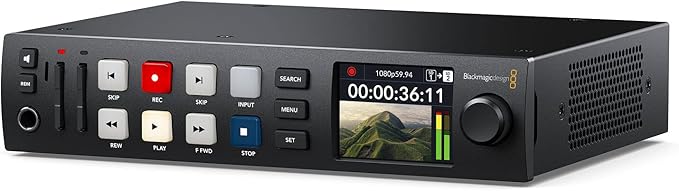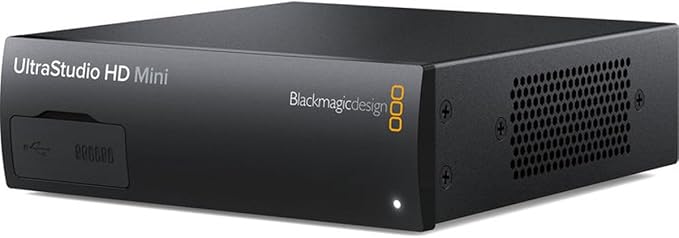
Blackmagic Design UltraStudio HD Mini
UltraStudio HD Mini for Thunderbolt is the highest quality capture and playback solutions for your Thunderbolt computer. UltraStudio HD Mini includes 3G‐SDI, analogue YUV and composite NTSC/PAL video inputs, two channel analogue audio in, and reference as well as RS‐422 for deck control! For output, you get dual link 3G‐SDI with simultaneous fill and key, plus HDMI. *Teranex Mini Smart Panel pictured is NOT INCLUDED, but can be purchased separately.
UltraStudio HD Mini for Thunderbolt is the highest quality capture and playback solutions for your Thunderbolt computer. UltraStudio HD Mini includes 3G‐SDI, analogue YUV and composite NTSC/PAL video inputs, two channel analogue audio in, and reference as well as RS‐422 for deck control! For output, you get dual link 3G‐SDI with simultaneous fill and key, plus HDMI. *Teranex Mini Smart Panel pictured is NOT INCLUDED, but can be purchased separately.
UltraStudio HD Mini for Thunderbolt is the highest quality capture and playback solutions for your Thunderbolt computer. UltraStudio HD Mini includes 3G‐SDI, analogue YUV and composite NTSC/PAL video inputs, two channel analogue audio in, and reference as well as RS‐422 for deck control! For output, you get dual link 3G‐SDI with simultaneous fill and key, plus HDMI. *Teranex Mini Smart Panel pictured is NOT INCLUDED, but can be purchased separately.
UltraStudio HD Mini for Thunderbolt is the highest quality capture and playback solutions for your Thunderbolt computer. UltraStudio HD Mini includes 3G‐SDI, analogue YUV and composite NTSC/PAL video inputs, two channel analogue audio in, and reference as well as RS‐422 for deck control! For output, you get dual link 3G‐SDI with simultaneous fill and key, plus HDMI. *Teranex Mini Smart Panel pictured is NOT INCLUDED, but can be purchased separately.
in 14 offers
The lowest price for Blackmagic Design UltraStudio HD Mini right now is $768.16 at avlfx Singapore, compared across 14 retailers.
The all-time low was $694.93 on 17 Mar 2026 — today's price is 11% above the lowest ever. That's a little above the best price we've seen.
Prices last updated 10 June 2026.
Last updated at 10/06/2026 03:03:30
Blackmagic Design BM-BDLKULSDMINHD Recorder
Affiliate Disclosure: We may receive a small commission for purchases made through this link at no extra cost to you. This helps support our site. Thank you!
Blackmagic Design UltraStudio HD Mini
Free delivery
Blackmagic Design Ultrastudio HD Mini
Delivery $16.50
Blackmagic UltraStudio HD Mini – Thunderbolt 3 Capture & Playback
Delivery between Mon – Tue $20
Blackmagic Design | UltraStudio HD Mini BDLKULSDMINHD - Gsus4
Free delivery
Blackmagic UltraStudio HD Mini
Free delivery
Blackmagic Design UltraStudio HD Mini
Delivery $177.90
Blackmagic Design UltraStudio HD MinI
Delivery $35.58
Blackmagic UltraStudio HD Mini
7-day returns
Blackmagic Design UltraStudio HD Mini
Delivery $77.51
originally posted on adorama.com
I love the device the quality of the video it records is great but it seems to only record uncompressed video and the files are huge. A half hour video took 200G, not a misprint 200G for 30 minutes. Maybe I can tell it to record in another format but that brings me to my only complaint, documentation. There is very little documentation on setting it up or operating it. It works best with it's own software but I have gotten it to work with XSplit and OBS but not Mnaycam. However the 2 it works with have drawbacks so I need to figure out how to use the native software but again the documentation that came with it is sparse and Google isn't helping so far. I would recommend but it is not without frustration which is why 4 satrs instead of 5.
originally posted on bhphotovideo.com
The Blackmagic Ultrastudio Express is an excellent Prosumer video capture device for non-copy protected sources. I can validate that it works great with OSX via thunderbolt as I am using it with a MacBook Retina and a Sony video camera. I've been able to use this device to input HQ video into a video conference meeting. The Good: Very simple to setup and get working. Tons of input/output options including HDMI. Works with Adobe Premiere CC. The Bad: Getting it to work with some Cameras can be tricky, as some models dont work at all. Your best bet is to consult the Blackmagic support forums before buying. Dont Forget: To buy a thunderbolt cable if you dont already have one. Oh and make sure your model of Mac has a thunderbolt input.
originally posted on bhphotovideo.com
I was looking for a device to take my component output from VHS and send to Mac. Works perfectly, but be sure to research the setup. The software download includes everything you need to begin transfer. It does require Thunderbolt 3. Great product.
| SDI Video Inputs | 1 x 3Gb/s SD/HD switchable |
| SDI Video Outputs | 2 x 3Gb/s SD/HD switchable |
| SDI Rates | 270Mb, 1.5G, 3G |
| HDMI Video Outputs | 1 x HDMI 1.4b Type-A connector |
| Analog Video Inputs | Y, B-Y, R-Y/NTSC/PAL |
Blackmagic Design BM-BDLKULSDMINHD Recorder
Affiliate Disclosure: We may receive a small commission for purchases made through this link at no extra cost to you. This helps support our site. Thank you!
Blackmagic Design UltraStudio HD Mini
Free delivery
Blackmagic Design Ultrastudio HD Mini
Delivery $16.50
Blackmagic UltraStudio HD Mini – Thunderbolt 3 Capture & Playback
Delivery between Mon – Tue $20
Blackmagic Design | UltraStudio HD Mini BDLKULSDMINHD - Gsus4
Free delivery
I love the device the quality of the video it records is great but it seems to only record uncompressed video and the files are huge. A half hour video took 200G, not a misprint 200G for 30 minutes. Maybe I can tell it to record in another format but that brings me to my only complaint, documentation. There is very little documentation on setting it up or operating it. It works best with it's own software but I have gotten it to work with XSplit and OBS but not Mnaycam. However the 2 it works with have drawbacks so I need to figure out how to use the native software but again the documentation that came with it is sparse and Google isn't helping so far. I would recommend but it is not without frustration which is why 4 satrs instead of 5.
The Blackmagic Ultrastudio Express is an excellent Prosumer video capture device for non-copy protected sources. I can validate that it works great with OSX via thunderbolt as I am using it with a MacBook Retina and a Sony video camera. I've been able to use this device to input HQ video into a video conference meeting. The Good: Very simple to setup and get working. Tons of input/output options including HDMI. Works with Adobe Premiere CC. The Bad: Getting it to work with some Cameras can be tricky, as some models dont work at all. Your best bet is to consult the Blackmagic support forums before buying. Dont Forget: To buy a thunderbolt cable if you dont already have one. Oh and make sure your model of Mac has a thunderbolt input.
I was looking for a device to take my component output from VHS and send to Mac. Works perfectly, but be sure to research the setup. The software download includes everything you need to begin transfer. It does require Thunderbolt 3. Great product.
Our goal was to join the SDI video signal from a Blackmagic Cinema Camera and audio signal from a shotgun mic processed through a Tascam DR-60D into the UltraStudio Express into an iMac 27 3.4 GHz i7 (32GB RAM, 3TB Fusion drive) for use with Livestream Producer. Not only did it not work but both tech support at Blackmagic and the video experts at B&H could not get it to work. We also tried another UltraStudio Express but this device failed as well.We then tried an AJA io XT and it worked perfectly.We decided not to use the Blackmagic Cinema Camera because there was an ever-present white noise quite different from room tone. We used our Canon XF100 for video and connected our Sennheiser shotgun mic to the XLR and sent the combined signal via HDMI to the AJA io XT ... MoreOur goal was to join the SDI video signal from a Blackmagic Cinema Camera and audio signal from a shotgun mic processed through a Tascam DR-60D into the UltraStudio Express into an iMac 27 3.4 GHz i7 (32GB RAM, 3TB Fusion drive) for use with Livestream Producer. Not only did it not work but both tech support at Blackmagic and the video experts at B&H could not get it to work. We also tried another UltraStudio Express but this device failed as well.We then tried an AJA io XT and it worked perfectly.We decided not to use the Blackmagic Cinema Camera because there was an ever-present white noise quite different from room tone. We used our Canon XF100 for video and connected our Sennheiser shotgun mic to the XLR and sent the combined signal via HDMI to the AJA io XT which connects to the iMac via Thunderbolt. The video signal was beautiful and the audio signal was rich and perfect with no white noise.We wasted 8 hours of everyone's time and missed our dress rehearsal deadline trying to get this device to work. We are staying away from Blackmagic from this point forward for any studio work.
This is my first 1 star review.I first saw the UltraStudio in Blackmagic's booth at NAB, last year. I told their booth worker that I wanted to:A. Record the SDI output of my Red camera for long shoots like interviews.B. Connecting a broadcast monitor for Final Cut Pro (FCP).C. Use it to line up Visual Effects (VFX) shots with a quicktime movie stored on my mac.I was told that it would be excellent for all of these tasks and was given a glossy brochure that confirmed all of the technical details, including that it records Time Code embedded in the SDI signal and that Blackmagic and Apple are like brothers. I was also told that it comes with a 'Live Key' application that would be GREAT for my VFX needs. I always test my equipment before going on a shoot. Before my ... MoreThis is my first 1 star review.I first saw the UltraStudio in Blackmagic's booth at NAB, last year. I told their booth worker that I wanted to:A. Record the SDI output of my Red camera for long shoots like interviews.B. Connecting a broadcast monitor for Final Cut Pro (FCP).C. Use it to line up Visual Effects (VFX) shots with a quicktime movie stored on my mac.I was told that it would be excellent for all of these tasks and was given a glossy brochure that confirmed all of the technical details, including that it records Time Code embedded in the SDI signal and that Blackmagic and Apple are like brothers. I was also told that it comes with a 'Live Key' application that would be GREAT for my VFX needs. I always test my equipment before going on a shoot. Before my interview project I plugged the Red Scarlet into the SDI input of the UltraStudio. After the usual amount of time futzing with drivers and re-downloading from the internet I was impressed with the Image Quality but was totally perplexed why I wasn't getting TimeCode. Of course I shoot double system and rely on TC to to sync my footage. I don't want to be slapping a slate in the face of my interviewee. Technical support was quick to respond but slow to get back to me that this device only reads Longitudinal Time Code (LTC) and not the more common Vertical Interval Time Code (VITC), which is the only TC that the RED camera supplies. So I had to scramble and find another device for that project. I ended up buying more Redmags so that I could record in full 4K quality.When it came time to edit that project I was thrilled that FCP-X added direct support for native Red R3D files and decided to upgrade. Unfortunately the BlackMagic UltraStudio doesn't support the current version of FCP either. Another couple of hours of futzing down the drain. Somebody please give me the link to the this fact or show me in the glossy brochure where it states that this device only supports FCP7. I promise this wasn't part of the discussion in the NAB booth. Lastly, on my VFX project I launched their LiveKey program and was immediately told that this devices isn't compatible with LiveKey, even though it is part of the download of drivers for this device. Tech support told me that they were working on it but that was 8 months ago. Latest drivers haven't helped.Other complaints:Only one Thunderbolt port makes this device incompatible with other single port devices on my computer. If you unplug this device at the end of the chain it interrupts the connection to your daisy chained hard drive. Only a matter of time before you hose that drive as a result. If this device had done a decent job of any of the three purposes I'd bought it for I would have been satisfied. As it is I think Blackmagic is the most ironically named company in our industry. I'll forward this review to their tech support and relay any follow up. Bottom line is that I would stay away until they sort out their drivers and make this device perform at least one of the functions that you might buy it for. I hope I win the $1000 B&H gift card for writing this review because I think I deserve it.
I've used this device a few times now and it works great for my needs. The only real drawback is that it only works with Thunderbolt 3, but since that's all my Macbook Pro has it's perfect. I use it mostly with Wirecast and it was an upgrade from the previous UltraStudio Express I had. A big plus with this unit is it can handle 1080p60, which the Express could not. Also, this unit can input and output video simultaneously, a huge upgrade from the past model. You really can't beat it for the price point either. Very slick.
We have a Mac Pro with a Decklink card that we use for video playback (via ProPresenter), but we needed a separate source that we could route directly to a projector for a special event. Since we only had MacBooks available to use as playback machines, we got the UltraStudio Express. It worked like a dream -- once I got online, downloaded the Blackmagic editing software package, and installed it so that the necessary drivers would show up (and once we learned that ProPresenter will only output HD from a MacBook if it has a Retina display, but that problem is with ProPresenter's programming). We got perfectly smooth playback, and we ran a video loop for hours without a single problem. This turned out to be the perfect way to integrate a MacBook into our SDI-based ... MoreWe have a Mac Pro with a Decklink card that we use for video playback (via ProPresenter), but we needed a separate source that we could route directly to a projector for a special event. Since we only had MacBooks available to use as playback machines, we got the UltraStudio Express. It worked like a dream -- once I got online, downloaded the Blackmagic editing software package, and installed it so that the necessary drivers would show up (and once we learned that ProPresenter will only output HD from a MacBook if it has a Retina display, but that problem is with ProPresenter's programming). We got perfectly smooth playback, and we ran a video loop for hours without a single problem. This turned out to be the perfect way to integrate a MacBook into our SDI-based system. I'm thinking about getting a second one, because these open up some interesting possibilities for mobile capture and playback.
An excellent device. I couldn't be happier with it. I am in the process of digitizing many video tapes of my wife's career in broadcasting but ran into a problem when trying to use equipment from JVC which requires firewire to tether it to my workstation. Windows 10 has no support for this, no machine drivers, so I had to find another way and the Blackmagic Design UltraStudio HD Mini saved the day. It was super simple to set up (my workstation is Thunderbolt 3 equipped and it is simple to use. The results are top drawer. I could have used a USB device like Elgato but that can record in MP4 only and I wanted to get the full resolution ingested into the machine. I also have HD equipment and the Mini handles that as well. I couldn't be happier.
We use this box in a few different ways. It serves as a great playback/capture/editing device for our iMac based edit suite. We also use it as part of our single or multicamera live broadcasting rigs. It takes the HDMI our from our cameras, or the SDI out from our ATEM 1 M/E and is a great ProRes recording, or Livestream broadcasting interface for our Mac mini i5. One issue that we've had is that not all of our HDMI cables seem to work with it. This may be cause by the Ultrastudio not putting out enough power over HDMI to drive the longer cables (and the amplified cables get their power from the input.) Beside that, it's been a great little tool. We look forward to getting one of the new Ultrastudio mini recorders for the Livestream setup and keeping the Express in ... MoreWe use this box in a few different ways. It serves as a great playback/capture/editing device for our iMac based edit suite. We also use it as part of our single or multicamera live broadcasting rigs. It takes the HDMI our from our cameras, or the SDI out from our ATEM 1 M/E and is a great ProRes recording, or Livestream broadcasting interface for our Mac mini i5. One issue that we've had is that not all of our HDMI cables seem to work with it. This may be cause by the Ultrastudio not putting out enough power over HDMI to drive the longer cables (and the amplified cables get their power from the input.) Beside that, it's been a great little tool. We look forward to getting one of the new Ultrastudio mini recorders for the Livestream setup and keeping the Express in the edit bay full time.
After building the PC and installing Windows 10, I installed the Blackmagic device and software. Then I installed Prem Pro. But....I had a lot of trouble getting PremPro to work properly.Buried deep in Blackmagic Design's website/support/help fiasco is this little nugget of information.If you install Adobe PremPro AFTER the Blackmagic install, they STRONGLY suggest that you un-install the Blackmagic software and re-install it so all the drivers go in the right place. (their words)I dunno....I thought that might be headline news. Doing things backward to make something work.Anyway, after that day (that I will never get back) of researching and eventually coming up with the fix, the device works quite well.No problems yet. Fast, snappy and so far...so good.
| SDI Video Inputs | 1 x 3Gb/s SD/HD switchable |
| SDI Video Outputs | 2 x 3Gb/s SD/HD switchable |
| SDI Rates | 270Mb, 1.5G, 3G |
| HDMI Video Outputs | 1 x HDMI 1.4b Type-A connector |
| Analog Video Inputs | Y, B-Y, R-Y/NTSC/PAL |