Brother QL-820NWB Label Printer
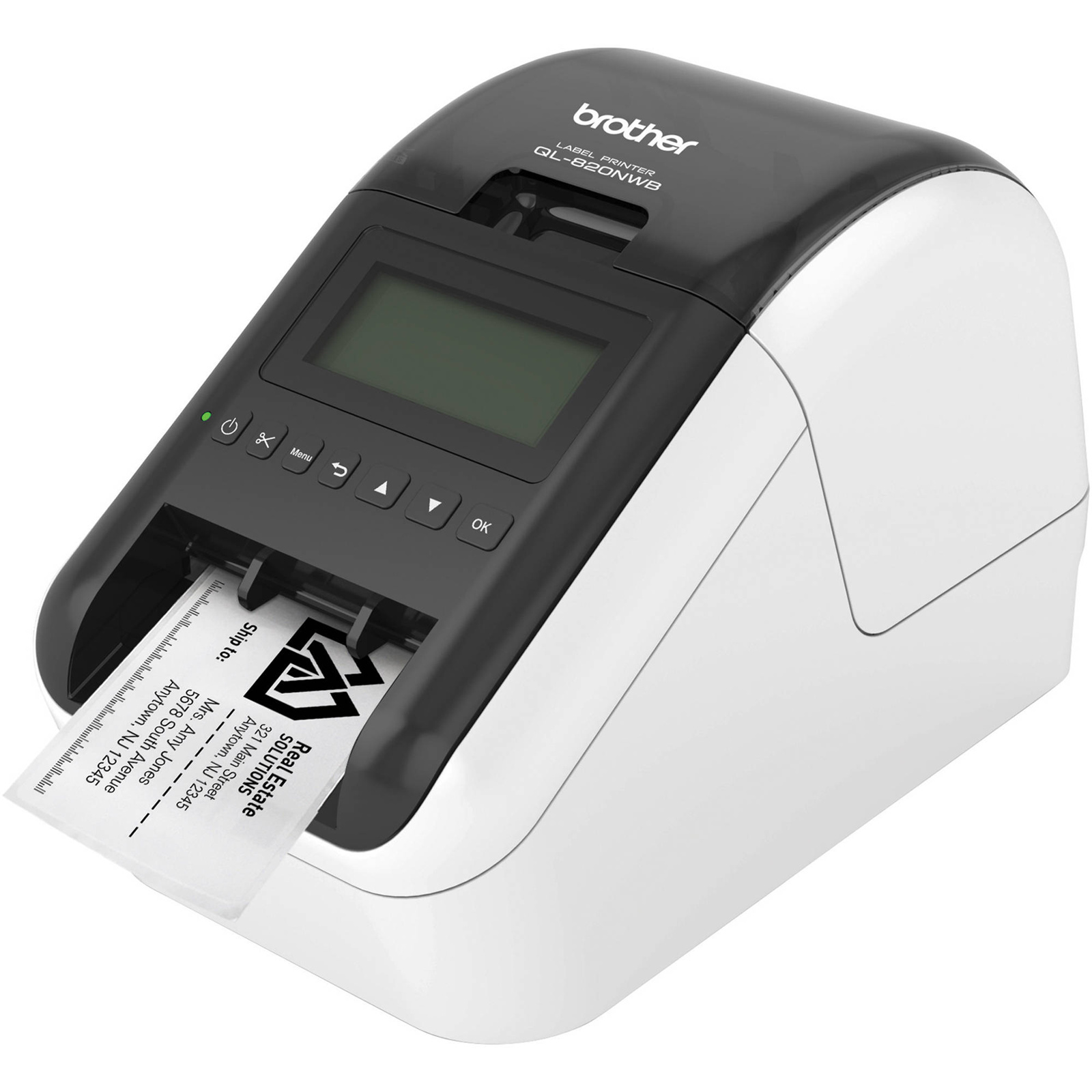
The QL-820NWB is BrotherÃÆââ,ìâ"âs fastest label printer of up to 110 labels/min. Equipped with a large graphic LCD display making it easier to operate and design personal labels, the Brother QL-820NWB can also work without being connected to a PC. Providing unprecedented flexibility and creative possibilities for users, this device prints in both black and red text, enabling a variety of use applications including warnings, highlighting important messages or emphasising offers on signs. Offering Bluetooth and wired network connectivity in addition to Wi-Fi, AirPrint and USB connection, and an optional Li-ion battery supporting mobile use, the QL-820NWB is the professional tool youÃÆââ,ìâ"âve been looking for.
The QL-820NWB is BrotherÃÆââ,ìâ"âs fastest label printer of up to 110 labels/min. Equipped with a large graphic LCD display making it easier to operate and design personal labels, the Brother QL-820NWB can also work without being connected to a PC. Providing unprecedented flexibility and creative possibilities for users, this device prints in both black and red text, enabling a variety of use applications including warnings, highlighting important messages or emphasising offers on signs. Offering Bluetooth and wired network connectivity in addition to Wi-Fi, AirPrint and USB connection, and an optional Li-ion battery supporting mobile use, the QL-820NWB is the professional tool youÃÆââ,ìâ"âve been looking for.
The QL-820NWB is BrotherÃÆââ,ìâ"âs fastest label printer of up to 110 labels/min. Equipped with a large graphic LCD display making it easier to operate and design personal labels, the Brother QL-820NWB can also work without being connected to a PC. Providing unprecedented flexibility and creative possibilities for users, this device prints in both black and red text, enabling a variety of use applications including warnings, highlighting important messages or emphasising offers on signs. Offering Bluetooth and wired network connectivity in addition to Wi-Fi, AirPrint and USB connection, and an optional Li-ion battery supporting mobile use, the QL-820NWB is the professional tool youÃÆââ,ìâ"âve been looking for.
The QL-820NWB is BrotherÃÆââ,ìâ"âs fastest label printer of up to 110 labels/min. Equipped with a large graphic LCD display making it easier to operate and design personal labels, the Brother QL-820NWB can also work without being connected to a PC. Providing unprecedented flexibility and creative possibilities for users, this device prints in both black and red text, enabling a variety of use applications including warnings, highlighting important messages or emphasising offers on signs. Offering Bluetooth and wired network connectivity in addition to Wi-Fi, AirPrint and USB connection, and an optional Li-ion battery supporting mobile use, the QL-820NWB is the professional tool youÃÆââ,ìâ"âve been looking for.
in 50 offers
The lowest price for Brother QL-820NWB Label Printer right now is $259.00 at Computer Alliance, compared across 40 retailers.
The all-time low was $79.37 on 18 Sept 2024 — today's price is 226% above the lowest ever. It has been notably cheaper before — worth setting a price alert.
Prices last updated 4 Oct 2026.
Last updated at 04/10/2026 19:36:33
Brother QL820NWB Label Maker Machine
Free delivery
Affiliate Disclosure: We may receive a small commission for purchases made through this link at no extra cost to you. This helps support our site. Thank you!
Brother QL-820NWB Professional Label Printer | Best Online Computer Store
Delivery $12.12
Brother QL-820NWB Professional Label Printer
Delivery $20
Brother QL-820NWB Professional Wi-Fi/Bluetooth Label Maker + Mobile Print (62mm)
Delivery between 8–13 Oct $22.65
Brother QL-820NWB, Wireless Networkable Hig Speed Label Printer, upto 62mm, 1 Yr Warranty
Delivery $7.95
Brother QL-820NWB Wireless High Speed Professional Label Printer With LCD Display
Delivery between 7–12 Oct $12
Brother QL-820NWB, Wireless Networkable Hig Speed Label Printer, upto 62mm, 1 Yr Warranty
Delivery $7.95
BROTHER QL-820NWB PROFESSIONAL LABEL PRINTER
Delivery between 13–16 Oct $32
Brother QL-820NWB Genuine Label Printer – USB, Wi-Fi, Bluetooth
Free delivery between 7–13 Oct
Brother QL-820NWB 62mm Network Label Printer USB Ethernet WiFi Bluetooth
Delivery $11.99
originally posted on brother.com.au
Purchased this label printer in the hopes of producing labels for enclosures, warning stickers, etc. First off the labels are not very colourful, not like what is shown in the photos. Reds are pink and washed out making for a very poor "warning" label. The printer has no drivers for Windows 11 so you can't use the USB cable. Labels are EXPENSIVE! and not waterproof
originally posted on brother-usa.com
I love these little printers. We have the small and larger version of it and they are great. Easy to use, great software and quick printing even from the phone. I only connect with BT since its so convenient and never disconnects.
originally posted on brother-usa.com
Great features - Wi-Fi and Bluetooth. The implementation of these features is what is lacking! It doesn't seem like you can just set it up with the Wi-Fi and forget it with it able to be printed to whenever you needed to use it. I am still working on it, though. I am also finding it doesn't accept the older labels of the same type and noticed the new ones, with the same number, have a larger base with more holes which enable the machine to read what label is installed - not acceptable! I kept the machine under the hopes I can learn to use it at a later date but it is VERY EXPENSIVE considering it has only worked for me when plugged directly into the laptop!
| Tape Width | 2.4 in (62mm) |
| Cartridge Type | DK |
| Consumable Compatibility | Brother genuine DK drop in labeling supplies, DK-2251 |
| Label Color | Black/Red, White |
| Label Material | Paper |

Brother QL820NWB Label Maker Machine
Free delivery
Affiliate Disclosure: We may receive a small commission for purchases made through this link at no extra cost to you. This helps support our site. Thank you!
Brother QL-820NWB Professional Label Printer | Best Online Computer Store
Delivery $12.12
Brother QL-820NWB Professional Label Printer
Delivery $20
Brother QL-820NWB Professional Wi-Fi/Bluetooth Label Maker + Mobile Print (62mm)
Delivery between 8–13 Oct $22.65
Brother QL-820NWB, Wireless Networkable Hig Speed Label Printer, upto 62mm, 1 Yr Warranty
Delivery $7.95
Purchased this label printer in the hopes of producing labels for enclosures, warning stickers, etc. First off the labels are not very colourful, not like what is shown in the photos. Reds are pink and washed out making for a very poor "warning" label. The printer has no drivers for Windows 11 so you can't use the USB cable. Labels are EXPENSIVE! and not waterproof
I love these little printers. We have the small and larger version of it and they are great. Easy to use, great software and quick printing even from the phone. I only connect with BT since its so convenient and never disconnects.
Great features - Wi-Fi and Bluetooth. The implementation of these features is what is lacking! It doesn't seem like you can just set it up with the Wi-Fi and forget it with it able to be printed to whenever you needed to use it. I am still working on it, though. I am also finding it doesn't accept the older labels of the same type and noticed the new ones, with the same number, have a larger base with more holes which enable the machine to read what label is installed - not acceptable! I kept the machine under the hopes I can learn to use it at a later date but it is VERY EXPENSIVE considering it has only worked for me when plugged directly into the laptop!
The printer is very good, but unfortunately wireless printing is very unreliable and tedious from a mobile device (or at least from an iPhone).The mobile app is really poorly designed, and that is a major drawback since I’ve specifically bought this WiFi printer for wireless printing!It is disappointing to see that Brother decided to abandon its customers, by not listening to their feedback and concerns - as the app has not been significantly improved at all for over 2 years! (A quick check on AppStore for Brother iPrint & Label will illustrate my point - as the reviews are poor.)My advice would be - DO NOT BUY this printer if you’re planning to print from an iPhone! This is because of poor software implementation and complete disregard to customer ... MoreThe printer is very good, but unfortunately wireless printing is very unreliable and tedious from a mobile device (or at least from an iPhone).The mobile app is really poorly designed, and that is a major drawback since I’ve specifically bought this WiFi printer for wireless printing!It is disappointing to see that Brother decided to abandon its customers, by not listening to their feedback and concerns - as the app has not been significantly improved at all for over 2 years! (A quick check on AppStore for Brother iPrint & Label will illustrate my point - as the reviews are poor.)My advice would be - DO NOT BUY this printer if you’re planning to print from an iPhone! This is because of poor software implementation and complete disregard to customer feedback!(If I didn’t already invest in lots of extra label rolls, I would have sold this printer and bought one with adequate support from any other manufacturer.)
This is great little printer will all it’s connectivity features. I have it connected to the home WiFi but do sometimes use it with USB and Bluetooth. I print from my Windows and Apple devices. It’s great to be able to print a label at will, especially in my workshop etc. I like the paper and film labels but I mainly use the continuous ones rather than the die cut ones. This is because it’s easy to switch between portrait and landscape modes from within the app so for smaller labels I just set it to portrait and then the cut length to say 13mm. It would be nice to see some different colour film labels though. The printer app for the iPad and iPhone is good too but I could like to be to see my saved labels created from within the app on my iPad and iPhone.
I purchased this label maker for the office to produce name badges. After printing out 500 yesterday, it was basically a snap, and I'm very happy with this purchase. Based on user reviews, I downloaded the software from the Brother website. I was able to use one of their templates to add a logo, name, and organization for the badges. I was very apprehensive about transferring the data from an Excel file to produce the badges, but it couldn't have been easier. I've struggled in the past trying to format Avery labels, trying to adjust the placement and correct font sizes for long names, etc. I didn't have time to figure out how to make edits to individual badges before printing, but the font size automatically adjusts to make it fit. The label rolls are easy to insert ... MoreI purchased this label maker for the office to produce name badges. After printing out 500 yesterday, it was basically a snap, and I'm very happy with this purchase. Based on user reviews, I downloaded the software from the Brother website. I was able to use one of their templates to add a logo, name, and organization for the badges. I was very apprehensive about transferring the data from an Excel file to produce the badges, but it couldn't have been easier. I've struggled in the past trying to format Avery labels, trying to adjust the placement and correct font sizes for long names, etc. I didn't have time to figure out how to make edits to individual badges before printing, but the font size automatically adjusts to make it fit. The label rolls are easy to insert and replace. I used the red/black version to have two colors on the badges. We didn't want to use the badges as is with the adhesive backing. So we placed them in plastic badge holders, and that worked well. Overall, it was an excellent experience.
Purchased this printer because of its 2 color capability. The red tends to blend in with the black giving it a hazey look. The colors look good when printed by themselves. I would recommend the vc500 if you want color although the paper is expensive. If you want red and black printing the paper for this printer is expensive as well. I purchased the battery pack as well it works great for portable operation. I really like the wireless capability and general label printing of this printer. It uses all the same size paper as my 720 printer so I can have different size labels in each printer without changing.
20 year IT professional here. I would throw this in the face of the designer and the managers that let this go to market.IssuesLack of robust menu - can not setup network via interface, only generic settingsLabels do not tear cleanly - there is no tear cut line and the 2 feed guides on the front (why?!) tear of the labelRequires extraneous software to manage - there is no reason this shouldn't be all integrated into the menu and or a web interface.Can't view printer info without printing label - that costs me money and is wastefulI spent more time troubleshooting the network on this device than I should have. Every other device of its type has on screen menu ways to look up info and change settings like static network. Seems very little priority to how ... More20 year IT professional here. I would throw this in the face of the designer and the managers that let this go to market.IssuesLack of robust menu - can not setup network via interface, only generic settingsLabels do not tear cleanly - there is no tear cut line and the 2 feed guides on the front (why?!) tear of the labelRequires extraneous software to manage - there is no reason this shouldn't be all integrated into the menu and or a web interface.Can't view printer info without printing label - that costs me money and is wastefulI spent more time troubleshooting the network on this device than I should have. Every other device of its type has on screen menu ways to look up info and change settings like static network. Seems very little priority to how the customer uses it was taken into consideration.
First and foremost, the printer is a very good dedicated label printer. So far it is performing very well. I purchased this to replace an earlier (corded) model because I have moved away from using a desktop, and want to be able to print from my laptop without having to hook up cables.The software installation wasn't an awesome experience on my MacBook Pro. The Brother automatic software installer tried to install everything, but I got an error message saying the installer failed to determine my location, and so I had to manually install everything. Most of that went okay, but running the wireless settings software for the printer took several attempts before it would successfully run.The P-Touch editor software does not have any templates for the 2.4 Black/Red ... MoreFirst and foremost, the printer is a very good dedicated label printer. So far it is performing very well. I purchased this to replace an earlier (corded) model because I have moved away from using a desktop, and want to be able to print from my laptop without having to hook up cables.The software installation wasn't an awesome experience on my MacBook Pro. The Brother automatic software installer tried to install everything, but I got an error message saying the installer failed to determine my location, and so I had to manually install everything. Most of that went okay, but running the wireless settings software for the printer took several attempts before it would successfully run.The P-Touch editor software does not have any templates for the 2.4 Black/Red labels, so I had to create my own. Hopefully they'll add templates for them at some point.
I was excited to upgrade to this label maker however its completely disappointing. The print quality is rubbish. Im getting blue tones when printing black and white. It also doesn't stick. Ive tried on both plastic and glass and the edges just curl off. I even tried adding double sided tape to help but they won't even stick to that. A complete waste of money.
| Tape Width | 2.4 in (62mm) |
| Cartridge Type | DK |
| Consumable Compatibility | Brother genuine DK drop in labeling supplies, DK-2251 |
| Label Color | Black/Red, White |
| Label Material | Paper |