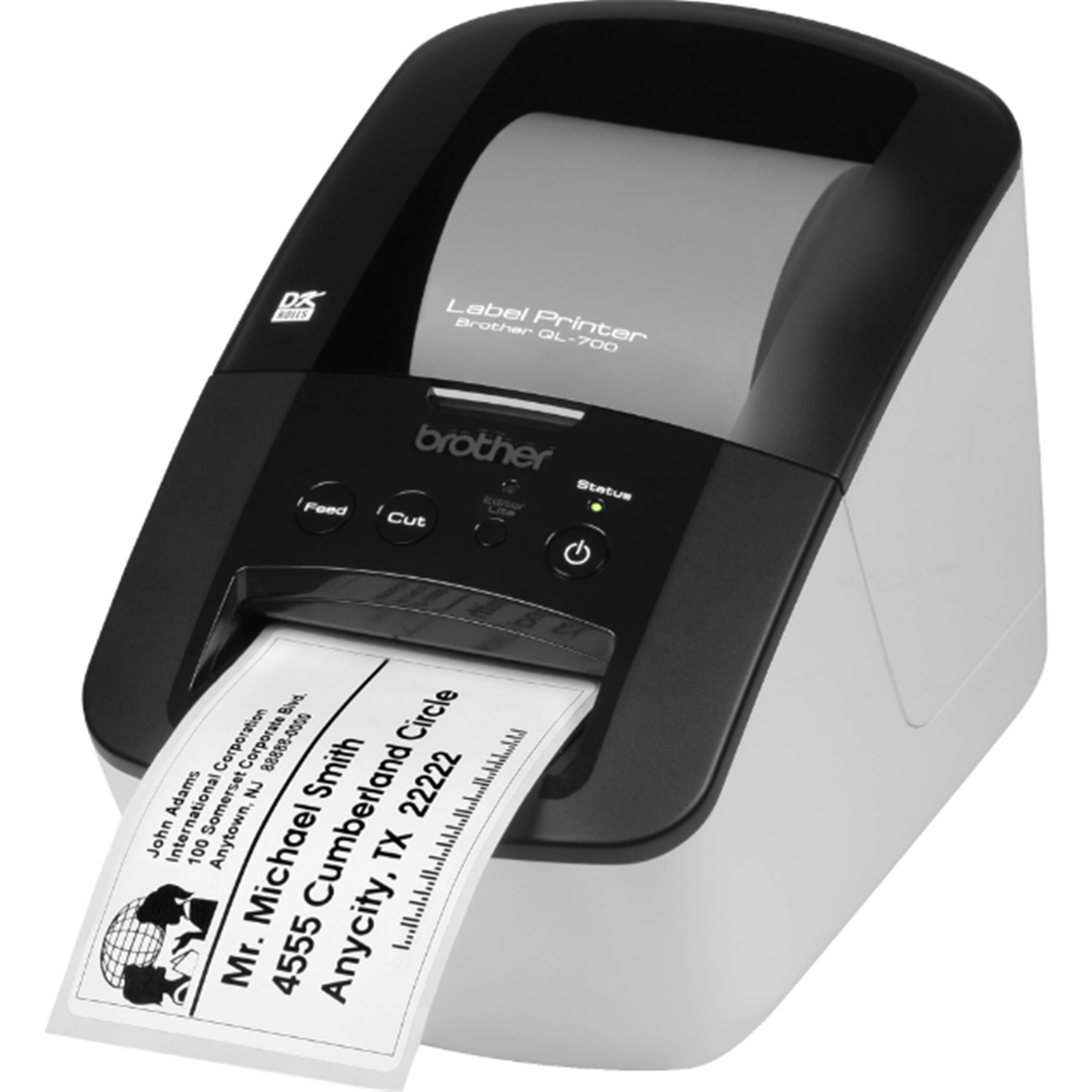
Brother QL 700 Professional Label Printer
The Brother QL-700 Professional Label Printer makes it easy to create your own professional labels and print them in a snap. The spool incorporates a roll guide so you always insert the label correctly and the machine recognises the size. Plus. it utilises plug and print functionality and comes with 2 rolls of labels so you're ready to go right away. KEY FEATURES ˇ With the Brother QL-700 you can print professional labels easily. ˇ Prints up to 93 labels per minute or 150 mm per second. ˇ Print resolution of 300 x 600 dpi your labels will look great. ˇ Built-in cutter helps you to keep your labels looking neat and professional. ˇ Brother DK label rolls with a maximum roll width of 62 mm and a maximum label length of up to 1m. ˇ Includes P-Touch Editor Lite software so you don't need to install the program on your PC or Mac. ˇ Utilises thermal printing technology so there's no ink or toner required.
The Brother QL-700 Professional Label Printer makes it easy to create your own professional labels and print them in a snap. The spool incorporates a roll guide so you always insert the label correctly and the machine recognises the size. Plus. it utilises plug and print functionality and comes with 2 rolls of labels so you're ready to go right away. KEY FEATURES ˇ With the Brother QL-700 you can print professional labels easily. ˇ Prints up to 93 labels per minute or 150 mm per second. ˇ Print resolution of 300 x 600 dpi your labels will look great. ˇ Built-in cutter helps you to keep your labels looking neat and professional. ˇ Brother DK label rolls with a maximum roll width of 62 mm and a maximum label length of up to 1m. ˇ Includes P-Touch Editor Lite software so you don't need to install the program on your PC or Mac. ˇ Utilises thermal printing technology so there's no ink or toner required.
The Brother QL-700 Professional Label Printer makes it easy to create your own professional labels and print them in a snap. The spool incorporates a roll guide so you always insert the label correctly and the machine recognises the size. Plus. it utilises plug and print functionality and comes with 2 rolls of labels so you're ready to go right away. KEY FEATURES ˇ With the Brother QL-700 you can print professional labels easily. ˇ Prints up to 93 labels per minute or 150 mm per second. ˇ Print resolution of 300 x 600 dpi your labels will look great. ˇ Built-in cutter helps you to keep your labels looking neat and professional. ˇ Brother DK label rolls with a maximum roll width of 62 mm and a maximum label length of up to 1m. ˇ Includes P-Touch Editor Lite software so you don't need to install the program on your PC or Mac. ˇ Utilises thermal printing technology so there's no ink or toner required.
The Brother QL-700 Professional Label Printer makes it easy to create your own professional labels and print them in a snap. The spool incorporates a roll guide so you always insert the label correctly and the machine recognises the size. Plus. it utilises plug and print functionality and comes with 2 rolls of labels so you're ready to go right away. KEY FEATURES ˇ With the Brother QL-700 you can print professional labels easily. ˇ Prints up to 93 labels per minute or 150 mm per second. ˇ Print resolution of 300 x 600 dpi your labels will look great. ˇ Built-in cutter helps you to keep your labels looking neat and professional. ˇ Brother DK label rolls with a maximum roll width of 62 mm and a maximum label length of up to 1m. ˇ Includes P-Touch Editor Lite software so you don't need to install the program on your PC or Mac. ˇ Utilises thermal printing technology so there's no ink or toner required.
in 55 offers
The lowest price for Brother QL 700 Professional Label Printer right now is $82.00 at Device Deal, compared across 34 retailers.
The all-time low was $20.69 on 3 Oct 2026 — today's price is 296% above the lowest ever. It has been notably cheaper before — worth setting a price alert.
Prices last updated 6 Oct 2026.
Last updated at 06/10/2026 02:21:13
Brother QL-700 Label Maker, USB 2.0, Address Label Printer, Desktop, Up to 62mm Wide Labels Black Compact
Free delivery
Affiliate Disclosure: We may receive a small commission for purchases made through this link at no extra cost to you. This helps support our site. Thank you!
Brother QL-700 62mm Direct Thermal Desktop Label Printer USB
Delivery $12.99
Brother QL700 Professional Label Printer QL-700
Free delivery between Tue – Fri
Brother QL-700 Professional PC/MAC Labeller/Label Maker Printer DK Die-Cut Paper
Delivery between 8–16 Oct $10
Brother QL-700 Professional PC/MAC Labeller/Label Maker Printer DK Die-Cut Paper
Delivery between 9–14 Oct $19.25
Brother QL-700 Label Printer
Delivery between Wed – Thu $12.65
Brother Ql700 Label Printer
Delivery $11.50
Affiliate Disclosure: We may receive a small commission for purchases made through this link at no extra cost to you. This helps support our site. Thank you!
Brother QL-700 Plug And Print Professional High-Performance Label Printer
Delivery between 8–13 Oct $14
Brother QL-700 Genuine Thermal Label Printer
Free delivery between 7–13 Oct
Brother QL-700 Professional Label Printers
Delivery between Tue – Mon $8
originally posted on woolworths.com.au
Great product, highly recommend. I got it as I have to send a lot of letters for work, and handwriting the addresses was becoming messy and time consuming. Only issue had was during set up, getting the P-touch editor to work. My computer was not recognising the QL-700 as a printer, making it impossible to access from the app. Changed a bunch of settings, lots of unplugging and replugging and finally got it all working, but I suspect the product is starting to become a little outdated for the current Windows versions - the accompanying instructions weren't entirely useful for the non-physical set-up, and I had to look online for fixes and things to try. However, once you get the product set-up, it's a fabulous item and I don't think you should be put off by the ... MoreGreat product, highly recommend. I got it as I have to send a lot of letters for work, and handwriting the addresses was becoming messy and time consuming. Only issue had was during set up, getting the P-touch editor to work. My computer was not recognising the QL-700 as a printer, making it impossible to access from the app. Changed a bunch of settings, lots of unplugging and replugging and finally got it all working, but I suspect the product is starting to become a little outdated for the current Windows versions - the accompanying instructions weren't entirely useful for the non-physical set-up, and I had to look online for fixes and things to try. However, once you get the product set-up, it's a fabulous item and I don't think you should be put off by the set-up if you're capable of systermatically troubleshooting through the process until it works. If you're not confident with your computer, I'm sure brother have a wonderful team to contact for assistance too.
originally posted on woolworths.com.au
Can only print from the dedicated software!! You cannot use it as a normal label printer from other software. Only found out about this after we bought it to specifically print labels from our dispensing software. Has a very poor cutter mechanism and is very prone to jamming. It is such a process to remove any stickers jamming the cutter in place, you have to open it completely up. We had already sent it once to be repaired under warranty.
originally posted on warehousestationery.co.nz
Bought this other day and fully recommend it. Simple to set up, very easy to use.Tip: There is a button on the machine called Editor Lite, when you start up the machine a folder will open showing a Windows and Apple OS quick link to use the machine without installation,this is when that light is on. I installed the software on Win7 no problem but when trying to do some text prints kept getting error - Can't find printer. Oh no....mucking around for hours reinstalling software, trying different computers and finally cracked it.....Turn off the Editor Lite button. Editor Lite runs the machine without software so with the software and Editor Lite turned on the computer can't see the machine.Anyways.....With the software, absolutely unbelievable. I needed to put QR ... MoreBought this other day and fully recommend it. Simple to set up, very easy to use.Tip: There is a button on the machine called Editor Lite, when you start up the machine a folder will open showing a Windows and Apple OS quick link to use the machine without installation,this is when that light is on. I installed the software on Win7 no problem but when trying to do some text prints kept getting error - Can't find printer. Oh no....mucking around for hours reinstalling software, trying different computers and finally cracked it.....Turn off the Editor Lite button. Editor Lite runs the machine without software so with the software and Editor Lite turned on the computer can't see the machine.Anyways.....With the software, absolutely unbelievable. I needed to put QR Codes on my labels and bought a software to make the QR Codes. Waste of time, the machine has that function plus around 20 other code types, Bar Codes, Line Codes, etc that it can do automatically simply add the text to produce the code. Again absolutely awesome!
| Tape Width | 2.4 in |
| Cartridge Type | DK |
| Consumable Compatibility | DK tape |
| Label Color | Yellow, Clear, White |
| Label Material | Paper |

Brother QL-700 Label Maker, USB 2.0, Address Label Printer, Desktop, Up to 62mm Wide Labels Black Compact
Free delivery
Affiliate Disclosure: We may receive a small commission for purchases made through this link at no extra cost to you. This helps support our site. Thank you!
Brother QL-700 62mm Direct Thermal Desktop Label Printer USB
Delivery $12.99
Brother QL700 Professional Label Printer QL-700
Free delivery between Tue – Fri
Brother QL-700 Professional PC/MAC Labeller/Label Maker Printer DK Die-Cut Paper
Delivery between 8–16 Oct $10
Brother QL-700 Professional PC/MAC Labeller/Label Maker Printer DK Die-Cut Paper
Delivery between 9–14 Oct $19.25
Great product, highly recommend. I got it as I have to send a lot of letters for work, and handwriting the addresses was becoming messy and time consuming. Only issue had was during set up, getting the P-touch editor to work. My computer was not recognising the QL-700 as a printer, making it impossible to access from the app. Changed a bunch of settings, lots of unplugging and replugging and finally got it all working, but I suspect the product is starting to become a little outdated for the current Windows versions - the accompanying instructions weren't entirely useful for the non-physical set-up, and I had to look online for fixes and things to try. However, once you get the product set-up, it's a fabulous item and I don't think you should be put off by the ... MoreGreat product, highly recommend. I got it as I have to send a lot of letters for work, and handwriting the addresses was becoming messy and time consuming. Only issue had was during set up, getting the P-touch editor to work. My computer was not recognising the QL-700 as a printer, making it impossible to access from the app. Changed a bunch of settings, lots of unplugging and replugging and finally got it all working, but I suspect the product is starting to become a little outdated for the current Windows versions - the accompanying instructions weren't entirely useful for the non-physical set-up, and I had to look online for fixes and things to try. However, once you get the product set-up, it's a fabulous item and I don't think you should be put off by the set-up if you're capable of systermatically troubleshooting through the process until it works. If you're not confident with your computer, I'm sure brother have a wonderful team to contact for assistance too.
Can only print from the dedicated software!! You cannot use it as a normal label printer from other software. Only found out about this after we bought it to specifically print labels from our dispensing software. Has a very poor cutter mechanism and is very prone to jamming. It is such a process to remove any stickers jamming the cutter in place, you have to open it completely up. We had already sent it once to be repaired under warranty.
Bought this other day and fully recommend it. Simple to set up, very easy to use.Tip: There is a button on the machine called Editor Lite, when you start up the machine a folder will open showing a Windows and Apple OS quick link to use the machine without installation,this is when that light is on. I installed the software on Win7 no problem but when trying to do some text prints kept getting error - Can't find printer. Oh no....mucking around for hours reinstalling software, trying different computers and finally cracked it.....Turn off the Editor Lite button. Editor Lite runs the machine without software so with the software and Editor Lite turned on the computer can't see the machine.Anyways.....With the software, absolutely unbelievable. I needed to put QR ... MoreBought this other day and fully recommend it. Simple to set up, very easy to use.Tip: There is a button on the machine called Editor Lite, when you start up the machine a folder will open showing a Windows and Apple OS quick link to use the machine without installation,this is when that light is on. I installed the software on Win7 no problem but when trying to do some text prints kept getting error - Can't find printer. Oh no....mucking around for hours reinstalling software, trying different computers and finally cracked it.....Turn off the Editor Lite button. Editor Lite runs the machine without software so with the software and Editor Lite turned on the computer can't see the machine.Anyways.....With the software, absolutely unbelievable. I needed to put QR Codes on my labels and bought a software to make the QR Codes. Waste of time, the machine has that function plus around 20 other code types, Bar Codes, Line Codes, etc that it can do automatically simply add the text to produce the code. Again absolutely awesome!
This product doesn't work on 4k resolution systems and is no longer compatible with Windows11. This is outdated technology and should not be sold. It even has some type of ancient disk thing? What did they call them 30years ago a CDROM or something?I'll be taking this back tomorrow as the drivers are defective if no longer compatible with Windows.
Absolutely not a plug-and-play installation.I tried setting it up multiple times, restarted my laptop twice, and still couldn’t get it to connect to the printer. Complete waste of time and money. I ended up watching a 22-minute YouTube tutorial—yes, a full 22 minutes for what should be straightforward! As someone who has installed many printers before, this one is unnecessarily complicated and frustrating. HATE IT.
We bought this printer a week ago. The box contains a CD. I am guessing that the software and drivers are on the CD. Only we do not have a CD drive. That is outdated. It should have contained a USB drive instead.My (retired engineer) husband and I each attempted to install the drivers and get the printer working on our computer. We each watched the installation instruction videos and each spent an hour trying to install it and were unsuccessful. My husband contacted support, obtained the installation steps, and was then able to install the drivers and get the label printer working.Since Epson is still selling this, it needs to update the technology. We are not happy to have needlessly wasted our time.
Perfect. Prints out high quality labels with easy to use computer interface. Just follow the instructions and you’ll be set. Paper stickers they provide has strong adhesive and can be designed into any length with a fixed width. Printer also automatically cuts to length with good quality print.
I needed a label printer to identify some parts I had purchased. I checked on-line at my local store and found a cashback deal on the QL-700. Brother has been doing label printers for a long time and I have had experience with Brother printers in the past, so I was happy to look at the brand options.I was delighted to find the installation simple enough, along with effective on-line support when I needed it.It sits on my desk in a corner, waiting patiently to spit out the next label. My parts finally look organised and allow me to see all the relevant information at the first glance.
Alright I give it some credit this product is easy to setup don't need instructions I give it that. But man the software this thing uses is awful its only prints labels by 62mm by 12.7mm that's the max it gives for height and width. Bought this product thinking it would be good for Courier Post tracking labelsbut does not work too small. I highly don't recommend this product if you are buying it for tracking labels cause its useless at it.
The labels will not print - I was told it was because I was not using brother labels. The machine is brand new and the labels were included. I tried three times to get help without any success and the chat just stopped. The machine worked when I set it up initially then next day it would not print. I tried dowloading again and got the "installation complete" message - bluntly told it was because the labels are not brother - strange as they came in the box with the machine and have BROTHER stamped all the way through on the back of the label I now have to go to the trouble of returning the machine and the BROTHER LABELS and will have to try another company who will be able to provide a working machine. waste of time, money and energy
| Tape Width | 2.4 in |
| Cartridge Type | DK |
| Consumable Compatibility | DK tape |
| Label Color | Yellow, Clear, White |
| Label Material | Paper |