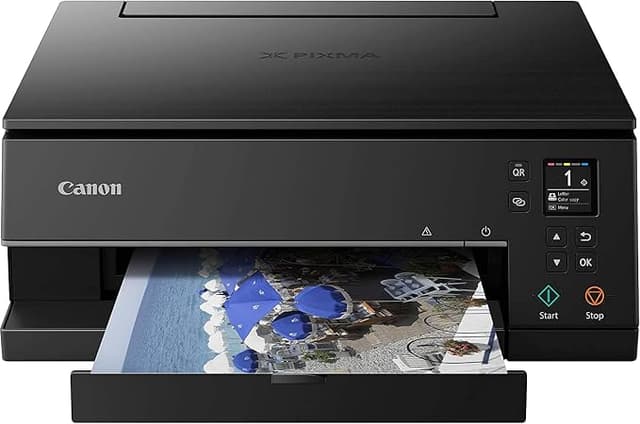
Canon - TS6360a PIXMA Home Printer
Print, Copy, Scan With Ease A sleek 3-in-1 device with smooth wireless connectivity and creative capabilities means this 5-individual-ink multitasker is perfect in your home office for documents and family projects. Intuitive LED Status Bar Designed to make life easy, the LED Status Bar will communicate the printer's status through colourful lights. High Quality Printing Print your favourite photos to last with Canon's ChromaLife100 inks, while dedicated pigment black ink delivers crisp documents with sharp text. Perfect For Family Projects With the ability to print on a varied range of high quality Canon paper, printing Instagram styled square photos, or on magnetic and restickable paper has never been easier. You can also seamlessly print from Canon Creative Park where you have access to hundreds of paper craft downloads- keep the kids entertained for hours! Easy Connect Connecting your smart device with your printer has never been easier. Simply scan the QR code displayed on the OLED screen with the Canon Inkjet Print App for seamless printing. Automated Functionality Automated features such as 2-sided printing, automatic expandable output tray and auto paper width detector help you save time in the home or office.
Print, Copy, Scan With Ease A sleek 3-in-1 device with smooth wireless connectivity and creative capabilities means this 5-individual-ink multitasker is perfect in your home office for documents and family projects. Intuitive LED Status Bar Designed to make life easy, the LED Status Bar will communicate the printer's status through colourful lights. High Quality Printing Print your favourite photos to last with Canon's ChromaLife100 inks, while dedicated pigment black ink delivers crisp documents with sharp text. Perfect For Family Projects With the ability to print on a varied range of high quality Canon paper, printing Instagram styled square photos, or on magnetic and restickable paper has never been easier. You can also seamlessly print from Canon Creative Park where you have access to hundreds of paper craft downloads- keep the kids entertained for hours! Easy Connect Connecting your smart device with your printer has never been easier. Simply scan the QR code displayed on the OLED screen with the Canon Inkjet Print App for seamless printing. Automated Functionality Automated features such as 2-sided printing, automatic expandable output tray and auto paper width detector help you save time in the home or office.
Print, Copy, Scan With Ease A sleek 3-in-1 device with smooth wireless connectivity and creative capabilities means this 5-individual-ink multitasker is perfect in your home office for documents and family projects. Intuitive LED Status Bar Designed to make life easy, the LED Status Bar will communicate the printer's status through colourful lights. High Quality Printing Print your favourite photos to last with Canon's ChromaLife100 inks, while dedicated pigment black ink delivers crisp documents with sharp text. Perfect For Family Projects With the ability to print on a varied range of high quality Canon paper, printing Instagram styled square photos, or on magnetic and restickable paper has never been easier. You can also seamlessly print from Canon Creative Park where you have access to hundreds of paper craft downloads- keep the kids entertained for hours! Easy Connect Connecting your smart device with your printer has never been easier. Simply scan the QR code displayed on the OLED screen with the Canon Inkjet Print App for seamless printing. Automated Functionality Automated features such as 2-sided printing, automatic expandable output tray and auto paper width detector help you save time in the home or office.
Print, Copy, Scan With Ease A sleek 3-in-1 device with smooth wireless connectivity and creative capabilities means this 5-individual-ink multitasker is perfect in your home office for documents and family projects. Intuitive LED Status Bar Designed to make life easy, the LED Status Bar will communicate the printer's status through colourful lights. High Quality Printing Print your favourite photos to last with Canon's ChromaLife100 inks, while dedicated pigment black ink delivers crisp documents with sharp text. Perfect For Family Projects With the ability to print on a varied range of high quality Canon paper, printing Instagram styled square photos, or on magnetic and restickable paper has never been easier. You can also seamlessly print from Canon Creative Park where you have access to hundreds of paper craft downloads- keep the kids entertained for hours! Easy Connect Connecting your smart device with your printer has never been easier. Simply scan the QR code displayed on the OLED screen with the Canon Inkjet Print App for seamless printing. Automated Functionality Automated features such as 2-sided printing, automatic expandable output tray and auto paper width detector help you save time in the home or office.
in 11 offers
The lowest price for Canon - TS6360a PIXMA Home Printer right now is $152.22 at Hot Toner, compared across 9 retailers.
The all-time low was $30.00 on 1 Aug 2023 — today's price is 407% above the lowest ever. It has been notably cheaper before — worth setting a price alert.
Prices last updated 22 Oct 2026.
Last updated at 22/10/2026 09:27:30
Canon TS6360A Pixma Multifunction Printer, Black, Medium (TS6360A) [AU Version]
Affiliate Disclosure: We may receive a small commission for purchases made through this link at no extra cost to you. This helps support our site. Thank you!
Canon PIXMA TS6360a HOME Inkjet MFP TS6360A
Free delivery between Fri – Tue
Canon PIXMA Home TS6360A Multi-Function Printer - Black
Canon TS6360A Pixma Home Multifunction Printer Black
Delivery between 28–30 Oct $9.95
Canon Pixma Home TS6360A MFP Print Copy Scan Printer Colour
Free delivery between 23–30 Oct
Canon Pixma Home TS6360A MFP Print Copy Scan Printer Colour
Delivery between 26–29 Oct $10
Ex Demo Canon PIXMA Home Office TS-6360a A4 All-in-One MFP Printer TS6360a (938M)
Delivery between 27–30 Oct $26.05
Canon PIXMA Home Office TS6360a A4 All-in-One Wireless Inkjet Printer – [TS6360a]
Delivery $29.95
Canon Pixma Ts6360a 3-in-1 Colour A4 Multifunction
Free delivery
Affiliate Disclosure: We may receive a small commission for purchases made through this link at no extra cost to you. This helps support our site. Thank you!
originally posted on jbhifi.com.au
Bought the Canon TS6360A as a replacement for the Canon TS6260 printer which stopped printing though ink cartridges were near full and also had spare cartridges — so could use the same cartridges in the TS6360A. It looks good and set up was easy, but have just printed 2 pages so far — therefore its too early to evaluate and hope it lasts long and does not pack-up like the TS6260!
originally posted on harveynorman.com.au
Recently purchased Canon Pixma home printed from Harvey Norman Booval Store. Online purchase was easy, I got the best deal available and printer was ready to collect the next day. Canon Pixma is easy to set up and use, plus is a great size for home. Very happy with purchase and customer service was excellent. Thanks.
originally posted on jbhifi.com.au
So easy to set up and use. Easy to follow on screen instructions. Very good value for money. Print quality is excellent. Highly recommended.
| Wireless | Yes |
| Yes | |
| Scan | Yes |
| Copy | Yes |
| Automatic Double Sided Printing | Yes |

Canon TS6360A Pixma Multifunction Printer, Black, Medium (TS6360A) [AU Version]
Affiliate Disclosure: We may receive a small commission for purchases made through this link at no extra cost to you. This helps support our site. Thank you!
Canon PIXMA TS6360a HOME Inkjet MFP TS6360A
Free delivery between Fri – Tue
Canon PIXMA Home TS6360A Multi-Function Printer - Black
Canon TS6360A Pixma Home Multifunction Printer Black
Delivery between 28–30 Oct $9.95
Canon Pixma Home TS6360A MFP Print Copy Scan Printer Colour
Free delivery between 23–30 Oct
Bought the Canon TS6360A as a replacement for the Canon TS6260 printer which stopped printing though ink cartridges were near full and also had spare cartridges — so could use the same cartridges in the TS6360A. It looks good and set up was easy, but have just printed 2 pages so far — therefore its too early to evaluate and hope it lasts long and does not pack-up like the TS6260!
Recently purchased Canon Pixma home printed from Harvey Norman Booval Store. Online purchase was easy, I got the best deal available and printer was ready to collect the next day. Canon Pixma is easy to set up and use, plus is a great size for home. Very happy with purchase and customer service was excellent. Thanks.
So easy to set up and use. Easy to follow on screen instructions. Very good value for money. Print quality is excellent. Highly recommended.
Once I got this up and going it has been exactly what I wanted, but compared to the ease of setting up my previous HP printer this one was a nightmare. Thank goodness for You Tube! Canon should employ a normal human being to read their instructions.
Holy moly does it print. It smashes out a 6x4 photo in like no time. We print stuff all the time off our phones and stick them up on the wall. It almost takes no time to print a whole A4 full colour photo. It probably prints black and white pages on plain A4 pages, but who needs an inkjet for that Not us! We just want to print glorious photos. And unlike other printers that we have returned to the store, this one takes photo paper at the back, not a tray - which means the photo paper does not need to bend 180 degrees to print out. THAT means that you can use proper quality thick photo paper. This printer has made me happier than a 4yo with a pack of cheezels. Get one! Get two, one as a backup.
So easy to setup especially the wireless connectivity. Prints fast, colour is good. Suits my needs for occasional and fast printing perfectly. The click and collect option was great as were the HN Gympie staff.
I started with a connectivity issue where the printer refused to recognise the laptop's SSID. After trying every trick in the manual, and in the process becoming very familiar with the menu options), as well as contacting Canon for help a number of times, I took the printer back to the retailers, The Good Guys, after a week. They listened to my tale of woe, and called for the resident techie.That was the best move ever! The young techie rose to the occasion and left nothing to chance. He fiddled, poked, pushed and tested with dizzying aplomb. He announced the printer to be in perfect working order. He finally ran a connectivity test which indicated the problem to be a missing laptop driver. I left very happy and I sorted out the driver issue with Canon on-line when ... MoreI started with a connectivity issue where the printer refused to recognise the laptop's SSID. After trying every trick in the manual, and in the process becoming very familiar with the menu options), as well as contacting Canon for help a number of times, I took the printer back to the retailers, The Good Guys, after a week. They listened to my tale of woe, and called for the resident techie.That was the best move ever! The young techie rose to the occasion and left nothing to chance. He fiddled, poked, pushed and tested with dizzying aplomb. He announced the printer to be in perfect working order. He finally ran a connectivity test which indicated the problem to be a missing laptop driver. I left very happy and I sorted out the driver issue with Canon on-line when I got home. Canon were also very helpful in all of this.Memo Good Guys Hang on to that young techie at all costs!!! As the printer doesn't come with a USB cable, I would suggest this be purchased with the printer as a back-up.
This printer prints fast and with amazing clarity, having the ink tanks separated means i can replace a colour as needed rather than having to change the whole thing. The machine is also quite slim compared to most canon printers and looks really nice. This printer also comes with full ink tanks as opposed to the half tanks most new printers come with and price wise is really good. Perfect use for our household with a business, uni student and high school student
Looked at lots of reviews and this printer seemed to offer what I need for home use. Price of product discounted (end of year sales) and ink usage/costs seem reasonable. Easy assembly with installation on line. So far so good
I will never buy Canon again. I wasted my money. Its a nightmare to try & set up & online support is minimal. I looked for my model as did our work IT guy & its not even listed. There seems to be no PC app or dashboard to use so I bought it for scanning to my computer & you cant do it. I could probably spend time on chat channels & phones & find someone at Canon but I dont have that much time in my life. Warning to anyone thinking of buying a CanonDONT.
| Wireless | Yes |
| Yes | |
| Scan | Yes |
| Copy | Yes |
| Automatic Double Sided Printing | Yes |