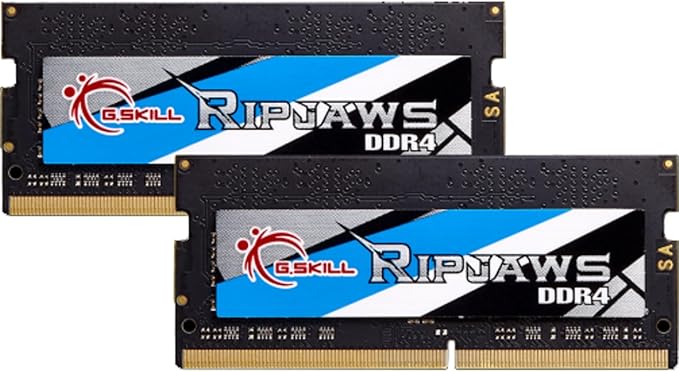
G.SKILL Ripjaws Series 32GB (2 x 16GB) 260-Pin DDR4 So-dimm DDR4 2400 (PC4 19200) Laptop Memory Model F4-2400C16D-32GRS
G.Skill Ripjaws DDR4 SO-DIMM kit is the ideal system upgrade and provides faster data transfer and higher energy efficiency than ever. Experience a new standard of speed with Ripjaws DDR4 SO-DIMM today.
G.Skill Ripjaws DDR4 SO-DIMM kit is the ideal system upgrade and provides faster data transfer and higher energy efficiency than ever. Experience a new standard of speed with Ripjaws DDR4 SO-DIMM today.
G.Skill Ripjaws DDR4 SO-DIMM kit is the ideal system upgrade and provides faster data transfer and higher energy efficiency than ever. Experience a new standard of speed with Ripjaws DDR4 SO-DIMM today.
G.Skill Ripjaws DDR4 SO-DIMM kit is the ideal system upgrade and provides faster data transfer and higher energy efficiency than ever. Experience a new standard of speed with Ripjaws DDR4 SO-DIMM today.
in 5 offers
The lowest price for G.SKILL Ripjaws Series 32GB (2 x 16GB) 260-Pin DDR4 So-dimm DDR4 2400 (PC4 19200) Laptop Memory Model F4-2400C16D-32GRS right now is $89.00 at Umart, compared across 5 retailers.
The all-time low was $89.00 on 15 Oct 2025. That's the lowest price we've ever tracked — a great time to buy.
Prices last updated 10 May 2026.
Last updated at 10/05/2026 08:57:14
G.SKILL 32GB (2 x 16G) Ripjaws Series DDR4 PC4-19200 2400MHz 260-Pin Laptop Memory Model F4-2400C16D-32GRS
Affiliate Disclosure: We may receive a small commission for purchases made through this link at no extra cost to you. This helps support our site. Thank you!
G.Skill 32G (2x16G) F4-2400C16D-32GRS SODIMM 2400MHz CL16 DDR4 RAM
30-day returns
G. SKILL F4-2400C16D-32GRS 32GB SO-DIMM DDR4 2400 Laptop Memory
Affiliate Disclosure: We may receive a small commission for purchases made through this link at no extra cost to you. This helps support our site. Thank you!
Ripjaws Ddr4 So Dimm Series Ddr4 Ram 32 Gb (2x16 Gb) 2400 Mt/S Cl16 16 16 39 1.20 V Unbuffered Non Ecc Notebook/Laptop Memory So Dimm (F4 2400 C16 D 3
Delivery between 16–19 May $29
G.SKILL Ripjaws Series 32GB (2 x 16GB) 260-Pin DDR4 SO-DIMM DDR4 2400 (PC4 19200) Laptop Memory Model F4-2400C16D-32GRS
Delivery $66.92
originally posted on newegg.com
Was going to go with a Crucial 2x16GB kit, but saw these on a lightning sale for just a little more. Didn't see any shots of the 32GB sticks being dual ranked, but took the risk seeing that the 16GB sticks were dual rank. It paid off - confirmed that the 32GB sticks are dual ranked. Previously had 2x8GB single tank sticks with the Same timing. Saw a notable jump in CPU score in 3D Mark (7300 to 9100) from that change alone. Big jump in write and copy speeds, nominal bump in read speeds just slightly above margin of error. I use this system for music/studio work and not gaming, so I don't really have any before/after benchmarks for that, but there's plenty of articles out there that show decent gains for dual rank, especially with Ryzen.
originally posted on neweggbusiness.com
Bought as an upgrade to max out a few years-old laptop and stop Windows 10's constant thrashing to swap file on HDD. Never any issues. Really nice price. The capacity is overkill for most of my tasks, but it's so great to have applications open and re-open so fast with so much cached in the copious unused RAM. I've not done any over-clocking or other tweaks, so I can comment on how far you can actually push them. With this much RAM space, why bother though? The lifetime warranty for the cheapest available part is also a nice peace of mind to have, though I've never needed it as these have been solid since day one.
originally posted on neweggbusiness.com
This was one of the only recommended brands for upgrading my Gigabyte Aero 15x v8 laptop. It came with a single 16gb stick of Kingston RAM, which worked great, but not quite enough for my needs, i.e. video editing, photo editing, coding, gaming, firefox with 100+ tabs open, etc... lol. I read a lot of stories of struggle by others with this laptop who tried to find a second RAM stick that would work with their existing one, some with bad results, and most with mixed results (RAM ran slower, etc). I swapped out the original stick for this pair, turned it on and it immediately booted and fully recognized the new set at full speed and capacity, no problem at all. I am extremely pleased with it! It's very snappy, obviously (dual sticks vs single, plus slightly lower CAS ... MoreThis was one of the only recommended brands for upgrading my Gigabyte Aero 15x v8 laptop. It came with a single 16gb stick of Kingston RAM, which worked great, but not quite enough for my needs, i.e. video editing, photo editing, coding, gaming, firefox with 100+ tabs open, etc... lol. I read a lot of stories of struggle by others with this laptop who tried to find a second RAM stick that would work with their existing one, some with bad results, and most with mixed results (RAM ran slower, etc). I swapped out the original stick for this pair, turned it on and it immediately booted and fully recognized the new set at full speed and capacity, no problem at all. I am extremely pleased with it! It's very snappy, obviously (dual sticks vs single, plus slightly lower CAS latency). I ran memtest for 4-5 hours on the first evening, absolutely no errors. Been using it for 2 weeks now, all is well. I'm glad I went with these!
| General | |
| Capacity | 32 GB: 2 x 16 GB |
| Upgrade Type | Generic |
| Memory | |
| Type | DRAM memory kit |
G.SKILL 32GB (2 x 16G) Ripjaws Series DDR4 PC4-19200 2400MHz 260-Pin Laptop Memory Model F4-2400C16D-32GRS
Affiliate Disclosure: We may receive a small commission for purchases made through this link at no extra cost to you. This helps support our site. Thank you!
G.Skill 32G (2x16G) F4-2400C16D-32GRS SODIMM 2400MHz CL16 DDR4 RAM
30-day returns
G. SKILL F4-2400C16D-32GRS 32GB SO-DIMM DDR4 2400 Laptop Memory
Affiliate Disclosure: We may receive a small commission for purchases made through this link at no extra cost to you. This helps support our site. Thank you!
Ripjaws Ddr4 So Dimm Series Ddr4 Ram 32 Gb (2x16 Gb) 2400 Mt/S Cl16 16 16 39 1.20 V Unbuffered Non Ecc Notebook/Laptop Memory So Dimm (F4 2400 C16 D 3
Delivery between 16–19 May $29
G.SKILL Ripjaws Series 32GB (2 x 16GB) 260-Pin DDR4 SO-DIMM DDR4 2400 (PC4 19200) Laptop Memory Model F4-2400C16D-32GRS
Delivery $66.92
Was going to go with a Crucial 2x16GB kit, but saw these on a lightning sale for just a little more. Didn't see any shots of the 32GB sticks being dual ranked, but took the risk seeing that the 16GB sticks were dual rank. It paid off - confirmed that the 32GB sticks are dual ranked. Previously had 2x8GB single tank sticks with the Same timing. Saw a notable jump in CPU score in 3D Mark (7300 to 9100) from that change alone. Big jump in write and copy speeds, nominal bump in read speeds just slightly above margin of error. I use this system for music/studio work and not gaming, so I don't really have any before/after benchmarks for that, but there's plenty of articles out there that show decent gains for dual rank, especially with Ryzen.
Bought as an upgrade to max out a few years-old laptop and stop Windows 10's constant thrashing to swap file on HDD. Never any issues. Really nice price. The capacity is overkill for most of my tasks, but it's so great to have applications open and re-open so fast with so much cached in the copious unused RAM. I've not done any over-clocking or other tweaks, so I can comment on how far you can actually push them. With this much RAM space, why bother though? The lifetime warranty for the cheapest available part is also a nice peace of mind to have, though I've never needed it as these have been solid since day one.
This was one of the only recommended brands for upgrading my Gigabyte Aero 15x v8 laptop. It came with a single 16gb stick of Kingston RAM, which worked great, but not quite enough for my needs, i.e. video editing, photo editing, coding, gaming, firefox with 100+ tabs open, etc... lol. I read a lot of stories of struggle by others with this laptop who tried to find a second RAM stick that would work with their existing one, some with bad results, and most with mixed results (RAM ran slower, etc). I swapped out the original stick for this pair, turned it on and it immediately booted and fully recognized the new set at full speed and capacity, no problem at all. I am extremely pleased with it! It's very snappy, obviously (dual sticks vs single, plus slightly lower CAS ... MoreThis was one of the only recommended brands for upgrading my Gigabyte Aero 15x v8 laptop. It came with a single 16gb stick of Kingston RAM, which worked great, but not quite enough for my needs, i.e. video editing, photo editing, coding, gaming, firefox with 100+ tabs open, etc... lol. I read a lot of stories of struggle by others with this laptop who tried to find a second RAM stick that would work with their existing one, some with bad results, and most with mixed results (RAM ran slower, etc). I swapped out the original stick for this pair, turned it on and it immediately booted and fully recognized the new set at full speed and capacity, no problem at all. I am extremely pleased with it! It's very snappy, obviously (dual sticks vs single, plus slightly lower CAS latency). I ran memtest for 4-5 hours on the first evening, absolutely no errors. Been using it for 2 weeks now, all is well. I'm glad I went with these!
The product i have not had any prob with, in 10 years. So just like anyone else, there must be some good testing and guidelines being gone threw. Unlike other places that are not iso regulated or otherwise for quality. I worked testing chips for other products. As for shipping and price, everyone knows how that is. No where near what it was. Make no mistake, I will mention the whole experience. The product being good or trash, the length of wait time and how the company selling has treated me in detail. There is no sugar coating or non-sense with me about that. Respect is earned not given, companies that produce trash do not deserve respect. Nor do companies that ruin other people property and try to blame them for it.
I've used several brands of memory cards and G Skill Ripjaw is right up there with the best of them. Affordable without all the weird colors and plastic molding, simple basic design and they work great. Leave the sticker on as it's a heat sink and helps remove excess heat from the memory chips. A small external auxiliary fan always helps for serious computer nuts, I never understood all the colors and flashing lights with computer components when the actions on the display screen.
Bought 32G stick to extend memory on freshly obtained ThinkPad T15, running Windows 10. For 2 months there was no problems then intermittently started to get BlueScreen which were getting worse overtime. After ensuring everything up to date software wise took the extra memory out. The BlueScreen crashes stopped. After 3 weeks of no crashes decided to put memory back in, thinking that maybe it was my fault of improper installation. After putting it in ThinkPad failed to boot altogether, including ability to get to BIOS. Took memory out - it works just fine.
Originally I left this review: "Installed these in my Dell Inspiron 5000 2-in-1 (model 5379). The laptop did the classic thing where you power it on with the new ram and it powers right off, and you go through this 2-3 times. But then it booted up to the BIOS, I confirmed the change in system memory, and now the thing flies." And the ram worked great for 6 months, yay. I then got a newer Dell 6-core G5 (G5587-7866BLK-PUS) a few weeks ago, and I pulled the ram from the 5379 and installed it in the new 5587 G5. Works great! I do realize I put 2400MHz ram in a 2666Mhz laptop, therefore not getting the full stock speed I could be, but considering the cost, I'll live with that. Having 32GB for MIDI Orchestration is pretty mandatory and this was a sort-of no-cost way to ... MoreOriginally I left this review: "Installed these in my Dell Inspiron 5000 2-in-1 (model 5379). The laptop did the classic thing where you power it on with the new ram and it powers right off, and you go through this 2-3 times. But then it booted up to the BIOS, I confirmed the change in system memory, and now the thing flies." And the ram worked great for 6 months, yay. I then got a newer Dell 6-core G5 (G5587-7866BLK-PUS) a few weeks ago, and I pulled the ram from the 5379 and installed it in the new 5587 G5. Works great! I do realize I put 2400MHz ram in a 2666Mhz laptop, therefore not getting the full stock speed I could be, but considering the cost, I'll live with that. Having 32GB for MIDI Orchestration is pretty mandatory and this was a sort-of no-cost way to do it. Anyway, those two Dell Laptops have no issues with this RAM.
Installed 32GB in my new ThinkPad E495. Due to recent negative reviews, I ran several hours of memory tests before clearing the laptop for service. No issues at all. I have used G.Skill in 2 of my last 3 builds, also without issues. Here is what I like about G.Skill: When I'm doing a build, I can look on the motherboard's QVL list and find a G.Skill part with the capacity, speed, and timings that I want. Then I get the part number and order it on Newegg. With other manufacturers, there is always something missing - I can't get the capacity I want, or the speed is lower, or the most maddening is when the part number doesn't match anything that is currently available. Kudos to G.Skill for making my life easier!
I would recommend these RAM cards when in search of the basic need of increasing your notebook's overall available RAM. This was a purchase of necessity, not exactly preference. *Be sure to know what RAM type your notebook needs! (DDR wise) I regularly play demanding video games on my notebook which originally came with 12gb of RAM. I would constantly hit this limit (obviously). Vast improvement with 32GB, "breathing room" if you will. I do not know enough about ram to effectively review how these cards compete with other comparable RAM cards and brands. Your in-dept review on card stats & performance is hopefully contained within another review. GLHF!
Now, about WHY such RAM is needed. This situation causes people to have to get more RAM like this product. This product helps the situation... So, not unique to this product, boosting any Windows 10 machine above 4GB, as I did with these, makes a huge performance difference... despite M$ claiming only 4GB is required. Hogwash. At 4GB, two of my laptops perform at an unbearable snail's pace. It doesn't help that Windows 10 tries to perform SO MANY background tasks, esp. at startup. And Google Chrome, Microsoft Edge, Google Drive Backup and Sync, and Dropbox apps ALL also contribute to this terrible problem, trying to so grab so many resources (CPU time, system interrupts, RAM/memory, swapping RAM to storage... to HDD or a SSD). It all results in attempts to perform ... MoreNow, about WHY such RAM is needed. This situation causes people to have to get more RAM like this product. This product helps the situation... So, not unique to this product, boosting any Windows 10 machine above 4GB, as I did with these, makes a huge performance difference... despite M$ claiming only 4GB is required. Hogwash. At 4GB, two of my laptops perform at an unbearable snail's pace. It doesn't help that Windows 10 tries to perform SO MANY background tasks, esp. at startup. And Google Chrome, Microsoft Edge, Google Drive Backup and Sync, and Dropbox apps ALL also contribute to this terrible problem, trying to so grab so many resources (CPU time, system interrupts, RAM/memory, swapping RAM to storage... to HDD or a SSD). It all results in attempts to perform lots of work just when you are trying to get a PC started an responsive to user inputs and attempts to launch and use one or two simple apps. Have you ever clocked how long all this takes? And all that system indexing, health status polling and reporting, system update checks, anti-malware scanning, data compression and swapping RAM to disk. Scanning caches and user profiles. I have never had any version of Linux bog down like Windows does, especially with a 4GB device. We should not have to use such powerfully equipped computers just to get a smoothly running Windows 10 experience, especially on startup. And M$ doesn't help the average user understand everything that is going on to slow performance. OK, some people know about the simply specified and somewhat well known "startup apps." Users even have their own startup folder to intentionally start desired programs at startup or logon. Fewer people realize how many so called "services" are running for Windows and apps, like the ones mentioned above. And how many of them are simply not necessary. And I'll bet very very few people realize that beyond those two sources for running tasks on Windows, there is YET A THIRD source that launches and runs tasks, possibly despite your efforts to stop such things from running (by disabling "startup apps" and various unnecessary "services"). Windows 10, like other operating systems, has a TASK SCHEDULER that launches and runs many tasks based on many criteria and triggers. Amazingly, if you struggle to disable Google updates, Dropbox updates, Chrome updates, or Edge updates in startup and also in services, if you look at Task Manager to see what's running, you'll be dumbfounded to see tasks for these things somehow mysteriously STILL running anyway. They get launched by the Task Scheduler. All that is to say that you can do several things to help system performance: (1) add more RAM, and (2) disable startup of many many unnecessary tasks. But you have to know what you are disabling and where to disable them. Funny, even a Linux distro running from a USB thumb-drive has minimal performance impact, despite running many tasks with its own task scheduling feature. And it does it with much less RAM and none (or very very little) memory swapping to disk. If you have a HDD, you notice an obviously difference in HDD activity. Windows never stops its continuous and extensive reading and writing to storage. Linux makes very very little such reading and writing to disk storage.
| General | |
| Capacity | 32 GB: 2 x 16 GB |
| Upgrade Type | Generic |
| Memory | |
| Type | DRAM memory kit |

