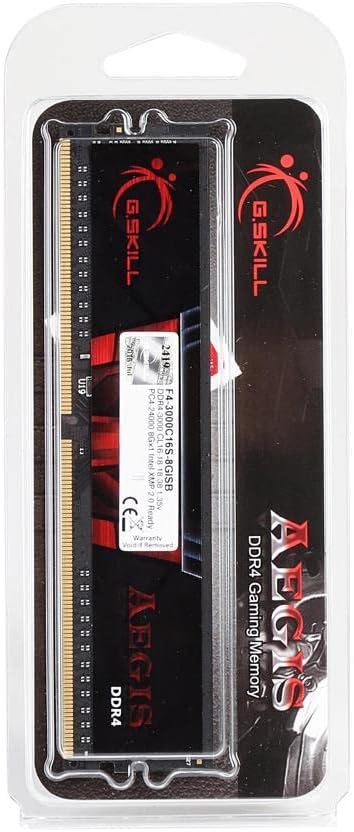
G.SKILL Flare x 32GB (2x16GB) 3200MHz DDR4 DIMM Memory [F4-3200C16D-32GFX]
Designed for the latest AMD Ryzen platforms the Flare X series DDR4 memory kit marks the return of the legendary Flare memory that provided awesome performance in the previous generation of DDR memory. Upgrade your next AMD system into the ultimate gaming rig or a powerful workstation with the Flare X series DDR4 memory! Rebirth of the Legendary AMD Performance Series Designed for the AMD Ryzen processor family the Flare X series DDR4 memory kit marks the return of the legendary Flare memory that provided awesome performance in the previous generation of DDR memory. Upgrade your next AMD system into the ultimate gaming rig or a powerful workstation with the Flare X series DDR4 memory! Designed for AMD Platforms Returning from the ashes the new AMD architecture features a completely different set of memory enhancements requiring a new approach. The Flare X memory series is designed with a distinct characteristic to optimize compatibility with the latest AMD Ryzen platform. Faster Transfer Speed Available in memory speeds starting from DDR4-2133MHz the Flare X series delivers high speed memory performance to efficiently transfer data for each of the cores on AMD Ryzen processors. Experience Performance Each and every single Flare X memory kit is tested under G.SKILLs rigorous testing process to ensure the best performance compatibility and stability on your AMD system. Power Efficient Designed with a low voltage of 1.2V1.35V at DDR4 standard this lowers the memory voltage requirement by 20% from DDR3 memory kits! Now your system can perform even faster without becoming an expensive appliance heater.
Designed for the latest AMD Ryzen platforms the Flare X series DDR4 memory kit marks the return of the legendary Flare memory that provided awesome performance in the previous generation of DDR memory. Upgrade your next AMD system into the ultimate gaming rig or a powerful workstation with the Flare X series DDR4 memory! Rebirth of the Legendary AMD Performance Series Designed for the AMD Ryzen processor family the Flare X series DDR4 memory kit marks the return of the legendary Flare memory that provided awesome performance in the previous generation of DDR memory. Upgrade your next AMD system into the ultimate gaming rig or a powerful workstation with the Flare X series DDR4 memory! Designed for AMD Platforms Returning from the ashes the new AMD architecture features a completely different set of memory enhancements requiring a new approach. The Flare X memory series is designed with a distinct characteristic to optimize compatibility with the latest AMD Ryzen platform. Faster Transfer Speed Available in memory speeds starting from DDR4-2133MHz the Flare X series delivers high speed memory performance to efficiently transfer data for each of the cores on AMD Ryzen processors. Experience Performance Each and every single Flare X memory kit is tested under G.SKILLs rigorous testing process to ensure the best performance compatibility and stability on your AMD system. Power Efficient Designed with a low voltage of 1.2V1.35V at DDR4 standard this lowers the memory voltage requirement by 20% from DDR3 memory kits! Now your system can perform even faster without becoming an expensive appliance heater.
Designed for the latest AMD Ryzen platforms the Flare X series DDR4 memory kit marks the return of the legendary Flare memory that provided awesome performance in the previous generation of DDR memory. Upgrade your next AMD system into the ultimate gaming rig or a powerful workstation with the Flare X series DDR4 memory! Rebirth of the Legendary AMD Performance Series Designed for the AMD Ryzen processor family the Flare X series DDR4 memory kit marks the return of the legendary Flare memory that provided awesome performance in the previous generation of DDR memory. Upgrade your next AMD system into the ultimate gaming rig or a powerful workstation with the Flare X series DDR4 memory! Designed for AMD Platforms Returning from the ashes the new AMD architecture features a completely different set of memory enhancements requiring a new approach. The Flare X memory series is designed with a distinct characteristic to optimize compatibility with the latest AMD Ryzen platform. Faster Transfer Speed Available in memory speeds starting from DDR4-2133MHz the Flare X series delivers high speed memory performance to efficiently transfer data for each of the cores on AMD Ryzen processors. Experience Performance Each and every single Flare X memory kit is tested under G.SKILLs rigorous testing process to ensure the best performance compatibility and stability on your AMD system. Power Efficient Designed with a low voltage of 1.2V1.35V at DDR4 standard this lowers the memory voltage requirement by 20% from DDR3 memory kits! Now your system can perform even faster without becoming an expensive appliance heater.
Designed for the latest AMD Ryzen platforms the Flare X series DDR4 memory kit marks the return of the legendary Flare memory that provided awesome performance in the previous generation of DDR memory. Upgrade your next AMD system into the ultimate gaming rig or a powerful workstation with the Flare X series DDR4 memory! Rebirth of the Legendary AMD Performance Series Designed for the AMD Ryzen processor family the Flare X series DDR4 memory kit marks the return of the legendary Flare memory that provided awesome performance in the previous generation of DDR memory. Upgrade your next AMD system into the ultimate gaming rig or a powerful workstation with the Flare X series DDR4 memory! Designed for AMD Platforms Returning from the ashes the new AMD architecture features a completely different set of memory enhancements requiring a new approach. The Flare X memory series is designed with a distinct characteristic to optimize compatibility with the latest AMD Ryzen platform. Faster Transfer Speed Available in memory speeds starting from DDR4-2133MHz the Flare X series delivers high speed memory performance to efficiently transfer data for each of the cores on AMD Ryzen processors. Experience Performance Each and every single Flare X memory kit is tested under G.SKILLs rigorous testing process to ensure the best performance compatibility and stability on your AMD system. Power Efficient Designed with a low voltage of 1.2V1.35V at DDR4 standard this lowers the memory voltage requirement by 20% from DDR3 memory kits! Now your system can perform even faster without becoming an expensive appliance heater.
in 3 offers
The lowest price for G.SKILL Flare x 32GB (2x16GB) 3200MHz DDR4 DIMM Memory [F4-3200C16D-32GFX] right now is $169.00 at Umart, compared across 3 retailers.
The all-time low was $53.00 on 2 Mar 2026 — today's price is 219% above the lowest ever. It has been notably cheaper before — worth setting a price alert.
Prices last updated 7 July 2026.
Last updated at 07/07/2026 08:24:40
G.Skill DIMM 32 GB DDR4-3200 Kit Memory F4-3200C16D-32GFX, Flare X
Affiliate Disclosure: We may receive a small commission for purchases made through this link at no extra cost to you. This helps support our site. Thank you!
G.Skill 16GB (2x8GB) F4-3200C14D-16GFX Flare X 3200MHz CL14 DDR4 RAM
30-day returns
G.skill DIMM 32GB DDR4-3200 Kit Memory
Free delivery
originally posted on newegg.com
Bought 2-8gb sticks of these back in 2018. Worked great. OC'd from 3200 to 3600 @ cl14 using Dram Calculator for Ryzen. Bought 2 more for 32gb total because some modern shooter games can be memory hogs. Have witnessed peak usage as high as 16-17gb in-game, and up to 18gb used when compiling shaders. Have the extra may not give you a huge fps uplift, but the game runs smoother in real world - no more stutter, shaders load fast instead of hanging for 20 minutes. And the obvious of being able to run more background applications. OCing 4 sticks is tricky. Noting even if I manually tune all of them @ 3200, the pc will not restart. Monitor and keyboard go black, pc fans stay on. Reset bios to default and revert back to standard xmp profile and restart works again. Same ... MoreBought 2-8gb sticks of these back in 2018. Worked great. OC'd from 3200 to 3600 @ cl14 using Dram Calculator for Ryzen. Bought 2 more for 32gb total because some modern shooter games can be memory hogs. Have witnessed peak usage as high as 16-17gb in-game, and up to 18gb used when compiling shaders. Have the extra may not give you a huge fps uplift, but the game runs smoother in real world - no more stutter, shaders load fast instead of hanging for 20 minutes. And the obvious of being able to run more background applications. OCing 4 sticks is tricky. Noting even if I manually tune all of them @ 3200, the pc will not restart. Monitor and keyboard go black, pc fans stay on. Reset bios to default and revert back to standard xmp profile and restart works again. Same result attempting more aggressive OC to 3600. So far passed both Windows Memory Diagnostic and Memtest. Will give Prime 95 a whirl at some point. In all, pretty good. Wish it wasn't so picky at 4 dimms. Sure it works out of the box at stock, but that's not why I bought B-die. 4 eggs, will come back and give 5 if/when I figure out why they're being picky. Ryzen 3600 B450 Tomahawk RX 5600XT Seasonic Prime Platinum Samsung 970 Evo Plus m.2
originally posted on newegg.com
Ok, very subjective: i'm tired of benching RAM so no more numbers. I've been through 5 sets of DDR4 3200 kits: Crucial Ballistix 16GB CL15 Corsair Vengeance LPX 16GB CL16 GeIL EVO SPEAR Phantom Gaming 16GB CL16 G.Skill Trident Z Neo (3600) 32GB CL16 G.Skill Flare X 32GB CL14 Maybe it's the 2x16Gb sticks at CL14...I don't know, but everything just feels FAST. Sadly, I got a BSOD; the last time i had bsod, it took me and the tech folks at Blizzard a month to figure out it was my horrid Vengeance RAM. No overclocking, just stock plug and play...who needs bsod when your not doing any overclocking on anything!?! minus 1 star!! fyi, all the 'bits' play well together...until this latest bsod which i'm attributing to the Flare X: Ryzen 5 2600x Gigabyte Aorus 5 x470 mb EVGA ... MoreOk, very subjective: i'm tired of benching RAM so no more numbers. I've been through 5 sets of DDR4 3200 kits: Crucial Ballistix 16GB CL15 Corsair Vengeance LPX 16GB CL16 GeIL EVO SPEAR Phantom Gaming 16GB CL16 G.Skill Trident Z Neo (3600) 32GB CL16 G.Skill Flare X 32GB CL14 Maybe it's the 2x16Gb sticks at CL14...I don't know, but everything just feels FAST. Sadly, I got a BSOD; the last time i had bsod, it took me and the tech folks at Blizzard a month to figure out it was my horrid Vengeance RAM. No overclocking, just stock plug and play...who needs bsod when your not doing any overclocking on anything!?! minus 1 star!! fyi, all the 'bits' play well together...until this latest bsod which i'm attributing to the Flare X: Ryzen 5 2600x Gigabyte Aorus 5 x470 mb EVGA rtx2080s xc ultra gpu Acer 27" 2k/144hz EVGA SuperNOVA 750 G3 ps WD Black sn750 1TB nvme ssd Samsung 970 evo 1TB nvme ssd Crucial mx300 2tb ssd btw: the Crucial Ballistix were the most stable; never a bsod
originally posted on newegg.com
Rock solid stable RAM. I've also used their 16gb Flare-X b-die kit... which also was rock solid stable. It's being run on a Gigabyte x470 gaming 7 rev 1.1 motherboard with a 3700x processor cooled by a Noctua NH-D15 single-fan. Was able to get it to 3400mhz with 14-14-14-28-42-1T-GDM OFF w/ subtimings REALLY tight... with only 1.41v... SOC voltage at 1.1v. Passed four passes of MemTest 86, 6000% RAMTEST, and Prime95. Most importantly - Battlefield V didn't crash it either - HAHA (seriously though... that game puts a ton of pressure on the system - it will "help" find instability). My case is set up for cooling, so it never gets over 37*C at that voltage under sustained load. Being dual-rank, it's not as easy to dial it up to 3600mhz/3800mhz... it often requires ... MoreRock solid stable RAM. I've also used their 16gb Flare-X b-die kit... which also was rock solid stable. It's being run on a Gigabyte x470 gaming 7 rev 1.1 motherboard with a 3700x processor cooled by a Noctua NH-D15 single-fan. Was able to get it to 3400mhz with 14-14-14-28-42-1T-GDM OFF w/ subtimings REALLY tight... with only 1.41v... SOC voltage at 1.1v. Passed four passes of MemTest 86, 6000% RAMTEST, and Prime95. Most importantly - Battlefield V didn't crash it either - HAHA (seriously though... that game puts a ton of pressure on the system - it will "help" find instability). My case is set up for cooling, so it never gets over 37*C at that voltage under sustained load. Being dual-rank, it's not as easy to dial it up to 3600mhz/3800mhz... it often requires increasing processor's SOC voltage even further, which I've chosen not to do. My previous single-rank 16gb kit went 3600mhz 1.45v and 1.1v SOC... but this one throws CPU errors at those same voltages. That's fine though... 3400mhz with ultra tight timings is really good and this kit actually gets me better scores at 3400mhz than my previous did at 3600mhz (with less RAM voltage required). Gets me over 5000pts on cinebench R20 consistently (no overclocking for the processor... not even PBO... I just leave it on AUTO and let it do it's thing). FPS in games is stable and frametimes are consistent (more-so than with the 16gb kit... not sure if it's because of 32gb -or- because of being dual rank -or- both). Overall - another A+ home run from G.Skill. THANK YOU for continuing to make B-Die products for us enthusiasts!
| General | |
| Capacity | 32 GB: 2 x 16 GB |
| Upgrade Type | Generic |
| Memory | |
| Type | DRAM memory kit |
G.Skill DIMM 32 GB DDR4-3200 Kit Memory F4-3200C16D-32GFX, Flare X
Affiliate Disclosure: We may receive a small commission for purchases made through this link at no extra cost to you. This helps support our site. Thank you!
G.Skill 16GB (2x8GB) F4-3200C14D-16GFX Flare X 3200MHz CL14 DDR4 RAM
30-day returns
G.skill DIMM 32GB DDR4-3200 Kit Memory
Free delivery
Bought 2-8gb sticks of these back in 2018. Worked great. OC'd from 3200 to 3600 @ cl14 using Dram Calculator for Ryzen. Bought 2 more for 32gb total because some modern shooter games can be memory hogs. Have witnessed peak usage as high as 16-17gb in-game, and up to 18gb used when compiling shaders. Have the extra may not give you a huge fps uplift, but the game runs smoother in real world - no more stutter, shaders load fast instead of hanging for 20 minutes. And the obvious of being able to run more background applications. OCing 4 sticks is tricky. Noting even if I manually tune all of them @ 3200, the pc will not restart. Monitor and keyboard go black, pc fans stay on. Reset bios to default and revert back to standard xmp profile and restart works again. Same ... MoreBought 2-8gb sticks of these back in 2018. Worked great. OC'd from 3200 to 3600 @ cl14 using Dram Calculator for Ryzen. Bought 2 more for 32gb total because some modern shooter games can be memory hogs. Have witnessed peak usage as high as 16-17gb in-game, and up to 18gb used when compiling shaders. Have the extra may not give you a huge fps uplift, but the game runs smoother in real world - no more stutter, shaders load fast instead of hanging for 20 minutes. And the obvious of being able to run more background applications. OCing 4 sticks is tricky. Noting even if I manually tune all of them @ 3200, the pc will not restart. Monitor and keyboard go black, pc fans stay on. Reset bios to default and revert back to standard xmp profile and restart works again. Same result attempting more aggressive OC to 3600. So far passed both Windows Memory Diagnostic and Memtest. Will give Prime 95 a whirl at some point. In all, pretty good. Wish it wasn't so picky at 4 dimms. Sure it works out of the box at stock, but that's not why I bought B-die. 4 eggs, will come back and give 5 if/when I figure out why they're being picky. Ryzen 3600 B450 Tomahawk RX 5600XT Seasonic Prime Platinum Samsung 970 Evo Plus m.2
Ok, very subjective: i'm tired of benching RAM so no more numbers. I've been through 5 sets of DDR4 3200 kits: Crucial Ballistix 16GB CL15 Corsair Vengeance LPX 16GB CL16 GeIL EVO SPEAR Phantom Gaming 16GB CL16 G.Skill Trident Z Neo (3600) 32GB CL16 G.Skill Flare X 32GB CL14 Maybe it's the 2x16Gb sticks at CL14...I don't know, but everything just feels FAST. Sadly, I got a BSOD; the last time i had bsod, it took me and the tech folks at Blizzard a month to figure out it was my horrid Vengeance RAM. No overclocking, just stock plug and play...who needs bsod when your not doing any overclocking on anything!?! minus 1 star!! fyi, all the 'bits' play well together...until this latest bsod which i'm attributing to the Flare X: Ryzen 5 2600x Gigabyte Aorus 5 x470 mb EVGA ... MoreOk, very subjective: i'm tired of benching RAM so no more numbers. I've been through 5 sets of DDR4 3200 kits: Crucial Ballistix 16GB CL15 Corsair Vengeance LPX 16GB CL16 GeIL EVO SPEAR Phantom Gaming 16GB CL16 G.Skill Trident Z Neo (3600) 32GB CL16 G.Skill Flare X 32GB CL14 Maybe it's the 2x16Gb sticks at CL14...I don't know, but everything just feels FAST. Sadly, I got a BSOD; the last time i had bsod, it took me and the tech folks at Blizzard a month to figure out it was my horrid Vengeance RAM. No overclocking, just stock plug and play...who needs bsod when your not doing any overclocking on anything!?! minus 1 star!! fyi, all the 'bits' play well together...until this latest bsod which i'm attributing to the Flare X: Ryzen 5 2600x Gigabyte Aorus 5 x470 mb EVGA rtx2080s xc ultra gpu Acer 27" 2k/144hz EVGA SuperNOVA 750 G3 ps WD Black sn750 1TB nvme ssd Samsung 970 evo 1TB nvme ssd Crucial mx300 2tb ssd btw: the Crucial Ballistix were the most stable; never a bsod
Rock solid stable RAM. I've also used their 16gb Flare-X b-die kit... which also was rock solid stable. It's being run on a Gigabyte x470 gaming 7 rev 1.1 motherboard with a 3700x processor cooled by a Noctua NH-D15 single-fan. Was able to get it to 3400mhz with 14-14-14-28-42-1T-GDM OFF w/ subtimings REALLY tight... with only 1.41v... SOC voltage at 1.1v. Passed four passes of MemTest 86, 6000% RAMTEST, and Prime95. Most importantly - Battlefield V didn't crash it either - HAHA (seriously though... that game puts a ton of pressure on the system - it will "help" find instability). My case is set up for cooling, so it never gets over 37*C at that voltage under sustained load. Being dual-rank, it's not as easy to dial it up to 3600mhz/3800mhz... it often requires ... MoreRock solid stable RAM. I've also used their 16gb Flare-X b-die kit... which also was rock solid stable. It's being run on a Gigabyte x470 gaming 7 rev 1.1 motherboard with a 3700x processor cooled by a Noctua NH-D15 single-fan. Was able to get it to 3400mhz with 14-14-14-28-42-1T-GDM OFF w/ subtimings REALLY tight... with only 1.41v... SOC voltage at 1.1v. Passed four passes of MemTest 86, 6000% RAMTEST, and Prime95. Most importantly - Battlefield V didn't crash it either - HAHA (seriously though... that game puts a ton of pressure on the system - it will "help" find instability). My case is set up for cooling, so it never gets over 37*C at that voltage under sustained load. Being dual-rank, it's not as easy to dial it up to 3600mhz/3800mhz... it often requires increasing processor's SOC voltage even further, which I've chosen not to do. My previous single-rank 16gb kit went 3600mhz 1.45v and 1.1v SOC... but this one throws CPU errors at those same voltages. That's fine though... 3400mhz with ultra tight timings is really good and this kit actually gets me better scores at 3400mhz than my previous did at 3600mhz (with less RAM voltage required). Gets me over 5000pts on cinebench R20 consistently (no overclocking for the processor... not even PBO... I just leave it on AUTO and let it do it's thing). FPS in games is stable and frametimes are consistent (more-so than with the 16gb kit... not sure if it's because of 32gb -or- because of being dual rank -or- both). Overall - another A+ home run from G.Skill. THANK YOU for continuing to make B-Die products for us enthusiasts!
Was running with Adata xpg gammix d10 3000mhz. cl16 ram and it never seemed to behave. Tried to run at 4x8gb. and that didn't work at all only at 2333mhz with the higher volts 1.35v put to the ram. Went to a 2x8gb and the ram ran at speed but was not stable and would crash once I did some lite video work or gaming. lowered ram clock speed and it worked well 2800mhz 1.4v but felt like I should not have to ramp up my volts and lower my speed. Kept trying other settings just to get them to run at there rated speed but never seemed to want to run with my ryzen 1800x and B350 mobo. (I sold the extra set of Adata ram to a friend that I took out first to go to a 2x8gb set up. It appears to run at rated speed 3000mhz. and cl 16 on a ryzen 2700, B450 mobo stable. Must be the ... MoreWas running with Adata xpg gammix d10 3000mhz. cl16 ram and it never seemed to behave. Tried to run at 4x8gb. and that didn't work at all only at 2333mhz with the higher volts 1.35v put to the ram. Went to a 2x8gb and the ram ran at speed but was not stable and would crash once I did some lite video work or gaming. lowered ram clock speed and it worked well 2800mhz 1.4v but felt like I should not have to ramp up my volts and lower my speed. Kept trying other settings just to get them to run at there rated speed but never seemed to want to run with my ryzen 1800x and B350 mobo. (I sold the extra set of Adata ram to a friend that I took out first to go to a 2x8gb set up. It appears to run at rated speed 3000mhz. and cl 16 on a ryzen 2700, B450 mobo stable. Must be the better memory controller that the second gen ryzen had and maybe the mobo. Big take away is he is happy with it and I gave it to him at a good price.) So in conclusion I should have gotten this set much earlier and never thought twice about it would have saved myself money and time. I am so satisfied with this set up now that I don't even have the want to upgrade my CPU and mobo to get good ram timings anymore even though the 12 core 3900x is pretty awesome. I just ended up upgrading my video card to a RX 5700 XT and the set up is so balanced I think i'm going to be happy for a good few years now.
One of two Threadripper systems I have at home: 1920x Threadripper CPU @ 4.0ghz MSI X399 Gaming Pro Carbon AC 32GB Flare X 3200mhz @ 3600mhz (CL16) NVidia Titan X GPU Samsung 256GB 950 PRO Not sure why other reviewers are saying things like "Ryzen wont push 4 sticks to 3200". That's just not true. I was able to get this kit to easily run at 3200mhz (CL14), perfectly stable. Contrary to popular belief, Ram kits like this are heavily overclocked from factory. 2133mhz is the official timing for DDR4 ram. A lot of these kits are not just plug-n-play. Tweaking in bios is often required. For this kit however I just inserted into my MSI X399 Gaming Pro Carbon AC mobo and in bios changed the "Memory Try It" to 3600mhz, lowered the voltage a bit and it worked like a charm. ... MoreOne of two Threadripper systems I have at home: 1920x Threadripper CPU @ 4.0ghz MSI X399 Gaming Pro Carbon AC 32GB Flare X 3200mhz @ 3600mhz (CL16) NVidia Titan X GPU Samsung 256GB 950 PRO Not sure why other reviewers are saying things like "Ryzen wont push 4 sticks to 3200". That's just not true. I was able to get this kit to easily run at 3200mhz (CL14), perfectly stable. Contrary to popular belief, Ram kits like this are heavily overclocked from factory. 2133mhz is the official timing for DDR4 ram. A lot of these kits are not just plug-n-play. Tweaking in bios is often required. For this kit however I just inserted into my MSI X399 Gaming Pro Carbon AC mobo and in bios changed the "Memory Try It" to 3600mhz, lowered the voltage a bit and it worked like a charm. In the bios, changing to XMP (either profile 1 or 2) did not work on this board. I don't recommend using XMP profiles for this mobo/Ram combo. This Ram works flawlessly up to 3600mhz but required a little effort to get the voltage just right (@ 1.39) and survived three hours of Prime95(v26.6) testing. Couldn't be happier with this purchase.
Sorry for the lengthy paragraphs below, but I had much to say and wanted to share my experiences to save others the troubles I suffered. I assure you that they are worth reading and have good info. READ YOUR MOTHERBOARD MANUAL! These RAM sticks are dual channel and dual rank. I didn't realize that the RAM slot numbers mattered. When I plugged these into the first and second slots, I only got 1833Mhz, and the computer wouldn't boot with the XMP profile enabled. It wasn't until I decided to check my Biostar B350 GT5 user manual that I learned I needed to plug the sticks into the second and fourth slots to take full advantage of the dual channel, dual rank abilities of these RAM sticks. I switched their positioning, enabled the XMP profile, rebooted, and the system now ... MoreSorry for the lengthy paragraphs below, but I had much to say and wanted to share my experiences to save others the troubles I suffered. I assure you that they are worth reading and have good info. READ YOUR MOTHERBOARD MANUAL! These RAM sticks are dual channel and dual rank. I didn't realize that the RAM slot numbers mattered. When I plugged these into the first and second slots, I only got 1833Mhz, and the computer wouldn't boot with the XMP profile enabled. It wasn't until I decided to check my Biostar B350 GT5 user manual that I learned I needed to plug the sticks into the second and fourth slots to take full advantage of the dual channel, dual rank abilities of these RAM sticks. I switched their positioning, enabled the XMP profile, rebooted, and the system now runs stably at 3200Mhz. Even with the XMP profile enabled, you may need to manually set the timings in your BIOS for best results. UPDATE 3/17/18: Once I built my PC and got everything running in July of 2017, I immediately noticed that my PC would not wake up from sleep (S3) properly. When I tried to wake up the computer, the fans spun and the LEDs lit up but there would be no display. I had to hard reset the PC to get display again. When awake, the computer functioned perfectly. I had simply disabled sleep as a workaround. This was an issue I was not able to figure out until last week as of this writing. When I reduced the speed of the RAM to 2667MHz, the computer began waking up from sleep properly. What I found out was that RAM running at 3200MHz was not supported by my AMD Ryzen 5 1600X by default. I would have to overclock the processor some unspecified amount in order to fully support this RAM. Take this lesson from my experience, if your motherboard of choice lists supported RAM speeds with "(O.C.)" next to them, it means you will need to overclock your processor to fully support those RAM speeds. If you will not be overclocking your processor, make sure to stick to the supported RAM speeds without the "(O.C.)" next to them for best performance from your system and to save time and money. Also, while it is not necessary, I highly advise consulting your motherboard's memory Qualified Venders List (QVL). This is on the motherboard manufacturer's website. There are some sets of RAM which the manufacturer advertises to run at a certain speed (i.e. 3200MHz), but the motherboard manufacturer's tests show that their motherboard will not support that speed for whatever reason. Therefore, if you bought that RAM you would have to use it at lower than advertised speeds as I am now doing. This set of RAM was not (and still is not) even on my motherboard's RAM QVL. However, other than the aforementioned sleep issue, it has not had any problems and is flawless once clocked back down to 2667MHz. As such, adhering to the QVL is really a suggestion, but it is a good guideline for decision making all the same. As a side note, based on 3DMark Time Spy DX12 tests, reducing the RAM speed from 3200MHz to 2667MHz caused an average loss of less than a single frame per second in tests. This may be due to the fact that I did not change the timings when I reduced the speed of the RAM. There is absolutely no noticeable difference when playing games either. I'm super happy the performance difference is practically nonexistent! Thanks for reading my book, lol. Happy PC building and have a great day!
Really not much to say but this memory runs as advertised at 3200Mhz. Any of the issues I would say are based on the motherboard used and it's immaturity. Initially I wanted RGB ram and was looking at the Trident series equivelant but at the time there was only the 3000Mhz version available that was on the QVL list. I could have taken the chance but I didn't want too much headaches :) My only gripe with this memory is the price, you definitely pay for it and especially now that prices are increasing it'll bruise your wallet just a bit more. However I can attest that this can run 3200Mhz all day as long as you find the right settings with your motherboard of choice. For what it's worth it wasn't that hard, in fact is was pretty much effortless. Some things to be ... MoreReally not much to say but this memory runs as advertised at 3200Mhz. Any of the issues I would say are based on the motherboard used and it's immaturity. Initially I wanted RGB ram and was looking at the Trident series equivelant but at the time there was only the 3000Mhz version available that was on the QVL list. I could have taken the chance but I didn't want too much headaches :) My only gripe with this memory is the price, you definitely pay for it and especially now that prices are increasing it'll bruise your wallet just a bit more. However I can attest that this can run 3200Mhz all day as long as you find the right settings with your motherboard of choice. For what it's worth it wasn't that hard, in fact is was pretty much effortless. Some things to be aware of, I'm using a Asus Crosshair VI Hero and Ryzen 1700. It does run as advertised but upon the first initial boot it'll load it at 2400Mhz. I first tested only the ram to see if I could get it running at 3200Mhz so I changed the DOCP profile to DOCP Standard to get the drop down for 3200Mhz, left everything else in auto and it booted up no problem. Once I dialed in my overclock at 3.7Ghz 1.25v, Memory Clock/DRAM 3200Mhz at 1.35v, Memory Timings 14-14-14-34 , SOC 1.1v PLL 1.8v and again it booted an ran with no issues. I did experience some cold boot issues where my system would still boot at 3200Mhz but the timings were changed to 15 or 16 and other times it would just reset to 2400Mhz. This was only happening when I overclocked to 3.8Ghz or higher so to remedy this I would boost the RAM voltage to 1.375 or 1.4v depending on how high my clock speed was and for added stability I increased the DRAM boot voltage as well. However the performance difference was neglible I dialed back down to 3.7Ghz and haven't experienced any cold boot issues for a few days now. In a nutshell, this ram will run at 3200Mhz with the CH6 but might take some fiddling when overclocking.
I did a lot of research before purchasing the ram for my X470 system build because I had seen a lot of posting complaints about ram stability and speed on Ryzen cpus and am4 motherboards. My build, MSI X470 Gaming Plus ATX mb, AMD Ryzen R5 2400G apu, AMD Wraith Max Cooler, Team Group L5 LITE 3D 2.5" 240GB SATA III 3D NAND Internal ssd (entire drive for windows 10 1903). 1 tb WD Blue work hdd, 3 tb WD Red storage hdd, StarTech 4 port USB 3.0 front panel hub, LG BlueRay DVD r/w optical drive all installed in Thermaltake Versa H22 midtower case and powered with Ultra LSP 550 watt ps with AOC 23 inch display monitor. Ram installed easy into mb A2-B2 dimm sockets with minimal pressure and locked in. with only ram and cpu installed, booted into bios, ram at default 2400 ... MoreI did a lot of research before purchasing the ram for my X470 system build because I had seen a lot of posting complaints about ram stability and speed on Ryzen cpus and am4 motherboards. My build, MSI X470 Gaming Plus ATX mb, AMD Ryzen R5 2400G apu, AMD Wraith Max Cooler, Team Group L5 LITE 3D 2.5" 240GB SATA III 3D NAND Internal ssd (entire drive for windows 10 1903). 1 tb WD Blue work hdd, 3 tb WD Red storage hdd, StarTech 4 port USB 3.0 front panel hub, LG BlueRay DVD r/w optical drive all installed in Thermaltake Versa H22 midtower case and powered with Ultra LSP 550 watt ps with AOC 23 inch display monitor. Ram installed easy into mb A2-B2 dimm sockets with minimal pressure and locked in. with only ram and cpu installed, booted into bios, ram at default 2400 speed, set axmp on to xmp file 2 and restarted into bios, ram speed now 3200. Shut system down installed Team 240 ssd that already had windows 10 installed mbr bios. Booted into bios saw ssd connected, saved and booted into windows, installed new mb drivers, system and chipset, and ethernet drivers. Rebooted and used convert mbr2gpt to convert windows 10 ssd from bios mbr to uefi gpt. Rebooted into windows and system now is uefi. Shut down and connected all other devices and hdds. Rebooted went into windows update and updated. System running stable and speedy.
| General | |
| Capacity | 32 GB: 2 x 16 GB |
| Upgrade Type | Generic |
| Memory | |
| Type | DRAM memory kit |