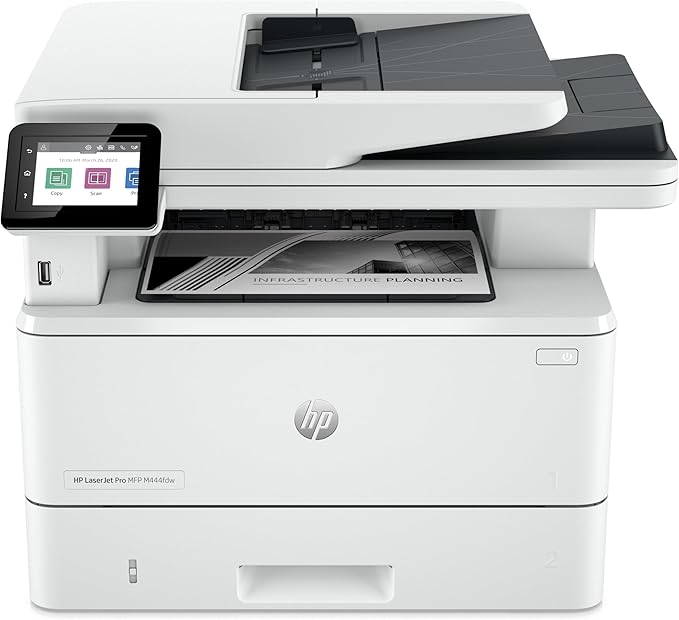
HP LaserJet Pro MFP M227fdn [G3Q79A]
Get more pages, performance, and protection[1] from an HP LaserJet Pro MFP powered by JetIntelligence Toner cartridges. Set a faster pace for your business: print two-sided documents, plus scan, copy, fax, and manage to help maximise efficiency.
Get more pages, performance, and protection[1] from an HP LaserJet Pro MFP powered by JetIntelligence Toner cartridges. Set a faster pace for your business: print two-sided documents, plus scan, copy, fax, and manage to help maximise efficiency.
Get more pages, performance, and protection[1] from an HP LaserJet Pro MFP powered by JetIntelligence Toner cartridges. Set a faster pace for your business: print two-sided documents, plus scan, copy, fax, and manage to help maximise efficiency.
Get more pages, performance, and protection[1] from an HP LaserJet Pro MFP powered by JetIntelligence Toner cartridges. Set a faster pace for your business: print two-sided documents, plus scan, copy, fax, and manage to help maximise efficiency.
in 10 offers
The lowest price for HP LaserJet Pro MFP M227fdn [G3Q79A] right now is $148.38 at eBay.com.au, compared across 8 retailers.
The all-time low was $145.55 on 1 June 2026 — today's price is 2% above the lowest ever. This is at or near its all-time low — a good time to buy.
Prices last updated 12 June 2026.
Last updated at 12/06/2026 04:56:18
HP LaserJet Pro M227fdn All-in-One Laser Printer with Print Security (G3Q79A). Replaces HP M225dn Laser Printer
Affiliate Disclosure: We may receive a small commission for purchases made through this link at no extra cost to you. This helps support our site. Thank you!
Hp Laserjet M227fdn M227-fdn All-in-one Laser Printer Copy Scan 27k
Free delivery
Affiliate Disclosure: We may receive a small commission for purchases made through this link at no extra cost to you. This helps support our site. Thank you!
Hp Laserjet Pro Mfp M227fdn Printer Aio Duplex Icloud Print Copy Fax
Delivery $140.26
Affiliate Disclosure: We may receive a small commission for purchases made through this link at no extra cost to you. This helps support our site. Thank you!
Hp Laserjet Pro Mfp M227fdn All-in-one Laser Printer G3q79a
Delivery $315.02
Affiliate Disclosure: We may receive a small commission for purchases made through this link at no extra cost to you. This helps support our site. Thank you!
HP LaserJet Pro MFP M227fdn A4 Mono MultiFunction Laser Printer
Delivery $19.99
*Special!* HP LaserJet Pro M227fdn 4-in-1 B&W Laser Network Printer+FAX+Duplex [G3Q79A] #30A
Delivery $10
HP LASERJET PRO M227FDN MONO MFP
Delivery $30
HP LaserJet Pro M227fdn 4-in-1 B&W Laser Network Printer+FAX+Duplex [G3Q79A] #30A
Delivery $29.95
HPLaserjet Pro M227fdn A4 Mono Multifunction Laser Printer White
Free delivery between 23–26 June
High Speed and High Efficiency HP Laserjet PRO Mfp M227fdn All-in-One Printer
Free delivery
originally posted on bestbuy.com
The printer prints well enough, but changing out cartridges and other, even simple functions is hellish. The instructions supplied are minimal and more often than not do not produce desired results. Also, it would be very easy to break something whether or not you follow the directions. All in all a very disappointing purchase as I'd been led to believe -- online -- that HP was storming the market. My old pain-in-the-neck Brother is easier to work with. And less costly in terms of ink cartridges and time, the most precious commodity. (Written after three hours of tinkering!)
originally posted on bestbuy.ca
Using a home printer for over 10 years I realize these are my three must have's:1) Print double-size directly from my phone or tablet easily2) Scan double-sided through ADF3) Works when I need to print important docs even if I rarely print.I own a lot of HP's and a few Canon inkjets. I recall ditching older HP models because the output were "too sharp" and photos weren't accurate. Well nowadays I just need to print forms/documents and I just need them to be as sharp as possible. There have always been problems with Canon's: one power supply dead, one print head clogged probably because I didn't print much, and the one that left working doesn't pick up paper all the time. For worse, Canon cancelled a lot of their cloud services and downgrade their software; I ... MoreUsing a home printer for over 10 years I realize these are my three must have's:1) Print double-size directly from my phone or tablet easily2) Scan double-sided through ADF3) Works when I need to print important docs even if I rarely print.I own a lot of HP's and a few Canon inkjets. I recall ditching older HP models because the output were "too sharp" and photos weren't accurate. Well nowadays I just need to print forms/documents and I just need them to be as sharp as possible. There have always been problems with Canon's: one power supply dead, one print head clogged probably because I didn't print much, and the one that left working doesn't pick up paper all the time. For worse, Canon cancelled a lot of their cloud services and downgrade their software; I used to be able to print double-side directly from tablets but now I can't. I used to be able to send print jobs over the internet as well.So here are the good things:- the current app /driver with HP can print Adobe PDF double-sided from phones and do it pretty quickly under 15 seconds. It cannot do double side with the gmail app for some reason. For Internet pages, somehow it needs to download the page perhaps because it took 2 minutes to actually start printing. DOuble-side printing must be done through the HP print service though, and not through the HP Smart app.- It cannot do auto-two side scanning with the ADF, but I am amazed that HP compensate it with its software. In general that usually means a $50 saving for the hardware cost (e.g. Brother 2730 vs. 2750). You can do that through HP Scan app but the other HP Smart app cannot. You have to manually rotate the pages after scanning the first side, but that's not too bad since you only need to do it once. The HP Scan app will then intelligently insert the even pages correctly between the odd-side pages. The ADF was pretty good too; I scanned 20 pages of heavily folded letters from mail, and they were pull through correctly. Like many people said, sometimes it won't scan straight. Hack, even when you scan through the flatbed, somehow it wasn't straight as well.- It's a laser printer, so hopefully its "ink" won't dry out like the inkjets.- It scan color photos better than my old Canon's. The Canon ones seem to have trouble scanning glossy color prints so they come up with a function call "De-screen". HP just scan well right out of the box.- It's smaller than the m4xx series so fits a home quite well.The bad:- It's loud. Not the printing part but when it tries to paper-feed. It's like it's disintegrating itself.- It's too expensive. I got it at deep discount with a display model, so at that price range it was compared favorably with models like Brother 2550 or even 2730. However, at full price, the Brother 2750 seems to be the better value, at least on paper. The HP does seem to be more modern though; the Brothers are still stuck with keys from the 80's. I also don't know how good the software is so can't compare that. I think the expensive price of the HP was because it has fax plus the extra business features which people will unlikely use. Also the toner is expensive too comparing to the Brother's.Other Issues:- I don't seem to have the wifi disconnect problem that other people have. I have it once but that's right after I rename my printer from the random characters HP assigned it. I re-install the printer and it seems to be fine after that.- initially I have issues printing envelopes as it keeps printing to the side. Turns out for the settings right on the printer itself (e.g. not in Windows), by default it sets Tray 1 to Letter size. That somehow will affect what it thinks the paper is in the priority tray, which is where the envelope is. Setting tray 1 to "Any" paper fixes the problem. What's even more neat is that in MS word, if you format your first page as envelope and the rest as letter, and then insert one envelop in the priorty tray in the printer, it will automatically print the envelope from the priority tray first (since it is page 1 in Word), and then continue printing the rest of the letter via Tray 1 automatically.- The default firmware can't seem to connect to the web services, so I can't send print job directly to it via email, but that doesn't bother me. I've heard people cannot use after-market toner with updated firmware.- So far I don't have issues "waking" it up from sleep (yes it does have a sleep mode and the power light does blink consistently, so don't put it in a bedroom where you want complete darkness). I've heard some people work around the wake-up issue by inserting a USB into the slot.
originally posted on staples.com
Nice and fast for printing and scanning- pages printing out it seems in 1-2 seconds. Wifi hook up was relatively easy, but issues with updating driver that were eventully resolved. Standard 600 dpi and up to 1200 for printing are nice, but only 150-300 dpi for scanning. Biggest headache, which almost caused me to return the MFP, is that, if you press too hard on the touchscreen, then the menu does not advance. Unfortunately, when menu does not advance, there is natural tendency to press harder, which does not work. I pressed very lightly after deseration, and it worked. If you have a light touch, then no problem.Do not order the extended warranty through Staples. The third party tech experts have limited weekday hours only, and of course my issues with the ... MoreNice and fast for printing and scanning- pages printing out it seems in 1-2 seconds. Wifi hook up was relatively easy, but issues with updating driver that were eventully resolved. Standard 600 dpi and up to 1200 for printing are nice, but only 150-300 dpi for scanning. Biggest headache, which almost caused me to return the MFP, is that, if you press too hard on the touchscreen, then the menu does not advance. Unfortunately, when menu does not advance, there is natural tendency to press harder, which does not work. I pressed very lightly after deseration, and it worked. If you have a light touch, then no problem.Do not order the extended warranty through Staples. The third party tech experts have limited weekday hours only, and of course my issues with the touchscreen reached a head Friday night. Extremely frustrating. I also have a the Total Tech Support plan from Best Buy, and they are the best. They helped me correct the issues on Saturday morning, and I did not even buy the printer from Best Buy, because they were out of stock.We lost power for a short time due to a severe thunderstorm. Just rebooted the printer and it then worked fine.Would I recommend this printer? Yes, I would even with its foibles, as once it is set up properly, it works great. Only, do not under any circumstances buy the extended warranty through Staples.
| Print speed black (ISO, A4) | Up to 28 ppm |
| First page out black (A4, ready) | As fast as 6.6 sec |
| Duty cycle (monthly, A4) | Up to 30,000 pages |
| Recommended monthly page volume | 250 to 2500 |
| Print technology | Laser |
HP LaserJet Pro M227fdn All-in-One Laser Printer with Print Security (G3Q79A). Replaces HP M225dn Laser Printer
Affiliate Disclosure: We may receive a small commission for purchases made through this link at no extra cost to you. This helps support our site. Thank you!
Hp Laserjet M227fdn M227-fdn All-in-one Laser Printer Copy Scan 27k
Free delivery
Affiliate Disclosure: We may receive a small commission for purchases made through this link at no extra cost to you. This helps support our site. Thank you!
Hp Laserjet Pro Mfp M227fdn Printer Aio Duplex Icloud Print Copy Fax
Delivery $140.26
Affiliate Disclosure: We may receive a small commission for purchases made through this link at no extra cost to you. This helps support our site. Thank you!
Hp Laserjet Pro Mfp M227fdn All-in-one Laser Printer G3q79a
Delivery $315.02
Affiliate Disclosure: We may receive a small commission for purchases made through this link at no extra cost to you. This helps support our site. Thank you!
HP LaserJet Pro MFP M227fdn A4 Mono MultiFunction Laser Printer
Delivery $19.99
The printer prints well enough, but changing out cartridges and other, even simple functions is hellish. The instructions supplied are minimal and more often than not do not produce desired results. Also, it would be very easy to break something whether or not you follow the directions. All in all a very disappointing purchase as I'd been led to believe -- online -- that HP was storming the market. My old pain-in-the-neck Brother is easier to work with. And less costly in terms of ink cartridges and time, the most precious commodity. (Written after three hours of tinkering!)
Using a home printer for over 10 years I realize these are my three must have's:1) Print double-size directly from my phone or tablet easily2) Scan double-sided through ADF3) Works when I need to print important docs even if I rarely print.I own a lot of HP's and a few Canon inkjets. I recall ditching older HP models because the output were "too sharp" and photos weren't accurate. Well nowadays I just need to print forms/documents and I just need them to be as sharp as possible. There have always been problems with Canon's: one power supply dead, one print head clogged probably because I didn't print much, and the one that left working doesn't pick up paper all the time. For worse, Canon cancelled a lot of their cloud services and downgrade their software; I ... MoreUsing a home printer for over 10 years I realize these are my three must have's:1) Print double-size directly from my phone or tablet easily2) Scan double-sided through ADF3) Works when I need to print important docs even if I rarely print.I own a lot of HP's and a few Canon inkjets. I recall ditching older HP models because the output were "too sharp" and photos weren't accurate. Well nowadays I just need to print forms/documents and I just need them to be as sharp as possible. There have always been problems with Canon's: one power supply dead, one print head clogged probably because I didn't print much, and the one that left working doesn't pick up paper all the time. For worse, Canon cancelled a lot of their cloud services and downgrade their software; I used to be able to print double-side directly from tablets but now I can't. I used to be able to send print jobs over the internet as well.So here are the good things:- the current app /driver with HP can print Adobe PDF double-sided from phones and do it pretty quickly under 15 seconds. It cannot do double side with the gmail app for some reason. For Internet pages, somehow it needs to download the page perhaps because it took 2 minutes to actually start printing. DOuble-side printing must be done through the HP print service though, and not through the HP Smart app.- It cannot do auto-two side scanning with the ADF, but I am amazed that HP compensate it with its software. In general that usually means a $50 saving for the hardware cost (e.g. Brother 2730 vs. 2750). You can do that through HP Scan app but the other HP Smart app cannot. You have to manually rotate the pages after scanning the first side, but that's not too bad since you only need to do it once. The HP Scan app will then intelligently insert the even pages correctly between the odd-side pages. The ADF was pretty good too; I scanned 20 pages of heavily folded letters from mail, and they were pull through correctly. Like many people said, sometimes it won't scan straight. Hack, even when you scan through the flatbed, somehow it wasn't straight as well.- It's a laser printer, so hopefully its "ink" won't dry out like the inkjets.- It scan color photos better than my old Canon's. The Canon ones seem to have trouble scanning glossy color prints so they come up with a function call "De-screen". HP just scan well right out of the box.- It's smaller than the m4xx series so fits a home quite well.The bad:- It's loud. Not the printing part but when it tries to paper-feed. It's like it's disintegrating itself.- It's too expensive. I got it at deep discount with a display model, so at that price range it was compared favorably with models like Brother 2550 or even 2730. However, at full price, the Brother 2750 seems to be the better value, at least on paper. The HP does seem to be more modern though; the Brothers are still stuck with keys from the 80's. I also don't know how good the software is so can't compare that. I think the expensive price of the HP was because it has fax plus the extra business features which people will unlikely use. Also the toner is expensive too comparing to the Brother's.Other Issues:- I don't seem to have the wifi disconnect problem that other people have. I have it once but that's right after I rename my printer from the random characters HP assigned it. I re-install the printer and it seems to be fine after that.- initially I have issues printing envelopes as it keeps printing to the side. Turns out for the settings right on the printer itself (e.g. not in Windows), by default it sets Tray 1 to Letter size. That somehow will affect what it thinks the paper is in the priority tray, which is where the envelope is. Setting tray 1 to "Any" paper fixes the problem. What's even more neat is that in MS word, if you format your first page as envelope and the rest as letter, and then insert one envelop in the priorty tray in the printer, it will automatically print the envelope from the priority tray first (since it is page 1 in Word), and then continue printing the rest of the letter via Tray 1 automatically.- The default firmware can't seem to connect to the web services, so I can't send print job directly to it via email, but that doesn't bother me. I've heard people cannot use after-market toner with updated firmware.- So far I don't have issues "waking" it up from sleep (yes it does have a sleep mode and the power light does blink consistently, so don't put it in a bedroom where you want complete darkness). I've heard some people work around the wake-up issue by inserting a USB into the slot.
Nice and fast for printing and scanning- pages printing out it seems in 1-2 seconds. Wifi hook up was relatively easy, but issues with updating driver that were eventully resolved. Standard 600 dpi and up to 1200 for printing are nice, but only 150-300 dpi for scanning. Biggest headache, which almost caused me to return the MFP, is that, if you press too hard on the touchscreen, then the menu does not advance. Unfortunately, when menu does not advance, there is natural tendency to press harder, which does not work. I pressed very lightly after deseration, and it worked. If you have a light touch, then no problem.Do not order the extended warranty through Staples. The third party tech experts have limited weekday hours only, and of course my issues with the ... MoreNice and fast for printing and scanning- pages printing out it seems in 1-2 seconds. Wifi hook up was relatively easy, but issues with updating driver that were eventully resolved. Standard 600 dpi and up to 1200 for printing are nice, but only 150-300 dpi for scanning. Biggest headache, which almost caused me to return the MFP, is that, if you press too hard on the touchscreen, then the menu does not advance. Unfortunately, when menu does not advance, there is natural tendency to press harder, which does not work. I pressed very lightly after deseration, and it worked. If you have a light touch, then no problem.Do not order the extended warranty through Staples. The third party tech experts have limited weekday hours only, and of course my issues with the touchscreen reached a head Friday night. Extremely frustrating. I also have a the Total Tech Support plan from Best Buy, and they are the best. They helped me correct the issues on Saturday morning, and I did not even buy the printer from Best Buy, because they were out of stock.We lost power for a short time due to a severe thunderstorm. Just rebooted the printer and it then worked fine.Would I recommend this printer? Yes, I would even with its foibles, as once it is set up properly, it works great. Only, do not under any circumstances buy the extended warranty through Staples.
Very happy with this printer for the price, having previously owned a very old and grumpy Kyocera Mita. Was very easy to setup, including all the functions like scan to email (gmail) and drivers/tools setup on Linux and Windows (was actually easier in Linux and 'just worked').The quality of the grey halftoning (shading) of this HP is not as good as more expensive printers and shows some horizontal marks/differences in shading - much like you'd see from an old tired drum or misaligned inkjet, but the general print quality is very good.It is fast, first page fast - scans fast etc. All the functions for scanning, review and printing work very well from the mobile app, it's generally all I use now instead of messing around with the main computer software.The in-build ... MoreVery happy with this printer for the price, having previously owned a very old and grumpy Kyocera Mita. Was very easy to setup, including all the functions like scan to email (gmail) and drivers/tools setup on Linux and Windows (was actually easier in Linux and 'just worked').The quality of the grey halftoning (shading) of this HP is not as good as more expensive printers and shows some horizontal marks/differences in shading - much like you'd see from an old tired drum or misaligned inkjet, but the general print quality is very good.It is fast, first page fast - scans fast etc. All the functions for scanning, review and printing work very well from the mobile app, it's generally all I use now instead of messing around with the main computer software.The in-build templates for calendars, note paper etc. are also very handy - accessed from the LCD screen. You can't customise the LCD menu/layout like in higher models, so even when disabling the Fax, you can't remove it from the menu, but it all still works well and has a decent LCD interface.Scan to email address book entries and defaults configured via the web admin page make it quick and easy to scan to email. It doesn't name the files with any unique id/timestamping, just a customisable prefix, so every email has the same filename attachment name. For high-volume set and forget work you'll need to do some file renaming after, or use the main computer software.
I needed to replace a 14 year old inkjet printer and about four weeks ago I decided to go for an all-in-one laser printer for better quality text. I'm glad I did. The print quality for letters, forms, etc. is crisp and sharp, and duplex printing is a snap. I was pleasantly surprised how easy it is to print wirelessly from my iPhone. The scan and fax functions have worked flawlessly. So far I'm really pleased with this printer and I am hoping to get at least another 14 years of use out of it as well.
Many customers stated how difficult it was to connect this printer to their wireless network. This caused me to hesitate before buying, but I pressed purchase anyway. I know HP printers to be of very high-quality and thought I would take the chance. I'm glad I did. While I have only been using this printer for about one month, it connected to my wireless network quickly and easily and I was able to print from all of my computers and iOS devices immediately. It goes to sleep quickly after printing and doesn't have the slow start up that my previous printer did. B&H Photo's ordering was quick and easy and they provided a seamless customer experience. The ability to scan documents wirelessly to my devices, including my phone and tablet, in such a seamless way is a ... MoreMany customers stated how difficult it was to connect this printer to their wireless network. This caused me to hesitate before buying, but I pressed purchase anyway. I know HP printers to be of very high-quality and thought I would take the chance. I'm glad I did. While I have only been using this printer for about one month, it connected to my wireless network quickly and easily and I was able to print from all of my computers and iOS devices immediately. It goes to sleep quickly after printing and doesn't have the slow start up that my previous printer did. B&H Photo's ordering was quick and easy and they provided a seamless customer experience. The ability to scan documents wirelessly to my devices, including my phone and tablet, in such a seamless way is a delight. If this printer checks the boxes for what you're looking for, don't hesitate ordering it.
This muti-trick monochome LaserJet replaced a 25-year-old LaserJet 4000 that WOULD. NOT. DIE. (That particular printer had replaced a 300ppi HP IIIP which was ALSO retired while still perfectly functional.) Finally we just had to weigh what a quality-of-life improvement a USB/network multitasker with wireless capability would be and took the plunge ... spending a fraction of what those earlier printers had cost. And of course it was a breeze to set up -- as it happens, I set most devices up online but, just to experiment, used the full CD procedure to set up on an older desktop. Interestingly, the apps installed were the ultimately same in function but slightly different in the two setups. But everything, and I cannot stress the importance of this enough, just ... ... MoreThis muti-trick monochome LaserJet replaced a 25-year-old LaserJet 4000 that WOULD. NOT. DIE. (That particular printer had replaced a 300ppi HP IIIP which was ALSO retired while still perfectly functional.) Finally we just had to weigh what a quality-of-life improvement a USB/network multitasker with wireless capability would be and took the plunge ... spending a fraction of what those earlier printers had cost. And of course it was a breeze to set up -- as it happens, I set most devices up online but, just to experiment, used the full CD procedure to set up on an older desktop. Interestingly, the apps installed were the ultimately same in function but slightly different in the two setups. But everything, and I cannot stress the importance of this enough, just ... works. The print quality is beautiful, the duplex printing is fast and seamless and the copy quality is good enough to also retire a small C_n_n portable copier we had also relied on for years. Even the somewhat maligned scanner works well enough for forms and documents, and the interfaces, both the CD and online-installed versions, are really easy to work with. So I guess this is the trade-off I can live with -- yeah, it's the dystopian future already and I never got the jet-pack I was promised ... but laserprinters are SO much better and cheaper now. So that's something, right?
So I bought this printer/scanner mainly for the flatbed scanner. I checked all the specs and thought it was perfect, but missed that there's no wifi connectivity. What's more, I missed that the printer doesn't come with a usb cable with which to print. So I got it, all excited to try it out and discovered that it came without any ability to connect to my computer and print things. It looks like a great printer, but I'll never know. I returned it for a model that has wifi and here's where it gets 2/5 stars:I was appalled (and I'm still upset about it) to find out that the returned printer, despite never being used, will be trashed (sent to be recycled) rather than being resold or (my preference) donated to a person or organization in need. Staples has deemed it ... MoreSo I bought this printer/scanner mainly for the flatbed scanner. I checked all the specs and thought it was perfect, but missed that there's no wifi connectivity. What's more, I missed that the printer doesn't come with a usb cable with which to print. So I got it, all excited to try it out and discovered that it came without any ability to connect to my computer and print things. It looks like a great printer, but I'll never know. I returned it for a model that has wifi and here's where it gets 2/5 stars:I was appalled (and I'm still upset about it) to find out that the returned printer, despite never being used, will be trashed (sent to be recycled) rather than being resold or (my preference) donated to a person or organization in need. Staples has deemed it wiser and likely more cost-efficient to throw away a perfectly good printer (as long as you get the USB cable separately) than to help people in need.A $350 printer that arrives without the ability to print anything and upon return will be trash recycled into who knows what that will be marked up and advertised as being made from 100% recycled product.Don't buy this printer. There are cheaper printers that can do the same things AND come with cables included and the 21st century standard ability to connect to wifi.
I bought this about a month ago, because my old printer could no longer handle large print jobs without constant jamming. As a freelance book indexer, I needed a printer that could print complete sets of book proofs rapidly and without jamming. This model was recommended to me by my sister and brother-in-law, who have something similar. They say theirs has lasted 10 years and still works great. I hope I'll have equally good luck with mine. Meanwhile, the printing has been working out great!
To me, HP is the top name in printers. So when I needed a second printer, and saw a Laser Jet on sale at Best Buy..great. Printer itself, when hooked up via usb cable works great.Problem is the connection via Wi-Fi fail miserably.After four hours of trying to connect to Wi_fi gave up in disgust. To be fair, when connected via USB printerworks great. If the wireless connection is your readon for buying.....rethink
| Print speed black (ISO, A4) | Up to 28 ppm |
| First page out black (A4, ready) | As fast as 6.6 sec |
| Duty cycle (monthly, A4) | Up to 30,000 pages |
| Recommended monthly page volume | 250 to 2500 |
| Print technology | Laser |