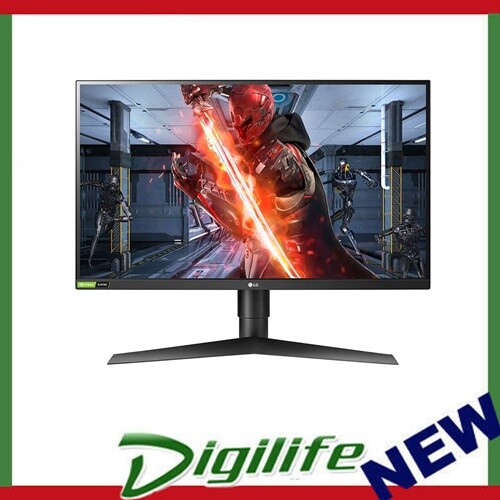
See your way to victory with the innovative 27GL850 UltraGear gaming monitor, providing the crispest visuals and the sharpest clarity. You can experience breathtaking immersion on a Nano IPS display with a 1ms response time.
See your way to victory with the innovative 27GL850 UltraGear gaming monitor, providing the crispest visuals and the sharpest clarity. You can experience breathtaking immersion on a Nano IPS display with a 1ms response time.
in 3 offers
The lowest price for LG UltraGear 27GL850-B 27" Gaming Monitor right now is $739.00 at Ubuy Australia, compared across 3 retailers.
The all-time low was $269.10 on 12 May 2026 — today's price is 175% above the lowest ever. It has been notably cheaper before — worth setting a price alert.
Prices last updated 2 Oct 2026.
LG UltraGear 27GL850-B 27" Gaming Monitor
See your way to victory with the innovative 27GL850 UltraGear gaming monitor, providing the crispest visuals and the sharpest clarity. You can experience breathtaking immersion on a Nano IPS display with a 1ms response time.
See your way to victory with the innovative 27GL850 UltraGear gaming monitor, providing the crispest visuals and the sharpest clarity. You can experience breathtaking immersion on a Nano IPS display with a 1ms response time.
Last updated at 02/10/2026 23:11:15
LG 27GL850-B 27 Inch Ultragear QHD Nano IPS 1ms NVIDIA G-Sync Compatible Gaming Monitor,
Delivery $730
27GL850-B 27 Inch Ultragear QHD Nano IPS 1ms NVIDIA G-Sync Compatible Gaming Monitor, Black
Delivery between 10–13 Oct $29
LG 27GL850-B 27 Inch Ultragear QHD Nano IPS 1ms NVIDIA G-Sync Compatible Gaming Monitor, Black
Free delivery between 14–16 Oct
originally posted on bestbuy.com
I bought three of these for a triple monitor setup. I currently have them on mounts on my desk, so I can't say if the stands were any good. But unboxing was simple and it looks like they can be re-boxed easily.The monitors themselves are physically pretty nice. Good color, contrast, sharp details. I have them connected to a KVM with a Mac Studio, Windows, and Linux machines.The issues I have with these is the light bleeding, it's noticeable when watching movies or playing games that's dark. It took me weeks to mostly not notice it, but it's there.What I don't like is that there is no control for how long a monitor will go to sleep, so when switching between KVM and another machine, the monitors will quickly fall asleep and then the video signal gets all messed ... MoreI bought three of these for a triple monitor setup. I currently have them on mounts on my desk, so I can't say if the stands were any good. But unboxing was simple and it looks like they can be re-boxed easily.The monitors themselves are physically pretty nice. Good color, contrast, sharp details. I have them connected to a KVM with a Mac Studio, Windows, and Linux machines.The issues I have with these is the light bleeding, it's noticeable when watching movies or playing games that's dark. It took me weeks to mostly not notice it, but it's there.What I don't like is that there is no control for how long a monitor will go to sleep, so when switching between KVM and another machine, the monitors will quickly fall asleep and then the video signal gets all messed up when they're awaken again during a boot up. It's extremely annoying because I have switch ports again on the KVM to try and reset the video signal.Also, LG's support for this monitor is not good. I still can't any firmware updates for this, or any instructions on how to update firmware or find any software that works for it. I was hoping some issues would be fixed by now, but I couldn't even update it if there were any.The other issue is that my Mac Studio WILL NOT work well with these monitors if I set them to 120Hz refresh, the text and image gets blurry. It works under 100Hz and 144Hz, but I can't drive all three at 144Hz on Mac Studio without one of the monitors blinking off and on. I don't know if it's Apple or LG that's the cause of this, but 120Hz works fine on my Linux and Windows machines.Even though they are "gaming" monitors, I use them mostly for software development and need reliability when switching between devices via KVM. So far these monitors aren't very reliable when on a KVM, it's a 50/50 chance that the monitors will even turn on when switching KVM ports.Overall, they are good monitors for what they are and are probably best when used with a single device.
originally posted on bestbuy.com
This is my first 1440p monitor and I LOVE it! It's a open box special that came in the original box and looked perfect. I wouldn't have known it was open box if the site hadn't said so. Huge discount for that, plus cash back points on my credit card got me $150 off retail price! I of course paid off the credit card before it was due, so no interest.But, you're not here to read about that. You're here to read about the monitor. Let me say this...if it dies, I'll buy another one just like it. The resolution settings "Gamer, Gamer2, Vivid, etc.) are very useful. Sometimes, you'll want a different setting when you're gaming than if you're streaming Amazon Prime Video, for example. If you do a lot of reading at your PC in an online course for example, this monitor has ... MoreThis is my first 1440p monitor and I LOVE it! It's a open box special that came in the original box and looked perfect. I wouldn't have known it was open box if the site hadn't said so. Huge discount for that, plus cash back points on my credit card got me $150 off retail price! I of course paid off the credit card before it was due, so no interest.But, you're not here to read about that. You're here to read about the monitor. Let me say this...if it dies, I'll buy another one just like it. The resolution settings "Gamer, Gamer2, Vivid, etc.) are very useful. Sometimes, you'll want a different setting when you're gaming than if you're streaming Amazon Prime Video, for example. If you do a lot of reading at your PC in an online course for example, this monitor has you covered. It has a second HDMI port which comes in handy if you want hook a second device such as a laptop, tablet, or gaming console to it. If you want to be a Twitch streamer, be sure to get 2 of these monitors, but maybe smaller.You can't go wrong. The display is beautiful and it has a 144mhz refresh rate. I'm running a GTX 1070 (best I could find during the chip shortage) with a Ryzen 3900x CPU and haven't seen any tearing during gaming. Just be patient and look for a discount so you're not paying retail price if you have time to wait.Just a side note, you're probably wondering about my desktop in the pictures. I'm running a modified version of Windows 10. I don't like the plain, bland Windows 10 Start button, so I changed it back to the Windows 7 style. :)
originally posted on bhphotovideo.com
I used to use a typical 48 home TV for SIM racing and gaming in general. But after reviewing many other SIM racer's monitor set ups, I realized that my particular set up was lacking the most beneficial aspects of having a proper SIM gaming set up for optimum performance and user satisfaction.My previous set up was too far away, angled too far up, too low a resolution, and too slow of a response time to enable me to accurately coordinate the the points on track without delay between my driving inputs and what I actually saw on screen. I'm sure a similar situation occurs in RPG style gaming also if not optimized.So, I was out to do research on all monitors available at the time and those that were to be soon released in 2019. For my requirements, I needed a monitor ... MoreI used to use a typical 48 home TV for SIM racing and gaming in general. But after reviewing many other SIM racer's monitor set ups, I realized that my particular set up was lacking the most beneficial aspects of having a proper SIM gaming set up for optimum performance and user satisfaction.My previous set up was too far away, angled too far up, too low a resolution, and too slow of a response time to enable me to accurately coordinate the the points on track without delay between my driving inputs and what I actually saw on screen. I'm sure a similar situation occurs in RPG style gaming also if not optimized.So, I was out to do research on all monitors available at the time and those that were to be soon released in 2019. For my requirements, I needed a monitor to represent a typical race car dashboard and windshield view with an FOV of between 48 ~ 62 depending on the type of car and track combo. In order to accomplish this, the monitor needed to be about 28 ~ 30 inches from my eyes and right behind the steering wheel. Only a computer type monitor will allow you to be that close and still retain good focus, detail, and resolution.Then it came down to which type of monitor would suit my viewing requirements best, and the choices came down to, TN, VA, IPS, and Nano-IPS. After many hours of reviews and analysis, I decided that the Nano-IPS was the clear choice for me.I went from a TV with 1920x1080, 60Hz refresh, and a MPRT of 15.3, to a 2560x1440, 144Hz refresh, and a 6.4ms MPRT. That effectively doubled the clarity, and a also provides a 59% improvement in the response time, (AKA lag). (Verified at BlurBusters)I'm using an i7-8750H, GTX-1070Max-Q with G-Sync enabled, and in -game Max Pre-rendered Frames at 1. In the monitor, I use Game mode 2, G-Sync, Fast response time. Sharpness ~ 90, Contrast ~82, Brite ~70, Black EQ ~55, and HDR OFF.I 'm also using a DP 1.40 certified cable from the PC to the monitor, and this combination is probably as good as it can be for the equipment that I currently have. I missed the first round of distribution of this monitor, so I had to wait three additional months until it was available again, but it was absolutely worth the wait!I couldn't be more pleased wit the monitor, tested it for light bleed, and dead pixels, and happy to report I received a very good one.And in closing, I would also like to point out that B & H Photo was super helpful in all my dealings during the purchase cycle, and would highly recommend them as a supplier to anyone.
| Display | |
| Screen shape | Flat |
| DDC/CI | Y |
| High Dynamic Range (HDR) supported | Y |
| Maximum refresh rate | 144 Hz |
LG 27GL850-B 27 Inch Ultragear QHD Nano IPS 1ms NVIDIA G-Sync Compatible Gaming Monitor,
Delivery $730
27GL850-B 27 Inch Ultragear QHD Nano IPS 1ms NVIDIA G-Sync Compatible Gaming Monitor, Black
Delivery between 10–13 Oct $29
LG 27GL850-B 27 Inch Ultragear QHD Nano IPS 1ms NVIDIA G-Sync Compatible Gaming Monitor, Black
Free delivery between 14–16 Oct
I bought three of these for a triple monitor setup. I currently have them on mounts on my desk, so I can't say if the stands were any good. But unboxing was simple and it looks like they can be re-boxed easily.The monitors themselves are physically pretty nice. Good color, contrast, sharp details. I have them connected to a KVM with a Mac Studio, Windows, and Linux machines.The issues I have with these is the light bleeding, it's noticeable when watching movies or playing games that's dark. It took me weeks to mostly not notice it, but it's there.What I don't like is that there is no control for how long a monitor will go to sleep, so when switching between KVM and another machine, the monitors will quickly fall asleep and then the video signal gets all messed ... MoreI bought three of these for a triple monitor setup. I currently have them on mounts on my desk, so I can't say if the stands were any good. But unboxing was simple and it looks like they can be re-boxed easily.The monitors themselves are physically pretty nice. Good color, contrast, sharp details. I have them connected to a KVM with a Mac Studio, Windows, and Linux machines.The issues I have with these is the light bleeding, it's noticeable when watching movies or playing games that's dark. It took me weeks to mostly not notice it, but it's there.What I don't like is that there is no control for how long a monitor will go to sleep, so when switching between KVM and another machine, the monitors will quickly fall asleep and then the video signal gets all messed up when they're awaken again during a boot up. It's extremely annoying because I have switch ports again on the KVM to try and reset the video signal.Also, LG's support for this monitor is not good. I still can't any firmware updates for this, or any instructions on how to update firmware or find any software that works for it. I was hoping some issues would be fixed by now, but I couldn't even update it if there were any.The other issue is that my Mac Studio WILL NOT work well with these monitors if I set them to 120Hz refresh, the text and image gets blurry. It works under 100Hz and 144Hz, but I can't drive all three at 144Hz on Mac Studio without one of the monitors blinking off and on. I don't know if it's Apple or LG that's the cause of this, but 120Hz works fine on my Linux and Windows machines.Even though they are "gaming" monitors, I use them mostly for software development and need reliability when switching between devices via KVM. So far these monitors aren't very reliable when on a KVM, it's a 50/50 chance that the monitors will even turn on when switching KVM ports.Overall, they are good monitors for what they are and are probably best when used with a single device.
This is my first 1440p monitor and I LOVE it! It's a open box special that came in the original box and looked perfect. I wouldn't have known it was open box if the site hadn't said so. Huge discount for that, plus cash back points on my credit card got me $150 off retail price! I of course paid off the credit card before it was due, so no interest.But, you're not here to read about that. You're here to read about the monitor. Let me say this...if it dies, I'll buy another one just like it. The resolution settings "Gamer, Gamer2, Vivid, etc.) are very useful. Sometimes, you'll want a different setting when you're gaming than if you're streaming Amazon Prime Video, for example. If you do a lot of reading at your PC in an online course for example, this monitor has ... MoreThis is my first 1440p monitor and I LOVE it! It's a open box special that came in the original box and looked perfect. I wouldn't have known it was open box if the site hadn't said so. Huge discount for that, plus cash back points on my credit card got me $150 off retail price! I of course paid off the credit card before it was due, so no interest.But, you're not here to read about that. You're here to read about the monitor. Let me say this...if it dies, I'll buy another one just like it. The resolution settings "Gamer, Gamer2, Vivid, etc.) are very useful. Sometimes, you'll want a different setting when you're gaming than if you're streaming Amazon Prime Video, for example. If you do a lot of reading at your PC in an online course for example, this monitor has you covered. It has a second HDMI port which comes in handy if you want hook a second device such as a laptop, tablet, or gaming console to it. If you want to be a Twitch streamer, be sure to get 2 of these monitors, but maybe smaller.You can't go wrong. The display is beautiful and it has a 144mhz refresh rate. I'm running a GTX 1070 (best I could find during the chip shortage) with a Ryzen 3900x CPU and haven't seen any tearing during gaming. Just be patient and look for a discount so you're not paying retail price if you have time to wait.Just a side note, you're probably wondering about my desktop in the pictures. I'm running a modified version of Windows 10. I don't like the plain, bland Windows 10 Start button, so I changed it back to the Windows 7 style. :)
I used to use a typical 48 home TV for SIM racing and gaming in general. But after reviewing many other SIM racer's monitor set ups, I realized that my particular set up was lacking the most beneficial aspects of having a proper SIM gaming set up for optimum performance and user satisfaction.My previous set up was too far away, angled too far up, too low a resolution, and too slow of a response time to enable me to accurately coordinate the the points on track without delay between my driving inputs and what I actually saw on screen. I'm sure a similar situation occurs in RPG style gaming also if not optimized.So, I was out to do research on all monitors available at the time and those that were to be soon released in 2019. For my requirements, I needed a monitor ... MoreI used to use a typical 48 home TV for SIM racing and gaming in general. But after reviewing many other SIM racer's monitor set ups, I realized that my particular set up was lacking the most beneficial aspects of having a proper SIM gaming set up for optimum performance and user satisfaction.My previous set up was too far away, angled too far up, too low a resolution, and too slow of a response time to enable me to accurately coordinate the the points on track without delay between my driving inputs and what I actually saw on screen. I'm sure a similar situation occurs in RPG style gaming also if not optimized.So, I was out to do research on all monitors available at the time and those that were to be soon released in 2019. For my requirements, I needed a monitor to represent a typical race car dashboard and windshield view with an FOV of between 48 ~ 62 depending on the type of car and track combo. In order to accomplish this, the monitor needed to be about 28 ~ 30 inches from my eyes and right behind the steering wheel. Only a computer type monitor will allow you to be that close and still retain good focus, detail, and resolution.Then it came down to which type of monitor would suit my viewing requirements best, and the choices came down to, TN, VA, IPS, and Nano-IPS. After many hours of reviews and analysis, I decided that the Nano-IPS was the clear choice for me.I went from a TV with 1920x1080, 60Hz refresh, and a MPRT of 15.3, to a 2560x1440, 144Hz refresh, and a 6.4ms MPRT. That effectively doubled the clarity, and a also provides a 59% improvement in the response time, (AKA lag). (Verified at BlurBusters)I'm using an i7-8750H, GTX-1070Max-Q with G-Sync enabled, and in -game Max Pre-rendered Frames at 1. In the monitor, I use Game mode 2, G-Sync, Fast response time. Sharpness ~ 90, Contrast ~82, Brite ~70, Black EQ ~55, and HDR OFF.I 'm also using a DP 1.40 certified cable from the PC to the monitor, and this combination is probably as good as it can be for the equipment that I currently have. I missed the first round of distribution of this monitor, so I had to wait three additional months until it was available again, but it was absolutely worth the wait!I couldn't be more pleased wit the monitor, tested it for light bleed, and dead pixels, and happy to report I received a very good one.And in closing, I would also like to point out that B & H Photo was super helpful in all my dealings during the purchase cycle, and would highly recommend them as a supplier to anyone.
Pretty much delivers all features promised, but its not perfect. Here is my experience.1) Poor quality of DP cable included - Within 1 hr of using, a red vertical line appeared across the screen, which is gone away reboot the machine. Screen went blank while playing game, again reboot fixes.2) Now I have replaced DP cable with certified high quality DP1.4 cable, the above issues are gone now, however with new cable it has trouble detecting signal when switched on and PC is already running. This happened several times, but currently this not an issues.3) It seems to take while to power on4) Light bleed is not bad, but it could be better.Other than that, great colors with HDR and and fast 1m response at 144hz.
Had unit for about a year, and have had no issues. Its' resolution is ~ 2K, which is fine for almost everything....though not all. I've considered a 4K unit but, at least in the reliable LG line, such means a 60 Hz refresh rate (if you're a gamer....I'm not....this would be an impediment). Yup, 4K requires pushing a lot of pixels out in rapid order so you'd also have to purchase a good (costly) graphics card.....I've a 3070ti but ramping to 4K drops the refresh rate to 60Hz whereas at 2K on my current monitor it's cranking 144. The 4K LGs do have a 500 nits brightness, more than the 350 that the GL850 has, but in a less than bright room 350 is fine. It would be nice to have a USB C option or modest speakers, but......
Even with a horizontal line a cross the screen,,I can tell you if you get one that's not defective, it's a great monitor despite what it don't actually have, say like actual G-SYNC...and yes it does do 1ms response time's, but do not use faster response setting unless you love ghosting. Don't think any monitor has yet overcome that one so far. The menu though easy to navigate, is confusing..some option's are not available in different modes and that can frustrate a gaming monitor newbie..just keep switching through them until the other option's are able to be accessed..you'll learn how it function's in short order. I bought this one knowing it was slightly defective because I'm poor and would never have the chance to have a nice monitor otherwise. I was able to put ... MoreEven with a horizontal line a cross the screen,,I can tell you if you get one that's not defective, it's a great monitor despite what it don't actually have, say like actual G-SYNC...and yes it does do 1ms response time's, but do not use faster response setting unless you love ghosting. Don't think any monitor has yet overcome that one so far. The menu though easy to navigate, is confusing..some option's are not available in different modes and that can frustrate a gaming monitor newbie..just keep switching through them until the other option's are able to be accessed..you'll learn how it function's in short order. I bought this one knowing it was slightly defective because I'm poor and would never have the chance to have a nice monitor otherwise. I was able to put together a great little DYI custom tower over the course of 2 yr's..Some day I hope I can find another monitor like this that's also broke that might allow me to finally have a defective free screen ( one that won't power on with a non-broke screen. The plight of the poor, lol. But hey, I'm gaming at 1440p 144 fps..first time..this is a good monitor model..it had 32 hr's on the timer, so it was a manufacturing defect..work's just fine otherwise, but it tell's me alot about Ultra Gear...
The LG UltraGear 27" IPS LED QHD FreeSync and G-SYNC Compatible Monitor with HDR 10 (DisplayPort, HDMI) is an outstanding product that delivers exceptional performance, image quality, and features. This high-quality monitor is designed to provide gamers with an immersive and seamless gaming experience, while also offering excellent value for money.The monitor features a QHD resolution of 2560 x 1440 pixels, delivering crystal-clear images with stunning detail and clarity. The IPS panel also provides wide viewing angles, ensuring that the colors and contrast remain consistent even when viewed from off-center angles. This makes it an ideal choice for gamers who need to view the screen from different angles.One of the key features of the LG UltraGear monitor is its ... MoreThe LG UltraGear 27" IPS LED QHD FreeSync and G-SYNC Compatible Monitor with HDR 10 (DisplayPort, HDMI) is an outstanding product that delivers exceptional performance, image quality, and features. This high-quality monitor is designed to provide gamers with an immersive and seamless gaming experience, while also offering excellent value for money.The monitor features a QHD resolution of 2560 x 1440 pixels, delivering crystal-clear images with stunning detail and clarity. The IPS panel also provides wide viewing angles, ensuring that the colors and contrast remain consistent even when viewed from off-center angles. This makes it an ideal choice for gamers who need to view the screen from different angles.One of the key features of the LG UltraGear monitor is its compatibility with both FreeSync and G-SYNC technologies, ensuring that gamers can experience smooth and tear-free gameplay without any lag or stuttering. This feature also makes the monitor compatible with both NVIDIA and AMD graphics cards, providing gamers with a wider range of options to choose from.The monitor also supports HDR 10, providing a wider range of colors and contrast for a more realistic and immersive gaming experience. This feature is especially useful for games with darker environments, as it allows for more detail to be seen in the shadows and highlights.In terms of connectivity, the LG UltraGear monitor offers both DisplayPort and HDMI inputs, ensuring compatibility with most modern gaming systems. The monitor also includes a USB hub, allowing for easy access to USB devices such as gaming controllers, keyboards, and mice.Overall, the LG UltraGear 27" IPS LED QHD FreeSync and G-SYNC Compatible Monitor with HDR 10 (DisplayPort, HDMI) is an excellent product that offers outstanding value for money. Its exceptional performance, image quality, and features make it an ideal choice for gamers who want an immersive and seamless gaming experience without breaking the bank. If you're in the market for a high-quality gaming monitor, I highly recommend the LG UltraGear monitor.
I got this monitor based off feedback I was getting from friends of mine. I mainly play FPS games and so far it has honestly and truly exceeded my expectations. Going from a 55inch tv to a 27 inch gaming monitor was a bit of an adjustment but I am happy that I purchased this. The graphics are fantastic, the response time is amazing, and it’s definitely made me a better player. I would recommend this to anyone looking to get a gaming monitor. You will not be disappointed.
I've Unleashed and been using this ultra beast now for over two months and I've been pushing it to it's full potential extensively using my Geforce RTX 2080-Ti.Forget the "Pro's & Con's"Here is the Truth:I purchased the "LG UltraGear 27GN850-B model" which is pretty much the same monitor as the 27GL850-B but without the (USB-ports).Let me tell you... This Monitor Dropkicks" the QHD 2K 1440p -144hrz & HD 1080p 100hrz gaming competition out of our solar system with it's raw IPS performance!!It is a phenomenal gaming monitor and I have experienced 3 other gaming monitors so far, now 4. It delivers vibrant, accurate, and consistent colors with the fastest response time speed equal if not better than any other IPS monitor in the market from 2019 into ... MoreI've Unleashed and been using this ultra beast now for over two months and I've been pushing it to it's full potential extensively using my Geforce RTX 2080-Ti.Forget the "Pro's & Con's"Here is the Truth:I purchased the "LG UltraGear 27GN850-B model" which is pretty much the same monitor as the 27GL850-B but without the (USB-ports).Let me tell you... This Monitor Dropkicks" the QHD 2K 1440p -144hrz & HD 1080p 100hrz gaming competition out of our solar system with it's raw IPS performance!!It is a phenomenal gaming monitor and I have experienced 3 other gaming monitors so far, now 4. It delivers vibrant, accurate, and consistent colors with the fastest response time speed equal if not better than any other IPS monitor in the market from 2019 into 2020!I've been giddy like a kid again enjoying the extremely low input lag, and tear-free G-sync action!. There's plenty of additional useful features that I am loving like the "Cross-Hair" input option that really actually helps in fast paced FPS games.I thought it was just a gimmick but I was schooled by it's attribute. Other features like "Black Stabilizer" which lets you tune/tweak the blacks/shadows within games and media to my satisfaction! Also, there is the "Game Mode" a preset configuration of different calibrated styles like "Gamer Mode 1 & 2 which are for a variety of different games that gives you the ability to tweak & configure them both to your liking!Along with an "FPS Mode - RTS Mode - HDR Effect - Reader Mode - sRGB Mode. But the best of them all..."My Favorite ~ Vibrant Mode" this mode (imo) is excellent for Movie watching and especially for single player open world Games like The Witcher 3 & Red Dead Redemption 2, also I'm currently playing The Last Of Us 2 on my PS4 Pro and it's gorgeous running at 2160p due to the wonderful radiant colors and finely tuned gamma/contrast ratio!.I could ramble on about how good this monitor is but I'm sure you get the point...Now for the other Truth:My only warning to anyone who loves to use monitors in the darkest of rooms will of course notice there is some IPS glow from the edges of the screen and some minor backlight bleeding. So to those who might be wondering what does that mean? It means the deep blacks within videos/movies that appear on screen look more like very dark grey and at bad angels there is shiny reflections/glowing from the corners of the screen but for games you can work around that with built in features/options as I described above. Also easy fix is to just turn on a lamp or burn some candles which will brighten up the room a little thus negating some of the IPS glow.But with that said this small downside does not have a negative impact on me with my every day enjoyment/experience with it, but it might for someone who like I said, "Really Loves" to watch scary horror flicks or prefers to work/edit in the dark.Overall:This LG UltraGear QHD LED IPS Monitor is a premium (Savage!)For the $400+ price-tag this is one of the top 5 best of the best gaming monitors you can buy hands down!!.For someone who is looking to upgrade or is a new adventurer in this landscape."I Highly Recommend This Product"
Bought the monitor in late December after seeing good reviews from LG for what I assumed would be a new monitor. I received a used monitor. Bags were already open in the box, there was no protective peels on the monitor, it already had 28 hours logged on it, and it had a return shipping label in it from the previous owner. Called LG support 4 times at this point and they kept telling me they will send out a new one in exchange. I still have not received a new monitor, nor the new invoice. The monitor seems OK, but probably just going to return it and cancel my pre-order for the 27" OLED because of the poor support.
| Display | |
| Screen shape | Flat |
| DDC/CI | Y |
| High Dynamic Range (HDR) supported | Y |
| Maximum refresh rate | 144 Hz |

