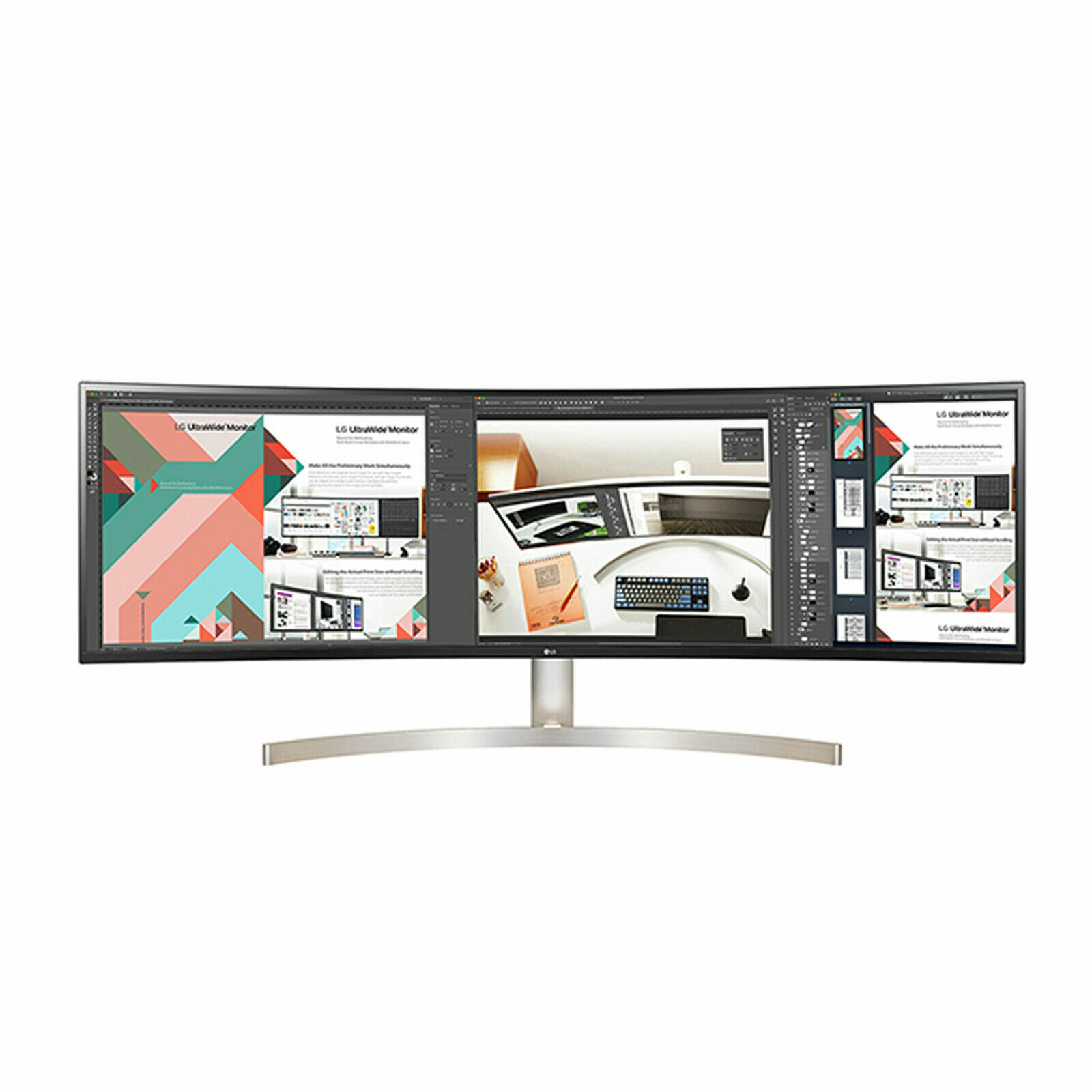
Go Beyond Multitasking. The 49WL95C is an 32:9 UltraWide (5120x1440) display with screen space equivalent to two 27-inch 16:9 QHD monitors.
Go Beyond Multitasking. The 49WL95C is an 32:9 UltraWide (5120x1440) display with screen space equivalent to two 27-inch 16:9 QHD monitors.
in 4 offers
The lowest price for LG 49WL95C-WE 49inch UltraWide 5K Dual QHD IPS Curved Monitor right now is $1,499.00 at Umart, compared across 4 retailers.
The all-time low was $1,495.00 on 9 Mar 2026. That's the lowest price we've ever tracked — a great time to buy.
Prices last updated 24 Aug 2026.
LG 49WL95C-WE 49inch UltraWide 5K Dual QHD IPS Curved Monitor
Go Beyond Multitasking. The 49WL95C is an 32:9 UltraWide (5120x1440) display with screen space equivalent to two 27-inch 16:9 QHD monitors.
Go Beyond Multitasking. The 49WL95C is an 32:9 UltraWide (5120x1440) display with screen space equivalent to two 27-inch 16:9 QHD monitors.
Last updated at 24/08/2026 11:11:10
LG 49in QHD IPS Ultra Wide Monitor 49WL95C WE - Monitors
Delivery $72.01
LG 49in QHD IPS Ultra Wide Monitor 49WL95C WE - Monitors
Delivery $58
LG 49in 49WL95C UHD IPS LED UltraWide Monitor
30-day returns
LG 49'' 49WL95C UHD IPS LED UltraWide Monitor 5120x1440 (32:9) /5ms/ 60Hz/VESA
Delivery between 27–31 Aug $10
originally posted on pbtech.co.nz
It is a great monitor, with so much screen real estate! I wish it was curved more though, so I didn't have to scoot my chair to see the sides. If the curve was greater, then I could just turn my head.The speakers are a weak point. I am used to Apple iMacs and Mac Book Pros, which have excellent speakers, so the LG's are a real disappointment.It has some cool software built in so you can use one keyboard and mouse, with two computers, and you can seamlessly split the screen as well.The stand is solid, easy to install and is a good height too.
originally posted on bhphotovideo.com
I was very excited to get this monitor and have enjoyed owning it. That being said there are items that you have no way of finding out how to do them using LG's website. I am on Windows 11 and they provide no drivers when you look the monitor up.I was after the ability to display two different computers side by side on this single monitor. LG's OnScreen Control app that they guided me to was incredibly worthless.I friend mentioned that I could get to the split screen view using the toggle cursor button on the back right side of the monitor (as you face it). To get to it, Depress the Cursor button once to bring up a circular center screen menu. Then toggle right to get to the Settings menu. Then move to PBP/PIP and click again. Here you can arrange the split ... MoreI was very excited to get this monitor and have enjoyed owning it. That being said there are items that you have no way of finding out how to do them using LG's website. I am on Windows 11 and they provide no drivers when you look the monitor up.I was after the ability to display two different computers side by side on this single monitor. LG's OnScreen Control app that they guided me to was incredibly worthless.I friend mentioned that I could get to the split screen view using the toggle cursor button on the back right side of the monitor (as you face it). To get to it, Depress the Cursor button once to bring up a circular center screen menu. Then toggle right to get to the Settings menu. Then move to PBP/PIP and click again. Here you can arrange the split screen in a variety of configurations.This works, but then there is no way in LG's tools to allow the mouse to cross from one computer's desktop to the other. I found that a Tool is available through the Microsoft Garage called Mouse without Borders. This enables the keyboard and mouse to cross from one desktop to the other as if they were one computer.Now having figured all that out I am a happy camper, but it was a frustrating process and I hope to help others avoid the frustrations I encountered.
originally posted on LG
I've had this monitor for almost a month and it's great. Ideal for video editors that want to expand their timeline or have up a script as they edit to see any notes. Features are simple and not complex - as it should be, so you can dive in shortly after install. The control knob on the back of the screen to navigate the menu is okay. I wish there were also a second option underneath the screen as well for those of us that have more depth in our desks. The split screen software/app would be much better with not only preset partitions, but an option to create and customize as well. There are other things out there to download and use, but it's just another app taking up space or, even worse, coming from a third party that seems a little janky. Would be much better to ... MoreI've had this monitor for almost a month and it's great. Ideal for video editors that want to expand their timeline or have up a script as they edit to see any notes. Features are simple and not complex - as it should be, so you can dive in shortly after install. The control knob on the back of the screen to navigate the menu is okay. I wish there were also a second option underneath the screen as well for those of us that have more depth in our desks. The split screen software/app would be much better with not only preset partitions, but an option to create and customize as well. There are other things out there to download and use, but it's just another app taking up space or, even worse, coming from a third party that seems a little janky. Would be much better to come from the manufacturer. Other than that, it's a small stain on a really great monitor. 5 stars or 9.5/10.
| Resolution | 5120 x 1440Panel Type IPS |
| Aspect Ratio | 32:9Pixel Pitch 0.234 x 0.234 mm |
| Brightness | (Min.) 280 cd/m²Brightness (Typ.) 350 cd/m² |
| Color Depth (Number of Colors) | 1.07BContrast Ratio (Min.) 700:1 |
| Contrast Ratio (Typ.) | 1000:1Response Time 5ms (GtG at Faster) |
LG 49in QHD IPS Ultra Wide Monitor 49WL95C WE - Monitors
Delivery $72.01
LG 49in QHD IPS Ultra Wide Monitor 49WL95C WE - Monitors
Delivery $58
LG 49in 49WL95C UHD IPS LED UltraWide Monitor
30-day returns
LG 49'' 49WL95C UHD IPS LED UltraWide Monitor 5120x1440 (32:9) /5ms/ 60Hz/VESA
Delivery between 27–31 Aug $10
It is a great monitor, with so much screen real estate! I wish it was curved more though, so I didn't have to scoot my chair to see the sides. If the curve was greater, then I could just turn my head.The speakers are a weak point. I am used to Apple iMacs and Mac Book Pros, which have excellent speakers, so the LG's are a real disappointment.It has some cool software built in so you can use one keyboard and mouse, with two computers, and you can seamlessly split the screen as well.The stand is solid, easy to install and is a good height too.
I was very excited to get this monitor and have enjoyed owning it. That being said there are items that you have no way of finding out how to do them using LG's website. I am on Windows 11 and they provide no drivers when you look the monitor up.I was after the ability to display two different computers side by side on this single monitor. LG's OnScreen Control app that they guided me to was incredibly worthless.I friend mentioned that I could get to the split screen view using the toggle cursor button on the back right side of the monitor (as you face it). To get to it, Depress the Cursor button once to bring up a circular center screen menu. Then toggle right to get to the Settings menu. Then move to PBP/PIP and click again. Here you can arrange the split ... MoreI was very excited to get this monitor and have enjoyed owning it. That being said there are items that you have no way of finding out how to do them using LG's website. I am on Windows 11 and they provide no drivers when you look the monitor up.I was after the ability to display two different computers side by side on this single monitor. LG's OnScreen Control app that they guided me to was incredibly worthless.I friend mentioned that I could get to the split screen view using the toggle cursor button on the back right side of the monitor (as you face it). To get to it, Depress the Cursor button once to bring up a circular center screen menu. Then toggle right to get to the Settings menu. Then move to PBP/PIP and click again. Here you can arrange the split screen in a variety of configurations.This works, but then there is no way in LG's tools to allow the mouse to cross from one computer's desktop to the other. I found that a Tool is available through the Microsoft Garage called Mouse without Borders. This enables the keyboard and mouse to cross from one desktop to the other as if they were one computer.Now having figured all that out I am a happy camper, but it was a frustrating process and I hope to help others avoid the frustrations I encountered.
I've had this monitor for almost a month and it's great. Ideal for video editors that want to expand their timeline or have up a script as they edit to see any notes. Features are simple and not complex - as it should be, so you can dive in shortly after install. The control knob on the back of the screen to navigate the menu is okay. I wish there were also a second option underneath the screen as well for those of us that have more depth in our desks. The split screen software/app would be much better with not only preset partitions, but an option to create and customize as well. There are other things out there to download and use, but it's just another app taking up space or, even worse, coming from a third party that seems a little janky. Would be much better to ... MoreI've had this monitor for almost a month and it's great. Ideal for video editors that want to expand their timeline or have up a script as they edit to see any notes. Features are simple and not complex - as it should be, so you can dive in shortly after install. The control knob on the back of the screen to navigate the menu is okay. I wish there were also a second option underneath the screen as well for those of us that have more depth in our desks. The split screen software/app would be much better with not only preset partitions, but an option to create and customize as well. There are other things out there to download and use, but it's just another app taking up space or, even worse, coming from a third party that seems a little janky. Would be much better to come from the manufacturer. Other than that, it's a small stain on a really great monitor. 5 stars or 9.5/10.
I have had this monitor for a few months now, and would rate it a 5 star, were it not for a few baffling design/techincal decisions, and its hideausly high price tag.1. USB Hub/KVM is not shared across HDMI or DP ports - absolutely Baffling!!! Monitor requires an urgent software update to support this.2. The joystick control is great, however it is on the back left hand side, which makes accessing it a pain, especially if you are short limbed, or in my case have speakers at the side of the monitor - would be much better placed botom centre, or very slightly offset from the the bottom middle.3. There is only one USB-C port - I have to use an external USB VKM to connect my laptops - Add more USB-C slots4. When USB-C input is selected (changed) on the ... MoreI have had this monitor for a few months now, and would rate it a 5 star, were it not for a few baffling design/techincal decisions, and its hideausly high price tag.1. USB Hub/KVM is not shared across HDMI or DP ports - absolutely Baffling!!! Monitor requires an urgent software update to support this.2. The joystick control is great, however it is on the back left hand side, which makes accessing it a pain, especially if you are short limbed, or in my case have speakers at the side of the monitor - would be much better placed botom centre, or very slightly offset from the the bottom middle.3. There is only one USB-C port - I have to use an external USB VKM to connect my laptops - Add more USB-C slots4. When USB-C input is selected (changed) on the (external) KVM, it drops connection to all connected USB devices, which means that when I go to log on to another device, windows Hello on the montor connected USB-C webcam does not connect properly to the external device.
I really, really want to stress that this monitor is fantastic in *just about* every way. I use it 8 hours a day, five days a week for work, and it has changed my workflow, definitely for the better. It sounds odd, but not thinking about which "screen" a certain piece of information might be on sped me up, having come from using two 27-inch monitors. What really let me down was LGs commitment to customer service. I order it in April of 2019, immediately after it came out, and it worked flawlessly for about 9 months. However, it then started experiencing intermittent power failure, where my monitor would sporadically turn on and off - and sometimes refuse to turn on altogether. That was a huge issue, as it's my only monitor for work. LG Support was reasonable enough ... MoreI really, really want to stress that this monitor is fantastic in *just about* every way. I use it 8 hours a day, five days a week for work, and it has changed my workflow, definitely for the better. It sounds odd, but not thinking about which "screen" a certain piece of information might be on sped me up, having come from using two 27-inch monitors. What really let me down was LGs commitment to customer service. I order it in April of 2019, immediately after it came out, and it worked flawlessly for about 9 months. However, it then started experiencing intermittent power failure, where my monitor would sporadically turn on and off - and sometimes refuse to turn on altogether. That was a huge issue, as it's my only monitor for work. LG Support was reasonable enough to hook me up with an authorized LG repair shop, as they had no factory repair centers near me. They concluded that there was an issue with the power supply, and opted to replace the board for me - under warranty - for no cost. That's the end of it, right? Everything was working correctly until I noticed a couple of days ago that my monitor is having trouble recognizing/waking up when prompted with an active display port (DP) signal. I used the LG provided 5K DP cable, and another high-quality cable, but neither can reliably wake the display to the correct input, requiring me to manually select the DP version. Suffice it to say, it's been a somewhat frustrating ownership experience. It's really, really tough for me to recommend this product based on my personal experience. I want to love this monitor - but I can't do much more than like it if LG isn't going to stand behind their products.
Let me first off say I love the monitor. I wish it did a couple things. One, I wish I could split it into multiple virtual monitors. The software to section it is...fine. I want to run a video or game full screen on one section of the monitor while using the rest for other things. Secondly the dual monitor setup does not work as advertised. The keyboard and mouse still have to be manually switched between computers unless both are being used in picture in picture mode. Also when using the mouse with dual controller software it moves the mice on both computers. Not a terrible experience but very unpolished. Knowing what I know now I probably would have gone with dual monitors.
I absolutely love this monitor! I have to reference several documents at a time while working, and as documents are increasingly in electric vs paper format, having the ability to clearly see multiple documents on the screen while still using the application I'm working on, has been a game changer. Additionally, the large curved screen also allows me to have my calendar and email applications visible for quick reference rather than having to constantly click in and out of screens. While I've used multiple screens in the past, I don't think I can ever go back after experiencing the single fluid screen. On top of making work a lot easier, it looks great and gets so many compliments from whoever sees it. Incredibly happy with this purchase. Highly recommend!
I bought this close to release thinking that Apple and LG were working together and ensuring their products were compatible. They're not. So many dramas at hardware and software level with my Mac Book Pro, so this now sits in a corner and collects dust. ONScreen Control might be the worst software ever developed for a computer. It is notoriously unstable, user-unfriendly and has a mind of it's own. And the screw splitting software is only useful for two Windows computers...not a Mac and a PC. And the upstream USB-C port intermittently cuts out, rendering your power supply and peripherals useless. The joystick controls are located on the rear (yes the REAR of a 49 inch screen) and there's no remote. So every adjustment, including volume, requires you to get up out of ... MoreI bought this close to release thinking that Apple and LG were working together and ensuring their products were compatible. They're not. So many dramas at hardware and software level with my Mac Book Pro, so this now sits in a corner and collects dust. ONScreen Control might be the worst software ever developed for a computer. It is notoriously unstable, user-unfriendly and has a mind of it's own. And the screw splitting software is only useful for two Windows computers...not a Mac and a PC. And the upstream USB-C port intermittently cuts out, rendering your power supply and peripherals useless. The joystick controls are located on the rear (yes the REAR of a 49 inch screen) and there's no remote. So every adjustment, including volume, requires you to get up out of your chair. The HDR feature is contrived or manipulated in some way, and Ive not had a single day where I could say I got good picture quality. Don't believe the marketing hype, and certainly don't expect any help from LG. Just look at the 'cut and paste' responses to most of these reviews. One bloke says he's battled with support not calling him back, so LG's response is to provide the same phone numbers so he can waste more time calling again. That is the very same experience I've had. Avoid spending your hard earned dollars on this folks. LG don't deserve you.
49 is just too much. The point of an ergonomic monitor is... ergonomics- primarily, minimizing head movement. But this monitor is so wide I cannot clearly read text on the sides even by moving my head. I ended up just using the middle ~60% or so of the monitor (at which point I might as well get a 38-43 ultrawide monitor).At 49, you really need this monitor to be around 3-4' from your head, but most people don't have desks that deep.The ambient light sensor seemed like a good idea, and while it usually worked well, there's no option to set an offset. For example, it would have been nice to be able to have that auto-brightness functionality, but be able to boost or reduce the brightness in case you find LG doesn't know how bright you like your monitor given the ... More49 is just too much. The point of an ergonomic monitor is... ergonomics- primarily, minimizing head movement. But this monitor is so wide I cannot clearly read text on the sides even by moving my head. I ended up just using the middle ~60% or so of the monitor (at which point I might as well get a 38-43 ultrawide monitor).At 49, you really need this monitor to be around 3-4' from your head, but most people don't have desks that deep.The ambient light sensor seemed like a good idea, and while it usually worked well, there's no option to set an offset. For example, it would have been nice to be able to have that auto-brightness functionality, but be able to boost or reduce the brightness in case you find LG doesn't know how bright you like your monitor given the ambient light. Also (and this happens with all of LG's monitors with ambient light sensors) if the brightness in the room is just right, it will constantly adjust from one brightness setting to another, since the ambient brightness is right on the threshold of those two brightness settings. It's one of those things you might just disable. LG should have the brightness adjust in small increments like a MacBook would, so that subtle changes in ambient brightness cause only subtle changes in the monitor's brightness.The stand, while a fancy rose-gold aluminum, is large and takes up a lot of depth as well as width on a desk. If you're taller than 5'6 or so, you'll probably wish the monitor would go higher on the stand and end up buying a VESA mount that allows the monitor to go higher, keeping the fancy stand in its box.The final issue I have with this monitor is that it's 60Hz. It's 2022. The monitor is (was) well over a grand. 60Hz is nonsense. I was able to overclock to 72Hz and even 75Hz, however at 75Hz LG displays this annoying out of range popup on the screen that doesn't go away. There is no way to get rid of it except to lower the resolution back to 60-72Hz. Another dumb move by LG.I'm glad to see the monitor is a third cheaper than when I bought it a few months ago, but it's still not a good choice. Go for something smaller and with a higher resolution and refresh rate.
I did a lot of research before buying this monitor. I've been very happy with this monitor over the last year or so I've used it. It works great with my MacBook Pro and my other HP laptop. There are some issues with my MacBook Pro and displaying on the highest resolution/screen-size on the monitor but I do not mind, and this has to do with my computers graphics card from my understanding and not the monitor itself. This monitor makes multi-tasking very easy and is great for balancing creative work and work with data at the same time in other parts of the screen. In the future when I buy a new Apple computer or other computer I will make sure it's graphics card can outputting the highest resolution a monitor like this offers since I very much know I will want to buy ... MoreI did a lot of research before buying this monitor. I've been very happy with this monitor over the last year or so I've used it. It works great with my MacBook Pro and my other HP laptop. There are some issues with my MacBook Pro and displaying on the highest resolution/screen-size on the monitor but I do not mind, and this has to do with my computers graphics card from my understanding and not the monitor itself. This monitor makes multi-tasking very easy and is great for balancing creative work and work with data at the same time in other parts of the screen. In the future when I buy a new Apple computer or other computer I will make sure it's graphics card can outputting the highest resolution a monitor like this offers since I very much know I will want to buy larger monitors like this again in the future. Highly recommend the LG brand, I've had nothing but good experiences with their products so far.
| Resolution | 5120 x 1440Panel Type IPS |
| Aspect Ratio | 32:9Pixel Pitch 0.234 x 0.234 mm |
| Brightness | (Min.) 280 cd/m²Brightness (Typ.) 350 cd/m² |
| Color Depth (Number of Colors) | 1.07BContrast Ratio (Min.) 700:1 |
| Contrast Ratio (Typ.) | 1000:1Response Time 5ms (GtG at Faster) |

