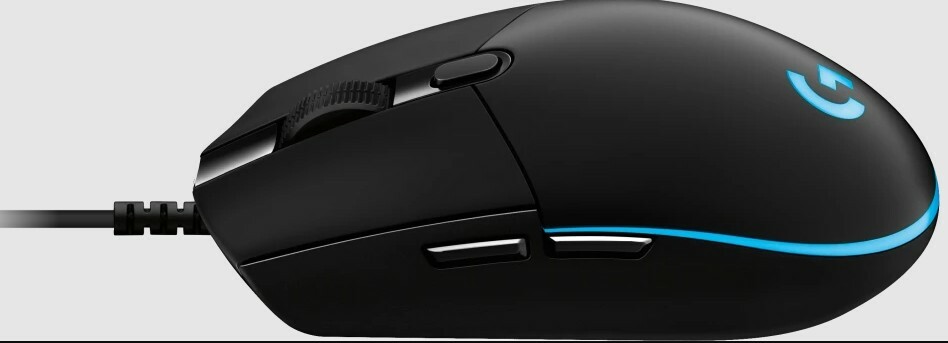
The mouse is the second most important way of communicating with a computer. Please be careful to choose the right type of connection when buying a mouse, there are three different types: – USB is the most modern. You can recognize it by the rectangular connector. – PS/2 connectors are round. This type of connection is fairly commonly used in PCs. – Bluetooth is another modern (wireless) connection method.
The mouse is the second most important way of communicating with a computer. Please be careful to choose the right type of connection when buying a mouse, there are three different types: – USB is the most modern. You can recognize it by the rectangular connector. – PS/2 connectors are round. This type of connection is fairly commonly used in PCs. – Bluetooth is another modern (wireless) connection method.
in 2 offers
The lowest price for Logitech G Pro Gaming Mouse right now is $97.95 at papita.co, compared across 2 retailers.
The all-time low was $35.00 on 8 June 2026 — today's price is 180% above the lowest ever. It has been notably cheaper before — worth setting a price alert.
Prices last updated 4 Sept 2026.
Logitech G Pro Gaming Mouse
The mouse is the second most important way of communicating with a computer. Please be careful to choose the right type of connection when buying a mouse, there are three different types: – USB is the most modern. You can recognize it by the rectangular connector. – PS/2 connectors are round. This type of connection is fairly commonly used in PCs. – Bluetooth is another modern (wireless) connection method.
The mouse is the second most important way of communicating with a computer. Please be careful to choose the right type of connection when buying a mouse, there are three different types: – USB is the most modern. You can recognize it by the rectangular connector. – PS/2 connectors are round. This type of connection is fairly commonly used in PCs. – Bluetooth is another modern (wireless) connection method.
Last updated at 04/09/2026 11:05:50
Logitech G Pro Wired Gaming Mouse | 910-005441
Free delivery between Mon – Wed
Logitech M-u0052 Pro Gaming Mouse 810-006283
Delivery $15
Affiliate Disclosure: We may receive a small commission for purchases made through this link at no extra cost to you. This helps support our site. Thank you!
originally posted on influenster.com
This Logitech mouse is a very good deal for someone who wants a more gaming oriented mouse without going all out and spending a large amount of money. It’s comfortable to use, it has good customization in the G hub app, and it has lasted me a fairly long amount of time. I don’t think you can beat it for the price, good quality and nice design!
originally posted on https://www.mightyape.co.nz
I don't use my Logitech G mouse for gaming, I use it for document editing and graphics work because a mouse that's accurate and precise is what I need. If you buy one of these don't use the generic Windows mouse driver as searching out the correct Logitech mouse driver is definitely worthwhile as it will give you full control of all the buttons on this type of mouse. For the work I do I always disable the forward and back thumb buttons as leaving them active is a great way to suddenly lose the document you were working on.
originally posted on ebay.com
This USB mouse did not work with my Linksys ProConnect Integrated 2-Port Switch Kit connecting the USB to the PS2 adapter and then into the Linksys; The computer did not see this mouse when doing that; I had to connect this mouse directly into the USB connector on the back of my PC computer in order for this mouse to be recognized by my computer. I have the Linksys Switch Kit because I use two computers [one computer for music recording and one for everything else] and it allows me to use the same mouse and keyboard on two separate computers; Now I can't do that with this new mouse. I discovered this mouse doesn't always click things as it should when clicking fast when using the light inside the mouse that displays all the colors on the mouse; I disabled the lights ... MoreThis USB mouse did not work with my Linksys ProConnect Integrated 2-Port Switch Kit connecting the USB to the PS2 adapter and then into the Linksys; The computer did not see this mouse when doing that; I had to connect this mouse directly into the USB connector on the back of my PC computer in order for this mouse to be recognized by my computer. I have the Linksys Switch Kit because I use two computers [one computer for music recording and one for everything else] and it allows me to use the same mouse and keyboard on two separate computers; Now I can't do that with this new mouse. I discovered this mouse doesn't always click things as it should when clicking fast when using the light inside the mouse that displays all the colors on the mouse; I disabled the lights on the mouse through the mouse gaming software and then it would click things as it should when clicking fast. This mouse slides really well on my black leather mouse pad that I bought at Etsy; My old mouse would stick to the leather mouse pad making the cursor skip around. This is the main reason I bought this mouse; I was hoping it would slide on my leather mouse pad better, and it does.
| Cable length | 6.89 ft (2.1 m) |
| Sensor | HERO 25K |
| Resolution | 100 – 25,600 dpi |
| Max. speed | >400 IPS |
| USB data format | 16 bits/axis |
Logitech G Pro Wired Gaming Mouse | 910-005441
Free delivery between Mon – Wed
Logitech M-u0052 Pro Gaming Mouse 810-006283
Delivery $15
Affiliate Disclosure: We may receive a small commission for purchases made through this link at no extra cost to you. This helps support our site. Thank you!
This Logitech mouse is a very good deal for someone who wants a more gaming oriented mouse without going all out and spending a large amount of money. It’s comfortable to use, it has good customization in the G hub app, and it has lasted me a fairly long amount of time. I don’t think you can beat it for the price, good quality and nice design!
I don't use my Logitech G mouse for gaming, I use it for document editing and graphics work because a mouse that's accurate and precise is what I need. If you buy one of these don't use the generic Windows mouse driver as searching out the correct Logitech mouse driver is definitely worthwhile as it will give you full control of all the buttons on this type of mouse. For the work I do I always disable the forward and back thumb buttons as leaving them active is a great way to suddenly lose the document you were working on.
This USB mouse did not work with my Linksys ProConnect Integrated 2-Port Switch Kit connecting the USB to the PS2 adapter and then into the Linksys; The computer did not see this mouse when doing that; I had to connect this mouse directly into the USB connector on the back of my PC computer in order for this mouse to be recognized by my computer. I have the Linksys Switch Kit because I use two computers [one computer for music recording and one for everything else] and it allows me to use the same mouse and keyboard on two separate computers; Now I can't do that with this new mouse. I discovered this mouse doesn't always click things as it should when clicking fast when using the light inside the mouse that displays all the colors on the mouse; I disabled the lights ... MoreThis USB mouse did not work with my Linksys ProConnect Integrated 2-Port Switch Kit connecting the USB to the PS2 adapter and then into the Linksys; The computer did not see this mouse when doing that; I had to connect this mouse directly into the USB connector on the back of my PC computer in order for this mouse to be recognized by my computer. I have the Linksys Switch Kit because I use two computers [one computer for music recording and one for everything else] and it allows me to use the same mouse and keyboard on two separate computers; Now I can't do that with this new mouse. I discovered this mouse doesn't always click things as it should when clicking fast when using the light inside the mouse that displays all the colors on the mouse; I disabled the lights on the mouse through the mouse gaming software and then it would click things as it should when clicking fast. This mouse slides really well on my black leather mouse pad that I bought at Etsy; My old mouse would stick to the leather mouse pad making the cursor skip around. This is the main reason I bought this mouse; I was hoping it would slide on my leather mouse pad better, and it does.
3 stars because I'm really not happy about this mouse. I don't like it and it doesn't fit my needs, but you may not feel the same way.After 6 years, my Razer Naga had finally broken down and I was looking for a replacement on a budget, without ordering online. The Logitech G Pro Gaming Optical Mouse was the cheapest 'gaming' mouse I found at my nearby Staples store. It's basically a higher quality office mouse. With the differences in ergonomics, it started hurting my hand after less than half an hour of gaming, and adapting to a mouse with a dozen fewer buttons than I was accustomed to and no wheel tilt was next to impossible.However, if you've never owned something like the Naga, and you've just been using a cheapo regular office computer mouse for your gaming and ... More3 stars because I'm really not happy about this mouse. I don't like it and it doesn't fit my needs, but you may not feel the same way.After 6 years, my Razer Naga had finally broken down and I was looking for a replacement on a budget, without ordering online. The Logitech G Pro Gaming Optical Mouse was the cheapest 'gaming' mouse I found at my nearby Staples store. It's basically a higher quality office mouse. With the differences in ergonomics, it started hurting my hand after less than half an hour of gaming, and adapting to a mouse with a dozen fewer buttons than I was accustomed to and no wheel tilt was next to impossible.However, if you've never owned something like the Naga, and you've just been using a cheapo regular office computer mouse for your gaming and you want a cheap upgrade, then this Logitech G Pro mouse will probably work great for you, as a starter. It also lights up, and you can choose the colors or let it cycle through the rainbow, which is pretty cool.
Good Points: It's a sturdily made mouse, the programmability features are useful and it mostly worked just out of the box, as you would expect from a USB wired mouse product.I actually like the programmable LED lights, even though I'm not a gamer and the sensitivity / resolution toggles are useful when doing graphics work.The mouse is well designed but then again, it isn't cheap.Improvement Points: The Logitech GHub software looks funky but the user experience is patchy. It couldn't connect to the my mouse initially and I had to restart my computer & reconnect the device for the software to see it. It turns out there are permissions in MacOS that need to be toggled and the computer restarted.It's not very clear how to save the resolution, speed, button & light ... MoreGood Points: It's a sturdily made mouse, the programmability features are useful and it mostly worked just out of the box, as you would expect from a USB wired mouse product.I actually like the programmable LED lights, even though I'm not a gamer and the sensitivity / resolution toggles are useful when doing graphics work.The mouse is well designed but then again, it isn't cheap.Improvement Points: The Logitech GHub software looks funky but the user experience is patchy. It couldn't connect to the my mouse initially and I had to restart my computer & reconnect the device for the software to see it. It turns out there are permissions in MacOS that need to be toggled and the computer restarted.It's not very clear how to save the resolution, speed, button & light configuration onto the device. This would be my preference rather than running GHub all the time.I also noticed random changing of resolution/sensitivity levels which from online searching appears to be a frustrating bug.
I just picked this up a few hours ago. It replaces a Logitech cordless mouse. The Pro is much more precise than the cordless one. The cordless Logitech used to drive me crazy, you would have to be very precise in the placement of the cursor to click on a link.I use it as a regular mouse, not for gaming. The USB cable has a braided cover but doesn't interfere with the mouse's movements. The mouse doesn't have batteries so it is lighter than a cordless mouse.This mouse is ambidextrous (unlike the Logitech G403 Pro). It fits my hand and my wife's hand better than the larger G403 Pro.The Logitech Gaming Software (download from Logitech.com) allows you to turn the illumination of the mouse on/off, fine tune the DPI of the pointer, turn on/off the two left side ... MoreI just picked this up a few hours ago. It replaces a Logitech cordless mouse. The Pro is much more precise than the cordless one. The cordless Logitech used to drive me crazy, you would have to be very precise in the placement of the cursor to click on a link.I use it as a regular mouse, not for gaming. The USB cable has a braided cover but doesn't interfere with the mouse's movements. The mouse doesn't have batteries so it is lighter than a cordless mouse.This mouse is ambidextrous (unlike the Logitech G403 Pro). It fits my hand and my wife's hand better than the larger G403 Pro.The Logitech Gaming Software (download from Logitech.com) allows you to turn the illumination of the mouse on/off, fine tune the DPI of the pointer, turn on/off the two left side switches, and turn on/off the switch below the scroll wheel that allows for up to 5 presets for the pointer DPI plus many other gaming effects. The mouse has internal memory so it can remember its settings. You can use it on another system and still have the same settings.Get a good mouse pad to go with the mouse. I use a Corsair cloth surface 12"x12" gaming mouse pad that I bought at Best Buy sometime ago hoping it would improve the old cordless mouse's performance. A gaming mouse pad can improve the precision of a gaming mouse especially one that has adjustments that can be optimized like this one.I am very pleased with this mouse.
This is my first high quality mouse. It has a really nice feel with its subtle indents for index and middle finger. It has a slightly heavier weight than any other mouse I've used, which I didn't realize I would appreciate so much. I'm only able to use a claw grip on the mouse, since my hands are pretty large, but it's what I've always used with previous mice, for the same reason, so I can't comment on the how it feels with the other grip styles. I'm not able to reach the side buttons with my thumb in a smooth motion because of my grip style, but that doesn't bother me and I'm happy how it feels. The braided cable is great and bends very easily in any direction. The scroll wheel is smooth and has nice feedback. RGB is nice too, with options for solid color, ... MoreThis is my first high quality mouse. It has a really nice feel with its subtle indents for index and middle finger. It has a slightly heavier weight than any other mouse I've used, which I didn't realize I would appreciate so much. I'm only able to use a claw grip on the mouse, since my hands are pretty large, but it's what I've always used with previous mice, for the same reason, so I can't comment on the how it feels with the other grip styles. I'm not able to reach the side buttons with my thumb in a smooth motion because of my grip style, but that doesn't bother me and I'm happy how it feels. The braided cable is great and bends very easily in any direction. The scroll wheel is smooth and has nice feedback. RGB is nice too, with options for solid color, breathing, and color cycle. I was using a linux machine before I recently built a new computer, so I initially wasn't able to use the logitech software to customize the mouse(not being available for linux), but I was able to download it on a windows machine I did have and customize the lighting, which then worked great once connected back to my linux computer, since the settings are saved onboard the mouse. Best Buy price matched it for me, and I then received it 2 days later, great job Best Buy!
I've tried nearly every single Logitech on the market. While this particular one isn't my favorite it is still very good.CLICKS: The left and right click are your standard from Logitech with a nice satisfying click that is audible with very light pressure. The side buttons feel great.LIGHTING: The lighting that goes around the back edge of the mouse looks nice and means you can see it even while gaming. The G logo itself also looks good with the RGB lighting. The RGB lighting isn't the most accurate but it's not bad. It also gets plenty bright.FEEL: This is a small mouse. Made for people with small to medium hands. If you have large hands this mouse will probably not work well for you. This is mostly for people who use claw grip. Palm can work as long as you ... MoreI've tried nearly every single Logitech on the market. While this particular one isn't my favorite it is still very good.CLICKS: The left and right click are your standard from Logitech with a nice satisfying click that is audible with very light pressure. The side buttons feel great.LIGHTING: The lighting that goes around the back edge of the mouse looks nice and means you can see it even while gaming. The G logo itself also looks good with the RGB lighting. The RGB lighting isn't the most accurate but it's not bad. It also gets plenty bright.FEEL: This is a small mouse. Made for people with small to medium hands. If you have large hands this mouse will probably not work well for you. This is mostly for people who use claw grip. Palm can work as long as you have small hands. There is rounding on the mouse which makes it easier to pick up the mouse. Sensor is great with the PMW3366. The cord itself isn't great. Is pretty stiff. It also comes in lighter than most gaming mice which is nice. It gives you a little more control and accuracy.
This mouse is perfect in every way. I owned the first G Pro and have tried many mice since then only to come back to this shape once it was released with the HERO sensor. I don't think there is a better shape out there. The mouse is light, sleek, has a quality feel. The rubber cord is a welcome addition because braided cables are honestly more of an inconvenience. I modded it this time around with a Paraflex cable and it basically feels wireless. The buttons have a softer click than the first G Pro but I like it better. Scroll wheels has very well defined steps. I was reading reviews of people clamming this wasn't a gaming mouse, they are either new to gaming or have no idea what they are talking about. A mouse doesn't need Lamborghini flares and 12 buttons to be a ... MoreThis mouse is perfect in every way. I owned the first G Pro and have tried many mice since then only to come back to this shape once it was released with the HERO sensor. I don't think there is a better shape out there. The mouse is light, sleek, has a quality feel. The rubber cord is a welcome addition because braided cables are honestly more of an inconvenience. I modded it this time around with a Paraflex cable and it basically feels wireless. The buttons have a softer click than the first G Pro but I like it better. Scroll wheels has very well defined steps. I was reading reviews of people clamming this wasn't a gaming mouse, they are either new to gaming or have no idea what they are talking about. A mouse doesn't need Lamborghini flares and 12 buttons to be a gaming mouse. This is going to be more of an FPS mouse.
I had to replace my Razer DeathAdder because the scroll wheel started going bad. I kept hearing about the sensor in this mouse, and decided to try it.I mainly play Battlefield 4, Unreal Tournament 2004, Defender's Quest and Minecraft (with the kids / family), and I had been liking this a lot.The mouse itself is small and pretty light. The 3 buttons are very easy to press, and you can really hear and feel them when you do. The main buttons are very clicky and tight, and very satisfying to use.The two side buttons are much smaller than I thought they would be and are way harder to press and not nearly as comfortable to press as the DeathAdder's side buttons. They're way too thin and too high up for me to use as effectively. In shooters, I use the more back ... MoreI had to replace my Razer DeathAdder because the scroll wheel started going bad. I kept hearing about the sensor in this mouse, and decided to try it.I mainly play Battlefield 4, Unreal Tournament 2004, Defender's Quest and Minecraft (with the kids / family), and I had been liking this a lot.The mouse itself is small and pretty light. The 3 buttons are very easy to press, and you can really hear and feel them when you do. The main buttons are very clicky and tight, and very satisfying to use.The two side buttons are much smaller than I thought they would be and are way harder to press and not nearly as comfortable to press as the DeathAdder's side buttons. They're way too thin and too high up for me to use as effectively. In shooters, I use the more back button to crouch, and the more forward button to go prone. It's not hard to use, just not nearly as good as it could be. This is the only reason I don't give this mouse 5 Stars.The DPS switch button is very easy to press when I want to press it and I haven't hit it on accident after a few hundred hours of gaming and many more hours in general use.It's light-weight enough that I haven't ever had a problem doing quick turn around shots, and it makes flying helicopters much better than I thought it could be.It has an RGB light on the palm and back part. It just drove me crazy, so I just made it purple and dim, just so I can find it. You can make it breathe, change color, stay solid, and adjust the brightness, which is good. The DeathAdder I got, I got with no light on it because I am not a fan of lights on mice. I do love it on the keyboards though.All in all, this mouse is easy to use and to take with me to work, and it's actually much better than I thought it would be. It's smooth with very good buttons. Just wish the side buttons were bigger. Not only would I recommend for a friend, I bought an extra for a friend and he really liked it as well.
| Cable length | 6.89 ft (2.1 m) |
| Sensor | HERO 25K |
| Resolution | 100 – 25,600 dpi |
| Max. speed | >400 IPS |
| USB data format | 16 bits/axis |

