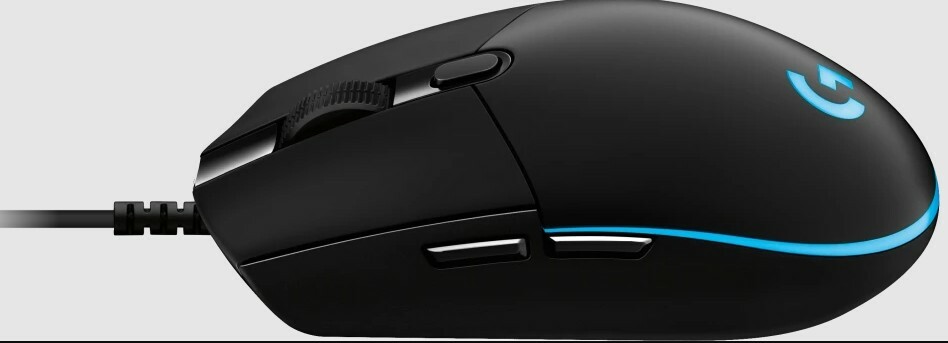
Logitech G Pro Hero Gaming Mouse
The mouse is the second most important way of communicating with a computer. Please be careful to choose the right type of connection when buying a mouse, there are three different types: – USB is the most modern. You can recognize it by the rectangular connector. – PS/2 connectors are round. This type of connection is fairly commonly used in PCs. – Bluetooth is another modern (wireless) connection method.
The mouse is the second most important way of communicating with a computer. Please be careful to choose the right type of connection when buying a mouse, there are three different types: – USB is the most modern. You can recognize it by the rectangular connector. – PS/2 connectors are round. This type of connection is fairly commonly used in PCs. – Bluetooth is another modern (wireless) connection method.
The mouse is the second most important way of communicating with a computer. Please be careful to choose the right type of connection when buying a mouse, there are three different types: – USB is the most modern. You can recognize it by the rectangular connector. – PS/2 connectors are round. This type of connection is fairly commonly used in PCs. – Bluetooth is another modern (wireless) connection method.
The mouse is the second most important way of communicating with a computer. Please be careful to choose the right type of connection when buying a mouse, there are three different types: – USB is the most modern. You can recognize it by the rectangular connector. – PS/2 connectors are round. This type of connection is fairly commonly used in PCs. – Bluetooth is another modern (wireless) connection method.
in 13 offers
The lowest price for Logitech G Pro Hero Gaming Mouse right now is $46.00 at Ubuy Australia, compared across 11 retailers.
The all-time low was $18.00 on 23 Feb 2026 — today's price is 156% above the lowest ever. It has been notably cheaper before — worth setting a price alert.
Prices last updated 4 Sept 2026.
Last updated at 04/09/2026 08:49:42
Logitech G502 Hero High Performance Wired Gaming Mouse (910-005471)
Delivery between 8–12 Sept $35.88
Logitech G Pro HERO RGB Optical Gaming Mouse 910 005442 - Mouse
Delivery $11.63
Logitech G Pro HERO RGB Optical Gaming Mouse 910 005442 - Mouse
Delivery $11
Logitech G Pro Gaming Mouse w HERO Sensor
Free delivery between Mon – Tue
Logitech G Pro Hero Gaming Mouse (910-005442)
Free delivery between Tue – Thu
Logitech G Pro Gaming Mouse with HERO 16K Sensor
Delivery $11.99
Logitech G Pro Gaming Wired Mouse with 16K Hero Sensor Black Blue
Delivery between 8–11 Sept $10
Logitech G Pro Gaming Mouse
Free delivery
Logitech G Pro Gaming Mouse with HERO Sensor
Delivery between 10–17 Sept $8.50
Logicool G USB PRO Gaming Mouse Wired HERO 25K Sensor for FPS 83g Lightweight LIGHTSYNC
Free delivery
originally posted on pbtech.co.nz
I purchased this mouse from somewhere else. But I love PB Tech and I love this mouse. So I m reviewing it here too!I love how understated this mouse looks. Its such a simple design, paired up with some really nice RGBs with awesome color cycles. You can download Logitech's 'G Hub' and sync the mouses RGBs to cycles and games, its has a few customization features. You can also sync this mouse to your mouse mat with the G Hub for extra precise movements.The tracking on this mouse is amazing too. Its really precise and accurate, and fast too. Its feels really responsive.Its also fits my claw style of play.The cables braided and good quality and clicks on the mouse are great, also the mouse wheel isnt smooth textured, its ribbed so you can feel each rotation ... MoreI purchased this mouse from somewhere else. But I love PB Tech and I love this mouse. So I m reviewing it here too!I love how understated this mouse looks. Its such a simple design, paired up with some really nice RGBs with awesome color cycles. You can download Logitech's 'G Hub' and sync the mouses RGBs to cycles and games, its has a few customization features. You can also sync this mouse to your mouse mat with the G Hub for extra precise movements.The tracking on this mouse is amazing too. Its really precise and accurate, and fast too. Its feels really responsive.Its also fits my claw style of play.The cables braided and good quality and clicks on the mouse are great, also the mouse wheel isnt smooth textured, its ribbed so you can feel each rotation notch.I dont really have any cons for this mouse.If you're looking for a nice understated looking mouse that packs an awesome punch, then this is the mouse for you.
originally posted on pbtech.co.nz
Simple and straightforward wired mouse, just plugin to your desktop/laptop and use immediately. It is pretty light and has a good scroll button.Recommended if you are looking for a gaming mouse on a tight budget.My only gripe about it is that the RGB is too bright for my liking.
originally posted on pbtech.co.nz
Been using this mouse for 3 weeks now, it's easily incorporated into my daily workflow now, and the DPI-on-the-fly switcher button is a life-changer, allowing for unparalleled accuracy when I'm editing intricate details in a Photoshop rendering at lower tracking speeds. Wish it had right edge side buttons as well as the left, and longer left and right click switches to make drag clicking easier and less of a hassle trying to keep my finger on the left click and not slip off from sweaty fingertips. The RGB lighting has customisable brightness for cycling and breathing profiles (finally no blinding LEDs) though I wish it was an option for fixed RGB too.However, the software incompatibility with the Apple M1 architecture CPU is a massive Logitech G fan-deterring con ... MoreBeen using this mouse for 3 weeks now, it's easily incorporated into my daily workflow now, and the DPI-on-the-fly switcher button is a life-changer, allowing for unparalleled accuracy when I'm editing intricate details in a Photoshop rendering at lower tracking speeds. Wish it had right edge side buttons as well as the left, and longer left and right click switches to make drag clicking easier and less of a hassle trying to keep my finger on the left click and not slip off from sweaty fingertips. The RGB lighting has customisable brightness for cycling and breathing profiles (finally no blinding LEDs) though I wish it was an option for fixed RGB too.However, the software incompatibility with the Apple M1 architecture CPU is a massive Logitech G fan-deterring con (at least for me) and without me being able to customise my mouse in any way (no default onboard memory profiles for side button commands or RGB lighting, just the DPI ones) it means that 90% of the deal is gone for me. The only thing that has minimised this problem from a POTUS 111 to a small annoyance is the fact that I own an Intel-based MacBook Pro from last year (2020), which using a Windows standard chipset can run install successfully and run the Logitech G-HUB software. So for the Apple Silicon folks, be warned, the software is incompatible with the M series chipset right now at time of writing (late 2021).Albeit a successful installation on my MacBook Pro, it was no without the need for a programmed fix; this is because I guess Logitech directs most of their products towards esports gamers in their Logitech G line of merchandise, whom are assumed to be all using Windows (probably facts to be honest, macOS has a lot of drawbacks compared to its Microsoft competitor in terms of gaming performance). The fix is as follows:NOTE - Successful installation is possible on both the Apple M1 Macs and Intel, but the proper G-HUB app will only run on the Intel Macs, whereas only the G-HUB installer app can run on both. Also, DO NOT drag the Installer app to "Applications" otherwise this will not work!1. Press on the icon for Finder in the bottom left of your screen.2. Once the tab with your files pops up, click on the search bar in the top right of it and type in "Logitech G-HUB Installer" (the name of G-HUB's installation program).3. Right-click the result's app icon, and from the selection menu choose "Show Package Contents".4. In Package Contents, select "Contents" and click on the folder.5. Navigate to "macOS", and in there you will find a Terminal .exec file labelled "lghub_installer".6. Double click on it, which will open the G-HUB Installer app and a Terminal tab.7. In the Terminal tab select and copy this section of console code: "/Users/[your name]/Downloads/lghub_installer.app/Contents/macOS/lghub_installer. ; exit;"8. Open another Terminal tab by pressing Command + N.9. Close that Terminal tab and confirm the termination of the programs being run in it, basically the Installer app.10. In the new tab, type in "sudo", then hit space, and paste the code that was copied from the previous Terminal tab.11. The console (your computer running Terminal) will prompt you for your computer login password, fill it in (no its not a scam, and don't worry if the usual * don't pop up on the screen; your psd is still being inputted nonetheless) and you're away!12. After completing the previous steps aforementioned Logitech G-HUB Installer will run as soon as your passcode is filled in. Follow the steps in the Installer, download it and launch G-HUB. It will run perfectly without any bugs (If you follow my previous instructions; install it on an Intel Mac, not an M1 or else the file type is incompatible)Also, if you've wondered how I can so confidently confirm it doesn't work on my M1 Mac, I've both downloaded it natively on my M1 Mac and also tried putting G-HUB on an external SSD, plugging that into my M1 desktop and running it from there; what followed was the "infinity loop" error of G-HUB - the loading symbol just looped its animation over and over again, and the app refused to boot properly. Logitech Gaming Software also doesn't work; the older software was made for macOS Catalina.Here's my final verdict on this mouse. After all, there is definitely still more to like about this mouse, than remaining pessimistic about buggy software.Pros:- Long cable (2.0m) so easy to reach the ports on my M1 desktop which are situated on its back panel (further than most PCs)- PVC-free esports-grade cable minimally impacts real-time gaming performance with cord drag thanks to its smooth and un-braided design (on purpose to reduce friction) whilst maintaining superior durability- Side buttons are a big convenience when reprogrammed to do extra commands, speeding up workflow and simplifying tasks- DPI switching button behind the scroll wheel is a nice touch, helped to make editing intricate details in Photoshop artwork easier to do so accurately- RGB lighting is great, cycling speed can be adjusted and brightness dimmed to make it less astoundingly bright- Mechanical spring tensioning in the left and right click make reaction speed faster in games as it makes them spring back up more swiftly- Scroll wheel has good grips for grasping with fingerpad for triggering scroll click- Using an adapter for the USB-A cable to match a USB-C interface doesn't affect performance- Soft and shallow switches make for easy drag clicking and fast actuation when split-second precision is required- 85g = lightweight constructionCons:- Logitech G-HUB incompatible with M1 CPUs from Apple, issue being unreported on Logitech's main website- Could come with a few more side buttons for more functionality in MMO gaming (only 3 extra buttons is a bit dismal to reprogram since lots of commands are prominent in the genre)- No dedicated sniper as a DPI Shift button to toggle between low and higher DPI levels faster in split-second scenarios in FPS's- Switches are a bit short in terms of length therefore not enabling the ability to long drag click and only in short bursts, as well as being shallow which makes them a bit too easy to actuate- Scroll click is hard to actuate quickly, requires a purposely applied force (not accidental grazes) to push down- Scroll wheel doesn't have different spin modes like the G502 and G903- No grip tape or aperture door for removing and replacing PTFE feet, sorry xQc and Loserfruit!(This is me nitpicking from an esports gamer's viewpoint lol - in terms of build quality there are no problems [none of that bad glue on grips problem here unlike Steelseries mice], and it's a good all-round capable mouse that has a minimalist design and is one of the lightest gaming mice out there - that is, if you don't count the honeycomb-holed mice like the Glorious Model O-. )
| Connections | USB |
| Manufacturer's Warranty | 2 Year |
| Colour | Black |
| What's In The Box | PRO gaming mouse User documentation |
| Weight (kg) | 0.085 |
Logitech G502 Hero High Performance Wired Gaming Mouse (910-005471)
Delivery between 8–12 Sept $35.88
Logitech G Pro HERO RGB Optical Gaming Mouse 910 005442 - Mouse
Delivery $11.63
Logitech G Pro HERO RGB Optical Gaming Mouse 910 005442 - Mouse
Delivery $11
Logitech G Pro Gaming Mouse w HERO Sensor
Free delivery between Mon – Tue
Logitech G Pro Hero Gaming Mouse (910-005442)
Free delivery between Tue – Thu
I purchased this mouse from somewhere else. But I love PB Tech and I love this mouse. So I m reviewing it here too!I love how understated this mouse looks. Its such a simple design, paired up with some really nice RGBs with awesome color cycles. You can download Logitech's 'G Hub' and sync the mouses RGBs to cycles and games, its has a few customization features. You can also sync this mouse to your mouse mat with the G Hub for extra precise movements.The tracking on this mouse is amazing too. Its really precise and accurate, and fast too. Its feels really responsive.Its also fits my claw style of play.The cables braided and good quality and clicks on the mouse are great, also the mouse wheel isnt smooth textured, its ribbed so you can feel each rotation ... MoreI purchased this mouse from somewhere else. But I love PB Tech and I love this mouse. So I m reviewing it here too!I love how understated this mouse looks. Its such a simple design, paired up with some really nice RGBs with awesome color cycles. You can download Logitech's 'G Hub' and sync the mouses RGBs to cycles and games, its has a few customization features. You can also sync this mouse to your mouse mat with the G Hub for extra precise movements.The tracking on this mouse is amazing too. Its really precise and accurate, and fast too. Its feels really responsive.Its also fits my claw style of play.The cables braided and good quality and clicks on the mouse are great, also the mouse wheel isnt smooth textured, its ribbed so you can feel each rotation notch.I dont really have any cons for this mouse.If you're looking for a nice understated looking mouse that packs an awesome punch, then this is the mouse for you.
Simple and straightforward wired mouse, just plugin to your desktop/laptop and use immediately. It is pretty light and has a good scroll button.Recommended if you are looking for a gaming mouse on a tight budget.My only gripe about it is that the RGB is too bright for my liking.
Been using this mouse for 3 weeks now, it's easily incorporated into my daily workflow now, and the DPI-on-the-fly switcher button is a life-changer, allowing for unparalleled accuracy when I'm editing intricate details in a Photoshop rendering at lower tracking speeds. Wish it had right edge side buttons as well as the left, and longer left and right click switches to make drag clicking easier and less of a hassle trying to keep my finger on the left click and not slip off from sweaty fingertips. The RGB lighting has customisable brightness for cycling and breathing profiles (finally no blinding LEDs) though I wish it was an option for fixed RGB too.However, the software incompatibility with the Apple M1 architecture CPU is a massive Logitech G fan-deterring con ... MoreBeen using this mouse for 3 weeks now, it's easily incorporated into my daily workflow now, and the DPI-on-the-fly switcher button is a life-changer, allowing for unparalleled accuracy when I'm editing intricate details in a Photoshop rendering at lower tracking speeds. Wish it had right edge side buttons as well as the left, and longer left and right click switches to make drag clicking easier and less of a hassle trying to keep my finger on the left click and not slip off from sweaty fingertips. The RGB lighting has customisable brightness for cycling and breathing profiles (finally no blinding LEDs) though I wish it was an option for fixed RGB too.However, the software incompatibility with the Apple M1 architecture CPU is a massive Logitech G fan-deterring con (at least for me) and without me being able to customise my mouse in any way (no default onboard memory profiles for side button commands or RGB lighting, just the DPI ones) it means that 90% of the deal is gone for me. The only thing that has minimised this problem from a POTUS 111 to a small annoyance is the fact that I own an Intel-based MacBook Pro from last year (2020), which using a Windows standard chipset can run install successfully and run the Logitech G-HUB software. So for the Apple Silicon folks, be warned, the software is incompatible with the M series chipset right now at time of writing (late 2021).Albeit a successful installation on my MacBook Pro, it was no without the need for a programmed fix; this is because I guess Logitech directs most of their products towards esports gamers in their Logitech G line of merchandise, whom are assumed to be all using Windows (probably facts to be honest, macOS has a lot of drawbacks compared to its Microsoft competitor in terms of gaming performance). The fix is as follows:NOTE - Successful installation is possible on both the Apple M1 Macs and Intel, but the proper G-HUB app will only run on the Intel Macs, whereas only the G-HUB installer app can run on both. Also, DO NOT drag the Installer app to "Applications" otherwise this will not work!1. Press on the icon for Finder in the bottom left of your screen.2. Once the tab with your files pops up, click on the search bar in the top right of it and type in "Logitech G-HUB Installer" (the name of G-HUB's installation program).3. Right-click the result's app icon, and from the selection menu choose "Show Package Contents".4. In Package Contents, select "Contents" and click on the folder.5. Navigate to "macOS", and in there you will find a Terminal .exec file labelled "lghub_installer".6. Double click on it, which will open the G-HUB Installer app and a Terminal tab.7. In the Terminal tab select and copy this section of console code: "/Users/[your name]/Downloads/lghub_installer.app/Contents/macOS/lghub_installer. ; exit;"8. Open another Terminal tab by pressing Command + N.9. Close that Terminal tab and confirm the termination of the programs being run in it, basically the Installer app.10. In the new tab, type in "sudo", then hit space, and paste the code that was copied from the previous Terminal tab.11. The console (your computer running Terminal) will prompt you for your computer login password, fill it in (no its not a scam, and don't worry if the usual * don't pop up on the screen; your psd is still being inputted nonetheless) and you're away!12. After completing the previous steps aforementioned Logitech G-HUB Installer will run as soon as your passcode is filled in. Follow the steps in the Installer, download it and launch G-HUB. It will run perfectly without any bugs (If you follow my previous instructions; install it on an Intel Mac, not an M1 or else the file type is incompatible)Also, if you've wondered how I can so confidently confirm it doesn't work on my M1 Mac, I've both downloaded it natively on my M1 Mac and also tried putting G-HUB on an external SSD, plugging that into my M1 desktop and running it from there; what followed was the "infinity loop" error of G-HUB - the loading symbol just looped its animation over and over again, and the app refused to boot properly. Logitech Gaming Software also doesn't work; the older software was made for macOS Catalina.Here's my final verdict on this mouse. After all, there is definitely still more to like about this mouse, than remaining pessimistic about buggy software.Pros:- Long cable (2.0m) so easy to reach the ports on my M1 desktop which are situated on its back panel (further than most PCs)- PVC-free esports-grade cable minimally impacts real-time gaming performance with cord drag thanks to its smooth and un-braided design (on purpose to reduce friction) whilst maintaining superior durability- Side buttons are a big convenience when reprogrammed to do extra commands, speeding up workflow and simplifying tasks- DPI switching button behind the scroll wheel is a nice touch, helped to make editing intricate details in Photoshop artwork easier to do so accurately- RGB lighting is great, cycling speed can be adjusted and brightness dimmed to make it less astoundingly bright- Mechanical spring tensioning in the left and right click make reaction speed faster in games as it makes them spring back up more swiftly- Scroll wheel has good grips for grasping with fingerpad for triggering scroll click- Using an adapter for the USB-A cable to match a USB-C interface doesn't affect performance- Soft and shallow switches make for easy drag clicking and fast actuation when split-second precision is required- 85g = lightweight constructionCons:- Logitech G-HUB incompatible with M1 CPUs from Apple, issue being unreported on Logitech's main website- Could come with a few more side buttons for more functionality in MMO gaming (only 3 extra buttons is a bit dismal to reprogram since lots of commands are prominent in the genre)- No dedicated sniper as a DPI Shift button to toggle between low and higher DPI levels faster in split-second scenarios in FPS's- Switches are a bit short in terms of length therefore not enabling the ability to long drag click and only in short bursts, as well as being shallow which makes them a bit too easy to actuate- Scroll click is hard to actuate quickly, requires a purposely applied force (not accidental grazes) to push down- Scroll wheel doesn't have different spin modes like the G502 and G903- No grip tape or aperture door for removing and replacing PTFE feet, sorry xQc and Loserfruit!(This is me nitpicking from an esports gamer's viewpoint lol - in terms of build quality there are no problems [none of that bad glue on grips problem here unlike Steelseries mice], and it's a good all-round capable mouse that has a minimalist design and is one of the lightest gaming mice out there - that is, if you don't count the honeycomb-holed mice like the Glorious Model O-. )
I read lots of reviews before purchasing this mouse and decided it sounded like good value. But if I'm honest as a hardcore FPS gamer I don't rate this mouse . The mouse itself is very light weight, it actually feels very cheap in my hand, reminds me of one of those old cheap laptop mice, the buttons are quite soft and I find myself often accidently clicking with the weight of my fingers. The 4 DPI settings are good, and the software is also great. The sensor is good, nice and smooth and accurate as you would expect. My previous mouse was a g400s and I upgraded reluctantly and this was quite disappointing. I think I will try another mouse and sell this one on. PBtech staff were great.
I don't use my Logitech G mouse for gaming, I use it for document editing and graphics work because a mouse that's accurate and precise is what I need. If you buy one of these don't use the generic Windows mouse driver as searching out the correct Logitech mouse driver is definitely worthwhile as it will give you full control of all the buttons on this type of mouse. For the work I do I always disable the forward and back thumb buttons as leaving them active is a great way to suddenly lose the document you were working on.
I've gone through 7 of these mice, Trying to exchange my current one now. Main issues are the right click does not stay held down even tho the 'click' is pressed down. The scroll wheel has failed where scrolling up or down would result in the reverse direction occurring at the start of the scroll. So far all have been replaced by PCCG with out issue so that's been good at least. I keep getting it because i really like this shape and keep thinking, this will be the one that works.so far:-replaced 4, 16k Hero sensor model-replaced 3, G Pro model (the previous model)
This mouse broke on me in about a year. I went through the effort of getting a replacement through customer service (a very annoying process), and then the replacement also broke in about a year. The double click issue is super obnoxious, and I can't believe they are selling a mouse for this much that consistently can't even last one year.The replacement one I got was supposedly a newer model, but it still has the same flaw. They just don't care.
This USB mouse did not work with my Linksys ProConnect Integrated 2-Port Switch Kit connecting the USB to the PS2 adapter and then into the Linksys; The computer did not see this mouse when doing that; I had to connect this mouse directly into the USB connector on the back of my PC computer in order for this mouse to be recognized by my computer. I have the Linksys Switch Kit because I use two computers [one computer for music recording and one for everything else] and it allows me to use the same mouse and keyboard on two separate computers; Now I can't do that with this new mouse. I discovered this mouse doesn't always click things as it should when clicking fast when using the light inside the mouse that displays all the colors on the mouse; I disabled the lights ... MoreThis USB mouse did not work with my Linksys ProConnect Integrated 2-Port Switch Kit connecting the USB to the PS2 adapter and then into the Linksys; The computer did not see this mouse when doing that; I had to connect this mouse directly into the USB connector on the back of my PC computer in order for this mouse to be recognized by my computer. I have the Linksys Switch Kit because I use two computers [one computer for music recording and one for everything else] and it allows me to use the same mouse and keyboard on two separate computers; Now I can't do that with this new mouse. I discovered this mouse doesn't always click things as it should when clicking fast when using the light inside the mouse that displays all the colors on the mouse; I disabled the lights on the mouse through the mouse gaming software and then it would click things as it should when clicking fast. This mouse slides really well on my black leather mouse pad that I bought at Etsy; My old mouse would stick to the leather mouse pad making the cursor skip around. This is the main reason I bought this mouse; I was hoping it would slide on my leather mouse pad better, and it does.
3 stars because I'm really not happy about this mouse. I don't like it and it doesn't fit my needs, but you may not feel the same way.After 6 years, my Razer Naga had finally broken down and I was looking for a replacement on a budget, without ordering online. The Logitech G Pro Gaming Optical Mouse was the cheapest 'gaming' mouse I found at my nearby Staples store. It's basically a higher quality office mouse. With the differences in ergonomics, it started hurting my hand after less than half an hour of gaming, and adapting to a mouse with a dozen fewer buttons than I was accustomed to and no wheel tilt was next to impossible.However, if you've never owned something like the Naga, and you've just been using a cheapo regular office computer mouse for your gaming and ... More3 stars because I'm really not happy about this mouse. I don't like it and it doesn't fit my needs, but you may not feel the same way.After 6 years, my Razer Naga had finally broken down and I was looking for a replacement on a budget, without ordering online. The Logitech G Pro Gaming Optical Mouse was the cheapest 'gaming' mouse I found at my nearby Staples store. It's basically a higher quality office mouse. With the differences in ergonomics, it started hurting my hand after less than half an hour of gaming, and adapting to a mouse with a dozen fewer buttons than I was accustomed to and no wheel tilt was next to impossible.However, if you've never owned something like the Naga, and you've just been using a cheapo regular office computer mouse for your gaming and you want a cheap upgrade, then this Logitech G Pro mouse will probably work great for you, as a starter. It also lights up, and you can choose the colors or let it cycle through the rainbow, which is pretty cool.
Used entirely on Razer Goliathus Extended Mouse Pad-SPEED (RZ02-00211700-R3M1-R). https://www.newegg.com/Product/Product.aspx?Item=N82E16826999088 Use it almost exclusively for reflex-intensive FPS games (Counter-Strike: Global Offensive, PLAYER UNKNOWN'S BATTLEGROUND, countless iterations of Battlefield). Occasionally Starcraft BW/2 and League of Legends. Very reliable and capable of dishing out pain to opponents. I've been using Logitech for my gaming mice for a very long time. They are solid, last many years and deliver results (as indicated by countless in-game scoreboards). Would recommend the mouse, as well as the brand, to anyone who games to win. Haven't been disappointed yet, which I cannot say for other brands (either breaks right after warranty or ... MoreUsed entirely on Razer Goliathus Extended Mouse Pad-SPEED (RZ02-00211700-R3M1-R). https://www.newegg.com/Product/Product.aspx?Item=N82E16826999088 Use it almost exclusively for reflex-intensive FPS games (Counter-Strike: Global Offensive, PLAYER UNKNOWN'S BATTLEGROUND, countless iterations of Battlefield). Occasionally Starcraft BW/2 and League of Legends. Very reliable and capable of dishing out pain to opponents. I've been using Logitech for my gaming mice for a very long time. They are solid, last many years and deliver results (as indicated by countless in-game scoreboards). Would recommend the mouse, as well as the brand, to anyone who games to win. Haven't been disappointed yet, which I cannot say for other brands (either breaks right after warranty or overpriced).
| Connections | USB |
| Manufacturer's Warranty | 2 Year |
| Colour | Black |
| What's In The Box | PRO gaming mouse User documentation |
| Weight (kg) | 0.085 |

