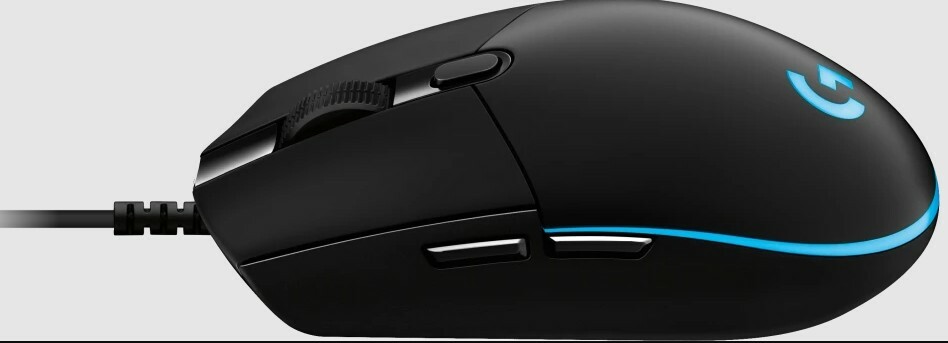
The mouse is the second most important way of communicating with a computer. Please be careful to choose the right type of connection when buying a mouse, there are three different types: – USB is the most modern. You can recognize it by the rectangular connector. – PS/2 connectors are round. This type of connection is fairly commonly used in PCs. – Bluetooth is another modern (wireless) connection method.
The mouse is the second most important way of communicating with a computer. Please be careful to choose the right type of connection when buying a mouse, there are three different types: – USB is the most modern. You can recognize it by the rectangular connector. – PS/2 connectors are round. This type of connection is fairly commonly used in PCs. – Bluetooth is another modern (wireless) connection method.
in 3 offers
The lowest price for Logitech G Pro Hero Gaming Mouse right now is $19.00 at Cash Converters, compared across 3 retailers.
The all-time low was $17.09 on 15 Aug 2026 — today's price is 11% above the lowest ever. That's a little above the best price we've seen.
Prices last updated 4 Sept 2026.
Logitech G Pro Hero Gaming Mouse
The mouse is the second most important way of communicating with a computer. Please be careful to choose the right type of connection when buying a mouse, there are three different types: – USB is the most modern. You can recognize it by the rectangular connector. – PS/2 connectors are round. This type of connection is fairly commonly used in PCs. – Bluetooth is another modern (wireless) connection method.
The mouse is the second most important way of communicating with a computer. Please be careful to choose the right type of connection when buying a mouse, there are three different types: – USB is the most modern. You can recognize it by the rectangular connector. – PS/2 connectors are round. This type of connection is fairly commonly used in PCs. – Bluetooth is another modern (wireless) connection method.
Last updated at 04/09/2026 02:00:49
Logitech G Pro Gaming Mouse Black Mouse - Gaming
Delivery $14.50
Logitech Pro Wired Gaming Mouse M-u0050 Usb Rgb Optical Esports Pc
Delivery $9.95
Affiliate Disclosure: We may receive a small commission for purchases made through this link at no extra cost to you. This helps support our site. Thank you!
Logitech G PRO Wired Gaming Mouse (Black, 910-005445)
Delivery $48
originally posted on lazada.com.ph
I've been using this Logitech G Pro Hero for about 3 months now, and I've got to say this is one hell of a mouse. After switching to this mouse, my gaming experience went from bad to epic. Small form factor, numerous dpi settings, and the smoothness when in-game is just unbelievable. Plus the RGB is just cute, it can be synced with other Logitech G Products. If you want to have the best of the best gaming experience and you have the cash for it, this is the way to go. I went with this over the G502 because even though they are priced the same, I don't feel like gaming with a big mouse, it kinda slows me down. Nonetheless, good job Logitech for this mouse. I got it on sale last october, the delivery was a day after i ordered it. Well done, lazada. Definitely would ... MoreI've been using this Logitech G Pro Hero for about 3 months now, and I've got to say this is one hell of a mouse. After switching to this mouse, my gaming experience went from bad to epic. Small form factor, numerous dpi settings, and the smoothness when in-game is just unbelievable. Plus the RGB is just cute, it can be synced with other Logitech G Products. If you want to have the best of the best gaming experience and you have the cash for it, this is the way to go. I went with this over the G502 because even though they are priced the same, I don't feel like gaming with a big mouse, it kinda slows me down. Nonetheless, good job Logitech for this mouse. I got it on sale last october, the delivery was a day after i ordered it. Well done, lazada. Definitely would recommend this to my fellow gamers out there.
originally posted on pbtech.co.nz
Been using this mouse for 3 weeks now, it's easily incorporated into my daily workflow now, and the DPI-on-the-fly switcher button is a life-changer, allowing for unparalleled accuracy when I'm editing intricate details in a Photoshop rendering at lower tracking speeds. Wish it had right edge side buttons as well as the left, and longer left and right click switches to make drag clicking easier and less of a hassle trying to keep my finger on the left click and not slip off from sweaty fingertips. The RGB lighting has customisable brightness for cycling and breathing profiles (finally no blinding LEDs) though I wish it was an option for fixed RGB too.However, the software incompatibility with the Apple M1 architecture CPU is a massive Logitech G fan-deterring con ... MoreBeen using this mouse for 3 weeks now, it's easily incorporated into my daily workflow now, and the DPI-on-the-fly switcher button is a life-changer, allowing for unparalleled accuracy when I'm editing intricate details in a Photoshop rendering at lower tracking speeds. Wish it had right edge side buttons as well as the left, and longer left and right click switches to make drag clicking easier and less of a hassle trying to keep my finger on the left click and not slip off from sweaty fingertips. The RGB lighting has customisable brightness for cycling and breathing profiles (finally no blinding LEDs) though I wish it was an option for fixed RGB too.However, the software incompatibility with the Apple M1 architecture CPU is a massive Logitech G fan-deterring con (at least for me) and without me being able to customise my mouse in any way (no default onboard memory profiles for side button commands or RGB lighting, just the DPI ones) it means that 90% of the deal is gone for me. The only thing that has minimised this problem from a POTUS 111 to a small annoyance is the fact that I own an Intel-based MacBook Pro from last year (2020), which using a Windows standard chipset can run install successfully and run the Logitech G-HUB software. So for the Apple Silicon folks, be warned, the software is incompatible with the M series chipset right now at time of writing (late 2021).Albeit a successful installation on my MacBook Pro, it was no without the need for a programmed fix; this is because I guess Logitech directs most of their products towards esports gamers in their Logitech G line of merchandise, whom are assumed to be all using Windows (probably facts to be honest, macOS has a lot of drawbacks compared to its Microsoft competitor in terms of gaming performance). The fix is as follows:NOTE - Successful installation is possible on both the Apple M1 Macs and Intel, but the proper G-HUB app will only run on the Intel Macs, whereas only the G-HUB installer app can run on both. Also, DO NOT drag the Installer app to "Applications" otherwise this will not work!1. Press on the icon for Finder in the bottom left of your screen.2. Once the tab with your files pops up, click on the search bar in the top right of it and type in "Logitech G-HUB Installer" (the name of G-HUB's installation program).3. Right-click the result's app icon, and from the selection menu choose "Show Package Contents".4. In Package Contents, select "Contents" and click on the folder.5. Navigate to "macOS", and in there you will find a Terminal .exec file labelled "lghub_installer".6. Double click on it, which will open the G-HUB Installer app and a Terminal tab.7. In the Terminal tab select and copy this section of console code: "/Users/[your name]/Downloads/lghub_installer.app/Contents/macOS/lghub_installer. ; exit;"8. Open another Terminal tab by pressing Command + N.9. Close that Terminal tab and confirm the termination of the programs being run in it, basically the Installer app.10. In the new tab, type in "sudo", then hit space, and paste the code that was copied from the previous Terminal tab.11. The console (your computer running Terminal) will prompt you for your computer login password, fill it in (no its not a scam, and don't worry if the usual * don't pop up on the screen; your psd is still being inputted nonetheless) and you're away!12. After completing the previous steps aforementioned Logitech G-HUB Installer will run as soon as your passcode is filled in. Follow the steps in the Installer, download it and launch G-HUB. It will run perfectly without any bugs (If you follow my previous instructions; install it on an Intel Mac, not an M1 or else the file type is incompatible)Also, if you've wondered how I can so confidently confirm it doesn't work on my M1 Mac, I've both downloaded it natively on my M1 Mac and also tried putting G-HUB on an external SSD, plugging that into my M1 desktop and running it from there; what followed was the "infinity loop" error of G-HUB - the loading symbol just looped its animation over and over again, and the app refused to boot properly. Logitech Gaming Software also doesn't work; the older software was made for macOS Catalina.Here's my final verdict on this mouse. After all, there is definitely still more to like about this mouse, than remaining pessimistic about buggy software.Pros:- Long cable (2.0m) so easy to reach the ports on my M1 desktop which are situated on its back panel (further than most PCs)- PVC-free esports-grade cable minimally impacts real-time gaming performance with cord drag thanks to its smooth and un-braided design (on purpose to reduce friction) whilst maintaining superior durability- Side buttons are a big convenience when reprogrammed to do extra commands, speeding up workflow and simplifying tasks- DPI switching button behind the scroll wheel is a nice touch, helped to make editing intricate details in Photoshop artwork easier to do so accurately- RGB lighting is great, cycling speed can be adjusted and brightness dimmed to make it less astoundingly bright- Mechanical spring tensioning in the left and right click make reaction speed faster in games as it makes them spring back up more swiftly- Scroll wheel has good grips for grasping with fingerpad for triggering scroll click- Using an adapter for the USB-A cable to match a USB-C interface doesn't affect performance- Soft and shallow switches make for easy drag clicking and fast actuation when split-second precision is required- 85g = lightweight constructionCons:- Logitech G-HUB incompatible with M1 CPUs from Apple, issue being unreported on Logitech's main website- Could come with a few more side buttons for more functionality in MMO gaming (only 3 extra buttons is a bit dismal to reprogram since lots of commands are prominent in the genre)- No dedicated sniper as a DPI Shift button to toggle between low and higher DPI levels faster in split-second scenarios in FPS's- Switches are a bit short in terms of length therefore not enabling the ability to long drag click and only in short bursts, as well as being shallow which makes them a bit too easy to actuate- Scroll click is hard to actuate quickly, requires a purposely applied force (not accidental grazes) to push down- Scroll wheel doesn't have different spin modes like the G502 and G903- No grip tape or aperture door for removing and replacing PTFE feet, sorry xQc and Loserfruit!(This is me nitpicking from an esports gamer's viewpoint lol - in terms of build quality there are no problems [none of that bad glue on grips problem here unlike Steelseries mice], and it's a good all-round capable mouse that has a minimalist design and is one of the lightest gaming mice out there - that is, if you don't count the honeycomb-holed mice like the Glorious Model O-. )
originally posted on shopee.com.my
Performance:Great mouse! But slight issueI love this mouse, it's so comfortable to use and such a difference between this and the MX Master 3.However, I didn't know or it's not stated anywhere that this charges using MICRO-USB, not USB-C, it's not a deal breaker for me, but it is still annoying I have to carry one more charger with me now.
| Interface | USB |
| Hand Orientation | Both Hands |
| Buttons | 6 |
| Scrolling Capability | 1 x Wheel |
Logitech G Pro Gaming Mouse Black Mouse - Gaming
Delivery $14.50
Logitech Pro Wired Gaming Mouse M-u0050 Usb Rgb Optical Esports Pc
Delivery $9.95
Affiliate Disclosure: We may receive a small commission for purchases made through this link at no extra cost to you. This helps support our site. Thank you!
Logitech G PRO Wired Gaming Mouse (Black, 910-005445)
Delivery $48
I've been using this Logitech G Pro Hero for about 3 months now, and I've got to say this is one hell of a mouse. After switching to this mouse, my gaming experience went from bad to epic. Small form factor, numerous dpi settings, and the smoothness when in-game is just unbelievable. Plus the RGB is just cute, it can be synced with other Logitech G Products. If you want to have the best of the best gaming experience and you have the cash for it, this is the way to go. I went with this over the G502 because even though they are priced the same, I don't feel like gaming with a big mouse, it kinda slows me down. Nonetheless, good job Logitech for this mouse. I got it on sale last october, the delivery was a day after i ordered it. Well done, lazada. Definitely would ... MoreI've been using this Logitech G Pro Hero for about 3 months now, and I've got to say this is one hell of a mouse. After switching to this mouse, my gaming experience went from bad to epic. Small form factor, numerous dpi settings, and the smoothness when in-game is just unbelievable. Plus the RGB is just cute, it can be synced with other Logitech G Products. If you want to have the best of the best gaming experience and you have the cash for it, this is the way to go. I went with this over the G502 because even though they are priced the same, I don't feel like gaming with a big mouse, it kinda slows me down. Nonetheless, good job Logitech for this mouse. I got it on sale last october, the delivery was a day after i ordered it. Well done, lazada. Definitely would recommend this to my fellow gamers out there.
Been using this mouse for 3 weeks now, it's easily incorporated into my daily workflow now, and the DPI-on-the-fly switcher button is a life-changer, allowing for unparalleled accuracy when I'm editing intricate details in a Photoshop rendering at lower tracking speeds. Wish it had right edge side buttons as well as the left, and longer left and right click switches to make drag clicking easier and less of a hassle trying to keep my finger on the left click and not slip off from sweaty fingertips. The RGB lighting has customisable brightness for cycling and breathing profiles (finally no blinding LEDs) though I wish it was an option for fixed RGB too.However, the software incompatibility with the Apple M1 architecture CPU is a massive Logitech G fan-deterring con ... MoreBeen using this mouse for 3 weeks now, it's easily incorporated into my daily workflow now, and the DPI-on-the-fly switcher button is a life-changer, allowing for unparalleled accuracy when I'm editing intricate details in a Photoshop rendering at lower tracking speeds. Wish it had right edge side buttons as well as the left, and longer left and right click switches to make drag clicking easier and less of a hassle trying to keep my finger on the left click and not slip off from sweaty fingertips. The RGB lighting has customisable brightness for cycling and breathing profiles (finally no blinding LEDs) though I wish it was an option for fixed RGB too.However, the software incompatibility with the Apple M1 architecture CPU is a massive Logitech G fan-deterring con (at least for me) and without me being able to customise my mouse in any way (no default onboard memory profiles for side button commands or RGB lighting, just the DPI ones) it means that 90% of the deal is gone for me. The only thing that has minimised this problem from a POTUS 111 to a small annoyance is the fact that I own an Intel-based MacBook Pro from last year (2020), which using a Windows standard chipset can run install successfully and run the Logitech G-HUB software. So for the Apple Silicon folks, be warned, the software is incompatible with the M series chipset right now at time of writing (late 2021).Albeit a successful installation on my MacBook Pro, it was no without the need for a programmed fix; this is because I guess Logitech directs most of their products towards esports gamers in their Logitech G line of merchandise, whom are assumed to be all using Windows (probably facts to be honest, macOS has a lot of drawbacks compared to its Microsoft competitor in terms of gaming performance). The fix is as follows:NOTE - Successful installation is possible on both the Apple M1 Macs and Intel, but the proper G-HUB app will only run on the Intel Macs, whereas only the G-HUB installer app can run on both. Also, DO NOT drag the Installer app to "Applications" otherwise this will not work!1. Press on the icon for Finder in the bottom left of your screen.2. Once the tab with your files pops up, click on the search bar in the top right of it and type in "Logitech G-HUB Installer" (the name of G-HUB's installation program).3. Right-click the result's app icon, and from the selection menu choose "Show Package Contents".4. In Package Contents, select "Contents" and click on the folder.5. Navigate to "macOS", and in there you will find a Terminal .exec file labelled "lghub_installer".6. Double click on it, which will open the G-HUB Installer app and a Terminal tab.7. In the Terminal tab select and copy this section of console code: "/Users/[your name]/Downloads/lghub_installer.app/Contents/macOS/lghub_installer. ; exit;"8. Open another Terminal tab by pressing Command + N.9. Close that Terminal tab and confirm the termination of the programs being run in it, basically the Installer app.10. In the new tab, type in "sudo", then hit space, and paste the code that was copied from the previous Terminal tab.11. The console (your computer running Terminal) will prompt you for your computer login password, fill it in (no its not a scam, and don't worry if the usual * don't pop up on the screen; your psd is still being inputted nonetheless) and you're away!12. After completing the previous steps aforementioned Logitech G-HUB Installer will run as soon as your passcode is filled in. Follow the steps in the Installer, download it and launch G-HUB. It will run perfectly without any bugs (If you follow my previous instructions; install it on an Intel Mac, not an M1 or else the file type is incompatible)Also, if you've wondered how I can so confidently confirm it doesn't work on my M1 Mac, I've both downloaded it natively on my M1 Mac and also tried putting G-HUB on an external SSD, plugging that into my M1 desktop and running it from there; what followed was the "infinity loop" error of G-HUB - the loading symbol just looped its animation over and over again, and the app refused to boot properly. Logitech Gaming Software also doesn't work; the older software was made for macOS Catalina.Here's my final verdict on this mouse. After all, there is definitely still more to like about this mouse, than remaining pessimistic about buggy software.Pros:- Long cable (2.0m) so easy to reach the ports on my M1 desktop which are situated on its back panel (further than most PCs)- PVC-free esports-grade cable minimally impacts real-time gaming performance with cord drag thanks to its smooth and un-braided design (on purpose to reduce friction) whilst maintaining superior durability- Side buttons are a big convenience when reprogrammed to do extra commands, speeding up workflow and simplifying tasks- DPI switching button behind the scroll wheel is a nice touch, helped to make editing intricate details in Photoshop artwork easier to do so accurately- RGB lighting is great, cycling speed can be adjusted and brightness dimmed to make it less astoundingly bright- Mechanical spring tensioning in the left and right click make reaction speed faster in games as it makes them spring back up more swiftly- Scroll wheel has good grips for grasping with fingerpad for triggering scroll click- Using an adapter for the USB-A cable to match a USB-C interface doesn't affect performance- Soft and shallow switches make for easy drag clicking and fast actuation when split-second precision is required- 85g = lightweight constructionCons:- Logitech G-HUB incompatible with M1 CPUs from Apple, issue being unreported on Logitech's main website- Could come with a few more side buttons for more functionality in MMO gaming (only 3 extra buttons is a bit dismal to reprogram since lots of commands are prominent in the genre)- No dedicated sniper as a DPI Shift button to toggle between low and higher DPI levels faster in split-second scenarios in FPS's- Switches are a bit short in terms of length therefore not enabling the ability to long drag click and only in short bursts, as well as being shallow which makes them a bit too easy to actuate- Scroll click is hard to actuate quickly, requires a purposely applied force (not accidental grazes) to push down- Scroll wheel doesn't have different spin modes like the G502 and G903- No grip tape or aperture door for removing and replacing PTFE feet, sorry xQc and Loserfruit!(This is me nitpicking from an esports gamer's viewpoint lol - in terms of build quality there are no problems [none of that bad glue on grips problem here unlike Steelseries mice], and it's a good all-round capable mouse that has a minimalist design and is one of the lightest gaming mice out there - that is, if you don't count the honeycomb-holed mice like the Glorious Model O-. )
Performance:Great mouse! But slight issueI love this mouse, it's so comfortable to use and such a difference between this and the MX Master 3.However, I didn't know or it's not stated anywhere that this charges using MICRO-USB, not USB-C, it's not a deal breaker for me, but it is still annoying I have to carry one more charger with me now.
When the product arrived on 05/09/2021 it was working well without problems. I had specifically ordered the G Pro gaming mouse since it is the counterpart of the G304 w/c I previously had. Size of the mouse and the feel of it is great.\n\nThe device was read by G-hub and also recognized by Logitech's website after checking its serial number for warranty. \n\nSadly on 05/13/2021 the mouse no longer is functioning. Tried to plug the device into different ports as well as my Laptop and still has not responded. \n\nThe shipping was quick and was quite delighted. The seller was responsive however only when the product was being shipped. I still am yet to receive a reply from them
I don't use my Logitech G mouse for gaming, I use it for document editing and graphics work because a mouse that's accurate and precise is what I need. If you buy one of these don't use the generic Windows mouse driver as searching out the correct Logitech mouse driver is definitely worthwhile as it will give you full control of all the buttons on this type of mouse. For the work I do I always disable the forward and back thumb buttons as leaving them active is a great way to suddenly lose the document you were working on.
This is my first high quality mouse. It has a really nice feel with its subtle indents for index and middle finger. It has a slightly heavier weight than any other mouse I've used, which I didn't realize I would appreciate so much. I'm only able to use a claw grip on the mouse, since my hands are pretty large, but it's what I've always used with previous mice, for the same reason, so I can't comment on the how it feels with the other grip styles. I'm not able to reach the side buttons with my thumb in a smooth motion because of my grip style, but that doesn't bother me and I'm happy how it feels. The braided cable is great and bends very easily in any direction. The scroll wheel is smooth and has nice feedback. RGB is nice too, with options for solid color, ... MoreThis is my first high quality mouse. It has a really nice feel with its subtle indents for index and middle finger. It has a slightly heavier weight than any other mouse I've used, which I didn't realize I would appreciate so much. I'm only able to use a claw grip on the mouse, since my hands are pretty large, but it's what I've always used with previous mice, for the same reason, so I can't comment on the how it feels with the other grip styles. I'm not able to reach the side buttons with my thumb in a smooth motion because of my grip style, but that doesn't bother me and I'm happy how it feels. The braided cable is great and bends very easily in any direction. The scroll wheel is smooth and has nice feedback. RGB is nice too, with options for solid color, breathing, and color cycle. I was using a linux machine before I recently built a new computer, so I initially wasn't able to use the logitech software to customize the mouse(not being available for linux), but I was able to download it on a windows machine I did have and customize the lighting, which then worked great once connected back to my linux computer, since the settings are saved onboard the mouse. Best Buy price matched it for me, and I then received it 2 days later, great job Best Buy!
I had to replace my Razer DeathAdder because the scroll wheel started going bad. I kept hearing about the sensor in this mouse, and decided to try it.I mainly play Battlefield 4, Unreal Tournament 2004, Defender's Quest and Minecraft (with the kids / family), and I had been liking this a lot.The mouse itself is small and pretty light. The 3 buttons are very easy to press, and you can really hear and feel them when you do. The main buttons are very clicky and tight, and very satisfying to use.The two side buttons are much smaller than I thought they would be and are way harder to press and not nearly as comfortable to press as the DeathAdder's side buttons. They're way too thin and too high up for me to use as effectively. In shooters, I use the more back ... MoreI had to replace my Razer DeathAdder because the scroll wheel started going bad. I kept hearing about the sensor in this mouse, and decided to try it.I mainly play Battlefield 4, Unreal Tournament 2004, Defender's Quest and Minecraft (with the kids / family), and I had been liking this a lot.The mouse itself is small and pretty light. The 3 buttons are very easy to press, and you can really hear and feel them when you do. The main buttons are very clicky and tight, and very satisfying to use.The two side buttons are much smaller than I thought they would be and are way harder to press and not nearly as comfortable to press as the DeathAdder's side buttons. They're way too thin and too high up for me to use as effectively. In shooters, I use the more back button to crouch, and the more forward button to go prone. It's not hard to use, just not nearly as good as it could be. This is the only reason I don't give this mouse 5 Stars.The DPS switch button is very easy to press when I want to press it and I haven't hit it on accident after a few hundred hours of gaming and many more hours in general use.It's light-weight enough that I haven't ever had a problem doing quick turn around shots, and it makes flying helicopters much better than I thought it could be.It has an RGB light on the palm and back part. It just drove me crazy, so I just made it purple and dim, just so I can find it. You can make it breathe, change color, stay solid, and adjust the brightness, which is good. The DeathAdder I got, I got with no light on it because I am not a fan of lights on mice. I do love it on the keyboards though.All in all, this mouse is easy to use and to take with me to work, and it's actually much better than I thought it would be. It's smooth with very good buttons. Just wish the side buttons were bigger. Not only would I recommend for a friend, I bought an extra for a friend and he really liked it as well.
Good Points: It's a sturdily made mouse, the programmability features are useful and it mostly worked just out of the box, as you would expect from a USB wired mouse product.I actually like the programmable LED lights, even though I'm not a gamer and the sensitivity / resolution toggles are useful when doing graphics work.The mouse is well designed but then again, it isn't cheap.Improvement Points: The Logitech GHub software looks funky but the user experience is patchy. It couldn't connect to the my mouse initially and I had to restart my computer & reconnect the device for the software to see it. It turns out there are permissions in MacOS that need to be toggled and the computer restarted.It's not very clear how to save the resolution, speed, button & light ... MoreGood Points: It's a sturdily made mouse, the programmability features are useful and it mostly worked just out of the box, as you would expect from a USB wired mouse product.I actually like the programmable LED lights, even though I'm not a gamer and the sensitivity / resolution toggles are useful when doing graphics work.The mouse is well designed but then again, it isn't cheap.Improvement Points: The Logitech GHub software looks funky but the user experience is patchy. It couldn't connect to the my mouse initially and I had to restart my computer & reconnect the device for the software to see it. It turns out there are permissions in MacOS that need to be toggled and the computer restarted.It's not very clear how to save the resolution, speed, button & light configuration onto the device. This would be my preference rather than running GHub all the time.I also noticed random changing of resolution/sensitivity levels which from online searching appears to be a frustrating bug.
| Interface | USB |
| Hand Orientation | Both Hands |
| Buttons | 6 |
| Scrolling Capability | 1 x Wheel |

