in 32 offers
The lowest price for Logitech G915 TKL Tenkeyless Lightspeed Wireless RGB Mechanical Gaming Keyboard Clicky right now is $229.00 at PCByte AU, compared across 23 retailers.
The all-time low was $144.74 on 31 May 2026 — today's price is 58% above the lowest ever. It has been notably cheaper before — worth setting a price alert.
Prices last updated 9 June 2026.
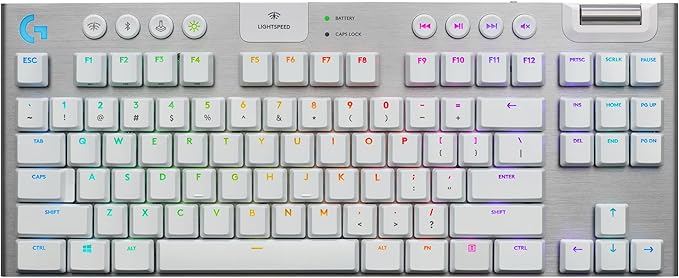
Logitech G915 TKL Tenkeyless Lightspeed Wireless RGB Mechanical Gaming Keyboard Clicky
Last updated at 09/06/2026 15:40:28
LOGITECH G915 TKL Lightspeed BelaidÄ— MechaninÄ— Klaviatūra žaidimams - Carbon - Nordic - Tactile
Affiliate Disclosure: We may receive a small commission for purchases made through this link at no extra cost to you. This helps support our site. Thank you!
Logitech G915 TKL Lightspeed Wireless RGB Mechanical Gaming Keyboard - Clicky (920-009529)
Logitech G915 TKL Lightspeed Wireless RGB Mechanical Gaming Keyboard - Linear (920-009512)
Logitech G915 TKL Lightspeed Wireless RGB Mechanical Gaming Keyboard Clicky 920 009529 - Keyboards
Delivery $15
Logitech G915 TKL Lightspeed Wireless RGB Mechanical Gaming Keyboard Linear 920 009512 - Keyboards
Delivery $15
Logitech G915 TKL Lightspeed Wireless RGB Mechanical Gaming Keyboard Tactile 920 009495 - Keyboards
Delivery $15
Logitech G915 TKL Lightspeed Wireless RGB Mechanical Keyboard Tactile White 920 009660 - Keyboards
Delivery $13
Logitech G915 TKL Tenkeyless Lightspeed Wireless RGB Mechanical Gaming Keyboard - White Tactile Bluetooth, Dedicated Media Controls, Endless Control,
Logitech G915 TKL TenKeyless Lightspeed Wireless RGB Mechanical Gaming Keyboard - Carbon/Tactile
Logitech G915 TKL TenKeyless Lightspeed Wireless RGB Mechanical Gaming Keyboard - Carbon/Clicky Lightsync RGB, Low Profile, Bluetooth, Wireless
originally posted on influenster.com
I bought this keyboard upon its release. It initially impressed me very much. It still does, and maybe it is because I have grown to not recognize how useful it is. You really understand Logitech’s lunge for wireless with this keyboard, mostly if you are a college student (like me) or keep this device at work. It is so versatile. I keep only my iPad connected via bluetooth to the keyboard, and switch the USB between my work and school laptops easily, giving me easy switching between 3 devices. Not only that, but since its wireless, I can throw the thing in the ground if I need desk space for textbooks and notebook. Both of these things are what drew me to this keyboard in the first place. I could’t imagine a working student life without it. That being said, this app ... MoreI bought this keyboard upon its release. It initially impressed me very much. It still does, and maybe it is because I have grown to not recognize how useful it is. You really understand Logitech’s lunge for wireless with this keyboard, mostly if you are a college student (like me) or keep this device at work. It is so versatile. I keep only my iPad connected via bluetooth to the keyboard, and switch the USB between my work and school laptops easily, giving me easy switching between 3 devices. Not only that, but since its wireless, I can throw the thing in the ground if I need desk space for textbooks and notebook. Both of these things are what drew me to this keyboard in the first place. I could’t imagine a working student life without it. That being said, this app does not allow me to give any division of a whole number of stars, leaving me to decide between 4 and 5 stars. The only reasoning for this decision is that the keys, sound, and design choices are mere mediocre. The keyboard is so boring to type on. Having owned the keyboard 3/4 years now, I realize I have had a lot of time with it, but it has been a long time I’ve been hearing a constant springy noise that has sidetracked my thought countless times. Also, a very interesting choice by LT to design their own switches. Not too huge of an issue with me but I have had some keys break and unfortunately you will have to order a full set to replace just one key. It is through this that I decided a 4 star review was necessary. If possible, I would give it a 4.5-4.7 review. I hope you found this helpful.
originally posted on pccasegear.com
I love the feel of mechanical keyboards, especially for gaming. I was looking for a mechanical keyboard with good tactile feel but a quieter 'click'. It's very difficult to find good information about how the quiet mechanical keyboards feel to use - and it's expensive to play a guessing game.In the end I bought this keyboard because the ability to have Wireless, Bluetooth, and Wired options was useful for my work from home requirements.It's a very nice keyboard, and I would recommend it. The tactile feel is not quite the same as what I really want in a gaming keyboard...which I think is because of the raised nature of the keys. They're a little bit wobbly just by the nature of the design. However the experience of typing and gaming is satisfactory and the wobble ... MoreI love the feel of mechanical keyboards, especially for gaming. I was looking for a mechanical keyboard with good tactile feel but a quieter 'click'. It's very difficult to find good information about how the quiet mechanical keyboards feel to use - and it's expensive to play a guessing game.In the end I bought this keyboard because the ability to have Wireless, Bluetooth, and Wired options was useful for my work from home requirements.It's a very nice keyboard, and I would recommend it. The tactile feel is not quite the same as what I really want in a gaming keyboard...which I think is because of the raised nature of the keys. They're a little bit wobbly just by the nature of the design. However the experience of typing and gaming is satisfactory and the wobble does not impact the action of the key when pressed.Having an integration with Discord for the Macro keys is also a nice surprise bonus, as (at the time of writing) Razer does not have this...on my previous Razer keyboard I had to bind the mute/deafen to a key combination and then bind the macro keys to that key combination. It worked, but was a bit messy.
originally posted on jbhifi.com.au
Expensive, but pretty great keyboard. Tactile switches provide excellent feedback without being annoyingly noisy. Aluminum finish looks premium and feels nice. Volume control wheel has a special place in my heart. Software is not without its flaws, but still is one of the best compared to some other manufacturers. RGB implementation is quite decent. Tenkeyless design means that your elbows won’t be in some weird position when using the mouse and keyboard at the same time, e.g. gaming. Perhaps the only problem that some people might face is that the letters might be hard to see without RGB on, but as a touch typist I am not bothered by that.My only complaint would be that the very first keyboard I got was full-sized G915 and it started to lose connection after ... MoreExpensive, but pretty great keyboard. Tactile switches provide excellent feedback without being annoyingly noisy. Aluminum finish looks premium and feels nice. Volume control wheel has a special place in my heart. Software is not without its flaws, but still is one of the best compared to some other manufacturers. RGB implementation is quite decent. Tenkeyless design means that your elbows won’t be in some weird position when using the mouse and keyboard at the same time, e.g. gaming. Perhaps the only problem that some people might face is that the letters might be hard to see without RGB on, but as a touch typist I am not bothered by that.My only complaint would be that the very first keyboard I got was full-sized G915 and it started to lose connection after about half a year, at which point I went to JB HI-FI and they offered a replacement, but did not have a full-sized version at the time so I ended up with TLK instead, which I enjoyed even more, but that one developed an issue with RGB after more than a year and I had to replace it once again. So technically this is my third G915, and JB HI-FI is always super helpful and honoring the warranty, but I just wish the keyboard lasted longer, don’t know whether this is due to the supply chain issues observed during the COVID outbreak or just down to my poor luck, but hopefully this one will last longer.
LOGITECH G915 TKL Lightspeed BelaidÄ— MechaninÄ— Klaviatūra žaidimams - Carbon - Nordic - Tactile
Affiliate Disclosure: We may receive a small commission for purchases made through this link at no extra cost to you. This helps support our site. Thank you!
Logitech G915 TKL Lightspeed Wireless RGB Mechanical Gaming Keyboard - Clicky (920-009529)
Logitech G915 TKL Lightspeed Wireless RGB Mechanical Gaming Keyboard - Linear (920-009512)
Logitech G915 TKL Lightspeed Wireless RGB Mechanical Gaming Keyboard Clicky 920 009529 - Keyboards
Delivery $15
Logitech G915 TKL Lightspeed Wireless RGB Mechanical Gaming Keyboard Linear 920 009512 - Keyboards
Delivery $15
I bought this keyboard upon its release. It initially impressed me very much. It still does, and maybe it is because I have grown to not recognize how useful it is. You really understand Logitech’s lunge for wireless with this keyboard, mostly if you are a college student (like me) or keep this device at work. It is so versatile. I keep only my iPad connected via bluetooth to the keyboard, and switch the USB between my work and school laptops easily, giving me easy switching between 3 devices. Not only that, but since its wireless, I can throw the thing in the ground if I need desk space for textbooks and notebook. Both of these things are what drew me to this keyboard in the first place. I could’t imagine a working student life without it. That being said, this app ... MoreI bought this keyboard upon its release. It initially impressed me very much. It still does, and maybe it is because I have grown to not recognize how useful it is. You really understand Logitech’s lunge for wireless with this keyboard, mostly if you are a college student (like me) or keep this device at work. It is so versatile. I keep only my iPad connected via bluetooth to the keyboard, and switch the USB between my work and school laptops easily, giving me easy switching between 3 devices. Not only that, but since its wireless, I can throw the thing in the ground if I need desk space for textbooks and notebook. Both of these things are what drew me to this keyboard in the first place. I could’t imagine a working student life without it. That being said, this app does not allow me to give any division of a whole number of stars, leaving me to decide between 4 and 5 stars. The only reasoning for this decision is that the keys, sound, and design choices are mere mediocre. The keyboard is so boring to type on. Having owned the keyboard 3/4 years now, I realize I have had a lot of time with it, but it has been a long time I’ve been hearing a constant springy noise that has sidetracked my thought countless times. Also, a very interesting choice by LT to design their own switches. Not too huge of an issue with me but I have had some keys break and unfortunately you will have to order a full set to replace just one key. It is through this that I decided a 4 star review was necessary. If possible, I would give it a 4.5-4.7 review. I hope you found this helpful.
I love the feel of mechanical keyboards, especially for gaming. I was looking for a mechanical keyboard with good tactile feel but a quieter 'click'. It's very difficult to find good information about how the quiet mechanical keyboards feel to use - and it's expensive to play a guessing game.In the end I bought this keyboard because the ability to have Wireless, Bluetooth, and Wired options was useful for my work from home requirements.It's a very nice keyboard, and I would recommend it. The tactile feel is not quite the same as what I really want in a gaming keyboard...which I think is because of the raised nature of the keys. They're a little bit wobbly just by the nature of the design. However the experience of typing and gaming is satisfactory and the wobble ... MoreI love the feel of mechanical keyboards, especially for gaming. I was looking for a mechanical keyboard with good tactile feel but a quieter 'click'. It's very difficult to find good information about how the quiet mechanical keyboards feel to use - and it's expensive to play a guessing game.In the end I bought this keyboard because the ability to have Wireless, Bluetooth, and Wired options was useful for my work from home requirements.It's a very nice keyboard, and I would recommend it. The tactile feel is not quite the same as what I really want in a gaming keyboard...which I think is because of the raised nature of the keys. They're a little bit wobbly just by the nature of the design. However the experience of typing and gaming is satisfactory and the wobble does not impact the action of the key when pressed.Having an integration with Discord for the Macro keys is also a nice surprise bonus, as (at the time of writing) Razer does not have this...on my previous Razer keyboard I had to bind the mute/deafen to a key combination and then bind the macro keys to that key combination. It worked, but was a bit messy.
Expensive, but pretty great keyboard. Tactile switches provide excellent feedback without being annoyingly noisy. Aluminum finish looks premium and feels nice. Volume control wheel has a special place in my heart. Software is not without its flaws, but still is one of the best compared to some other manufacturers. RGB implementation is quite decent. Tenkeyless design means that your elbows won’t be in some weird position when using the mouse and keyboard at the same time, e.g. gaming. Perhaps the only problem that some people might face is that the letters might be hard to see without RGB on, but as a touch typist I am not bothered by that.My only complaint would be that the very first keyboard I got was full-sized G915 and it started to lose connection after ... MoreExpensive, but pretty great keyboard. Tactile switches provide excellent feedback without being annoyingly noisy. Aluminum finish looks premium and feels nice. Volume control wheel has a special place in my heart. Software is not without its flaws, but still is one of the best compared to some other manufacturers. RGB implementation is quite decent. Tenkeyless design means that your elbows won’t be in some weird position when using the mouse and keyboard at the same time, e.g. gaming. Perhaps the only problem that some people might face is that the letters might be hard to see without RGB on, but as a touch typist I am not bothered by that.My only complaint would be that the very first keyboard I got was full-sized G915 and it started to lose connection after about half a year, at which point I went to JB HI-FI and they offered a replacement, but did not have a full-sized version at the time so I ended up with TLK instead, which I enjoyed even more, but that one developed an issue with RGB after more than a year and I had to replace it once again. So technically this is my third G915, and JB HI-FI is always super helpful and honoring the warranty, but I just wish the keyboard lasted longer, don’t know whether this is due to the supply chain issues observed during the COVID outbreak or just down to my poor luck, but hopefully this one will last longer.
Coming from a Corsair K70 RGB Mk.2, I had some reservations about buying this keyboard. I was worried about latency, charging, and the GL switches.Now that I have it, I'm honestly more upset I didn't buy it sooner.There's no noticeable latency, there's very little fatigue after coding for hours with it, the keys are responsive, and the battery lasts a decent amount of time even with full lighting.There are a handful of drawbacks to be mindful of however.1. The software. The first time it complained about needed to be charged, the lighting scheme froze in "recharge" mode until I restarted the app. I don't know how, but as good of a hardware manufacturer Logitech are, their software over the years has been consistently quirky and poorly designed.2. It also only ... MoreComing from a Corsair K70 RGB Mk.2, I had some reservations about buying this keyboard. I was worried about latency, charging, and the GL switches.Now that I have it, I'm honestly more upset I didn't buy it sooner.There's no noticeable latency, there's very little fatigue after coding for hours with it, the keys are responsive, and the battery lasts a decent amount of time even with full lighting.There are a handful of drawbacks to be mindful of however.1. The software. The first time it complained about needed to be charged, the lighting scheme froze in "recharge" mode until I restarted the app. I don't know how, but as good of a hardware manufacturer Logitech are, their software over the years has been consistently quirky and poorly designed.2. It also only saves presets on-board. If you're using a custom lighting configuration, you HAVE to use the software. The side effect of this is, when the keyboard boots, you get the default rainbow effect until it connects (only a couple of seconds but meh).This also means if you want custom lighting when switching between devices, you also will need to install the software on the second device.Not massive but this feels like something easily fixed with a firmware update, but I'd be surprised if they do.3. The placement of the G keys on the side.I had to set G5 to act as a second ctrl key due to me being used to the ctrl key being where it is lol.I'll probably grow out of it the more I use the keyboard, but it's definitely a gotcha.4. Keys secondary functions (like symbols on the num row) are silk screened on so they don't light up.And a minor gripe, but if you put it on the floor, unless the feet are up there's not really many places to grab it with one hand since it's so low profile and doesn't have a wrist rest.Despite it not being 100% perfect, it's one of the nicest keyboards I've ever used, and works for enough of my use cases that these drawbacks aren't a dealbreaker.I'd recommend it to most.
I've been using the keyboard for a couple of days now and like it alot. There is no perceivable latency and I have had no issues with the wireless system or the battery. RGB works great and is relatively bright but all white does have a hint of blue. The media keys are awesome and the large volume wheel is a pleasure to use. The linear switches took some time to get used to coming from an MX Keys but after an evening I got the feel of typing on them. My first gripe with this keyboard is it doesn't come with a wrist rest. Typing can be straining for long periods of time even with the limited tilt that it offers. I would recommend doing some googling and finding a suitable wrist rest from G-skill, Hyper-X, or even the Logitech MX palm rest. (although pricey) Secondly, ... MoreI've been using the keyboard for a couple of days now and like it alot. There is no perceivable latency and I have had no issues with the wireless system or the battery. RGB works great and is relatively bright but all white does have a hint of blue. The media keys are awesome and the large volume wheel is a pleasure to use. The linear switches took some time to get used to coming from an MX Keys but after an evening I got the feel of typing on them. My first gripe with this keyboard is it doesn't come with a wrist rest. Typing can be straining for long periods of time even with the limited tilt that it offers. I would recommend doing some googling and finding a suitable wrist rest from G-skill, Hyper-X, or even the Logitech MX palm rest. (although pricey) Secondly, what engineer at Logitech thought it was a good idea for their most expensive keyboard to use MICRO USB? I haven't even had the board in my hands for a week and the connector already feels loose when I go to plug it in. The much cheaper MX keys use Type-C why can the G915? Lastly, although not a deal-breaker Logitech G Hub isn't the best It gets the job done.
Tried the Clicky and the Tactile at the store and picked up the Clicky.Been using it for a few weeks now. I do appreciate it. The main reason I got it was because I needed a low profile keyboard that is wireless to fit in my computer desk keyboard tray. I use the keyboard with the keyboard tray closed so that it still under the desk. If the keyboard is too thick, I cannot get my hands in between to type. This keyboard leaves me ample room to do this.Took a star off, might need to take off another, because certain key strokes to not register properly. For example, When hitting the backspace button at a certain angle, it depresses and even hears a click but the stroke is not actuated. I can replicate this pretty often on not normal sized keys (like enter, ... MoreTried the Clicky and the Tactile at the store and picked up the Clicky.Been using it for a few weeks now. I do appreciate it. The main reason I got it was because I needed a low profile keyboard that is wireless to fit in my computer desk keyboard tray. I use the keyboard with the keyboard tray closed so that it still under the desk. If the keyboard is too thick, I cannot get my hands in between to type. This keyboard leaves me ample room to do this.Took a star off, might need to take off another, because certain key strokes to not register properly. For example, When hitting the backspace button at a certain angle, it depresses and even hears a click but the stroke is not actuated. I can replicate this pretty often on not normal sized keys (like enter, backspace, caps, shift and tab).Also, not a fan how it flashes different colors when the computer wakes from sleep.Other note: initial actuation pressure is higher than what I am used to. Meaning it requires more pressure to press the key. This means that you won't get accidental key presses but it also means that it slows me down compared to my Razer Huntsman Mini keyboard. I can type faster and actually with fewer errors on my Razer.But ultimately, this is the only compact TKL low profile wireless keyboard that is wifi (not bluetooth). So you don't really have many options...
I like the concept of this keyboard but execution left little to be desired, for me at least. I was used to an MSI wired keyboard previously which has a satisfying clack to the keys, this one wasn't as satisfying. Additionally, my previous keyboard also had all labels on the keys illuminated while this one has 95% illuminated (save for some of the punctuation keys requiring shift to input). Finally, as a personal quirk, I've never used a keyboard with the Macro keys on the left of the board. My indexing of keys to hands require the edge of the keyboard to be the standard style without macro keys. As a result, I would always push the wrong keys when my hand is at the corner of the keyboard. It's a solid keyboard, and great product. Just not for me. As such, I ended ... MoreI like the concept of this keyboard but execution left little to be desired, for me at least. I was used to an MSI wired keyboard previously which has a satisfying clack to the keys, this one wasn't as satisfying. Additionally, my previous keyboard also had all labels on the keys illuminated while this one has 95% illuminated (save for some of the punctuation keys requiring shift to input). Finally, as a personal quirk, I've never used a keyboard with the Macro keys on the left of the board. My indexing of keys to hands require the edge of the keyboard to be the standard style without macro keys. As a result, I would always push the wrong keys when my hand is at the corner of the keyboard. It's a solid keyboard, and great product. Just not for me. As such, I ended up returning the product.n
I love how "clicky" and compact this keyboard is, but have questions about the build quality. I have owned my keyboard for 1 year and had to RMA it twice. The first time, one of the arrow keys was unresponsive unless I repeatedly clicked it, and the second time a button was double-firing if pressed lightly. The first issue occurred less than 1 month after ownership and the second started about 10 months after receiving the first replacement. I opted for the Best Buy extended warranty to make sure that I retain coverage in case the issue occurs again. I am now on my third keyboard and notice that the "enter" key double-fires occasionally. I have not filed another RMA yet, but will likely do that after the holidays since it took >1 month to get my second replacement ... MoreI love how "clicky" and compact this keyboard is, but have questions about the build quality. I have owned my keyboard for 1 year and had to RMA it twice. The first time, one of the arrow keys was unresponsive unless I repeatedly clicked it, and the second time a button was double-firing if pressed lightly. The first issue occurred less than 1 month after ownership and the second started about 10 months after receiving the first replacement. I opted for the Best Buy extended warranty to make sure that I retain coverage in case the issue occurs again. I am now on my third keyboard and notice that the "enter" key double-fires occasionally. I have not filed another RMA yet, but will likely do that after the holidays since it took >1 month to get my second replacement due to limited stock.Regardless of the issues I've encountered, I love that this keyboard can connect to three different devices and it's so easy to switch between them (wired, wireless, and bluetooth). I pair this with my gaming PC (wired) and work laptop (bluetooth) and switching between the two is as easy as pressing a single button.Overall, I really do enjoy this keyboard, and am curious if others have experienced the double-firing keypress issues or if I've just had bad luck
Since many of us are working from home our desk becomes our home office, gaming center, breakfast lunch and dinner table. I was in the market for a keyboard that does everything. A few important features for me was it had to be mechanical, have decent feedback, feels good to type on for hours and suitable for FPS gaming.I narrowed down to 4 keyboards that I thought would be suitable. I tested the Keychron V2, Razor Tourament TKL, Microsoft Sculp ergo and G915 (clicky).There's something that I love about each of the keyboards but ultimately I ended up with the G915 for a few reasons.1. The feedback of the clicky is great and the sound is addicting to me.2. It's just loud enough to hear the click but isn't overly loud to the point of it being annoying.3. The ... MoreSince many of us are working from home our desk becomes our home office, gaming center, breakfast lunch and dinner table. I was in the market for a keyboard that does everything. A few important features for me was it had to be mechanical, have decent feedback, feels good to type on for hours and suitable for FPS gaming.I narrowed down to 4 keyboards that I thought would be suitable. I tested the Keychron V2, Razor Tourament TKL, Microsoft Sculp ergo and G915 (clicky).There's something that I love about each of the keyboards but ultimately I ended up with the G915 for a few reasons.1. The feedback of the clicky is great and the sound is addicting to me.2. It's just loud enough to hear the click but isn't overly loud to the point of it being annoying.3. The spacing is perfect inbetween the keys. I have big hands and I found myself making typos often when keys are smaller. I also found that linear keys requires less pressure and I was making tons of typos on the Razor Tourament keyboard.4. The MS Sculp ergo keyboard is great for long typing sessions for work but the keys gets stuck sometimes which overtime can be an issue.5. The low profile keys is very attractive and I feel I type faster because of the shorter height of the keys.Some people buy this keyboard because it's wireless, it can do bluetooth and it's a gaming keyboard with decent battery life.I purchased 2 of these and my wife loves it as well. She said the battery least a good 10 days of heavy 8 hour work usage because you the low battery signal.At 179.99 I do believe this keyboard is a tad overpriced. But at the original MSRP it's not worth getting. I think if the price drops another 30 dollars it would be just right. Def give this keyboard a try if you have similar requirements as me! Good luck.
There are a lot of mechanical keyboards on the market that feature advanced features catering to gamers and people looking to show off their design chops. There are slightly less mechanical keyboards on the market allowing people who want to enjoy the superior typing experience provided by a mechanical board without needing to worry about running a wire back to your computer. There is surprisingly little overlap between the two groups. But the G915 manages to fit into that narrow little sliver of the Venn diagram, and does so with surprising aplomb.One of the first things I noticed on taking the keyboard out of the box is how well built the whole thing is. While the bulk of the keyboard is still plastic, the machined aluminum top plate gives it a surprising amount ... MoreThere are a lot of mechanical keyboards on the market that feature advanced features catering to gamers and people looking to show off their design chops. There are slightly less mechanical keyboards on the market allowing people who want to enjoy the superior typing experience provided by a mechanical board without needing to worry about running a wire back to your computer. There is surprisingly little overlap between the two groups. But the G915 manages to fit into that narrow little sliver of the Venn diagram, and does so with surprising aplomb.One of the first things I noticed on taking the keyboard out of the box is how well built the whole thing is. While the bulk of the keyboard is still plastic, the machined aluminum top plate gives it a surprising amount of heft and rigidity for how thin it is. The G915 is barely larger than some of the portable Bluetooth keyboards I've seen being sold for use with smart phones, and yet there's barely a hint of deck flex or any kind of fitting gap in the seams. Even better is the fact that they've found a way to include integrated storage for the keyboard's RF dongle, a particularly important addition seeing as it sticks out far enough that I don't think I'd be comfortable keeping it plugged in on a laptop if I wanted to throw the whole setup into a backpack to take along with me.In using the keyboard for typing and gaming, I've found its performance to be very good overall, though perhaps not quite matching some of the larger boards I've tried. The short travel distance you get with the low profile switches makes for a very responsive board overall, though there will likely be a little bit of adjustment time required if you're using to typing on a full size mechanical as it's very easy to use too much force and end up banging away at the keys. Unfortunately in testing my keyboard, one of the tactile "clicky" variants, I also discovered that the switches' actuation point where they register a key press is slightly shallower than the tactile bump meant to provide feedback. There's easily enough tension in the spring to keep this from being a problem if you're just resting your fingers on the home row or WASD keys during normal use, so I don't think this is likely to be a serious problem for most. But if you're the kind of gamer who habitually rides a key just shy of the actuation point, it's worth considering that you might have a bit of a hard time doing it with these particular switches.Speaking of reaction time, let's talk about transmission delays. It's commonly accepted by many that wireless peripherals in general have to contend with a certain amount of latency that can make them either unreliable or simply less desirable for gaming purposes. Having tried it in all three modes (Wired, bluetooth, and Logitech's proprietary Lightspeed wireless) I can confirm that latency and reliability do not appear to be significant issues. Wired and Lightspeed modes are rock solid, though admittedly you might encounter some issues with the latter if you don't have a relatively unobstructed path between the keyboard and the receiver. In recognition of this, they thoughtfully include an adapter which can turn any standard micro-USB cable into an extension that can bring the receiver out onto your desk. There is admittedly some noticeable lag in Bluetooth mode, but despite my best efforts I couldn't get it to drop any keypresses. But if you're determined not to risk it,, plugging the keyboard in with a micro-usb cable will immediately switch it over to wired operation.So, now that I've adequately covered all the technical performance, let's talk about the creature comforts. The keyboard can be set to elevations of 0, 4, and 8 degrees using the integrated feet, and as one might expect from a product designed to maximize your desk space there isn't an integrated wrist rest. Media controls are more than adequate, with a nice large wheel to use for volume control or whatever else you might want to configure it for using Logitech's G-Hub software. There's also options for two different key mapping profiles (with the default gaming mode disabling common problem keys such as the windows and context menu buttons) and support for full per-key lighting profiles that work in both Lightspeed and wired modes. Switching the keyboard over to Bluetooth will bring up a standard rainbow cycle, and you can control the brightness or turn off the backlight completely with a dedicated button on the top of the keyboard. There are also three macro buttons (sharing space with the F1, F2, and F3 keys) as one would expect on such a board. The only thing that's missing is built in integration with other desktop RGB ecosystems like iCue or Aura Sync - though there's always the chance that it could be added at a later date.Overall, the G915 is an excellent keyboard and arguably the first mechanical board I've seen that could really qualify as portable. Thin and small might not be for everyone, but Logitech has really done it right here.