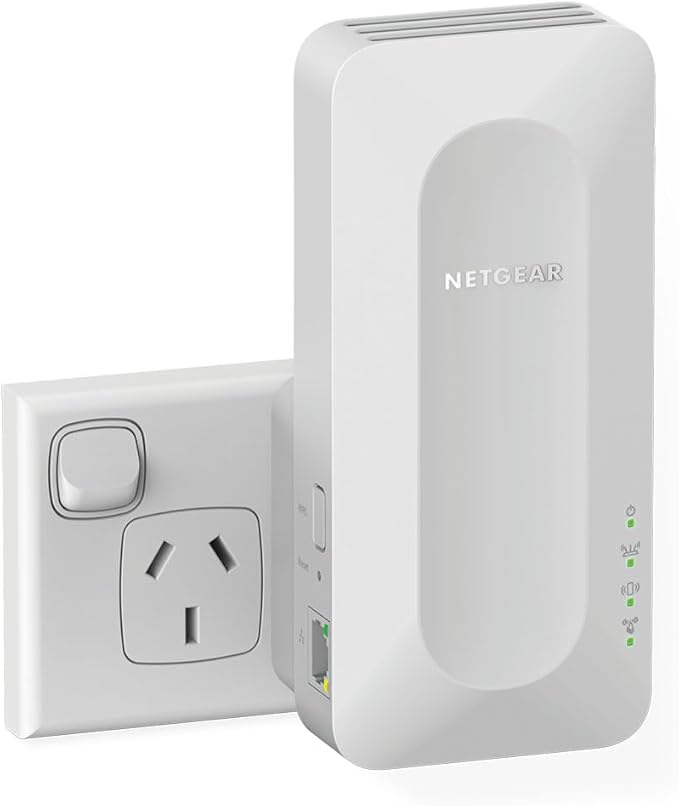
Netgear AX1800 4-Stream Wifi 6 Mesh Extender
Netgear Dual-band WiFi 6 Mesh Extender is designed to enhance and extend the coverage of your existing Wi-Fi network. Easily creates a mesh WiFi 6 system with your existing router. WiFi 6 delivers great capacity, fast speed and more coverage. WiFi coverage on more devices throughout your home with speeds up to 1.8Gbps. The wall-plug design has two powerful internal antennas that extend WiFi signals to where your router WiFi cannot reach. This AX1800 Mesh Extender is backward compatible with previous WiFi generations (11b/g/n/a/ac) and will work with all your existing internet-connected devices.
Netgear Dual-band WiFi 6 Mesh Extender is designed to enhance and extend the coverage of your existing Wi-Fi network. Easily creates a mesh WiFi 6 system with your existing router. WiFi 6 delivers great capacity, fast speed and more coverage. WiFi coverage on more devices throughout your home with speeds up to 1.8Gbps. The wall-plug design has two powerful internal antennas that extend WiFi signals to where your router WiFi cannot reach. This AX1800 Mesh Extender is backward compatible with previous WiFi generations (11b/g/n/a/ac) and will work with all your existing internet-connected devices.
Netgear Dual-band WiFi 6 Mesh Extender is designed to enhance and extend the coverage of your existing Wi-Fi network. Easily creates a mesh WiFi 6 system with your existing router. WiFi 6 delivers great capacity, fast speed and more coverage. WiFi coverage on more devices throughout your home with speeds up to 1.8Gbps. The wall-plug design has two powerful internal antennas that extend WiFi signals to where your router WiFi cannot reach. This AX1800 Mesh Extender is backward compatible with previous WiFi generations (11b/g/n/a/ac) and will work with all your existing internet-connected devices.
Netgear Dual-band WiFi 6 Mesh Extender is designed to enhance and extend the coverage of your existing Wi-Fi network. Easily creates a mesh WiFi 6 system with your existing router. WiFi 6 delivers great capacity, fast speed and more coverage. WiFi coverage on more devices throughout your home with speeds up to 1.8Gbps. The wall-plug design has two powerful internal antennas that extend WiFi signals to where your router WiFi cannot reach. This AX1800 Mesh Extender is backward compatible with previous WiFi generations (11b/g/n/a/ac) and will work with all your existing internet-connected devices.
in 10 offers
The lowest price for Netgear AX1800 4-Stream Wifi 6 Mesh Extender right now is $110.90 at eBay.com.au, compared across 9 retailers.
The all-time low was $42.00 on 14 Jan 2025 — today's price is 164% above the lowest ever. It has been notably cheaper before — worth setting a price alert.
Prices last updated 3 Oct 2026.
Last updated at 03/10/2026 05:20:34
NETGEAR WiFi 6 Mesh Range Extender (EAX15) – Add up to 90 sq. m. and 20 Devices with AX1800 Dual-Band Wireless Signal Booster & Repeater (up to 1.8
Free delivery
Affiliate Disclosure: We may receive a small commission for purchases made through this link at no extra cost to you. This helps support our site. Thank you!
Netgear Ax1800 Model Eax14 Wifi Mesh Extender 4 Stream
Delivery $50.86
Affiliate Disclosure: We may receive a small commission for purchases made through this link at no extra cost to you. This helps support our site. Thank you!
Netgear EAX15 AX1800 WiFi Mesh Extender | Best Online Computer Store
Delivery between 9–16 Oct $9.90
Netgear AX1800 4-Stream WiFi 6 Mesh
Delivery between 7–14 Oct $7.95
Netgear AX1800 4-Stream WiFi 6 Mesh
Delivery between 7–12 Oct $7.95
Netgear AX1800 4-Stream WiFi 6 Mesh
Delivery between 7–12 Oct $7.95
Netgear EAX15 AX1800 4-Stream Wi-Fi6 Mesh Extender
Delivery between 7–12 Oct $10
NETGEAR AX1800 4-Stream Wi-Fi 6 Mesh Extender
Delivery $8.99
NETGEAR (EAX15) AX1800 4-STREAM WIFI 6 MESH EXTENDER WALLPLUG 2Y
Delivery $16.50
originally posted on pbtech.co.nz
I've had this extender for 4 months now (at the time of writing) and I'm so happy with it. The main reason I bought this extender is because my TP-LINK extender actually had severe heating issues immediately after I switched from broadband to fibre which lead to it frying what I believe was it's WiFi chip. The main problem I had is that the router is actually located in a DIFFERENT building on my property and all the rooms EXCEPT for my room had a WiFi signal. So having networking wasn't an option for us. (Testing conditions: sources of microwaves were powered off, fibre internet, same day testing and phone + laptop placed in front of modem/router. All data show are averages) The extender actually boosted my wifi speed: Router 2.4Ghz speeds: 56.72 Mbps Download, ... MoreI've had this extender for 4 months now (at the time of writing) and I'm so happy with it. The main reason I bought this extender is because my TP-LINK extender actually had severe heating issues immediately after I switched from broadband to fibre which lead to it frying what I believe was it's WiFi chip. The main problem I had is that the router is actually located in a DIFFERENT building on my property and all the rooms EXCEPT for my room had a WiFi signal. So having networking wasn't an option for us. (Testing conditions: sources of microwaves were powered off, fibre internet, same day testing and phone + laptop placed in front of modem/router. All data show are averages) The extender actually boosted my wifi speed: Router 2.4Ghz speeds: 56.72 Mbps Download, 84.65 Mbps Upload Extender 2.4Ghz speeds: 82.36 Mbps Download 102.63 Mbps Upload (Please note your experience may vary) The range of the extender is so big that I could connect to the network at my neighbors house and still have a fast and reliable connection. With the Night Hawk app you can split the networks and I use the 5Ghz network and it's super fast. I've never experienced such fast speeds before: Extender 5Ghz speeds: 113.25 Mbps Download 142.57 Mbps Upload (Please note your experience may vary) So I've been able to watch YouTube in actual 1080p 60fps (Router's network also VERY unstable) without buffering or random drops in quality. I've also been able to play games with low ping (Oceania servers) so I no longer have to suffer from bad net. (Please note your experience may vary) There is a 1Gbps female connection on the extender and if you were to plug in a 1Gbps male ethernet cable, holy cow you're gonna get some speed, might as well go to the moon and back. The LEDs on the front makes it easy to tell if any of the networks are working properly (no issues so far) The Night Hawk app is super user friendly which makes it easy to use, you can manage which devices can have access to the WiFi, you can change the network names and change the network password easily in the app. HOWEVER, the instructions in the box tells you to go on a website to set up the networks like with TP-LINK, but it doesn't seem to work so I end up having to download the Night Hawk app (It does say in the instructions that you can download the app to set the extender up). That's the only reason I'm giving it 4 stars (4.85) out of 5 otherwise it's an amazing product. I do highly recommend you buy this when it's on special (which it often is) to get more out of your money. You also need a Night Hawk account but that's fine with me. Also make sure that you have a working AU power outlet and at least a power supply and an existing WiFi modem/router with an active internet plan.
originally posted on netgear.com
I've been a Netgear loyalist for years but this is the second consecutive bad experience I've had with their equipment. I bought this to upgrade our current WiFi extender and increase signal to the most distant corner of our home. After setup the throughput was 1/3 of what we had previously. Customization options are very limited and no amount of tweaking improved the performance. Tweaks also took extremely long periods to save in the unit. The firmware was not the latest version and attempts to update the firmware manually (the automatic system couldn't find the internet even though all the pertinent settings were correct) were unsuccessful as every attempt timed out. The last Netgear router I bought had to be replaced twice by the company after their automatic ... MoreI've been a Netgear loyalist for years but this is the second consecutive bad experience I've had with their equipment. I bought this to upgrade our current WiFi extender and increase signal to the most distant corner of our home. After setup the throughput was 1/3 of what we had previously. Customization options are very limited and no amount of tweaking improved the performance. Tweaks also took extremely long periods to save in the unit. The firmware was not the latest version and attempts to update the firmware manually (the automatic system couldn't find the internet even though all the pertinent settings were correct) were unsuccessful as every attempt timed out. The last Netgear router I bought had to be replaced twice by the company after their automatic firmware updates at initial setup bricked the device both times. And their tech support has become atrocious. This will be my last attempt at using a Netgear product.
originally posted on walmart.com
Got this wifi extender in hopes of filling in the dead zone of my home. Had high hopes givin the high price. Setup was a breeze with the WPS. After plugging in wait for the top red light to turn green. Step one press the WPS button on your router, Step two immediately press the WPS button on the extender, Step 3 wait for them to connect. When all four lights on the extender are green everything is good. If you see a red light, you might need to move the extender closer to your router. Or your devices closer to the extender. First off don't expect much, the extender is only going to give you better than nothing speeds. At times not bad. Its only there to fill in the dead zone. It doesn't compare to being in the same room as your wifi router. The number one most ... MoreGot this wifi extender in hopes of filling in the dead zone of my home. Had high hopes givin the high price. Setup was a breeze with the WPS. After plugging in wait for the top red light to turn green. Step one press the WPS button on your router, Step two immediately press the WPS button on the extender, Step 3 wait for them to connect. When all four lights on the extender are green everything is good. If you see a red light, you might need to move the extender closer to your router. Or your devices closer to the extender. First off don't expect much, the extender is only going to give you better than nothing speeds. At times not bad. Its only there to fill in the dead zone. It doesn't compare to being in the same room as your wifi router. The number one most confusing thing is that it doesn't show up on the wifi list as EXT. Instead it merges with your routers wifi as one. Also known as mesh. The only indacater I got to show that I was connected. Was instead of being on wifi 5. It showed up as wifi 6. The reason for my low score. Too many connection issues. Causing me to reset and relink the thing. It has very low performance. It gets hot. It saves nothing. If the power goes out or you unplug it to relocate it. You will have to reconnect the thing. I really expected better from Netgear at this price. With my head hung low with disappointment. I have to settle, go without, and make the dreaded return.
| Gigabit Ethernet | 1 x Gigabit Port |
| Data Transfer Speed | 1800 (Mbps) |
| Manufacturer's Warranty | 2 Year |
| Wi-Fi | Wi-Fi 6 (802.11 ax) |
| Connection Ports | 1 x LAN |

NETGEAR WiFi 6 Mesh Range Extender (EAX15) – Add up to 90 sq. m. and 20 Devices with AX1800 Dual-Band Wireless Signal Booster & Repeater (up to 1.8
Free delivery
Affiliate Disclosure: We may receive a small commission for purchases made through this link at no extra cost to you. This helps support our site. Thank you!
Netgear Ax1800 Model Eax14 Wifi Mesh Extender 4 Stream
Delivery $50.86
Affiliate Disclosure: We may receive a small commission for purchases made through this link at no extra cost to you. This helps support our site. Thank you!
Netgear EAX15 AX1800 WiFi Mesh Extender | Best Online Computer Store
Delivery between 9–16 Oct $9.90
Netgear AX1800 4-Stream WiFi 6 Mesh
Delivery between 7–14 Oct $7.95
Netgear AX1800 4-Stream WiFi 6 Mesh
Delivery between 7–12 Oct $7.95
I've had this extender for 4 months now (at the time of writing) and I'm so happy with it. The main reason I bought this extender is because my TP-LINK extender actually had severe heating issues immediately after I switched from broadband to fibre which lead to it frying what I believe was it's WiFi chip. The main problem I had is that the router is actually located in a DIFFERENT building on my property and all the rooms EXCEPT for my room had a WiFi signal. So having networking wasn't an option for us. (Testing conditions: sources of microwaves were powered off, fibre internet, same day testing and phone + laptop placed in front of modem/router. All data show are averages) The extender actually boosted my wifi speed: Router 2.4Ghz speeds: 56.72 Mbps Download, ... MoreI've had this extender for 4 months now (at the time of writing) and I'm so happy with it. The main reason I bought this extender is because my TP-LINK extender actually had severe heating issues immediately after I switched from broadband to fibre which lead to it frying what I believe was it's WiFi chip. The main problem I had is that the router is actually located in a DIFFERENT building on my property and all the rooms EXCEPT for my room had a WiFi signal. So having networking wasn't an option for us. (Testing conditions: sources of microwaves were powered off, fibre internet, same day testing and phone + laptop placed in front of modem/router. All data show are averages) The extender actually boosted my wifi speed: Router 2.4Ghz speeds: 56.72 Mbps Download, 84.65 Mbps Upload Extender 2.4Ghz speeds: 82.36 Mbps Download 102.63 Mbps Upload (Please note your experience may vary) The range of the extender is so big that I could connect to the network at my neighbors house and still have a fast and reliable connection. With the Night Hawk app you can split the networks and I use the 5Ghz network and it's super fast. I've never experienced such fast speeds before: Extender 5Ghz speeds: 113.25 Mbps Download 142.57 Mbps Upload (Please note your experience may vary) So I've been able to watch YouTube in actual 1080p 60fps (Router's network also VERY unstable) without buffering or random drops in quality. I've also been able to play games with low ping (Oceania servers) so I no longer have to suffer from bad net. (Please note your experience may vary) There is a 1Gbps female connection on the extender and if you were to plug in a 1Gbps male ethernet cable, holy cow you're gonna get some speed, might as well go to the moon and back. The LEDs on the front makes it easy to tell if any of the networks are working properly (no issues so far) The Night Hawk app is super user friendly which makes it easy to use, you can manage which devices can have access to the WiFi, you can change the network names and change the network password easily in the app. HOWEVER, the instructions in the box tells you to go on a website to set up the networks like with TP-LINK, but it doesn't seem to work so I end up having to download the Night Hawk app (It does say in the instructions that you can download the app to set the extender up). That's the only reason I'm giving it 4 stars (4.85) out of 5 otherwise it's an amazing product. I do highly recommend you buy this when it's on special (which it often is) to get more out of your money. You also need a Night Hawk account but that's fine with me. Also make sure that you have a working AU power outlet and at least a power supply and an existing WiFi modem/router with an active internet plan.
I've been a Netgear loyalist for years but this is the second consecutive bad experience I've had with their equipment. I bought this to upgrade our current WiFi extender and increase signal to the most distant corner of our home. After setup the throughput was 1/3 of what we had previously. Customization options are very limited and no amount of tweaking improved the performance. Tweaks also took extremely long periods to save in the unit. The firmware was not the latest version and attempts to update the firmware manually (the automatic system couldn't find the internet even though all the pertinent settings were correct) were unsuccessful as every attempt timed out. The last Netgear router I bought had to be replaced twice by the company after their automatic ... MoreI've been a Netgear loyalist for years but this is the second consecutive bad experience I've had with their equipment. I bought this to upgrade our current WiFi extender and increase signal to the most distant corner of our home. After setup the throughput was 1/3 of what we had previously. Customization options are very limited and no amount of tweaking improved the performance. Tweaks also took extremely long periods to save in the unit. The firmware was not the latest version and attempts to update the firmware manually (the automatic system couldn't find the internet even though all the pertinent settings were correct) were unsuccessful as every attempt timed out. The last Netgear router I bought had to be replaced twice by the company after their automatic firmware updates at initial setup bricked the device both times. And their tech support has become atrocious. This will be my last attempt at using a Netgear product.
Got this wifi extender in hopes of filling in the dead zone of my home. Had high hopes givin the high price. Setup was a breeze with the WPS. After plugging in wait for the top red light to turn green. Step one press the WPS button on your router, Step two immediately press the WPS button on the extender, Step 3 wait for them to connect. When all four lights on the extender are green everything is good. If you see a red light, you might need to move the extender closer to your router. Or your devices closer to the extender. First off don't expect much, the extender is only going to give you better than nothing speeds. At times not bad. Its only there to fill in the dead zone. It doesn't compare to being in the same room as your wifi router. The number one most ... MoreGot this wifi extender in hopes of filling in the dead zone of my home. Had high hopes givin the high price. Setup was a breeze with the WPS. After plugging in wait for the top red light to turn green. Step one press the WPS button on your router, Step two immediately press the WPS button on the extender, Step 3 wait for them to connect. When all four lights on the extender are green everything is good. If you see a red light, you might need to move the extender closer to your router. Or your devices closer to the extender. First off don't expect much, the extender is only going to give you better than nothing speeds. At times not bad. Its only there to fill in the dead zone. It doesn't compare to being in the same room as your wifi router. The number one most confusing thing is that it doesn't show up on the wifi list as EXT. Instead it merges with your routers wifi as one. Also known as mesh. The only indacater I got to show that I was connected. Was instead of being on wifi 5. It showed up as wifi 6. The reason for my low score. Too many connection issues. Causing me to reset and relink the thing. It has very low performance. It gets hot. It saves nothing. If the power goes out or you unplug it to relocate it. You will have to reconnect the thing. I really expected better from Netgear at this price. With my head hung low with disappointment. I have to settle, go without, and make the dreaded return.
I had another brand of a WiFi extender that had a mother and child node. My belief was that it would boost both my signal from the router (mother node) to the child node. It required multiple steps to set up. Including changing the name of my router and more settings on the new router website to find the best signal. After multiple calls to tech support, we would sometimes find solutions to the signal strength and the reasons for multiple crashes. I searched for a simpler solution. Just plug it in and it works. Netgear to the rescue. One call to Netgear Tech support and I was up and running. It searches automatically for the best frequency. I can plug the single node anywhere in the house without making any changes. It really was a plug-and-play option and has not ... MoreI had another brand of a WiFi extender that had a mother and child node. My belief was that it would boost both my signal from the router (mother node) to the child node. It required multiple steps to set up. Including changing the name of my router and more settings on the new router website to find the best signal. After multiple calls to tech support, we would sometimes find solutions to the signal strength and the reasons for multiple crashes. I searched for a simpler solution. Just plug it in and it works. Netgear to the rescue. One call to Netgear Tech support and I was up and running. It searches automatically for the best frequency. I can plug the single node anywhere in the house without making any changes. It really was a plug-and-play option and has not crashed once. The cost was another factor. The value of the result was far above my expectations' today I am streaming on all devices and did not require a router name change or an additional site to make tweaks. Smart TV, online classes from another room, conference calls, phones, and every device capable of WiFi is boosted beyond my expectations in my 3000 sq. ft. house.
Recently purchased this clever, low profile Wi-Fi extender and am immediately grateful. Due to some structural complications with my old home, I have difficulty getting any Wi-Fi to certain parts of the house. I was able to utilize a mesh system (one on each floor) to fix this, however half the kitchen, as well as the backyard and garage were a poor signal at best. The AX1800, with a simple click of my WPS, synced with my mesh router, maintaining the same SSID, allowing me for the first time in many years, to enjoy internet in the rear of my house. The signal is strong and consistent, and because it shares the same SSID, I can move seamlessly from yard to kitchen, bedroom, etc., without awkward disconnect/reconnect issues. The product depth easily fits discretely ... MoreRecently purchased this clever, low profile Wi-Fi extender and am immediately grateful. Due to some structural complications with my old home, I have difficulty getting any Wi-Fi to certain parts of the house. I was able to utilize a mesh system (one on each floor) to fix this, however half the kitchen, as well as the backyard and garage were a poor signal at best. The AX1800, with a simple click of my WPS, synced with my mesh router, maintaining the same SSID, allowing me for the first time in many years, to enjoy internet in the rear of my house. The signal is strong and consistent, and because it shares the same SSID, I can move seamlessly from yard to kitchen, bedroom, etc., without awkward disconnect/reconnect issues. The product depth easily fits discretely behind a wheeled wooden cabinet, with no cost to signal strength. Got this at a great price during a site promo, and my only regret is that I had not looked into this solution sooner.
I rarely leave reviews but as a graduate student who’s classes are online and who does not have major cash flow for major tech improvements - this Wifi 6 Mesh extender has been a game changer and online students should look no further (note for students: you may qualify for student discount so do your homework) I’ve had it for almost 1 month so it’s given me time to notice improvements before/after purchase. Prior to purchase - I had issues with multiple internet disconnects throughout the day, major lagging, and just overall delays and issues. It became very problematic when the wifi would suddenly disconnect on my laptop while taking an exam for class. All the issues I had prior to the extender are no longer factors. My husband also benefits from it a lot when it ... MoreI rarely leave reviews but as a graduate student who’s classes are online and who does not have major cash flow for major tech improvements - this Wifi 6 Mesh extender has been a game changer and online students should look no further (note for students: you may qualify for student discount so do your homework) I’ve had it for almost 1 month so it’s given me time to notice improvements before/after purchase. Prior to purchase - I had issues with multiple internet disconnects throughout the day, major lagging, and just overall delays and issues. It became very problematic when the wifi would suddenly disconnect on my laptop while taking an exam for class. All the issues I had prior to the extender are no longer factors. My husband also benefits from it a lot when it comes to his video games (not much a benefit for me though). The only issue I had was the installation process. I had some difficulties connecting the wifi to my router but this could’ve just been a me problem and not the product. Hope this helps
I went from using 2 Urant repeaters for years, almost flawlessley. At some point, something went wrong and I was having to re-boot both repeater almost daily. I could even use a 4k UHD TV in my garage without flaw. I did some research and found that with each repeater used, there was an `25% loss through each. I did much research (what I used to do but in a multi-platform field) and found this extender to possibly meet my needs. I was surprised! Not only was it so much faster but I only needed 1! I considered Lynksys and TPLink as well because I have used both and they were always easier to setup. After reading reviews and spec's on all 3, I deceided on NetGear. Netgear in the past has been hard for me to setup. I understand now. It is so versatile and they give ... MoreI went from using 2 Urant repeaters for years, almost flawlessley. At some point, something went wrong and I was having to re-boot both repeater almost daily. I could even use a 4k UHD TV in my garage without flaw. I did some research and found that with each repeater used, there was an `25% loss through each. I did much research (what I used to do but in a multi-platform field) and found this extender to possibly meet my needs. I was surprised! Not only was it so much faster but I only needed 1! I considered Lynksys and TPLink as well because I have used both and they were always easier to setup. After reading reviews and spec's on all 3, I deceided on NetGear. Netgear in the past has been hard for me to setup. I understand now. It is so versatile and they give options to set things up the way you want. They have since developed a more intuitive procedure. So far, so good. Would recommend even to a first timer.
At first, I was really frustrated with my new AT&T Fiber connection. It would disconnect several times a day which knocked off all my VPN secure connections while trying to work from home. I called AT&T several times, had technicians out to my house at least three times, trying to find the root cause of the disconnections. I finally read an article that said modern WiFi 6 routers will automatically attempt to reconnect with devices that have a weak signal. I thought that this might be what was knocking out my connections. So, I did some research on Best Buy and decided on this unit as the best features at this very reasonable price point. I installed the extender about halfway between my work laptop and the fiber gateway. No more disconnects! So the technical ... MoreAt first, I was really frustrated with my new AT&T Fiber connection. It would disconnect several times a day which knocked off all my VPN secure connections while trying to work from home. I called AT&T several times, had technicians out to my house at least three times, trying to find the root cause of the disconnections. I finally read an article that said modern WiFi 6 routers will automatically attempt to reconnect with devices that have a weak signal. I thought that this might be what was knocking out my connections. So, I did some research on Best Buy and decided on this unit as the best features at this very reasonable price point. I installed the extender about halfway between my work laptop and the fiber gateway. No more disconnects! So the technical problem that several support people and field techs were unable to solve was simply a weak signal. I was so happy with my first extender that I bought another one just like it to help with the signal for my PS5. I can now stream cloud-based games at full resolution! These extender units rock! I'm really happy to have made the investment to increase the reliability and speed of my network! Everything really is, now, blazing fast and rock solid. Thank you, Netgear and Best Buy!
My situation is probably different from most buyers of the product. My boat is in a marina that just rolled out new 5Ghz high-speed wi-fi. Prior to this I was paying $50/month for a Solus hotspot for reliable streaming. I had two problems with the new 5Ghz wifi- 1) the signal was weak (streaming YouTube TV was glitching badly). 2) My motion-sensitive cameras will only connect to a 2.4 GHz network- which was no longer available. I used the Netgear AX1800 to boost the marina’s wifi. Now I can stream YouTube TV with no problems. Even better- I now have an additional 2.4 GHz network for my cameras- which also works very well. The perfect solution for very modest cost.
I absolutely love the NETGEAR AX1800 Wifi 6 Mesh Range Extender. In fact I have convinced a couple of friends to get it as well because it’s so awesome. At my house I have a fiber, 1000 x 1000 mps per second, but my bedroom is upstairs and I wasn’t getting the speeds it offered. I just built a pc and I was lagging in most of my games and disconnecting from chat parties with my friends until I bought this. I was getting over 200mps of upload and over 300mps download! With 3 ping! I have not lagged in a game since or had any trouble with it at all. I personally have the Ethernet category 6 cable running from the extender straight into my pc to make sure I’m getting the most speed’s available. The Ethernet port option on this is amazing. This is completely worth the ... MoreI absolutely love the NETGEAR AX1800 Wifi 6 Mesh Range Extender. In fact I have convinced a couple of friends to get it as well because it’s so awesome. At my house I have a fiber, 1000 x 1000 mps per second, but my bedroom is upstairs and I wasn’t getting the speeds it offered. I just built a pc and I was lagging in most of my games and disconnecting from chat parties with my friends until I bought this. I was getting over 200mps of upload and over 300mps download! With 3 ping! I have not lagged in a game since or had any trouble with it at all. I personally have the Ethernet category 6 cable running from the extender straight into my pc to make sure I’m getting the most speed’s available. The Ethernet port option on this is amazing. This is completely worth the cost and is probably the highest preforming extender I’ve ever used. Super quick and easy set up as well. Took me a total of about 15 minutes to set up completely. This extender has been an absolute game changer and will always be the first item I recommend to anyone else who needs this. For anyone looking for the perfect extender for high speed. This is the one you’re looking for!
| Gigabit Ethernet | 1 x Gigabit Port |
| Data Transfer Speed | 1800 (Mbps) |
| Manufacturer's Warranty | 2 Year |
| Wi-Fi | Wi-Fi 6 (802.11 ax) |
| Connection Ports | 1 x LAN |


