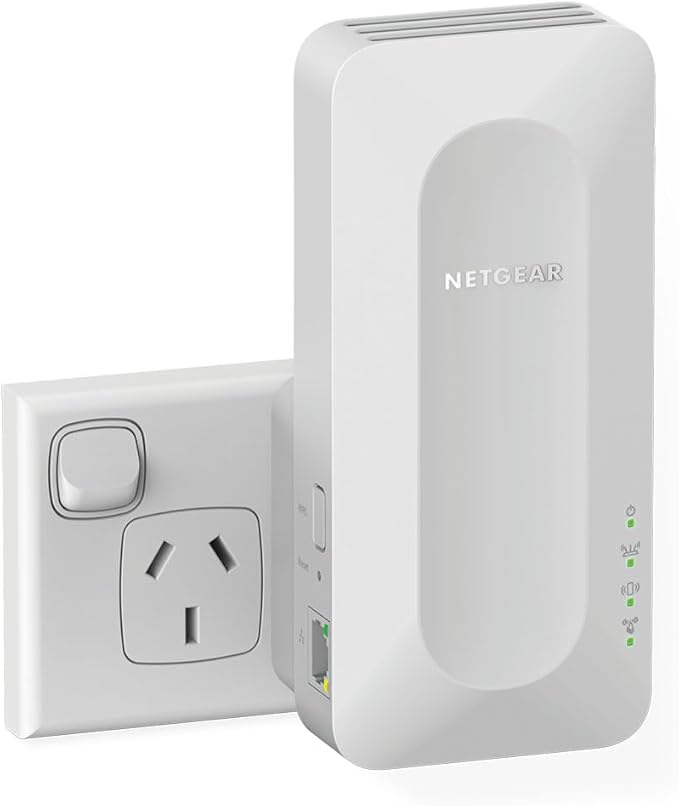
Netgear EAX20 AX1800 4-Stream Wifi 6 Mesh Extender
NETGEAR AX1800 4-Stream Mesh Extender is built for the future of WiFi delivering great capacity, fast speed and more coverage. Enjoy a better connected home experience and extend faster WiFi to the farthest corner of your home with speeds up to 1.8Gbps. WiFi 6: The Fastest WiFi Ever With WiFi 6, you get the fastest speeds available, and up to 4X more device capacity than WiFi 5. Stream in ultra HD 4K/8K, video call, and more without getting interrupted or slowed down, even as you connect more devices to your network. It’s like upgrading your WiFi to first class. Easily Create a Mesh WiFi 6 System with your Existing Router Expand coverage of your Existing Router using your current WiFi name and password. This desktop design has two powerful internal antennas that extend WiFi signals to where your router WiFi cannot reach. This AX1800 Mesh Extender is backward compatible with previous WiFi generations (11b/g/n/a/ac) and will work with all your existing internet-connected devices. Easy Setup and Use with the Nighthawk App With the Nighthawk app, setup takes just minutes, so you can start enjoying better WiFi sooner. You can also see your connected devices, run an internet speed test, manage your NETGEAR service subscriptions, and more from the palm of your hand.
NETGEAR AX1800 4-Stream Mesh Extender is built for the future of WiFi delivering great capacity, fast speed and more coverage. Enjoy a better connected home experience and extend faster WiFi to the farthest corner of your home with speeds up to 1.8Gbps. WiFi 6: The Fastest WiFi Ever With WiFi 6, you get the fastest speeds available, and up to 4X more device capacity than WiFi 5. Stream in ultra HD 4K/8K, video call, and more without getting interrupted or slowed down, even as you connect more devices to your network. It’s like upgrading your WiFi to first class. Easily Create a Mesh WiFi 6 System with your Existing Router Expand coverage of your Existing Router using your current WiFi name and password. This desktop design has two powerful internal antennas that extend WiFi signals to where your router WiFi cannot reach. This AX1800 Mesh Extender is backward compatible with previous WiFi generations (11b/g/n/a/ac) and will work with all your existing internet-connected devices. Easy Setup and Use with the Nighthawk App With the Nighthawk app, setup takes just minutes, so you can start enjoying better WiFi sooner. You can also see your connected devices, run an internet speed test, manage your NETGEAR service subscriptions, and more from the palm of your hand.
NETGEAR AX1800 4-Stream Mesh Extender is built for the future of WiFi delivering great capacity, fast speed and more coverage. Enjoy a better connected home experience and extend faster WiFi to the farthest corner of your home with speeds up to 1.8Gbps. WiFi 6: The Fastest WiFi Ever With WiFi 6, you get the fastest speeds available, and up to 4X more device capacity than WiFi 5. Stream in ultra HD 4K/8K, video call, and more without getting interrupted or slowed down, even as you connect more devices to your network. It’s like upgrading your WiFi to first class. Easily Create a Mesh WiFi 6 System with your Existing Router Expand coverage of your Existing Router using your current WiFi name and password. This desktop design has two powerful internal antennas that extend WiFi signals to where your router WiFi cannot reach. This AX1800 Mesh Extender is backward compatible with previous WiFi generations (11b/g/n/a/ac) and will work with all your existing internet-connected devices. Easy Setup and Use with the Nighthawk App With the Nighthawk app, setup takes just minutes, so you can start enjoying better WiFi sooner. You can also see your connected devices, run an internet speed test, manage your NETGEAR service subscriptions, and more from the palm of your hand.
NETGEAR AX1800 4-Stream Mesh Extender is built for the future of WiFi delivering great capacity, fast speed and more coverage. Enjoy a better connected home experience and extend faster WiFi to the farthest corner of your home with speeds up to 1.8Gbps. WiFi 6: The Fastest WiFi Ever With WiFi 6, you get the fastest speeds available, and up to 4X more device capacity than WiFi 5. Stream in ultra HD 4K/8K, video call, and more without getting interrupted or slowed down, even as you connect more devices to your network. It’s like upgrading your WiFi to first class. Easily Create a Mesh WiFi 6 System with your Existing Router Expand coverage of your Existing Router using your current WiFi name and password. This desktop design has two powerful internal antennas that extend WiFi signals to where your router WiFi cannot reach. This AX1800 Mesh Extender is backward compatible with previous WiFi generations (11b/g/n/a/ac) and will work with all your existing internet-connected devices. Easy Setup and Use with the Nighthawk App With the Nighthawk app, setup takes just minutes, so you can start enjoying better WiFi sooner. You can also see your connected devices, run an internet speed test, manage your NETGEAR service subscriptions, and more from the palm of your hand.
in 3 offers
The lowest price for Netgear EAX20 AX1800 4-Stream Wifi 6 Mesh Extender right now is $249.00 at 7stores.net, compared across 3 retailers.
The all-time low was $43.84 on 21 Nov 2024 — today's price is 468% above the lowest ever. It has been notably cheaper before — worth setting a price alert.
Prices last updated 28 Oct 2026.
Last updated at 28/10/2026 00:46:26
NETGEAR AX1800 4-Stream WiFi 6 Mesh Extender EAX20 - Desktop
Delivery between Thu – Tue $20
Eax20
Delivery between 3–6 Nov $29
Netgear Eax20 Ax1800 Dual Band Wireless Gigabit Wifi Extender Booster
Free delivery
Affiliate Disclosure: We may receive a small commission for purchases made through this link at no extra cost to you. This helps support our site. Thank you!
originally posted on netgear.com
This Netgear EAX20 Wi-Fi 6 Range Extender can be setup via the Nighthawk mobile app or the web-based console application. It’s not obvious when you receive the device which one you should use. Also, the Nighthawk app is quite limited in functionality and only really designed for a simple application as a Wi-Fi range extender (not as a Wireless Access point, which you’ll want if you have a wired Ethernet connection back to your Wi-Fi router). There are also not very clear instructions on these variations in setups, either how or when to implement each type of configuration. This is even more complicated if you are maintaining primary and guest networks or if you want to hide SSIDs, change security settings, channels, etc.The software and instructions need a lot of ... MoreThis Netgear EAX20 Wi-Fi 6 Range Extender can be setup via the Nighthawk mobile app or the web-based console application. It’s not obvious when you receive the device which one you should use. Also, the Nighthawk app is quite limited in functionality and only really designed for a simple application as a Wi-Fi range extender (not as a Wireless Access point, which you’ll want if you have a wired Ethernet connection back to your Wi-Fi router). There are also not very clear instructions on these variations in setups, either how or when to implement each type of configuration. This is even more complicated if you are maintaining primary and guest networks or if you want to hide SSIDs, change security settings, channels, etc.The software and instructions need a lot of work and leave a lot to be desired. Once you figure out what you want and how to set it up, the device works like a charm.
originally posted on netgear.com
Once working, the coverage is excellent. However, as a mesh extender, the signal was too weak due to the distance from my Netgear router. So taking advantage of the ethernet cable that is in the distant location, I set it up as a wired access point to extend the wifi. The difficulty is that the Nighthawk app did not work for this application and I had to set it up using the web interface. It was then hard to monitor with the Nighthawk app and customer support had me do a factory reset only to set it up again exactly as I had. This time, it did not work at all so I had to do another factory reset and the third time was successful. So four stars for a product that is working perfectly but knocking off a star for less than stellar customer support.
originally posted on netgear.com
I kept having issues with multiple devices on one router. Especially with devices further away from the living room. Once I got this router extender, total game changer. I get faster speeds and less circle of death loading because of devices losing the wifi signal. I can split my devices between which router they are closer to, and it's helped so much with faster speeds as well as no dropping off wifi. If you are wondering whether or not to get this, do it. It helps so much with weak signals and continuous dragging loading. It's worth it.
| Performance | |
| Browser supported | Microsoft Internet Explorer 8.0, Firefox 20 or Safari 5.1 or Google Chrome 25.0 browsers or higher |
| WPS push button | Y |
| Ethernet LAN data rates | 10,100,1000 Mbit/s |
| Data transfer rate | 1800 Mbit/s |
NETGEAR AX1800 4-Stream WiFi 6 Mesh Extender EAX20 - Desktop
Delivery between Thu – Tue $20
Eax20
Delivery between 3–6 Nov $29
Netgear Eax20 Ax1800 Dual Band Wireless Gigabit Wifi Extender Booster
Free delivery
Affiliate Disclosure: We may receive a small commission for purchases made through this link at no extra cost to you. This helps support our site. Thank you!
This Netgear EAX20 Wi-Fi 6 Range Extender can be setup via the Nighthawk mobile app or the web-based console application. It’s not obvious when you receive the device which one you should use. Also, the Nighthawk app is quite limited in functionality and only really designed for a simple application as a Wi-Fi range extender (not as a Wireless Access point, which you’ll want if you have a wired Ethernet connection back to your Wi-Fi router). There are also not very clear instructions on these variations in setups, either how or when to implement each type of configuration. This is even more complicated if you are maintaining primary and guest networks or if you want to hide SSIDs, change security settings, channels, etc.The software and instructions need a lot of ... MoreThis Netgear EAX20 Wi-Fi 6 Range Extender can be setup via the Nighthawk mobile app or the web-based console application. It’s not obvious when you receive the device which one you should use. Also, the Nighthawk app is quite limited in functionality and only really designed for a simple application as a Wi-Fi range extender (not as a Wireless Access point, which you’ll want if you have a wired Ethernet connection back to your Wi-Fi router). There are also not very clear instructions on these variations in setups, either how or when to implement each type of configuration. This is even more complicated if you are maintaining primary and guest networks or if you want to hide SSIDs, change security settings, channels, etc.The software and instructions need a lot of work and leave a lot to be desired. Once you figure out what you want and how to set it up, the device works like a charm.
Once working, the coverage is excellent. However, as a mesh extender, the signal was too weak due to the distance from my Netgear router. So taking advantage of the ethernet cable that is in the distant location, I set it up as a wired access point to extend the wifi. The difficulty is that the Nighthawk app did not work for this application and I had to set it up using the web interface. It was then hard to monitor with the Nighthawk app and customer support had me do a factory reset only to set it up again exactly as I had. This time, it did not work at all so I had to do another factory reset and the third time was successful. So four stars for a product that is working perfectly but knocking off a star for less than stellar customer support.
I kept having issues with multiple devices on one router. Especially with devices further away from the living room. Once I got this router extender, total game changer. I get faster speeds and less circle of death loading because of devices losing the wifi signal. I can split my devices between which router they are closer to, and it's helped so much with faster speeds as well as no dropping off wifi. If you are wondering whether or not to get this, do it. It helps so much with weak signals and continuous dragging loading. It's worth it.
I have a Netgear CAX80 Cable Modem and wanted to extend my WiFi range with this device. I setup the modem first and had quite some struggles. Had to run the setup several times with the app on a Android device before it worked. Then I added this device to the network. The first thing I realized is, that only one WiFi's range can be extended. I have a private WiFi and a quest WiFi. I can only extend the one or the other. Also the handshake between those doesn't work at all. When I walk through the home while having a video call or such, the connection breaks down when the phone connects to the respective other device. For that price absolute crap!I somehow made it to the web interface of that device and found that there're way more options like a VPN service and ... MoreI have a Netgear CAX80 Cable Modem and wanted to extend my WiFi range with this device. I setup the modem first and had quite some struggles. Had to run the setup several times with the app on a Android device before it worked. Then I added this device to the network. The first thing I realized is, that only one WiFi's range can be extended. I have a private WiFi and a quest WiFi. I can only extend the one or the other. Also the handshake between those doesn't work at all. When I walk through the home while having a video call or such, the connection breaks down when the phone connects to the respective other device. For that price absolute crap!I somehow made it to the web interface of that device and found that there're way more options like a VPN service and more that are simply not available on the app. So the customer is shielded from taking full advantage of the products capabilities.Now I switched to Apple and wanted to setup the Nighthawk app on there. Now, however, to add the device, I have to login to the router locally with a admin password that I never set up because in the app you simply use the Netgear account to authenticate. There's a lot to improve though.
Our home is in a rural area with poor cellular reception and no internet service other than satellite that is very poor at best. We installed a cellular booster that did give us reliable and much faster cellphone service. 4 bars;of 5g inside, still dead areas outside. We bought a Netgear MR 1100 Nighthawk that is fantastic but I wanted stronger coverage inside our 1700 ft house and outside as well. I bought the Netgear wifi 6 Mesh Extender and it is AWESOME! It not only extended our coverage in the home but also distances from 80-90 ft outside! We have a dedicated data only line from T-Mobile 100GB that is very affordable. I've read that range extenders do not boost signal strength. This may be but my average download speed has went from a highly variable 18 mb/s to ... MoreOur home is in a rural area with poor cellular reception and no internet service other than satellite that is very poor at best. We installed a cellular booster that did give us reliable and much faster cellphone service. 4 bars;of 5g inside, still dead areas outside. We bought a Netgear MR 1100 Nighthawk that is fantastic but I wanted stronger coverage inside our 1700 ft house and outside as well. I bought the Netgear wifi 6 Mesh Extender and it is AWESOME! It not only extended our coverage in the home but also distances from 80-90 ft outside! We have a dedicated data only line from T-Mobile 100GB that is very affordable. I've read that range extenders do not boost signal strength. This may be but my average download speed has went from a highly variable 18 mb/s to a steady 46 mb/s. Maybe not game playing speeds but fast enough to stream movies, zoom meetings for my work at home wife and great voice communication. The Netgear products Just Work! Oh, btw I'm not tech savy so had to call for assistance to set up both my Netgear devices. They were very patient and walked me through every step. Great products and excellent service!
I purchased this extender because I had multiple zones in my house that struggled with connectivity, mostly upstairs as my router is downstairs. Since purchasing the EAX20 I've had full connection throughout the entire house with no issues at all. The signal extension is incredibly strong and the initial setup out of the box was easier than expected. Within 10 minutes I was setup and ready to go. I'd highly recommend the Netgear EAX20! I'm happy I decided to go with Netgear. The accompanied app is also streamlined and easy to navigate, giving full control of your network and devices attached. This is by far the best purchase I've made for my homes wireless ecosystem.
I’m pretty pleased with the EAX20 after a week or so of use. It has solved the main problems of an upstairs Apple TV not reliably connecting to the network and of video conference calls freezing when we move around the house. Some people complain about the size and say it’s hard to hide; it’s more compact than these reviews led me to envision. Pretty easy to conceal, and it’s not ugly to begin with. I ended up putting it behind a desk and connecting a desktop computer to it via Ethernet, which gives me 50 Mbps faster download speeds than Wi-Fi on the same computer, so pretty pleased. The only cons I have encountered so far: 1) The QR code didn’t work for setup (but this was easily completed anyway 2) it doesn’t extend a guest network, just a single 2G
We noticed that devices on the second floor of our house started having some performance issues. Slow speeds on our laptops and our smart TVs and fire sticks would need a lot of time to buffer, so, we decided to get this extender by Netgear. Several years ago, we used other extenders with some success, but we absolutely love this one. It was super easy to install, connected instantly with our network, and we saw immediate improvements on the second floor of our house on all those devices that were having issues. The smart TV in our bedroom doesn’t buffer at all anymore and we’re getting great speeds on all of our laptops and other devices to be able to stream and do anything else we want to do. I highly recommend it!
This extender was a great choice. It was very simple to set up and only took a few minutes. It was not rocket science, just a few simple steps and it did the rest by itself. My old extender was old and was not dual band. I have a 3600 square foot one story home and my router is on one end of the home and I placed the Netgear WiFi 6 Mesh Extender in the middle of my home. It covers the rest of my home as well as my sunroom, where we spend a lot of time, and most of my back yard. I am very impressed with this extender to say the least. I pondered over several weeks to purchase a new extender. My decision of purchasing this extender over several different brands, including Linksys that I had been very loyal to in the past was not easy, but I am glad I chose this ... MoreThis extender was a great choice. It was very simple to set up and only took a few minutes. It was not rocket science, just a few simple steps and it did the rest by itself. My old extender was old and was not dual band. I have a 3600 square foot one story home and my router is on one end of the home and I placed the Netgear WiFi 6 Mesh Extender in the middle of my home. It covers the rest of my home as well as my sunroom, where we spend a lot of time, and most of my back yard. I am very impressed with this extender to say the least. I pondered over several weeks to purchase a new extender. My decision of purchasing this extender over several different brands, including Linksys that I had been very loyal to in the past was not easy, but I am glad I chose this Netgear Extender over the competition. I have a lot of different devices connected to this extender, like TV's, desktop computers, laptops, ipad, cell phones, several echo dots and guest that visit and never dropped a connection or diminished connection speed or strength. I highly recommend this extender.
This helped convey the signal for the new wifi 6 router across our building to where I've got my personal computer. Really impressive speed between Xfinity's new wifi 6 router, and this thing. I was surprised to find something on that protocol for such a reasonable price. Inside a large 20ft by 11ft space, my results were actually best when I had my old wall plug wifi 5d mesh extender working with this to box me in with wifi (heh).I had a few hiccups while toying with different aspects of this. If you do need to reset (to setup the extended network from scratch) just hold the reset button for about seven seconds. Also, my Ubuntu-based OS was saving several duplicate settings for the initial NETGEAR_EXT network, but would not display the option..so that took a bit ... MoreThis helped convey the signal for the new wifi 6 router across our building to where I've got my personal computer. Really impressive speed between Xfinity's new wifi 6 router, and this thing. I was surprised to find something on that protocol for such a reasonable price. Inside a large 20ft by 11ft space, my results were actually best when I had my old wall plug wifi 5d mesh extender working with this to box me in with wifi (heh).I had a few hiccups while toying with different aspects of this. If you do need to reset (to setup the extended network from scratch) just hold the reset button for about seven seconds. Also, my Ubuntu-based OS was saving several duplicate settings for the initial NETGEAR_EXT network, but would not display the option..so that took a bit to figure out.Crazy though these were $100 when I bought it (down from $130, and black friday sales have them at $80). Of course tech becomes very affordable if you're willing to be patient and buy a generation or two behind.My other qualm personally is that there seems to be a lack of options for FOSS firmware to install onto this device. Probably not a concern, if you are looking for something as mainstream as Netgear. But I've had good experiences with their products in the past, and have just gotten into learning FOSS stuff so I hadn't even contemplated how a router/extender would factor into that..These seem to be dropping in price as more advanced and Wifi 6e devices begin to emerge. A really good value for a simple setup. The ability to add hidden/guest networks and some other customized settings are all very nice.
| Performance | |
| Browser supported | Microsoft Internet Explorer 8.0, Firefox 20 or Safari 5.1 or Google Chrome 25.0 browsers or higher |
| WPS push button | Y |
| Ethernet LAN data rates | 10,100,1000 Mbit/s |
| Data transfer rate | 1800 Mbit/s |