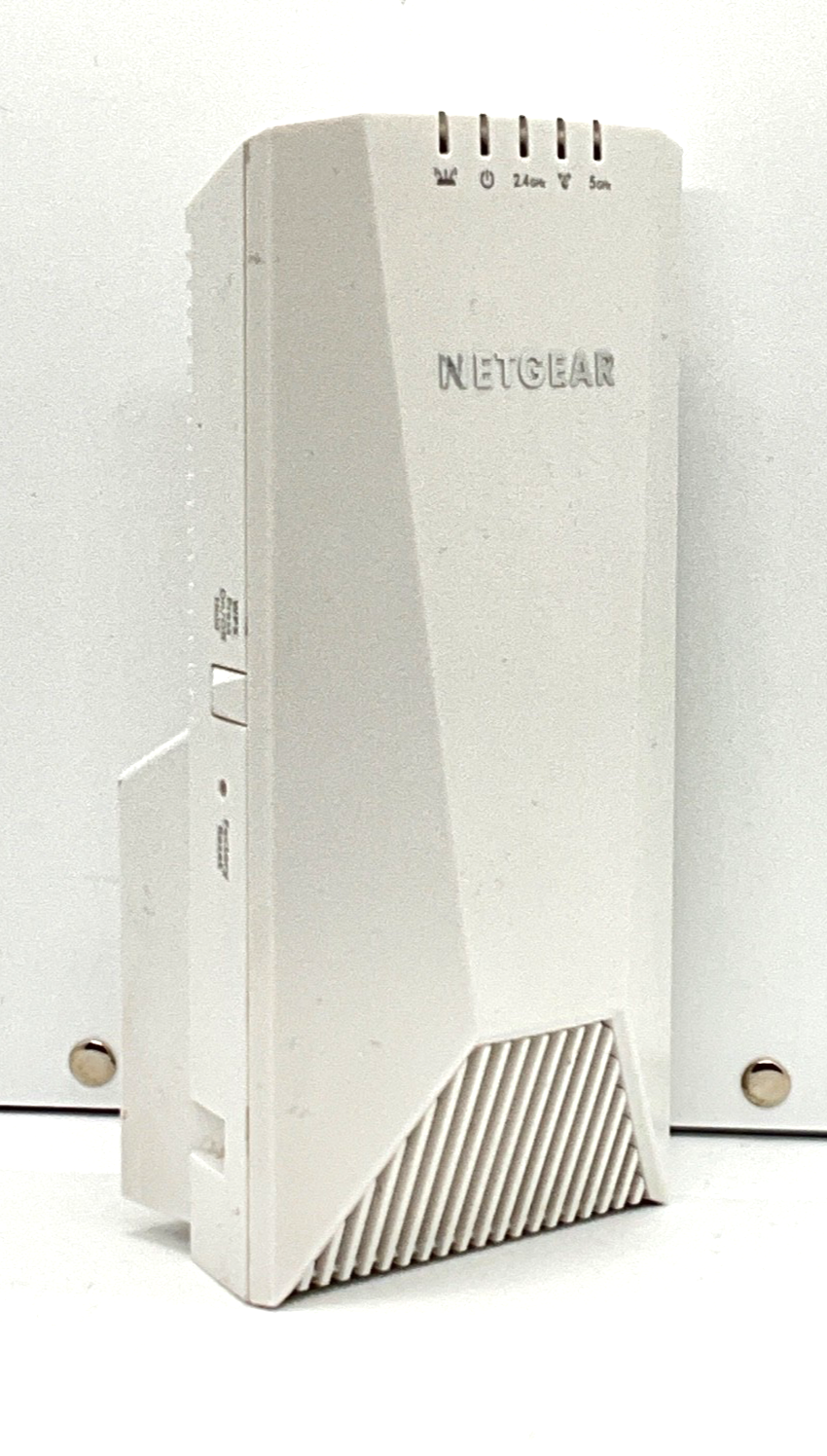
Netgear Nighthawk X4S Ex7500 AC2200 Triband Wifi Range Extender -
Netgear Nighthawk X4S WiFi Mesh Extender (EX7500-100AUS) The Netgear Nighthawk X4S Wi-Fi Mesh Extender with FastLane3 Technology boosts your home s Wi-Fi so you can enjoy high speed Internet everywhere in your home. Tri-band Wi-Fi with combined speeds up to 2.2Gbps Delivers high performance with the latest technology Wi-Fi protected access and WEP Simple browser installation Push N Connect using WPS The Netgear Nighthawk X4S Wi-Fi Mesh Extender keeps the same Wi-Fi name and password you already have so you ll enjoy seamless Wi-Fi like never before. Go room-to-room while streaming video or on a video call without interruption or needing to restart. FastLane3 technology delivers up to 100% performance boost compared to typical extenders by creating a dedicated wireless link to your Wi-Fi. Nighthawk Mesh technology powers the Nighthawk X4S to boost your existing Wi-Fi with high-performance, seamless Wi-Fi at the push of a button.
Netgear Nighthawk X4S WiFi Mesh Extender (EX7500-100AUS) The Netgear Nighthawk X4S Wi-Fi Mesh Extender with FastLane3 Technology boosts your home s Wi-Fi so you can enjoy high speed Internet everywhere in your home. Tri-band Wi-Fi with combined speeds up to 2.2Gbps Delivers high performance with the latest technology Wi-Fi protected access and WEP Simple browser installation Push N Connect using WPS The Netgear Nighthawk X4S Wi-Fi Mesh Extender keeps the same Wi-Fi name and password you already have so you ll enjoy seamless Wi-Fi like never before. Go room-to-room while streaming video or on a video call without interruption or needing to restart. FastLane3 technology delivers up to 100% performance boost compared to typical extenders by creating a dedicated wireless link to your Wi-Fi. Nighthawk Mesh technology powers the Nighthawk X4S to boost your existing Wi-Fi with high-performance, seamless Wi-Fi at the push of a button.
Netgear Nighthawk X4S WiFi Mesh Extender (EX7500-100AUS) The Netgear Nighthawk X4S Wi-Fi Mesh Extender with FastLane3 Technology boosts your home s Wi-Fi so you can enjoy high speed Internet everywhere in your home. Tri-band Wi-Fi with combined speeds up to 2.2Gbps Delivers high performance with the latest technology Wi-Fi protected access and WEP Simple browser installation Push N Connect using WPS The Netgear Nighthawk X4S Wi-Fi Mesh Extender keeps the same Wi-Fi name and password you already have so you ll enjoy seamless Wi-Fi like never before. Go room-to-room while streaming video or on a video call without interruption or needing to restart. FastLane3 technology delivers up to 100% performance boost compared to typical extenders by creating a dedicated wireless link to your Wi-Fi. Nighthawk Mesh technology powers the Nighthawk X4S to boost your existing Wi-Fi with high-performance, seamless Wi-Fi at the push of a button.
Netgear Nighthawk X4S WiFi Mesh Extender (EX7500-100AUS) The Netgear Nighthawk X4S Wi-Fi Mesh Extender with FastLane3 Technology boosts your home s Wi-Fi so you can enjoy high speed Internet everywhere in your home. Tri-band Wi-Fi with combined speeds up to 2.2Gbps Delivers high performance with the latest technology Wi-Fi protected access and WEP Simple browser installation Push N Connect using WPS The Netgear Nighthawk X4S Wi-Fi Mesh Extender keeps the same Wi-Fi name and password you already have so you ll enjoy seamless Wi-Fi like never before. Go room-to-room while streaming video or on a video call without interruption or needing to restart. FastLane3 technology delivers up to 100% performance boost compared to typical extenders by creating a dedicated wireless link to your Wi-Fi. Nighthawk Mesh technology powers the Nighthawk X4S to boost your existing Wi-Fi with high-performance, seamless Wi-Fi at the push of a button.
in 3 offers
The lowest price for Netgear Nighthawk X4S Ex7500 AC2200 Triband Wifi Range Extender - right now is $70.00 at CeX, compared across 2 retailers.
The all-time low was $43.10 on 19 June 2026 — today's price is 62% above the lowest ever. It has been notably cheaper before — worth setting a price alert.
Prices last updated 9 Oct 2026.
Last updated at 09/10/2026 07:01:34
Netgear Nighthawk X4S EX7500 AC2200 Tri-Band WiFi Mesh Extender
Free delivery
Netgear Ex7500 Ac2200 Nighthawk X4s Tri-band Wifi Range Mesh Extender
Delivery $10.50
Affiliate Disclosure: We may receive a small commission for purchases made through this link at no extra cost to you. This helps support our site. Thank you!
originally posted on netgear.com
First, this extenders setup really was a test. I tried and tried to get this thing up and running and then determined in the midst of the whole ordeal that my router 5GHZ side had become intermittent. I got a new one and all of the sudden the netgear extender began to function correctly. I still had some issues with the nighthawk app and it’s connectivity and still do. That app could function some better. A good part of the time it won’t connect to my router saying it can’t find it when I am trying to see what is connected to the extender it is frustrating to get the can’t connect to router message. At some random time later it will connect. Overall I think this system works pretty good once setup.
originally posted on walmart.com
I ordered the Nighthawk X4S AC2200 Model EX7500 wifi range extender in an effort to boost the signal strength to my bedroom which is about 35 feet and 4 walls from the wifi router. I had difficulty setting it up with my Airport Extreme router, but , after researching, I was able to figure it out. I got solid blue lights on 1, 2 and 4, but no lights on 3 (2.4GHz) and 5 (5GHz) except for occasional flashes of amber or red. I did not see any boost in signal strength in my bedroom area at all even though I tried every single outlet between the router and the room. The only difference I experienced was not good. The wifi signal would cycle on and off repeatedly, requiring me to frequently have to sign back into sites. I contacted tech support and, honestly, had ... MoreI ordered the Nighthawk X4S AC2200 Model EX7500 wifi range extender in an effort to boost the signal strength to my bedroom which is about 35 feet and 4 walls from the wifi router. I had difficulty setting it up with my Airport Extreme router, but , after researching, I was able to figure it out. I got solid blue lights on 1, 2 and 4, but no lights on 3 (2.4GHz) and 5 (5GHz) except for occasional flashes of amber or red. I did not see any boost in signal strength in my bedroom area at all even though I tried every single outlet between the router and the room. The only difference I experienced was not good. The wifi signal would cycle on and off repeatedly, requiring me to frequently have to sign back into sites. I contacted tech support and, honestly, had difficulty communicating. Between the gentleman's heavy accent and my hearing loss, it was not a great experience. He finally told me that, if I had solid blue lights on 1, 2 and 4, that the unit was operating just as it should be. So, I continued to work with it. I can't say how many times I reset the unit and started over, but it was a lot. I would work with it until I would get frustrated with it and then set it aside for several days or a week and then try again by doing things in a different order. No luck. Finally, I attempted to contact Tech Support at Netgear again on February 6 and received a message that someone would contact me when my case was reviewed. Since then, crickets. I contacted Walmart customer svc on the 2/12 and requested a return, but they informed me that I was out of the return period - by 2 days. That was my fault because I didn't allow for 31 days in December and January. Even so, if Netgear had responded within a week, then I could have made a more timely decision. I've seen the positive reviews on this item, but it certainly didn't work for me.
originally posted on netgear.com
Netgear Ex7500 is really hard to connect to my Netgear Nighthawk router. I followed the Netgear instructions pamphlet and linked to its website for Netgear installation assistant. I was told by Soft Tree Tech., Inc was the authorized tech support for Netgear. So I paid $149.99 to fixed the connectivity of my new extender and my router. 2 days later when I reboot my router I lost all WiFi connection on my devices. I had to go through Soft Tree again in order to make it work. This time Soft Tree technician advised me not to perform any basic setup on my own but always have their technician to do the work. At that moment, I realized that I had actually lost control over my own router and Soft Tree had complete access to my Netgear admin account with my password. I ... MoreNetgear Ex7500 is really hard to connect to my Netgear Nighthawk router. I followed the Netgear instructions pamphlet and linked to its website for Netgear installation assistant. I was told by Soft Tree Tech., Inc was the authorized tech support for Netgear. So I paid $149.99 to fixed the connectivity of my new extender and my router. 2 days later when I reboot my router I lost all WiFi connection on my devices. I had to go through Soft Tree again in order to make it work. This time Soft Tree technician advised me not to perform any basic setup on my own but always have their technician to do the work. At that moment, I realized that I had actually lost control over my own router and Soft Tree had complete access to my Netgear admin account with my password. I became very concerned about my internet / computer privacy being compromised after speaking with Soft Tree’s adviser. I contacted Netgear by phone again and was later told that Soft Tree was not an authorized support provider. I researched and decided to replace a new router and return Netgear Range Extender EX7500. I just wanted to make sure things are secure. I was surprised to see so many customers got scammed by Soft Tree Tech., Inc. in Netgear Community Forum. My question is how can a company pretend to be Netgear and be allowed to con clients into forking out $149.99 when they could have got support directly from Netgear for free under 90 warranty support?
| WIFI TECHNOLOGY | 802.11ac |
| WIFI PERFORMANCE | AC2200 |
| Band 1 | 400Mbps @2.4GHz - 256QAM |
| Band 2 | 866Mbps @5GHz - 256QAM |
| Band 3 | 866Mbps @5GHz - 256QAM |
Netgear Nighthawk X4S EX7500 AC2200 Tri-Band WiFi Mesh Extender
Free delivery
Netgear Ex7500 Ac2200 Nighthawk X4s Tri-band Wifi Range Mesh Extender
Delivery $10.50
Affiliate Disclosure: We may receive a small commission for purchases made through this link at no extra cost to you. This helps support our site. Thank you!
First, this extenders setup really was a test. I tried and tried to get this thing up and running and then determined in the midst of the whole ordeal that my router 5GHZ side had become intermittent. I got a new one and all of the sudden the netgear extender began to function correctly. I still had some issues with the nighthawk app and it’s connectivity and still do. That app could function some better. A good part of the time it won’t connect to my router saying it can’t find it when I am trying to see what is connected to the extender it is frustrating to get the can’t connect to router message. At some random time later it will connect. Overall I think this system works pretty good once setup.
I ordered the Nighthawk X4S AC2200 Model EX7500 wifi range extender in an effort to boost the signal strength to my bedroom which is about 35 feet and 4 walls from the wifi router. I had difficulty setting it up with my Airport Extreme router, but , after researching, I was able to figure it out. I got solid blue lights on 1, 2 and 4, but no lights on 3 (2.4GHz) and 5 (5GHz) except for occasional flashes of amber or red. I did not see any boost in signal strength in my bedroom area at all even though I tried every single outlet between the router and the room. The only difference I experienced was not good. The wifi signal would cycle on and off repeatedly, requiring me to frequently have to sign back into sites. I contacted tech support and, honestly, had ... MoreI ordered the Nighthawk X4S AC2200 Model EX7500 wifi range extender in an effort to boost the signal strength to my bedroom which is about 35 feet and 4 walls from the wifi router. I had difficulty setting it up with my Airport Extreme router, but , after researching, I was able to figure it out. I got solid blue lights on 1, 2 and 4, but no lights on 3 (2.4GHz) and 5 (5GHz) except for occasional flashes of amber or red. I did not see any boost in signal strength in my bedroom area at all even though I tried every single outlet between the router and the room. The only difference I experienced was not good. The wifi signal would cycle on and off repeatedly, requiring me to frequently have to sign back into sites. I contacted tech support and, honestly, had difficulty communicating. Between the gentleman's heavy accent and my hearing loss, it was not a great experience. He finally told me that, if I had solid blue lights on 1, 2 and 4, that the unit was operating just as it should be. So, I continued to work with it. I can't say how many times I reset the unit and started over, but it was a lot. I would work with it until I would get frustrated with it and then set it aside for several days or a week and then try again by doing things in a different order. No luck. Finally, I attempted to contact Tech Support at Netgear again on February 6 and received a message that someone would contact me when my case was reviewed. Since then, crickets. I contacted Walmart customer svc on the 2/12 and requested a return, but they informed me that I was out of the return period - by 2 days. That was my fault because I didn't allow for 31 days in December and January. Even so, if Netgear had responded within a week, then I could have made a more timely decision. I've seen the positive reviews on this item, but it certainly didn't work for me.
Netgear Ex7500 is really hard to connect to my Netgear Nighthawk router. I followed the Netgear instructions pamphlet and linked to its website for Netgear installation assistant. I was told by Soft Tree Tech., Inc was the authorized tech support for Netgear. So I paid $149.99 to fixed the connectivity of my new extender and my router. 2 days later when I reboot my router I lost all WiFi connection on my devices. I had to go through Soft Tree again in order to make it work. This time Soft Tree technician advised me not to perform any basic setup on my own but always have their technician to do the work. At that moment, I realized that I had actually lost control over my own router and Soft Tree had complete access to my Netgear admin account with my password. I ... MoreNetgear Ex7500 is really hard to connect to my Netgear Nighthawk router. I followed the Netgear instructions pamphlet and linked to its website for Netgear installation assistant. I was told by Soft Tree Tech., Inc was the authorized tech support for Netgear. So I paid $149.99 to fixed the connectivity of my new extender and my router. 2 days later when I reboot my router I lost all WiFi connection on my devices. I had to go through Soft Tree again in order to make it work. This time Soft Tree technician advised me not to perform any basic setup on my own but always have their technician to do the work. At that moment, I realized that I had actually lost control over my own router and Soft Tree had complete access to my Netgear admin account with my password. I became very concerned about my internet / computer privacy being compromised after speaking with Soft Tree’s adviser. I contacted Netgear by phone again and was later told that Soft Tree was not an authorized support provider. I researched and decided to replace a new router and return Netgear Range Extender EX7500. I just wanted to make sure things are secure. I was surprised to see so many customers got scammed by Soft Tree Tech., Inc. in Netgear Community Forum. My question is how can a company pretend to be Netgear and be allowed to con clients into forking out $149.99 when they could have got support directly from Netgear for free under 90 warranty support?
I’m pretty good with technology and setting up devices. This extender simply doesn’t work. I have a R6900P and bought the EX7500 extender to my wifi would work throughout the entire house. It doesn’t. It constantly makes the wifi in the house worse! I drop calls, video conferencing doesn’t work because the signal isn’t strong enough and videos constantly need to buffer. I reset the extender multiple times and it still doesn’t work. I unplugged the extender, put it in my junk pile and now just use wifi within the range of the original router. I wish I never bought this product.
I purchased two EX7500 extenders to connect to my C7800 netgear modem-router to use as a mesh system. I had issues at first trying to get the first one connected. A little more information in the instructions would be helpful. Once the first one was connected, the second one connected with no trouble. After both were connected there were issues with using the same SSID. Having around 40 devices, and most are stationary, the devices were having trouble connecting to the network. I gave each extender 2g and 5G ssid a different name, ended up with 6 names using the same password, and had no issues after that. With stationary devices that use one ssid is no problem. With mobile devices such as phones and tablets where multiple ssid passwords can be stored is no issues ... MoreI purchased two EX7500 extenders to connect to my C7800 netgear modem-router to use as a mesh system. I had issues at first trying to get the first one connected. A little more information in the instructions would be helpful. Once the first one was connected, the second one connected with no trouble. After both were connected there were issues with using the same SSID. Having around 40 devices, and most are stationary, the devices were having trouble connecting to the network. I gave each extender 2g and 5G ssid a different name, ended up with 6 names using the same password, and had no issues after that. With stationary devices that use one ssid is no problem. With mobile devices such as phones and tablets where multiple ssid passwords can be stored is no issues also, they will connect the strongest signal on there own. The only problem is Amazon tap echo that only sets to one ssid, I would have to physically change and re-enter the password evrytime when moving the echo from one area to another. I still need to contact netgear support to find out how to use the same ssid name without having any issues being there are so many devices that are stationary connecting to the network and having one that needs a mesh system using one ssid.
I purchased a new combo modem/router unit to replace my aging combo. Connected to the new combo was a Netgear 2.4GHz extender. The coverage was adequate but slow. So I started looking for a mesh solution but soon found I would have to replace the new combo modem/router I had just purchased with a mesh router. Searching the web I found the Netgear EX7500 that promised to give me a mesh network solution without purchasing a mesh router. It works great. The setup was quick and easy and we now have full 5.0 GHz coverage throughout the house under one network ID and no need to sign into different _EXT networks any longer. This is a great solution for those wanting the advantages of mesh without going through the hassle of replacing your current router or combo unit.
When this extender is working, it's excellent. The range is fantastic, and I've never had a problem with speeds. However, periodically (quite often) it will stop broadcasting either the 2.4Ghz or 5Ghz network (or both), causing my devices to drop off the network and get confused. I haven't found any settings that make a difference, and sometimes resort to unplugging the thing so my devices can reconnect properly. Very frustrating.
This is, in my opinion, the worst product I have ever purchased. The item itself is too big and 'front heavy' meaning that it pulls away from the socket and therefore has an unreliable power supply. However, further to that, it's setup is not straightforward and the WiFi signal that it provides is unreliable as it switches between 2.4 and 5GHz... this results in the signal continually dropping out and / or poor service. WiFi business calls and virtual meetings are better held over a phones 4G which is by far more reliable that this product. Very dissatisfied.
i need a solution for weak wifi signal. i alraedy using netgear product, maybe i'm kind a fanboy of netgear. nighthawk ax12 Rax120 for my office, and nighthawk x8 R8500 for my home they are working great. my home have second floor(almost 1200 square feet both floor) and wifi signal weak there. so i decide buy netgear extender. i nought it on amazon, and i placed it 2nd floor wall outlet. it quite difficult find out best location both 2.4ghz, 5ghz signal on green. and i start first setup with
I needed an easy way to extend my wifi network to the second floor. Already had 2 router on ground floor, one at each end of the house where we spend most of the time. None of them did provide strong enough signal to the upstairs bedrooms. When I got me the EX 7500 I just plugged it in, a quick setup to map to my existing router and to extend my network. Using the same SSID on all 3 stations. Can easily take phones and tablets throughout the house without problems. Very satisfied!
| WIFI TECHNOLOGY | 802.11ac |
| WIFI PERFORMANCE | AC2200 |
| Band 1 | 400Mbps @2.4GHz - 256QAM |
| Band 2 | 866Mbps @5GHz - 256QAM |
| Band 3 | 866Mbps @5GHz - 256QAM |